
qoq-fullstack
Chief of staff for one feature that spans several repos — an API and a UI, two APIs and a front end, any set of qoq-based JavaScript/TypeScript repos in one parent folder. `plan` grills the business side only into a Given/When/Then BRD with master milestones, then has each repo write its own `qoq plan` in its own background session; `execute` runs every repo's plan in parallel, one session per repo, unblocking a repo only when the milestone it depends on is delivered and each master milestone only when its integration check passes; `status` shows where the feature stands. Use it whenever the user wants a cross-repo or full-stack feature planned or delivered, a scrum of scrums, a master plan over several repos, or parallel per-repo plans coordinated — even if they never say "fullstack".
- GitHub stars
- 5






Add marketplace
/plugin marketplace add ladamczyk-it/qoqRun it inside Claude Code once, then install the plugin below.
Install
/plugin install qoq-fullstack@qoq-agent-skillsRun it inside Claude Code after adding the marketplace.
Files
Discovered from sourceQoQ fullstack — a scrum of scrums
This thread is the chief of staff. It owns a business-level master plan
(the BRD) and does three things: it starts one Claude session per repo,
relays their questions to the user, and unblocks work across repos. Each repo
session runs the ordinary qoq plan and qoq execute on its own code, in its
own folder, under its own conventions.
The chief of staff never writes code, never plans a repo, and never decides anything technical. A technical decision made here would bind a repo whose conventions this thread hasn't read.
<root> is the parent folder that holds the repos, and this session's working
directory. This thread is the user's own session, never a background one.
A repo session's question is answered by the user typing in this thread, and
an answer that arrives from another session is not the user's. The shapes of feature.json and the BRD are in
assets/feature-template.md.
| Invocation | Does | Reference |
|---|---|---|
/qoq-fullstack plan <requirements> | business grilling → BRD → one plan per repo, relayed | references/plan.md |
/qoq-fullstack execute <slug> | every repo's plan in parallel, gated per master | references/execute.md |
/qoq-fullstack status [<slug>] | read-only | below |
Invoked with: $ARGUMENTS. No sub-command given → ask which one.
Entry
qoqis required. Is it in your own available-skills list? If not, stop:qoq-fullstackrunsqoqin every repo. Install it with/plugin install qoq@qoq-agent-skills, then run this again.- The status script is
qoq's, at${CLAUDE_SKILL_DIR}/../qoq/scripts/feature-status.mjs.<status>below means that path. If the file isn't there, stop with the same message as in step 1. This skill's own scripts,${CLAUDE_SKILL_DIR}/scripts/status.mjsandschedule.mjs, take the same--root <root> --feature <slug>and build onqoq's rules, so all three always give the same answer.
The files are the state
Run node <status> --root <root> --feature <slug>
at the start of every sub-command, and again after every message or idle
notice that arrives. Act only on what it returns. It reads feature.json,
the BRD and every repo's plan index from disk.
Never act on what this thread remembers. A message tells you to look, but only the file says what happened. A repo session writes to its plan file before it sends a message, so if a message and the file disagree, believe the file.
Starting and waking repo sessions
One session per repo, named <project>-<repo> (e.g. trackbook-be):
cd <root>/<path> && claude --bg --model <model> --permission-mode <mode> --name <project>-<repo> "<launch prompt>"
<mode> is feature.json's permissionMode, which the user chose when the
file was written. Never infer it from this session's own mode. A background session that hits a
permission prompt waits in a window nobody is watching.
<model> is feature.json's model, chosen by the user with the same file;
opus is the recommendation. Inside its repo, a session is the lead that
makes the decisions: it plans, gates and escalates, and it dispatches each
ticket to a qoq-developer at the tier the plan rated. A tier name resolves
through the user's ANTHROPIC_DEFAULT_*_MODEL, like every qoq tier. A
feature.json written before the field existed has none: ask once, recommend
opus, write the answer in, then launch. Never infer it from this session's
model.
Each session starts in its own repo, so it loads that repo's CLAUDE.md,
qoq.config, discovery record and agents. Start a session only if ListAgents
doesn't already list one with that name. If it's listed, SendMessage the
instruction to it instead.
Every launch prompt and every instruction message contains:
- What to run. A
/qoqinvocation, and nothing more specific than that. - Who to report to. This session's name, and the rule: write to your plan
files first, then
SendMessagethe chief of staff a one-line summary. - Where the work goes. Work on
feature/<slug>in this checkout, and commit there as the plan says. Commits on that branch are part of the approved plan. Never create or enter a worktree, and never switch branches. - Where questions go. Every question you would ask the user, including
grilling rounds, approval and escalations, goes to the chief of staff with
SendMessage. End your turn and wait for the answer. A session running in the background has nobody to ask, so a question asked locally just sits there.
After each launch or instruction, SendMessage the session again with
notify_when_idle set. A session that stops without messaging still wakes you up.
A question from a repo goes to the user verbatim, prefixed with the repo's name. The answer goes back verbatim too. Never answer one yourself: a technical answer from this thread is exactly the decision it doesn't own.
Setup — once per repo
Which repos. plan starts every repo in feature.json, because only a repo
can tell from its own code whether a requirement lands in it. execute starts
only the repos whose Repo plans row is a plan directory: a none row means
no changes are needed there, so that repo gets no session, no setup and no
question.
Before the first session starts in a repo, check:
-
Repo settings. The repo's
.claude/settings.local.jsonneeds both of these:"crossSessionInbound": "accept". Without it, the messages you send are held for approval in a window nobody is watching. It accepts messages from any local session."worktree": { "bgIsolation": "none" }. Without it, a background session moves its edits into a git worktree on a branch of its own, so the plan files in the checkout never move and nothing here can see the work. Delivery is plain branching: one branch per repo, in its own checkout.
Ask the user once per repo whether to add what's missing, and say what each setting does. Declined → that repo is a stop, because the run can't drive it.
-
Claude Code version. Run
claude --version. Cross-session messaging needs 2.1.224 or later, andnotify_when_idleneeds 2.1.236 or later. Below that → stop and name the version. -
Workspace trust.
claude --bgrefuses a folder that was never trusted, and printsWorkspace not trusted. Accepting trust is the user's act. If a launch prints that, ask the user to runclaudeonce in that folder and accept the prompt, then retry. Don't edit the trust record yourself. -
Branch. Every repo works on
feature/<slug>, checked out in the repo's own checkout before its session starts, with no worktree. A repo that isn't on it, or has uncommitted changes, is asked about once, together with the other repos.
Standing rules
- Repos run in parallel, and nothing else does. Each repo is its own git
repo with one writer, so "did this change break it?" never crosses between
repos. Inside a repo,
qoq executestill runs one ticket at a time. - Never assume a default. Anything unclear is a question for the user. Every question a repo session relays goes to the user too, unanswered here.
Status
Read-only. Run node ${CLAUDE_SKILL_DIR}/scripts/status.mjs --root <root> --feature <slug>
and print what it prints. With no slug, list feature/*/ and ask which one.
From the ladamczyk-it/qoq README
QoQ logo
Quality over Quantity (QoQ)
A streamlined suite of tools to format, lint, and analyze any JavaScript/TypeScript project with minimal setup — and a Claude Code skill that turns those checks into a guarded delivery loop.
🚀 Why QoQ?
- 🛠 Zero-hassle Configuration – Set up once and focus on coding.
- ⚡ Optimized Performance – Run tools efficiently without redundant overhead.
- 🔬 Precision over Bulk – Enforce best practices with well-curated presets.
📦 What's Included?
QoQ provides essential tooling to ensure code quality across all your projects:
- ESLint v9 – Enforce best practices with extendable, opinionated presets.
- Prettier – Automatically format code for consistency.
- Knip – Detect and remove unused code effortlessly.
- JSCPD – Identify and eliminate duplicate code.
- Stylelint – Lint CSS/SCSS with opinionated presets.
- Structurelint – Validate project file/folder structure (via
@ladamczyk/structurelint). - Skillslint – Lint Claude Code skill documentation (via
@ladamczyk/skillslint). - Justify-disable – Check that lint-disable comments carry a justification (via
@ladamczyk/justify-disable). - Dependency checks – Flag outdated, deprecated and stale dependencies on a configurable cadence.
Most tools are available as an independent package under the @ladamczyk/qoq-* namespace, making it easy to integrate and customize. Structurelint, Skillslint and Justify-disable are optional integrations backed by separate @ladamczyk/structurelint, @ladamczyk/skillslint and @ladamczyk/justify-disable packages.
🚀 Getting Started
1️⃣ Install QoQ
npm install @ladamczyk/qoq-cli
2️⃣ Set Up Configuration
QoQ uses an intuitive Config Wizard to guide you through setup. Run:
npx -y @ladamczyk/qoq-cli --init
This will generate a qoq.config.js file with all necessary configurations.
3️⃣ Run Quality Checks
qoq --check– Runs a full code check, typically used in the CI lint step or pre-push hook.qoq staged– Checks only staged changes, typically used in the pre-commit hook.qoq --fix– Fixes issues where possible, typically triggered manually after hooks or a CI failure to quickly correct problems.
qoq scan [--json] [--output <path>] [--timeout <ms>] [--production] [--silent] – On-demand vulnerability scan of package-lock.json. Not part of the checks above; see scan docs.
🤖 The qoq skill — a guarded delivery loop on top of the CLI
The CLI is a gate. The qoq Claude Code skill is a small SDLC harness built on that gate: a guarded delivery loop that takes work from requirements to committed code. Every step has to clear the CLI's own verdict, read from its --json reports, so nothing lands that the CLI rejects.
flowchart LR
    idea["💡 Idea or ticket"] --> plan["🗺 plan<br/>cut it into small tickets"]
    plan --> build["🧱 execute<br/>build one ticket, tests first"]
    build --> guard{"🚦 Guard<br/>qoq CLI green<br/>and tests reviewed?"}
    guard -- "not yet" --> fix["🔧 fix"]
    fix --> guard
    guard -- "yes" --> done["✅ commit"]
    done -- "next ticket" --> build
    done -.-> care["🧹 refactor · 🧪 test · 📦 bump<br/>keep it healthy"]
- Plan –
/qoq planbreaks a spec, or a Jira, Linear or Trello milestone, into milestones and tickets with contracts and acceptance criteria./qoq replanreshapes the plan when the requirements or the codebase move. - Execute –
/qoq executedelivers the plan one ticket at a time test-first, one acceptance criterion at a time, on top of Matt Pocock'stddskill. A ticket is committed only after/qoq fixpasses and an independent reviewer approves its tests. - Keep it healthy –
/qoq fixloops on CLI findings until they pass.refactor,test,bumpandcompresshandle duplication and code smells, missing coverage, dependency upgrades and agent-facing docs.
Agent-written code meets the same standard as code you write by hand. Each run also leaves things the next one builds on: plans, specs and a clean lint baseline.
/plugin marketplace add ladamczyk-it/qoq
/plugin marketplace add DietrichGebert/ponytail
/plugin install qoq@qoq-agent-skills
Installing qoq also installs the two plugins it depends on: mattpocock-skills from Claude Code's official marketplace, and ponytail. See Built on for what each one is used for.
Your qoq:check and qoq:fix scripts
The skill runs your project's own scripts, never its own copy of the command. It
reads only these two names from package.json, and it asks to add any that's missing:
{
  "scripts": {
    "qoq:check": "qoq --check --skip-npm",
    "qoq:fix": "qoq --fix"
  }
}
qoq:checkis the gate. Everyfixloop runs it asnpm run qoq:check -- --json, so your--skip-<tool>flags hold. The digest's first line quotes the script, so a skipped tool is never mistaken for a passing one.qoq:fixapplies the auto-fixes, run as written.- Each must be a single
qoqcommand.--jsonis appended to the end, so an env prefix (FOO=1 qoq --check) or a chain breaks the gate. - No other script is read. A
lintorfoo:checkthat runsqoqisn't the gate. Turning a tool off for good belongs inqoq.config.
Working across several repos? qoq-fullstack is a separate plugin for one feature that spans an API and a UI, or any set of qoq-based repos in one parent folder. /qoq-fullstack plan grills the business side only into a Given/When/Then master plan. Each repo then plans and delivers its own share with qoq, in its own background session and in parallel with the others. A repo's work is unblocked only by a delivered milestone, and a master milestone only by its integration check. The chief of staff's session shows a feature board above the prompt, with one line per repo saying what it's working on or waiting for. Installing it also installs qoq:
/plugin install qoq-fullstack@qoq-agent-skills
🙏 Built on
The skill builds on other people's skills rather than writing its own copy of them. Used means qoq invokes the skill, or preloads it into one of its agents, when a command runs, so you get whatever version you have installed. Inspired by means an idea was adopted and written into qoq's own files.
| Skill | From | Used by | How |
|---|---|---|---|
tdd | mattpocock/skills | execute, test | Used: preloaded into qoq-developer, qoq-tester and qoq-test-reviewer. Every spec is written red → green on top of it |
codebase-design | mattpocock/skills | plan, replan | Used: preloaded into qoq-architect for its contracts vocabulary |
grilling | mattpocock/skills | plan, replan | Used: the interview that closes gaps in the requirements |
domain-modeling | mattpocock/skills | plan, replan | Used: writes GLOSSARY.md and docs/adr/ during the grill |
writing-for-agents | mattpocock/skills | compress | Used: the base every cut is judged against |
code-review | mattpocock/skills | review | Used: the Spec/Standards split, and its smell baseline pasted into the Standards axis |
to-tickets | mattpocock/skills | plan, replan | Inspired by: how tickets are sliced. Vertical slices, and a prefactor ticket first |
diagnosing-bugs | mattpocock/skills | sheriff | Inspired by: its rule to redact every secret, adopted by qoq-sheriff |
ponytail-review | DietrichGebert/ponytail | refactor | Used: assessment 3, what can be deleted |
| Refactoring, ch. 3 | Martin Fowler | review | Inspired by: the code smells in code-review's baseline |
| Design patterns | Refactoring.Guru, after the Gang of Four | refactor | Inspired by: assets/patterns/ names the GoF catalogue and links there for more reading. Its text is written from scratch, because the Refactoring.Guru examples are CC BY-NC-ND |
skill-creator | anthropics/skills | evals/ | Inspired by: the eval set uses its evals.json format |
A skill marked Used that isn't installed is handled by each command: it either stops with the install command or asks whether to go on without it.
In an interactive terminal, the CLI mentions the skill at the end of a run, including qoq scan, if it isn't installed yet. When the run found something the skill handles, the hint names the command for it:
- ESLint or Stylelint findings
--fixcan't resolve, or Knip, Structurelint or Justify-disable findings →/qoq fix - duplicated code (JSCPD) →
/qoq refactor - outdated or deprecated dependencies, or
qoq scanvulnerabilities →/qoq bump
Set hints: false in qoq.config.js to hide it.
🏗 Project Structure
QoQ is designed for flexibility and ease of use. Its core components include:
📂 Config Wizard – Guides setup and generates a config file. 📂 Config Handlers – Manages default and user-defined settings. 📂 Executors – Executes commands efficiently, handling errors and performance optimizations.
For more details, check out our technical documentation.
🌍 Contributing
Join us in making QoQ even better! Read our Contributing Guidelines before submitting changes.
💡 QoQ: Focus on writing great code, we handle the rest.
Feel free to join us, please read Contributing Guidelines
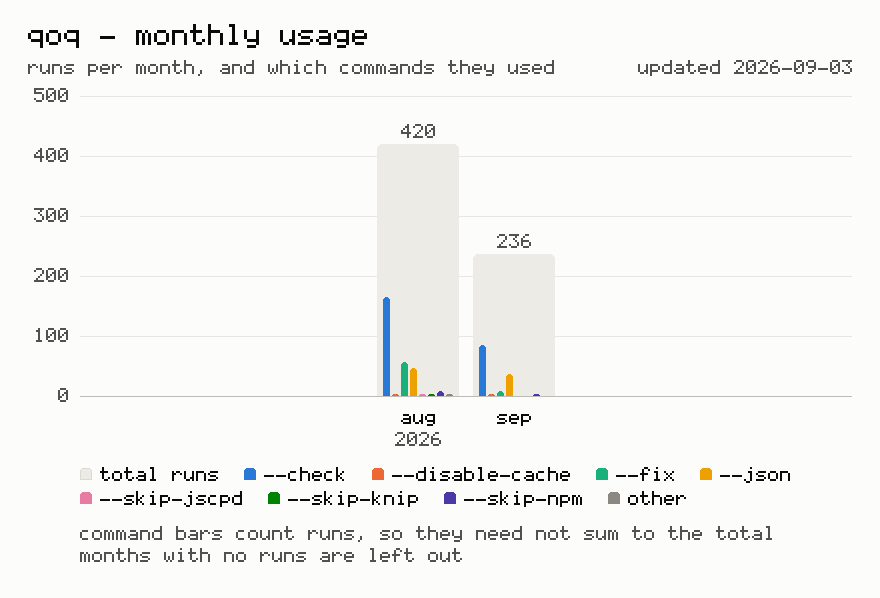
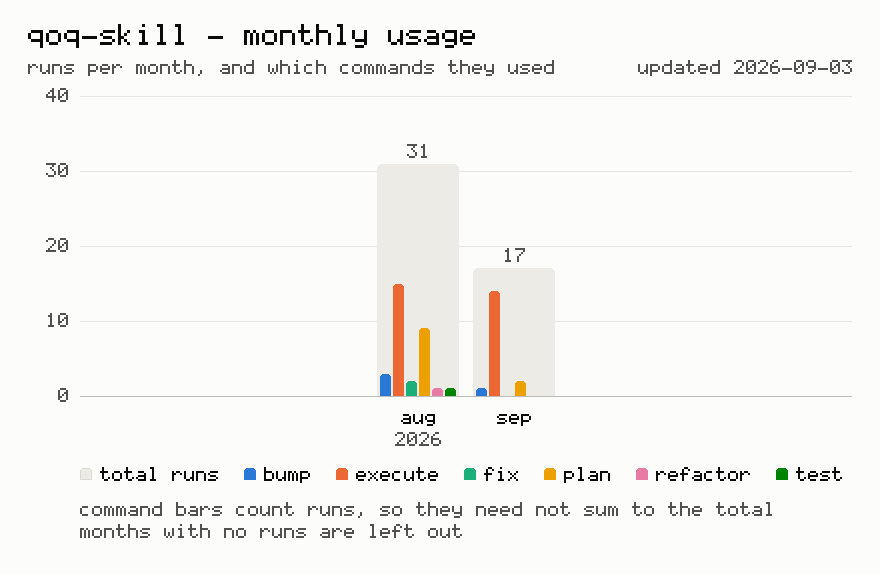
Last 12 months usage statistics (>=6.0.0)
Regenerated on each release, for daily updated numbers click on chart or visit https://adamczyk.ovh/docs/qoq/introduction#usage-statistics.
Details
- Marketplace
- ladamczyk-it/qoq
- Category
- Community
More from ladamczyk-it/qoq
All 2Similar to qoq-fullstack
More Backend & APIs claude-apianthropics/skills196.9K starsClaude API and SDK documentation skill for building LLM-powered applications
 ruviewruvnet/RuView104.5K starsEnd-to-end RuView toolkit: getting started, ESP32 hardware setup, configuration, sensing applications (presence / vitals / pose / sleep / MAT), camera-free + ca
- ruflo-docsruvnet/ruflo82.2K starsDocumentation generation, drift detection, and API docs automation
 headroom-skillheadroomlabs-ai/headroom80.3K starsSkill: add headroom-ai compress() to a Python or TypeScript app to cut LLM input tokens (tool outputs, logs, JSON, chat history). No API key.
 ai-ml-api-automationComposioHQ/awesome-claude-skills51.5K starsAutomate AI ML API tasks via Rube MCP (Composio). Always search tools first for current schemas.
 agentic-bundle-aas-api-platform-buildersickn33/agentic-awesome-skills50.1K starsInstall the "AAS Backend & API Platform" editorial skill bundle for Claude Code.