
nimble
Live web search for AI agents. Find current pages, read any URL, and run research agents that work across many sources and return findings with citations. Includes reusable Extraction Templates for consistently shaped records from known sites, and Web Search Agents for research, enrichment, and dataset building.
- version
- 1.10.0
- GitHub stars
- 75
Install
/plugin install nimble@nimble-plugin-marketplaceRun it inside Claude Code after adding the marketplace with /plugin marketplace add Nimbleway/agent-skills.
Contents
Discovered from sourceSkills 36
Account brief
Writes a dated, sourced brief on one company before a sales meeting: what they do, priorities, challenges, changes in the last 90 days, key people and talking points.
What the user gets
A short brief: what the company does, current priorities and challenges with evidence, what changed in the last 90 days, key people, and talking points. Every item is dated and sourced.
Agent template
This skill runs the Nimble gallery template account-brief. The agent's instructions, sources and output schema live in the template. Do not rewrite them in the run.
Effort: this skill runs the template at medium effort (about 1-3 minutes), even when the template's default effort is different. That is on purpose. If the user asks for a specific effort (low, medium, high or x-high), run that one instead.
Flow
- Interview the user.
- Connect Nimble if it is not connected already.
- Run the agent and show the result.
- Offer next steps.
Ask every question with the host's question UI, never as plain text: AskUserQuestion in Claude Code, ChatGPT's interactive question form (clickable choices and a Submit button) in ChatGPT.
Get the inputs
| Input | Required | Ask for | If skipped |
|---|---|---|---|
| Company | yes | Name and domain | - |
| What you sell | no | One line. It sharpens the talking points | general talking points |
| Meeting goal | no | For example a first call, a renewal or an exec intro | no specific goal |
| People in the meeting | no | Names and titles, if they want a line on each | no named attendees |
- Skip anything the user already said in this conversation or in their request, and ask only for what is missing. Do not fill in answers from earlier conversations, with one exception: a stable fact about the user, such as what they sell, may be offered as the first option, labeled "(from before)". Never carry over the subject of the request, dates or rules from an earlier conversation.
- Ask the required inputs first, in table order, one question at a time. Then ask the optional ones together, in one question-tool call, as many as the tool takes per call (a second call for the rest).
- Put the whole question in the question tool, once. Never restate or introduce a question in text. Between questions, acknowledge the answer in a few words, and before the first question, at most one short sentence that acknowledges your role (the user's, if they named one), such as "Sure, I'll use Nimble to be your meeting preparation assistant." Talk in plain, friendly words: never say "input", "required" or "optional", and use no field names. Use plain text only if the host has no question tool, in one short line.
- Write 2-3 likely answers as options, based on what the user has already said. Fixed examples in the table are a guide to what the answer contains, not a list to copy. Offer only answers Nimble can act on with public web data, never ones that need the user's own data, such as their customers or CRM.
- If you cannot guess likely answers, such as a company name or an industry, still use the tool and offer two or three examples as options, written as answers the user could really give. If the user picks one, use it as their answer.
- Every question must let the user type their own answer, optional ones too. Claude's question UI adds its own free-text choice ("Something else" in Claude, "Other" in Claude Code), so add none there. ChatGPT's form does not, so add "Other" as the last option of every question, even one whose options look complete, opening a text field with a placeholder. In any other host, add "Other" unless you know its UI already has a free-text choice. Keep Skip and Other, when you add them, even if you must drop an answer to fit the option limit.
- Use single-select only. For a range, such as a size or a date, offer a few options that do not overlap.
- Optional questions can be skipped, and a skipped answer uses the "If skipped" value. Claude's question UI has its own Skip button, so add no Skip option there. In other hosts, include a Skip option that states the default in its label, for example "Skip (any location)", not in the question. When you acknowledge a skipped question, say the default you will use, for example "Any location.", not that it was skipped. Do not offer a "skip all" option. If the user asks to skip the remaining questions, use the "If skipped" values for all of them.
- Do not ask about effort.
Build the agent input from this pattern:
Prepare me for a meeting with <Company> (<domain>). I sell <one line>. The meeting is <goal>.
Example: Prepare me for a meeting with Attio (attio.com)
- Always include the domain. It stops the agent from drifting to a company with a similar name.
- If they name the people in the meeting, add them to the input.
- Leave out any part of the pattern the user skipped: leaving it out is the default.
Connect Nimble
Do this after the interview. Until the questions are done, say nothing about connecting Nimble.
Check the connection. If a Nimble tool is listed in this session, call nimble_agents_list. If the CLI is available, run nimble --client-source nimble-agent-skills agents list. A normal response from either, even an empty list, means the user is connected: say nothing and go on.
If neither check succeeds (no tool is listed and the CLI is missing or fails, or a check returns an auth error or an authorization link), connect it in these steps. Your message is only these steps: no summary of what the user told you, no mention of the skill, the template or the workflow, and no plan for what happens after connecting (that belongs in the run notice).
- Tell the user, in two short sentences at most: "Nimble searches the live web and links where every answer came from. Connecting takes one approval, and if you're new to Nimble you start with a free trial."
- Connect it in the first of these ways that works, and stop at the first one that does:
- Show the host's card to connect or install Nimble from nimbleway.com: the Connect card for the connector in Claude, the install card for the plugin in ChatGPT.
- If you can't show a card and a check returned an authorization link, show that link to the user.
- If you can do neither but can run commands, follow https://docs.nimbleway.com/agent-onboarding.md and involve the user only for the sign-up and the approval. With only the CLI and no
NIMBLE_API_KEY, an approval is not enough: follow the page's API key fallback and have the user set the key in their environment, never in the chat. That page is written for you: never link it or its steps to the user. - If none of these works, tell the user how to find Nimble in this app, with the clicks: in ChatGPT, open Plugins in the sidebar, search for Nimble, pick the one described as "Expert web search for agents" and install it; in Claude, open Customize, then Connectors, then Nimble, then Connect. Never send the user to nimbleway.com for this.
- Ask with the question tool, with the options "I've connected Nimble" and "Not now". If the host has no question tool, end the message by asking them to reply "connected", and add nothing after that.
Never ask the user to paste an API key into the chat. When they confirm, check the connection again and go on without comment. If it is still not connected, say so in one line and ask again. If they pick "Not now", say the skill needs Nimble and stop. Show no research until Nimble is connected, not from your own search and not from memory.
Run the agent
Do not comment on the connection check or on creating or reusing the agent. The first thing the user hears is step 2.
- Create the agent from the template:
nimble_agents_create(template="account-brief", agent_name="account-brief"). A 409 "already exists" means it was created before, so go on. If the template is not found, tell the user it is unavailable and stop. Do not substitute another template. - Tell the user once, in one line, what you are researching and how long it takes at the effort you will use: "Researching <the request in a few words, with any limits>. Expected to take ." The time is 10-30 seconds for low, 1-3 minutes for medium, 5-15 minutes for high and 15-30 minutes for x-high.
- Start the run:
nimble_agents_run(agent_name="account-brief", input="<the input>", effort="<the effort the user asked for, otherwise medium>"). Leave schema and skill to the template. - Poll with
nimble_agents_run_statusuntil the run finishes. On MCP each call waits up to about 45 seconds and returns "still running" if the run is not done: that is not an error, so call it again right away. Otherwise poll every 20-30 seconds. If a call fails with a transient error (timeout, server error, lost connection), retry only that call, once, and never sendnimble_agents_runagain. If starting the run fails with a transient error, checknimble_agents_runs_listfor a run you already started before starting another. If a call fails again, say so and stop. - Keep track of how long the run has been going: the time since you started it or, on MCP, about 45 seconds per status call. When it passes the top of its range (30 seconds for low, 3 minutes for medium, 15 minutes for high, 30 minutes for x-high), write one line to the user saying it is taking longer than usual, but that this is OK and you are still waiting for the result, then keep polling.
With only the CLI, the same calls are under nimble agents and nimble agents:runs. Add --client-source nimble-agent-skills as a global flag before the subcommand on every call, as in nimble --client-source nimble-agent-skills agents list, and run --help for the other flags.
Show the result
When the run finishes, get nimble_agents_run_result and write the result out in your message. The user cannot see tool output, so copy what matters into the chat. Do this even when the result is one row or empty: a short result is still a result. Never go straight to the next question.
- Start with one line saying what was found, for example the count or the risk call.
- Then the result in the shape that fits: a table for lists, people and events, one row each; short sections for briefs and memos; a field, value and source table for a single record. Show the whole list.
- Put each source next to the claim it supports, as a link.
- Use the agent's wording and numbers. Add nothing from your own knowledge, and show no raw JSON or field names.
- End with one line on what a deeper run may be able to find, such as empty fields or thin areas. If the run was already high, say what the sources did not cover.
If it finishes with an empty result, say so, show the sources it checked, and do not retry.
Next steps
Write the result first, then, in the same turn, ask what to do next with the host's question tool:
- Go deeper. A high-effort run reads more sources and fills more fields. It is expected to take 5-15 minutes. Offer it only if the last run was below high, and start it only on a yes:
nimble_agents_run(agent_name="account-brief", input="<the same input>", effort="high"). When it finishes, lead with what it added or corrected, then give the full result. - Brief another company. Ask the questions again, and keep the answers the user does not want to change.
- Make it recurring. As a scheduled task in the host, or as code that calls Nimble. For a scheduled task, pass the last run date as the new since date where the input has one. For code, the agent is saved as
account-brief: give a short Python or TypeScript snippet that runs it by name.
Pitfalls
- Challenges come from reviews, press and job posts. If none are found, the list is short on purpose.
- Check the dates on recent changes. Anything older than 90 days should not be there.
Rules
- Never invent values. Show missing fields as missing.
- Never print or log an API key.
Account deep research with Nimble Web Search Agents
A Web Search Agent takes one research question, plans its own searches, reads dozens of pages in parallel (company sites, newsrooms, careers pages, ATS boards, the press) and returns a cited answer, either free text or JSON that matches a schema. This skill runs the 12 GTM agents Nimble publishes (nine in its agent gallery, three from its GTM developer guide) and builds a custom agent when a request falls outside them.
1. Route before you spend a run
| The request | Use |
|---|---|
| One closed fact ("Who is Gong's CFO?", "Did Clay raise this year?") | account-fast-search (Search with an answer) |
| One known URL (a pricing page, a job post, a press release) | account-fast-search (Extract) |
| A named account or question that needs several sources, a table or verification | This skill: one agent run |
| Tens to thousands of rows to enrich or a list to build and push to a CRM | account-lists-and-enrichment |
| Job postings, reviews or listings tracked over time | gtm-data-at-scale |
Use one run per account and question. Do not research first and then start a run, and do not split one question across several runs. Put every sub-question in the run's input. For a watchlist, put all accounts in one gtm-buying-trigger-monitor run rather than one run per account.
2. Pick the agent
Agent (agent_name) | Use it when the user asks... | Use case | Source |
|---|---|---|---|
account-brief | to prepare for a meeting or call: what the company does, its priorities and challenges, recent changes, key people, talking points | research | gallery |
account-signals | what changed at one account since a date: funding, hires and departures, launches, layoffs, pricing changes, hiring pushes | research | gallery |
gtm-buying-trigger-monitor | for buying triggers across a watchlist in a window, graded High/Medium/Low for a stated seller, with an outreach angle per account and the rejected events listed | research | gallery (GTM guide) |
decision-maker-identification | who currently holds named roles at an account (CRO, head of RevOps, CTO...), with title, start date, past roles and public profiles | enrichment | gallery |
competitive-intelligence | for a side-by-side of named competitors: published pricing and plans, target customers, differentiators, recent announcements | research | gallery |
brand-intelligence | how a brand or product is being talked about (Reddit, X, LinkedIn, review sites): a sentiment score, themes, incidents | research | gallery |
social-media-monitor | what named people or handles posted in a window, with engagement, and what went viral | dataset_building | gallery |
account-enrichment | for firmographics on one domain: legal name, HQ, industry, ownership, headcount, funding, leaders, tech stack used | enrichment | gallery |
gtm-account-enrichment | to fill a CRM record from a domain: products, target customer, HQ, headcount, funding and investors, leadership, customer count, hiring, recent signals, with conflicts between sources kept | enrichment | gallery (GTM guide) |
account-discovery | for companies matching an ICP description, each with why it fits and a source | dataset_building | gallery |
gtm-icp-discovery | for an ICP list where every hard criterion (HQ, category, size, stage, a live sales posting) is verified on a cited page, plus near-misses with the criterion they failed | dataset_building | gallery (GTM guide) |
business-discovery | for local businesses by category and place (clinics, salons, contractors, restaurants) with address, phone, website, rating and review count | dataset_building | gallery |
Each agent's full spec (its skill, output schema, effort and example questions) is in agents/<agent_name>.json next to this file. Read the matching file before the first run; its suggested_questions show the input format the agent expects. The specs are snapshots of the gallery templates (2026-11-12). All 12 are in the Go-to-market section of the Nimble Web Search Agent gallery, each with a pre-run example answer. The three GTM-guide agents started in Nimble's cookbook (Nimbleway/cookbook, apps/gtm-*-agent) and were tightened for the gallery: their rules live in the skill and every schema object has non-null required fields.
If two agents fit, run the one closest to the user's words and the shape they need:
- One account, a quick answer → the gallery agent (
account-signals,account-enrichment,account-discovery), atmediumeffort where its spec says so. - A watchlist, CRM-ready fields or a verified list → the GTM-guide agent (
gtm-buying-trigger-monitor,gtm-account-enrichment,gtm-icp-discovery) athigh. - "Who should I call?" is
decision-maker-identification; "prep me for Thursday" isaccount-brief; "is anything happening at X?" isaccount-signals. - Anything about a specific person (a brief on an attendee, a buying committee, whether a contact changed jobs) goes to
people-research, which has fast Search patterns and people-focused agents.
For more than a handful of accounts to enrich or a list headed for a CRM, hand off to account-lists-and-enrichment, which batches these same agents and applies write-back rules. If none fits, go to section 5 and build a custom agent.
3. Get the agent into the account (reuse first)
Check in this order and stop at the first hit:
- Already in the account.
nimble_agents_list(MCP) orGET /v2/agents. Look for an agent with the sameagent_name(orgallery-<name>,gtm-<name>). If found, run it byagent_id. - In the gallery.
nimble_agent_templates_list(orGET /v2/agents/templates). If a template with the sametemplate_nameexists, create from it:nimble_agents_create(template="account-brief", agent_name="account-brief"). The gallery copy is maintained by Nimble, so prefer it over the bundled file. If the gallery does not list a template (an older deployment, or a custom agent), go to step 3. - From the bundled spec. Create the agent from
agents/<agent_name>.json. Pass itsagent_name,display_name,description,use_case,effort,skill,output_schemaandsuggested_questionsunchanged (omitoutput_schemawhen it is null: that agent returns free text).
MCP:
nimble_agents_create(
  agent_name="gtm-buying-trigger-monitor",
  display_name="GTM Buying Trigger Monitor",
  description=<description>, use_case="research", effort="high",
  skill=<skill>, output_schema=<output_schema>, suggested_questions=<suggested_questions>)
REST (any language, NIMBLE_API_KEY from the environment, never printed):
jq '{agent_name, display_name, description, use_case, effort, skill, output_schema, suggested_questions}
    | with_entries(select(.value != null))' \
  agents/gtm-buying-trigger-monitor.json |
curl -s -X POST https://sdk.nimbleway.com/v2/agents \
  -H "Authorization: Bearer $NIMBLE_API_KEY" -H "Content-Type: application/json" -d @-
Create each agent once and reuse it. A new agent per account loses the agent's learned context (which sources and retrieval patterns worked) and clutters the account.
4. Run it and read the result
Write input in the shape of the agent's suggested questions: the company's name and domain (the domain stops namesake drift: there are many companies called Eve, Mercury or Clay), the window or "since" date, the roles or criteria, and the seller's context when grading matters ("the seller offers revenue software to B2B SaaS companies"). Keep it short. The agent's skill already holds the method.
nimble_agents_run(agent_id=<id>,
  input="Prepare me for a meeting with Gong (gong.io). I sell data infrastructure to revenue teams; the meeting is with their VP of RevOps.")
→ nimble_agents_run_status(run_id=<run_id>, agent_id=<agent_id>) # waits ~45 s per call; call again until it completes
REST: POST /v2/agents/{agent_id}/runs with {"input": ...} (enrichment agents also take input_data: the CRM record with the fields to fill set to null), poll GET /v2/agents/{agent_id}/runs/{run_id} while is_active, then GET .../runs/{run_id}/result. Set trust_mode: "full_trust" (MCP) when the user wants per-claim confidence and citations, for example before writing to a CRM.
Timing: medium runs take about 1 to 3 minutes, high about 3 to 8 (a five-account trigger watch took about 4.5 minutes, an ICP list about 7.5), x-high can run to 15 or more. Tell the user the run started and roughly how long it takes. Do not start a second run of the same question while one is active.
Check before you present. completed means finished, not correct:
- Rows or sections returned against what was asked. An empty
eventslist ortrigger_count: 0is a valid answer when nothing happened; a thin list on a busy company (a recent funding round you can find in one search is missing) means the agent stopped early; say so. - Entity drift: every source is about the right company (domain, HQ city, product), not a namesake, a parent or a former employer's page.
- Open two or three citations. Each
source_urlmust be the page that states the value, not a search page or a homepage. - Event dates, not article dates. "Since 2026-09-21" means the event happened after it; a feature re-covered this month about a 2025 round is excluded. Check the
excluded_eventslist where the agent returns one. - People are current. A title counts only when a dated source in the last year or a current profile shows it; old bio pages and conference speaker pages go stale. Never present an email or phone number that a page did not publish.
- Numbers carry their date and source type: "about 376 employees (LinkedIn, 2026-10)" and "1-10 (Crunchbase)" are a conflict to show, not average.
- Required fields can come back null. The platform does not enforce the schema at run time, so check the required fields and say which are empty rather than filling them.
- No internal references in text. Strings such as
quote:/pages/...,.md#L12or file paths inside a field are leaks; remove them and cite thesource_urlinstead. - Lists are not padded: for
gtm-icp-discovery, every row incompaniesshould have a livesales_role_urland evidence for each criterion; a row that misses one belongs innear_misses. - Pricing: a vendor's own pricing page is the only source for its prices; "Not publicly listed" is a correct answer.
- Social: logged-in or blocked platforms (X, LinkedIn feeds) may come back thin. Report a platform the agent could not reach as a coverage gap, not as "no posts".
Present the answer with its citations inline. Lead with what the seller acts on: the strongest trigger and its outreach angle, the two or three talking points for the meeting, the person to contact. Label anything that is a company's own claim (a customer count on its homepage) as the company's claim.
Follow-ups. For a narrower follow-up on the same account, run the same agent again with previous_interaction_id set to the earlier run's interaction_id (REST), or put the earlier answer's key facts into the new input. Rerunning account-signals or gtm-buying-trigger-monitor with a later "since" date produces the change log; schedule it weekly for a watchlist.
5. When nothing fits: build a custom research agent
Create one agent per repeatable question type, not per account. Name it gtm-custom-<topic> so it is found and reused next time.
- Classify
use_case.researchfor a brief or a nested answer on one subject (an account, a deal, a market);dataset_buildingfor a list of entities that meet criteria (every company exhibiting at a conference, every customer a competitor names, every clinic in a county);enrichmentfor adding fields to rows the user already has (a watchlist or CSV, at most 20 rows and 200 cells per run, practical batch about 5 rows for 6 researched fields). - Write the
skillas a playbook, in the style of the bundled specs: where the evidence lives (the company's newsroom, careers page, ATS boards, case studies, integration directories, trade press, registries), what each term means for this seller, the pitfalls, and the evidence rules. Copy the "Citations and evidence" block verbatim fromaccount-brieforgtm-buying-trigger-monitor; it holds the citation, dating and entity rules every GTM agent needs. - Write
goals(REST only; some clients drop them, so also state them in the skill) as 3 to 8 checkable requirements, for example "Return accounts with no qualifying event with trigger_count 0 instead of padding with weak events". - Design the
output_schema. Flat, 5 to 8 described fields per object,["string","null"]for anything uncertain,YYYY-MM-DDdates, numbers as numbers with the unit in the description, enums for judgments (trigger type, strength, fit), asource_urlper value, and amissing_fieldsorexcluded_eventsarray so absence and rejections are reported, not hidden. Put the field a rep acts on first (strongest_trigger,outreach_angle,why_it_fits). Array root for lists. Noformat,pattern,min*,max*or free-form maps. - Set
sourceswhen you know them:prioritize(company newsrooms, ATS boards, trade press for the vertical) andavoid(SEO listicles, "top 10" vendor posts, aggregators that re-date old news, job boards as evidence of an event). - Effort.
highfor anything with a schema and for all dataset building (required).mediumfor a single-account brief or signals check.x-highfor a multi-vendor comparison or an exhaustive single-site catalog. Neverlowwhen citations matter. - Test on one account you already know the answer for, check it against section 4, then fix the skill or schema (not the effort) before running the rest.
One-shot create-and-run (MCP): nimble_agents_run(agent_name="gtm-custom-<topic>", use_case=..., effort="high", skill=..., output_schema=..., input=...). An unseen name creates the agent; a known name reuses it.
Example: "Which of Gong's customers named on its site are hiring RevOps leaders?" is dataset_building, with a skill that names Gong's customer stories and logo wall, the customers' own careers pages and ATS boards, and a schema of company, domain, customer_evidence_url, role_title, role_url, posted_date, location.
6. Rules that apply to every run
- Public information only. No logged-in, paywalled or purchased data. Never construct an email address or phone number from a pattern; only publish contact details a page states, and only when the task needs them.
- Facts, not guesses. A value nobody published is null. Pains, priorities and intent are reported only when a source shows them, with the source.
- First-party sources win for what a company says about itself (product, pricing, leadership, open roles): its own site, newsroom, careers page and filings. Reputable press beats aggregators; aggregators are for discovery and corroboration.
- Point in time. Every value carries the date it was published or happened. A headcount, a title or a price without a date is a lead, not a fact.
- No padding. Fewer, verified rows beat a list filled to the requested count.
- Web Search Agents read public pages. For LinkedIn, Glassdoor or social feeds, use
gtm-data-at-scale(Extract Templates) or--focus socialsearch.
Account discovery
Builds a list of companies that match an ideal customer profile (ICP), each with the reason it fits and a source.
What the user gets
A list of companies that match the profile. Each row has the company name, website, why it fits, and a source.
Agent template
This skill runs the Nimble gallery template account-discovery. The agent's instructions, sources and output schema live in the template. Do not rewrite them in the run.
Effort: this skill runs the template at medium effort (about 1-3 minutes), even when the template's default effort is different. That is on purpose. If the user asks for a specific effort (low, medium, high or x-high), run that one instead.
Flow
- Interview the user.
- Connect Nimble if it is not connected already.
- Run the agent and show the result.
- Offer next steps.
Ask every question with the host's question UI, never as plain text: AskUserQuestion in Claude Code, ChatGPT's interactive question form (clickable choices and a Submit button) in ChatGPT.
Get the inputs
| Input | Required | Ask for | If skipped |
|---|---|---|---|
| Ideal customer | yes | What they sell or do, for example the industry or product | - |
| Geography | no | Where they are based | any location |
| Size | no | Employee range | any size |
| Hard rules | no | For example "raised Series A or later since 2024". To leave companies out, ask for their names or domains | no extra rules |
| Best-fit examples | no | Two or three customers or domains to find more like | no examples |
- Skip anything the user already said in this conversation or in their request, and ask only for what is missing. Do not fill in answers from earlier conversations, with one exception: a stable fact about the user, such as what they sell, may be offered as the first option, labeled "(from before)". Never carry over the subject of the request, dates or rules from an earlier conversation.
- Ask the required inputs first, in table order, one question at a time. Then ask the optional ones together, in one question-tool call, as many as the tool takes per call (a second call for the rest).
- Put the whole question in the question tool, once. Never restate or introduce a question in text. Between questions, acknowledge the answer in a few words, and before the first question, at most one short sentence that acknowledges your role (the user's, if they named one), such as "Sure, I'll use Nimble to be your prospecting assistant." Talk in plain, friendly words: never say "input", "required" or "optional", and use no field names. Use plain text only if the host has no question tool, in one short line.
- Write 2-3 likely answers as options, based on what the user has already said. Fixed examples in the table are a guide to what the answer contains, not a list to copy. Offer only answers Nimble can act on with public web data, never ones that need the user's own data, such as their customers or CRM.
- If you cannot guess likely answers, such as a company name or an industry, still use the tool and offer two or three examples as options, written as answers the user could really give. If the user picks one, use it as their answer.
- Every question must let the user type their own answer, optional ones too. Claude's question UI adds its own free-text choice ("Something else" in Claude, "Other" in Claude Code), so add none there. ChatGPT's form does not, so add "Other" as the last option of every question, even one whose options look complete, opening a text field with a placeholder. In any other host, add "Other" unless you know its UI already has a free-text choice. Keep Skip and Other, when you add them, even if you must drop an answer to fit the option limit.
- Use single-select only. For a range, such as a size or a date, offer a few options that do not overlap.
- Optional questions can be skipped, and a skipped answer uses the "If skipped" value. Claude's question UI has its own Skip button, so add no Skip option there. In other hosts, include a Skip option that states the default in its label, for example "Skip (any location)", not in the question. When you acknowledge a skipped question, say the default you will use, for example "Any location.", not that it was skipped. Do not offer a "skip all" option. If the user asks to skip the remaining questions, use the "If skipped" values for all of them.
- Do not ask about effort.
Build the agent input from this pattern:
Find <type of company> in <geography> with <size>, that <hard rules>. Companies like <examples>.
Example: Find US-based vertical SaaS companies for dental practices, 50-500 employees, that sell practice-management or patient-engagement software
- Turn each criterion into a clear test. "Mid-market" is not a test. "200-2,000 employees" is.
- Do not ask for a number of rows. The agent returns every company it can verify.
- Leave out any part of the pattern the user skipped: leaving it out is the default.
Connect Nimble
Do this after the interview. Until the questions are done, say nothing about connecting Nimble.
Check the connection. If a Nimble tool is listed in this session, call nimble_agents_list. If the CLI is available, run nimble --client-source nimble-agent-skills agents list. A normal response from either, even an empty list, means the user is connected: say nothing and go on.
If neither check succeeds (no tool is listed and the CLI is missing or fails, or a check returns an auth error or an authorization link), connect it in these steps. Your message is only these steps: no summary of what the user told you, no mention of the skill, the template or the workflow, and no plan for what happens after connecting (that belongs in the run notice).
- Tell the user, in two short sentences at most: "Nimble searches the live web and links where every answer came from. Connecting takes one approval, and if you're new to Nimble you start with a free trial."
- Connect it in the first of these ways that works, and stop at the first one that does:
- Show the host's card to connect or install Nimble from nimbleway.com: the Connect card for the connector in Claude, the install card for the plugin in ChatGPT.
- If you can't show a card and a check returned an authorization link, show that link to the user.
- If you can do neither but can run commands, follow https://docs.nimbleway.com/agent-onboarding.md and involve the user only for the sign-up and the approval. With only the CLI and no
NIMBLE_API_KEY, an approval is not enough: follow the page's API key fallback and have the user set the key in their environment, never in the chat. That page is written for you: never link it or its steps to the user. - If none of these works, tell the user how to find Nimble in this app, with the clicks: in ChatGPT, open Plugins in the sidebar, search for Nimble, pick the one described as "Expert web search for agents" and install it; in Claude, open Customize, then Connectors, then Nimble, then Connect. Never send the user to nimbleway.com for this.
- Ask with the question tool, with the options "I've connected Nimble" and "Not now". If the host has no question tool, end the message by asking them to reply "connected", and add nothing after that.
Never ask the user to paste an API key into the chat. When they confirm, check the connection again and go on without comment. If it is still not connected, say so in one line and ask again. If they pick "Not now", say the skill needs Nimble and stop. Show no research until Nimble is connected, not from your own search and not from memory.
Run the agent
Do not comment on the connection check or on creating or reusing the agent. The first thing the user hears is step 2.
- Create the agent from the template:
nimble_agents_create(template="account-discovery", agent_name="account-discovery"). A 409 "already exists" means it was created before, so go on. If the template is not found, tell the user it is unavailable and stop. Do not substitute another template. - Tell the user once, in one line, what you are researching and how long it takes at the effort you will use: "Researching <the request in a few words, with any limits>. Expected to take ." The time is 10-30 seconds for low, 1-3 minutes for medium, 5-15 minutes for high and 15-30 minutes for x-high.
- Start the run:
nimble_agents_run(agent_name="account-discovery", input="<the input>", effort="<the effort the user asked for, otherwise medium>"). Leave schema and skill to the template. - Poll with
nimble_agents_run_statusuntil the run finishes. On MCP each call waits up to about 45 seconds and returns "still running" if the run is not done: that is not an error, so call it again right away. Otherwise poll every 20-30 seconds. If a call fails with a transient error (timeout, server error, lost connection), retry only that call, once, and never sendnimble_agents_runagain. If starting the run fails with a transient error, checknimble_agents_runs_listfor a run you already started before starting another. If a call fails again, say so and stop. - Keep track of how long the run has been going: the time since you started it or, on MCP, about 45 seconds per status call. When it passes the top of its range (30 seconds for low, 3 minutes for medium, 15 minutes for high, 30 minutes for x-high), write one line to the user saying it is taking longer than usual, but that this is OK and you are still waiting for the result, then keep polling.
With only the CLI, the same calls are under nimble agents and nimble agents:runs. Add --client-source nimble-agent-skills as a global flag before the subcommand on every call, as in nimble --client-source nimble-agent-skills agents list, and run --help for the other flags.
Show the result
When the run finishes, get nimble_agents_run_result and write the result out in your message. The user cannot see tool output, so copy what matters into the chat. Do this even when the result is one row or empty: a short result is still a result. Never go straight to the next question.
- Start with one line saying what was found, for example the count or the risk call.
- Then the result in the shape that fits: a table for lists, people and events, one row each; short sections for briefs and memos; a field, value and source table for a single record. Show the whole list.
- Put each source next to the claim it supports, as a link.
- Use the agent's wording and numbers. Add nothing from your own knowledge, and show no raw JSON or field names.
- End with one line on what a deeper run may be able to find, such as empty fields or thin areas. If the run was already high, say what the sources did not cover.
If it finishes with an empty result, say so, show the sources it checked, and do not retry.
Next steps
Write the result first, then, in the same turn, ask what to do next with the host's question tool:
- Go deeper. A high-effort run reads more sources and fills more fields. It is expected to take 5-15 minutes. Offer it only if the last run was below high, and start it only on a yes:
nimble_agents_run(agent_name="account-discovery", input="<the same input>", effort="high"). When it finishes, lead with what it added or corrected, then give the full result. - Try a different profile. Ask the questions again, and keep the answers the user does not want to change.
- Make it recurring. As a scheduled task in the host, or as code that calls Nimble. For a scheduled task, pass the last run date as the new since date where the input has one. For code, the agent is saved as
account-discovery: give a short Python or TypeScript snippet that runs it by name.
Pitfalls
- Headcount for private companies is often a range. Accept a range, or good rows drop out.
- Fewer rows than expected is a signal, not a finished list. Offer a deeper run or a wider profile.
Rules
- Never invent values. Show missing fields as missing.
- Never print or log an API key.
Account enrichment
Fills a CRM record for a company from its domain: firmographics, current leadership, tech stack and funding, every field cited or left empty.
What the user gets
One record per company: legal name, HQ, founded, employees, industry, ownership, leadership, tech stack and funding. Each field has a source, or is left empty with a reason.
Agent template
This skill runs the Nimble gallery template account-enrichment. The agent's instructions, sources and output schema live in the template. Do not rewrite them in the run.
Effort: this skill runs the template at medium effort (about 1-3 minutes), even when the template's default effort is different. That is on purpose. If the user asks for a specific effort (low, medium, high or x-high), run that one instead.
Flow
- Interview the user.
- Connect Nimble if it is not connected already.
- Run the agent and show the result.
- Offer next steps.
Ask every question with the host's question UI, never as plain text: AskUserQuestion in Claude Code, ChatGPT's interactive question form (clickable choices and a Submit button) in ChatGPT.
Get the inputs
| Input | Required | Ask for | If skipped |
|---|---|---|---|
| Company | yes | Its domain | - |
| Extra fields | no | Anything beyond the default fields, for example "SOC 2 status" or "uses Salesforce" | standard fields only |
- Skip anything the user already said in this conversation or in their request, and ask only for what is missing. Do not fill in answers from earlier conversations, with one exception: a stable fact about the user, such as what they sell, may be offered as the first option, labeled "(from before)". Never carry over the subject of the request, dates or rules from an earlier conversation.
- Ask the required inputs first, in table order, one question at a time. Then ask the optional ones together, in one question-tool call, as many as the tool takes per call (a second call for the rest).
- Put the whole question in the question tool, once. Never restate or introduce a question in text. Between questions, acknowledge the answer in a few words, and before the first question, at most one short sentence that acknowledges your role (the user's, if they named one), such as "Sure, I'll use Nimble to be your CRM enrichment assistant." Talk in plain, friendly words: never say "input", "required" or "optional", and use no field names. Use plain text only if the host has no question tool, in one short line.
- Write 2-3 likely answers as options, based on what the user has already said. Fixed examples in the table are a guide to what the answer contains, not a list to copy. Offer only answers Nimble can act on with public web data, never ones that need the user's own data, such as their customers or CRM.
- If you cannot guess likely answers, such as a company name or an industry, still use the tool and offer two or three examples as options, written as answers the user could really give. If the user picks one, use it as their answer.
- Every question must let the user type their own answer, optional ones too. Claude's question UI adds its own free-text choice ("Something else" in Claude, "Other" in Claude Code), so add none there. ChatGPT's form does not, so add "Other" as the last option of every question, even one whose options look complete, opening a text field with a placeholder. In any other host, add "Other" unless you know its UI already has a free-text choice. Keep Skip and Other, when you add them, even if you must drop an answer to fit the option limit.
- Use single-select only. For a range, such as a size or a date, offer a few options that do not overlap.
- Optional questions can be skipped, and a skipped answer uses the "If skipped" value. Claude's question UI has its own Skip button, so add no Skip option there. In other hosts, include a Skip option that states the default in its label, for example "Skip (any location)", not in the question. When you acknowledge a skipped question, say the default you will use, for example "Any location.", not that it was skipped. Do not offer a "skip all" option. If the user asks to skip the remaining questions, use the "If skipped" values for all of them.
- Do not ask about effort.
Build the agent input from this pattern:
Enrich the company at <domain>
Example: Enrich the company at attio.com
- One company at a time. If the user names several, run the first and offer the rest next.
- Extra fields go in the input as one line each, for example: "Also return: SOC 2 status (yes/no, with source)."
Connect Nimble
Do this after the interview. Until the questions are done, say nothing about connecting Nimble.
Check the connection. If a Nimble tool is listed in this session, call nimble_agents_list. If the CLI is available, run nimble --client-source nimble-agent-skills agents list. A normal response from either, even an empty list, means the user is connected: say nothing and go on.
If neither check succeeds (no tool is listed and the CLI is missing or fails, or a check returns an auth error or an authorization link), connect it in these steps. Your message is only these steps: no summary of what the user told you, no mention of the skill, the template or the workflow, and no plan for what happens after connecting (that belongs in the run notice).
- Tell the user, in two short sentences at most: "Nimble searches the live web and links where every answer came from. Connecting takes one approval, and if you're new to Nimble you start with a free trial."
- Connect it in the first of these ways that works, and stop at the first one that does:
- Show the host's card to connect or install Nimble from nimbleway.com: the Connect card for the connector in Claude, the install card for the plugin in ChatGPT.
- If you can't show a card and a check returned an authorization link, show that link to the user.
- If you can do neither but can run commands, follow https://docs.nimbleway.com/agent-onboarding.md and involve the user only for the sign-up and the approval. With only the CLI and no
NIMBLE_API_KEY, an approval is not enough: follow the page's API key fallback and have the user set the key in their environment, never in the chat. That page is written for you: never link it or its steps to the user. - If none of these works, tell the user how to find Nimble in this app, with the clicks: in ChatGPT, open Plugins in the sidebar, search for Nimble, pick the one described as "Expert web search for agents" and install it; in Claude, open Customize, then Connectors, then Nimble, then Connect. Never send the user to nimbleway.com for this.
- Ask with the question tool, with the options "I've connected Nimble" and "Not now". If the host has no question tool, end the message by asking them to reply "connected", and add nothing after that.
Never ask the user to paste an API key into the chat. When they confirm, check the connection again and go on without comment. If it is still not connected, say so in one line and ask again. If they pick "Not now", say the skill needs Nimble and stop. Show no research until Nimble is connected, not from your own search and not from memory.
Run the agent
Do not comment on the connection check or on creating or reusing the agent. The first thing the user hears is step 2.
- Create the agent from the template:
nimble_agents_create(template="account-enrichment", agent_name="account-enrichment"). A 409 "already exists" means it was created before, so go on. If the template is not found, tell the user it is unavailable and stop. Do not substitute another template. - Tell the user once, in one line, what you are researching and how long it takes at the effort you will use: "Researching <the request in a few words, with any limits>. Expected to take ." The time is 10-30 seconds for low, 1-3 minutes for medium, 5-15 minutes for high and 15-30 minutes for x-high.
- Start the run:
nimble_agents_run(agent_name="account-enrichment", input="<the input>", effort="<the effort the user asked for, otherwise medium>"). Leave schema and skill to the template. - Poll with
nimble_agents_run_statusuntil the run finishes. On MCP each call waits up to about 45 seconds and returns "still running" if the run is not done: that is not an error, so call it again right away. Otherwise poll every 20-30 seconds. If a call fails with a transient error (timeout, server error, lost connection), retry only that call, once, and never sendnimble_agents_runagain. If starting the run fails with a transient error, checknimble_agents_runs_listfor a run you already started before starting another. If a call fails again, say so and stop. - Keep track of how long the run has been going: the time since you started it or, on MCP, about 45 seconds per status call. When it passes the top of its range (30 seconds for low, 3 minutes for medium, 15 minutes for high, 30 minutes for x-high), write one line to the user saying it is taking longer than usual, but that this is OK and you are still waiting for the result, then keep polling.
With only the CLI, the same calls are under nimble agents and nimble agents:runs. Add --client-source nimble-agent-skills as a global flag before the subcommand on every call, as in nimble --client-source nimble-agent-skills agents list, and run --help for the other flags.
Show the result
When the run finishes, get nimble_agents_run_result and write the result out in your message. The user cannot see tool output, so copy what matters into the chat. Do this even when the result is one row or empty: a short result is still a result. Never go straight to the next question.
- Start with one line saying what was found, for example the count or the risk call.
- Then the result in the shape that fits: a table for lists, people and events, one row each; short sections for briefs and memos; a field, value and source table for a single record. Show the whole list.
- Put each source next to the claim it supports, as a link.
- Use the agent's wording and numbers. Add nothing from your own knowledge, and show no raw JSON or field names.
- End with one line on what a deeper run may be able to find, such as empty fields or thin areas. If the run was already high, say what the sources did not cover.
If it finishes with an empty result, say so, show the sources it checked, and do not retry.
Next steps
Write the result first, then, in the same turn, ask what to do next with the host's question tool:
- Go deeper. A high-effort run reads more sources and fills more fields. It is expected to take 5-15 minutes. Offer it only if the last run was below high, and start it only on a yes:
nimble_agents_run(agent_name="account-enrichment", input="<the same input>", effort="high"). When it finishes, lead with what it added or corrected, then give the full result. - Enrich another company. Ask the questions again, and keep the answers the user does not want to change.
- Make it recurring. As a scheduled task in the host, or as code that calls Nimble. For a scheduled task, pass the last run date as the new since date where the input has one. For code, the agent is saved as
account-enrichment: give a short Python or TypeScript snippet that runs it by name.
Pitfalls
- Tech stack means tools the company uses, not tools it sells.
- A missing CFO or CRO is often real. Check missing_fields before calling it a gap.
Rules
- Never invent values. Show missing fields as missing.
- Never print or log an API key.
Fast web search for GTM
Nimble gives three fast tools. Pick the cheapest one that answers the question, and answer in seconds rather than minutes.
| Tool | What it does | Use it for |
|---|---|---|
Search (nimble_search, POST /v2/search) | Live web results across engines; optional cited answer (include_answer), full page text (full_content) | Finding the page: the press release, the job post, the leadership page, the article. One closed fact. |
Extract (nimble_extract, POST /v2/extract) | Clean markdown from one known URL, rendered and unblocked when needed | Reading the page you found: a pricing page, a careers page, an ATS board, a customer story, a newsroom post |
Extract Template (nimble_extract_templates_*, POST /v2/extract/templates/run) | Structured JSON from a supported site (Google Maps, Indeed, LinkedIn job search, Google Search, ChatGPT and Perplexity answers, YouTube, TikTok...) | A known listing, job search, SERP or AI answer on a named site |
Escalate to account-deep-research when the answer needs more than about three searches or pages, several sources reconciled, a table, or verification across sites (a meeting brief, a trigger check, a competitive comparison). For anything about a specific person beyond one quick fact (a brief, a buying committee, job changes), use people-research. For a list of accounts or a CSV to fill, use account-lists-and-enrichment. For hundreds of job posts, reviews or listings over time, use gtm-data-at-scale.
The fast loop
- Pin the entity. Write down the company name and its domain before searching (plus HQ city or ticker if it helps). Use the domain in every query or as
include_domains. Watch for namesakes (Eve the legal AI vs. Eve the mattress, Mercury the bank vs. Mercury the insurer), rebrands and former names, parents and subsidiaries, and products whose name differs from the company's. For a person, pin name plus current company. - Decide what kind of source answers it (see
references/source-map.md) and aim the query there withinclude_domainsor asite:operator. - Search narrow.
max_results3 to 5,search_depth: "lite"when titles and URLs are enough to pick the page, the default (standard) when snippets may hold the answer. - Read the primary page with Extract when the snippet is not enough or the value matters. Quote the value from the page, not from the snippet.
- Answer with the citation and its date: the value, the URL it was read on, and the date the source published it. Say what you checked and did not find, naming the pages and the period they cover.
Stop at the first first-party or primary source that answers the question. If after three searches you are reconciling conflicting pages, escalate to a Web Search Agent instead of searching more.
Writing queries
- Quote exact phrases a page would contain:
"appointed" "Chief Revenue Officer","joins as","Series B","led by","acquires","now available","partnership","case study". - Scope by domain: the account's own domain for products, pricing, leadership and newsroom; ATS boards for hiring (
job-boards.greenhouse.io,boards.greenhouse.io,jobs.ashbyhq.com,jobs.lever.co,apply.workable.com,jobs.gem.com); press wires (prnewswire.com,businesswire.com,globenewswire.com) for announcements;g2.com,capterra.com,trustradius.comfor reviews. Up to 50 domains;exclude_domainsdrops listicles, content farms and data-broker pages. - Scope by time:
time_range(day,week,month,year) for "latest" questions, orstart_date/end_date(YYYY-MM-DD) for a window such as "since our last call". They cannot be combined. - Pick the focus (focus modes work only with
search_depth: "lite"):focus: "news"for what happened recently;focus: "general"withcontent_type: ["pdf"](orpresentations) for case studies, annual reports and investor decks;focus: "location"for offices and stores; up to 10 Extract Template names infocusto fan one keyword across sites. - One question per search. Run independent searches in parallel rather than one long query.
Patterns that travel across most tasks:
| Need | Query sketch |
|---|---|
| Who holds a role | "<Company>" "VP of Sales" OR "Chief Revenue Officer" with the company's domain; then a date-scoped search on the person's name to confirm the title is still current (see people-research) |
| A new executive | "<Company>" <domain> appoints OR "joins as" OR hires CRO OR CMO OR "VP", time_range: "month" |
| Funding | "<Company>" <domain> raises Series, focus: "news" with search_depth: "lite", start_date set to the window |
| Acquisitions and partnerships | "<Company>" acquires OR "acquired by" OR partnership, focus: "news" |
| Product launches | include_domains: [<domain>] + launch OR "now available" OR "introducing", time_range: "month"; or Extract the changelog or blog |
| Hiring (and what they are building) | "<Company>" jobs with include_domains set to the ATS boards plus their careers domain, search_depth: "lite", max_results: 20; Extract the board to count open roles by function |
| Tech stack they use | "<Company>" "experience with" Salesforce OR HubSpot OR Snowflake on ATS boards (job posts name tools); vendor case studies naming the account; their integrations page |
| Pricing and packaging | Extract the account's or competitor's /pricing page; web.archive.org/web/<YYYYMMDD>/<url> for the earlier version |
| Customers they announced | "<Company>" "case study" OR "customer story" OR "selects", or Extract their customers page |
| Reviews and reputation | "<Product>" reviews with include_domains: ["g2.com","capterra.com","trustradius.com"]; google_maps_reviews template for local businesses |
| Events and sponsors | "<Conference> 2026" sponsors OR exhibitors, then Extract the sponsor page |
| What AI assistants say about a brand | chatgpt, perplexity, google_ai or gemini template with the buyer's prompt |
| Public company priorities | "<Company>" "earnings call" OR "investor day" 2026; 10-K and 8-K on sec.gov (include_domains: ["sec.gov"]) |
For a single closed fact, set include_answer: true (Nimble Answer) and still check that the answer cites a first-party or reputable page.
Reading pages with Extract
- Pass the exact URL. Default output is markdown, which is what an agent should read.
- If the page comes back empty or truncated, retry with a JS-rendering driver (
vx8) or a full-browser driver (vx10) before giving up; addwait(ms) for pages that load data late (many careers pages and ATS embeds do). - Use
country(andlocale) for region-specific pricing. - A PDF case study, annual report or deck can be parsed to markdown through the REST API or CLI with
file_parsing_options({"mode": "light"}); the MCP server does not expose that option. - On sites Nimble maintains a template for, use the template: it returns stable fields instead of page text. Find it with
nimble_extract_templates_list(query="<site>"), inspect params withnimble_extract_templates_get, run withnimble_extract_templates_run. Prefer templatesmanaged_by: "nimble"; community templates vary in quality.
Source priority
Use secondary pages to find facts and primary pages to cite them.
- The company's own pages: site, newsroom and blog, leadership page, careers page and ATS board, pricing, docs and changelog, customers page. Authoritative for what the company says about itself; note that customer counts and growth claims are the company's claims.
- Official records: SEC filings for public companies, state and national company registries, court dockets, government contract awards.
- Press releases and reputable press: press wires, business and trade press.
- Aggregators and data sites (Crunchbase, PitchBook, Tracxn, review aggregators): useful for discovery; often stale on headcount, funding totals and titles.
- Social posts and forums: signals and context, not facts on their own. Verify against a first-party page.
When two sources disagree, show both with their dates; for fast-moving values (headcount, open roles, titles) the most recent dated first-party value usually wins.
Timing and point-in-time
- Date events by when they happened, not when an article was published. Republished or roundup coverage of old news is the most common false "new" signal.
- Titles go stale quickly. A role counts as current only with a dated source in the last year or a page that shows it as current today.
- Job posts come and go. Record the date you saw a posting and its URL; a closed posting is not evidence of current hiring.
- Prices change without announcement. Quote the pricing page with the date you read it; use web.archive.org for the earlier version.
- Check whether something was reversed: an announced partnership that ended, an executive who has since left, a product that was sunset.
Privacy and compliance guardrails (apply to every lookup)
- Public information only. Do not use logged-in, paywalled or purchased data, and do not try to get past logins, paywalls or CAPTCHAs or create accounts to see data.
- Personal data is minimal. Name, title, company and a public profile URL are usually enough. Never construct email addresses or phone numbers from patterns, and do not collect home addresses, personal social accounts or sensitive data.
- Respect opt-outs: if the user's own tools mark a person or company as do-not-contact, that wins over anything found on the web.
- Report a vendor's or analyst's claims (market share, "leader in") as attributed claims, not facts.
Answer format
Lead with the answer, then the evidence:
Answer: Datadog's Chief Revenue Officer is , in the role since . Source: Datadog leadership page, https://..., read 2026-11-12; appointment release, https://..., published . Checked, nothing found: Datadog newsroom and press wires from to today; no later change.
Keep numbers with their units and dates, include every URL, and say how fresh each source is.
See references/source-map.md for the full map of GTM research questions to sources and how fast each goes stale.
Account lists and CRM enrichment with Nimble
Two jobs fill most of a pipeline: find the accounts that match an ideal customer profile (ICP), and fill the fields a rep needs on accounts you already have. Nimble does both two ways:
| Web Search Agent (Agent API) | Search API pipeline | |
|---|---|---|
| Who owns the workflow | Nimble: you give the objective, the rules and the output shape; the agent plans searches, navigates newsrooms, careers boards and registries, cross-checks and returns JSON with per-claim confidence | Your code: you choose each query, its sources and depth, run an LLM step over the results and apply your own rules |
| Best for | Most lists and enrichment: fastest to good results, finds evidence on pages a fixed query list misses | Very large or very cheap runs, strict control of every source, or when results must be reproducible query by query |
| Typical time | Enrichment about 3 to 5 minutes per batch; an ICP list about 7 to 8 minutes per run (both at high) | Seconds per search; you pay for your own LLM step |
They find different things. In Nimble's GTM guide, the agent found a company through a Gem-hosted careers board the Search pipeline's fixed ATS list missed, and the Search pipeline found another company's sales roles on Ashby and Lever that the agent did not verify. For a list that matters, run the agent and a short Search sweep, then merge and verify.
1. Get the agents into the account
These skills use six agents. Check in this order: an agent with the same agent_name already in the account (nimble_agents_list) → the Nimble gallery (nimble_agent_templates_list, then nimble_agents_create(template=<name>, agent_name=<name>)) → the bundled spec.
| Agent | Job | Gallery template | Bundled spec |
|---|---|---|---|
gtm-icp-discovery | ICP list where every hard criterion is verified on a cited page, plus near-misses | yes | account-deep-research/agents/gtm-icp-discovery.json |
account-discovery | Quick ICP list from a description, each with why it fits and a source | yes | account-deep-research/agents/account-discovery.json |
business-discovery | Local businesses by category and place, with address, phone, website, rating, review count | yes | account-deep-research/agents/business-discovery.json |
gtm-account-enrichment | CRM-shaped profile from a domain, with conflicts between sources kept | yes | account-deep-research/agents/gtm-account-enrichment.json |
account-enrichment | Firmographics on one domain: legal name, HQ, industry, ownership, headcount, funding, leaders, tech stack | yes | account-deep-research/agents/account-enrichment.json |
decision-maker-identification | Who holds named roles at an account now | yes | account-deep-research/agents/decision-maker-identification.json |
The bundled specs ship in the account-deep-research skill of this repo. If only this skill is installed, read them from https://raw.githubusercontent.com/Nimbleway/agent-skills/main/skills/account-deep-research/agents/<agent_name>.json. All six are in the Go-to-market section of the Nimble gallery, so nimble_agents_create(template=<name>, agent_name=<name>) works for each; use the bundled spec only if the gallery does not list one. Create each agent once and reuse it; never one agent per account.
People at those accounts. Once the account list is final, people-research finds the contacts: people-discovery for people who match a role and seniority across the list, buying-committee-map for the committee at one target account, and contact-job-change-monitor to keep the contact list current.
2. Build a list
Frame the ICP as hard criteria before running anything. Write down with the user:
- Firmographics: HQ country or region, category in plain words ("builds AI software sold to law firms or in-house legal teams, not a law firm itself"), headcount range, ownership.
- Stage and timing: latest priced round and the date it must be after, or "public", or "PE-backed".
- A live signal: hiring for a function (a quota-carrying sales role in the US), a technology they use, a recent launch, an event they sponsor.
- Count and exclusions: how many, and the domains already in the CRM or already customers (pass them in so they are not returned).
Then run gtm-icp-discovery with the criteria as a bulleted list and "Treat every criterion as a hard constraint. List near-misses with the criterion they failed." Use its suggested question as the template. Ask for 15 to 50 rows per run; for a bigger TAM, split by region, sub-category or funding stage and run each scope separately (one run over a whole market truncates). Pass domains already found as input_data with "exclude the domains in input_data" so top-up runs find new ones.
Check the list before you show it:
- Every row in
companieshas a livesales_role_url(or the user's signal), a dated headcount source andevidence_urlsfor each criterion. A row that misses one is a near-miss, not a match. - Headcount gate. Headcount is the field agents infer most. For each row, run one
nimble_search("<company> <domain> employees headcount",search_depth: "lite",max_results: 5) and drop rows whose only figure is older than a year or outside the range. - Domains resolve to the named company (open one or two).
- Near-misses are useful: show them with the failed criterion ("HQ is Toronto, not the US"). They are often next quarter's accounts.
- No padding. If fewer companies qualify than asked, the shorter list is the right answer.
Local and SMB lists (dentists in Austin, HVAC contractors in three counties): run business-discovery per city or county and category, at least 10 rows per run. For thousands of listings or a refresh every month, use the google_maps_search Extract Template in gtm-data-at-scale instead; it returns stable fields per listing and runs as a batch or a scheduled Job.
3. Enrich a list
Send the rows you have in input_data, with the fields to fill set to null. Your values pass through untouched (pre_existing in the trust block); only the blanks are researched.
Pick the shape. gtm-account-enrichment and account-enrichment return one profile per run (an object schema): send one record per run and run several in parallel. To fill a few columns across many rows in one run, create a custom enrichment agent with an array-root schema (one output row per input row, input values carried through) as in section 5 of account-deep-research.
Batch size is the lever for array-root agents. At high, about 5 rows with 6 researched fields per run; 10 rows with 2 or 3 fields; 1 to 3 rows at x-high for hard fields (financials of private companies, named executives). The hard cap is 20 rows and 200 input cells, but a 10-row, 6-field batch at high once ran 21 minutes and researched only half its rows.
curl -s -X POST https://sdk.nimbleway.com/v2/agents/runs \
  -H "Authorization: Bearer $NIMBLE_API_KEY" -H "Content-Type: application/json" \
  -d '{
    "agent_name": "gtm-account-enrichment",
    "input": "Enrich this CRM account into a current company profile. Resolve it from its domain (eve.legal), not its name.",
    "input_data": {"company_name": "Eve", "domain": "eve.legal", "headquarters": null,
                   "employee_count": null, "last_round": null, "leadership": null, "currently_hiring": null}
  }'
Then poll GET /v2/agents/{agent_id}/runs/{run_id} while is_active and read GET .../runs/{run_id}/result (MCP: nimble_agents_run → nimble_agents_run_status). For more than a few batches, write a small loop rather than calling tools one by one:
- Concurrency about 10 runs at a time (account defaults: 30 concurrent agents, 200 runs a day; ask Nimble to raise them for a large backfill).
- A ledger keyed on the user's identifier (domain or CRM ID), not on run IDs: which rows came back, which did not. Resubmit missing rows once in a new batch.
- A stuck threshold: a run still active after 30 minutes is resubmitted once, not looped.
- Dedupe after every merge on the domain.
- Write results to a file (CSV or JSONL), not into the chat. Show the user a sample and the fill rate per field.
For people, run decision-maker-identification per account with the exact roles ("current CRO, head of RevOps, VP Marketing") after the account list is final. Titles differ by company size; the agent maps "Head of", "VP" and "Director" to the same scope and reports missing_roles. Never generate emails or phone numbers from patterns; if the user needs contact data, that comes from their licensed contact provider, matched on name, company and LinkedIn URL.
4. Write back to the CRM safely
Most damage happens at write-back, not research. Agree on these rules with the user before touching Salesforce or HubSpot, and keep the raw results file:
- Never overwrite a value a person entered unless the user says so. Fill blanks; send conflicts to a review queue.
- Gate on confidence. Run with
trust_mode: "full_trust"(MCP) or read thetrust.claimsblock: writehighconfidence fields automatically, queuemedium, droplowand null. - Store the source and date with the value (a
source_urlandas_offield, or a note) so reps can see why a field says what it says. - Precedence when sources disagree. For fast-moving fields (headcount, customer count, open roles, titles) the most recent dated value wins. For everything else the most trusted tier wins: the company's own site and ATS boards → press releases and reputable press → everything else → aggregators (Crunchbase, PitchBook, Tracxn).
gtm-account-enrichmentreturnsdata_conflictswith every value found; show them rather than silently picking one. - Match on domain, not company name, and normalize to the bare hostname before matching.
- Dry run first: write 10 records, have the user check them in the CRM, then the rest.
Enrichment goes stale. Re-run headcount, leadership and hiring every quarter, and buying signals weekly (gtm-buying-trigger-monitor in account-deep-research).
5. The Search API pipeline (when your code owns the workflow)
Use this when the user wants full control, a very large list, or no agent runs. The pattern from Nimble's GTM guide:
Enrichment, one account: one focused search pass per attribute group, each with its own sources and depth, then an LLM step that fills a fixed profile and keeps every conflicting value with its source and date, then code-side precedence rules.
| Pass | Parameters |
|---|---|
| Identity and products | include_domains: [<domain>], search_depth: "standard", max_results: 5 |
| Funding and investors | search_depth: "standard", max_results: 6 |
| Leadership, HQ, headcount | search_depth: "standard", max_results: 5 |
| Hiring | include_domains: ["job-boards.greenhouse.io","jobs.ashbyhq.com","jobs.lever.co", <domain>], search_depth: "lite", max_results: 20 |
| Recent news | time_range: "year", search_depth: "lite", max_results: 8 |
List building: broaden, then narrow. Five or six lite discovery queries from different angles (funding stage, buyer type, trade press via include_domains, investor portfolios) with start_date set to the funding window and max_results: 10; dedupe candidates; one lite firmographic search per candidate (5 results); a hiring search on ATS boards plus the company's own domain only for candidates that pass; an LLM judges each criterion from the evidence, and code makes the pass/fail decision and records the failed criterion.
Buying triggers for a watchlist: three focus: "news", search_depth: "lite", max_results: 8 queries per account (funding and acquisitions; executive hires; launches, expansions and partnerships) with start_date at the window start; an LLM step dates each event by when it happened, types and grades it; code keeps events inside the window, merges duplicate coverage and picks the strongest trigger per account.
Full runnable versions of all three (Search pipeline and agent, with post-processing that guarantees the output shape) are in Nimbleway/cookbook under apps/gtm-account-enrichment-agent, apps/gtm-account-discovery-agent and apps/gtm-buying-trigger-agent.
6. Rules that apply to every list
- Public information only. No logged-in, paywalled or purchased data. No emails or phone numbers constructed from patterns; personal data limited to name, title, company and a public profile URL unless the task needs more.
- Respect the user's suppression lists: existing customers, open opportunities, do-not-contact flags and regional privacy rules (GDPR, CASL) decide who goes into an outbound sequence, not the web data.
- Every value has a source and a date; a value nobody published is null.
- No padding: fewer verified rows beat a list filled to the requested count.
- Lists are a snapshot. Say the date the list was built, and re-verify hiring and headcount before a campaign that starts weeks later.
Account signals
Lists what changed at an account since a date: funding, exec moves, launches, pricing changes and hiring pushes, each dated and cited.
What the user gets
Only events dated after the since date, each with date, type, headline, summary and source. If nothing changed, an empty list and the sources it checked.
Agent template
This skill runs the Nimble gallery template account-signals. The agent's instructions, sources and output schema live in the template. Do not rewrite them in the run.
Effort: this skill runs the template at medium effort (about 1-3 minutes), even when the template's default effort is different. That is on purpose. If the user asks for a specific effort (low, medium, high or x-high), run that one instead.
Flow
- Interview the user.
- Connect Nimble if it is not connected already.
- Run the agent and show the result.
- Offer next steps.
Ask every question with the host's question UI, never as plain text: AskUserQuestion in Claude Code, ChatGPT's interactive question form (clickable choices and a Submit button) in ChatGPT.
Get the inputs
| Input | Required | Ask for | If skipped |
|---|---|---|---|
| Account | yes | Name and domain | - |
| Since | no | A date in YYYY-MM-DD | last 30 days |
| Signal types | no | For example "only exec hires and funding" | all signal types |
- Skip anything the user already said in this conversation or in their request, and ask only for what is missing. Do not fill in answers from earlier conversations, with one exception: a stable fact about the user, such as what they sell, may be offered as the first option, labeled "(from before)". Never carry over the subject of the request, dates or rules from an earlier conversation.
- Ask the required inputs first, in table order, one question at a time. Then ask the optional ones together, in one question-tool call, as many as the tool takes per call (a second call for the rest).
- Put the whole question in the question tool, once. Never restate or introduce a question in text. Between questions, acknowledge the answer in a few words, and before the first question, at most one short sentence that acknowledges your role (the user's, if they named one), such as "Sure, I'll use Nimble to be your account monitoring assistant." Talk in plain, friendly words: never say "input", "required" or "optional", and use no field names. Use plain text only if the host has no question tool, in one short line.
- Write 2-3 likely answers as options, based on what the user has already said. Fixed examples in the table are a guide to what the answer contains, not a list to copy. Offer only answers Nimble can act on with public web data, never ones that need the user's own data, such as their customers or CRM.
- If you cannot guess likely answers, such as a company name or an industry, still use the tool and offer two or three examples as options, written as answers the user could really give. If the user picks one, use it as their answer.
- Every question must let the user type their own answer, optional ones too. Claude's question UI adds its own free-text choice ("Something else" in Claude, "Other" in Claude Code), so add none there. ChatGPT's form does not, so add "Other" as the last option of every question, even one whose options look complete, opening a text field with a placeholder. In any other host, add "Other" unless you know its UI already has a free-text choice. Keep Skip and Other, when you add them, even if you must drop an answer to fit the option limit.
- Use single-select only. For a range, such as a size or a date, offer a few options that do not overlap.
- Optional questions can be skipped, and a skipped answer uses the "If skipped" value. Claude's question UI has its own Skip button, so add no Skip option there. In other hosts, include a Skip option that states the default in its label, for example "Skip (any location)", not in the question. When you acknowledge a skipped question, say the default you will use, for example "Any location.", not that it was skipped. Do not offer a "skip all" option. If the user asks to skip the remaining questions, use the "If skipped" values for all of them.
- Do not ask about effort.
Build the agent input from this pattern:
Check <Company> (<domain>) for changes since <YYYY-MM-DD>
Example: Check Mercury (mercury.com) for changes since 2026-09-21
- One account at a time. If the user names several, run the first and offer the rest next.
- Always pass an explicit date in YYYY-MM-DD form. A skipped Since means the date 30 days before today. Take today's date from the host or by running
date, and if you have neither, ask the user for the date. - If they only care about some signal types, add one line to the input.
Connect Nimble
Do this after the interview. Until the questions are done, say nothing about connecting Nimble.
Check the connection. If a Nimble tool is listed in this session, call nimble_agents_list. If the CLI is available, run nimble --client-source nimble-agent-skills agents list. A normal response from either, even an empty list, means the user is connected: say nothing and go on.
If neither check succeeds (no tool is listed and the CLI is missing or fails, or a check returns an auth error or an authorization link), connect it in these steps. Your message is only these steps: no summary of what the user told you, no mention of the skill, the template or the workflow, and no plan for what happens after connecting (that belongs in the run notice).
- Tell the user, in two short sentences at most: "Nimble searches the live web and links where every answer came from. Connecting takes one approval, and if you're new to Nimble you start with a free trial."
- Connect it in the first of these ways that works, and stop at the first one that does:
- Show the host's card to connect or install Nimble from nimbleway.com: the Connect card for the connector in Claude, the install card for the plugin in ChatGPT.
- If you can't show a card and a check returned an authorization link, show that link to the user.
- If you can do neither but can run commands, follow https://docs.nimbleway.com/agent-onboarding.md and involve the user only for the sign-up and the approval. With only the CLI and no
NIMBLE_API_KEY, an approval is not enough: follow the page's API key fallback and have the user set the key in their environment, never in the chat. That page is written for you: never link it or its steps to the user. - If none of these works, tell the user how to find Nimble in this app, with the clicks: in ChatGPT, open Plugins in the sidebar, search for Nimble, pick the one described as "Expert web search for agents" and install it; in Claude, open Customize, then Connectors, then Nimble, then Connect. Never send the user to nimbleway.com for this.
- Ask with the question tool, with the options "I've connected Nimble" and "Not now". If the host has no question tool, end the message by asking them to reply "connected", and add nothing after that.
Never ask the user to paste an API key into the chat. When they confirm, check the connection again and go on without comment. If it is still not connected, say so in one line and ask again. If they pick "Not now", say the skill needs Nimble and stop. Show no research until Nimble is connected, not from your own search and not from memory.
Run the agent
Do not comment on the connection check or on creating or reusing the agent. The first thing the user hears is step 2.
- Create the agent from the template:
nimble_agents_create(template="account-signals", agent_name="account-signals"). A 409 "already exists" means it was created before, so go on. If the template is not found, tell the user it is unavailable and stop. Do not substitute another template. - Tell the user once, in one line, what you are researching and how long it takes at the effort you will use: "Researching <the request in a few words, with any limits>. Expected to take ." The time is 10-30 seconds for low, 1-3 minutes for medium, 5-15 minutes for high and 15-30 minutes for x-high.
- Start the run:
nimble_agents_run(agent_name="account-signals", input="<the input>", effort="<the effort the user asked for, otherwise medium>"). Leave schema and skill to the template. - Poll with
nimble_agents_run_statusuntil the run finishes. On MCP each call waits up to about 45 seconds and returns "still running" if the run is not done: that is not an error, so call it again right away. Otherwise poll every 20-30 seconds. If a call fails with a transient error (timeout, server error, lost connection), retry only that call, once, and never sendnimble_agents_runagain. If starting the run fails with a transient error, checknimble_agents_runs_listfor a run you already started before starting another. If a call fails again, say so and stop. - Keep track of how long the run has been going: the time since you started it or, on MCP, about 45 seconds per status call. When it passes the top of its range (30 seconds for low, 3 minutes for medium, 15 minutes for high, 30 minutes for x-high), write one line to the user saying it is taking longer than usual, but that this is OK and you are still waiting for the result, then keep polling.
With only the CLI, the same calls are under nimble agents and nimble agents:runs. Add --client-source nimble-agent-skills as a global flag before the subcommand on every call, as in nimble --client-source nimble-agent-skills agents list, and run --help for the other flags.
Show the result
When the run finishes, get nimble_agents_run_result and write the result out in your message. The user cannot see tool output, so copy what matters into the chat. Do this even when the result is one row or empty: a short result is still a result. Never go straight to the next question.
- Start with one line saying what was found, for example the count or the risk call.
- Then the result in the shape that fits: a table for lists, people and events, one row each; short sections for briefs and memos; a field, value and source table for a single record. Show the whole list.
- Put each source next to the claim it supports, as a link.
- Use the agent's wording and numbers. Add nothing from your own knowledge, and show no raw JSON or field names.
- End with one line on what a deeper run may be able to find, such as empty fields or thin areas. If the run was already high, say what the sources did not cover.
If it finishes with an empty result, say so, show the sources it checked, and do not retry.
Next steps
Write the result first, then, in the same turn, ask what to do next with the host's question tool:
- Go deeper. A high-effort run reads more sources and fills more fields. It is expected to take 5-15 minutes. Offer it only if the last run was below high, and start it only on a yes:
nimble_agents_run(agent_name="account-signals", input="<the same input>", effort="high"). When it finishes, lead with what it added or corrected, then give the full result. - Check another account. Ask the questions again, and keep the answers the user does not want to change.
- Make it recurring. As a scheduled task in the host, or as code that calls Nimble. For a scheduled task, pass the last run date as the new since date where the input has one. For code, the agent is saved as
account-signals: give a short Python or TypeScript snippet that runs it by name.
Pitfalls
- Events on the since date itself can slip in. Keep only events strictly after it.
- For repeat checks, keep the sources you already showed and drop them next time.
Rules
- Never invent values. Show missing fields as missing.
- Never print or log an API key.
Alternative data at scale with Nimble Extract Templates
An Extract Template is a maintained scraper for one page type on one site (an Amazon product page, a Walmart search page, a Google Maps reviews page, an Indeed search). You pass parameters (an ASIN, a keyword, a place ID, a zip code) and get the same JSON fields every time. That consistency is what turns web pages into a panel a fund can trade on.
| Scale | Mode | Endpoint |
|---|---|---|
| 1 to a few inputs, need it now | Realtime run | POST /v2/extract/templates/run (MCP nimble_extract_templates_run) |
| One input, deliver later | Async | POST /v2/extract/templates/async (MCP nimble_extract_templates_run_async) |
| Up to 1,000 inputs at once | Batch | POST /v2/extract/templates/batch |
| Thousands to millions of inputs, on a schedule | Extract Job | POST /v2/jobs or online.nimbleway.com/jobs |
| A site with no template | Template generation | POST /v2/extract/templates/generations |
Base URL https://sdk.nimbleway.com, header Authorization: Bearer $NIMBLE_API_KEY (never print the key). For large pulls prefer the CLI, SDKs or REST over MCP, so results go to files, not the context window.
1. Frame the dataset like an analyst
Before running anything, write down with the user:
- The question and the ticker(s). For example: "Is Celsius losing shelf share to Alani Nu at Walmart and Target?" or "Are Chipotle's delivery menu prices rising slower than peers'?"
- The universe. The exact SKUs, stores, place IDs, keywords or company names, each mapped to a brand, company and ticker. A fixed universe is a panel; a moving one is noise.
- The metrics: average and median price, discount depth and frequency, in-stock rate, rank or position, review count velocity, average rating and its trend, postings count by function and location, new store count.
- Geography and cadence. Which zip codes or stores (prices and stock vary by location) and how often (daily for prices, weekly for reviews and postings).
- History. Web data mostly starts the day you begin collecting. Start early; use web.archive.org snapshots or review timestamps for partial backfill, and say clearly what is backfilled. A baseline is the same page, product, place and unit on the earlier date. Never invent or approximate one to fill a gap; with too few, the answer is "insufficient evidence". A year-over-year figure is not a comparison with your since date.
Pilot on 20 to 50 inputs, check the fields, then scale.
2. Find the template
- List:
nimble_extract_templates_list(query="walmart")orGET /v2/extract/templates?limit=200&offset=0(paginate through about 850). Each item hasname,managed_by(nimbleorcommunity), andmetadata(vertical, entity type, description). - Inspect:
nimble_extract_templates_get(template_name=...)orGET /v2/extract/templates/{name}. Readpublished_version.input_schema(required params and their exact names),output_schema(the fields you will get) andsamples. - Prefer
managed_by: "nimble"templates: Nimble maintains them around the clock and they auto-heal when sites change. Community templates work but vary; check a sample run before building on one. - Param names differ between templates:
walmart_pdptakesproduct_idandzipcode;amazon_pdptakesasinandzip_code;google_maps_reviewstakesplace_id,sort,num_results;indeed_serptakeskeywordandlocation. Always copy names from theinput_schema.
references/template-catalog.md lists the alt-data templates in the catalog as of 2026-11-11, grouped by signal. Typical starting points:
| Signal | Templates to start with |
|---|---|
| Prices, promotions, availability | amazon_pdp, walmart_pdp, best_buy_pdp, target_serp, homedepot_serp, lowes_pdp, kroger_serp, sams_club_pdp, heb_pdp, aldi_pdp, tesco_pdp, zara_*, hm_pdp |
| Rank and share of shelf | amazon_serp, amazon_best_sellers, amazon_plp, walmart_serp, walmart_clp, target_serp, bestbuy_serp |
| Reviews and ratings | google_maps_reviews, Amazon review templates by marketplace, bestbuy_com_product_reviews_*, glassdoor_company_reviews_*, g2_product_profile_*, bbb_org_customer_reviews_*, booking_com_property_reviews_*, doordash_store_reviews_* |
| Hiring | indeed_serp, linkedin_job_search_*, dice_com_company_jobs_* |
| Footprint | google_maps_search, store locator templates |
| Restaurants and delivery | doordash_pdp, uber_eats_pdp, doordash_restaurant_menu_* |
| Travel and live events | booking_com_*, airbnb_*, expedia_hotel_search_*, stubhub_event_get_page, ticketmaster_offers_details, vividseats_json |
| Housing | zillow_plp, zillow_pdp, zillow_serp_region |
| Social and creators | tiktok_account, tiktok_shop_pdp, youtube_channel, instagram_profile_by_account, facebook_page |
| Brand visibility in AI answers | chatgpt, perplexity, gemini, google_ai |
| Clinical and regulatory | clinicaltrials_gov_*, fda_recall_alerts_*, fda_510k_device_search_* |
Search can also run templates: nimble_search with focus set to up to 10 template names (for example ["amazon_serp","walmart_serp","target_serp"]) fans one keyword across retailers for a quick cross-retailer snapshot.
3. Run it
Realtime (pilot and spot checks)
curl -s -X POST https://sdk.nimbleway.com/v2/extract/templates/run \
  -H "Authorization: Bearer $NIMBLE_API_KEY" -H "Content-Type: application/json" \
  -d '{"template": "walmart_pdp", "params": {"product_id": "<walmart_item_id>", "zipcode": "10001"}}' \
  | jq '.data.parsing'
Structured fields are in data.parsing. Add "formats": ["markdown"] or ["html"] only when you need the raw page too (for audit). Every template also accepts the shared params country, locale, tag and parse inside params. Set "localization": true when passing a zip code or store ID to templates that support local pricing.
Batch (up to 1,000 inputs per request)
curl -s -X POST https://sdk.nimbleway.com/v2/extract/templates/batch \
  -H "Authorization: Bearer $NIMBLE_API_KEY" -H "Content-Type: application/json" \
  -d '{
    "shared_inputs": {"template": "amazon_pdp", "params": {"zip_code": "10001"}},
    "inputs": [ {"params": {"asin": "B0DLKFK6LR"}}, {"params": {"asin": "B08N5WRWNW"}} ]
  }'
shared_inputs.templateis required and applies to every item; per-itemparamsmerge overshared_inputs.params(per-item wins).localizationandformatscan be set shared or per item.- Delivery options go in
shared_inputs.params:storage_type(s3orgs),storage_url,storage_compress,callback_url. - Poll
GET /v2/batches/{batch_id}/progressuntilcompleted: true, thenGET /v2/batches/{batch_id}for each task'sstateanddownload_url, and fetch eachsuccesstask'sdownload_url(orGET /v2/tasks/{task_id}/results). The progress counter can trail the task states, so also read task states fromGET /v2/batches/{batch_id}and collect finished tasks as they land; retryerrortasks once in a new batch. - Put a
tagin params (for examplecelh_panel_2026-11-11) so rows can be traced to a collection run.
Async (single input, delivered): POST /v2/extract/templates/async with template, params, and optional storage_type, storage_url, storage_object_name, storage_compress or callback_url. Poll GET /v2/tasks/{task_id} until state is success, then GET /v2/tasks/{task_id}/results. Results land as {task_id}.json (or your object name) in the bucket. The callback carries task metadata only, not data.
Extract Jobs (recurring panels): the right tool once the pilot works. A job binds one template to an input set, a schedule and a destination, then fans out one run per input row with retries and concurrency handled by Nimble.
curl -s -X POST https://sdk.nimbleway.com/v2/jobs \
  -H "Authorization: Bearer $NIMBLE_API_KEY" -H "Content-Type: application/json" \
  -d '{
    "name": "daily-energy-drink-shelf-walmart",
    "extract_template_name": "walmart_pdp",
    "schedule": {"cron": "0 7 * * *", "enabled": true},
    "inputs": {"type": "inline", "data": [{"product_id": "<walmart_item_id>", "zipcode": "10001"}]},
    "destination": {"type": "s3", "path": "s3://alt-data/energy-drinks/walmart/", "format": "parquet"}
  }'
- Inputs: inline JSON, an uploaded CSV or Parquet whose column names match the template params, an S3 file or folder (latest file is used), or a Databricks table via Delta Sharing. Rows may include
country,localeandtag. - Destinations: download from Nimble, S3, or Databricks (Delta Sharing, 14-day retention: materialize into your own table). Formats JSON, CSV or Parquet. Turn on include input so each output row carries its input keys for joins.
- Schedule: cron in UTC, or Day / Week / Month presets; manual triggers (
POST /v2/jobs/{job_id}/runs) add runs without changing the schedule. - Monitor:
GET /v2/jobs/runs/{run_id}for status; artifacts hold the input set, valid rows and invalid rows, with success rate and error samples per run. Edits take effect on the next run. One job runs one template; use one job per retailer or site.
4. When no template exists: generate one
Use generation only when the catalog has nothing for the site and the data will be pulled repeatedly. For a one-off, use Extract or a Web Search Agent instead.
curl -s -X POST https://sdk.nimbleway.com/v2/extract/templates/generations \
  -H "Authorization: Bearer $NIMBLE_API_KEY" -H "Content-Type: application/json" \
  -d '{
    "url": "https://www.example-retailer.com/p/energy-drink-12pk/12345",
    "prompt": "Product detail page. Extract product name, brand, size, list price, sale price, promo text, in-stock status, rating, review count. Prices as numbers in USD.",
    "name": "example_retailer_pdp",
    "output_schema": {"type": "object", "properties": {"product_name": {"type": "string"}, "price": {"type": "number"}}}
  }'
- Required:
url(a representative example page) andprompt. Optional:name(lowercase, digits and underscores),input_schema,output_schema,metadata. - Poll
GET /v2/extract/templates/generations/{generation_id}untilstatusis terminal. On success it reportsgenerated_versionwith itsinput_schema,output_schemaandsamples. Check the samples on two or three other pages of the same type before trusting it. - Refine with
POST /v2/extract/templates/generationsand{"from_extract_template": "<name>", "prompt": "Also capture unit price; price was missing on sale items"}. - Manage:
GET /v2/extract/templates/{name}/versionsand/versions/{version_id}to compare versions,PATCH /v2/extract/templates/{name}(JSON Patch:[{"op": "replace", "path": "...", "value": ...}]),DELETE /v2/extract/templates/{name}. - MCP equivalents:
nimble_extract_templates_generate,nimble_extract_templates_generation_status,nimble_extract_templates_update_from_template. Only generate when the user asked for a reusable template.
5. Make the data research-grade
- Keys and timestamps. Store every row with input key, template name and version, collection timestamp (UTC), zip or store, and
tag. Keep raw JSON next to the cleaned table so fields can be re-derived. - Same panel every run. Changes to the universe, zip codes or templates break time series. Version the input list and log every change.
- Company statements are not observations. Promotions or prices the company announced (releases, earnings calls) are what the company said; measure them on the live page before counting them.
- Missing is not zero. A failed or empty fetch is a gap, not "out of stock" or "price 0". Track success rate per run and per site; alert when it drops.
- Normalize: currency, unit price (per oz, per count), pack size, sale versus list price, sponsored versus organic rank.
- Entity mapping. Map product to brand to company to ticker, and keep the map under version control. Private-label and licensed brands are common traps.
- Sanity checks: day-over-day jumps, duplicate rows, template field drift after a site redesign (Nimble-managed templates heal, but check the fields you depend on).
- Survivorship. Keep discontinued SKUs and closed stores in the panel with their status rather than dropping them.
- Review data: dedupe on review ID, use the review timestamp rather than the collection date, and drop reviewer names and profile links that the analysis does not need.
6. Compliance
- Collect public pages only: no logins, created accounts, paywalls or CAPTCHA bypassing. Logged-out collection of public pages is the position courts have treated most favorably; logged-in collection that breaches terms is not.
- Minimize personal data (reviewer and job-poster identities); anonymize or drop it.
- Document lineage for the compliance team: the sites, the templates, the cadence, what is and is not collected, and that no MNPI is involved. Regulators have asked advisers to show this diligence for alternative data.
- Keep request volume proportionate; Jobs and batches handle pacing, so do not hand-roll parallel floods on top of them.
Brand Mention Monitor
Scans the web and social media for brand mentions, scores each one on reach, velocity, sentiment, and risk-topic match, and surfaces the ones that need attention — bucketed into Crisis / Watch / Engage / Log with a suggested owner.
Onboarding message
When this skill is triggered for the first time in a session, send this message:
👋 Brand Mention Monitor is ready.
This skill scans Reddit, X, LinkedIn, Instagram, TikTok, YouTube, blogs, news, and review platforms for mentions of your brand — scoring each one across reach, velocity, sentiment, and risk so you see what matters before it spirals, and telling you exactly who should respond and how fast.
To start, just say: "Monitor mentions of [brand name]"
Or try:
- "What are people saying about [brand] this week?"
- "Run a brand sweep for [brand] — last 30 days"
- "Find high-risk mentions of [brand]"
- "How does [brand] compare to [competitor] in the conversation?"
Would you like me to save your preferences so I skip the questions next time?
Preflight
Follow the transport selection and standard preflight from references/nimble-playbook.md: pick CLI vs MCP at session start, then run the parallel preflight calls (date, profile, memory index) simultaneously. Tag every Nimble CLI call: nimble --client-source nimble-agent-skills <subcommand>.
From the profile (~/.nimble/business-profile.json): load brand name, competitors, routing preferences, and last_runs.brand-mention-monitor for date windowing. Pre-populate setup questions so the user confirms rather than re-enters. If no profile exists, follow the first-run onboarding flow in references/profile-and-onboarding.md and create a stub after the first run. Check ~/.nimble/memory/index.md to understand what mention data already exists before sweeping.
How to start
Before asking anything, do two quick research steps:
Step A — Resolve brand variants automatically: Search for the brand the user named to discover all alternate spellings, hashtags, product names, handles, and common misspellings. Do not ask the user for this. Use what you find to build a comprehensive search term list for the sweep.
- Search:
"[brand name]" official name OR handle OR "also known as" OR hashtag - Check the brand's main product names and any sub-brands that get mentioned independently
- For brands with common-word names, find the disambiguating terms (industry, founder, domain) so the sweep doesn't pull unrelated noise
- Add all confirmed variants to your search queries silently — the user never needs to see this step
Step B — Profile the brand automatically: Search to establish the brand's industry, business model (B2B/B2C), geography, language, and audience before asking the user. This selects the market-specific source profile (see Step 0) and calibrates scoring — what counts as "high reach" differs for a niche B2B tool vs a consumer app with millions of users. Surface what you find and fold it into the confirmation question rather than asking blind.
- Search:
"[brand name]" company OR product industry OR category - Determine: B2B vs B2C, industry vertical, primary geography/language, rough audience size
- Use this to pick the source profile and the default risk-topic dictionary for the industry
Then ask in a single message:
"Before I run — just confirming a few things:
- Brand: I found [brand] — a [category] [B2B/B2C] company targeting [audience]. Is that right, and any competitors to track alongside it?
- Date range: How far back should I look? (default: last 7 days — or give me a window like 'June 1–15' or 'since the launch')
- Depth: Quick scan (faster) or deep sweep (more thorough, more sources)? (default: deep)
- Routing: When I find a Crisis-tier mention, who should I flag it for? (default: marketing team — or name a PR lead, legal, founder, etc.)"
Output is always the triage console rendered directly in Claude. Do not ask about format or output options.
Exceptions — skip asking entirely if:
- The user provided all the above in their initial message
- The user has run this skill before in the session (use prior config)
Defaults if user says "just run it":
- Date range: last 7 days
- Depth: deep
- Risk topics: auto-detected for the industry
- Routing: flag to marketing team
Disambiguation: If the brand name is ambiguous after research, confirm before proceeding:
"Just to confirm — by [brand], do you mean [Option A] or [Option B]?"
Step 0 — Source profile (market-specific, not fixed list)
This is the most important configuration step. Source selection must match where the brand's audience actually talks. Do not scan all platforms equally — weight the channels that matter for this company type.
B2B enterprise software / SaaS
Primary (run every pass): LinkedIn, G2, Capterra, Hacker News, r/sysadmin, r/devops, r/[category], trade press (InfoQ, TechCrunch, ZDNet, The Register), Glassdoor (employee signal) Secondary: Reddit broad, X/Twitter (exec accounts, analysts), Medium/Substack Deprioritize: TikTok, Instagram, Facebook (low-signal for B2B buyers)
Consumer brand / e-commerce
Primary (run every pass): TikTok, Instagram, X/Twitter, Reddit, YouTube, Facebook, Trustpilot, Google Play / App Store Secondary: News press, blogs, Pinterest Deprioritize: HN, LinkedIn (low signal for consumer sentiment), trade press
Regulated industry (finance, healthcare, pharma, insurance)
Primary: News press (Reuters, AP, Bloomberg, sector-specific), regulatory watchdog sites, journalist Twitter accounts, LinkedIn exec commentary, formal review platforms (BBB, Consumer Financial Protection Bureau) Secondary: Reddit, X, forums Deprioritize: TikTok, Instagram (reputational risk from user-gen content is lower priority than press/regulatory)
Regional / non-English brand
Primary: Local-language news, regional forums and social platforms (e.g. Weibo for China, VK for Russia, Naver for Korea), local-language Twitter/Instagram
Secondary: English-language global platforms only if relevant
Note: Use Nimble locale and country parameters to surface local-language results
Startup / developer tool
Primary: HN, Reddit (r/programming, r/webdev, r/[category]), GitHub discussions, Dev.to, X/Twitter (developer influencers), ProductHunt Secondary: LinkedIn, Medium, TechCrunch
Step 1 — Mention sweep
For deep sweeps, fan out across source tiers using parallel sub-agents (max 4 concurrent) via the Agent tool — one agent per source group (e.g., social, review platforms, news, community). Follow the parallel-gathering pattern in references/nimble-playbook.md. Always include a fallback: if a sub-agent fails, continue with remaining agents and note the gap in the output.
Run sources matching the brand's profile (Step 0). Use --search-depth lite for discovery; use --search-depth deep for full content on high-score candidates. Apply --start-date / --end-date from the user's date range on every search call. Tag every call: nimble --client-source nimble-agent-skills search ...
Core queries (run for every brand type)
"[brand name]" site:reddit.com"[brand name]" site:x.com"[brand name]" news"[brand name]" review OR complaint OR "doesn't work"— risk sweep"[brand name]" love OR recommend OR "game changer"— opportunity sweep- Nimble
focus:"social"query"[brand name]"— broad social
Risk-specific queries (run every pass)
Build from the risk topic dictionary for this brand type plus any user-specified topics:
"[brand name]" [risk topic 1]"[brand name]" [risk topic 2]"[brand name]" lawsuit OR legal OR "class action""[brand name]" outage OR "not working" OR down(for SaaS/tech)"[brand name]" recall OR safety OR "side effects"(for consumer/pharma)"[brand name]" scam OR fraud OR fake
Velocity check (run on high-score candidates — re-runs only)
For any mention that scored above 50 on a previous run, re-fetch the post to compare engagement counts. If this is a first-pass sweep with no prior baseline, skip hourly-rate velocity scoring — proxy signals only (see Step 2 velocity gating rules).
Step 2 — Scoring each mention (four dimensions)
Score every mention 0–100 on each dimension, then compute composite.
Reach / Visibility (0–100)
How many people can see this?
| Signal | Points |
|---|---|
| 500K+ followers / major publication | +35 |
| 100K–500K followers | +25 |
| 10K–100K followers | +15 |
| 1K–10K followers | +8 |
| Under 1K | +3 |
| Thread with 100+ replies/comments | +20 |
| Post going viral (100+ reposts in <1h) | +25 |
| High-authority domain (TechCrunch, Reuters, etc.) | +25 |
| Reddit front page / 1K+ upvotes | +25 |
Velocity (0–100) — the differentiator
How fast is this gaining ground? This is what separates "viral forming" from "stale."
Baseline requirement: Hourly-rate rows (+40/+25/+10) require two data points — a prior engagement count and the current count — to compute a real rate. On a first-pass single sweep you do not have a baseline. Apply the following rules:
- Re-run with prior data (baseline available): use the full table below.
- First-pass single sweep (no baseline): skip hourly-rate rows; score only observable proxy signals (cross-platform pickup, press pickup, absolute engagement thresholds). Set velocity label to
~estimatedon the card so the user knows it is inferred, not measured.
| Signal | Points | Requires baseline? |
|---|---|---|
| Engagement climbing 50%+/hour vs. baseline | +40 | Yes |
| Engagement climbing 20–50%/hour | +25 | Yes |
| Engagement climbing 5–20%/hour | +10 | Yes |
| Flat engagement | +0 | Yes |
| Cross-platform pickup (mention appearing on 2+ platforms) | +20 | No |
| Press picking up a social post | +25 | No |
| 2.3K+ reposts in 40 minutes (crisis velocity) | +40 | No — observable in single sweep |
Tier upgrade on rapid re-check: if re-running within 2 hours of a previous run, re-fetch every mention that scored Watch or higher and compare engagement counts. If engagement has grown 20%+ since last check, upgrade the tier and flag it ↑ accelerating. If flat or declining, note → stable or ↓ declining.
Sentiment (0–100 risk score; 0–100 opportunity score)
| Negative signals (risk) | Points |
|---|---|
| Explicit negative sentiment | +20 |
| Complaint + product/service failure language | +20 |
| Sarcasm detected ("great job [brand]…") | +15 |
| All-caps, exclamation marks, profanity | +10 |
| Replies amplifying the negative tone | +15 |
| Positive signals (opportunity) | Points |
| Organic praise, unprompted | +20 |
| Purchase intent or recommendation | +20 |
| User-generated content shareable by brand | +15 |
| Journalist / analyst positive mention | +20 |
Risk topic match (0–100)
Does this hit a flagged risk category?
| Topic category | Points |
|---|---|
| Legal / regulatory / lawsuit / class action | +40 |
| Safety / health / injury / recall | +40 |
| Executive misconduct or controversy | +35 |
| Product outage or critical failure | +30 |
| Pricing / billing complaint (if viral) | +20 |
| Competitor comparison framing brand negatively | +15 |
| False claim / misinformation about brand | +25 |
Composite score
composite = (reach × 0.30) + (velocity × 0.30) + (max(risk_sentiment, risk_topic) × 0.25) + (opportunity × 0.15)
Step 2.5 — Memory dedup (filter already-known mentions)
Before assigning tiers, run the dedup lifecycle from references/memory-and-distribution.md against prior brand-mention-monitor reports in ~/.nimble/memory/reports/.
Skill-specific rules:
- Fingerprint:
{url, platform, published_date}— normalize URLs (strip query params, trailing slashes). - Returning with score shift ≥10: keep in feed, mark with
↩ returning · score changedbadge. - Already known, score unchanged: move to Log tier; suppress from Crisis/Watch/Engage unless user requested full history.
- Summary line: show at top of triage console:
X net-new · Y returning (score changed) · Z suppressed (already logged). - Persist: after the run, save mention fingerprints to
~/.nimble/memory/reports/brand-mention-monitor-{BRAND}-{YYYY-MM-DD}.mdand append alog.mdentry perreferences/memory-and-distribution.md.
Step 3 — Tier assignment and routing
Assign every mention to exactly one tier. Teams act on tiers, not numbers.
| Tier | Score | Color | Action | Suggested owner | Window |
|---|---|---|---|---|---|
| Crisis | 80–100 | 🔴 | Route immediately | PR + Legal + Leadership | Respond <2h |
| Watch | 50–79 | 🟠 | Assign owner, monitor velocity | Marketing / Comms | Respond <24h |
| Engage | Any score, positive high-reach | 🟢 | Amplify / thank / share | Marketing / Social team | Act within 48h |
| Log | <50, no risk signals | ⚪ | No action, searchable record | — | — |
Crisis-tier mentions must surface immediately — they should appear at the very top of the output with a full decision card showing: excerpt, reach, velocity, reason for flagging, suggested owner, response window, and suggested draft action.
Output template (REQUIRED)
Claude MUST follow references/template.html exactly. Load the template, substitute real data, keep all CSS, JS, and interaction patterns identical.
Response structure (wrap the widget)
The chat response must follow the standard contract: open with a TL;DR and close with a What This Means section, with the triage console in between.
- TL;DR (first, 2–4 lines): total mentions, the tier breakdown (
X Crisis · Y Watch · Z Engage), and the single most urgent item with its response window. - The triage console — the interactive widget, rendered inline per the rules below.
- What This Means (final top-level section): what the sweep signals for the brand right now and the top 1–3 recommended actions, each tied to a tier and owner.
Rendering — INLINE FIRST, ALWAYS (read this before producing output)
The triage console is an interactive widget that must be rendered inline in the chat. A downloadable file is a secondary artifact, never the primary deliverable. Follow this sequence exactly, every run:
- Render the triage console inline FIRST. Write the fully-populated
brand-mention-monitor-{YYYY-MM-DD}.htmlto~/.nimble/using the Write tool, then emit the HTML content inline in the conversation so the user sees the interactive widget immediately. This inline output is the main deliverable and must happen before anything else is offered. - Then, and only then, offer downloads. After the inline output is on screen, confirm that
~/.nimble/brand-mention-monitor-{YYYY-MM-DD}.htmland~/.nimble/brand-mention-monitor-{YYYY-MM-DD}.mdhave been saved and offer them to the user for download or sharing.
Hard rules:
- Never respond with only a file path. If the user sees a path but no inline triage console, the run has failed its primary job.
- Do not ask the user whether they want it inline or as a file, and do not ask about format — inline is always the default and the file always accompanies it.
- The inline output and the saved HTML are the same artifact — render the identical template, do not produce a stripped-down inline version.
If the inline output genuinely cannot be produced:
- Say so explicitly in one short line — e.g. "I couldn't render the triage console inline this time, so here's the file instead."
- Confirm the file has been saved to
~/.nimble/brand-mention-monitor-{YYYY-MM-DD}.htmlas the fallback.
Never silently fall back to a file — if inline fails, name the failure so the user knows it was the environment, not the intended behavior.
Output template spec (brand-mention-monitor-{YYYY-MM-DD}.html)
Visual identity — distinct from all other skills:
- Triage console aesthetic — dense, action-oriented, not a report
- Crisis-tier mentions get a full-width alert card at the top before the feed
- Four score pips per card: Reach / Velocity / Sentiment / Risk — not just one urgency signal
- Tier badge replaces composite number as the primary visual label
- Sources searched panel (collapsible) showing exactly what was queried this run
- Date range picker (custom From/To date inputs) that re-filters the feed client-side
- Platform filter + Tier filter stacked
- Velocity indicator on each card:
↑ accelerating/→ stable/↓ declining
Score pip colors:
- Reach:
#185FA5(blue) - Velocity:
#854F0B(amber — urgency signal) - Sentiment:
#A32D2D(red for risk) /#3B6D11(green for opportunity) - Risk topic:
#A32D2D(red)
Tier colors:
- Crisis 🔴: red left border + red tier badge
- Watch 🟠: amber left border + amber tier badge
- Engage 🟢: green left border + green tier badge
- Log ⚪: gray border
Required sections (in this render order):
- Brand header bar — brand name · date range (from onboarding, read-only label e.g. "Window: Jun 11–18, 2026") · total mentions
- Sources searched — collapsible panel showing every source queried this run with ✓ marks + mention-count badges; click a source to filter the feed by platform
- Score summary row — four aggregate meters: avg Reach / top Velocity / top Sentiment risk / top Opportunity
- Market visibility (share of voice) — donut chart (white center) + legend showing the brand's share of conversations vs competitors in this window. Hovering a segment or legend row highlights it and shows that brand's share in the donut center. CLICKING a segment or row opens a detail panel with critical intelligence for that brand: mention count, trend vs last window (color-coded red rising / green falling), estimated reach, a positive/neutral/negative sentiment split bar, and a one-line Signal takeaway explaining what's driving that brand's share. Use
mvBrands[]: first entry is the user's brand; each entry is{name, pct, fill, stroke, mentions, trend, reach, pos, neu, neg, signal}. Percentages sum to ~100 (include an "Other" bucket); pos+neu+neg sum to 100. - Crisis alert cards — full-width, only shown if tier = Crisis; includes excerpt, all 4 scores, published date, reason, owner, window, suggested action
- Mentions by platform — horizontal bars, clickable to filter feed (synced with sources panel)
- Geographic breakdown — interactive world map with mention hotspots. Use
geoPoints[]: each point{name, lat, lng, tier, sources}where tier is 'high'/'med'/'low' (drives dot color red/amber/blue, size, pulse ring on high-tier). Mention count is derived from the length ofsources. Each entry insourcesis{head, plat, meta, url, tier}— head = headline, plat = platform key, meta = followers/upvotes and date, tier = that mention's own tier, and url MUST be the EXACT Nimble result URL (article/post/thread), never a homepage. Hovering a point shows a summary tooltip; CLICKING pins a detail panel below the map listing every source from that location with an open link to the exact URL. Map geometry loads from world-atlas via D3 (jsDelivr/unpkg/cdnjs fallbacks; shows "Map unavailable" if all blocked). lat/lng = country centroid. - Mention feed (2-column grid) — sorted by composite score, each card with 4 score pips + tier badge + velocity arrow + platform tag + publish date + source link
- Filter bar — Tier (All / Crisis / Watch / Engage / Log) + Score range, stacked with dismissable chips
Interaction:
- Click any card to expand: full quote, score breakdown explaining each score, routing suggestion, suggested action text
- Click "Sources searched" header to expand/collapse the sources panel; click a source row to filter the feed by platform
- Market visibility donut: hover a segment or legend row to highlight and preview share; click to open the detail panel with that brand's mentions, trend, reach, sentiment split, and signal
- Platform bars clickable to filter feed (synced with sources panel)
- Geographic map: hover a hotspot for the summary; click it to pin a panel listing the exact sources (with open links) from that location
- All filters stack with dismissable chips
Visualization libraries:
The template loads D3 (d3.min.js) and topojson (topojson.min.js) from cdnjs for the geographic map, plus world-atlas country geometry from jsDelivr/unpkg/cdnjs (with fallbacks). The market visibility donut uses a plain <canvas> with no dependency. Keep these script tags.
Source URL rule:
Every mention must include <a href="[EXACT_NIMBLE_URL]" class="src-link">↗ source</a> with the exact article/post URL from Nimble. Never use a homepage.
- CORRECT:
https://reddit.com/r/SaaS/comments/abc123/title - CORRECT:
https://x.com/username/status/1234567890 - WRONG:
https://reddit.comWRONG:https://x.com
Markdown output spec (brand-mention-monitor-{YYYY-MM-DD}.md)
# Brand Mention Monitor — [Brand Name]
**Date range:** [DATE RANGE]
**Generated:** [TIMESTAMP]
**Total mentions:** [N]
**Sources searched:** [list]

## TL;DR
[2–4 lines: total mentions · tier breakdown (X Crisis · Y Watch · Z Engage) · the single most urgent item + its response window]

## Crisis tier (80–100) — respond <2h
- **[Tier] Score:[N]** | [Platform] | [Author] | R:[N] V:[N] S:[N] RT:[N]
  "[Excerpt]"
  Owner: [PR/Legal/Marketing] · Window: <2h
  Action: [Suggested action]
  Source: [EXACT_NIMBLE_URL]

## Watch tier (50–79) — respond <24h
...

## Engage tier — amplify within 48h
...

## Log (no action required)
...

## What This Means
[What the sweep signals for the brand right now + the top 1–3 recommended actions, each tied to a tier and owner]
Source URL rule
Every mention must include the exact Nimble result URL.
CORRECT: https://reddit.com/r/SaaS/comments/abc123/title
WRONG: https://reddit.com
Distribution
After output is rendered inline and files are saved, offer sharing following references/memory-and-distribution.md (connector detection, AskUserQuestion flow, Notion/Slack options).
Skill-specific routing: push brand-mention-monitor-{YYYY-MM-DD}.md to Notion (full report); post Crisis + Watch tiers only to Slack (not the full feed). Use destination from integrations in ~/.nimble/business-profile.json if set; otherwise ask and save for next time.
Saved preferences
After first run, ask:
"Save preferences? I'll remember [brand], source profile, risk topics, and routing so future runs skip setup."
Say "change settings" to update anytime.
Re-run behavior
For date window calculation, follow the Smart Date Windowing pattern in references/nimble-playbook.md — use last_runs.brand-mention-monitor from the profile.
"Sweeping for new mentions since [last run]. Anything to add to the watch list?"
Net-new mentions only. Crisis and Watch items carry forward until marked handled.
End-of-run next steps
After delivering the triage console and confirming distribution, suggest the most relevant follow-on action based on what the sweep surfaced:
- If any Watch or Crisis mentions came from competitors framing your brand negatively: → "Want to go deeper on what competitors are saying about you? Try the
competitor-positioningskill — it maps competitor messaging, positioning gaps, and attack vectors in detail." - If the brand appeared in funding, hiring, or M&A context: → "There are signals here that go beyond brand sentiment — the
competitor-intelskill tracks business moves, hiring signals, and strategic shifts that could affect your market position." - If the sweep found mostly positive mentions worth amplifying: → "Some of these are worth turning into content or outreach — the
competitor-positioningskill can help you identify the messaging angles your audience is already responding to." - If this is the first run (no prior memory): → "Run this again in 7 days to get velocity data and start seeing trends. I'll have a baseline for comparison on the next pass."
Present only the suggestions relevant to this run — do not list all four if only one applies.
Company Deep Dive
360° company research powered by Nimble's web data APIs.
User request: $ARGUMENTS
Before running any commands, read references/nimble-playbook.md for Claude Code
constraints (no shell state, no &/wait, sub-agent permissions, communication style).
Instructions
Step 0: Preflight
Follow the transport selection + standard preflight from references/nimble-playbook.md — pick CLI or MCP at session start, then run the standard preflight calls (date calc, today, profile, memory index) in parallel.
From the results:
- CLI missing or API key unset →
references/profile-and-onboarding.md, stop - Tag all
nimbleCLI calls:nimble --client-source nimble-agent-skills <subcommand>. MCP requests are attributed at the transport level — seereferences/nimble-playbook.md. - Profile exists → note it for context (company name helps frame the research). Read
~/.nimble/memory/companies/index.mdto check if the target company already has prior research. Follow[[path/entity]]cross-references to load related context.- Prior research exists: Load it. Run in refresh mode — focus on what's new since the last report date. Tell the user: "I have prior research on [Company] from [date]. Refreshing with latest data."
- No prior research: Run in full mode — comprehensive across all dimensions.
- No profile → that's fine. Company deep dive doesn't require onboarding (unlike competitor-intel). Proceed directly to Step 1.
Step 1: Identify Target Company
Parse the target company from $ARGUMENTS or the user's message.
If clear (e.g., "research Stripe", "tell me about Datadog"):
- Extract the company name
- Run two Bash calls simultaneously to confirm identity:
nimble search --query "[Company] official site" --max-results 3 --search-depth litenimble search --query "[Company] company overview" --max-results 5 --search-depth lite
- Confirm briefly: "Researching [Company] ([domain])..."
If ambiguous (e.g., "research Mercury" — could be bank, auto, or other):
- Ask one clarifying question with the top candidates
If missing — ask: "Which company would you like me to research?"
Scope selection — if the user hasn't specified depth, default to full deep dive. If they say "quick overview", "brief", or "summary", run a quick mode that skips the Deep Extraction step and produces a shorter report.
Step 2: WSA Discovery
Discover available WSAs for the target company's domain. Run both searches simultaneously:
nimble extract:templates list --limit 100 # then filter items for "{company-domain}"
nimble extract:templates list --limit 100 # then filter items for "{company-name}"
From the results, filter for WSAs with entity_type matching SERP or PDP, and
prefer managed_by: "nimble". Validate each with
nimble extract:templates get --extract-template-name {name}, then cache discovered WSA names + params
for the run. Pass them to dimension agents in Step 3 for enrichment alongside
nimble search. If no WSAs found, continue with nimble search alone.
Step 3: Parallel Research Across Dimensions (sub-agents)
Read references/dimension-agent-prompt.md for the full agent prompt template.
Follow the sub-agent spawning rules from references/nimble-playbook.md
(bypassPermissions, batch max 4, explicit Bash instruction, fallback on failure).
Spawn nimble-researcher agents (agents/nimble-researcher.md) with
mode: "bypassPermissions". Each agent researches one dimension of the company.
Pass discovered WSA names from Step 2 to each agent so they can use them for
enrichment alongside nimble search.
Important: The Nimble API has a 10 req/sec rate limit per API key. With each agent running 4-5 searches in parallel, limit concurrent agents to 2 per batch to stay under the limit. Run overview searches in their own phase, not alongside agent batches.
Call estimation & Scaled Execution: Before launching agents, estimate total API
calls: 2 overview searches + ~5 searches per agent × 5 agents = ~27 calls. Each agent
should use extract-batch or agent run-batch for 11+ calls instead of individual
calls. See the Scaled Execution pattern in references/nimble-playbook.md for tier
selection.
Phase A — Overview searches (run directly, before agents):
nimble search --query "about" --include-domain '["[domain]"]' --max-results 3 --search-depth litenimble search --query "[Company] Wikipedia OR Crunchbase OR Pitchbook" --max-results 5 --search-depth lite
These give foundational context (founding date, HQ, employee count, mission) that frames all dimensional findings.
Phase B — Batch 1 (2 agents simultaneously):
| Agent | Dimension | Focus |
|---|---|---|
| 1 | Funding & Financials | Funding rounds, valuation, revenue signals, investors, financial health |
| 2 | Product & Technology | Products, tech stack, recent launches, engineering blog, open-source |
Phase C — Batch 2 (2 agents simultaneously):
| Agent | Dimension | Focus |
|---|---|---|
| 3 | Leadership & Team | Founders, C-suite, key hires, departures, team size, culture signals |
| 4 | Recent News & Events | Press coverage, announcements, partnerships, awards, conferences |
Phase D — Batch 3 (1 agent):
| Agent | Dimension | Focus |
|---|---|---|
| 5 | Market Position | Competitors, market share, positioning, analyst coverage, customer reviews |
Refresh mode adjustment: If prior research exists, pass the known facts to each
agent as context so they focus on what's new. Agents should use --start-date to
filter for recent data only.
Fallback: If any agent fails or returns empty, run those dimension searches directly from the main context. Don't leave gaps in the report.
Step 4: Deep Extraction
From all agents' results, identify the top 5-8 most informative URLs across dimensions. Prioritize:
- Funding announcements with specific amounts
- Official product/feature pages
- Executive interviews, podcast appearances, or conference talks
- In-depth analyst or journalist profiles
- The company's own about/team page
Make one Bash call per URL, all simultaneously:
nimble extract --url "https://..." --format markdown
For extraction failures, follow the fallback in references/nimble-playbook.md.
Quick mode: Skip this step entirely. Report from search snippets only.
WSA enrichment: If WSAs were discovered in Step 2, use them here for richer
extraction on key URLs before falling back to nimble extract.
Step 5: Synthesize Report
Structure the output as a 360° Company Report:
# [Company Name] — Deep Dive
*As of [today's date]*

## Quick Assessment
[2-3 sentence verdict: what this company is, where they stand, and the one thing
that matters most right now. This is the "if you read nothing else" paragraph.]

## Company Overview
- Founded: [year] | HQ: [location] | Employees: [estimate]
- Domain: [domain] | Industry: [industry]
- Mission/focus: [one line]

## Funding & Financials
[Latest round, total raised, key investors, valuation signals, revenue indicators.
Every claim dated and sourced.]

## Leadership & Team
[Founders, C-suite, notable recent hires or departures. Executive perspectives
on company direction — direct quotes when available from interviews or talks.]

## Product & Technology
[Core products, recent launches, tech stack signals, engineering culture,
open-source contributions. What they're building and how.]

## Market Position
[Key competitors, differentiation, market share signals, analyst perspectives,
customer sentiment from reviews (G2/Capterra/Reddit).]

## Recent News & Events
[Chronological, most recent first. Each entry dated with source.]

## Strategic Outlook
[Synthesis across all dimensions: where the company is heading, key risks,
growth signals, and strategic bets. This is insight, not summary.]

## Sources
[Numbered list of all URLs cited in the report]
Core rules:
- Every factual claim must have a date and source URL.
- Lead with the Quick Assessment — most readers stop there.
- Say "no public data found" for a dimension rather than speculating.
- Distinguish between confirmed facts and inferred signals.
- Executive quotes add credibility — include direct quotes from interviews, earnings calls, or conference talks when found.
- In refresh mode: lead with "What's New Since [last date]" before the full sections.
Step 6: Save to Memory
Make all Write calls simultaneously:
- Report →
~/.nimble/memory/reports/company-deep-dive-[date].md - Company profile →
~/.nimble/memory/companies/[company-name-slug].md(use the format inreferences/memory-and-distribution.md). Add[[path/entity]]cross-references for key people discovered (e.g.,[[people/jane-smith]]), competitors in the same space (e.g.,[[competitors/widgetco]]), and any other related entities. - If profile exists → update
last_runs.company-deep-divein~/.nimble/business-profile.json - Follow the wiki update pattern from
references/memory-and-distribution.md: updateindex.mdrows for all affected entity files, append alog.mdentry for this run.
The company profile in companies/ should contain structured key facts (overview,
financials, leadership, products) that can be loaded by future runs of any skill
that needs context on this company.
Step 7: Share & Distribute
Always offer distribution — do not skip this step. Follow
references/memory-and-distribution.md for connector detection, sharing flow, and
source links enforcement.
Step 8: Follow-ups
- Go deeper on a dimension → focused searches on that topic
- Compare with another company → side-by-side analysis
- "What about [specific topic]?" → targeted search + extraction
- "Looks good" → done
Sibling skill suggestions:
Next steps:
- Run
competitor-intelto track this company as a competitor over time- Run
meeting-prepif you're meeting with someone at this company- Run
competitor-positioningto analyze their messaging vs yours
Agent Teams Mode (Dual-Mode)
Check at startup: echo $CLAUDE_CODE_EXPERIMENTAL_AGENT_TEAMS
Team mode (flag set): Spawn 3 teammates instead of sub-agents. Each teammate covers related dimensions and can message the others to cross-check findings.
| Teammate | Dimensions | Cross-checks with |
|---|---|---|
| Financials & News | Funding, revenue, recent news, events | Market (valuation vs positioning) |
| Product & Leadership | Products, tech stack, founders, key hires | Financials (pivots vs funding) |
| Market | Competitors, positioning, reviews, analysts | Product (differentiation claims) |
Lead (you): Create shared tasks, wait for all teammates to complete, then synthesize the final report. When a teammate finds a claim that another should verify (e.g., a funding amount that implies a valuation), it posts a task for the relevant teammate.
Solo mode (flag not set): Standard sub-agent flow from Step 3.
What This Skill Is NOT
- Not competitor monitoring. For tracking multiple competitors over time, use
competitor-intel. This skill goes deep on ONE company. - Not meeting prep. For researching people you're meeting with, use
meeting-prep. This skill researches companies, not individuals. - Not financial advice. This is intelligence gathering from public sources, not investment analysis or due diligence certification.
- Not real-time monitoring. This produces a point-in-time report. For ongoing
tracking, run it again later or use
competitor-intelwith the company added.
Error Handling
See references/nimble-playbook.md for the standard error table (missing API key, 429,
401, empty results, extraction garbage). Skill-specific errors:
- Search 500: Retry once without
--focusflag. If still failing, retry with a simplified query (shorter terms, no date filter). Log the failure but don't skip the dimension. - Search timeout: Retry once, then skip that call and continue — consistent with the playbook's timeout policy.
- Company not found: Retry with domain, alternative names, or parent company
- Empty results for a dimension: Note "No public data found" — don't speculate
Company deep research with Nimble Web Search Agents
A Web Search Agent takes one research question, plans its own searches, reads dozens of pages in parallel and returns a cited answer, either free text or JSON that matches a schema. This skill runs the 13 hedge fund research agents Nimble published in its agent gallery, and builds a custom agent when a request falls outside them.
1. Route before you spend a run
| The request | Use |
|---|---|
| One closed fact ("Who is CRWV's CFO?", "When is NVDA's next earnings date?") | company-fast-search (Search with an answer) |
| One known URL or filing | company-fast-search (Extract) or filings-media-pdfs |
| A named question that needs several sources, a table or verification | This skill: one agent run |
| Thousands of product, review or job rows | alt-data-at-scale |
Use one run per company and question. Do not research first and then start a run, and do not split one question across several runs. Put every sub-question in the run's input.
2. Pick the agent
Agent (agent_name) | Use it when the user asks... | Use case |
|---|---|---|
hf-fundamental-deep-dive | for a full underwriting brief tied to a strategy: business, financials, moat, alpha signals, management, risks, catalysts, variant view | research |
hf-catalyst-calendar | what dated events could move the stock (earnings, FDA, trials, lockups, maturities, votes, index changes) | research |
hf-filing-changes | what changed in the latest 10-K or 10-Q against the prior one (new risks, dropped language, moved numbers) | research |
hf-forensic-red-flags | about accounting or governance risk: auditor changes, restatements, related parties, SEC letters, short reports | research |
hf-management-track-record | whether management delivers on guidance and commitments, plus leadership changes and insider trades | research |
hf-channel-check | a specific "what does the web show today versus a past date" question: prices, promotions, stores, hiring, public databases, each measured against an archived baseline | research |
hf-customer-supplier-map | who the company sells to and buys from, with evidence | dataset_building |
hf-competitor-momentum | which rivals (public or private) are gaining ground, as dated signals | dataset_building |
hf-government-contracts | for federal awards, task orders and bid protests, with obligated amounts against ceilings | dataset_building |
hf-deal-terms | for the terms of a merger agreement: consideration, outside date, break fees, regulatory covenants, conditions | research |
hf-deal-tracker | where a pending merger stands with each regulator and court: approvals, lawsuits, votes, rival bids, next dates, and the outside date from the merger agreement | research |
hf-credit-profile | for a credit file on a public or private borrower: capital structure, ratings, lender marks, financials, key terms | research |
hf-credit-early-warning | for stress signals around a borrower since a date: lender actions, debt quotes, lawsuits, liens, WARN notices, adviser hires, each marked active, cured or historical, plus capital structure and liquidity | research |
Each agent's full spec (its skill, output schema, effort and example questions) is in agents/<agent_name>.json next to this file. Read the matching file before the first run; its suggested_questions show the input format the agent expects.
The three monitors (hf-deal-tracker, hf-credit-early-warning, hf-channel-check) were tightened after live tests and open with a bottom_line object: summary, key_risk, next_catalyst and next_catalyst_date (plus stress_level for credit, from active signals only). If an account copy of one of these agents was created before 2026-11-11, update it from the gallery template or the bundled spec (nimble_agents_update or PATCH /v2/agents/{agent_id}) so it gets the new skill and schema.
If two agents fit, run the one closest to the user's words. "Is this a short?" is hf-forensic-red-flags; "build me the bull and bear case" is hf-fundamental-deep-dive. Credit desks start with hf-credit-profile, then monitor with hf-credit-early-warning. Merger arb starts with hf-deal-terms, then monitors with hf-deal-tracker.
If none fits, go to section 5 and build a custom agent.
3. Get the agent into the account (reuse first)
Check in this order and stop at the first hit:
- Already in the account.
nimble_agents_list(MCP) orGET /v2/agents. Look for an agent namedhf-<name>orgallery-hf-<name>. If found, run it byagent_id. - In the gallery.
nimble_agent_templates_list(orGET /v2/agents/templates). If a template with the sametemplate_nameexists, create from it:nimble_agents_create(template="hf-catalyst-calendar", agent_name="hf-catalyst-calendar"). The gallery copy is maintained by Nimble, so prefer it over the bundled file. - From the bundled spec. Create the agent from
agents/<agent_name>.json. Pass itsagent_name,display_name,description,use_case,effort,skill,output_schemaandsuggested_questionsunchanged.
MCP:
nimble_agents_create(
  agent_name="hf-catalyst-calendar",
  display_name="Catalyst calendar",
  description=<description>, use_case="research", effort="high",
  skill=<skill>, output_schema=<output_schema>, suggested_questions=<suggested_questions>)
REST (any language, NIMBLE_API_KEY from the environment, never printed):
jq '{agent_name, display_name, description, use_case, effort, skill, output_schema, suggested_questions}' \
  agents/hf-catalyst-calendar.json |
curl -s -X POST https://sdk.nimbleway.com/v2/agents \
  -H "Authorization: Bearer $NIMBLE_API_KEY" -H "Content-Type: application/json" -d @-
Create each agent once and reuse it. A new agent per question loses the agent's learned context and clutters the account.
4. Run it and read the result
Write input in the shape of the agent's suggested questions: the company's legal name, ticker and domain (two identifiers stop namesake drift), the window or "since" date, and the strategy or question. Keep it short. The agent's skill already holds the method.
nimble_agents_run(agent_id=<id>,
  input="Build a catalyst calendar for Rocket Lab (RKLB, rocketlabusa.com) for the next 12 months.")
→ nimble_agents_run_status(run_id=<run_id>, agent_id=<agent_id>) # waits ~45 s per call; call again until it completes
REST: POST /v2/agents/{agent_id}/runs with {"input": ...}, poll GET /v2/agents/{agent_id}/runs/{run_id} while is_active, then GET .../runs/{run_id}/result. Set trust_mode: "full_trust" (MCP) when the user wants per-claim confidence and citations.
Timing: high runs take about 5 to 15 minutes and can run to 30. Tell the user the run started and roughly how long it takes. Do not start a second run of the same question while one is active.
Check before you present. completed means finished, not correct:
- Rows or sections returned against what was asked. A thin
checked_no_findinglist on a hard question means the agent stopped early; say so. - Entity drift: every source is about the right company (ticker, CIK, domain), not a parent, subsidiary or namesake.
- Open two or three citations. Each
source_urlmust be the page that states the value, not a search page. - Dates are event dates, not today's date. A window ("third or fourth quarter of 2027") stays a window:
dateis null and the window is indate_textwithdate_precision. Never turn a window into a day. - Status is current. In
hf-credit-early-warning, read each signal'sstatus: acuredsignal (seecured_by) or ahistoricalone is not live stress. A cured exchange-listing deficiency shown as active is the classic error. - Required fields can come back null. The platform does not enforce the schema at run time, so check the required fields and say which are empty rather than filling them.
- No internal references in text. Strings such as
quote:/pages/...,.md#L12or file paths inside a field are leaks; remove them and cite thesource_urlinstead. - A value whose only source is a paywalled page is unverified; say so.
- Prices name the instrument, the date and the quote type (
price_note). A fair value disclosed in a filing is not a market quote. checked_no_findingnames the exact registers, dockets or pages searched and the period. A news search that never reached the register is not evidence that nothing exists.- For
hf-channel-check,evidence_direction: insufficientmeans too few like-for-like baselines. Report it as insufficient, not as "no", and say how many observations had a baseline.
Present the answer with its citations inline. Lead with the bottom_line when the agent returns one, otherwise with what matters for the position (the variant view, the nearest catalyst, the highest-severity flag), and keep analyst opinions labeled as opinions.
Follow-ups. For a narrower follow-up on the same subject, run the same agent again with previous_interaction_id set to the earlier run's interaction_id (REST), or put the earlier answer's key facts into the new input. Rerunning monitors such as hf-credit-early-warning or hf-deal-tracker with a later "since" date produces the change log.
5. When nothing fits: build a custom research agent
Create one agent per repeatable question type, not per company. Name it hf-custom-<topic> so it is found and reused next time.
- Classify
use_case.researchfor a brief or a nested answer on one subject;dataset_buildingfor a list of entities that meet criteria (all suppliers, all lawsuits, every store opening);enrichmentfor adding fields to rows the user already has (a watchlist or CSV, at most 20 rows and 200 cells per run, practical batch about 5 rows for 6 researched fields). - Write the
skillas a playbook, in the style of the bundled specs: where the evidence lives (name the regulators, registries and filing types), what each term means, the pitfalls, and the evidence rules below. Copy the "Citations and evidence" and "What was not found" blocks verbatim fromhf-deal-tracker,hf-credit-early-warningorhf-channel-check(the latest versions, which also ban internal references in text and paywalled-only sources); they hold the MNPI and citation rules every investment agent needs. - Write
goals(REST only) as 3 to 6 checkable requirements, for example "Every row cites the primary record (filing, docket, regulator page) when one exists". - Design the
output_schema. Flat, 5 to 8 described fields per object,["string","null"]for anything uncertain,YYYY-MM-DDdates, numbers as numbers with the unit in the description, enums for judgments, asource_urlper value, and achecked_no_findingarray so absence is reported, not hidden. For a research object, put abottom_lineobject first (summary, key risk, next catalyst). Dates that may be windows getdate(null unless exact) plusdate_textanddate_precision. Monitoring signals getstatus(active, cured, historical),cured_byandseverity_reason. Keep roles apart in separate fields (a lender is not an owner). Array root for lists. Noformat,pattern,min*,max*or free-form maps. - Set
sourceswhen you know them:allowtiers (for example SEC EDGAR, the company's IR domain, the relevant regulator),blockmirrors and scraped-filing sites, andprioritizesuch as "primary records beat press; press beats aggregators". - Effort.
highfor anything with a schema and for all dataset building (required).mediumonly for a free-text brief.x-highfor an exhaustive single-site catalog or hard fields one row per run. Neverlowwhen citations matter. - Test on one company you already know the answer for, check it against section 4, then fix the skill or schema (not the effort) before running the rest.
One-shot create-and-run (MCP): nimble_agents_run(agent_name="hf-custom-<topic>", use_case=..., effort="high", skill=..., output_schema=..., input=...). An unseen name creates the agent; a known name reuses it.
Example: "Map every data center campus Vertiv's top customers announced in 2026" is dataset_building, with a skill that names utility interconnection queues, county permit portals and hyperscaler press rooms, and a schema of campus, owner, location, mw_capacity, announced_date, vertiv_mentioned, source_url.
6. Rules that apply to every run
- Public information only. No paywalled, logged-in, leaked or expert-network content. If only a paywalled headline is public, it can be quoted as "Headline only:".
- Facts, not forecasts. A value nobody published is null. Analyst estimates, ratings and targets are reported as views with their source, never as evidence.
- Primary sources win. Filings, regulators, courts, government databases and the company's own statements beat press, and press beats aggregators.
- Point in time. Every value carries the date it was published or happened, so the user can tell what the market knew and when. A window is not a date, and a cured problem is not a live one.
- No paywalled-only values. A paywalled page is never the only source for a value.
- Web Search Agents read public pages. For LinkedIn, Glassdoor or social feeds, use
alt-data-at-scale(Extract Templates) or--focus socialsearch.
Fast web search for company investment research
Nimble gives three fast tools. Pick the cheapest one that answers the question, and answer in seconds rather than minutes.
| Tool | What it does | Use it for |
|---|---|---|
Search (nimble_search, POST /v2/search) | Live web results across engines; optional cited answer (include_answer), full page text (full_content) | Finding the page: the filing, the release, the deck, the article. One closed fact. |
Extract (nimble_extract, POST /v2/extract) | Clean markdown from one known URL, rendered and unblocked when needed | Reading the page you found: an 8-K, an IR page, a pricing page, a court docket |
Extract Template (nimble_extract_templates_*, POST /v2/extract/templates/run) | Structured JSON from a supported site (Amazon, Walmart, Google Maps, app and review sites, job boards...) | A known product, store, listing or SERP on a named site |
Escalate to company-deep-research when the answer needs more than about three searches or pages, several sources reconciled, a table, or verification across sites. To download a PDF or parse a long filing, use filings-media-pdfs. For hundreds of products, reviews or postings, use alt-data-at-scale.
The fast loop
- Pin the entity. Write down legal name, ticker, exchange and primary domain before searching (and SEC CIK when it is a US filer). Use two of them in every query. Watch for namesakes (Block vs H&R Block), share classes, parents and subsidiaries (the debt issuer is often a subsidiary with its own filings), brands that differ from the registrant, and former names after a rename or spin-off.
- Decide what kind of source answers it (see
references/source-map.md) and aim the query there withinclude_domainsor asite:operator. - Search narrow.
max_results3 to 5,search_depth: "lite"when titles and URLs are enough to pick the page, the default (standard) when snippets may hold the answer. - Read the primary page with Extract when the snippet is not enough or the number matters. Quote the figure from the page, not from the snippet.
- Answer with the citation and its date: the value, the URL it was read on, and the date the source published it. Say what you checked and did not find, naming the exact pages or registers and the period they cover.
Stop at the first primary source that answers the question. If after three searches you are reconciling conflicting pages, escalate to a Web Search Agent instead of searching more.
Writing queries
- Quote exact phrases a document would contain:
"Item 5.02","going concern","material weakness","termination fee","guidance","amendment no.". - Name the document type:
10-K,8-K,DEF 14A,S-4,424B4,"investor presentation","earnings call transcript","press release". - Scope by domain:
include_domains: ["sec.gov"]for filings, the company's IR domain for decks,["fda.gov","clinicaltrials.gov"]for biotech,["courtlistener.com"]for dockets,["usaspending.gov","sam.gov"]for federal contracts. Up to 50 domains;exclude_domainsdrops mirrors, content farms and stock-promo sites. - Scope by time:
time_range(day,week,month,year) for "latest" questions, orstart_date/end_date(YYYY-MM-DD) for a window such as "since the last earnings call" or "as of the deal announcement". They cannot be combined. - Pick the focus:
focus: "news"for what happened this week;focus: "general"withcontent_type: ["pdf"](orpresentations,spreadsheets) for decks, annual reports and statistical releases;focus: "shopping"for product pricing across merchants;focus: "location"for stores and sites. - One question per search. Run independent searches in parallel rather than one long query.
Patterns that travel across most tasks:
| Need | Query sketch |
|---|---|
| Latest material event | "<Company>" 8-K + include_domains: ["sec.gov"], time_range: "month" |
| Officer or director change | "<Company>" "Item 5.02" on sec.gov, or "<Company>" appoints OR resigns CFO with focus: "news" |
| Auditor change or restatement | "<Company>" "Item 4.01" / "Item 4.02" / "non-reliance" |
| IR deck or investor day | "<Company>" "investor presentation" 2026, content_type: ["pdf","presentations"], or include_domains: [<ir domain>] |
| Merger terms | "<Target>" "merger agreement" "termination fee" on sec.gov (DEFM14A, S-4, 8-K Ex. 2.1) |
| Activist stake | "<Company>" "SC 13D" or "<Company>" "open letter" nominate with focus: "news" |
| Debt and covenants | "<Company>" "credit agreement" on sec.gov (8-K Ex. 10.x), "<Company>" indenture "senior notes due" |
| Distress | "<Company>" forbearance OR "grace period" OR "restructuring support agreement", "<Company>" "claims agent" |
| Regulatory event | site:fda.gov "<Company>" "warning letter", site:clinicaltrials.gov <drug> |
| Price or promotion today | Extract Template on the retailer (walmart_pdp, amazon_pdp, target_serp...), or Extract on the pricing page |
| Hiring signal | Extract the company's careers page or ATS board (Greenhouse, Lever, Ashby, Workday); indeed_serp template for postings |
For a single closed fact, set include_answer: true (Nimble Answer) and still check that the answer cites a primary page.
Reading pages with Extract
- Pass the exact URL. Default output is markdown, which is what an agent should read.
- If the page comes back empty or truncated, retry with a JS-rendering driver (
vx8) or a full-browser driver (vx10) before giving up; addwait(ms) for pages that load data late. - Use
country(andlocale) for region-specific prices and availability. - For PDFs, spreadsheets and decks, use
filings-media-pdfs(Extract withfile_parsing_options). - On sites Nimble maintains a template for, use the template: it returns stable fields instead of page text. Find it with
nimble_extract_templates_list(query="<site>"), inspect params withnimble_extract_templates_get, run withnimble_extract_templates_run. Prefer templatesmanaged_by: "nimble"; community templates vary in quality.
Source priority
Use secondary pages to find facts and primary pages to cite them.
- Regulatory filings and records: SEC EDGAR, foreign regulators, courts, government databases (FDA, ClinicalTrials.gov, USAspending, FCC, FERC, state UCC and WARN portals).
- The company's own statements: earnings releases, IR decks, webcast pages, press releases, careers and pricing pages. Primary but promotional; note company-defined metrics.
- Original reporting from reputable outlets and trade press.
- Repeated press, aggregators and data sites. Useful for discovery; often stale or wrong on units, periods and restatements.
- Social posts, forums, blogs and short reports. Signals and allegations, never facts on their own. Verify each claim against a primary record.
When two sources disagree, the primary one wins; report the conflict if it matters.
Timing and point-in-time
- Filing deadlines set how fresh a source can be: 8-K within 4 business days of most events, Form 4 within 2 business days, Schedule 13D within 5 business days of crossing 5%, 13F up to 45 days after quarter-end (so holdings can be months old).
- Prefer the filing or acceptance date over an article's date, and the fiscal period over the publication date. Note "as reported" versus "restated".
- For "as of" questions, use only pages dated on or before that date, and never fill gaps from model memory. Before concluding, check once for a newer filing, an amendment (
/A) or a correction. - A window is not a date. "Expected to close in the third or fourth quarter of 2027" is reported as that window, never as a specific day.
- Check whether a problem is still live. An exchange deficiency notice, covenant breach or going-concern doubt can be cured or withdrawn by a later filing; say "cured on " rather than reporting it as current.
Compliance guardrails (apply to every lookup)
- Public information only. Do not use paywalled, logged-in, leaked or confidential material, or expert-network transcripts: they carry MNPI risk. If only a paywalled headline and opening lines are public, they may be quoted, labeled "Headline only". A paywalled page is never the only source for a value.
- Do not try to get past logins, paywalls or CAPTCHAs, and do not create accounts to see data.
- Avoid collecting personal data that the question does not need.
- Report estimates, price targets and ratings as attributed views, not facts.
Answer format
Lead with the answer, then the evidence:
Answer: CoreWeave's next earnings date is 2026-11-12 (confirmed). Source: CoreWeave IR events page, https://..., published 2026-10-22. Checked, nothing found: EDGAR 8-K filings for CoreWeave from 2026-10-22 to today; none changes the date.
Keep numbers in their units and periods, include every URL, and say how fresh each source is.
See references/source-map.md for the full map of research questions to sources and their timing.
Competitor Intelligence
Real-time competitive intelligence powered by Nimble's web data APIs.
User request: $ARGUMENTS
Before running any commands, read references/nimble-playbook.md for Claude Code
constraints (no shell state, no &/wait, sub-agent permissions, communication style).
Instructions
Step 0: Preflight
Follow the transport selection + standard preflight from references/nimble-playbook.md — pick CLI or MCP at session start, then run the standard preflight calls (date calc, today, profile, memory index) in parallel.
From the results:
- CLI missing or API key unset →
references/profile-and-onboarding.md, stop - Tag all
nimbleCLI calls:nimble --client-source nimble-agent-skills <subcommand>. MCP requests are attributed at the transport level — seereferences/nimble-playbook.md. - Profile exists → read
~/.nimble/memory/competitors/index.mdto identify which competitor files exist and their last-updated dates. If the index doesn't exist (first run or upgrade), fall back to reading all~/.nimble/memory/competitors/*.mddirectly — the index is an optimization, not a gate. Then load the relevant competitor files for known signals (used for dedup in Steps 3 + 5). Follow cross-references ([[path/entity]]links) to load related context. Determine mode using smart date windowing fromreferences/nimble-playbook.md:- Full mode: first run OR last run > 14 days ago
- Quick refresh: last run < 14 days ago
- Same-day repeat: if
last_runs.competitor-intelis today, check if a report already exists at~/.nimble/memory/reports/competitor-intel-[today].md. If so, ask: "Already ran today. Run again for fresh data?" Don't silently re-run. - Skip to Step 2
- No profile → Step 1
Note: Step 2 (WSA Discovery) runs after onboarding but before any research.
Step 1: First-Run Onboarding (2 prompts max)
Prompt 1 — ask in plain text (NOT AskUserQuestion with options):
"What's your company's website domain? (e.g., acme.com)"
Verify — make two Bash calls simultaneously:
nimble search --query "[domain]" --include-domain '["[domain]"]' --max-results 3 --search-depth litenimble search --query "[domain] company" --max-results 5 --search-depth lite
Prompt 2 — confirm company + choose competitor method (use AskUserQuestion):
I found that [Company] ([domain]) is [brief description]. Is this right? And how should I find your competitors?
- Yes — find competitors for me
- Yes — I'll list them myself
- Wrong company — let me clarify
If "find competitors", make three Bash calls simultaneously:
nimble search --query "[Company] competitors" --max-results 10 --search-depth litenimble search --query "[Company] vs" --max-results 10 --search-depth litenimble search --query "[Company] alternatives" --max-results 5 --search-depth lite
Propose the list. Once the user confirms, create the profile and start Steps 2+3.
When creating the profile, also ask for or infer each competitor's domain and the
user's industry keywords. See references/profile-and-onboarding.md for the full
profile schema (company, competitors with domains/categories, industry_keywords,
integrations, preferences).
Step 2: WSA Discovery
For each competitor domain and the user's domain, discover available WSAs:
nimble extract:templates list --limit 100 # then filter items for "{domain}"
Run one search per domain simultaneously. From the results, filter for WSAs with
entity_type matching SERP or PDP, prefer managed_by: "nimble", and validate
each with nimble extract:templates get --extract-template-name {name}. Cache discovered WSA names +
params for the run. Use discovered WSAs alongside nimble search in Steps 3-4
for richer data. If no WSAs found, continue with nimble search alone.
Step 3: Research the User's Company
Use --include-domain to avoid noise from generic company names. Make two Bash calls:
nimble search --query "product updates OR changelog OR releases" --include-domain '["[company-domain]"]' --start-date "[start-date]" --max-results 5 --search-depth litenimble search --query "[UserCompany] news" --focus news --start-date "[start-date]" --max-results 5 --search-depth lite
Fallback if < 3 results: nimble search --query "blog" --include-domain '["[company-domain]"]' --max-results 5 --search-depth lite
Step 4: Parallel Research Per Competitor (sub-agents)
Read references/competitor-agent-prompt.md for the full agent prompt template.
Follow the sub-agent spawning rules from references/nimble-playbook.md
(bypassPermissions, batch max 4, explicit Bash instruction, fallback on failure).
Spawn nimble-researcher agents (agents/nimble-researcher.md) with
mode: "bypassPermissions". Customize the prompt template with each competitor's
name, domain, start-date, known signals from memory (loaded in Step 0), and any
discovered WSA names from Step 2 so agents can use them for enrichment.
Call estimation & Scaled Execution: Before launching agents, estimate total API
calls: ~6 searches per competitor × N competitors + ~2 industry searches + extractions.
For 2+ competitors (12+ calls), tell agents to use extract-batch for page extractions
instead of individual calls. See the Scaled Execution pattern in
references/nimble-playbook.md for tier selection.
Also run industry searches directly (not in sub-agents), using industry_keywords
from the business profile:
nimble search --query "[industry_keyword] AI agents OR automation" --focus news --start-date "[start-date]" --max-results 5 --search-depth litenimble search --query "[industry_keyword] regulation OR compliance OR pricing" --focus news --start-date "[start-date]" --max-results 5 --search-depth lite
Step 5: Deep Extraction
Extract signals that need date verification OR richer detail. See
references/nimble-playbook.md → "Signal Date Validation" → "Verification Budget"
for the full rules.
Must extract:
- All P1 signals (funding, M&A, leadership) — need confirmed details AND date verification
- Any signal with
DATE_CONFIDENCE: LOW— event date needs verification from page content - Any signal where
SOURCE_TYPE: DERIVATIVE— confirm the event date from the actual page content
Extract if useful:
- P2 signals where the snippet lacks a date or key detail
Skip: P3 signals with DATE_CONFIDENCE: HIGH.
Make one Bash call per URL, all simultaneously:
nimble extract --url "https://..." --format markdown
For extraction failures, follow the fallback in references/nimble-playbook.md.
When reading extracted content, determine the actual event date from the article body (not just the page header date). Look for: explicit dates tied to the event, temporal language ("last September", "in Q3"), and datelines.
Step 5.5: Signal Validation
Before building the report, validate every signal's freshness. See
references/nimble-playbook.md → "Signal Date Validation" for the full pattern.
For each signal from Step 3, classify it:
| Check | Result | Action |
|---|---|---|
| EVENT_DATE within freshness window + not in memory | NEW | Include |
| EVENT_DATE within window + updates a known signal | UPDATED | Include as update |
| EVENT_DATE outside freshness window | STALE | Drop — old event, new article |
| DATE_CONFIDENCE: LOW + couldn't verify in Step 4 | UNCERTAIN | Drop with note |
P1 corroboration (mandatory) — any P1 signal with NEEDS_CORROBORATION: true MUST
be corroborated before it can enter the report. This is a hard gate, not a suggestion.
For each flagged P1, run:
nimble search --query "[Company] [event summary]" --max-results 5 --search-depth lite
Look for the primary source (company blog, press release, official filing). If the primary source dates the event outside the freshness window, reclassify as STALE. If no primary source is found, reclassify as UNCERTAIN and drop.
Drop rules:
- Event date is outside the freshness window → STALE
- Only sourced from derivative/aggregator sites with no corroborating primary or major outlet → UNCERTAIN, drop unless verified via extraction
- Content clearly describes a past event (temporal language like "last year", "back in Q3", "months ago") with event date outside the window → STALE
After validation, you should have a clean list of NEW and UPDATED signals only.
Step 6: Analysis & Output
Full mode (first run or > 14 days since last) — structured briefing:
- TL;DR — 3-5 P1 signals, most recent first, every one dated with source
- Per competitor — "Recent" and "Older Context" subsections, "Where They Win vs. Where You Win" table, "What This Means" (1-2 sentences)
- Industry Trends — signals from industry searches
- Your Company Update — releases/news from Step 2
- Cross-Competitor Patterns — converging trends
- What This Means for [Company] — strategic implications + suggested actions
Quick refresh mode (last run < 14 days) — short format:
- New Signals — dated, with competitor name, priority, and clickable source URL
- Nothing New — list competitors with no new signals
- Action Items — only if something requires attention
Core rules:
- Every signal MUST have a verified event date. Only events that happened within the freshness window qualify as new signals — older events are background context.
- Only include signals classified as NEW or UPDATED in Step 5.5. STALE and UNCERTAIN signals have already been dropped.
- Deduplicate against
~/.nimble/memory/competitors/*.md— only surface NEW findings. - Say "nothing notable this period" rather than padding with fluff.
- P3 signals: mention briefly or omit if report is long.
Step 7: Save & Update Memory
Only persist signals that passed Step 5.5 validation (classified as NEW or UPDATED). Do not write STALE or UNCERTAIN signals to competitor memory files.
Make all Write calls simultaneously:
- Report →
~/.nimble/memory/reports/competitor-intel-[date].md(save the full briefing, not a summary — this is the local source of truth) - Per competitor → append validated signals to
~/.nimble/memory/competitors/[name].md(use the format documented inreferences/memory-and-distribution.md). Add[[path/entity]]cross-references for relationships discovered during research (e.g., key people →[[people/name]], related competitors →[[competitors/name]]). - Profile → update
last_runs.competitor-intelin~/.nimble/business-profile.json - Follow the wiki update pattern from
references/memory-and-distribution.md: updateindex.mdrows for all affected entity files, append alog.mdentry for this run.
Step 7.5: Synthesis Page Generation
If 3+ competitors were researched in this run, OR the existing
~/.nimble/memory/synthesis/competitive-landscape.md has stale source timestamps
(source entity files were updated since generation), generate or refresh the synthesis
page.
Use the nimble-analyst agent (agents/nimble-analyst.md) with
mode: "bypassPermissions" to synthesize patterns across all competitor files. The
agent should read all ~/.nimble/memory/competitors/*.md files and produce a
competitive-landscape.md following the format in
references/memory-and-distribution.md — market map, feature comparison, pricing
comparison, key patterns, and strategic implications. Cite source entity files with
[[competitors/name]] links.
Also append any unanswered questions to ~/.nimble/memory/backlog.md
(e.g., competitors where key data like pricing or funding is missing).
After generating, update index.md with the synthesis page entry.
Step 8: Share & Distribute
Always offer distribution — do not skip this step. Follow
references/memory-and-distribution.md for connector detection, sharing flow, and
source links enforcement.
Step 9: Follow-ups
- Go deeper on a competitor → more focused searches
- Skip a competitor → update
preferences.skip_competitors - Add a competitor → update
competitors, create memory stub - "Looks good" → done
Sibling skill suggestions:
Next steps:
- Run
competitor-positioningto analyze how competitors present themselves online- Run
company-deep-divefor a full 360 profile on any competitor from this report- Run
meeting-prepif you're meeting with someone at a competitor
Agent Teams Mode (Dual-Mode)
Check at startup: echo $CLAUDE_CODE_EXPERIMENTAL_AGENT_TEAMS
Team mode (flag set): Spawn full teammates instead of sub-agents:
- Lead (you): Assign competitors, synthesize the final briefing
- One teammate per competitor: Uses
references/competitor-agent-prompt.mdwith discovered WSAs — teammates can message each other when they find overlapping signals - Devil's Advocate (optional): Challenges findings, looks for blind spots
- Lead synthesizes a cross-validated briefing with higher confidence
Solo mode (flag not set): Standard sub-agent flow from Step 3.
Error Handling
See references/nimble-playbook.md for the standard error table (missing API key, 429,
401, empty results, extraction garbage). Skill-specific errors:
- Search 500: Retry once without
--focusflag. If still failing, retry with a simplified query (shorter terms, no date filter). Log the failure but don't skip the competitor. - Search timeout: Retry once, then skip that call and continue — consistent with the playbook's timeout policy.
Competitor Positioning
Marketing-focused competitive positioning analysis powered by Nimble's web data APIs. Built for marketing teams who need to understand how competitors present themselves — messaging, value props, content themes, pricing — and how that evolves over time.
The output is a marketing briefing, not a signal feed. Every insight should answer: "what does this mean for our messaging and positioning?"
User request: $ARGUMENTS
Argument parsing — determine what to do before running anything:
- No arguments → run full workflow (scope confirmation in Step 2)
- Competitor names (e.g., "Exa, Tavily") → research only those, skip scope confirmation
- "battlecard [competitor]" → skip to Battlecard Generation (see below) using existing snapshots from memory
- "delta" / "what changed" → force delta mode regardless of timing
Before running any commands, read references/nimble-playbook.md for Claude Code
constraints (no shell state, no &/wait, sub-agent permissions, communication style).
Instructions
Step 0: Preflight
Follow the transport selection + standard preflight from references/nimble-playbook.md — pick CLI or MCP at session start, then run the standard preflight calls (date calc, today, profile, memory index) in parallel.
From the results:
- CLI missing or API key unset →
references/profile-and-onboarding.md, stop - Tag all
nimbleCLI calls:nimble --client-source nimble-agent-skills <subcommand>. MCP requests are attributed at the transport level — seereferences/nimble-playbook.md. - Profile exists → load prior data from two sources:
~/.nimble/memory/positioning/*.md— prior positioning snapshots (used for delta detection in Steps 4 + 5)~/.nimble/memory/competitors/*.md— business signals from competitor-intel runs (provides context for why positioning may have shifted, e.g., a funding round or leadership change that preceded a messaging pivot) Determine mode:- Full snapshot: first run OR no prior positioning data OR last run > 14 days ago
- Delta mode: last run < 14 days ago — only surface what changed
- Same-day repeat: if
last_runs.competitor-positioningis today, check for existing report at~/.nimble/memory/reports/competitor-positioning-[today].md. If found, ask: "Already ran today. Run again for fresh data?" Don't silently re-run. - Skip to Step 2
- No profile → Step 1
Step 1: First-Run Onboarding (2 prompts max)
This skill shares the competitor list from competitor-intel. If a profile already
exists with competitors, skip onboarding entirely.
If no profile exists, follow references/profile-and-onboarding.md for the full
onboarding flow. The profile and competitor list created here will be shared across
all business skills.
Step 2: Confirm Scope
If $ARGUMENTS already specifies competitors, use those and skip this step.
Otherwise, check how many competitors are in the profile:
-
4 or fewer → proceed with all, no confirmation needed
-
More than 4 → ask which to focus on (use AskUserQuestion):
You have [N] competitors tracked. Which ones should I analyze?
- All [N] (~[3-5 × N] Nimble API credits, ~[N × 2] min)
- [Category A]: [names] (grouped by
categoryfrom profile) - [Category B]: [names]
- Let me pick — I'll list them
Accept natural language: "just the AI search ones" → resolve from profile categories.
This prevents wasted API credits and wall time on competitors the user doesn't care about right now. Each competitor costs ~3-5 Nimble API credits (1 map + 3-4 extracts
- 2-3 searches).
Step 3: WSA Discovery
For each competitor domain and the user's domain, discover available WSAs:
nimble extract:templates list --limit 100 # then filter items for "{domain}"
Run one search per domain simultaneously. Filter for SERP/PDP WSAs, prefer
managed_by: "nimble", validate with nimble extract:templates get --extract-template-name {name}.
Cache discovered names + params. Pass them to competitor agents in Step 5 for
richer extraction. If no WSAs found, continue with nimble search/extract/map.
Step 4: Capture the User's Own Positioning (baseline)
Before analyzing competitors, capture the user's own positioning as a baseline for the messaging matrix.
First, discover the site structure to find the right pages to extract:
nimble --transform "links.#.url" map --url "https://[company-domain]" --sitemap only --limit 200
From the returned URLs, identify the features/product page and pricing page (look
for paths containing /features, /product, /platform, /pricing, /plans).
Then extract the key pages simultaneously (homepage + whichever pages map found):
nimble extract --url "https://[company-domain]" --format markdown→ Homepage messaging, tagline, hero copy, CTAsnimble extract --url "[features-page-url]" --format markdown→ Features page structure and emphasis (skip if map found no match)nimble extract --url "[pricing-page-url]" --format markdown→ Pricing structure and tier naming (skip if map found no match)
If a page extraction returns garbage, note "page not accessible" and continue — partial baseline is better than none.
Step 5: Parallel Research Per Competitor (sub-agents)
Read references/positioning-agent-prompt.md for the full agent prompt template.
Follow the sub-agent spawning rules from references/nimble-playbook.md
(bypassPermissions, batch max 4, explicit Bash instruction, fallback on failure).
Call estimation & Scaled Execution: Before launching agents, estimate total API
calls: ~1 map + 3 extractions + 3 searches per competitor = ~7 × N calls (plus baseline
from Step 3). For 2+ competitors (14+ calls), tell agents to use extract-batch for
page extractions instead of individual calls. See the Scaled Execution pattern in
references/nimble-playbook.md for tier selection.
For each competitor in scope, spawn a general-purpose sub-agent with
mode: "bypassPermissions" and inline the prompt from
references/positioning-agent-prompt.md. Customize the prompt with each competitor's
name, domain, start-date, previous positioning snapshot from memory (loaded in
Step 0), and any discovered WSA names from Step 3 for richer data access.
Do NOT use agents/nimble-researcher.md — that agent is scoped for raw data gathering
and explicitly forbids analysis, but this skill requires interpretive work (identifying
audience signals, comparing positioning snapshots, assessing structure implications).
Each agent handles the complete research cycle for one competitor:
nimble mapto discover the site's actual page structure- Extract homepage, features, and pricing pages (using discovered URLs)
- Search for and extract recent blog posts (2-3 deep dives)
- Analyze social proof (case studies, testimonials)
- Compare against previous snapshot for changes
The agent returns a structured positioning snapshot — see the prompt template for the full output format. No separate blog extraction step is needed; agents handle it.
If an agent's blog extraction was thin (< 2 posts extracted), optionally extract additional posts from the main context using URLs from the agent's search results.
Fallback: If an agent fails entirely, run extractions directly from the main context using the same prompt template steps.
Step 6: Analysis & Output
Frame everything for a marketing team. Use terms they work with: messaging hierarchy, share of voice, battlecard inputs, content calendar implications.
When analyzing blog content from agent results, look for:
- Recurring narratives — what story is this company telling repeatedly?
- Audience targeting — are posts aimed at developers, executives, practitioners?
- Competitive mentions — do they name competitors or position against categories?
- SEO patterns — what keywords do titles and headings target?
- Content maturity — original research, thought leadership, or generic how-tos?
Full snapshot mode (first run or > 14 days since last):
-
TL;DR for Marketing — 3-5 key positioning insights the marketing team should act on, each with a specific implication (e.g., "Competitor X shifted tagline from developer-focused to enterprise — consider whether our messaging still differentiates")
-
Messaging Matrix — build a comparison table with rows for Tagline, Primary CTA, Value Props, Target Audience, and Pricing Model across all competitors including your company. Use verbatim quotes for taglines and CTAs.
-
Per Competitor — Positioning Profile:
- Site structure signals (what pages exist/don't exist, subdomains)
- Homepage messaging breakdown (tagline, hero, CTAs, value props)
- Features page analysis (what they emphasize, differentiation claims)
- Pricing positioning (model, tier strategy, enterprise signals)
- Content strategy (blog themes, cadence, audience, content types)
- Social proof strategy (who they showcase, what outcomes they highlight)
-
Content Gap Analysis — what competitors are publishing that you're not:
- Topics they cover that you don't
- Content formats they use (case studies, benchmarks, ROI calculators)
- Audience segments they address in content
-
Positioning White Space — messaging angles no competitor has claimed strongly:
- Unclaimed value props
- Underserved audience segments
- Narrative gaps
-
Recommended Actions — specific, actionable next steps for the marketing team (e.g., "Draft counter-messaging for Competitor X's new enterprise positioning", "Prioritize case studies targeting [segment] — 3 competitors already own this space")
Delta mode (last run < 14 days) — changes only:
-
What Changed — per competitor, before/after for each shift:
- "Tagline: '[old]' → '[new]'"
- "New feature category added: [name]"
- "Pricing model shifted from [old] to [new]"
- "New blog theme emerging: [topic] (3 posts in last 2 weeks)"
-
Nothing Changed — list competitors with no positioning shifts
-
Marketing Implications — what the changes mean for your team's priorities
Core rules:
- Every claim must link to the source page.
- Deduplicate against
~/.nimble/memory/positioning/*.md— in delta mode, only surface genuinely new changes. - Say "no positioning changes detected" rather than padding with fluff.
- Use verbatim quotes for taglines, CTAs, and value props — don't paraphrase.
WSA enrichment: If WSAs were discovered in Step 3, agents should use them
alongside nimble map/nimble extract for richer page data.
Step 7: Save & Update Memory
Make all Write calls simultaneously:
-
Report →
~/.nimble/memory/reports/competitor-positioning-[date].md(save the full briefing, not a summary — this is the local source of truth) -
Per competitor → save positioning snapshot to
~/.nimble/memory/positioning/[name].mdusing the format inreferences/positioning-snapshot-format.md. Append a dated entry to the History section so future runs can detect what changed and when. Add[[competitors/name]]cross-references to link positioning snapshots to competitor intel files. -
Profile → update
last_runs.competitor-positioningin~/.nimble/business-profile.json -
Follow the wiki update pattern from
references/memory-and-distribution.md: updateindex.mdrows for all affected entity files, append alog.mdentry for this run.
Step 8: Share & Distribute
Always offer distribution — do not skip this step. Follow
references/memory-and-distribution.md for connector detection, sharing flow, and
source links enforcement. Marketing teams especially benefit from shared Notion pages
they can reference in positioning workshops and content planning sessions.
Battlecard Generation
Triggered by "battlecard [competitor]" argument or as a follow-up request.
Inputs: Read the competitor's positioning snapshot from
~/.nimble/memory/positioning/[name].md and the user's own baseline from the most
recent report. If no snapshot exists (or it's stale > 14 days), run Steps 4-5 for
that competitor first, then return here.
Output format:
# Battlecard: [Your Company] vs [Competitor]
## As of [date]

### Competitor Overview
- Tagline: [verbatim]
- Primary CTA: [verbatim]
- Target audience: [who their messaging speaks to]
- Pricing model: [type and entry price if known]

### Their Key Claims
[List each value prop / differentiator they emphasize, verbatim with source URL]

### Our Counter-Positioning
[For each claim above: our response, proof points, and messaging angle]

### Feature Comparison
| Capability | Us | Them | Advantage |
|---|---|---|---|

### Where They Win (acknowledge honestly)
[Areas where their positioning is stronger or they have genuine advantages]

### Where We Win
[Our unique advantages, with evidence]

### Objection Handling
| Prospect Says | Respond With |
|---|---|

### Recommended Talking Points
[3-5 concise talking points for sales/marketing conversations]
Step 9: Follow-ups
- Generate battlecard for a competitor → runs Battlecard Generation above
- Draft counter-messaging for a specific competitor claim → suggest alternative angles and proof points
- Content calendar comparison → map your publishing against competitors' cadence
- Go deeper on a competitor → extract additional pages (about, careers, partners, case studies)
- Track a new competitor → update
competitors, create positioning snapshot - Skip a competitor → update
preferences.skip_competitors - "Looks good" → done
Sibling skill suggestions:
Next steps:
- Run
competitor-intelfor business signals (funding, hiring, product launches)- Run
company-deep-divefor a full 360 profile on any competitor- Run
meeting-prepif you're meeting with someone at a competitor
Agent Teams Mode (Dual-Mode)
Check at startup: echo $CLAUDE_CODE_EXPERIMENTAL_AGENT_TEAMS
Team mode (flag set):
- Use the
Agenttool withname:parameter so teammates are addressable - Teammates can use
SendMessageto share cross-competitor patterns they discover (e.g., "two competitors both shifted to usage-based pricing this month") - After all competitor teammates return, spawn a Marketing Analyst teammate with all findings as input, focused solely on content gap analysis and positioning white space — this separates data collection from strategic analysis
- Lead synthesizes the final cross-validated marketing briefing
Solo mode (flag not set):
- Standard fire-and-forget sub-agents (no
SendMessage, noname:) - All analysis happens in the main context after agents return
Error Handling
See references/nimble-playbook.md for the standard error table (missing API key, 429,
401, empty results, extraction garbage). Skill-specific errors:
- Search 500: Retry once without
--focusflag. If still failing, retry with a simplified query (shorter terms, no date filter). Log the failure but don't skip the competitor. - Search timeout: Retry once, then skip that call and continue — consistent with the playbook's timeout policy.
- Page extraction fails (404/garbage): The map step should prevent most 404s by discovering actual URLs first. If extraction still fails, note "page not accessible" and continue — partial data is better than no data.
- Map returns empty: Some sites block sitemap access. Fall back to extracting the homepage directly and guessing common paths (/features, /pricing, /blog).
- Empty blog results: Some companies don't blog. Note "no active blog detected" and focus on page-based positioning instead.
Credit risk
Builds a dated, sourced credit picture of a company: financials, ratings, debt events, payment behaviour, distress signals and ownership, with a risk call and its reasons.
What the user gets
Financials with periods, ratings, debt events, payment behaviour, distress signals, ownership, and a risk call (low, moderate, elevated or high) with the reasons behind it.
Agent template
This skill runs the Nimble gallery template credit-risk. The agent's instructions, sources and output schema live in the template. Do not rewrite them in the run.
Effort: this skill runs the template at medium effort (about 1-3 minutes), even when the template's default effort is different. That is on purpose. If the user asks for a specific effort (low, medium, high or x-high), run that one instead.
Flow
- Interview the user.
- Connect Nimble if it is not connected already.
- Run the agent and show the result.
- Offer next steps.
Ask every question with the host's question UI, never as plain text: AskUserQuestion in Claude Code, ChatGPT's interactive question form (clickable choices and a Submit button) in ChatGPT.
Get the inputs
| Input | Required | Ask for | If skipped |
|---|---|---|---|
| Company | yes | The exact legal entity if it is a subsidiary, with a domain or ticker | - |
| Purpose | no | Lending, trade credit or a supplier check. It sets what the reasons stress | general credit view |
| Country of registration | no | For a private company, where it is registered. Its filings come from that registry | country not specified |
- Skip anything the user already said in this conversation or in their request, and ask only for what is missing. Do not fill in answers from earlier conversations, with one exception: a stable fact about the user, such as what they sell, may be offered as the first option, labeled "(from before)". Never carry over the subject of the request, dates or rules from an earlier conversation.
- Ask the required inputs first, in table order, one question at a time. Then ask the optional ones together, in one question-tool call, as many as the tool takes per call (a second call for the rest).
- Put the whole question in the question tool, once. Never restate or introduce a question in text. Between questions, acknowledge the answer in a few words, and before the first question, at most one short sentence that acknowledges your role (the user's, if they named one), such as "Sure, I'll use Nimble to be your credit research assistant." Talk in plain, friendly words: never say "input", "required" or "optional", and use no field names. Use plain text only if the host has no question tool, in one short line.
- Write 2-3 likely answers as options, based on what the user has already said. Fixed examples in the table are a guide to what the answer contains, not a list to copy. Offer only answers Nimble can act on with public web data, never ones that need the user's own data, such as their customers or CRM.
- If you cannot guess likely answers, such as a company name or an industry, still use the tool and offer two or three examples as options, written as answers the user could really give. If the user picks one, use it as their answer.
- Every question must let the user type their own answer, optional ones too. Claude's question UI adds its own free-text choice ("Something else" in Claude, "Other" in Claude Code), so add none there. ChatGPT's form does not, so add "Other" as the last option of every question, even one whose options look complete, opening a text field with a placeholder. In any other host, add "Other" unless you know its UI already has a free-text choice. Keep Skip and Other, when you add them, even if you must drop an answer to fit the option limit.
- Use single-select only. For a range, such as a size or a date, offer a few options that do not overlap.
- Optional questions can be skipped, and a skipped answer uses the "If skipped" value. Claude's question UI has its own Skip button, so add no Skip option there. In other hosts, include a Skip option that states the default in its label, for example "Skip (any location)", not in the question. When you acknowledge a skipped question, say the default you will use, for example "Any location.", not that it was skipped. Do not offer a "skip all" option. If the user asks to skip the remaining questions, use the "If skipped" values for all of them.
- Do not ask about effort.
Build the agent input from this pattern:
Assess the credit and counterparty risk of <Company> (<domain or ticker>). Purpose: <purpose>. Registered in <country>.
Example: Assess the credit and counterparty risk of Rite Aid Corporation
- One company at a time. If the user names several, run the first and offer the rest next.
- For a subsidiary, name the exact legal entity. The agent will not use the parent's numbers.
- Leave out any part of the pattern the user skipped: leaving it out is the default.
Connect Nimble
Do this after the interview. Until the questions are done, say nothing about connecting Nimble.
Check the connection. If a Nimble tool is listed in this session, call nimble_agents_list. If the CLI is available, run nimble --client-source nimble-agent-skills agents list. A normal response from either, even an empty list, means the user is connected: say nothing and go on.
If neither check succeeds (no tool is listed and the CLI is missing or fails, or a check returns an auth error or an authorization link), connect it in these steps. Your message is only these steps: no summary of what the user told you, no mention of the skill, the template or the workflow, and no plan for what happens after connecting (that belongs in the run notice).
- Tell the user, in two short sentences at most: "Nimble searches the live web and links where every answer came from. Connecting takes one approval, and if you're new to Nimble you start with a free trial."
- Connect it in the first of these ways that works, and stop at the first one that does:
- Show the host's card to connect or install Nimble from nimbleway.com: the Connect card for the connector in Claude, the install card for the plugin in ChatGPT.
- If you can't show a card and a check returned an authorization link, show that link to the user.
- If you can do neither but can run commands, follow https://docs.nimbleway.com/agent-onboarding.md and involve the user only for the sign-up and the approval. With only the CLI and no
NIMBLE_API_KEY, an approval is not enough: follow the page's API key fallback and have the user set the key in their environment, never in the chat. That page is written for you: never link it or its steps to the user. - If none of these works, tell the user how to find Nimble in this app, with the clicks: in ChatGPT, open Plugins in the sidebar, search for Nimble, pick the one described as "Expert web search for agents" and install it; in Claude, open Customize, then Connectors, then Nimble, then Connect. Never send the user to nimbleway.com for this.
- Ask with the question tool, with the options "I've connected Nimble" and "Not now". If the host has no question tool, end the message by asking them to reply "connected", and add nothing after that.
Never ask the user to paste an API key into the chat. When they confirm, check the connection again and go on without comment. If it is still not connected, say so in one line and ask again. If they pick "Not now", say the skill needs Nimble and stop. Show no research until Nimble is connected, not from your own search and not from memory.
Run the agent
Do not comment on the connection check or on creating or reusing the agent. The first thing the user hears is step 2.
- Create the agent from the template:
nimble_agents_create(template="credit-risk", agent_name="credit-risk"). A 409 "already exists" means it was created before, so go on. If the template is not found, tell the user it is unavailable and stop. Do not substitute another template. - Tell the user once, in one line, what you are researching and how long it takes at the effort you will use: "Researching <the request in a few words, with any limits>. Expected to take ." The time is 10-30 seconds for low, 1-3 minutes for medium, 5-15 minutes for high and 15-30 minutes for x-high.
- Start the run:
nimble_agents_run(agent_name="credit-risk", input="<the input>", effort="<the effort the user asked for, otherwise medium>"). Leave schema and skill to the template. - Poll with
nimble_agents_run_statusuntil the run finishes. On MCP each call waits up to about 45 seconds and returns "still running" if the run is not done: that is not an error, so call it again right away. Otherwise poll every 20-30 seconds. If a call fails with a transient error (timeout, server error, lost connection), retry only that call, once, and never sendnimble_agents_runagain. If starting the run fails with a transient error, checknimble_agents_runs_listfor a run you already started before starting another. If a call fails again, say so and stop. - Keep track of how long the run has been going: the time since you started it or, on MCP, about 45 seconds per status call. When it passes the top of its range (30 seconds for low, 3 minutes for medium, 15 minutes for high, 30 minutes for x-high), write one line to the user saying it is taking longer than usual, but that this is OK and you are still waiting for the result, then keep polling.
With only the CLI, the same calls are under nimble agents and nimble agents:runs. Add --client-source nimble-agent-skills as a global flag before the subcommand on every call, as in nimble --client-source nimble-agent-skills agents list, and run --help for the other flags.
Show the result
When the run finishes, get nimble_agents_run_result and write the result out in your message. The user cannot see tool output, so copy what matters into the chat. Do this even when the result is one row or empty: a short result is still a result. Never go straight to the next question.
- Start with one line saying what was found, for example the count or the risk call.
- Then the result in the shape that fits: a table for lists, people and events, one row each; short sections for briefs and memos; a field, value and source table for a single record. Show the whole list.
- Put each source next to the claim it supports, as a link.
- Use the agent's wording and numbers. Add nothing from your own knowledge, and show no raw JSON or field names.
- End with one line on what a deeper run may be able to find, such as empty fields or thin areas. If the run was already high, say what the sources did not cover.
If it finishes with an empty result, say so, show the sources it checked, and do not retry.
Next steps
Write the result first, then, in the same turn, ask what to do next with the host's question tool:
- Go deeper. A high-effort run reads more sources and fills more fields. It is expected to take 5-15 minutes. Offer it only if the last run was below high, and start it only on a yes:
nimble_agents_run(agent_name="credit-risk", input="<the same input>", effort="high"). When it finishes, lead with what it added or corrected, then give the full result. - Assess another company. Ask the questions again, and keep the answers the user does not want to change.
- Make it recurring. As a scheduled task in the host, or as code that calls Nimble. For a scheduled task, pass the last run date as the new since date where the input has one. For code, the agent is saved as
credit-risk: give a short Python or TypeScript snippet that runs it by name.
Pitfalls
- Many mid-size companies have no public rating. The run says so.
- For private companies, figures come from filed accounts or press. Check who stated them.
Rules
- Never invent values. Show missing fields as missing.
- Never print or log an API key.
- Always show the risk call with its reasons and sources, never alone.
Deal sourcing
Builds a list of private companies that fit an investment thesis (sector, geography, size, ownership), with evidence for each criterion.
What the user gets
A list of companies that fit the thesis, with ownership and evidence for each criterion. A short list is an honest answer.
Agent template
This skill runs the Nimble gallery template deal-sourcing. The agent's instructions, sources and output schema live in the template. Do not rewrite them in the run.
Effort: this skill runs the template at medium effort (about 1-3 minutes), even when the template's default effort is different. That is on purpose. If the user asks for a specific effort (low, medium, high or x-high), run that one instead.
Flow
- Interview the user.
- Connect Nimble if it is not connected already.
- Run the agent and show the result.
- Offer next steps.
Ask every question with the host's question UI, never as plain text: AskUserQuestion in Claude Code, ChatGPT's interactive question form (clickable choices and a Submit button) in ChatGPT.
Get the inputs
| Input | Required | Ask for | If skipped |
|---|---|---|---|
| Sector | yes | What the companies do, for example the industry or product | - |
| Geography | yes | Country, region or state | - |
| Ownership | yes | For example founder-owned, family-owned or PE-backed | - |
| Size | no | Employee or revenue range | any size |
| Exclusions | no | For example "no PE-backed", or names or domains to leave out | no exclusions |
- Skip anything the user already said in this conversation or in their request, and ask only for what is missing. Do not fill in answers from earlier conversations, with one exception: a stable fact about the user, such as what they sell, may be offered as the first option, labeled "(from before)". Never carry over the subject of the request, dates or rules from an earlier conversation.
- Ask the required inputs first, in table order, one question at a time. Then ask the optional ones together, in one question-tool call, as many as the tool takes per call (a second call for the rest).
- Put the whole question in the question tool, once. Never restate or introduce a question in text. Between questions, acknowledge the answer in a few words, and before the first question, at most one short sentence that acknowledges your role (the user's, if they named one), such as "Sure, I'll use Nimble to be your deal sourcing assistant." Talk in plain, friendly words: never say "input", "required" or "optional", and use no field names. Use plain text only if the host has no question tool, in one short line.
- Write 2-3 likely answers as options, based on what the user has already said. Fixed examples in the table are a guide to what the answer contains, not a list to copy. Offer only answers Nimble can act on with public web data, never ones that need the user's own data, such as their customers or CRM.
- If you cannot guess likely answers, such as a company name or an industry, still use the tool and offer two or three examples as options, written as answers the user could really give. If the user picks one, use it as their answer.
- Every question must let the user type their own answer, optional ones too. Claude's question UI adds its own free-text choice ("Something else" in Claude, "Other" in Claude Code), so add none there. ChatGPT's form does not, so add "Other" as the last option of every question, even one whose options look complete, opening a text field with a placeholder. In any other host, add "Other" unless you know its UI already has a free-text choice. Keep Skip and Other, when you add them, even if you must drop an answer to fit the option limit.
- Use single-select only. For a range, such as a size or a date, offer a few options that do not overlap.
- Optional questions can be skipped, and a skipped answer uses the "If skipped" value. Claude's question UI has its own Skip button, so add no Skip option there. In other hosts, include a Skip option that states the default in its label, for example "Skip (any location)", not in the question. When you acknowledge a skipped question, say the default you will use, for example "Any location.", not that it was skipped. Do not offer a "skip all" option. If the user asks to skip the remaining questions, use the "If skipped" values for all of them.
- Do not ask about effort.
Build the agent input from this pattern:
Find <ownership> <sector> companies in <geography> with <size>. Exclude <exclusions>.
Example: Find bootstrapped European vertical SaaS companies for logistics or freight forwarding with 20-200 employees
- Turn each criterion into a clear test. Ownership is the hard one, so state it exactly.
- Do not ask for a number of companies. Narrow theses return few rows on purpose.
- Leave out any part of the pattern the user skipped: leaving it out is the default.
Connect Nimble
Do this after the interview. Until the questions are done, say nothing about connecting Nimble.
Check the connection. If a Nimble tool is listed in this session, call nimble_agents_list. If the CLI is available, run nimble --client-source nimble-agent-skills agents list. A normal response from either, even an empty list, means the user is connected: say nothing and go on.
If neither check succeeds (no tool is listed and the CLI is missing or fails, or a check returns an auth error or an authorization link), connect it in these steps. Your message is only these steps: no summary of what the user told you, no mention of the skill, the template or the workflow, and no plan for what happens after connecting (that belongs in the run notice).
- Tell the user, in two short sentences at most: "Nimble searches the live web and links where every answer came from. Connecting takes one approval, and if you're new to Nimble you start with a free trial."
- Connect it in the first of these ways that works, and stop at the first one that does:
- Show the host's card to connect or install Nimble from nimbleway.com: the Connect card for the connector in Claude, the install card for the plugin in ChatGPT.
- If you can't show a card and a check returned an authorization link, show that link to the user.
- If you can do neither but can run commands, follow https://docs.nimbleway.com/agent-onboarding.md and involve the user only for the sign-up and the approval. With only the CLI and no
NIMBLE_API_KEY, an approval is not enough: follow the page's API key fallback and have the user set the key in their environment, never in the chat. That page is written for you: never link it or its steps to the user. - If none of these works, tell the user how to find Nimble in this app, with the clicks: in ChatGPT, open Plugins in the sidebar, search for Nimble, pick the one described as "Expert web search for agents" and install it; in Claude, open Customize, then Connectors, then Nimble, then Connect. Never send the user to nimbleway.com for this.
- Ask with the question tool, with the options "I've connected Nimble" and "Not now". If the host has no question tool, end the message by asking them to reply "connected", and add nothing after that.
Never ask the user to paste an API key into the chat. When they confirm, check the connection again and go on without comment. If it is still not connected, say so in one line and ask again. If they pick "Not now", say the skill needs Nimble and stop. Show no research until Nimble is connected, not from your own search and not from memory.
Run the agent
Do not comment on the connection check or on creating or reusing the agent. The first thing the user hears is step 2.
- Create the agent from the template:
nimble_agents_create(template="deal-sourcing", agent_name="deal-sourcing"). A 409 "already exists" means it was created before, so go on. If the template is not found, tell the user it is unavailable and stop. Do not substitute another template. - Tell the user once, in one line, what you are researching and how long it takes at the effort you will use: "Researching <the request in a few words, with any limits>. Expected to take ." The time is 10-30 seconds for low, 1-3 minutes for medium, 5-15 minutes for high and 15-30 minutes for x-high.
- Start the run:
nimble_agents_run(agent_name="deal-sourcing", input="<the input>", effort="<the effort the user asked for, otherwise medium>"). Leave schema and skill to the template. - Poll with
nimble_agents_run_statusuntil the run finishes. On MCP each call waits up to about 45 seconds and returns "still running" if the run is not done: that is not an error, so call it again right away. Otherwise poll every 20-30 seconds. If a call fails with a transient error (timeout, server error, lost connection), retry only that call, once, and never sendnimble_agents_runagain. If starting the run fails with a transient error, checknimble_agents_runs_listfor a run you already started before starting another. If a call fails again, say so and stop. - Keep track of how long the run has been going: the time since you started it or, on MCP, about 45 seconds per status call. When it passes the top of its range (30 seconds for low, 3 minutes for medium, 15 minutes for high, 30 minutes for x-high), write one line to the user saying it is taking longer than usual, but that this is OK and you are still waiting for the result, then keep polling.
With only the CLI, the same calls are under nimble agents and nimble agents:runs. Add --client-source nimble-agent-skills as a global flag before the subcommand on every call, as in nimble --client-source nimble-agent-skills agents list, and run --help for the other flags.
Show the result
When the run finishes, get nimble_agents_run_result and write the result out in your message. The user cannot see tool output, so copy what matters into the chat. Do this even when the result is one row or empty: a short result is still a result. Never go straight to the next question.
- Start with one line saying what was found, for example the count or the risk call.
- Then the result in the shape that fits: a table for lists, people and events, one row each; short sections for briefs and memos; a field, value and source table for a single record. Show the whole list.
- Put each source next to the claim it supports, as a link.
- Use the agent's wording and numbers. Add nothing from your own knowledge, and show no raw JSON or field names.
- End with one line on what a deeper run may be able to find, such as empty fields or thin areas. If the run was already high, say what the sources did not cover.
If it finishes with an empty result, say so, show the sources it checked, and do not retry.
Next steps
Write the result first, then, in the same turn, ask what to do next with the host's question tool:
- Go deeper. A high-effort run reads more sources and fills more fields. It is expected to take 5-15 minutes. Offer it only if the last run was below high, and start it only on a yes:
nimble_agents_run(agent_name="deal-sourcing", input="<the same input>", effort="high"). When it finishes, lead with what it added or corrected, then give the full result. - Try a different thesis. Ask the questions again, and keep the answers the user does not want to change.
- Make it recurring. As a scheduled task in the host, or as code that calls Nimble. For a scheduled task, pass the last run date as the new since date where the input has one. For code, the agent is saved as
deal-sourcing: give a short Python or TypeScript snippet that runs it by name.
Pitfalls
- Ownership is the hardest field. Spot-check the top rows before outreach.
- A narrow thesis can return one or two companies. Offer to widen one criterion.
Rules
- Never invent values. Show missing fields as missing.
- Never print or log an API key.
Decision-maker identification
Finds the people who hold given roles at a company today, with current title, career history and the source that proves it.
What the user gets
For each role, the person who holds it now: name, exact title, start date, previous roles, public profiles and a dated source. Roles it cannot confirm are listed as missing.
Agent template
This skill runs the Nimble gallery template decision-maker-identification. The agent's instructions, sources and output schema live in the template. Do not rewrite them in the run.
Effort: this skill runs the template at medium effort (about 1-3 minutes), even when the template's default effort is different. That is on purpose. If the user asks for a specific effort (low, medium, high or x-high), run that one instead.
Flow
- Interview the user.
- Connect Nimble if it is not connected already.
- Run the agent and show the result.
- Offer next steps.
Ask every question with the host's question UI, never as plain text: AskUserQuestion in Claude Code, ChatGPT's interactive question form (clickable choices and a Submit button) in ChatGPT.
Get the inputs
| Input | Required | Ask for | If skipped |
|---|---|---|---|
| Company | yes | Name and domain | - |
| Roles | yes | Up to about 5, for example "CFO, head of RevOps, VP engineering" | - |
| Region or business unit | no | For a large company, for example "EMEA" or "the payments team" | whole company |
- Skip anything the user already said in this conversation or in their request, and ask only for what is missing. Do not fill in answers from earlier conversations, with one exception: a stable fact about the user, such as what they sell, may be offered as the first option, labeled "(from before)". Never carry over the subject of the request, dates or rules from an earlier conversation.
- Ask the required inputs first, in table order, one question at a time. Then ask the optional ones together, in one question-tool call, as many as the tool takes per call (a second call for the rest).
- Put the whole question in the question tool, once. Never restate or introduce a question in text. Between questions, acknowledge the answer in a few words, and before the first question, at most one short sentence that acknowledges your role (the user's, if they named one), such as "Sure, I'll use Nimble to be your contact research assistant." Talk in plain, friendly words: never say "input", "required" or "optional", and use no field names. Use plain text only if the host has no question tool, in one short line.
- Write 2-3 likely answers as options, based on what the user has already said. Fixed examples in the table are a guide to what the answer contains, not a list to copy. Offer only answers Nimble can act on with public web data, never ones that need the user's own data, such as their customers or CRM.
- If you cannot guess likely answers, such as a company name or an industry, still use the tool and offer two or three examples as options, written as answers the user could really give. If the user picks one, use it as their answer.
- Every question must let the user type their own answer, optional ones too. Claude's question UI adds its own free-text choice ("Something else" in Claude, "Other" in Claude Code), so add none there. ChatGPT's form does not, so add "Other" as the last option of every question, even one whose options look complete, opening a text field with a placeholder. In any other host, add "Other" unless you know its UI already has a free-text choice. Keep Skip and Other, when you add them, even if you must drop an answer to fit the option limit.
- Use single-select only. For a range, such as a size or a date, offer a few options that do not overlap.
- Optional questions can be skipped, and a skipped answer uses the "If skipped" value. Claude's question UI has its own Skip button, so add no Skip option there. In other hosts, include a Skip option that states the default in its label, for example "Skip (any location)", not in the question. When you acknowledge a skipped question, say the default you will use, for example "Any location.", not that it was skipped. Do not offer a "skip all" option. If the user asks to skip the remaining questions, use the "If skipped" values for all of them.
- Do not ask about effort.
Build the agent input from this pattern:
At <Company> (<domain>), find the current <role 1>, <role 2>, <role 3> in <region or business unit>
Example: At Gong, find the current CTO, CMO, head of revenue operations and CFO
- One company at a time. If the user names several, run the first and offer the rest next.
- Use the title the company would use. "Head of RevOps" finds more than "Revenue Operations Leader".
- If they ask for emails or phone numbers, say up front that it does not return them.
- Leave out any part of the pattern the user skipped: leaving it out is the default.
Connect Nimble
Do this after the interview. Until the questions are done, say nothing about connecting Nimble.
Check the connection. If a Nimble tool is listed in this session, call nimble_agents_list. If the CLI is available, run nimble --client-source nimble-agent-skills agents list. A normal response from either, even an empty list, means the user is connected: say nothing and go on.
If neither check succeeds (no tool is listed and the CLI is missing or fails, or a check returns an auth error or an authorization link), connect it in these steps. Your message is only these steps: no summary of what the user told you, no mention of the skill, the template or the workflow, and no plan for what happens after connecting (that belongs in the run notice).
- Tell the user, in two short sentences at most: "Nimble searches the live web and links where every answer came from. Connecting takes one approval, and if you're new to Nimble you start with a free trial."
- Connect it in the first of these ways that works, and stop at the first one that does:
- Show the host's card to connect or install Nimble from nimbleway.com: the Connect card for the connector in Claude, the install card for the plugin in ChatGPT.
- If you can't show a card and a check returned an authorization link, show that link to the user.
- If you can do neither but can run commands, follow https://docs.nimbleway.com/agent-onboarding.md and involve the user only for the sign-up and the approval. With only the CLI and no
NIMBLE_API_KEY, an approval is not enough: follow the page's API key fallback and have the user set the key in their environment, never in the chat. That page is written for you: never link it or its steps to the user. - If none of these works, tell the user how to find Nimble in this app, with the clicks: in ChatGPT, open Plugins in the sidebar, search for Nimble, pick the one described as "Expert web search for agents" and install it; in Claude, open Customize, then Connectors, then Nimble, then Connect. Never send the user to nimbleway.com for this.
- Ask with the question tool, with the options "I've connected Nimble" and "Not now". If the host has no question tool, end the message by asking them to reply "connected", and add nothing after that.
Never ask the user to paste an API key into the chat. When they confirm, check the connection again and go on without comment. If it is still not connected, say so in one line and ask again. If they pick "Not now", say the skill needs Nimble and stop. Show no research until Nimble is connected, not from your own search and not from memory.
Run the agent
Do not comment on the connection check or on creating or reusing the agent. The first thing the user hears is step 2.
- Create the agent from the template:
nimble_agents_create(template="decision-maker-identification", agent_name="decision-maker-identification"). A 409 "already exists" means it was created before, so go on. If the template is not found, tell the user it is unavailable and stop. Do not substitute another template. - Tell the user once, in one line, what you are researching and how long it takes at the effort you will use: "Researching <the request in a few words, with any limits>. Expected to take ." The time is 10-30 seconds for low, 1-3 minutes for medium, 5-15 minutes for high and 15-30 minutes for x-high.
- Start the run:
nimble_agents_run(agent_name="decision-maker-identification", input="<the input>", effort="<the effort the user asked for, otherwise medium>"). Leave schema and skill to the template. - Poll with
nimble_agents_run_statusuntil the run finishes. On MCP each call waits up to about 45 seconds and returns "still running" if the run is not done: that is not an error, so call it again right away. Otherwise poll every 20-30 seconds. If a call fails with a transient error (timeout, server error, lost connection), retry only that call, once, and never sendnimble_agents_runagain. If starting the run fails with a transient error, checknimble_agents_runs_listfor a run you already started before starting another. If a call fails again, say so and stop. - Keep track of how long the run has been going: the time since you started it or, on MCP, about 45 seconds per status call. When it passes the top of its range (30 seconds for low, 3 minutes for medium, 15 minutes for high, 30 minutes for x-high), write one line to the user saying it is taking longer than usual, but that this is OK and you are still waiting for the result, then keep polling.
With only the CLI, the same calls are under nimble agents and nimble agents:runs. Add --client-source nimble-agent-skills as a global flag before the subcommand on every call, as in nimble --client-source nimble-agent-skills agents list, and run --help for the other flags.
Show the result
When the run finishes, get nimble_agents_run_result and write the result out in your message. The user cannot see tool output, so copy what matters into the chat. Do this even when the result is one row or empty: a short result is still a result. Never go straight to the next question.
- Start with one line saying what was found, for example the count or the risk call.
- Then the result in the shape that fits: a table for lists, people and events, one row each; short sections for briefs and memos; a field, value and source table for a single record. Show the whole list.
- Put each source next to the claim it supports, as a link.
- Use the agent's wording and numbers. Add nothing from your own knowledge, and show no raw JSON or field names.
- End with one line on what a deeper run may be able to find, such as empty fields or thin areas. If the run was already high, say what the sources did not cover.
If it finishes with an empty result, say so, show the sources it checked, and do not retry.
Next steps
Write the result first, then, in the same turn, ask what to do next with the host's question tool:
- Go deeper. A high-effort run reads more sources and fills more fields. It is expected to take 5-15 minutes. Offer it only if the last run was below high, and start it only on a yes:
nimble_agents_run(agent_name="decision-maker-identification", input="<the same input>", effort="high"). When it finishes, lead with what it added or corrected, then give the full result. - Look up other roles or companies. Ask the questions again, and keep the answers the user does not want to change.
- Make it recurring. As a scheduled task in the host, or as code that calls Nimble. For a scheduled task, pass the last run date as the new since date where the input has one. For code, the agent is saved as
decision-maker-identification: give a short Python or TypeScript snippet that runs it by name.
Pitfalls
- A role in missing_roles means no current source confirmed it. That is the safe behaviour, not a failure.
- LinkedIn profile pages need a login, so the agent relies on company pages, press and public posts.
- If the company has no such role, it returns the closest one and explains why.
Rules
- Never invent values. Show missing fields as missing.
- Never print or log an API key.
Due diligence
Writes a first-pass due diligence memo on a private company: business, traction, team, funding, financial signals, legal issues, reputation and red flags, every claim dated and cited.
What the user gets
A memo with sections for business, traction, team, funding, financial signals, legal and regulatory, reputation, red flags and a short verdict. Every claim has a date and source.
Agent template
This skill runs the Nimble gallery template due-diligence. The agent's instructions, sources and output schema live in the template. Do not rewrite them in the run.
Effort: this skill runs the template at medium effort (about 1-3 minutes), even when the template's default effort is different. That is on purpose. If the user asks for a specific effort (low, medium, high or x-high), run that one instead.
Flow
- Interview the user.
- Connect Nimble if it is not connected already.
- Run the agent and show the result.
- Offer next steps.
Ask every question with the host's question UI, never as plain text: AskUserQuestion in Claude Code, ChatGPT's interactive question form (clickable choices and a Submit button) in ChatGPT.
Get the inputs
| Input | Required | Ask for | If skipped |
|---|---|---|---|
| Company | yes | Name and domain | - |
| Focus | no | Anything to check first, for example "focus on the AI cost story" | no specific focus |
- Skip anything the user already said in this conversation or in their request, and ask only for what is missing. Do not fill in answers from earlier conversations, with one exception: a stable fact about the user, such as what they sell, may be offered as the first option, labeled "(from before)". Never carry over the subject of the request, dates or rules from an earlier conversation.
- Ask the required inputs first, in table order, one question at a time. Then ask the optional ones together, in one question-tool call, as many as the tool takes per call (a second call for the rest).
- Put the whole question in the question tool, once. Never restate or introduce a question in text. Between questions, acknowledge the answer in a few words, and before the first question, at most one short sentence that acknowledges your role (the user's, if they named one), such as "Sure, I'll use Nimble to be your due diligence assistant." Talk in plain, friendly words: never say "input", "required" or "optional", and use no field names. Use plain text only if the host has no question tool, in one short line.
- Write 2-3 likely answers as options, based on what the user has already said. Fixed examples in the table are a guide to what the answer contains, not a list to copy. Offer only answers Nimble can act on with public web data, never ones that need the user's own data, such as their customers or CRM.
- If you cannot guess likely answers, such as a company name or an industry, still use the tool and offer two or three examples as options, written as answers the user could really give. If the user picks one, use it as their answer.
- Every question must let the user type their own answer, optional ones too. Claude's question UI adds its own free-text choice ("Something else" in Claude, "Other" in Claude Code), so add none there. ChatGPT's form does not, so add "Other" as the last option of every question, even one whose options look complete, opening a text field with a placeholder. In any other host, add "Other" unless you know its UI already has a free-text choice. Keep Skip and Other, when you add them, even if you must drop an answer to fit the option limit.
- Use single-select only. For a range, such as a size or a date, offer a few options that do not overlap.
- Optional questions can be skipped, and a skipped answer uses the "If skipped" value. Claude's question UI has its own Skip button, so add no Skip option there. In other hosts, include a Skip option that states the default in its label, for example "Skip (any location)", not in the question. When you acknowledge a skipped question, say the default you will use, for example "Any location.", not that it was skipped. Do not offer a "skip all" option. If the user asks to skip the remaining questions, use the "If skipped" values for all of them.
- Do not ask about effort.
Build the agent input from this pattern:
Write a due diligence memo on <Company> (<domain>). Focus on <focus>.
Example: Write a due diligence memo on Canva
- One company at a time. If the user names several, run the first and offer the rest next.
- A focus line shifts depth. It does not remove sections.
Connect Nimble
Do this after the interview. Until the questions are done, say nothing about connecting Nimble.
Check the connection. If a Nimble tool is listed in this session, call nimble_agents_list. If the CLI is available, run nimble --client-source nimble-agent-skills agents list. A normal response from either, even an empty list, means the user is connected: say nothing and go on.
If neither check succeeds (no tool is listed and the CLI is missing or fails, or a check returns an auth error or an authorization link), connect it in these steps. Your message is only these steps: no summary of what the user told you, no mention of the skill, the template or the workflow, and no plan for what happens after connecting (that belongs in the run notice).
- Tell the user, in two short sentences at most: "Nimble searches the live web and links where every answer came from. Connecting takes one approval, and if you're new to Nimble you start with a free trial."
- Connect it in the first of these ways that works, and stop at the first one that does:
- Show the host's card to connect or install Nimble from nimbleway.com: the Connect card for the connector in Claude, the install card for the plugin in ChatGPT.
- If you can't show a card and a check returned an authorization link, show that link to the user.
- If you can do neither but can run commands, follow https://docs.nimbleway.com/agent-onboarding.md and involve the user only for the sign-up and the approval. With only the CLI and no
NIMBLE_API_KEY, an approval is not enough: follow the page's API key fallback and have the user set the key in their environment, never in the chat. That page is written for you: never link it or its steps to the user. - If none of these works, tell the user how to find Nimble in this app, with the clicks: in ChatGPT, open Plugins in the sidebar, search for Nimble, pick the one described as "Expert web search for agents" and install it; in Claude, open Customize, then Connectors, then Nimble, then Connect. Never send the user to nimbleway.com for this.
- Ask with the question tool, with the options "I've connected Nimble" and "Not now". If the host has no question tool, end the message by asking them to reply "connected", and add nothing after that.
Never ask the user to paste an API key into the chat. When they confirm, check the connection again and go on without comment. If it is still not connected, say so in one line and ask again. If they pick "Not now", say the skill needs Nimble and stop. Show no research until Nimble is connected, not from your own search and not from memory.
Run the agent
Do not comment on the connection check or on creating or reusing the agent. The first thing the user hears is step 2.
- Create the agent from the template:
nimble_agents_create(template="due-diligence", agent_name="due-diligence"). A 409 "already exists" means it was created before, so go on. If the template is not found, tell the user it is unavailable and stop. Do not substitute another template. - Tell the user once, in one line, what you are researching and how long it takes at the effort you will use: "Researching <the request in a few words, with any limits>. Expected to take ." The time is 10-30 seconds for low, 1-3 minutes for medium, 5-15 minutes for high and 15-30 minutes for x-high.
- Start the run:
nimble_agents_run(agent_name="due-diligence", input="<the input>", effort="<the effort the user asked for, otherwise medium>"). Leave schema and skill to the template. - Poll with
nimble_agents_run_statusuntil the run finishes. On MCP each call waits up to about 45 seconds and returns "still running" if the run is not done: that is not an error, so call it again right away. Otherwise poll every 20-30 seconds. If a call fails with a transient error (timeout, server error, lost connection), retry only that call, once, and never sendnimble_agents_runagain. If starting the run fails with a transient error, checknimble_agents_runs_listfor a run you already started before starting another. If a call fails again, say so and stop. - Keep track of how long the run has been going: the time since you started it or, on MCP, about 45 seconds per status call. When it passes the top of its range (30 seconds for low, 3 minutes for medium, 15 minutes for high, 30 minutes for x-high), write one line to the user saying it is taking longer than usual, but that this is OK and you are still waiting for the result, then keep polling.
With only the CLI, the same calls are under nimble agents and nimble agents:runs. Add --client-source nimble-agent-skills as a global flag before the subcommand on every call, as in nimble --client-source nimble-agent-skills agents list, and run --help for the other flags.
Show the result
When the run finishes, get nimble_agents_run_result and write the result out in your message. The user cannot see tool output, so copy what matters into the chat. Do this even when the result is one row or empty: a short result is still a result. Never go straight to the next question.
- Start with one line saying what was found, for example the count or the risk call.
- Then the result in the shape that fits: a table for lists, people and events, one row each; short sections for briefs and memos; a field, value and source table for a single record. Show the whole list.
- Put each source next to the claim it supports, as a link.
- Use the agent's wording and numbers. Add nothing from your own knowledge, and show no raw JSON or field names.
- End with one line on what a deeper run may be able to find, such as empty fields or thin areas. If the run was already high, say what the sources did not cover.
If it finishes with an empty result, say so, show the sources it checked, and do not retry.
Next steps
Write the result first, then, in the same turn, ask what to do next with the host's question tool:
- Go deeper. A high-effort run reads more sources and fills more fields. It is expected to take 5-15 minutes. Offer it only if the last run was below high, and start it only on a yes:
nimble_agents_run(agent_name="due-diligence", input="<the same input>", effort="high"). When it finishes, lead with what it added or corrected, then give the full result. - Research another company. Ask the questions again, and keep the answers the user does not want to change.
- Make it recurring. As a scheduled task in the host, or as code that calls Nimble. For a scheduled task, pass the last run date as the new since date where the input has one. For code, the agent is saved as
due-diligence: give a short Python or TypeScript snippet that runs it by name.
Pitfalls
- A red flag must point to a cited claim above it. If one does not, drop it.
- Revenue for private companies is usually an estimate. Check who stated it before quoting.
- Some legal items cite a secondary page. Open the primary source before relying on it.
Rules
- Never invent values. Show missing fields as missing.
- Never print or log an API key.
Filings, decks, PDFs and media for investment research
Two Nimble capabilities do this work:
| Capability | Endpoint | Returns | Use it to |
|---|---|---|---|
| Extract + file parsing | POST https://sdk.nimbleway.com/v2/extract with file_parsing_options | The document as markdown in data.markdown | Read a PDF, DOCX, XLSX/XLS/ODS/CSV or PPTX/PPT/ODP: summarize it, quote it, pull tables, diff it against a prior version |
| Media Download | POST https://sdk.nimbleway.com/v2/media (realtime) or /v2/media/async (to your bucket) | The raw file (binary), validated against the MIME types you expect | Keep the original file: archive a point-in-time copy, download images, audio or video, or hand a file to another tool |
Rule of thumb: if the next step is reading, parse with Extract. If the next step needs the file itself, download with Media.
Both run through the REST API, the SDKs (nimble_python, @nimble-way/nimble-js, nimble-go) or the nimble CLI with NIMBLE_API_KEY set. The Nimble MCP server does not expose Media or file-parsing options, so when you only have MCP, use nimble_extract for HTML pages and tell the user the CLI or API is needed for parsing documents and downloading media. Never print the API key; let the shell expand $NIMBLE_API_KEY.
1. Find the right document first
- Prefer the HTML filing to a PDF. SEC EDGAR serves 10-Ks, 10-Qs, 8-Ks and proxies as HTML. Extract the HTML filing (plain
nimble_extractor/v2/extractwithout parsing options) and save parsing for exhibits and documents that only exist as PDFs. - Locate PDFs and decks with Search:
focus: "general"pluscontent_type: ["pdf"](or"presentations","spreadsheets","documents"),include_domains: [<company IR domain>], and a date window. Example query:"<Company>" investor presentation 2026. - Use the dated copy. A deck furnished under 8-K Item 7.01 (Ex. 99.x) is the timestamped version of what is on the IR page; cite it when you can.
- Confirm the entity and the version: right issuer, right period, latest amendment. File names like
Q3-2026-Earnings-Deck-vF2.pdfget replaced silently; record the URL and the date you fetched it. - Common investment documents: annual and sustainability reports, earnings releases and financial supplements (often XLSX), investor day decks, prospectuses (424B), merger agreements and proxies (DEFM14A, S-4 exhibits), credit agreements and indentures (8-K Ex. 10.x and 4.x), rating agency press releases, regulator letters (FDA warning letters, SEC comment letters), court filings and first-day declarations, short-seller reports and company rebuttals, conference presentation slides.
2. Parse a document into markdown
curl -s -X POST https://sdk.nimbleway.com/v2/extract \
  -H "Authorization: Bearer $NIMBLE_API_KEY" -H "Content-Type: application/json" \
  -d '{
    "url": "https://investors.example.com/static-files/q3-2026-deck.pdf",
    "formats": ["markdown"],
    "file_parsing_options": {"mode": "light", "max_pages": 80}
  }' | jq -r '.data.markdown' > q3-2026-deck.md
Python (plain HTTP, works with any SDK version):
import os, requests
r = requests.post("https://sdk.nimbleway.com/v2/extract",
    headers={"Authorization": f"Bearer {os.environ['NIMBLE_API_KEY']}"},
    json={"url": url, "formats": ["markdown"],
          "file_parsing_options": {"mode": "pro", "max_pages": 150}},
    timeout=300)
r.raise_for_status()
doc = r.json()
markdown, warnings = doc["data"].get("markdown", ""), doc.get("warnings", [])
Choose the mode
| Mode | Best for | Notes |
|---|---|---|
light (default) | Text-native PDFs with simple layouts: releases, letters, most agreements and prospectuses | Fast and cheapest. No OCR. Tables can come back flat |
pro | Financial tables (income statements, debt schedules, capitalization tables), scanned or image-only PDFs, court filings that are scans | LLM-based parsing with OCR fallback. About $7.50 per 1,000 pages, on top of the base Extract price |
Start with light for text. Switch to pro when tables come back flattened or pages come back empty. Test one document before a large batch.
Parameters that matter
formats: ["markdown"]: returns only the parsed text. Without it, the original file also comes back base64-encoded indata.html, which bloats the response.max_pages: a guard against surprise 600-page filings. A PDF over the limit is rejected before parsing (400 file exceeds limit), with no parsing charge. It does not truncate: raise the limit, omit it, or find a shorter document (the exhibit instead of the whole filing). Only PDFs are page-checked.- Billing is per page parsed, not per document. A parse that fails still returns
200with a warning and is not billed; checkwarningsand an emptydata.markdownbefore trusting the result. - File type is detected from the content type, URL extension or contents. CSV needs a
.csvextension ortext/csvcontent type. countryroutes the fetch through a region when an IR site is geo-restricted.
What parsing cannot do well: charts, diagrams and heavily designed slides. For a deck whose numbers live in charts, check the matching earnings release or financial supplement (often XLSX, which parses cleanly) instead of reading values off the chart.
3. Work with the parsed text
- Long filings: split by headings (
Item 1A. Risk Factors,Item 7,Note 9 — Debt) and read only the sections the question needs. Do not paste a whole 10-K into context. - Tables: keep them as markdown tables; carry the units ("in thousands", "in millions") and the period headers with every number you quote.
- Diffs: to compare filings (this year's risk factors against last year's), parse both versions in the same mode, align by section heading, and report added, removed and changed sentences with both URLs. The
hf-filing-changesagent incompany-deep-researchdoes this end to end. - Citations: cite the document URL, its date, and the section or page heading the value came from. Quote short passages; do not reproduce whole documents.
- Allegations: a short report or complaint is a claim, not a fact. Pair each claim with the primary record it relies on.
- Read the exact words. Going concern means the filing states substantial doubt exists now, not that auditors "may" express it in future. A merger's outside (end) date and extension terms come from the merger agreement's termination section (8-K Exhibit 2.1), updated by any amendment; cite the section. A debt fair value in the notes is not a market quote.
- Windows stay windows. "Expected to close in the second half of 2027" is quoted as written, not converted to a day.
4. Download files with Media
Realtime (raw bytes back in the response):
curl -s -X POST https://sdk.nimbleway.com/v2/media \
  -H "Authorization: Bearer $NIMBLE_API_KEY" -H "Content-Type: application/json" \
  -d '{"url": "https://investors.example.com/q3-2026-deck.pdf",
       "expected_mime_types": ["application/pdf"]}' \
  -D headers.txt --output 2026-11-11_EXMP_q3-2026-deck.pdf
The body is the file itself, not JSON. Read the actual type from the Content-Type response header. In the SDKs, read the raw response (nimble.media.with_raw_response.run(...) in Python, .asResponse() in TypeScript). The CLI prints structured output only, so use curl or an SDK for downloads.
Async (file delivered to your bucket):
curl -s -X POST https://sdk.nimbleway.com/v2/media/async \
  -H "Authorization: Bearer $NIMBLE_API_KEY" -H "Content-Type: application/json" \
  -d '{"url": "https://example.com/webcast-replay.mp4",
       "expected_mime_types": ["video/mp4"],
       "storage": {"url": "s3://research-archive/exmp/2026-q3/", "type": "s3",
                   "object_name": "exmp_2026q3_webcast_20261111"}}'
It returns a task.id at once; poll GET /v2/tasks/{task_id} until state is success (or failed). The file lands at storage.url + object_name + its original extension. Bucket permissions must be granted to Nimble first (see the Callbacks & Delivery guide in the Nimble docs). Use async for large files, video, and anything going straight into a data lake.
Parameters
expected_mime_types: always set it. The request fails if the server returns something else, which catches the common case of an HTML error or login page served in place of the file. Wildcards work:["image/*"],["application/pdf"],["audio/*", "video/mp4"],["application/vnd.openxmlformats-officedocument.spreadsheetml.sheet"].country/locale: fetch as if from a region, for geo-restricted IR sites or regional product images.storage.object_namemust be unique. A repeated name overwrites the earlier file. Build names from ticker, document type and date, for exampleEXMP_10-K_2026-02-14.- Pricing: billed per GB downloaded (about $2.00/GB); failed downloads are not billed.
Investment uses for Media
- Point-in-time archive: save the exact deck, release or pricing PDF as published, with the fetch date in the name, so the evidence holds up after the company replaces it.
- Earnings webcast replays and podcasts: download direct audio or video file links (mp3, mp4) for transcription. Streaming playlists (
.m3u8) and players behind registration forms are not direct files; record the page URL instead and do not get past registration. - Images: product, packaging and shelf photos from retailer pages, store photos, satellite or site images published by the company, to pair with alt-data tables.
- Spreadsheets and data supplements: download the XLSX when you want to load it into pandas yourself rather than read it as markdown.
5. Batch work
For tens to hundreds of documents (every 10-K exhibit for a coverage list, every deck from a conference):
- Build the URL list first (Search, or a Web Search Agent in
dataset_buildingmode for "find every investor deck from these 40 companies since 2025"). - Parse with Extract in parallel at a modest concurrency, set
max_pages, and write each result to disk named<ticker>_<doctype>_<date>.md. Keep a ledger (URL, status, pages, warnings) and retry failures once withpro. - Archive originals with
/v2/media/asyncinto the bucket, one uniqueobject_nameper file.
6. Guardrails
- Public documents only. Do not fetch material behind logins, paywalls or registration walls, leaked or "confidential" decks circulating online, or expert-network transcripts: they carry MNPI risk.
- Respect each source's access policy. SEC EDGAR asks for modest request rates (around 10 requests a second at most); keep batch concurrency low there.
- Copyrighted reports (broker research, paid newsletters) are not fair game for redistribution, even when a copy is online.
- Never print or log
NIMBLE_API_KEY.
GTM data at scale with Nimble Extract Templates
An Extract Template is a maintained scraper for one page type on one site (an Indeed job search, a Google Maps search, a Google Maps reviews page, a ChatGPT answer, a YouTube channel). You pass parameters (a keyword and location, a place ID, a prompt) and get the same JSON fields every time. That consistency is what turns web pages into a signal feed a RevOps or marketing team can score, route and trend.
| Scale | Mode | Endpoint |
|---|---|---|
| 1 to a few inputs, need it now | Realtime run | POST /v2/extract/templates/run (MCP nimble_extract_templates_run) |
| One input, deliver later | Async | POST /v2/extract/templates/async (MCP nimble_extract_templates_run_async) |
| Up to 1,000 inputs at once | Batch | POST /v2/extract/templates/batch |
| Thousands to millions of inputs, on a schedule | Extract Job | POST /v2/jobs or online.nimbleway.com/jobs |
| A site with no template | Template generation | POST /v2/extract/templates/generations |
Base URL https://sdk.nimbleway.com, header Authorization: Bearer $NIMBLE_API_KEY (never print the key). For large pulls prefer the CLI, SDKs or REST over MCP, so results go to files, not the context window.
1. Frame the dataset like an operator
Before running anything, write down with the user:
- The decision it feeds. For example: "Which of our 500 target accounts are growing their sales team this month?" (route to SDRs), "Are we or our competitors named when buyers ask ChatGPT for the best tool in our category?" (content and AEO), "Which dental practices in Texas have 4.5+ stars and 200+ reviews?" (SMB list), "Which competitor's G2 reviews mention switching away?" (displacement campaign).
- The universe. The exact accounts (with domains and CRM IDs), keywords, place IDs, handles or prompts. A fixed universe is a trend; a moving one is noise.
- The metrics: open roles by function and location, new postings this week, rating and review-count velocity, share of AI answers that mention the brand and which pages they cite, search position and ad presence, follower and engagement change.
- Geography and cadence. Which locations or countries (job and local results differ by place; AI answers differ by country) and how often (weekly for hiring and AI answers, monthly for reviews and listings).
- History. Web data mostly starts the day you begin collecting. Start early; review timestamps and posting dates give partial backfill. A baseline is the same page, query, place and unit on the earlier date. Never invent or approximate one to fill a gap.
Pilot on 20 to 50 inputs, check the fields, then scale.
2. Find the template
- List:
nimble_extract_templates_list(query="indeed")orGET /v2/extract/templates?limit=50&offset=0(paginate through about 840). Each item hasname,managed_by(nimbleorcommunity), andmetadata(vertical, entity type, description). - Inspect:
nimble_extract_templates_get(template_name=...)orGET /v2/extract/templates/{name}. Readpublished_version.input_schema(required params and their exact names),output_schema(the fields you will get) andsamples. - Prefer
managed_by: "nimble"templates: Nimble maintains them around the clock and they auto-heal when sites change. Community templates work but vary; check a sample run before building on one. - Param names differ between templates:
indeed_serptakeskeywordandlocation;linkedin_job_search_*takesqueryandlocation;google_maps_searchtakesquery(and optionalcoordinates);google_maps_reviewstakesplace_id,sort,num_results;chatgptandperplexitytakeprompt(andcountry_code);google_aitakeskeyword;youtube_channeltakesaccount_id. Always copy names from theinput_schema.
references/template-catalog.md lists the GTM-relevant templates in the catalog as of 2026-11-12, grouped by signal. Typical starting points:
| Signal | Templates to start with |
|---|---|
| Hiring and sales-team growth | indeed_serp, linkedin_job_search_*, dice_com_company_jobs_*; for one company's own ATS board, Extract its Greenhouse, Ashby or Lever URL |
| People for named roles | ti_linkedin_serp_profiles (Google results limited to LinkedIn profiles); confirm current role on a first-party page |
| Software and employee reviews | g2_product_profile_*, glassdoor_company_reviews_*, shopify_app_store_search, bbb_org_customer_reviews_* |
| Local businesses (SMB prospecting) | google_maps_search, google_maps_reviews, bing_maps_local_listings_*, bbb_org_business_search_* |
| AI answers and AI search visibility | chatgpt, perplexity, gemini, google_ai, reddit_answers |
| Search rankings and competitor ads | google_search (organic and is_sponsored results), bing_web_search_results_* |
| News monitoring | bing_news_search_*, duckduckgo_news_search_*, yahoo_news_search_* |
| Social and creators | youtube_channel, tiktok_account, instagram_profile_by_account, facebook_page, reddit_subreddit_posts_* |
| Selling to ecommerce brands | amazon_serp, amazon_best_sellers, walmart_serp, target_serp, tiktok_shop_pdp, myshopify_com_* |
Search can also run templates: nimble_search with focus set to up to 10 template names (for example ["chatgpt","perplexity","google_ai"]) fans one prompt across engines for a quick snapshot.
3. Run it
Realtime (pilot and spot checks)
curl -s -X POST https://sdk.nimbleway.com/v2/extract/templates/run \
  -H "Authorization: Bearer $NIMBLE_API_KEY" -H "Content-Type: application/json" \
  -d '{"template": "indeed_serp", "params": {"keyword": "account executive Rippling", "location": "United States"}}' \
  | jq '.data.parsing'
Structured fields are in data.parsing. Add "formats": ["markdown"] or ["html"] only when you need the raw page too (for audit). Every template also accepts the shared params country, locale, tag and parse inside params.
Batch (up to 1,000 inputs per request)
curl -s -X POST https://sdk.nimbleway.com/v2/extract/templates/batch \
  -H "Authorization: Bearer $NIMBLE_API_KEY" -H "Content-Type: application/json" \
  -d '{
    "shared_inputs": {"template": "chatgpt", "params": {"country_code": "US", "tag": "aeo_panel_2026-11-12"}},
    "inputs": [
      {"params": {"prompt": "What are the best conversation intelligence tools for a 50-person sales team?"}},
      {"params": {"prompt": "Gong vs Clari vs Outreach for revenue forecasting"}}
    ]
  }'
shared_inputs.templateis required and applies to every item; per-itemparamsmerge overshared_inputs.params(per-item wins).formatscan be set shared or per item.- Delivery options go in
shared_inputs.params:storage_type(s3orgs),storage_url,storage_compress,callback_url. - Poll
GET /v2/batches/{batch_id}/progressuntilcompleted: true, thenGET /v2/batches/{batch_id}for each task'sstateanddownload_url, and fetch eachsuccesstask'sdownload_url(orGET /v2/tasks/{task_id}/results). The progress counter can trail the task states, so also read task states fromGET /v2/batches/{batch_id}and collect finished tasks as they land; retryerrortasks once in a new batch. - Put a
tagin params (for examplehiring_panel_2026-11-12) so rows can be traced to a collection run.
Async (single input, delivered): POST /v2/extract/templates/async with template, params, and optional storage_type, storage_url, storage_object_name, storage_compress or callback_url. Poll GET /v2/tasks/{task_id} until state is success, then GET /v2/tasks/{task_id}/results. Results land as {task_id}.json (or your object name) in the bucket. The callback carries task metadata only, not data.
Extract Jobs (recurring feeds): the right tool once the pilot works. A job binds one template to an input set, a schedule and a destination, then fans out one run per input row with retries and concurrency handled by Nimble.
curl -s -X POST https://sdk.nimbleway.com/v2/jobs \
  -H "Authorization: Bearer $NIMBLE_API_KEY" -H "Content-Type: application/json" \
  -d '{
    "name": "weekly-target-account-sales-hiring",
    "extract_template_name": "indeed_serp",
    "schedule": {"cron": "0 7 * * 1", "enabled": true},
    "inputs": {"type": "inline", "data": [{"keyword": "account executive Rippling", "location": "United States"}]},
    "destination": {"type": "s3", "path": "s3://gtm-signals/hiring/indeed/", "format": "parquet"}
  }'
- Inputs: inline JSON, an uploaded CSV or Parquet whose column names match the template params, an S3 file or folder (latest file is used), or a Databricks table via Delta Sharing. Rows may include
country,localeandtag. Add your CRM account ID as an extra column and turn on include input so each output row carries it for joins. - Destinations: download from Nimble, S3, or Databricks (Delta Sharing, 14-day retention: materialize into your own table). Formats JSON, CSV or Parquet. From there, load into the warehouse and sync scores to the CRM with the user's existing reverse-ETL or CRM import.
- Schedule: cron in UTC, or Day / Week / Month presets; manual triggers (
POST /v2/jobs/{job_id}/runs) add runs without changing the schedule. - Monitor:
GET /v2/jobs/runs/{run_id}for status; artifacts hold the input set, valid rows and invalid rows, with success rate and error samples per run. Edits take effect on the next run. One job runs one template; use one job per site. - Jobs run Extract Templates, not Web Search Agents. For a scheduled agent job (a weekly trigger watch), run the agent from the user's own scheduler.
4. When no template exists: generate one
Use generation only when the catalog has nothing for the site and the data will be pulled repeatedly (a vertical directory, an association's member list, a marketplace's partner directory, a conference's exhibitor pages). For a one-off, use Extract or a Web Search Agent instead.
curl -s -X POST https://sdk.nimbleway.com/v2/extract/templates/generations \
  -H "Authorization: Bearer $NIMBLE_API_KEY" -H "Content-Type: application/json" \
  -d '{
    "url": "https://www.example-conference.com/2026/exhibitors",
    "prompt": "Exhibitor directory page. Extract every exhibitor: company name, website, booth number, sponsorship tier, category, and the exhibitor profile URL.",
    "name": "example_conference_exhibitors",
    "output_schema": {"type": "array", "items": {"type": "object", "properties": {"company": {"type": "string"}, "website": {"type": "string"}, "tier": {"type": "string"}}}}
  }'
- Required:
url(a representative example page) andprompt. Optional:name(lowercase, digits and underscores),input_schema,output_schema,metadata. - Poll
GET /v2/extract/templates/generations/{generation_id}untilstatusis terminal. On success it reportsgenerated_versionwith itsinput_schema,output_schemaandsamples. Check the samples on two or three other pages of the same type before trusting it. - Refine with
POST /v2/extract/templates/generationsand{"from_extract_template": "<name>", "prompt": "Also capture the booth number; it was missing for sponsors"}. - Manage:
GET /v2/extract/templates/{name}/versionsand/versions/{version_id}to compare versions,PATCH /v2/extract/templates/{name}(JSON Patch:[{"op": "replace", "path": "...", "value": ...}]),DELETE /v2/extract/templates/{name}. - MCP equivalents:
nimble_extract_templates_generate,nimble_extract_templates_generation_status,nimble_extract_templates_update_from_template. Only generate when the user asked for a reusable template.
5. Make the data decision-grade
- Keys and timestamps. Store every row with the CRM account ID or domain, template name and version, collection timestamp (UTC), location or country, and
tag. Keep raw JSON next to the cleaned table so fields can be re-derived. - Entity mapping. Job and review sites name employers their own way ("Rippling People Center Inc.", a subsidiary, a staffing agency posting for a client). Map employer name → domain → CRM account and keep the map under version control. Exclude staffing agencies and reposts unless the user wants them.
- Same panel every run. Changes to the account list, keywords, prompts or locations break trends. Version the input list and log every change.
- Missing is not zero. A failed or empty fetch is a gap, not "no open roles" or "not mentioned". Track success rate per run and per site; alert when it drops.
- Dedupe: job posts on job ID (the same role is often posted in many cities), reviews on review ID, listings on place ID.
- Use the event's own date: posting date, review timestamp, answer collection date, not the collection run.
- AI answers vary. Sample several phrasings of each buyer prompt, in each country that matters, on a fixed cadence; report mention share and cited sources over time, not one answer.
- Sanity checks: week-over-week jumps, duplicate rows, template field drift after a site redesign (Nimble-managed templates heal, but check the fields you depend on).
- Turn data into actions: a score per account (for example new sales roles in 30 days, new senior hire, rating drop) and a threshold that routes it to an owner, rather than a raw table.
6. Compliance
- Collect public pages only: no logins, created accounts, paywalls or CAPTCHA bypassing.
- Minimize personal data. Drop reviewer names, job-poster identities and profile links the analysis does not need; keep business contact details only for businesses (a dental practice's public phone), not for individuals unless the task needs it and the user's privacy rules allow it.
- Outbound use of web data follows the user's own rules: suppression lists, opt-outs, GDPR, CASL and CAN-SPAM decide who is contacted, not the dataset.
- Document lineage for legal or RevOps: the sites, the templates, the cadence, and what is and is not collected.
- Keep request volume proportionate; Jobs and batches handle pacing, so do not hand-roll parallel floods on top of them.
Healthcare Providers Enrich
Fill gaps in existing practitioner lists with verified web data, powered by Nimble's web data APIs.
User request: $ARGUMENTS
Before running any commands, read references/nimble-playbook.md for Claude Code
constraints (no shell state, no &/wait, sub-agent permissions, communication style).
Instructions
Step 0: Preflight + WSA Discovery
Sibling handoff check: Before running full preflight, check if
healthcare-providers-extract ran earlier in this session by following the Sibling
Handoff pattern from references/nimble-playbook.md. If same-day extract output
exists, skip CLI check and profile load, and reuse WSA Layer 1/3 inventory. Only
re-run Layer 2 if the specialty changed.
Otherwise, run full preflight from references/nimble-playbook.md (5 simultaneous
Bash calls: date calc, today, CLI check, profile load, index.md load).
Also simultaneously — run WSA discovery and setup:
mkdir -p ~/.nimble/memory/{reports,healthcare-providers-enrich/checkpoints}ls ~/.nimble/memory/healthcare-providers-enrich/checkpoints/ 2>/dev/null- Run Layer 1 (vertical) and Layer 3 (general tools) WSA discovery from
references/wsa-reference.md. Layer 2 (session-specific) runs after Step 1 when you know the user's specialty.
Classify discovered agents into phases and validate with nimble extract:templates get per
references/wsa-reference.md.
From the preflight results:
- CLI missing or API key unset ->
references/profile-and-onboarding.md, stop - Tag all
nimbleCLI calls:nimble --client-source nimble-agent-skills <subcommand>. MCP requests are attributed at the transport level — seereferences/nimble-playbook.md. - Profile exists -> note it for context. Determine mode using smart date windowing
from
references/nimble-playbook.md:- Full mode: first run OR last run > 14 days ago
- Quick refresh: last run < 14 days ago (re-enrich only records with gaps)
- Same-day repeat: if
last_runs.healthcare-providers-enrichis today, check for existing report at~/.nimble/memory/reports/healthcare-providers-enrich-*[today].md. If found, ask: "Already ran today. Run again for fresh data?"
- No profile -> that's fine. This skill doesn't require onboarding. Proceed to Step 1.
Step 1: Parse Input + Starting Questions
Chained-from-extract shortcut: Check for a same-day extract report:
ls ~/.nimble/memory/reports/healthcare-providers-extract-*$(date +%Y-%m-%d).md 2>/dev/null
If a same-day report exists, parse the {slug} from the filename and load
~/.nimble/memory/healthcare-providers-extract/{slug}/providers.json. The practice
domains and page URL patterns are already known — construct individual bio page URLs
from the site's URL convention and skip Step 3 entirely. This avoids N unnecessary
web searches. If no same-day report exists, do not reuse old providers.json files.
Parse $ARGUMENTS for input type using the Input Parsing Pattern from
references/nimble-playbook.md. Key routing:
- Extract output detected (providers.json) -> proceed to Step 2, mark Step 3 skip
- CSV/Sheet/pasted data detected -> proceed to Step 2
- Unclear -> ask (counts as 1 of max 2 prompts)
If input is clear, confirm and ask one shaping question (plain text, not AskUserQuestion):
"Found N providers in your list. Quick questions:
- Which fields need filling? (contact info, credentials, specialty, reviews, regulatory — or all gaps)
- Healthcare vertical? (ophthalmology, dental, dermatology, general, or other)"
If input is ambiguous, use AskUserQuestion (counts as 1 of max 2 prompts):
What provider list should I enrich?
- Paste provider data directly (name + any known info, one per line)
- Provide a CSV file path or Google Sheet URL
- Or describe what you have (e.g., "a list of 50 ophthalmologists with just names and states")
Skip questions the user already answered in their initial message.
Step 2: Analyze Existing Data
Parse the input into structured records. For each provider, identify:
- Known fields — what the user already has (name, state, specialty, etc.)
- Missing fields — gaps against the 5 core fields from
references/provider-extraction-patterns.md(name, credentials, specialty, contact, education) - Enrichment targets — additional fields the user requested (reviews, regulatory, accreditation)
Early exit — no gaps: If all providers are already High confidence (5/5 fields), skip to Step 5 (WSA enrichment) or report: "All providers already have complete profiles. Want me to add supplementary data (reviews, clinical trials, accreditation) instead?"
Build a gap analysis summary:
"Analyzing N providers:
- Names: N/N present
- Credentials: N/N present (N missing)
- Specialty: N/N present (N missing)
- Contact info: N/N present (N missing)
- Education: N/N present (N missing)
Starting enrichment for N providers with gaps..."
Run Layer 2 WSA discovery now that you know the specialty:
nimble extract:templates list --limit 50  # filter items for "[specialty]"
nimble extract:templates list --limit 50  # filter items for "[directory-user-mentioned]"
See references/wsa-reference.md for session-specific discovery.
Step 3: Web Search for Provider Identity
For each provider with gaps, find their practice website and bio page:
nimble search --query "[provider name] [credentials] [location] [specialty]" --max-results 5 --search-depth lite
Search strategy:
- Include all known fields in the query to disambiguate common names
- Prioritize results from practice websites over directory listings
- If the provider has a known practice name, add it to the query
- For providers with only name + state, broaden:
"[name] [state] doctor"
Result selection: Pick the most relevant result — practice bio page > healthcare directory profile > LinkedIn. Save the selected URL for extraction.
For 10+ providers, use sub-agents (see Sub-Agent Strategy below).
Checkpoint (mandatory): You MUST write the checkpoint file before proceeding. Interrupted runs with 20+ providers waste significant API credits without resume.
echo '{...}' > ~/.nimble/memory/healthcare-providers-enrich/checkpoints/{slug}/search.json
Step 4: Extract Missing Fields
Choose extraction strategy based on provider count. Follow the Scaled Execution
pattern from references/nimble-playbook.md — it covers individual calls (1-10),
extract-batch (11-100), and the confirmation gate for larger jobs. Use the Page
Extraction with Retry pattern from the same reference for garbage detection and
retry logic.
Parse extracted content for missing fields using the detection patterns from
references/provider-extraction-patterns.md (credential regex, specialty keywords,
contact patterns, education mentions).
Merge rules:
- Only fill fields that are actually missing — never overwrite existing data
- Track which fields were added and their source URL
- If extracted data conflicts with existing data, keep the existing value and flag the conflict for user review
Checkpoint (mandatory): You MUST write the checkpoint file before proceeding.
echo '{...}' > ~/.nimble/memory/healthcare-providers-enrich/checkpoints/{slug}/extraction.json
Step 5: WSA Enrichment (Optional)
If the user requested reviews, regulatory data, or accreditation — or if the gap analysis shows most core fields are already filled and enrichment adds more value:
Run enrichment-phase WSAs discovered in Step 0. See references/wsa-reference.md
for the enrichment phase mapping, agent evaluation, and fallback chains.
For each practice or provider, run relevant enrichment agents simultaneously.
Follow the Scaled Execution pattern from references/nimble-playbook.md for
batching.
Merge enrichment data into provider records:
- Reviews/ratings -> add as supplementary fields (not part of core 5)
- Clinical trial activity -> add as supplementary field
- Accreditation status -> add as supplementary field
Step 6: Deduplication & Confidence Scoring
Follow the Entity Deduplication and Entity Confidence Scoring patterns from
references/nimble-playbook.md. Skill-specific dedup rules and the 5-field
confidence criteria are in references/provider-extraction-patterns.md.
Enrichment-specific confidence: Score only the newly added fields:
- High — field found and confirmed by 2+ sources
- Medium — field found from 1 source
- Low — field inferred or partially matched
Step 7: Output
Present results as an enrichment diff — showing what was added to each provider. Group by practice, sort by confidence within each group, and include a "What This Means" section at the end with actionable next steps.
# Provider Enrichment: [N] Providers Updated
*[Date] | [A] fields added across [P] providers | [H] High, [M] Medium, [L] Low confidence*

## TL;DR
Enriched [P] of [T] providers. Added [A] total fields: [breakdown by field type].
[Key finding: e.g., "Found contact info for 18 of 20 providers, 3 have clinical trials"].

## Enrichment Results

| # | Name | Added Fields | Confidence | Source |
|---|------|-------------|------------|--------|
| 1 | Dr. Jane Smith | +credentials (MD, FACS), +contact ((555) 123-4567) | High | [source](url) |
| 2 | Dr. John Doe | +specialty (General Ophthalmology), +education (Wills Eye) | Medium | [source](url) |
| 3 | Dr. Alex Chen | +contact ((555) 987-6543) | Low | [source](url) |

## Detailed Records

### Dr. Jane Smith
**Existing:** Name, State (TX)
**Added:**
- Credentials: MD, FACS — [source](url)
- Contact: (555) 123-4567 — [source](url)
- Education: Fellowship, Bascom Palmer Eye Institute — [source](url)
**Confidence:** High (3 fields added, 2 sources)

[Repeat per provider with additions]

## Providers Not Enriched
[List providers where no additional data was found, with attempted searches]

## Data Quality Summary
- **Fully enriched (5/5 fields):** [N] providers
- **Partially enriched:** [N] providers — common gaps: [list]
- **No new data found:** [N] providers

## Sources
[Clickable URL for every page used, grouped by provider]

## What This Means
[Actionable interpretation: which providers are ready to contact, which need more
data, what the enrichment coverage tells you about this list's quality]
Source links are mandatory. Every added field must trace back to a source URL.
Step 8: Save to Memory
Make all Write calls simultaneously:
- Report ->
~/.nimble/memory/reports/healthcare-providers-enrich-{slug}-{date}.md - Enriched data ->
~/.nimble/memory/healthcare-providers-enrich/{slug}/enriched.json - Profile -> update
last_runs.healthcare-providers-enrichin~/.nimble/business-profile.json(only if profile exists) - Follow the wiki update pattern from
references/memory-and-distribution.md: updateindex.mdrows for all affected entity files, append alog.mdentry for this run. - Clean up checkpoint (complete run) or keep (partial run)
Step 9: Share & Distribute
Always offer distribution — do not skip. Follow
references/memory-and-distribution.md for connector detection and sharing flow.
Notion: full enrichment report as a dated subpage. Slack: TL;DR with enrichment summary and field counts only.
Step 10: Follow-ups
- "Tell me more about Dr. X" -> show full enriched profile
- "Export as CSV" -> generate CSV with original + enriched fields
- "Enrich more fields" -> re-run with expanded field targets
- "Which providers still have gaps?" -> filter to incomplete records
Sibling skill suggestions:
Next steps:
- Run
healthcare-providers-verifyto validate the enriched credentials and license status- Run
healthcare-providers-extractto discover more providers from practice websites- Run
market-finderto find additional practices in this area
Sub-Agent Strategy
For batch enrichment (10+ providers), use nimble-researcher agents
(agents/nimble-researcher.md) to parallelize search and extraction.
Follow the sub-agent spawning rules from references/nimble-playbook.md
(bypassPermissions, batch max 4, explicit Bash instruction, fallback on failure).
Spawn pattern: One agent per batch of 5 providers. Each agent runs Steps 3-4
for its assigned providers and returns enriched records. Tell each agent to use
nimble extract-batch for its assigned URLs rather than individual nimble extract
calls — one batch call per agent is faster and more reliable than sequential calls.
Small batch optimization: If fewer than 10 providers, run directly from the main context instead of spawning agents.
Fallback: If any agent fails, run those enrichments directly from the main context. Never leave gaps in the output.
Error Handling
See references/nimble-playbook.md for the standard error table (missing API key,
429, 401, empty results, extraction garbage). Skill-specific errors:
- No search results for provider: "Couldn't find a web presence for [name] in [state]. The name may be too common or the provider may not have an online presence. Want me to try with additional context (practice name, specialty)?"
- Ambiguous provider match: "Found multiple providers named [name] in [state]. Can you confirm which one? [list top 3 with practice names]"
- All extractions returned garbage: "The provider websites appear to be heavily
JavaScript-rendered. Retrying with browser rendering..." (auto-retry with
--renderper the shared pattern) - CSV/Sheet parse error: "Couldn't parse the input file. Expected columns with provider names and at least one identifier (state, specialty, or practice). Can you paste the data directly instead?"
- No gaps detected: Handled in Step 2 (early exit to WSA enrichment or report).
Healthcare Providers Extract
Structured practitioner extraction from healthcare practice websites, powered by Nimble's web data APIs.
User request: $ARGUMENTS
Before running any commands, read references/nimble-playbook.md for Claude Code
constraints (no shell state, no &/wait, sub-agent permissions, communication style).
Instructions
Step 0: Preflight + WSA Discovery
Follow the transport selection + standard preflight from references/nimble-playbook.md — pick CLI or MCP at session start, then run the standard preflight calls (date calc, today, profile, memory index) in parallel.
Also simultaneously — run WSA discovery and setup:
mkdir -p ~/.nimble/memory/{reports,healthcare-providers-extract/checkpoints}ls ~/.nimble/memory/healthcare-providers-extract/checkpoints/ 2>/dev/null- Run Layer 1 (vertical) and Layer 3 (general tools) WSA discovery from
references/wsa-reference.md. Layer 2 (session-specific) runs after Step 1 when you know the user's specialty.
Classify discovered agents into phases and validate with nimble extract:templates get per
references/wsa-reference.md.
From the preflight results:
- CLI missing or API key unset ->
references/profile-and-onboarding.md, stop - Tag all
nimbleCLI calls:nimble --client-source nimble-agent-skills <subcommand>. MCP requests are attributed at the transport level — seereferences/nimble-playbook.md. - Profile exists -> note it for context. Determine mode using smart date windowing
from
references/nimble-playbook.md:- Full mode: first run OR last run > 14 days ago
- Quick refresh: last run < 14 days ago (re-extract only new/changed pages)
- Same-day repeat: if
last_runs.healthcare-providers-extractis today, check for existing report at~/.nimble/memory/reports/healthcare-providers-extract-*[today].md. If found, ask: "Already ran today. Run again for fresh data?"
- No profile -> that's fine. This skill doesn't require onboarding. Proceed to Step 1.
Step 1: Parse Input & Starting Questions
Parse $ARGUMENTS for input type using the Input Parsing Pattern from
references/nimble-playbook.md. Key routing:
- URLs detected -> proceed to Step 3
- Specialty + location (no URLs) -> proceed to Step 2 (practice discovery)
- Unclear -> ask (counts as 1 of max 2 prompts)
If input is clear, confirm and ask one shaping question (plain text, not AskUserQuestion):
"Extracting providers from N practice sites. Quick questions:
- Healthcare vertical? (ophthalmology, dental, dermatology, general, or other)
- Quick scan (names + credentials only) or full extraction (all 5 fields)?"
If input is ambiguous, use AskUserQuestion (counts as 1 of max 2 prompts):
What practice sites should I extract providers from?
- Paste URLs directly (one per line)
- Provide a CSV file path or Google Sheet URL with practice URLs
- Or describe what you're looking for (e.g., "ophthalmologists in Austin, TX") and I'll find practices first
Skip questions the user already answered in their initial message.
Step 2: Practice Discovery (Optional)
Only if the user provided a specialty + location instead of URLs.
Two input paths into discovery:
Path A — Fresh discovery. User gave specialty + location. Run Layer 2 WSA discovery for session-specific agents:
nimble extract:templates list --limit 50  # filter items for "[specialty]"
nimble extract:templates list --limit 50  # filter items for "[directory-user-mentioned]"
See references/wsa-reference.md for the full discovery strategy, agent evaluation
criteria, and healthcare discovery prioritization.
Run all discovery-phase agents simultaneously. Validate params with
nimble extract:templates get first.
Path B — Market-finder handoff. User ran market-finder first and wants to
extract providers from those results. Read the market-finder output:
cat ~/.nimble/memory/market-finder/{slug}/entities.json 2>/dev/null
Extract practice records. Note: Google Maps results contain place_url (a Maps
link) but not the practice's actual website URL. Proceed to Step 2b to resolve
real website URLs before site mapping.
After either path: Deduplicate by domain. Present discovered practices:
"Found N practices for [specialty] in [location] across [M] data sources. Proceeding to extract providers from these sites..."
Fallback — if no discovery WSAs were found, or results are sparse (< 3):
nimble search --query "[specialty] in [location]" --max-results 20 --search-depth lite
Step 2b: Resolve Practice Website URLs
Discovery sources (Google Maps, Yelp, BBB) return listing URLs, not practice website URLs. Before site mapping, resolve the actual website for each practice:
- Check structured data first — Google Maps results often include a
websitefield in the structured output. Use it if present. - Extract from listing page — if no
websitefield, extract the Maps listing to find the practice website link:nimble extract --url "[maps-listing-url]" --format markdown - Search fallback — if extraction fails:
nimble search --query "[practice-name] [city] official website" --max-results 3 --search-depth lite
Skip practices where no website URL can be resolved — note them in the "Data Quality Summary" output section.
Step 3: Site Mapping
Follow the Site Mapping Pattern from references/nimble-playbook.md for each
practice URL. Skill-specific settings:
- Keyword weight table:
references/provider-extraction-patterns.md - Page cap: 15 per site
- Fallback query:
site:[domain] doctors OR providers OR team
For 6+ practices, use sub-agents (see Sub-Agent Strategy below).
Save checkpoint: ~/.nimble/memory/healthcare-providers-extract/checkpoints/{slug}/mapping.json
Step 4: Page Extraction
WSA shortcuts first: If WSA discovery found agents that extract provider data from healthcare directories, use those for matching practices — structured WSA output is higher quality than parsed markdown.
For all other practices, follow the Page Extraction with Retry pattern from
references/nimble-playbook.md. Scale using the Scaled Execution pattern from
the same reference.
Save checkpoint: ~/.nimble/memory/healthcare-providers-extract/checkpoints/{slug}/extraction.json
Step 5: Structured Parsing
Parse extracted markdown to identify providers and their fields. Read
references/provider-extraction-patterns.md for the 5 core fields, credential
regex patterns, and specialty keywords.
For each extracted page:
- Scan for provider name patterns (Dr. prefix, heading patterns, bold text near credential suffixes)
- Match credentials using the regex patterns from
references/provider-extraction-patterns.md - Match specialty using keywords for the detected healthcare vertical
- Extract contact info (phone regex, appointment URLs, email)
- Extract education/training mentions
Build structured records:
{
  "name": "Dr. Jane Smith",
  "credentials": "MD, FACS",
  "specialty": "Retinal Surgery",
  "contact": {"phone": "(555) 123-4567", "scheduling_url": "..."},
  "education": "Fellowship: Bascom Palmer Eye Institute",
  "source_url": "https://practice.com/our-doctors",
  "practice_name": "Shore Center for Eye Care",
  "practice_url": "https://practice.com",
  "confidence": "High"
}
Step 6: Deduplication & Confidence Scoring
Follow the Entity Deduplication and Entity Confidence Scoring patterns from
references/nimble-playbook.md. Skill-specific dedup rules and the 5-field
confidence criteria are in references/provider-extraction-patterns.md.
Step 7: Output
Present results grouped by practice, sorted by confidence within each practice.
# Provider Extraction: [N] Providers from [M] Practices
*[Date] | [H] High, [M] Medium, [L] Low confidence*

## TL;DR
Extracted [N] providers from [M] practice websites. [H] with complete profiles,
[L] with partial data. [Key finding: e.g., "12 of 15 providers are board-certified"].

## [Practice Name] ([domain])

| # | Name | Credentials | Specialty | Contact | Education | Confidence |
|---|------|------------|-----------|---------|-----------|------------|
| 1 | Dr. Jane Smith | MD, FACS | Retinal Surgery | (555) 123-4567 | Fellowship: Bascom Palmer | High |
| 2 | Dr. John Doe | OD | General Ophthalmology | [Book](url) | Residency: Wills Eye | Medium |

[Repeat per practice]

## Data Quality Summary
- **Complete profiles (High):** [N] providers
- **Partial profiles (Medium):** [N] providers — missing: [list common gaps]
- **Minimal profiles (Low):** [N] providers — missing: [list common gaps]

## Sources
[Clickable URL for every page extracted, grouped by practice]
Source links are mandatory. Every provider record must trace back to a source URL.
Step 8: Save to Memory
Make all Write calls simultaneously:
- Report ->
~/.nimble/memory/reports/healthcare-providers-extract-{slug}-{date}.md - Provider data ->
~/.nimble/memory/healthcare-providers-extract/{slug}/providers.json - Profile -> update
last_runs.healthcare-providers-extractin~/.nimble/business-profile.json(only if profile exists) - Follow the wiki update pattern from
references/memory-and-distribution.md: updateindex.mdrows for all affected entity files, append alog.mdentry for this run. - Clean up checkpoint (complete run) or keep (partial run)
Step 9: Share & Distribute
Always offer distribution -- do not skip. Follow
references/memory-and-distribution.md for connector detection and sharing flow.
Notion: full provider table as a dated subpage. Slack: TL;DR with provider count and confidence breakdown only.
Step 10: Follow-ups
- "Tell me more about Dr. X" -> show full extracted profile
- "Export as CSV" -> generate CSV from providers.json
- "Run on more sites" -> append new practice URLs, extract and merge
- "What's missing?" -> detail the data gaps per provider
Enrichment from discovered WSAs: If Step 0 found enrichment-phase agents (reviews, regulatory, practice details), offer them as immediate follow-ups:
"I also found [N] WSAs that could enrich this data: [brief list]. Want me to run reputation checks or regulatory lookups on these providers/practices?"
See references/wsa-reference.md for enrichment phase mapping and fallback chains.
Sibling skill suggestions:
Next steps:
- Run
healthcare-providers-enrichto fill data gaps (NPI lookup, board certification verification, additional contact info)- Run
healthcare-providers-verifyto validate credentials and license status- Run
market-finderto discover more practice URLs in this area
Sub-Agent Strategy
For batch extraction (6+ practices), use nimble-researcher agents
(agents/nimble-researcher.md) to parallelize site mapping and extraction.
Follow the sub-agent spawning rules from references/nimble-playbook.md
(bypassPermissions, batch max 4, explicit Bash instruction, fallback on failure).
Spawn pattern: One agent per practice (or per batch of 3 practices for large jobs). Each agent runs Steps 3-5 for its assigned practices and returns structured provider records.
Single-practice optimization: If only 1-2 practices, run directly from the main context instead of spawning agents.
Fallback: If any agent fails, run those extractions directly from the main context. Never leave gaps in the output.
Error Handling
See references/nimble-playbook.md for the standard error table (missing API key,
429, 401, empty results, extraction garbage). Skill-specific errors:
- No provider pages found: "Couldn't find provider/team pages on [domain]. The site may list staff differently. Want me to try extracting from the homepage or search for this practice on healthcare directories?"
- All extractions returned garbage: "The practice sites appear to be heavily
JavaScript-rendered. Retrying with browser rendering..." (auto-retry with
--renderper the shared pattern) - Ambiguous practice name: If a URL fails and the user provided a name instead,
search for the practice:
nimble search --query "[practice name] [location] doctors" --max-results 5 --search-depth lite - CSV/Sheet parse error: "Couldn't parse the input file. Expected a column with practice URLs. Can you paste the URLs directly instead?"
Healthcare Providers Verify
Validate practitioner credentials against the NPI registry and authoritative sources, powered by Nimble's web data APIs.
User request: $ARGUMENTS
Before running any commands, read references/nimble-playbook.md for Claude Code
constraints (no shell state, no &/wait, sub-agent permissions, communication style).
Instructions
Step 0: Preflight + WSA Discovery
Sibling handoff check: Before running full preflight, check if
healthcare-providers-extract or healthcare-providers-enrich ran earlier in this
session by following the Sibling Handoff pattern from references/nimble-playbook.md.
If same-day output exists, skip CLI check and profile load, and reuse WSA Layer 1/3
inventory. Only re-run Layer 2 if the verification focus changed.
Otherwise, run full preflight from references/nimble-playbook.md (5 simultaneous
Bash calls: date calc, today, CLI check, profile load, index.md load).
Also simultaneously — run WSA discovery and setup:
mkdir -p ~/.nimble/memory/{reports,healthcare-providers-verify/checkpoints}ls ~/.nimble/memory/healthcare-providers-verify/checkpoints/ 2>/dev/null- Run Layer 1 (vertical) and Layer 3 (general tools) WSA discovery from
references/wsa-reference.md. Layer 2 (session-specific) runs after Step 1 when you know the user's specialty and verification focus.
Classify discovered agents into verification categories and validate with
nimble extract:templates get per references/wsa-reference.md.
From the preflight results:
- CLI missing or API key unset ->
references/profile-and-onboarding.md, stop - Tag all
nimbleCLI calls:nimble --client-source nimble-agent-skills <subcommand>. MCP requests are attributed at the transport level — seereferences/nimble-playbook.md. - Profile exists -> note it for context. Determine mode using smart date windowing
from
references/nimble-playbook.md:- Full mode: first run OR last run > 14 days ago
- Quick refresh: last run < 14 days ago (re-verify only previously Unverified/Flagged practitioners)
- Same-day repeat: if
last_runs.healthcare-providers-verifyis today, check for existing report at~/.nimble/memory/reports/healthcare-providers-verify-*[today].md. If found, ask: "Already ran today. Run again for fresh data?"
- No profile -> that's fine. This skill doesn't require onboarding. Proceed to Step 1.
Step 1: Parse Input + Starting Questions
Chained-from-sibling shortcut: Check for same-day extract or enrich output:
ls ~/.nimble/memory/reports/healthcare-providers-extract-*$(date +%Y-%m-%d).md 2>/dev/null
ls ~/.nimble/memory/reports/healthcare-providers-enrich-*$(date +%Y-%m-%d).md 2>/dev/null
If a same-day report exists, parse the {slug} and load the provider data
(providers.json or enriched.json). This gives you names, credentials, specialties,
and locations — skip parsing and go directly to Step 2.
Parse $ARGUMENTS for input type using the Input Parsing Pattern from
references/nimble-playbook.md. Key routing:
- Sibling output detected (providers.json/enriched.json) -> proceed to Step 2
- CSV/Sheet/pasted data detected -> proceed to Step 2
- Unclear -> ask (counts as 1 of max 2 prompts)
If input is clear, confirm and ask one shaping question (plain text, not AskUserQuestion):
"Found N practitioners to verify. Quick questions:
- What should I verify? (credentials, specialty, active status, practice address — or all)
- Healthcare vertical? (ophthalmology, dental, dermatology, general, or other)"
If input is ambiguous, use AskUserQuestion (counts as 1 of max 2 prompts):
What practitioner data should I verify?
- Paste provider data directly (name + credentials + location, one per line)
- Provide a CSV file path or Google Sheet URL
- Or describe what you have (e.g., "a list of 50 ophthalmologists I need to verify against the NPI registry")
Skip questions the user already answered in their initial message.
Step 2: Analyze Input Data
Parse the input into structured records. For each practitioner, identify:
- Claimed fields — name, credentials, specialty, state/city, practice name
- Verification targets — which claims to check based on user's focus
Minimum required fields: Name + at least one of (credentials, state, specialty). If a practitioner has only a name with no other identifiers, flag it: "Cannot verify [name] — need at least a state, credential, or specialty to search."
Build a verification plan summary:
"Analyzing N practitioners for verification:
- Names: N/N present
- Credentials claimed: N/N
- Specialty claimed: N/N
- State/location: N/N
Starting NPI verification..."
Run Layer 2 WSA discovery now that you know the specialty:
nimble extract:templates list --limit 50  # filter items for "[specialty]"
nimble extract:templates list --limit 50  # filter items for "[registry-user-mentioned]"
See references/wsa-reference.md for session-specific discovery.
Step 3: NPI Registry Lookup
Prefer the NPPES API — it returns structured JSON in one call instead of search + extract (two calls). Build the query URL from the practitioner's fields:
nimble extract --url "https://npiregistry.cms.hhs.gov/api/?version=2.1&first_name=[First]&last_name=[Last]&state=[ST]&limit=5" --format markdown
Add &taxonomy_description=[Specialty] if the specialty is known and specific
enough. The API returns NPI number, status, credentials, taxonomy codes, addresses,
and enumeration dates — everything needed for verification in a single call.
Fallback to web search if the NPPES API returns zero results or errors:
nimble search --query "[Name] [Credential] [State] NPI registry" --max-results 5 --search-depth lite
Then extract the top result from an NPI source (see source priority below).
Source priority (enforce in sub-agent prompts):
- NPPES API (
npiregistry.cms.hhs.gov/api/) — preferred, structured JSON npidb.org/doctors/— clean structured data, good fallbacknppes.cms.hhs.gov(provider-view pages) — official CMS source- Skip all others (healthline, hmedata, vitals, etc.) — inconsistent formatting
Tell sub-agents: "Only extract from NPPES API, npidb.org, or nppes.cms.hhs.gov. Ignore other NPI aggregator sites."
Search budget per provider: Max 3 search queries + 1 extraction per practitioner. If no NPI match after 3 attempts, mark as Unverified and move on. Tell sub-agents: "Do not run more than 4 nimble commands per provider. Mark as Unverified if no match by then."
For 10+ practitioners, use sub-agents (see Sub-Agent Strategy below).
Key fields from NPI records — see references/npi-verification-patterns.md
for the full list: NPI number, status, credentials, taxonomy/specialty,
enumeration date, last updated, practice address.
Checkpoint enforcement: After each sub-agent returns its batch results, the main context MUST write the checkpoint before spawning the next step or presenting results:
- Receive sub-agent results
- Write checkpoint:
echo '[results]' > ~/.nimble/memory/healthcare-providers-verify/checkpoints/{slug}/batch-{n}.json - Continue to next step
Do NOT skip this — if the run fails between steps, the user loses all progress.
Step 4: Cross-Reference and Verify
For each practitioner, compare claimed data against extracted NPI data. Follow the
verification logic in references/npi-verification-patterns.md:
- Name matching — normalize both names and determine match level (Strong, Likely, Weak, No Match) per the name matching rules in the reference
- Credential matching — compare claimed credentials against NPI record
- Specialty matching — compare claimed specialty against NPI taxonomy using the taxonomy matching strategy in the reference
- Address matching — compare claimed state/city against NPI practice address
- Status check — verify NPI status is Active
Assign verification status per practitioner based on the totality of evidence:
- Verified — all claims match NPI record
- Partially Verified — NPI found, minor discrepancies
- Unverified — no NPI match found or unable to disambiguate
- Flagged — active mismatches requiring human review
See references/npi-verification-patterns.md for the detailed criteria for each
status and the mismatch severity levels (Critical vs Warning).
Step 5: WSA Supplementary Verification (Optional)
If the user requested regulatory verification beyond NPI lookup, or if Step 5 left practitioners as Unverified that might benefit from additional sources:
Run verification-phase WSAs discovered in Step 0. See references/wsa-reference.md
for the verification phase mapping, agent evaluation, and fallback chains.
Practice confirmation: For Unverified practitioners, try confirming their practice exists via practice-level WSAs or web search:
nimble search --query "[practice-name] [city] [state]" --max-results 5 --search-depth lite
Regulatory verification: For practitioners the user wants regulatory checks on:
nimble search --query "[name] [credentials] clinical trials OR FDA OR board certification" --max-results 5 --search-depth lite
Step 6: Deduplication & Confidence Scoring
Follow the Entity Deduplication pattern from references/nimble-playbook.md.
Skill-specific dedup rules are in references/provider-extraction-patterns.md.
NPI dedup check: After all sub-agents return, scan for duplicate NPI numbers across batches. If two different providers mapped to the same NPI, flag both as "Flagged — possible NPI collision, requires human review." This catches data entry errors and name confusion in the source provider list.
Verification-specific scoring: The verification status (Verified / Partially Verified / Unverified / Flagged) replaces confidence scoring for this skill. Each status includes a confidence qualifier:
- High confidence — 2+ NPI sources corroborate, strong name match
- Medium confidence — single NPI source, likely name match
- Low confidence — weak name match, partial field matches
Step 7: Output
Present results as a verification report — showing status per practitioner with specific mismatch details. Group by verification status, include a "What This Means" section at the end.
# Provider Verification: [N] Practitioners Checked
*[Date] | [V] Verified, [PV] Partially Verified, [U] Unverified, [F] Flagged*

## TL;DR
Verified [V] of [T] practitioners against the NPI registry. [F] flagged for
review: [brief description of critical issues]. [U] could not be verified —
[common reason].

## Verification Results

| # | Name | Claimed | NPI Status | Verification | Issues | Source |
|---|------|---------|------------|-------------|--------|--------|
| 1 | Dr. Jane Smith | MD, Retinal Surgery, TX | Active (NPI 1234567890) | Verified | — | [NPI](url) |
| 2 | Dr. John Doe | OD, Ophthalmology, CA | Active (NPI 0987654321) | Partially Verified | Subspecialty differs | [NPI](url) |
| 3 | Dr. Alex Chen | MD, Dentistry, NY | Not Found | Unverified | No NPI match | [NPPES query](api-url) |
| 4 | Dr. Pat Lee | DO, Cardiology, FL | Deactivated | Flagged | NPI deactivated 2024-01 | [NPI](url) |

## Flagged Practitioners (Requires Human Review)

### Dr. Pat Lee
**Claimed:** DO, Cardiology, FL
**NPI Record:** NPI 1122334455 — **Deactivated** (01/15/2024)
**Issues:**
- CRITICAL: NPI status is Deactivated since January 2024
- Credential matches (DO confirmed)
- Specialty matches (Cardiovascular Disease taxonomy)
**Source:** [NPI Record](url)
**Action needed:** Confirm if provider has re-registered or if this is a
different individual.

[Repeat per flagged practitioner]

## Unverified Practitioners

[List practitioners where no NPI match was found, with search queries attempted]

## Verification Summary
- **Verified:** [V] practitioners — all claims confirmed
- **Partially Verified:** [PV] — minor discrepancies noted
- **Unverified:** [U] — no NPI match (common names, missing identifiers)
- **Flagged:** [F] — critical issues requiring review

## Sources
[Clickable URL for every NPI lookup page used, grouped by practitioner]

## What This Means
[Actionable interpretation: which practitioners are safe to include in your
directory, which need follow-up, what the verification rate tells you about
your data quality. Suggest next steps for unverified/flagged records.]
Source links are mandatory. Every verification finding must trace back to a source URL.
Step 8: Save to Memory
Make all Write calls simultaneously:
- Report ->
~/.nimble/memory/reports/healthcare-providers-verify-{slug}-{date}.md - Verification data ->
~/.nimble/memory/healthcare-providers-verify/{slug}/verified.json - Profile -> update
last_runs.healthcare-providers-verifyin~/.nimble/business-profile.json(only if profile exists) - Follow the wiki update pattern from
references/memory-and-distribution.md: updateindex.mdrows for all affected entity files, append alog.mdentry for this run. - Clean up checkpoint (complete run) or keep (partial run)
Update sibling artifacts: If providers.json or enriched.json exists for this
slug under ~/.nimble/memory/, merge NPI numbers and verification status into those
files. Generate a verified CSV export at
~/.nimble/memory/healthcare-providers-verify/{slug}/verified-{date}.csv with all
verification columns (NPI, NPI Status, NPI Taxonomy, Verification Status). Offer
this export path in Step 9 so the user can copy it where needed.
Step 9: Share, Distribute & Follow-ups
Always offer distribution — do not skip. Follow
references/memory-and-distribution.md for connector detection and sharing flow.
Notion: full verification report as a dated subpage. Slack: TL;DR with verification counts and flagged items only.
Follow-ups:
- "Tell me more about Dr. X" -> show full verification detail
- "Export as CSV" -> generate CSV with verification statuses
- "Re-verify flagged only" -> re-run NPI search for Flagged/Unverified only
- "What should I do about the flagged ones?" -> actionable next steps per issue
Sibling skill suggestions:
Next steps:
- Run
healthcare-providers-extracton unverified providers' practice URLs to get fresh data- Run
healthcare-providers-enrichto fill gaps in verified providers' records- Run
market-finderto find additional practices in this area
Sub-Agent Strategy
For batch verification (10+ practitioners), use nimble-researcher agents
(agents/nimble-researcher.md) to parallelize NPI lookups and extraction.
Follow the sub-agent spawning rules from references/nimble-playbook.md
(bypassPermissions, batch max 4, explicit Bash instruction, fallback on failure).
Spawn pattern: One agent per batch of 5 practitioners. Each agent runs Steps 3-4
for its assigned practitioners and returns verification records. Tell each agent to
use nimble extract-batch for its NPI result URLs where possible — one batch call
per agent is faster than sequential calls.
Small batch optimization: If fewer than 10 practitioners, run directly from the main context instead of spawning agents.
Fallback: If any agent fails, run those verifications directly from the main context. Never leave gaps in the output.
Error Handling
See references/nimble-playbook.md for the standard error table (missing API key,
429, 401, empty results, extraction garbage). Skill-specific errors:
- No NPI results for practitioner: "Couldn't find an NPI record for [name] in [state]. The name may be too common, or the provider may practice under a different name. Want me to try with additional context (practice name, NPI number)?"
- Multiple NPI matches: "Found multiple NPI records for [name] in [state]. Can you confirm which one? [list top 3 with NPI numbers and specialties]"
- NPI page extraction returned garbage: "The NPI lookup page appears to be
JavaScript-rendered. Retrying with browser rendering..." (auto-retry with
--renderper the shared pattern) - CSV/Sheet parse error: "Couldn't parse the input file. Expected columns with practitioner names and at least one identifier (state, specialty, or credentials). Can you paste the data directly instead?"
- Insufficient data for verification: "Cannot verify [N] practitioners — they have only a name with no state, credential, or specialty. Add identifiers or remove them from the list."
KYC screening
Runs a sourced KYC / AML research screen on a company: registration, officers, beneficial owners, sanctions, PEPs and adverse media, with namesakes excluded and a risk rating.
What the user gets
Registry details, officers and owners, sanctions and PEP checks, adverse media, related entities, how many namesakes were excluded, and a risk rating with reasons.
Agent template
This skill runs the Nimble gallery template kyc-screening. The agent's instructions, sources and output schema live in the template. Do not rewrite them in the run.
Effort: this skill runs the template at medium effort (about 1-3 minutes), even when the template's default effort is different. That is on purpose. If the user asks for a specific effort (low, medium, high or x-high), run that one instead.
Flow
- Interview the user.
- Connect Nimble if it is not connected already.
- Run the agent and show the result.
- Offer next steps.
Ask every question with the host's question UI, never as plain text: AskUserQuestion in Claude Code, ChatGPT's interactive question form (clickable choices and a Submit button) in ChatGPT.
Get the inputs
| Input | Required | Ask for | If skipped |
|---|---|---|---|
| Company | yes | Legal or trading name | - |
| Country | yes | Where it is registered | - |
| Registry number or LEI | no | Removes namesake risk | matched by name and country |
| Website | no | The company's domain. It confirms the right entity | no website given |
- Skip anything the user already said in this conversation or in their request, and ask only for what is missing. Do not fill in answers from earlier conversations, with one exception: a stable fact about the user, such as what they sell, may be offered as the first option, labeled "(from before)". Never carry over the subject of the request, dates or rules from an earlier conversation.
- Ask the required inputs first, in table order, one question at a time. Then ask the optional ones together, in one question-tool call, as many as the tool takes per call (a second call for the rest).
- Put the whole question in the question tool, once. Never restate or introduce a question in text. Between questions, acknowledge the answer in a few words, and before the first question, at most one short sentence that acknowledges your role (the user's, if they named one), such as "Sure, I'll use Nimble to be your KYC research assistant." Talk in plain, friendly words: never say "input", "required" or "optional", and use no field names. Use plain text only if the host has no question tool, in one short line.
- Write 2-3 likely answers as options, based on what the user has already said. Fixed examples in the table are a guide to what the answer contains, not a list to copy. Offer only answers Nimble can act on with public web data, never ones that need the user's own data, such as their customers or CRM.
- If you cannot guess likely answers, such as a company name or an industry, still use the tool and offer two or three examples as options, written as answers the user could really give. If the user picks one, use it as their answer.
- Every question must let the user type their own answer, optional ones too. Claude's question UI adds its own free-text choice ("Something else" in Claude, "Other" in Claude Code), so add none there. ChatGPT's form does not, so add "Other" as the last option of every question, even one whose options look complete, opening a text field with a placeholder. In any other host, add "Other" unless you know its UI already has a free-text choice. Keep Skip and Other, when you add them, even if you must drop an answer to fit the option limit.
- Use single-select only. For a range, such as a size or a date, offer a few options that do not overlap.
- Optional questions can be skipped, and a skipped answer uses the "If skipped" value. Claude's question UI has its own Skip button, so add no Skip option there. In other hosts, include a Skip option that states the default in its label, for example "Skip (any location)", not in the question. When you acknowledge a skipped question, say the default you will use, for example "Any location.", not that it was skipped. Do not offer a "skip all" option. If the user asks to skip the remaining questions, use the "If skipped" values for all of them.
- Do not ask about effort.
Build the agent input from this pattern:
Run a KYC screen on <Company> in <Country>. Registry number: <number>. Website: <domain>.
Example: Run a KYC screen on Greensill Capital in the United Kingdom
- One entity at a time. If the user names several, run the first and offer the rest next. Country is required.
- A registry number or LEI makes the match exact.
- Leave out any part of the pattern the user skipped: leaving it out is the default.
Connect Nimble
Do this after the interview. Until the questions are done, say nothing about connecting Nimble.
Check the connection. If a Nimble tool is listed in this session, call nimble_agents_list. If the CLI is available, run nimble --client-source nimble-agent-skills agents list. A normal response from either, even an empty list, means the user is connected: say nothing and go on.
If neither check succeeds (no tool is listed and the CLI is missing or fails, or a check returns an auth error or an authorization link), connect it in these steps. Your message is only these steps: no summary of what the user told you, no mention of the skill, the template or the workflow, and no plan for what happens after connecting (that belongs in the run notice).
- Tell the user, in two short sentences at most: "Nimble searches the live web and links where every answer came from. Connecting takes one approval, and if you're new to Nimble you start with a free trial."
- Connect it in the first of these ways that works, and stop at the first one that does:
- Show the host's card to connect or install Nimble from nimbleway.com: the Connect card for the connector in Claude, the install card for the plugin in ChatGPT.
- If you can't show a card and a check returned an authorization link, show that link to the user.
- If you can do neither but can run commands, follow https://docs.nimbleway.com/agent-onboarding.md and involve the user only for the sign-up and the approval. With only the CLI and no
NIMBLE_API_KEY, an approval is not enough: follow the page's API key fallback and have the user set the key in their environment, never in the chat. That page is written for you: never link it or its steps to the user. - If none of these works, tell the user how to find Nimble in this app, with the clicks: in ChatGPT, open Plugins in the sidebar, search for Nimble, pick the one described as "Expert web search for agents" and install it; in Claude, open Customize, then Connectors, then Nimble, then Connect. Never send the user to nimbleway.com for this.
- Ask with the question tool, with the options "I've connected Nimble" and "Not now". If the host has no question tool, end the message by asking them to reply "connected", and add nothing after that.
Never ask the user to paste an API key into the chat. When they confirm, check the connection again and go on without comment. If it is still not connected, say so in one line and ask again. If they pick "Not now", say the skill needs Nimble and stop. Show no research until Nimble is connected, not from your own search and not from memory.
Run the agent
Do not comment on the connection check or on creating or reusing the agent. The first thing the user hears is step 2.
- Create the agent from the template:
nimble_agents_create(template="kyc-screening", agent_name="kyc-screening"). A 409 "already exists" means it was created before, so go on. If the template is not found, tell the user it is unavailable and stop. Do not substitute another template. - Tell the user once, in one line, what you are researching and how long it takes at the effort you will use: "Researching <the request in a few words, with any limits>. Expected to take ." The time is 10-30 seconds for low, 1-3 minutes for medium, 5-15 minutes for high and 15-30 minutes for x-high.
- Start the run:
nimble_agents_run(agent_name="kyc-screening", input="<the input>", effort="<the effort the user asked for, otherwise medium>"). Leave schema and skill to the template. - Poll with
nimble_agents_run_statusuntil the run finishes. On MCP each call waits up to about 45 seconds and returns "still running" if the run is not done: that is not an error, so call it again right away. Otherwise poll every 20-30 seconds. If a call fails with a transient error (timeout, server error, lost connection), retry only that call, once, and never sendnimble_agents_runagain. If starting the run fails with a transient error, checknimble_agents_runs_listfor a run you already started before starting another. If a call fails again, say so and stop. - Keep track of how long the run has been going: the time since you started it or, on MCP, about 45 seconds per status call. When it passes the top of its range (30 seconds for low, 3 minutes for medium, 15 minutes for high, 30 minutes for x-high), write one line to the user saying it is taking longer than usual, but that this is OK and you are still waiting for the result, then keep polling.
With only the CLI, the same calls are under nimble agents and nimble agents:runs. Add --client-source nimble-agent-skills as a global flag before the subcommand on every call, as in nimble --client-source nimble-agent-skills agents list, and run --help for the other flags.
Show the result
When the run finishes, get nimble_agents_run_result and write the result out in your message. The user cannot see tool output, so copy what matters into the chat. Do this even when the result is one row or empty: a short result is still a result. Never go straight to the next question.
- Start with one line saying what was found, for example the count or the risk call.
- Then the result in the shape that fits: a table for lists, people and events, one row each; short sections for briefs and memos; a field, value and source table for a single record. Show the whole list.
- Put each source next to the claim it supports, as a link.
- Use the agent's wording and numbers. Add nothing from your own knowledge, and show no raw JSON or field names.
- End with one line on what a deeper run may be able to find, such as empty fields or thin areas. If the run was already high, say what the sources did not cover.
If it finishes with an empty result, say so, show the sources it checked, and do not retry.
Next steps
Write the result first, then, in the same turn, ask what to do next with the host's question tool:
- Go deeper. A high-effort run reads more sources and fills more fields. It is expected to take 5-15 minutes. Offer it only if the last run was below high, and start it only on a yes:
nimble_agents_run(agent_name="kyc-screening", input="<the same input>", effort="high"). When it finishes, lead with what it added or corrected, then give the full result. - Screen another entity. Ask the questions again, and keep the answers the user does not want to change.
- Make it recurring. As a scheduled task in the host, or as code that calls Nimble. For a scheduled task, pass the last run date as the new since date where the input has one. For code, the agent is saved as
kyc-screening: give a short Python or TypeScript snippet that runs it by name.
Pitfalls
- One trading name can map to several legal entities. Check the registration block is the one they meant.
- Coverage is strongest where public registries exist: the UK, the EU and US states.
Rules
- Never invent values. Show missing fields as missing.
- Never print or log an API key.
- Say once that this is a research screen, not a certified compliance check.
Launch Monitor
Monitors press, social, and community forums from launch day — tracking sentiment, flagging mischaracterizations, surfacing competitor responses, and recommending actions so you can respond fast.
Onboarding message
When this skill is triggered for the first time in a session, send this message. Send it exactly once per session, before asking any setup questions. Do not skip it even when the user's opening message already names a product — the onboarding sets expectations for what the skill collects and how it works.
👋 Launch Monitor is ready.
This skill monitors press, social media, developer communities, and competitor channels around a product launch — tracking sentiment, flagging mischaracterizations, surfacing competitor responses, and telling you exactly what to respond to and how.
To start, just say: "Monitor the launch of [product name]"
Or try:
- "Track coverage since we announced [product] yesterday"
- "What's the reaction to our [product] launch?"
- "Flag any mischaracterizations in our [product] press coverage"
- "How are competitors responding to our [product] launch?"
Would you like me to save your preferences so I skip the questions next time?
Preflight
Follow the transport selection and standard preflight from references/nimble-playbook.md: pick CLI vs MCP at session start, then run the parallel preflight calls (date, profile, memory index) simultaneously. Tag every Nimble CLI call: nimble --client-source nimble-agent-skills <subcommand>.
From the profile (~/.nimble/business-profile.json): load product/brand context and last_runs.launch-monitor for date windowing. Pre-populate setup questions so the user confirms rather than re-enters. If no profile exists, follow the first-run onboarding flow in references/profile-and-onboarding.md and create a stub after the first run.
How to start
Before asking anything, do two quick research steps:
Step A — Resolve alternate names automatically: Search for the product the user named to discover all alternate names, codenames, version names, and related search terms. Do not ask the user for this. Use what you find to build a comprehensive search term list for Step 1.
- Search:
"[product name]" official name OR "also known as" OR codename OR version - For Apple products, always check for internal codename, model number, and marketing name variants
- For software: check GitHub repo names, API names, and SDK names
- Add all confirmed variants to your search queries silently — the user never needs to see this step
Step B — Confirm launch date automatically: Search for when the product launched before asking the user. Surface what you find and ask the user to confirm or correct it.
- Search:
"[product name]" launch date OR announced OR "available now" OR "shipping today" - If you find a clear date, present it to the user for confirmation
- If you find multiple conflicting dates (announcement vs GA), surface both and ask which window to use
Then ask in a single message:
"Before I run — just confirming a couple of things:
- Launch date: I found that [product] launched on [DATE YOU FOUND] — is that the right date to monitor from, or a different one?
- Window: How far back should I look beyond that? (default: from launch date to now)
- Depth: Quick scan (faster) or deep sweep (more thorough, more sources)? (default: deep)
- Competitors: I'll monitor competitor responses by default — any specific competitors to prioritize or exclude?"
Output is always the Response War Room rendered directly in Claude. Do not ask about format or output options.
Exceptions — skip asking entirely if:
- The user provided all the above in their initial message
- The user has run this skill before in the session (use prior config)
Defaults if user says "just run it":
- Window: launch date to now
- Depth: deep
- Competitors: on (identify automatically from context profiling)
Disambiguation: If the product name is ambiguous after research, confirm before proceeding:
"Just to confirm — by [product], do you mean [Option A] or [Option B]?"
Step 0 — Context profiling (run before any searches)
Before searching, profile the product to adapt all queries:
- What category is this? (developer tool, consumer app, enterprise SaaS, hardware, API, etc.)
- What ecosystem does it live in? (e.g. Claude/Anthropic, AWS, Salesforce, open source)
- Who is the target audience? (developers, PMs, enterprise buyers, consumers)
- What are the key claims made at launch? (extract from the user's description or a quick search of the announcement)
- What would a mischaracterization look like? (wrong category, wrong pricing, wrong capability, wrong comparison)
Use this profile to:
- Target the right communities and press outlets
- Build precise search queries that find real coverage vs noise
- Know what "correct" positioning looks like so mischaracterizations can be flagged accurately
- Understand what competitor responses would look like
Step 1 — Signal sweep
Run all of the following in parallel. Use --search-depth lite for the discovery pass. Switch to --search-depth deep only when extracting full article or thread content. Tag every call: nimble --client-source nimble-agent-skills search ...
Press & editorial
"[product name]" site:techcrunch.com"[product name]" site:theverge.com"[product name]" site:wired.com"[product name]" site:arstechnica.com"[product name]" site:venturebeat.com"[product name]" site:siliconangle.com"[product name]" site:theregister.com"[product name]" site:zdnet.com"[product name]" "[company name]" announcement OR launch OR release- Category-specific press (e.g. for dev tools: InfoQ, SDTimes; for AI: The Information, Import AI)
Social & community
Run ALL of the following — social moves faster than press. Use focus:"social" on Nimble for broader platform reach. See references/sources.md Tier 2b for full query patterns per platform.
Reddit (run multiple subreddit-specific queries, not just the broad one):
"[product name]" site:reddit.com— broad"[product name]" site:reddit.com/r/[category]— category subreddit"[product name]" site:reddit.com/r/[company]— brand subreddit"[product name]" site:reddit.com/r/technologyand other relevant subs- Nimble social focus:
focus:"social"query"[product name]" reddit
X / Twitter:
"[product name]" site:x.com"[product name]" wrong OR broken OR disappointed site:x.com— complaint hunt"[product name]" "actually" OR correcting site:x.com— correction chains- Check quote-tweets of the official launch tweet
LinkedIn:
"[product name]" site:linkedin.com"[product name]" launched OR "my take" site:linkedin.com
Instagram:
- Nimble social focus:
focus:"social"query"[product name]" instagram - Signal: influencer posts, brand account engagement, consumer reactions
TikTok:
- Nimble social focus:
focus:"social"query"[product name]" tiktok review OR reaction - Signal: viral reaction videos within 48h; comment sentiment
YouTube:
"[product name]" review OR reaction OR "first impressions" site:youtube.com"[product name]" problems OR issues site:youtube.com
Facebook / Threads:
- Nimble social focus:
focus:"social"query"[product name]" facebook OR threads
Hacker News:
"[product name]" site:news.ycombinator.com- Also search:
hn.algolia.com/?q=[product+name]&dateRange=last24h
Dev communities:
"[product name]" site:dev.to"[product name]" site:medium.com
Developer communities (if applicable)
"[product name]" site:stackoverflow.com"[product name]" site:github.com— issues, discussions, reactions"[product name]" site:discord.com OR discord community"[product name]" site:hashnode.com
Competitor monitoring (if enabled)
[competitor A] "[product name]" OR "[category]"— how are they reacting?[competitor A] announcement OR response OR "compared to"— any counter-announcements?- Check competitor social accounts and blogs for positioning moves
- Search for "[competitor] vs [product name]" content published since launch date
Mischaracterization hunting
Run targeted queries designed to surface wrong information:
"[product name]" "[wrong claim to watch for]""[product name]" pricing OR price— check if pricing is being reported accurately"[product name]" vs "[wrong comparison]"— is it being compared to the wrong thing?"[product name]" "[capability it doesn't have]"— check for capability inflation or deflation
Step 2 — Signal triage
For every signal found, assign:
Urgency level:
- 🔴 Act now — mischaracterization going viral, high-reach negative coverage, competitor counter-announcement, crisis signal
- 🟡 Monitor — emerging negative theme, mid-reach inaccurate coverage, competitor positioning content
- 🟢 Good signal — accurate positive coverage, organic enthusiasm, developer adoption signals
- ⬜ Noise — irrelevant mentions, unrelated products with similar names, spam
Action badge:
RESPOND— requires a direct public response (tweet, comment, press outreach)CORRECT— requires a correction or clarification (DM, comment, press note)AMPLIFY— worth sharing, retweeting, or building onESCALATE— needs to go to comms, legal, or leadershipWATCH— no action yet but track for escalationIGNORE— filtered noise
Signal type:
- Press coverage · Community discussion · Social mention · Competitor move · Mischaracterization · Churn signal · Influencer take · Developer reaction · Analyst comment
Source URL — required for every signal: Every signal must include the exact URL returned by Nimble for that article, thread, or post. This URL powers the clickable ↗ source link on each card. A homepage URL is useless to the user.
CORRECT — exact article/thread/post URLs:
https://techcrunch.com/2026/06/11/nimble-mcp-connector-launchhttps://news.ycombinator.com/item?id=12345678https://reddit.com/r/MachineLearning/comments/abc123/is_nimble_just_another_scraperhttps://x.com/[username]/status/[POST_ID]
WRONG — never use these:
https://techcrunch.comhttps://news.ycombinator.comhttps://reddit.comhttps://x.com
Use the URL exactly as Nimble returns it in the search result. Do not fabricate a URL.
Step 3 — Mischaracterization analysis
For every piece of coverage that gets something wrong, extract:
- The claim — exactly what was said
- The source — outlet, author, reach estimate, date
- What's wrong — specific inaccuracy
- The correct version — what the accurate statement is
- Spread risk — is this being picked up by others? (search for secondary coverage citing the wrong claim)
- Suggested response — one-sentence correction Claude recommends
Step 4 — Sentiment velocity
Track how sentiment is trending over time since launch:
- Break the window into intervals (e.g. hourly for first 24h, daily after that)
- For each interval: count positive, negative, neutral signals
- Identify the inflection point — when did sentiment peak? When did it shift?
- Flag any velocity spike — sudden surge in mentions (positive or negative)
Memory dedup (filter already-known signals)
Before generating output, run the dedup lifecycle from references/memory-and-distribution.md against prior launch-monitor reports in ~/.nimble/memory/reports/.
Skill-specific rules:
- Fingerprint:
{url, signal_type, published_date}— normalize URLs (strip query params, trailing slashes). - Returning signal, urgency changed: keep in feed, mark with
↩ returning · urgency changedbadge. - Already known, no change: suppress from Act Now / Monitor sections; include in appendix only if user requested full history.
- Summary line: show at top of war room:
X net-new · Y returning (urgency changed) · Z suppressed. - Persist: after the run, save signal fingerprints to
~/.nimble/memory/reports/launch-monitor-{YYYY-MM-DD}.mdand append alog.mdentry perreferences/memory-and-distribution.md.
Output template (REQUIRED)
Claude MUST follow references/template.html exactly when generating the HTML output. Load the template, substitute real researched data into placeholders, keep all CSS, JS, and interaction patterns identical.
Required response structure
Every launch-monitor response must follow this structure, in order:
## TL;DR— first section, always. Two to three sentences: overall sentiment read (positive / mixed / negative / trending), count of act-now items, and the single most urgent signal or mischaracterization. Example: "Sentiment is mixed-to-negative in the first 48 hours, with 5 act-now items. The dominant risk is the 'Gemini reskin' framing spreading across HN and press. Three mischaracterizations are active, two spreading."- The inline Response War Room widget — rendered immediately after TL;DR per the sequence below.
## What This Means— final section, always. Two to three sentences synthesizing what the signal pattern implies for launch trajectory and the single most important action for the team to take right now.
Rendering — INLINE FIRST, ALWAYS (read this before producing output)
The Response War Room is an interactive widget that must be rendered inline in the chat. A downloadable file is a secondary artifact, never the primary deliverable. Follow this sequence exactly, every run:
- Render the war room inline FIRST. Write the fully-populated
launch-monitor-{YYYY-MM-DD}.htmlto~/.nimble/using the Write tool, then emit the HTML content inline in the conversation so the user sees the interactive widget immediately. This inline output is the main deliverable and must happen before anything else is offered. - Then, and only then, offer downloads. After the inline widget is on screen, confirm that
~/.nimble/launch-monitor-{YYYY-MM-DD}.htmland~/.nimble/launch-monitor-{YYYY-MM-DD}.mdhave been saved and offer them to the user for download or sharing.
Hard rules:
- Never respond with only a download link or only a file. If the user sees a file but no inline war room, the run has failed its primary job.
- Do not ask the user whether they want it inline or as a file, and do not ask about format — inline is always the default and the file always accompanies it.
- The inline widget and the downloadable HTML are the same artifact — render the identical template, do not produce a stripped-down inline version.
If the inline output genuinely cannot be produced:
- Say so explicitly in one short line — e.g. "I couldn't render the war room inline this time, so here's the file instead."
- Confirm the file has been saved to
~/.nimble/launch-monitor-{YYYY-MM-DD}.htmlas the fallback.
Never silently fall back to a download — if inline fails, name the failure so the user knows it was the environment, not the intended behavior.
Output template spec (launch-monitor-{YYYY-MM-DD}.html)
The Response War Room has a distinct visual identity from all other skills:
- Light background using CSS variables — inherits host theme, works in both light and dark mode
- Monospace accents for signal metadata — feels operational, not reporty
- Color system: Red
#A32D2D/ Amber#854F0B/ Green#3B6D11for urgency — matches the CSS variable palette - Tight, dense layout — war room feel, not a dashboard feel
- Source links:
<a href="[EXACT_NIMBLE_URL]" class="src-link">↗ source</a>— color#185FA5, no border/background, click listener onsc-top(notsc) so links pass through
Required sections in order:
0. Launch header bar Full-width bar showing: product name · launch date · time since launch · total signals found · last updated timestamp
1. Sentiment velocity chart A small line chart (not bars) showing signal volume over time since launch, split into positive (green line) and negative (red line). X-axis = time intervals. Y-axis = signal count. Hoverable data points showing count + top signal at that moment. Click a point to filter the signal feed to that time window.
2. Signal feed — the war room The main panel. Signal cards displayed in a responsive grid that packs 2–3 cards across by available width (it auto-fills columns rather than forcing a fixed count, so the feed stays compact and never collapses to a single long column). Cards are sorted by urgency (🔴 first, then 🟡, then 🟢). Each card shows:
- Top row: urgency dot + action badge + type tag + chevron (all on one line in
.sc-header) - Headline (font-size 12px, font-weight 500)
- One-line context (font-size 11px, muted)
- Bottom row: metadata + ↗ source link — pinned to card bottom with
margin-top:autoand a top border so all cards in a row align visually - Suggested action shown on expand — click card to expand (click listener on
.sc-top, not.sc, so source link clicks pass through)
Grid layout CSS: .feed { display:grid; grid-template-columns:repeat(auto-fill,minmax(215px,1fr)); gap:8px } — auto-fill packs as many ~215px columns as fit (2–3 across at typical render widths), keeping the feed short. Do not change this back to a fixed repeat(2,...), which can collapse to one column at narrow widths.
.no-sigs spans both columns: grid-column:1/-1
Filter bar above the feed:
- Primary: View tabs — All / 🔴 Act now / 🟡 Monitor / 🟢 Good / Mischar. — synced with clickable stat cards
- Secondary: Collapsed "Refine" button → expands panel with action type + signal type pills
- Active filters shown as dismissable chips with "Clear all"
All filters stack. Signal count updates live. "No signals match" empty state spans full width.
3. Mischaracterization tracker A dedicated panel — only shown if mischaracterizations were found. Two-column layout:
Left column: The claim (what was said, source, reach) Right column: The correction (accurate version + suggested response text)
Each row has a COPIED button that copies the suggested correction to clipboard. Status badge: SPREADING (if being picked up) / CONTAINED (single source) / CORRECTED (if already addressed).
4. Competitor response panel Only shown if competitor monitoring is enabled. One card per competitor showing:
- Competitor name
- What they did (published content, tweet, counter-announcement, silence)
- Urgency assessment
- Suggested counter-move
5. Coverage summary Compact stats row: Total signals · Press mentions · Community threads · Social mentions · Mischaracterizations · Competitor moves · Avg sentiment score
Interaction requirements (JS click handlers — never CSS hover):
- Signal cards: click to expand/collapse suggested action text
- Velocity chart: click data point to filter feed to that time window
- Filter buttons: all three filter rows stack independently
- Mischaracterization copy button: copies correction text to clipboard
- All filters show live count of matching signals
Styling:
- Background:
var(--color-background-primary)— transparent outer, inherits host - Card background:
var(--color-background-primary)with0.5px solid var(--color-border-tertiary)border - Section backgrounds:
var(--color-background-secondary) - Text:
var(--color-text-primary)/var(--color-text-secondary)— never hardcoded - Monospace:
'SF Mono', 'Fira Code', monospacefor metadata fields - Urgency red:
#A32D2D· amber:#854F0B· green:#3B6D11 - Action badge colors: RESPOND/ESCALATE use red tint · CORRECT amber tint · AMPLIFY green tint · WATCH gray tint
- Source links:
color: #185FA5— inline<a href>tag, no border or background - Do NOT use hardcoded dark backgrounds anywhere
Markdown output spec (launch-monitor-{YYYY-MM-DD}.md)
# Launch Monitor — [Product Name]
**Launch date:** [DATE]
**Monitored window:** [DATE RANGE]
**Generated:** [TIMESTAMP]
**Total signals:** [N]

## TL;DR
[2-3 sentences: overall sentiment read, count of act-now items, single most urgent signal or mischaracterization]

## Summary
- Act now: [N] | Monitor: [N] | Good signals: [N] | Noise: [N]
- Mischaracterizations found: [N]
- Competitor moves: [N]
- Overall sentiment: [Positive / Mixed / Negative / Trending negative]

## Signal Feed

### 🔴 Act Now
- **[RESPOND/CORRECT/ESCALATE]** | [Signal type] | [Headline]
  Context: [One sentence]
  Source: [outlet] · Reach: [estimate] · [Time since launch]
  Action: [Suggested action]

### 🟡 Monitor
...

### 🟢 Good Signals
...

## Mischaracterizations
| Claim | Source | Reach | Correct version | Status |
|---|---|---|---|---|
| [What was said] | [Source] | [Reach] | [Accurate version] | SPREADING/CONTAINED |

## Competitor Moves
- **[Competitor]:** [What they did] — [Suggested counter-move]

## Source Index
- [URL] | [Source] | [Date] | [Urgency] | [Action]

## What This Means
[2-3 sentences: what the signal pattern implies for launch trajectory; the single most important action for the team to take right now]
Saved preferences
After onboarding, ask once:
"Would you like me to save your preferences so I skip the questions next time? You can always say 'change settings' to update anything."
Store: product name(s), key competitors, launch window preference, depth setting.
Distribution
After output is rendered inline and files are saved, offer sharing following references/memory-and-distribution.md (connector detection, AskUserQuestion flow, Notion/Slack options).
Skill-specific routing: push launch-monitor-{YYYY-MM-DD}.md to Notion (full report); post Act Now signals only to Slack. Use destination from integrations in ~/.nimble/business-profile.json if set; otherwise ask and save for next time.
Re-run behavior
For date window calculation, follow the Smart Date Windowing pattern in references/nimble-playbook.md — use last_runs.launch-monitor from the profile.
If the user asks to re-run or refresh monitoring:
"I'll sweep for new signals since [last run timestamp] and update the war room. Anything new to add to the watch list?"
Only surface net-new signals since last run. Carry forward unresolved mischaracterizations and open action items.
Related skills — next steps
After delivering the war room, suggest relevant next steps in the ## What This Means section:
- Ongoing brand monitoring: Once the active launch window closes (typically 2–4 weeks post-launch), suggest handing off to
brand-mention-monitorfor continuous brand health tracking — it is optimized for steady-state monitoring rather than launch spikes. - Competitor follow-up: If competitors made significant moves during the launch window, suggest
competitor-intelfor deeper, ongoing competitive intelligence — it tracks messaging, positioning shifts, and counter-narrative development over time. - Consumer sentiment: If the product is consumer-facing and early usage data is accumulating, suggest
consumer-sentiment-monitorto track how real users are experiencing the product beyond the launch press cycle.
Materiality threshold
Skip signals that are:
- Clearly about a different product with the same name (filter via context profiling)
- Automated bots or spam accounts
- Duplicate coverage with no new information (syndicated wire copy)
- Single-digit reach with no amplification potential
Flag but don't prioritize:
- Neutral coverage that accurately describes the product
- Positive signals that need no action
Local Places
Location intelligence powered by Nimble Web Search Agents and web data APIs.
User request: $ARGUMENTS
Before running any commands, read references/nimble-playbook.md for Claude Code
constraints (no shell state, no &/wait, sub-agent permissions, communication style).
Instructions
Step 0: Preflight
Follow the transport selection + standard preflight from references/nimble-playbook.md — pick CLI or MCP at session start, then run the standard preflight calls (date calc, today, profile, memory index) in parallel.
Also simultaneously:
mkdir -p ~/.nimble/memory/{reports,local-places/checkpoints}- Check for existing checkpoints:
ls ~/.nimble/memory/local-places/checkpoints/ 2>/dev/null
From the results:
- CLI missing or API key unset ->
references/profile-and-onboarding.md, stop - Tag all
nimbleCLI calls:nimble --client-source nimble-agent-skills <subcommand>. MCP requests are attributed at the transport level — seereferences/nimble-playbook.md. - Profile exists -> note the user's location preferences if any. Determine mode
using smart date windowing from
references/nimble-playbook.md:- Full mode: first run OR last run > 14 days ago
- Quick refresh: last run < 14 days ago (skip social enrichment, reviews only for new places)
- Same-day repeat: if
last_runs.local-placesis today, check if a report already exists at~/.nimble/memory/reports/local-places-*[today].md. If so, ask: "Already ran today for this area. Run again for fresh data?" Don't silently re-run. - Skip to Step 1
- No profile -> that's fine. Local places doesn't require onboarding. Proceed to Step 1.
Step 1: Parse Request & Starting Questions
Parse $ARGUMENTS for place type and location. Extract:
| Field | Required | Source |
|---|---|---|
| Place type | Yes | User input ("coffee shops", "gyms", "restaurants") |
| Location | Yes | User input ("Williamsburg", "downtown Austin", "Park Slope") |
| Filters | Optional | User input ("with good reviews", "open late", "cheap") |
| Output preference | Optional | User input ("map", "list", "guide") |
If both place type and location are clear from $ARGUMENTS, confirm briefly and
proceed: "Searching for coffee shops in Williamsburg, Brooklyn..."
If partial or ambiguous, ask one combined question in plain text:
"What type of places are you looking for, and where? (e.g., 'coffee shops in Williamsburg' or 'gyms near downtown Austin')"
If the user provided both but you want to scope further, use AskUserQuestion (counts as 1 of max 2 prompts):
How thorough should this search be?
- Quick scan -- top results from Google Maps + Yelp (~20 places)
- Comprehensive -- full discovery + social enrichment + reviews (~50+ places)
- Deep dive with map -- everything above + interactive neighborhood map
Step 2: Location Disambiguation
Before any API calls, resolve the location to avoid wasted searches.
Disambiguation triggers:
- Location name exists in multiple cities/states (e.g., "Williamsburg" = Brooklyn NY vs. Williamsburg VA)
- Location is a broad area (e.g., "downtown Austin" = multiple neighborhoods)
- Location is informal (e.g., "Soho" = NYC vs. London)
If ambiguous, ask the user (counts toward 2-prompt max):
"There are a few places called Williamsburg. Which one?"
- Williamsburg, Brooklyn, NY
- Williamsburg, VA
- Other -- I'll specify
If unambiguous, infer the full location (city + state/country) and confirm inline: "Searching Williamsburg, Brooklyn, NY..."
After disambiguation, derive the slug for checkpointing and file paths:
lowercase, hyphenated, includes city + state/country (e.g., williamsburg-brooklyn-ny).
Step 3: Check for Existing Checkpoint
Follow the Checkpointing & Resume pattern from references/memory-and-distribution.md.
Check: cat ~/.nimble/memory/local-places/checkpoints/{slug}/discovery.json 2>/dev/null
- Checkpoint found -> offer: "Found previous run ({N} places from {date}). Resume and fill gaps, or start fresh?"
- No checkpoint -> proceed to Step 4
Step 4: WSA Discovery
Discover available WSAs for all phases before execution. Run these searches simultaneously:
nimble extract:templates list --limit 100 # then filter items for "maps"
nimble extract:templates list --limit 100 # then filter items for "reviews"
nimble extract:templates list --limit 100 # then filter items for "social"
nimble extract:templates list --limit 100 # then filter items for "{place-type}"
From the combined results:
- Filter by
entity_type: SERP for discovery, PDP/Profile for enrichment/detail - Prefer
managed_by: "nimble"overmanaged_by: "community" - Classify into phases -- see
references/wsa-pipeline.mdfor classification strategy - Validate each with
nimble extract:templates get --extract-template-name {name}to confirm params - Cache all discovered WSA names + validated params for the rest of the run
If no WSAs found for a phase, that phase falls back to nimble search. Log
which phases had WSA coverage and which are using fallback.
Step 5: Primary Search (Phase 1)
Read references/wsa-pipeline.md for category detection logic.
Run discovered maps/location WSAs simultaneously, using the validated params from Step 4:
nimble extract:templates run --template {discovered_maps_wsa} --params '{...validated params...}'
nimble extract:templates run --template {discovered_review_site_wsa} --params '{...validated params...}'
Tertiary (conditional): Run discovered credibility WSAs only if primary + secondary return < 10 combined unique results, or if the user asked for credibility/trust data.
If any WSA fails or returns empty, fall back to:
nimble search --query "[place-type] in [location]" --max-results 20 --search-depth lite
After discovery:
- Parse all results into a unified entity list
- Deduplicate following the Entity Deduplication pattern from
references/nimble-playbook.md: place_id exact match -> domain normalization -> fuzzy name + city - Save checkpoint:
~/.nimble/memory/local-places/checkpoints/{slug}/discovery.json
Step 6: Social Enrichment (Phase 2)
For each discovered place that has a Facebook page or Instagram handle, run the social WSAs discovered in Step 4. Batch max 4 concurrent Bash calls.
nimble extract:templates run --template {discovered_social_wsa} --params '{...validated params...}'
Run each discovered social WSA for places with matching handles. Skip social platforms for which no WSA was discovered. If no social WSAs were found in Step 4, skip this phase entirely.
Save checkpoint: ~/.nimble/memory/local-places/checkpoints/{slug}/social.json
Step 7: Reviews (Phase 3)
For the top places (by source count and data completeness), run the review WSAs discovered in Step 4:
nimble extract:templates run --template {discovered_reviews_wsa} --params '{...validated params...}'
Batch max 4 concurrent calls. Focus on places that have a place_id or equivalent
identifier from Phase 1 discovery. If no review WSAs were found in Step 4, fall
back to: nimble search --query "[place-name] reviews" --max-results 5 --search-depth lite
Save checkpoint:
~/.nimble/memory/local-places/checkpoints/{slug}/reviews.json
Step 8: Food/Drink Bonus (Phase 4)
Auto-trigger when the place type category matches food/drink keywords.
See references/wsa-pipeline.md for the category detection logic.
If triggered, run the delivery/food WSAs discovered in Step 4. Discovery first, then detail:
nimble extract:templates run --template {discovered_delivery_serp_wsa} --params '{...validated params...}'
For places found on delivery platforms, fetch full details using discovered detail WSAs:
nimble extract:templates run --template {discovered_delivery_detail_wsa} --params '{...validated params...}'
If no delivery WSAs were found in Step 4, fall back to:
nimble search --query "[place-name] [location] delivery" --max-results 3 --search-depth lite
Only run for food/drink categories. Skip if category doesn't match.
Step 9: Deduplication & Confidence Scoring
Deduplication: Run a final dedup pass across all phases following the Entity
Deduplication pattern from references/nimble-playbook.md. Merge fields from
multiple sources into a single enriched record per place.
Confidence scoring: Follow the Entity Confidence Scoring pattern from
references/nimble-playbook.md. Skill-specific target fields (N=8):
| Field | Description |
|---|---|
| name | Business name |
| address | Full street address |
| phone | Phone number |
| website | Website URL |
| rating | Average rating |
| review_count | Number of reviews |
| social | At least one social profile |
| hours | Operating hours |
Scoring criteria:
- High (8/8 fields + 2+ sources + 10+ reviews) -> display as
*** High - Medium (5-7/8 fields OR 2+ sources with partial data) ->
** Medium - Low (<=4/8 fields, single source, few/no reviews) ->
* Low
Step 10: Output
Present results as a numbered table sorted by confidence (High first), then by rating within each tier.
# Local Places: [Place Type] in [Location]
*Found [N] places | [Date] | Confidence: [H] High, [M] Medium, [L] Low*

## Results

| # | Name | Rating | Reviews | Confidence | Address | Sources |
|---|------|--------|---------|------------|---------|---------|
| 1 | Place A | 4.8 (312) | *** High | 123 Main St | [Maps][Yelp] |
| 2 | Place B | 4.6 (89)  | ** Medium | 456 Oak Ave | [Maps] |
...

## Top Picks (High Confidence)

### 1. Place A
- **Address:** 123 Main St, Williamsburg, Brooklyn, NY
- **Phone:** (555) 123-4567 | **Website:** [placea.com](https://placea.com)
- **Rating:** 4.8/5 (312 reviews on Google Maps, 289 on Yelp)
- **Social:** Instagram @placea (2.1K followers) | Facebook (1.8K likes)
- **Hours:** Mon-Fri 7am-7pm, Sat-Sun 8am-6pm
- **Delivery:** Available on DoorDash, Uber Eats
- **Why it stands out:** [1-2 sentences from review highlights]
- **Sources:** [Google Maps](link) | [Yelp](link) | [Facebook](link)

[Repeat for each High confidence place]

## Other Results (Medium + Low Confidence)
[Briefer format -- name, rating, address, missing data noted]

## What's Missing
[Note any data gaps: "3 places had no website or social presence",
 "Reviews unavailable for BBB-only listings"]
Source links are mandatory. Every place must have at least one clickable source URL (Google Maps link, Yelp listing, website, or social profile). Places without any source link should be noted in "What's Missing" but still included if they have sufficient data from WSA results.
Drill-down: After presenting, tell the user:
"Want details on any place? Say 'tell me more about #3' or ask for the interactive map."
Step 11: Interactive Map (on request or "Deep dive" mode)
Generate an HTML file with Leaflet.js + OpenStreetMap tiles. See
references/wsa-pipeline.md for the full map generation pattern and color scheme.
Save to: ~/.nimble/memory/local-places/{slug}-map-{date}.html
Open in browser: open ~/.nimble/memory/local-places/{slug}-map-{date}.html
Only generate automatically if the user chose "Deep dive with map" in Step 1.
For map generation details, see references/wsa-pipeline.md.
Otherwise, offer it as a follow-up action.
Step 12: Save to Memory
Make all Write calls simultaneously:
- Report ->
~/.nimble/memory/reports/local-places-{slug}-{date}.md - Per-place data ->
~/.nimble/memory/local-places/{slug}/places.json(structured JSON with all enriched records) - Profile -> update
last_runs.local-placesin~/.nimble/business-profile.json(only if profile exists) - Follow the wiki update pattern from
references/memory-and-distribution.md: updateindex.mdrows for all affected entity files, append alog.mdentry for this run. - Clean up checkpoint (complete run) or keep (partial run)
Step 13: Share & Distribute
Always offer distribution -- do not skip this step. Follow
references/memory-and-distribution.md for connector detection, sharing flow, and
source links enforcement.
Notion: full results table as a dated subpage. Slack: TL;DR with top 5 places only.
Step 14: Follow-ups
- "Tell me more about #N" -> show full detail for that place
- "Show the map" -> generate interactive map (Step 11)
- "Add filters" -> re-search with additional constraints
- "Search nearby area" -> expand to adjacent neighborhoods
- "Export as CSV" -> generate CSV from places.json
- "Looks good" -> done
Sibling skill suggestions:
Next steps:
- Run
company-deep-divefor a full 360 profile on any business from this list- Run
meeting-prepif you're meeting with someone at one of these businesses- Run
competitor-positioningto compare businesses in this area
Sub-Agent Strategy
For comprehensive searches (50+ places), use nimble-researcher agents
(agents/nimble-researcher.md) to parallelize enrichment.
Follow the sub-agent spawning rules from references/nimble-playbook.md
(bypassPermissions, batch max 4, explicit Bash instruction, fallback on failure).
For WSA calls at scale (11+ entities), tell agents to use agent run-batch instead
of individual calls. See the Scaled Execution pattern in
references/nimble-playbook.md for tier selection. Pass the discovered WSA names
from Step 4 to each agent so they use the same cached names.
Spawn pattern: One agent per batch of 10 places for social enrichment. Each agent runs the Phase 2 WSAs for its batch and returns structured results.
Single-batch optimization: If <= 10 places, run enrichment directly from the main context instead of spawning agents -- saves overhead.
Fallback: If any agent fails, run those WSA calls directly from the main context.
Agent Teams Mode (Dual-Mode)
Check at startup: echo $CLAUDE_CODE_EXPERIMENTAL_AGENT_TEAMS
Team mode (flag set): Spawn teammates for parallel phases:
- Discovery teammate: Runs all Phase 1 WSAs, deduplicates, returns unified list
- Enrichment teammate: Runs Phases 2-4 for each place batch
- Lead (you): Coordinates, scores, generates output and map
Solo mode (flag not set): Standard sequential flow from Steps 4-7.
Error Handling
See references/nimble-playbook.md for the standard error table (missing API key, 429,
401, empty results, extraction garbage). Skill-specific errors:
- WSA/Search 500: Retry once with the same params. If still failing, fall back
to
nimble searchfor that place/query. Log the failure but don't skip the place. - WSA/Search timeout: Retry once, then skip that call and continue — consistent with the playbook's timeout policy.
- WSA not found: If no WSAs are discovered for a phase, skip that phase's WSA
calls and fall back to
nimble search. Log which phases had no WSA coverage. - Location not found: "Couldn't find results for [location]. Could you be more specific? Try including city and state (e.g., 'Williamsburg, Brooklyn, NY')."
- No results for place type: "No [place type] found in [location]. Want to try a broader category or nearby area?"
- Ambiguous place type: "Did you mean [option A] or [option B]?" (e.g., "bar" could be cocktail bar, sports bar, wine bar)
Market Finder
Market intelligence powered by Nimble Web Search Agents.
User request: $ARGUMENTS
Before running any commands, read references/nimble-playbook.md for Claude Code
constraints (no shell state, no &/wait, sub-agent permissions, communication style).
Instructions
Step 0: Preflight
Follow the transport selection + standard preflight from references/nimble-playbook.md — pick CLI or MCP at session start, then run the standard preflight calls (date calc, today, profile, memory index) in parallel.
Also simultaneously:
mkdir -p ~/.nimble/memory/{reports,market-finder/checkpoints}- Check for existing checkpoints:
ls ~/.nimble/memory/market-finder/checkpoints/ 2>/dev/null
From the results:
- CLI missing or API key unset ->
references/profile-and-onboarding.md, stop - Tag all
nimbleCLI calls:nimble --client-source nimble-agent-skills <subcommand>. MCP requests are attributed at the transport level — seereferences/nimble-playbook.md. - Profile exists -> note industry keywords if any. Apply smart date windowing from
references/nimble-playbook.md. Market-finder tweak: in quick refresh mode, skip enrichment and only discover new metros. - No profile -> fine. Market-finder doesn't require onboarding. Proceed to Step 1.
Step 1: Parse Request & Detect Mode
Parse $ARGUMENTS for business type, geography, qualifiers, and mode detection.
Mode detection
Check $ARGUMENTS for a reference list. Read references/audit-mode.md for the
full detection signals and parsing rules.
| Signal | Mode |
|---|---|
| Google Sheet URL, CSV path, or inline list of 3+ businesses | Audit |
| Explicit audit language ("audit my list", "compare against", "gap analysis") | Audit |
| No reference list provided | Discovery (default) |
If a reference list is present but intent is ambiguous, ask: "Want me to audit your list against fresh discovery, or use it as a starting point?"
If audit language is detected but no reference list is provided, ask: "You mentioned auditing — please provide your list (Google Sheet URL, CSV file path, or paste inline)." Do not proceed with Audit mode until a reference list is received.
Extract fields
| Field | Required | Source |
|---|---|---|
| Business type / vertical | Yes | User input ("dentists", "SaaS CRM tools") |
| Geography | Yes (except SaaS) | User input ("Florida", "Austin TX", "nationwide") |
| Reference list | Audit mode only | Google Sheet URL, CSV path, or inline |
| Qualification criteria | Optional | User input ("must have website", "10+ reviews") |
| Output preference | Optional | User input ("quick summary", "full dataset") |
If both type and geography are clear from $ARGUMENTS, confirm briefly and
proceed: "Finding dentists in Florida..." (or "Auditing your list against
dentists in Florida..." in Audit mode)
If partial or ambiguous, ask one combined question (counts as 1 of max 2 AskUserQuestion prompts):
Use AskUserQuestion with up to 3 questions:
- Vertical -- "What type of business?" with options: Healthcare, SaaS/Software, Restaurants/Food, Legal/Financial, Auto/Home Services, Other
- Geography -- "What geography?" (free text or: City, State, Region, Nationwide)
- Depth -- "Quick scan or comprehensive discovery?"
Skip questions already answered by $ARGUMENTS.
Depth modes (determines how much work each step does):
| Depth | Discovery | Enrichment | Verification | Distribution |
|---|---|---|---|---|
| Quick scan | All sources, 1 pass | Skip (or top 5 only) | Top 5 entities | Offer |
| Comprehensive | All sources + fallback retries | Full | All entities | Offer |
Step 2: Vertical Detection & Preset Loading
Read references/vertical-presets.md and match the user's business type against
preset trigger keywords.
| Match | Action |
|---|---|
| Clear match | Load that preset's WSA routing and query pattern |
| Partial match | Confirm: "This looks like Healthcare. Use healthcare presets?" |
| No match | Use Custom preset with user's keywords |
| SaaS match | Switch to non-geographic pipeline (no geo-tiling) |
Note which discovery WSAs and enrichment WSAs the preset specifies.
Step 3: Geographic Scoping
Skip this step for SaaS vertical (no geography needed).
| Geography level | Tiling strategy |
|---|---|
| City | Single query, no tiling |
| Metro area | Single query per WSA |
| State | Tile by top 5-10 metros in the state |
| Region | Tile by states, then top metros per state |
| Nationwide | Tile by all states, then top metros per state |
Estimate API calls: metros * discovery_wsas * (1 + enrichment_ratio) where
enrichment_ratio is ~0.3. Follow the Scaled Execution pattern from
references/nimble-playbook.md to choose execution tier (individual / batch /
multi-batch / confirmation gate):
Estimated API calls: ~1,560 (50 states x 8 metros x 3 WSAs + enrichment)
This is a nationwide search. Proceed? [Y/n]
Derive a slug for checkpointing: lowercase, hyphenated, includes vertical + geo
(e.g., dentists-florida, saas-crm-tools, hvac-nationwide).
Step 4: Check for Existing Checkpoint
Follow the Checkpointing & Resume pattern from references/memory-and-distribution.md.
Check: cat ~/.nimble/memory/market-finder/checkpoints/{slug}/discovery.json 2>/dev/null
- Checkpoint found -> offer: "Found previous run ({N} entities from {date}). Resume and fill gaps, or start fresh?"
- No checkpoint -> proceed to Step 5
Step 5: WSA Discovery & Execution
5a: Discover available WSAs
For each target domain in the selected vertical preset, discover current WSAs:
nimble extract:templates list --limit 100 # then filter items for "{domain}"
Run these searches simultaneously (one per target domain). From the results:
- Filter by entity_type (SERP for discovery, PDP/Profile for enrichment)
- Prefer
managed_by: "nimble"overmanaged_by: "community" - If no WSA found for a domain, mark it for
nimble searchfallback - If no WSAs found for ANY domain, fall back entirely to
nimble searchfor all metros
Then validate each discovered WSA's input params:
nimble extract:templates get --extract-template-name {discovered_name}
Cache the discovered WSA names + params for the rest of the run.
5b: Geographic discovery (all except SaaS)
For each metro in the tiling plan, run the discovered WSAs simultaneously:
nimble extract:templates run --template {maps_wsa} --params '{...validated params...}'
nimble extract:templates run --template {yelp_wsa} --params '{...validated params...}'
Run tertiary domain WSAs only if the preset includes them AND primary + secondary return < 10 combined unique results for that metro.
Choose execution tier per the Scaled Execution pattern in
references/nimble-playbook.md (based on total estimated calls from Step 3).
5c: SaaS discovery (non-geographic)
SaaS skips WSA discovery. Run the two-pass search queries defined in the SaaS
preset from references/vertical-presets.md:
- Pass 1 -- Product discovery: G2, Capterra, general, ProductHunt, GitHub
- Pass 2 -- Financial discovery: Crunchbase, funding news, market landscape
Both passes run simultaneously. Pass 2 is critical -- without it, funding and traction data will be missing or wrong.
5d: Fallback
If no WSA was found for a target domain, or if a WSA fails for any metro:
nimble search --query "[type] in [metro]" --max-results 20 --search-depth lite
After discovery:
- Parse all results into a unified entity list
- Deduplicate following the Entity Deduplication pattern from
references/nimble-playbook.md: place_id -> domain -> fuzzy name + city - Track
source_countper entity (how many WSAs/sources found it) - Save checkpoint:
~/.nimble/memory/market-finder/checkpoints/{slug}/discovery.json
Step 6: Enrichment
Run enrichment using the WSAs discovered in Step 5a for the preset's enrichment
target domains. Prioritize entities with the highest source count first. Choose
execution tier per Scaled Execution in references/nimble-playbook.md.
nimble extract:templates run --template {enrichment_wsa} --params '{...validated params...}'
Only run enrichment WSAs that apply to the current vertical's enrichment targets
(see references/vertical-presets.md). Skip entities without the required ID/URL
for the enrichment WSA.
Save checkpoint: ~/.nimble/memory/market-finder/checkpoints/{slug}/enrichment.json
Step 6b: Financial Verification (SaaS vertical)
For SaaS entities, verify funding claims before reporting. Never label a company's funding stage without a source.
For each entity in the top results (top 5 in quick scan, all in comprehensive):
nimble search --query "{company name} funding raised series" --max-results 5 --search-depth lite
- Source found: Use the sourced amount and date
- No source found: Display "Undisclosed" -- never guess "Early stage" or "Bootstrapped"
This step prevents publishing unverified financial claims. It's fast (one search per entity, lite depth) and catches recent funding rounds that directory sites miss.
Step 7: Deduplication & Scoring
Final deduplication: Run a final dedup pass across all phases following the
Entity Deduplication pattern from references/nimble-playbook.md. Merge fields
from multiple sources into a single record per entity.
Discovery strength scoring (skill-specific, varies by vertical):
Geographic verticals (Healthcare, Restaurants, Legal, Auto/Home, Custom):
| Level | Criteria |
|---|---|
| High | 3+ sources OR 2+ sources with reviews > 50 |
| Medium | 2 sources OR 1 source with reviews > 10 |
| Low | 1 source only, few/no reviews |
SaaS vertical (funding + directory presence matter more than review count):
| Level | Criteria |
|---|---|
| High | Verified funding > $10M OR 3+ directory sources OR 1000+ G2 reviews |
| Medium | Verified funding < $10M OR 2 sources OR 100+ G2 reviews |
| Low | 1 source only, no verified funding, few reviews |
Display as: *** High, ** Medium, * Low
Step 7b: Audit Comparison (Audit mode only)
Skip this step in Discovery mode.
Read references/audit-mode.md for the full matching algorithm, normalization rules,
and output template.
- Parse reference list — detect format (Google Sheet / CSV / inline), extract
records, normalize to
{name, domain, city, state, phone}per the parsing rules inreferences/audit-mode.md - Run three matching layers in order (domain → name+city → phone). Once an entity matches at any layer, stop. Track which layer produced the match.
- Categorize every entity:
matched— in both reference list and discovery resultsdiscovered_only— found by discovery, not in reference listreference_only— in reference list, not found by discovery
- Calculate coverage score —
matched / reference_count × 100
Proceed to Step 8 with the categorized results.
Step 8: Output
# Market Finder: [Business Type] in [Geography]
*Found [N] businesses | [Date] | Strength: [H] High, [M] Medium, [L] Low*

## Summary
- **Total discovered:** [N] unique businesses across [M] metros
- **Geographic breakdown:** [top 5 metros by count]
- **Source coverage:** [list each source used with entity counts]

## Top Results (High Strength)

| # | Name | Location | Rating | Reviews | Strength | Sources |
|---|------|----------|--------|---------|----------|---------|
| 1 | Acme Dental | Miami, FL | 4.8 | 312 | *** High | Maps, Yelp, BBB |
| 2 | WidgetCo Health | Orlando, FL | 4.6 | 89 | *** High | Maps, Yelp |
...

## All Results by Geography

### Miami, FL ([n] businesses)
[Table of businesses in this metro]

### Orlando, FL ([n] businesses)
[Table of businesses in this metro]
...

## What's Missing
[Data gaps: metros with low coverage, entities without websites, etc.]
SaaS output variant (when vertical is SaaS, replace "All Results by Geography" with tier-based grouping):
## Players by Tier

### Pure-Play (dedicated to this vertical)
| # | Name | Domain | Funding | Key Metric | Strength | Sources |
...

### Adjacent (feature overlap from larger platforms)
| # | Name | Domain | Funding | Key Metric | Strength | Sources |
...

### Open Source
| # | Name | Repo | Stars | Key Metric | Strength | Sources |
...
Source links are mandatory. Every entity must have at least one clickable source URL (Google Maps link, Yelp listing, website, BBB profile, G2 page, or GitHub repo).
Audit output variant (when in Audit mode, replace the Discovery output above):
Use the audit output template from references/audit-mode.md. Key sections: Summary
with coverage score, Matched table, Discovered Only table (expansion candidates),
Reference Only table (coverage gaps), and "What This Means" interpretation.
Step 9: Save to Memory
Make all Write calls simultaneously:
Discovery mode:
- Report ->
~/.nimble/memory/reports/market-finder-{slug}-{date}.md - Entity data ->
~/.nimble/memory/market-finder/{slug}/entities.json
Audit mode:
- Report ->
~/.nimble/memory/reports/market-finder-audit-{slug}-{date}.md - Structured data ->
~/.nimble/memory/market-finder/{slug}/audit-{date}.json(all three categories with match metadata)
Both modes:
- Profile -> update
last_runs.market-finderin~/.nimble/business-profile.json(only if profile exists) - Follow the wiki update pattern from
references/memory-and-distribution.md: updateindex.mdrows for all affected entity files, append alog.mdentry for this run. - Clean up checkpoint (complete run) or keep (partial run)
Step 10: Share & Distribute
Always offer distribution -- do not skip this step. Follow
references/memory-and-distribution.md for connector detection, sharing flow, and
source links enforcement.
Notion: full results table as a dated subpage. Slack: TL;DR with total count + top 10 entities only.
Step 11: Follow-ups
Discovery mode follow-ups:
- "Tell me more about #N" -> show full detail for that entity
- "Filter by [criteria]" -> re-filter existing results
- "Expand to [new geography]" -> add metros and re-run discovery
- "Export as CSV" -> generate CSV from entities.json
- "Run enrichment on all" -> extend enrichment beyond top entities
- "Audit against my existing list" -> switch to Audit mode with this run's results
- "Looks good" -> done
Audit mode follow-ups:
- "Export discovered-only as CSV for outreach?" -> CSV of expansion candidates
- "Investigate reference-only gaps?" -> targeted searches for reference_only entries
- "Run company-deep-dive on new discoveries?" -> deep research on discovered_only
- "Re-run with a different geography?" -> audit the same list against a new area
- "Looks good" -> done
Sibling skill suggestions:
Next steps:
- Run
company-deep-divefor a full 360 profile on any business from this list- Run
competitor-positioningto compare top players in this market- Run
local-placesfor neighborhood-level discovery with social enrichment and maps
Sub-Agent Strategy
For large jobs, nimble extract:templates batch handles WSA parallelism server-side (see
Scaled Execution in references/nimble-playbook.md). Sub-agents are useful for
preparing batch inputs and processing results, not for running individual
WSA calls.
Use nimble-researcher agents (agents/nimble-researcher.md) when:
- Building metro query lists for large geographies (one agent per state)
- Processing and deduplicating batch results in parallel
Follow the sub-agent spawning rules from references/nimble-playbook.md
(bypassPermissions, batch max 4, fallback on failure).
Agent Teams Mode (Dual-Mode)
Check at startup: echo $CLAUDE_CODE_EXPERIMENTAL_AGENT_TEAMS
Team mode (flag set): Spawn teammates for parallel phases:
- Discovery teammate(s): Run all discovery WSAs across metro batches
- Enrichment teammate: Run enrichment WSAs for top entities
- Lead (you): Coordinate, scope, deduplicate, score, generate output
Solo mode (flag not set): Standard sequential flow from Steps 5-8.
Error Handling
See references/nimble-playbook.md for the standard error table (missing API key,
429, 401, empty results, extraction garbage). Skill-specific errors:
- WSA not found: Skip silently and rely on other discovery sources. Log which WSAs were unavailable.
- Search 500/timeout: Retry once without
--focusflag. If still failing, retry with a simplified query. Log the failure but don't skip the entire search category -- partial data is better than none. - No results for metro: "No [type] found in [metro]. Skipping to next metro." Don't abort the entire job for one empty metro.
- Ambiguous business type: "Did you mean [option A] or [option B]?" (e.g., "practice" could be medical, dental, legal)
- SaaS with geography: If the selected preset has no geo-tiling but the user specified a geography, offer it as a search qualifier instead.
- Reference list parse failure: If Google Sheet extraction returns garbage or CSV is malformed, ask the user to paste the data inline instead.
- Empty reference list: If parsed list has 0 valid records, warn and offer to switch to Discovery mode.
- No matches found: If all three matching layers produce zero matches, report it — a 0% coverage score is valid and informative.
Meeting Prep
Research-powered meeting preparation with attendee intelligence and company context.
User request: $ARGUMENTS
Before running any commands, read references/nimble-playbook.md for Claude Code
constraints (no shell state, no &/wait, sub-agent permissions, communication style).
Instructions
Step 0: Preflight
Follow the transport selection + standard preflight from references/nimble-playbook.md — pick CLI or MCP at session start, then run the standard preflight calls (date calc, today, profile, memory index) in parallel.
From the results:
- CLI missing or API key unset →
references/profile-and-onboarding.md, stop - Tag all
nimbleCLI calls:nimble --client-source nimble-agent-skills <subcommand>. MCP requests are attributed at the transport level — seereferences/nimble-playbook.md. - Profile exists → read
~/.nimble/memory/people/index.mdto identify existing person profiles. Load relevant~/.nimble/memory/people/files for attendees before — skip redundant searches, surface prior meeting notes. Follow[[path/entity]]cross-references in person files: if an attendee's file links to[[competitors/widgetco]], load that competitor file for richer context (e.g., recent intel from competitor-intel runs). Also check~/.nimble/memory/companies/for cached company research. No same-day report check — meeting-prep is per-meeting, not per-day. Users may prep for multiple meetings in one day. Instead, check entity freshness: if a person/company profile was updated within the last 24 hours, offer to reuse it: "I have a recent profile for [Name] from earlier today. Use it, or refresh?" - No profile → that's fine. Meeting prep doesn't require onboarding. Proceed to Step 1.
Step 1: Gather Meeting Context
Parse the meeting details from $ARGUMENTS or ask the user.
Calendar shortcut: If the user didn't specify attendees and a calendar connector
is available — either a calendar MCP tool (look for list_events in the tool list)
or the gws CLI (gws calendar +agenda --today) — offer to pull today's meetings
so they can pick one. If neither is available, skip this silently.
If clear (e.g., "prep me for my meeting with Alex Kim at WidgetCo tomorrow"):
- Extract: attendee name(s), company, meeting date/time (if given)
- Confirm briefly: "Preparing briefing for your meeting with Alex Kim at WidgetCo..."
If partial (e.g., "prep me for my meeting tomorrow"):
- Ask one clarifying question in plain text:
"Who are you meeting with? (names, titles, and company if you have them)"
If just a person (e.g., "research John Smith"):
- Proceed with the person. Try to infer their company from search results.
Extract these fields:
| Field | Required | Source |
|---|---|---|
| Attendee name(s) | Yes | User input or calendar event |
| Company | Preferred | User input or inferred from search |
| Attendee title(s) | Optional | User input or discovered in Step 2 |
| Meeting type | Required | User input, inferred, or asked (discovery, demo, check-in, interview, partnership, internal) |
| Meeting date/time | Optional | User input |
| Additional context | Optional | User notes ("they're evaluating our product", "board member intro") |
Meeting type detection — if the user doesn't specify, infer from context clues:
| Signal | Inferred type |
|---|---|
| "prospect", "demo", "sales call" | Sales / discovery |
| "interview", "candidate" | Interview |
| "board", "investor" | Board / investor |
| "partner", "integration" | Partnership |
| "check-in", "sync", "1:1" with colleague | Internal |
| No signal | Ask (see below) |
If no signal — don't guess "general external." The meeting type gates whether the Value Positioning section is generated, so it's worth one question. Use AskUserQuestion:
What's the goal of this meeting?
- Sales / discovery — pitching, demo, exploring fit
- Partnership — integration, co-selling, joint venture
- Board / investor — board meeting, investor update, fundraising
- Interview — evaluating a candidate
- General / other — networking, catch-up, or not sure
Map the answer to the meeting type. If the user picks "General / other", treat as general external (no value positioning section).
The meeting type shapes the briefing focus — specifically, it determines whether the Value Positioning section (Step 4.5 + Step 6) is generated. Value positioning activates for: sales/discovery, partnership, board/investor. It is skipped for: interview, internal, general external.
Step 2: WSA Discovery
Discover available WSAs for each attendee's company domain:
nimble extract:templates list --limit 100 # then filter items for "{company-domain}"
Run one search per unique company simultaneously. Filter for SERP/PDP WSAs,
prefer managed_by: "nimble", validate with nimble extract:templates get --extract-template-name {name}.
Cache discovered names + params. Pass them to attendee agents in Step 3 for richer
data. If no WSAs found, continue with nimble search alone.
Step 3: Per-Attendee Research (sub-agents)
Read references/attendee-agent-prompt.md for the full agent prompt template.
Follow the sub-agent spawning rules from references/nimble-playbook.md
(bypassPermissions, batch max 4, explicit Bash instruction, fallback on failure).
Check memory first. For each attendee, check ~/.nimble/memory/people/[name-slug].md.
If a profile exists and is < 30 days old, load it as known context and pass it to the
agent so it focuses on what's new. If > 30 days old, run a full refresh.
Spawn nimble-researcher agents (agents/nimble-researcher.md) with
mode: "bypassPermissions". One agent per attendee. Pass discovered WSA names
from Step 2 to each agent for enrichment.
Important: The Nimble API has a 10 req/sec rate limit per API key. With each agent running 4-5 searches, limit concurrent agents to 2 per batch. For 3+ attendees, batch in groups of 2.
Call estimation & Scaled Execution: Before launching agents, estimate total API
calls: ~5 searches per attendee + ~4 company searches + 3-5 extractions = ~(5 × N) + 9
calls. For 3+ attendees (15+ calls), tell agents to use extract-batch for page
extractions instead of individual calls. See the Scaled Execution pattern in
references/nimble-playbook.md for tier selection.
Batch 1 (2 agents simultaneously):
- Attendee 1 research
- Attendee 2 research
Batch 2 (if needed):
- Attendee 3 research
- Attendee 4 research
Single attendee optimization: If only one person, run the searches directly from the main context instead of spawning an agent — saves overhead.
Fallback: If any agent fails or returns empty, run those searches directly from the main context. Don't leave gaps in the briefing.
Step 3.5: Gap Check
Before proceeding, verify every attendee has at least a title and company confirmed.
For any attendee with < 3 meaningful results or "Role Unknown":
- Run a
--focus socialfallback search directly (this searches social platform people indices and is the most reliable way to find someone):nimble search --query "[Name] [Company]" --focus social --max-results 5 --search-depth lite - If
--focus socialis unavailable, fall back to:nimble search --query "[Name]" --include-domain '["linkedin.com"]' --max-results 5 --search-depth lite - Try name variations: "[First] [Last]", "[Full Name] [Company] [Title if known]"
Do NOT present a briefing with "Role Unknown" — exhaust social search first. If still nothing after fallbacks, note it honestly: "Limited public presence — could not confirm role. Consider asking for their LinkedIn URL."
Also collect LinkedIn profile URLs for each attendee during this step if not already found. These are high-value for the final briefing output and Notion distribution.
Step 4: Company Research
Research the attendees' company for meeting-relevant context. This is a lighter version of company-deep-dive — focused on what's useful for the conversation, not a full 360°.
Company name quoting: If the company name contains common words that cause noisy
results (e.g., "Acme Supply", "Nova Dynamics", "Global Industries"), wrap it in escaped
quotes: "\"Acme Supply\" news". Use --include-domain '["[domain]"]' as an alternative anchor.
Make these Bash calls simultaneously:
nimble search --query "\"[Company]\" news" --focus news --start-date "[14-days-ago]" --max-results 8 --search-depth litenimble search --query "\"[Company]\" product launch OR announcement" --focus news --start-date "[14-days-ago]" --max-results 5 --search-depth litenimble search --query "about" --include-domain '["[domain]"]' --max-results 3 --search-depth litenimble search --query "\"[Company]\" funding OR raised OR investors" --max-results 5 --search-depth lite
If your user's company profile exists, also run:
nimble search --query "[Company] [UserCompany] OR [user-domain]" --max-results 5 --search-depth lite
This catches any existing relationship between the two companies — prior partnerships, mentions, shared investors, or competitive overlap.
If < 3 results from the news searches, retry without --start-date.
Date validation: When including company news in the briefing, verify that the
event date (when something actually happened) is recent, not just the article date.
See references/nimble-playbook.md → "Signal Date Validation" for details. If a snippet
uses past-tense language like "last year" or "back in Q3", treat it as background context
rather than recent news.
If the company was already researched (exists in ~/.nimble/memory/companies/),
load the existing profile and only run the news search for fresh updates.
Step 4.5: Value Positioning Research
Skip this step if the meeting type is interview, internal, or general external.
This step cross-references what you learned about the attendee's company (Step 4) with
the user's own business profile to find concrete positioning angles. It works best when
business-profile.json exists with at least company.name and company.domain.
If no profile exists, skip searches that reference the user's company or competitors (searches 2, 4, 5) and rely on generic research (searches 1, 3) for positioning insights. Use any WSAs discovered in Step 2 for richer attendee company data. The Value Positioning section will be thinner but still useful — pain-to-solution mapping and tech stack discovery work without a profile.
Load the user's sales context from ~/.nimble/business-profile.json:
sales_context.key_differentiators— what makes the user's product uniquesales_context.integration_partners— tools the user's product connects withsales_context.case_studies— similar customers and outcomessales_context.common_objections— pre-built objection responsescompetitors— tracked competitors (check if the attendee's company uses any)
If sales_context doesn't exist in the profile, the skill still works — the value
positioning section will rely on web research alone rather than profile-enriched data.
Mention at the end: "Tip: Add sales context to your profile for richer positioning
next time."
Make these Bash calls simultaneously (3-5 searches depending on available data):
-
nimble search --query "\"[AttendeeCompany]\" tech stack OR tools OR platform OR uses" --max-results 5 --search-depth lite→ Discover what tools/platforms they use — match againstintegration_partners -
nimble search --query "\"[AttendeeCompany]\" [UserCompany] OR [user-domain]" --max-results 5 --search-depth lite→ Any existing relationship, mentions, or competitive overlap (skip if already run in Step 3) -
nimble search --query "\"[AttendeeCompany]\" challenges OR pain points OR struggling OR migrating" --max-results 5 --search-depth lite→ Pain signals to map against user's value props -
(If
competitorslist exists)nimble search --query "\"[AttendeeCompany]\" [CompetitorName1] OR [CompetitorName2]" --max-results 5 --search-depth lite→ Check if they use a competitor — critical for displacement positioning -
(If
case_studiesexist with matching industry)nimble search --query "[UserCompany] [attendee-industry] case study OR customer story" --max-results 5 --search-depth lite→ Find published case studies in the attendee's industry to reference
From the results, extract:
- Tools/platforms they use (for integration hooks)
- Pain signals or challenges (for value mapping)
- Competitor usage (for displacement angles)
- Industry match to existing case studies (for social proof)
This data feeds directly into the Value Positioning section in Step 5.
Step 5: Deep Extraction
From Steps 3-4.5, identify the top 3-5 most informative URLs across all results. Prioritize:
- Attendee's own LinkedIn posts, articles, or talks
- Recent company announcements directly relevant to the meeting
- Interviews or profiles of the attendee
- The company's about/team page (if attendee title wasn't found)
- (If value positioning active) Pages revealing their tech stack or tool usage
- (If value positioning active) Articles about their challenges or migration plans
Make one Bash call per URL, all simultaneously:
nimble extract --url "https://..." --format markdown
For extraction failures, follow the fallback in references/nimble-playbook.md.
Single attendee + known company: Skip company extraction, focus on person URLs. Multiple attendees: Prioritize person-specific URLs over company-level ones.
Step 6: Synthesize Briefing
Structure the output as a meeting prep briefing. Adapt focus based on meeting type.
# Meeting Prep: [Company Name]
*[Meeting date/time if known] | Prepared [today's date]*

## Quick Take
[2-3 sentences: who you're meeting, why it matters, and the one thing to know
going in. This is the "read nothing else" paragraph.]

## Attendees

### [Name] — [Title]
**Background:** [Current role, time in position, career trajectory highlights]
**Recent Activity:** [What they've been posting, speaking about, or working on.
  Direct quotes from posts/talks when available.]
**Conversation hooks:** [2-3 specific things to reference — shared connections,
  their recent project, a post they wrote, a talk they gave]
**Notes from prior meetings:** [If exists in memory — what was discussed, their
  preferences, open items. "No prior meetings on file" if none.]

[Repeat for each attendee]

## Relationship Map
[Cross-attendee connections — shared employers, mutual connections, overlapping
  interests, organizational dynamics between attendees. Skip if single attendee.]

## Company Context
- **What they do:** [One line]
- **Size / Stage:** [Employees, funding stage, HQ]
- **Recent news:** [Top 2-3 items, dated with source]
- **Relevant to your meeting:** [How their company context connects to your
  discussion — e.g., recent product launch you might discuss, funding that
  signals growth, leadership change affecting priorities]

## Value Positioning
*[Only for sales/discovery, partnership, and board/investor meetings. Omit entirely
  for interview, internal, and general external meetings.]*

### Value Mapping
[Match their specific needs/pain points to your capabilities. Every mapping must
  be grounded in research from Step 4.5, not generic claims.
  Format: "They [specific finding with source] → Your product [specific capability]"]

### Integration Hooks
[Tools/platforms they use that your product integrates with. Only include
  integrations confirmed from research (their tech stack) AND your profile
  (integration_partners). If no overlap found, say so honestly.]

### Recommended Positioning
[2-3 sentences on how to frame your pitch for THIS specific company and person.
  Consider: their company stage, recent news, the attendee's role and priorities,
  and any competitive displacement opportunity. This is the "elevator pitch
  calibrated to this meeting" paragraph.]

### Reference Customers
[Similar companies from your case_studies that match their industry, size, or
  use case. Include the outcome/metric if available. If no matching case studies,
  omit this subsection rather than forcing a weak match.]

## Talking Points
[3-5 specific, actionable conversation starters grounded in the research.
  Not generic "ask about their priorities" — specific: "Ask about their
  migration from [old tool] to [new tool] that they announced last month."
  When value positioning is active, weave 1-2 positioning angles into the
  talking points naturally — don't make every talking point a sales pitch.]

## Watch Out For
[1-3 things to be aware of — sensitive topics (recent layoffs, bad press),
  potential awkward overlaps, information gaps you couldn't fill.]

## Sources
[Numbered list of key URLs cited in the briefing]
Meeting type adaptations:
| Type | Emphasis | Add to briefing | Value Positioning |
|---|---|---|---|
| Sales / discovery | Buyer authority, pain signals, competitive stack | "Qualification signals" section | Yes — full section |
| Partnership | Mutual benefit signals, integration opportunities | "Alignment opportunities" section | Yes — focus on integration hooks |
| Board / investor | Financial context, market position, portfolio overlap | "Key metrics to reference" section | Yes — focus on recommended positioning |
| Interview | Candidate's work history depth, cultural signals | "Assessment angles" section | No |
| Internal | Skip company research, focus on person's recent work | Lighter format, no company section | No |
| General external | Balanced across all dimensions | Standard format above | No |
Core rules:
- Every factual claim about an external company or person must have a source URL. Data drawn from the user's own business profile (differentiators, integrations, case studies) should be attributed to the profile rather than requiring an external source.
- Lead with the Quick Take — most readers stop there.
- Talking points must be specific to THIS meeting, grounded in research findings. Never generate generic conversation starters.
- Say "no public information found" for a person rather than speculating about their role or background.
- If memory has prior meeting notes, surface open items and continuity points prominently — this is the highest-value content.
- Value Positioning claims must be grounded in research from Step 4.5. Never generate generic positioning advice like "highlight your product's strengths." Every value mapping must reference a specific finding about the attendee's company paired with a specific capability from the user's profile or research.
- If
sales_contextis missing from the profile, note it once at the end of the Value Positioning section: "Tip: Edit your profile at~/.nimble/business-profile.jsonto add sales context (differentiators, integrations, case studies) for richer positioning next time."
Step 7: Save to Memory
Make all Write calls simultaneously:
- Report →
~/.nimble/memory/reports/meeting-prep-[company-slug]-[date].md - Per attendee →
~/.nimble/memory/people/[name-slug].md(use the format inreferences/memory-and-distribution.md). Add[[path/entity]]cross-references for the attendee's employer (e.g.,[[competitors/widgetco]]or[[companies/widgetco]]) and any other discovered relationships. - Company profile → update
~/.nimble/memory/companies/[company-slug].mdif new company data was found. Add reverse cross-references to the people researched (e.g.,[[people/alex-kim]]). - Profile → update
last_runs.meeting-prepin~/.nimble/business-profile.json(only if profile exists) - Follow the wiki update pattern from
references/memory-and-distribution.md: updateindex.mdrows for all affected entity files, append alog.mdentry for this run.
The person profile in people/ should contain structured key facts (role, background,
interests, communication style) that can be loaded by future meeting prep runs.
Step 8: Share & Distribute
Always offer distribution — do not skip this step. Follow
references/memory-and-distribution.md for connector detection, sharing flow, and
source links enforcement.
Step 9: Follow-ups
- Go deeper on an attendee → more focused person research
- Add attendees → research additional people joining the meeting
- "What about [topic]?" → targeted search on specific dimension
- "Looks good" → done
- Sibling skills:
company-deep-divefor a full 360 on the company,competitor-intelto track them as a competitor,competitor-positioningto compare messaging before a sales meeting
Agent Teams Mode (Dual-Mode)
Check at startup: echo $CLAUDE_CODE_EXPERIMENTAL_AGENT_TEAMS
Team mode (flag set): Spawn teammates instead of sub-agents. Each teammate researches one attendee and can message the others when finding cross-connections.
| Teammate | Focus | Cross-checks with |
|---|---|---|
| Attendee 1 researcher | Full person + company research for attendee 1 | All other teammates (shared employers, connections) |
| Attendee 2 researcher | Full person + company research for attendee 2 | All other teammates |
| [Additional per attendee] | ... | ... |
How cross-attendee discovery works:
- Each teammate researches their assigned attendee independently
- When a teammate discovers a workplace, school, or connection that overlaps with another attendee, they send a message to that teammate: "My attendee [Name] worked at [Company] from 2019-2022 — did yours overlap?"
- The receiving teammate checks and responds
- Lead (you) collects all cross-references and builds the Relationship Map section
This produces higher-quality relationship maps than solo mode because teammates actively search for connections rather than just comparing results post-hoc.
Solo mode (flag not set): Standard sub-agent flow from Step 3.
What This Skill Is NOT
- Not competitor monitoring — use
competitor-intelfor tracking competitors - Not a company deep dive — use
company-deep-divefor research without attendees - Not a CRM — gathers web intelligence, doesn't manage contacts or pipelines
- Not a calendar app — reads events for context but doesn't manage them
Error Handling
See references/nimble-playbook.md for the standard error table. Skill-specific errors:
- Person not found: Try name variations (full, first+last, with company). If still nothing: "Couldn't find public info on [Name]. Can you share their title or LinkedIn?"
- Ambiguous name: Present top candidates with company/title context and ask.
- Empty company results: Note it and focus on attendee-level findings.
Nimble on Databricks — data products builder
Turn a natural-language brief like
pricing analysis on dog products from walmart and amazon into working Databricks data products:
discover agents → ingest live web search data into Delta → build dashboard and/or app → deliver links.
Equally at home for a quick demo or a real, reusable data product.
You are the orchestrator. Databricks mechanics are delegated to the official databricks-*
skills (see references/databricks-skills.md); this skill owns the Nimble glue and the gaps
(agent discovery, ingestion-from-agents, the AI/BI dashboard JSON, branding).
Golden rules
- Discover, don't assume. Read agent names via
nimble_agent_list(), input params vianimble_agent_describe('<agent>'), and output fields by probing one call (to_json(parsing[0])) — never hardcode from memory (Amazon search takeskeyword, notquery). - Probe before fanning out. Run one call per source first to learn its localization flag, field names, and value formats — sources differ (some return numeric prices, others currency strings).
- One statement per Statements API call. Multiple
;-separated statements in one call are a parse error. - Each Bash call is a fresh shell. Env vars and
cddon't persist — set them inline. Seereferences/preflight.md. - Fail fast, then confirm. Run Phase 0 preflight first; recommend a warehouse + writable schema, then confirm before writing.
- Always ask the deliverable. Table / +dashboard / +app is a per-run choice.
- Branding is always on, neutral. "Powered by Nimble" + light theme + yellow accent. See
references/branding.md. - Leave artifacts in place. No teardown.
- Show your work and the headline. End with URLs and the one-sentence insight (e.g. the price gap).
Workflow
Track these as todos so nothing is skipped.
Phase 0 — Preflight (read-only, fail fast)
Lean on the databricks-core skill for the generic checks.
databricks current-user me→ confirm auth; capture the username (for the default schema).- Find a RUNNING SQL warehouse:
databricks warehouses list. Prefer one already RUNNING; if none, offer to start one. - Integration gate — confirm these exist:
nimble_integration.tools.{nimble_search, nimble_extract, nimble_agent_run, nimble_agent_list, nimble_agent_describe}. Quick check:databricks functions list nimble_integration tools. If missing → STOP and walk the user throughreferences/install-nimble-integration.md(Nimble cookbook). Do not try to auto-install. - Recommend + confirm the target: a warehouse and a writable
catalog.schema(defaultusers.<username>). Verify writability — some shared catalogs denyCREATE TABLE. Present the recommendation and let the user confirm or override before writing.
Details + exact commands: references/preflight.md.
Phase 1 — Interpret the brief + clarify (AskUserQuestion)
Parse the brief into: domain/entity · search terms · sources · analysis goal. Then ask (batch into one AskUserQuestion call):
- Deliverable — always ask: table / table + dashboard / table + dashboard + app.
- Sources — confirm the agents you matched (e.g. Amazon + Walmart SERP).
- Volume — default ~8–10 search terms, ~100+ rows/source.
Keep the brief's intent (the "analysis goal") — it picks the Phase 4 template and the headline.
Phase 2 — Discover agents + map a unified schema
See references/nimble-agents.md.
nimble_agent_list()via SQL, filter by the source/domain keywords.- For each chosen agent:
nimble_agent_describe('<name>')→ read its input params (required ones, exact names, localization/pagination flags). Output fields come from the §2.5 probe, not here. - Design one unified table with a
sourcecolumn + a normalized core (product_name, price, currency, rating, review_count, brand, url, …), keeping only fields the chosen agents actually emit. Multi-source comparison hinges on the shared columns.
Phase 3 — Ingest (control table + one set-based call)
See references/nimble-agents.md for the full SQL. Drive ingestion from a control table, not
per-keyword files — it's reproducible and expandable (add a row, re-run).
0. Probe ONE call per source first (fail fast). Before fanning out, run a single
nimble_agent_run per source and check: status, the real field names, the localization flag, and
whether a price casts cleanly. This catches the Walmart-class surprises (localization, currency-
string prices, product_price vs price) in ~40s instead of after a wasted full round. Highest-
leverage step — see nimble-agents.md §2.5.
- Create a control (queries) table
<schema>.<table>_queries(source, agent, keyword, params_json, localization, enabled) and seed one row per (source × term).params_jsonuses each agent's real param name (frominput_properties); set localization per agent (e.g.amazon_serptrue,walmart_serpfalse). - Create the unified results table (
sourcecolumn + normalized core +raw VARIANT). - Run one INSERT that calls
nimble_agent_run(q.agent, q.params_json, q.localization)via a correlatedLATERALjoin over the control table, with a/*+ REPARTITION(N) */hint (N ≈ enabled rows, kept modest — high parallelism can trip API rate limits) so the agent calls run in parallel. It's one long statement → run it async withbash scripts/ingest.sh <WH> ingest.sql. - Reconcile against the control table (LEFT JOIN): a term that lands no items returns an empty
result, and a correlated LATERAL drops empty rows — so reconcile to confirm every source is
covered. If a source shows 0, re-check its localization flag (per-agent) and casts before
building; see
nimble-agents.md§6 for the diagnostic order.
Phase 4 — Build the deliverable(s)
Choose a template from the matched agents' vertical/entity_type:
| Vertical | Dashboard/app shape |
|---|---|
| Ecommerce (SERP/PDP/CLP) | KPIs; listings & avg price by source/keyword; sponsored share; price-vs-rating scatter; product table with Open links; multi-source → comparison bars + best-effort item-level price gap |
| Social | volume/engagement by account/post; top-content table; like/follower distributions |
| Real Estate | price & price/sqft; listings by location; beds/baths breakdowns |
| Maps / Local | avg rating; review counts; places table |
| LLM / AEO | source/answer presence; share-of-voice; citation table |
| fallback | KPIs + 2 categorical bars + the raw table (works off any output_schema) |
Comparison depth (hybrid): always build the aggregate/category comparison; additionally try best-effort item-level matching across sources (normalize brand + key tokens). If confident matches exist, add a "same-product price gap" view; otherwise keep the aggregate comparison and note that item-level matching wasn't confident.
- Dashboard → use
scripts/build_dashboard.py(compact spec → validserialized_dashboard, create + publish). It bakes in every Lakeview gotcha. Readreferences/dashboard-cookbook.mdfor the spec format and recipes. - App → follow
references/app-cookbook.md(delegates scaffold/deploy todatabricks-apps; adds the Nimble-specific SQL, branding, and the numeric-string / light-mode gotchas). - Branding →
references/branding.md(always applied).
Phase 5 — Verify, deliver & share
- Publish the dashboard / confirm the app is
RUNNING; collect URLs. - Summarize what was built and the headline insight (the comparison takeaway).
- Offer to share the dashboard/app link — if a Slack or Notion connector is available, offer to post it there (Slack = the link + headline; Notion = a short dated page). Mention once; don't nag.
- Suggest next steps with sibling skills, e.g.
competitor-intel/company-deep-divefor business signals on the brands surfaced, ornimble-web-expertfor a one-off deeper pull. - Offer iterations (more charts, item-level matching, theming, a scheduled refresh job).
Reference map
references/databricks-skills.md— which officialdatabricks-*skill to use per phase.references/install-nimble-integration.md— setup when the integration gate fails.references/preflight.md— auth, warehouse, writable-schema discovery (exact commands).references/nimble-agents.md— discovery, schema mapping, ingestion SQL + gotchas.references/dashboard-cookbook.md— Lakeview JSON recipes + every gotcha (authoritative).references/app-cookbook.md— AppKit demo app glue + gotchas.references/branding.md— "Powered by Nimble", logo, colors.scripts/ingest.sh— async statement fan-out + poll.scripts/build_dashboard.py— compact spec → create + publish a dashboard.assets/nimble-logo.png— the Nimble mark for app branding.
Nimble Web Expert
Web extraction, search, and URL discovery using the Nimble CLI. Returns clean structured data from any website.
User request: $ARGUMENTS
Core principles
- Route by intent first (see Analyze & Route for the full decision model). Named site with a matching Extraction Template + a direct item to look up → run the template. Site with no template, or a need that requires discovery/reasoning across pages → a Web Search Agent. One-off single URL →
nimble extract. Raw results to work from ("find pages/articles about…") →nimble search; a synthesized deliverable (report, brief, comparison, recommendation) → a Web Search Agent. Discover/crawl URLs →nimble mapornimble crawl. - Web Search Agent runs: pick a run mode before building the command. Default to named create-or-reuse —
nimble agents run --agent-name <stable-name>— so a repeat session lands on the same agent.agents:runs createis the explicit-agent-ID route only and requires--agent-id.references/nimble-agents/reference.mdhas the mode table,use_caselocking, and the one-timeskilloverride. - One command → present results → done. Run once, show the data immediately as a table. Do NOT experiment, loop, or write Python to parse output.
- Multiple inputs → always parallel. 2+ URLs/keywords/ASINs →
&+wait. 6–20 →xargs -P. 20+ → Python asyncio script. Seereferences/batch-patterns.md. - Escalate render tiers silently on empty or truncated content. Tier 1 → 2 → 3 → … without asking. Surface a decision only when all tiers fail and investigation tools are needed. An access barrier is a different outcome, not a tier to climb — see Guardrails.
- Never answer from training data. Live prices, current news, today's listings → always fetch via Nimble. If unavailable, say so.
- AskUserQuestion at every meaningful choice. Header ≤12 chars, 2–4 options, label 1–5 words, recommended option first. Never present choices as numbered prose.
- Save all outputs to
.nimble/. Never leave extraction results in memory only. - Verify the connection BEFORE working — don't fire a data call and react to the error. With bash,
nimble --version+NIMBLE_API_KEYconfirms the CLI path; otherwise run one read-onlymcp__plugin_nimble_nimble__nimble_agents_listprobe. Success = connected; an auth/not-connected error or a response containing an OAuth authorization URL = not connected. - No working CLI and no connected MCP → stop. Do not fall back to WebFetch, WebSearch, curl, or
dangerouslyDisableSandbox. If the plugin is installed but the connector isn't connected (typical Cowork / claude.ai), surface the verbatim connect steps fromrules/setup.mdand stop; if no plugin at all, follow the install flow inrules/setup.md. - If a tool hands back an OAuth "Authorize" link instead of data, present it exactly as given and stop. Never invent a "paste the URL back" / "I'll complete the connection" step — none exists — and never claim tools "will activate" then call them in the same turn. Wait for the user to authorize, then retry or re-probe.
Capabilities
One skill, one taxonomy. Use Nimble's own product names precisely — never paraphrase them.
| Capability | What it is | Command family |
|---|---|---|
| Search | Real-time web search — raw results (pages, snippets), 8 focus modes | nimble search |
| Extract | Fetch + parse a single known URL (the one-off primitive) | nimble extract |
| Extraction Template | Reusable, site-specific structured scraper for a known item (by URL or identifier) | nimble extract:templates |
| Web Search Agent | Open-ended research / enrichment / dataset building — discovers sources, synthesizes, cites | nimble agents / agents:runs |
| Map | Discover the URLs that exist on a site | nimble map |
| Crawl | Bulk-fetch many pages across a site (one-time, at scale) | nimble crawl |
Extraction Templates and Web Search Agents are distinct — an Extraction Template is a fixed, site-specific parser; a Web Search Agent reasons across sources. Never call an Extraction Template a "WSA" or a "legacy WSA," and never route a template use to agents (or vice-versa) by name alone. Building new templates/agents is out of scope here — use existing ones (point users to the Nimble app to build new).
Interactive UX
- Use
AskUserQuestionat every meaningful choice — never guess, never ask in prose. - Ambiguous request (no URL, vague topic): ask before running — "What would you like to do?" → Research & report / Search / Fetch URL / Discover URLs
- Gate B landed on a Web Search Agent at
high+ effort: offer the cost/latency fork — Researched report / Quick scan (see Analyze & Route) - Before running a search (if task maps to a specific focus mode): offer focus mode — General / News / Coding / Shopping / Academic / Social
- After all tiers fail: check investigation tools (
which browser-use,python3 -c "from playwright.sync_api...") and ask whether to investigate with browser-use, Playwright, or skip. - After presenting results, always close with: "Were these results what you needed?" →
Looks great!/Mostly good/Not quite/Skip feedback
Prerequisites
Pick CLI or MCP at session start — same skill, two transports. Once a transport is selected, stick with it for the session and don't re-probe on every command.
nimble --version && echo "${NIMBLE_API_KEY:+API key: set}"        # CLI path
# OR (fallback when shell isn't available)
claude mcp list 2>/dev/null | grep -q "nimble" && echo "MCP: ok"  # plugin MCP
- CLI ready (version + API key both print) → proceed to Step 0, use
nimble ...commands. - MCP connected (no CLI, but plugin is installed) → proceed to Step 0, use
mcp__plugin_nimble_nimble__*tools instead. - Neither → load
rules/setup.mdfor the environment-aware install flow. Any Claude product (Code, Cowork, claude.ai) →/plugin install nimble. Codex or other terminal-only agents →npm i -g @nimble-way/nimble-cli. Cursor / VS Code / generic MCP clients → paste themcp.jsonsnippet.
If bash is denied: you're in a Cowork-like / MCP-only host. Use mcp__plugin_nimble_nimble__* tools, but verify the connection first with one read-only nimble_agents_list probe. If the probe fails with an auth/not-connected error or returns an OAuth authorization URL, the connector isn't connected — surface the connection steps from Core principles and stop (and never invent an auth-completion flow). Never substitute WebFetch, WebSearch, curl, or any other tool for Nimble operations.
Analyze & Route
Two gates, in order. Gate A asks where the data lives; Gate B asks what the user wants back. Most mis-routes come from skipping Gate B — a request with no location signal is not automatically a search.
Gate A — do I know where the data lives?
| User signal | Route |
|---|---|
| Direct single URL to fetch | nimble extract |
| Named site + a direct item to look up (URL/ID) | Step 0 — check for an Extraction Template first |
| "Find URLs / sitemap / all pages" | nimble map |
| "Crawl / archive a whole section" | nimble crawl |
| No location signal at all | Fall through to Gate B |
| Named site with no template | Fall through to Gate B, carrying the site as a source constraint |
The most common overlap — a site with no Extraction Template. It looks like a choice between a raw extract (which dumps parsing work on the user) or building a template (out of scope). Neither is right: fall through to Gate B, which will land on a Web Search Agent — it configures fresh for any site and reasons about structure without a maintained template. This isn't a question to put to the user; when no template fits, the answer is the same every time.
Step 0 — Extraction Template check (when a site + direct item is named)
Templates return clean structured data with zero selector work. Always check first.
Always verbalize — never silently:
- Announce: "Let me check if there's a Nimble Extraction Template for [site]..."
- Report: "Found
<template_name>— using it now." or "No template for [site] — using a Web Search Agent instead."
Lookup order:
~/.claude/skills/nimble-web-expert/learned/examples.json→ learned templatesnimble extract:templates list --limit 100→ filter by site/domain client-side; confirm the match- Inspect the schema before running:
nimble extract:templates get --extract-template-name <name> - No match → route to a Web Search Agent (per the overlap rule above)
nimble extract:templates run --template <name> --params '{"key": "value"}'
--params is a JSON/YAML mapping matching the template's input_schema. The response is the records defined by the template's output_schema (array for list/SERP-style, object for detail/PDP-style) — read the schema from get to know the shape. See references/nimble-extract-templates/reference.md.
⚠️ For finding information, use nimble search, not a SERP-analysis template. SERP templates are for rank/SEO analysis, not general retrieval.
Gate B — what does the user want back?
nimble search returns raw material to skim. A Web Search Agent returns a finished, cited answer. The prompt's deliverable noun decides it — route on that, not on how open-ended the topic sounds.
| → Web Search Agent | → nimble search |
|---|---|
| report, brief, analysis, landscape, teardown, deep dive | find, search for, look up |
| compare, "best X", "which should I", "state of", recommend | "pages/articles about", "links to" |
| enrich, build a list, dataset, "…with their pricing/headcount" | latest news, recent posts, what's trending |
Structured rows about many entities → Web Search Agent with enrichment or dataset_building. See references/nimble-agents/reference.md.
Offer the fork when the answer is the expensive one
A Web Search Agent at high effort takes minutes and costs more; a search takes seconds. That's a real trade-off, so surface it — but only when Gate B lands on a Web Search Agent AND the recommended effort is high or above. One AskUserQuestion, recommended option first:
- Researched report — Web Search Agent, a few minutes, every claim cited
- Quick scan —
nimble search, seconds, raw links you skim yourself
Below high, don't ask — just run the Web Search Agent. Never ask when Gate A already resolved the route.
Dataset requests always clear the threshold. "Build a list of…" → dataset_building, which runs at high or above by definition, so the fork always applies. Enrichment has no such floor — judge "enrich these rows" on the normal effort rule and skip the prompt when a small, well-specified fill-in lands below high.
Before starting any Web Search Agent run, say how long it will take, then narrate at phase transitions. On MCP, progress comes from bounded status polling rather than a live stream — poll and report each step, because an un-narrated multi-minute run reads as a hang.
Workflow
| Situation | Command | Reference |
|---|---|---|
| Site + item → template first | extract:templates list → extract:templates run | references/nimble-extract-templates/reference.md |
| Research / enrichment / dataset | pick a run mode → get → result | references/nimble-agents/reference.md |
| Direct URL | nimble extract | references/nimble-extract/reference.md |
| Search the live web | nimble search | references/nimble-search/reference.md |
| Discover URLs on a site | nimble map | references/nimble-map/reference.md |
| Bulk crawl a section | nimble crawl run | references/nimble-crawl/reference.md |
| Batch templates (up to 1,000) | nimble extract:templates batch | references/nimble-extract-templates/reference.md |
| Batch extract (up to 1,000) | nimble extract-batch | references/nimble-extract/reference.md |
| Poll tasks / batches / results | nimble tasks / nimble batches | references/nimble-tasks/reference.md |
| Unknown selectors or XHR path | browser-use or Playwright investigation | references/nimble-extract/browser-investigation.md |
| Proven site patterns | copy a recipe | references/recipes.md |
| 2+ inputs | parallel bash &+wait or generated script | references/batch-patterns.md |
For the full extract waterfall (tiers, flags, browser actions, network capture), see references/nimble-extract/reference.md.
Response shapes
| Command | Output |
|---|---|
nimble extract:templates | Records per the template's output_schema — array (list/SERP) or object (detail/PDP) |
nimble agents:runs result | output (type:"text" prose or type:"json" structured) + trust per-claim citations |
nimble extract | HTML, Markdown, or parsed JSON — depends on --format and --parse |
nimble search | Structured results array (title, URL, description) |
nimble map | URL list + metadata |
nimble crawl | Async job — poll with nimble crawl status <job_id> |
Read the template's output_schema (from extract:templates get) before parsing — a list/SERP-style template returns an array, a detail/PDP-style template returns an object. Web Search Agent runs are async: poll agents:runs get to a terminal state, then fetch result.
Output & Organization
mkdir -p .nimble # save all outputs here
Naming: .nimble/<site>-<task>.md (e.g. .nimble/amazon-airpods.md, .nimble/yelp-sf-italian.json)
Working with saved files:
wc -l .nimble/page.md && head -100 .nimble/page.md
grep -n "price\|rating" .nimble/page.md | head -30
End every response with: Source: [URL] — fetched live via Nimble CLI
Self-Improvement
The skill maintains ~/.claude/skills/nimble-web-expert/learned/examples.json.
- At task start: read the file, scan
good[]forurl_patternmatches → use documentedcommand/tieras starting point. Scanbad[]→ avoid documented pitfalls. - After presenting results: ask "Were these results what you needed?" → on positive feedback, append to
good[]withurl_pattern,task,command,tier,notes. On negative feedback, ask "What went wrong?" and append tobad[]withurl_pattern,task,issue,avoid,better. - Keep entries concise — 5–10 per site. Only write on real feedback, never speculatively.
Guardrails
- NEVER answer from training data for live prices, current news, or real-time data. If Nimble is unavailable, say so.
- NEVER skip Step 0 silently. Even if certain there's no template, announce the check before falling back to a Web Search Agent or extract/search.
- NEVER answer a synthesis deliverable with raw search results. "Report", "brief", "compare", "best X", "which should I" → Gate B routes to a Web Search Agent. Handing back a list of links and calling it a report is the most common mis-route.
- Distinguish Extraction Templates from Web Search Agents. Never call a template a "WSA"/"legacy WSA," and never route a template use to
agentsby name alone (or the reverse). Building new templates/agents is out of scope — use existing ones. - When a run comes back empty, partial, or clearly wrong, say so plainly — a domain that returned nothing, a template that matched poorly, a search with no relevant hits are real outcomes, not something to present as success. Suggest an obvious next step (broader source, a different capability) where one exists.
- NEVER retry the same render tier. If a tier returns empty or truncated content, escalate — do not re-run.
- NEVER escalate at an access barrier. A CAPTCHA, a human-verification page, or a sign-in wall in place of the target is a real outcome — report it plainly and stop. Where a supported alternative exists, take it:
--focus socialsearch for social profiles, public search results for gated articles. - NEVER substitute WebFetch, WebSearch, curl, or wget for nimble operations. They're not in
allowed-tools— if a Nimble transport isn't available, stop and follow the guidance in the no-transport branch of Core principles. Don't try to work around it. - NEVER load reference files speculatively. Only read a reference when the current task explicitly needs it.
- Task agents MUST use
run_in_background=False. - Hard retry limit. On error (not empty content): retry at most 2 times with different flags. After 2 errors, report and stop.
- Hard 429 rule. On rate-limit error: stop immediately. Do not retry or switch tiers.
Reference files
Load only when needed:
| File | Load when |
|---|---|
references/recipes.md | Need a proven command for a common site (Amazon, Yelp, LinkedIn…) |
references/nimble-extract-templates/reference.md | Step 0 — discover/inspect/run Extraction Templates for a known site |
references/nimble-agents/reference.md | Web Search Agents — discovery, run lifecycle, authoring, trust/citations |
references/nimble-extract/reference.md | Extract flags, render tiers, browser actions, network capture, parser schemas |
references/nimble-search/reference.md | Search flags, all 8 focus modes |
references/nimble-map/reference.md | Map flags, response structure |
references/nimble-crawl/reference.md | Full async crawl workflow |
references/nimble-tasks/reference.md | Poll tasks/batches, fetch results — for async, batch, and crawl operations |
references/nimble-extract/browser-investigation.md | Tier 6 — CSS selector/XHR discovery with browser-use or Playwright |
references/nimble-extract/parsing-schema.md | Parser types, selectors, extractors, post-processors |
references/nimble-extract/browser-actions.md | Full browser action types and parameters |
references/nimble-extract/network-capture.md | Filter syntax, XHR mode, capture+parse patterns |
references/nimble-search/search-focus-modes.md | Decision tree, mode details, combination strategies |
references/batch-patterns.md | Parallel bash patterns for 2–5, 6–20, and 20+ inputs |
references/error-handling.md | Error codes, known site issues, troubleshooting |
Onboard your agent: Nimble for company investment research
You are setting up Nimble for an investment professional (analyst, PM, credit or event-driven desk, data scientist). Nimble gives you the live web as cited, structured data. Follow the steps in order.
Step 1: Show the benchmark chart, the five tiles and ask one question
As soon as this skill loads, show the benchmark chart, then the five tiles below it, then ask exactly one question. Do this before any setup talk.
1a. Show the prebuilt onboarding screen (never redraw it)
The benchmark chart and the five tiles are prebuilt in assets/, next to this file (paths below are relative to this skill's base directory). Show them as they are. Never write chart or tile code yourself: generating it is what makes onboarding slow.
Show them inline, in the conversation itself. The user must see the chart and all five tiles in the chat, above your question. Never put them only in a side panel, a file card, a separate artifact or a browser tab, and never tell the user to look in a panel. Pick the first row your host supports:
| Your host can… | Show |
|---|---|
| Render HTML inline in the chat (for example the Claude apps' inline visual or widget tool, an inline HTML block) | Read assets/onboarding-inline.html and pass it verbatim: chart and all five tiles in one static fragment (no doctype, no scripts, no libraries, about 6 KB) |
| Render visuals inline only from SVG | Read assets/benchmark-chart.svg and pass it verbatim (3 KB of static SVG), then the markdown tiles below in your reply |
| Show an image in the chat | 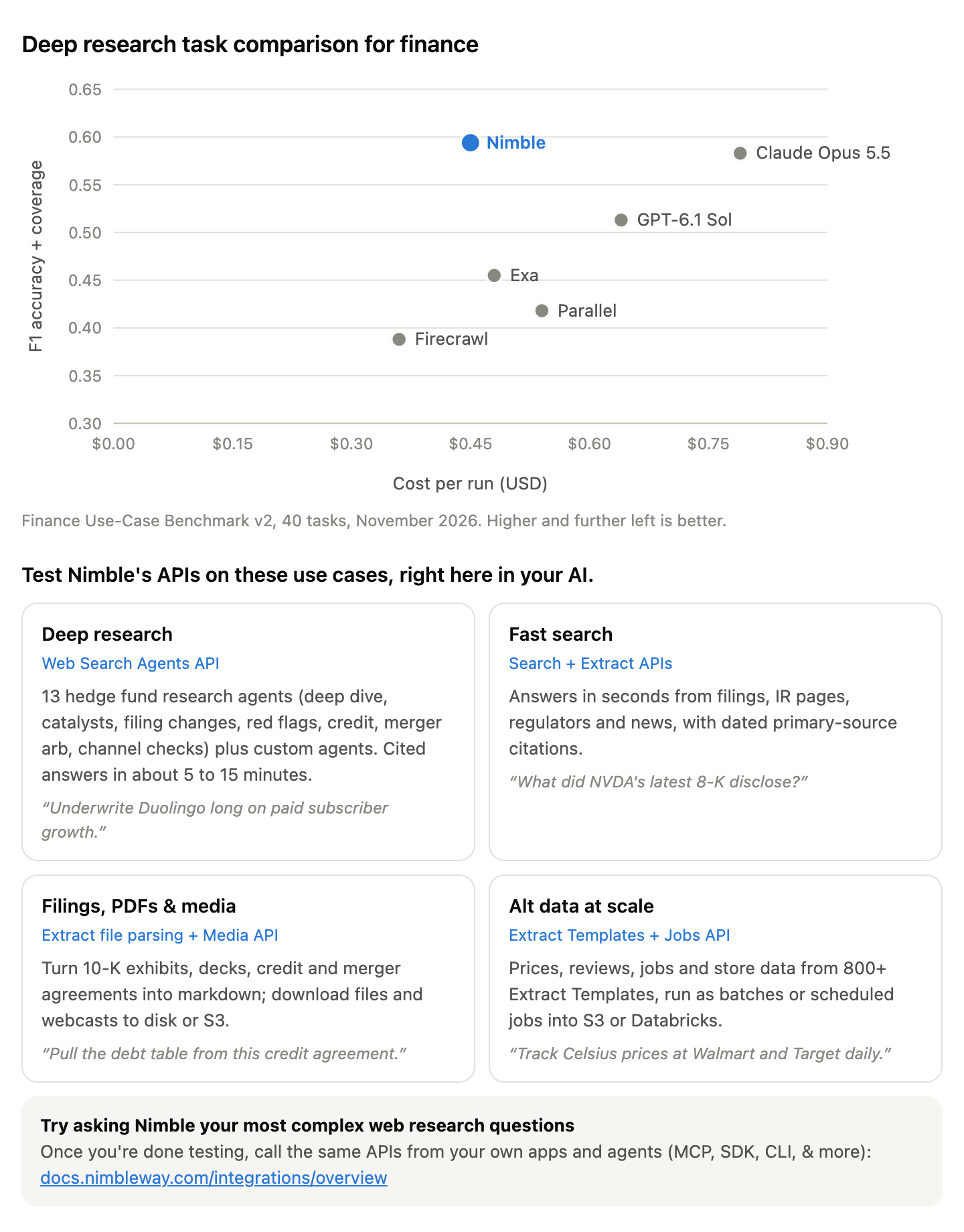 (chart and tiles in one image), then the integrations link below as text so it is clickable |
| None of these (plain terminal) | The benchmark table below under its title, with Nimble's row in bold, then the markdown tiles below |
assets/onboarding.html is the same screen as a full standalone page, for hosts that can only preview files; if that is all you can do, also put the markdown tiles in your reply so the user sees them in the chat.
For the fallbacks, the chart data: Nimble's public Finance Use-Case Benchmark v2 (all eight finance jobs, 40 tasks, November 2026; source: references/benchmark.md). Title: "Deep research task comparison for finance". Caption: "Finance Use-Case Benchmark v2, 40 tasks, November 2026. Higher and further left is better."
| Provider | F1 accuracy + coverage | Cost per run (USD) |
|---|---|---|
| Nimble | 0.594 | 0.45 |
| Claude Opus 5.5 | 0.583 | 0.79 |
| GPT-6.1 Sol | 0.513 | 0.64 |
| Exa | 0.455 | 0.48 |
| Parallel | 0.418 | 0.54 |
| Firecrawl | 0.388 | 0.36 |
Use exactly these numbers; never round them up or add providers. The same numbers and the tile copy live in assets/build.py; when either changes, edit it there and run python3 skills/onboard-your-agent/assets/build.py to rebuild the SVGs, the HTML page and fragment, and the PNG.
1b. The five tiles
The tiles say what they are: the user is testing Nimble's APIs on real investment research use cases, right here in their own AI. Each tile names the Nimble API behind it. The fifth tile is for taking those APIs into the user's own stack.
The inline fragment and the PNG already contain the tiles. When you showed only the SVG or the table, put this line above the tiles: "Test Nimble's APIs on these use cases, right here in your AI." Then use this markdown:
| 🔎 Deep research · Web Search Agents API | ⚡ Fast search · Search + Extract APIs |
|---|---|
| 13 hedge fund research agents (deep dive, catalysts, filing changes, red flags, credit, merger arb, channel checks) plus custom agents. Cited answers in about 5 to 15 minutes. | Answers in seconds from filings, IR pages, regulators and news, with dated primary-source citations. |
| "Underwrite Duolingo long on paid subscriber growth." | "What did NVDA's latest 8-K disclose?" |
| 📄 Filings, PDFs & media · Extract file parsing + Media API | 📊 Alt data at scale · Extract Templates + Jobs API |
| Turn 10-K exhibits, decks, credit and merger agreements into markdown; download files and webcasts to disk or S3. | Prices, reviews, jobs and store data from 800+ Extract Templates, run as batches or scheduled jobs into S3 or Databricks. |
| "Pull the debt table from this credit agreement." | "Track Celsius prices at Walmart and Target daily." |
🔌 Try asking Nimble your most complex web research questions
Once you're done testing, call the same APIs from your own apps and agents (MCP, SDK, CLI, & more): https://docs.nimbleway.com/integrations/overview
Then ask:
What kind of company investment research do you want to test? For example, a name you're underwriting, a catalyst or deal you're tracking, a borrower you're watching, or a dataset you want to build. Or try: "Underwrite Duolingo long on paid subscriber growth."
Keep the chart, the tiles and the question to one screen. No preamble. Then stop and wait for the user's answer: never run the example prompt yourself or answer it on the user's behalf.
Step 2: Check whether Nimble is already connected
While the user answers, check silently. This probe is the only Nimble call before the user replies: no Search, Extract or Web Search Agent call on the example prompt or anything else, and no "test" or "verification" call. Either surface working means setup is done; once the user answers, skip to Step 5 and route their request.
- MCP: if any Nimble tool is listed, call the read-only
nimble_agents_list. - CLI: if you can run shell commands:
command -v nimble && nimble --version && nimble agents list. The CLI readsNIMBLE_API_KEYfrom the environment.
| Result | Next |
|---|---|
| Either probe returns data | Step 5 |
| A Nimble tool returns an auth error or an authorization URL | Step 4 |
| Nothing is installed and the user has no Nimble account | Step 3 |
| Nothing is installed but the user has an account | Step 4 |
Step 3: Start the free trial
If the user has no Nimble account, this comes first. Say it in two or three lines:
Nimble has a free trial, and signing up takes about two minutes.
- Open https://online.nimbleway.com/signup and create an account with your work email.
- Confirm your email, then log in to the dashboard. Tell me when you're in and I'll connect it.
Open the link for them if your host can. Do not fill in the form, create the account or confirm the email for them. Wait for them to confirm, then go to Step 4.
On hosts that use OAuth (most MCP clients), the user can also create the account during the first authorization in Step 4; mention it so they do not sign up twice.
Step 4: Connect Nimble to this agent
Default to the MCP server: it uses OAuth, so no API key is created, pasted or stored. Pick the row for your host:
| Host | How |
|---|---|
| Claude Code | If the nimble plugin (nimble@nimble-plugin-marketplace) is installed, the Nimble MCP server is bundled: run /mcp, pick nimble and authorize. If the skills were installed with npx skills add, run claude mcp add --transport http --scope user nimble https://mcp.nimbleway.com/mcp in a terminal (or run it for the user if you can run shell commands), then /mcp to authorize |
| Claude.ai / Claude Desktop / Cowork | Install Nimble from the plugin directory, or add a custom connector at https://mcp.nimbleway.com/mcp under Customize → Connectors, then Connect |
| ChatGPT | Settings → Apps & Connectors → add a custom connector with URL https://mcp.nimbleway.com/mcp (requires developer mode on some plans), then sign in |
| Cursor, VS Code, other MCP clients | Add {"mcpServers": {"nimble": {"type": "http", "url": "https://mcp.nimbleway.com/mcp"}}}; the first tool call starts OAuth |
| Codex Desktop | Plugins → search Nimble → install and approve OAuth |
| Codex CLI | In ~/.codex/config.toml: [mcp_servers.nimble-mcp-server], url = "https://mcp.nimbleway.com/mcp", bearer_token_env_var = "NIMBLE_API_KEY" |
When the CLI or API is also needed. The MCP server covers Search, Extract, Extract Templates, Map, Crawl and Web Search Agents. Parsing PDFs, downloading media, template batches and Extract Jobs need the CLI or REST API (filings-media-pdfs, alt-data-at-scale). If the user's task needs those and the host has a terminal, ask once whether to add the CLI and say why in one sentence:
npm i -g @nimble-way/nimble-cli
Then the user creates a key at https://online.nimbleway.com/settings/api-keys (one key per agent, named for it) and sets NIMBLE_API_KEY in their shell profile or secret manager.
Credential safety. Never ask the user to paste the key into the chat. Never print it (echo $NIMBLE_API_KEY, printenv) or write it to a file that could be committed or shared. Check it exists with [ -n "$NIMBLE_API_KEY" ] && echo set || echo missing and let the shell expand it in an Authorization: Bearer $NIMBLE_API_KEY header.
If a tool returns an authorization URL, show it exactly as given and wait. Do not fall back to a generic web search or fetch tool while waiting; that hides the setup problem and returns different data.
Install these skills so the agent can route requests (if the user is reading this, they are installed on this host; share this when they want them on another tool or for a teammate):
| Host | How |
|---|---|
| Claude Code, Codex, Cursor and other agents | npx skills add Nimbleway/agent-skills (one command; then connect the MCP server as above) |
| Claude Code, with the MCP server bundled | claude plugin marketplace add Nimbleway/agent-skills && claude plugin install nimble@nimble-plugin-marketplace |
| ChatGPT Business, Enterprise and Edu | Zip each folder under skills/ and upload it under Skills → Create → Upload from your computer (one zip per skill; a workspace admin may need to allow uploads) |
| ChatGPT on other plans, or any other agent | Add the SKILL.md files to the project or custom GPT instructions |
| Claude.ai | Zip each folder under skills/ and upload it under Customize → Skills |
Step 5: Route the request to a skill
Once Nimble is connected, say so in one line and route the user's answer from Step 1. Do not run a separate test call first; the user's own request is the first call.
| What the user said | Skill | First move |
|---|---|---|
| A single fact, date, person, filing or page ("who", "when", "what did the 8-K say") | company-fast-search | One scoped Search, then Extract the primary page |
| A name to underwrite, a thesis to test, a short idea, management credibility | company-deep-research | hf-fundamental-deep-dive, hf-forensic-red-flags or hf-management-track-record |
| What's coming up, what changed | company-deep-research | hf-catalyst-calendar, hf-filing-changes |
| A pending merger (merger arb) | company-deep-research | hf-deal-terms, then hf-deal-tracker |
| A borrower's credit file (capital structure, loans, bonds), stress signals since the last review | company-deep-research | hf-credit-profile, then hf-credit-early-warning |
| A quick credit view or counterparty check on one company ("can they pay") | credit-risk | The credit-risk agent |
| Customers, suppliers, competitors, government revenue | company-deep-research | hf-customer-supplier-map, hf-competitor-momentum, hf-government-contracts |
| "What does the web show today versus last quarter" for one question | company-deep-research | hf-channel-check |
| Anything else that needs many sources | company-deep-research | Build a custom Web Search Agent (section 5 of that skill) |
| Using Nimble's APIs from their own code, agents, pipelines or warehouse | None | Link https://docs.nimbleway.com/integrations/overview and help them pick a path (MCP server, plugin and skills, SDK and CLI, Databricks or Snowflake) |
| A PDF, deck, agreement, spreadsheet, webcast or image | filings-media-pdfs | Extract with file_parsing_options, or Media download |
| A panel of prices, reviews, postings or locations over time | alt-data-at-scale | Find the Extract Template, pilot 20 to 50 inputs, then batch or schedule a Job |
If the answer spans more than one (common), start with the fastest piece that unblocks the rest and say what comes next. For example: fast search to pin the entity and latest filing, then a deep research run, then an alt-data panel to keep watching.
By strategy, the usual starting points:
- Fundamental long/short: fundamental deep dive → catalyst calendar → channel check or an alt-data panel on the key KPI.
- Event-driven / merger arb: deal terms → deal tracker on a schedule → fast search for each new filing.
- Credit / distressed: credit file → early-warning log since the last review → parse the credit agreement.
- Quant / data science: alt-data panels via Extract Jobs into S3 or Databricks, with entity maps to tickers.
- Activist: forensic screen, management track record, proxy (DEF 14A) parsing.
Ground rules to state once
Say these once during onboarding, briefly, then apply them silently:
- Only public information. No paywalled, logged-in, leaked or expert-network content, which could be MNPI. A paywalled page is never the only source for a value.
- Every value comes with its source URL and date; anything unpublished is reported as not found, not estimated. Date windows stay windows, and problems that were cured are labeled cured, not live.
- Analyst estimates and price targets are labeled as opinions.
- Deep research runs take minutes. You'll be told when one starts and roughly when it will finish.
Reference
- Docs index: https://docs.nimbleway.com/llms.txt
- Agent setup (general): https://docs.nimbleway.com/agent-onboarding.md
- Credentials for agents: https://nimbleway.com/auth.md
- Pricing and usage: the Usage page in the Nimble dashboard
Onboard your agent: Nimble for GTM research
You are setting up Nimble for a go-to-market professional (AE, SDR/BDR, sales leader, RevOps, growth or product marketing, founder doing sales). Nimble gives you the live web as cited, structured data. Follow the steps in order.
Step 1: Show the benchmark chart, the six tiles and ask one question
As soon as this skill loads, show the benchmark chart, then the six tiles below it, then ask exactly one question. Do this before any setup talk.
1a. Show the prebuilt onboarding screen (never redraw it)
The benchmark chart and the six tiles are prebuilt in assets/, next to this file (paths below are relative to this skill's base directory). Show them as they are. Never write chart or tile code yourself: generating it is what makes onboarding slow.
Show them inline, in the conversation itself. The user must see the chart and all six tiles in the chat, above your question. Never put them only in a side panel, a file card, a separate artifact or a browser tab, and never tell the user to look in a panel. Pick the first row your host supports:
| Your host can… | Show |
|---|---|
| Render HTML inline in the chat (for example the Claude apps' inline visual or widget tool, an inline HTML block) | Read assets/onboarding-inline.html and pass it verbatim: chart and all six tiles in one static fragment (no doctype, no scripts, no libraries, about 6 KB) |
| Render visuals inline only from SVG | Read assets/benchmark-chart.svg and pass it verbatim (3 KB of static SVG), then the markdown tiles below in your reply |
| Show an image in the chat | 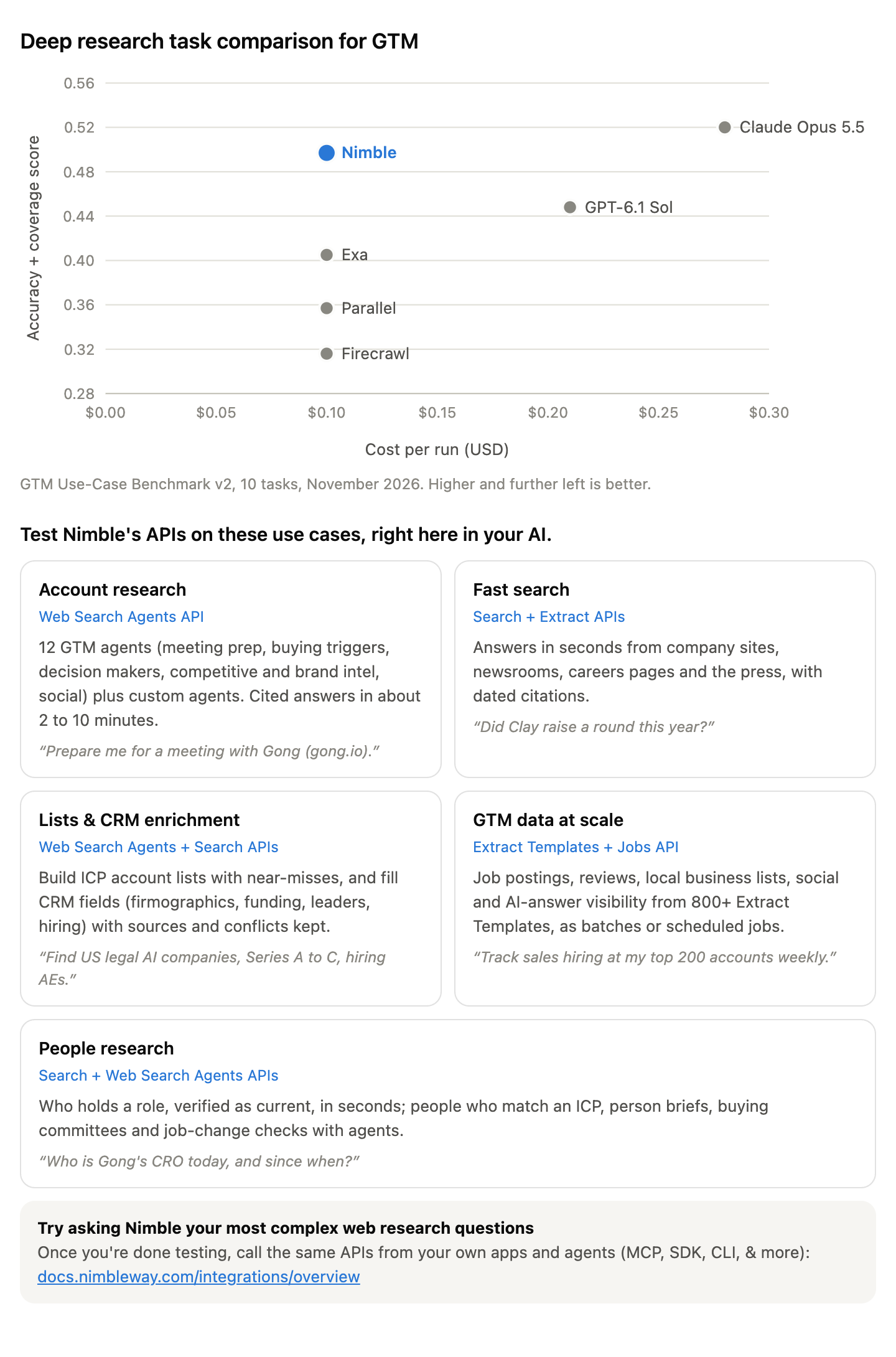 (chart and tiles in one image), then the integrations link below as text so it is clickable |
| None of these (plain terminal) | The benchmark table below under its title, with Nimble's row in bold, then the markdown tiles below |
assets/onboarding.html is the same screen as a full standalone page, for hosts that can only preview files; if that is all you can do, also put the markdown tiles in your reply so the user sees them in the chat.
For the fallbacks, the chart data: Nimble's public GTM Use-Case Benchmark v2 (meeting prep and signal tracking, 10 tasks, November 2026; source: references/benchmark.md). Title: "Deep research task comparison for GTM". Caption: "GTM Use-Case Benchmark v2, 10 tasks, November 2026. Higher and further left is better."
| Provider | Accuracy + coverage score | Cost per run (USD) |
|---|---|---|
| Claude Opus 5.5 | 0.520 | 0.28 |
| Nimble | 0.497 | 0.10 |
| GPT-6.1 Sol | 0.448 | 0.21 |
| Exa | 0.405 | 0.10 |
| Parallel | 0.357 | 0.10 |
| Firecrawl | 0.316 | 0.10 |
Use exactly these numbers; never round them up, reorder them or add providers. If the user asks, the honest read is: Nimble scored highest of the four research APIs at the same price, and close to Claude Opus 5.5 at about a third of its cost; it found the most verified facts of any provider and scored highest on signal tracking. The same numbers and the tile copy live in assets/build.py; when either changes, edit it there and run python3 skills/onboard-your-gtm-agent/assets/build.py to rebuild the SVGs, the HTML page and fragment, and the PNG.
1b. The six tiles
The tiles say what they are: the user is testing Nimble's APIs on real GTM use cases, right here in their own AI. Each tile names the Nimble API behind it. The last tile is for taking those APIs into the user's own stack.
The inline fragment and the PNG already contain the tiles. When you showed only the SVG or the table, put this line above the tiles: "Test Nimble's APIs on these use cases, right here in your AI." Then use this markdown:
| 🔎 Account research · Web Search Agents API | ⚡ Fast search · Search + Extract APIs |
|---|---|
| 12 GTM agents (meeting prep, buying triggers, decision makers, competitive and brand intel, social) plus custom agents. Cited answers in about 2 to 10 minutes. | Answers in seconds from company sites, newsrooms, careers pages and the press, with dated citations. |
| "Prepare me for a meeting with Gong (gong.io)." | "Did Clay raise a round this year?" |
| 📋 Lists & CRM enrichment · Web Search Agents + Search APIs | 📊 GTM data at scale · Extract Templates + Jobs API |
| Build ICP account lists with near-misses, and fill CRM fields (firmographics, funding, leaders, hiring) with sources and conflicts kept. | Job postings, reviews, local business lists, social and AI-answer visibility from 800+ Extract Templates, as batches or scheduled jobs. |
| "Find US legal AI companies, Series A to C, hiring AEs." | "Track sales hiring at my top 200 accounts weekly." |
| 👤 People research · Search + Web Search Agents APIs | |
| Who holds a role, verified as current, in seconds; people who match an ICP, person briefs, buying committees and job-change checks with agents. | |
| "Who is Gong's CRO today, and since when?" |
🔌 Try asking Nimble your most complex web research questions
Once you're done testing, call the same APIs from your own apps and agents (MCP, SDK, CLI, & more): https://docs.nimbleway.com/integrations/overview
Then ask:
What GTM research do you want to test? For example, an account or a person you're meeting this week, a watchlist you want buying triggers for, an ICP list you want built, or CRM records you want enriched. Or try: "Prepare me for a meeting with Gong (gong.io)."
Keep the chart, the tiles and the question to one screen. No preamble. Then stop and wait for the user's answer: never run the example prompt yourself or answer it on the user's behalf.
Step 2: Check whether Nimble is already connected
While the user answers, check silently. This probe is the only Nimble call before the user replies: no Search, Extract or Web Search Agent call on the example prompt or anything else, and no "test" or "verification" call. Either surface working means setup is done; once the user answers, skip to Step 5 and route their request.
- MCP: if any Nimble tool is listed, call the read-only
nimble_agents_list. - CLI: if you can run shell commands:
command -v nimble && nimble --version && nimble agents list. The CLI readsNIMBLE_API_KEYfrom the environment.
| Result | Next |
|---|---|
| Either probe returns data | Step 5 |
| A Nimble tool returns an auth error or an authorization URL | Step 4 |
| Nothing is installed and the user has no Nimble account | Step 3 |
| Nothing is installed but the user has an account | Step 4 |
Step 3: Start the free trial
If the user has no Nimble account, this comes first. Say it in two or three lines:
Nimble has a free trial, and signing up takes about two minutes.
- Open https://online.nimbleway.com/signup and create an account with your work email.
- Confirm your email, then log in to the dashboard. Tell me when you're in and I'll connect it.
Open the link for them if your host can. Do not fill in the form, create the account or confirm the email for them. Wait for them to confirm, then go to Step 4.
On hosts that use OAuth (most MCP clients), the user can also create the account during the first authorization in Step 4; mention it so they do not sign up twice.
Step 4: Connect Nimble to this agent
Default to the MCP server: it uses OAuth, so no API key is created, pasted or stored. Pick the row for your host:
| Host | How |
|---|---|
| Claude Code | If the nimble plugin (nimble@nimble-plugin-marketplace) is installed, the Nimble MCP server is bundled: run /mcp, pick nimble and authorize. If the skills were installed with npx skills add, run claude mcp add --transport http --scope user nimble https://mcp.nimbleway.com/mcp in a terminal (or run it for the user if you can run shell commands), then /mcp to authorize |
| Claude.ai / Claude Desktop / Cowork | Install Nimble from the plugin directory, or add a custom connector at https://mcp.nimbleway.com/mcp under Customize → Connectors, then Connect |
| ChatGPT | Settings → Apps & Connectors → add a custom connector with URL https://mcp.nimbleway.com/mcp (requires developer mode on some plans), then sign in |
| Cursor, VS Code, other MCP clients | Add {"mcpServers": {"nimble": {"type": "http", "url": "https://mcp.nimbleway.com/mcp"}}}; the first tool call starts OAuth |
| Codex Desktop | Plugins → search Nimble → install and approve OAuth |
| Codex CLI | In ~/.codex/config.toml: [mcp_servers.nimble-mcp-server], url = "https://mcp.nimbleway.com/mcp", bearer_token_env_var = "NIMBLE_API_KEY" |
When the CLI or API is also needed. The MCP server covers Search, Extract, Extract Templates, Map, Crawl and Web Search Agents. Enriching a whole CSV or CRM export, template batches and scheduled Extract Jobs are better through the CLI or REST API, so results land in files instead of the chat (account-lists-and-enrichment, gtm-data-at-scale). If the user's task needs those and the host has a terminal, ask once whether to add the CLI and say why in one sentence:
npm i -g @nimble-way/nimble-cli
Then the user creates a key at https://online.nimbleway.com/settings/api-keys (one key per agent, named for it) and sets NIMBLE_API_KEY in their shell profile or secret manager.
Credential safety. Never ask the user to paste the key into the chat. Never print it (echo $NIMBLE_API_KEY, printenv) or write it to a file that could be committed or shared. Check it exists with [ -n "$NIMBLE_API_KEY" ] && echo set || echo missing and let the shell expand it in an Authorization: Bearer $NIMBLE_API_KEY header.
If a tool returns an authorization URL, show it exactly as given and wait. Do not fall back to a generic web search or fetch tool while waiting; that hides the setup problem and returns different data.
Install these skills so the agent can route requests (if the user is reading this, they are installed on this host; share this when they want them on another tool or for a teammate):
| Host | How |
|---|---|
| Claude Code, Codex, Cursor and other agents | npx skills add Nimbleway/agent-skills (one command; then connect the MCP server as above) |
| Claude Code, with the MCP server bundled | claude plugin marketplace add Nimbleway/agent-skills && claude plugin install nimble@nimble-plugin-marketplace |
| ChatGPT Business, Enterprise and Edu | Zip each folder under skills/ and upload it under Skills → Create → Upload from your computer (one zip per skill; a workspace admin may need to allow uploads) |
| ChatGPT on other plans, or any other agent | Add the SKILL.md files to the project or custom GPT instructions |
| Claude.ai | Zip each folder under skills/ and upload it under Customize → Skills |
Step 5: Route the request to a skill
Once Nimble is connected, say so in one line and route the user's answer from Step 1. Do not run a separate test call first; the user's own request is the first call.
| What the user said | Skill | First move |
|---|---|---|
| A single fact about an account ("did they raise", "are they hiring AEs", "what's on their pricing page") | account-fast-search | One scoped Search, then Extract the primary page |
| A meeting or call with one account, "brief me on", "prep me for" | account-brief | The account-brief agent |
| What changed at an account, buying triggers, a watchlist | account-deep-research | account-signals (one account) or gtm-buying-trigger-monitor (a watchlist) |
| Who holds a role at one company ("who is their CRO", "who runs RevOps at") | decision-maker-identification | The decision-maker-identification agent, with the current title proved by a dated source |
| Who to talk to: a person brief, a buying committee, decision makers across many accounts, job changes on a contact list | people-research | person-brief, buying-committee-map, decision-maker-identification per account, contact-job-change-monitor |
| A list of people who match an ICP (roles, seniority, company criteria) | people-research | people-discovery |
| Competitors, battlecards, pricing comparisons | account-deep-research | competitive-intelligence |
| What people say about a brand or product; what an influencer or exec posted | account-deep-research | brand-intelligence, social-media-monitor |
| Anything else about one account that needs many sources | account-deep-research | Build a custom Web Search Agent (section 5 of that skill) |
| An ICP or target account list, a TAM list, local businesses in an area | account-lists-and-enrichment | gtm-icp-discovery / account-discovery, or business-discovery for local SMBs |
| A CSV, CRM export or list of domains to fill in | account-lists-and-enrichment | gtm-account-enrichment / account-enrichment in batches, then CRM write-back rules |
| Hiring, reviews, local listings, social or AI-answer data tracked over time for many accounts | gtm-data-at-scale | Find the Extract Template, pilot 20 to 50 inputs, then batch or schedule a Job |
| Using Nimble's APIs from their own code, agents, CRM or warehouse | None | Link https://docs.nimbleway.com/integrations/overview and help them pick a path (MCP server, plugin and skills, SDK and CLI, Databricks or Snowflake) |
If the answer spans more than one (common), start with the fastest piece that unblocks the rest and say what comes next. For example: fast search to pin the account's domain and latest news, then an account brief, then a trigger watch on the same account.
By motion, the usual starting points:
- AE preparing for a meeting: account brief (
account-brief) → person brief on each attendee and a buying committee map (people-research) → competitive intelligence if a rival is in the deal (account-deep-research). - SDR/BDR prospecting: ICP discovery → enrichment of the list → buying triggers on the list weekly → decision makers for the accounts that trigger → job-change checks on past champions monthly.
- RevOps / data: enrichment of the CRM in batches with precedence rules → Extract Jobs for hiring and review signals into the warehouse.
- Product and competitive marketing: competitive intelligence → brand intelligence → AI-answer visibility panels (
chatgpt,perplexity,google_ai,geminitemplates). - Local and SMB sales: business discovery by category and city → Google Maps reviews and ratings → enrichment of the shortlist.
Ground rules to state once
Say these once during onboarding, briefly, then apply them silently:
- Only public information. No logged-in, paywalled or purchased data, and no emails or phone numbers guessed from patterns. Personal data is limited to what the task needs.
- Every value comes with its source URL and date; anything unpublished is reported as not found, not estimated. Lists are never padded to reach a count.
- Events are dated by when they happened, not when an article was published. Re-reported old news is not a new signal.
- Deep research runs take minutes. You'll be told when one starts and roughly when it will finish.
Reference
- Docs index: https://docs.nimbleway.com/llms.txt
- Agent setup (general): https://docs.nimbleway.com/agent-onboarding.md
- Credentials for agents: https://nimbleway.com/auth.md
- GTM guide with code: https://www.nimbleway.com/blog/building-gtm-agents-three-use-cases-with-nimbles-apis
- Pricing and usage: the Usage page in the Nimble dashboard
People research with Nimble
People questions come in two speeds. Start fast, and go deep only when the question needs it.
| Speed | Nimble API | Use it for | Time |
|---|---|---|---|
| Fast | Search (nimble_search, POST /v2/search), plus Extract for one page | One person or one role: who holds it, since when, where they came from, one recent quote or talk | Seconds |
| Deep | Web Search Agents (nimble_agents_*) | A list of people who match an ICP, a full brief on a person, a buying committee at an account, job-change checks on a contact list, decision makers across accounts | About 1.5 to 10 minutes (a person brief took about 2 minutes, a one-contact job-change check about 1.5) |
Rule of thumb: if three searches answer it, stay fast. If the user wants a brief, a map, a table or many people, run one agent.
1. Pin the person first
Write down full name + company + company domain (and title or city if known) before searching, and use at least two of them in every query. People research fails on identity more than on search:
- Common names: there are many people called Shane Evans; there is one Shane Evans at Gong.
- Company names that are common words (Gong, Ramp, Clay, Mercury): add the domain or a product word, or the search returns everything else.
- Former employees: bios, speaker pages and profiles from previous jobs stay indexed for years.
- Same title in several units or regions at large companies: say which one the person covers.
2. The fast path: Search API
The loop:
- Find the candidate. One search for the role or the name, scoped to the company.
- Verify the title is current. A press release announcing an appointment is dated history. Run a second, date-scoped search on the person's name (
time_range: "year") and open the newest first-party page. This step is not optional. - Read the page with Extract when the snippet is not enough (the leadership page, the release, the speaker page).
- Answer with the source and its date, and say what you checked for a later change.
Worked example (why step 2 matters). "Who is Gong's CRO?" with include_answer: true returns Shane Evans, citing Gong's October 2023 appointment release. A date-scoped search for "Shane Evans" Gong in the last year returns Gong's own blog and February 2026 coverage: he is now Gong's Chief Revenue Architect. The first answer was true in 2023 and wrong today. (contact-job-change-monitor catches the same change: new_title_same_company, change date 2026-02-19.)
Query patterns:
| Need | Search |
|---|---|
| Who holds a role | "<Company>" "<Title>" with include_answer: true, then verify (step 2). Or Extract the company's leadership page |
| A cited one-line answer | include_answer: true with time_range: "year"; check the answer cites a first-party or dated page |
| Find their public profile | site:linkedin.com/in "<Company>" "<Title>", search_depth: "lite", max_results: 10: result titles read "Name - Title at Company". A profile seen in search results is a lead; confirm the current role elsewhere when it matters |
| Recent appointment or move | "<Name>" "<Company>" joins OR appointed OR named, time_range: "year" |
| What they said recently | "<Name>" "<Company>" podcast OR interview OR webinar OR keynote, time_range: "year"; include_domains: [<company domain>] for blog posts they wrote |
| Quotes in press | "<Name>" "<Company>" said, or focus: "news" with search_depth: "lite" and the domain in the query |
| Career history | "<Name>" "previously" OR "prior to joining" with the company; appointment releases list past roles |
| Who leads a team that is hiring | Job posts on the company's ATS board often name the team; Extract the board (see account-fast-search) |
Parameter notes (tested):
focusmodes (news,social,locationand the rest) only work withsearch_depth: "lite". For people, plain queries with quotes and the domain usually beatfocus: "social", which matches the name loosely (a search for Gong's CRO insocialreturned people whose surname is Gong).time_range(day,week,month,year) orstart_date/end_date: always date-scope "current" and "recent" questions. They cannot be combined.max_results5 to 10 is enough; run independent searches in parallel rather than one long query.- The
ti_linkedin_serp_profilesExtract Template parses a Google results page limited tolinkedin.com/inprofiles (pass the Google search URL asurl) intoname,title,snippet,linkedin_url, which is handy for many roles at once.
Escalate to an agent when you have run three searches and are still reconciling pages, when the user wants more than a few facts, or when it is more than two or three people.
3. The deep path: people research agents
Agent (agent_name) | Use it when the user asks... | Use case | Source |
|---|---|---|---|
people-discovery | for people who match an ICP for people (roles and seniority, plus company criteria such as industry, size, location or funding), each with why they fit and a page showing the current title | dataset_building | gallery |
person-brief | to research one named person before a meeting or outreach: current role verified with its date, career history, recent public activity, stated priorities, talking points | research | gallery |
decision-maker-identification | who holds named roles at one company now, with title, start date, past roles and public profiles | enrichment | gallery |
buying-committee-map | who at an account would buy, champion, evaluate or block a purchase in a product category, each with why they matter | research | gallery |
contact-job-change-monitor | whether contacts on a list are still in the same role, changed title, or moved employer, with the date (champion tracking, CRM hygiene) | enrichment | gallery |
social-media-monitor | what named people posted in a window, with engagement | dataset_building | gallery |
All six are templates in the Go-to-market section of the Nimble Web Search Agent gallery, each with a pre-run example answer. Each spec (skill, output schema, effort, example questions) is also in agents/<agent_name>.json next to this file, a snapshot of the gallery template (2026-11-12). decision-maker-identification and social-media-monitor are shared with account research, so their specs live in account-deep-research/agents/. If only this skill is installed, read them from https://raw.githubusercontent.com/Nimbleway/agent-skills/main/skills/account-deep-research/agents/<agent_name>.json. Read the matching file before the first run; its suggested_questions show the input format.
Get the agent into the account (reuse first): an agent with the same agent_name already in the account (nimble_agents_list) → the Nimble gallery (nimble_agent_templates_list, then nimble_agents_create(template=<name>, agent_name=<name>)) → the bundled spec, if the gallery does not list it (an older deployment) (pass its agent_name, display_name, description, use_case, effort, skill, output_schema and suggested_questions unchanged). Create each agent once and reuse it.
Run it:
nimble_agents_run(agent_id=<id>,
  input="Brief me on Shane Evans at Gong (gong.io) before a call next week. I sell data infrastructure to revenue teams.")
→ nimble_agents_run_status(run_id=<run_id>, agent_id=<agent_id>) # waits ~45 s per call; call again until it completes
Put the name, company and domain, the roles, and the seller's context ("I sell X to Y") in the input. For contact-job-change-monitor, pass the contacts as input_data rows (full_name, company, domain, last_known_title, optional profile_url), about 5 rows per run at high. REST: POST /v2/agents/{agent_id}/runs with {"input": ..., "input_data": ...}, poll GET /v2/agents/{agent_id}/runs/{run_id} while is_active, then GET .../runs/{run_id}/result.
Check before you present. completed means finished, not correct:
- Same person: every source names the right company (and title or city). Drop pages about namesakes.
- Current, with a date: each title has an
as_ofwithin the last 12 months or a page showing it as current. An appointment release alone is not proof of today's title. - Moves need evidence:
moved_companyneeds a dated page naming the new employer. "Not on the leadership page" iscannot_verify, not a departure. - Priorities are quoted, not guessed: every stated priority or talking point traces to something the person or their company published.
- Nothing personal: remove any home address, personal email or phone, family or other sensitive detail that slipped in, and never present a constructed email address.
- Missing roles are reported: a role nobody publicly holds belongs in
missing_rolesormissing_fields, not filled with a near match.
4. Many people, many accounts
- People who match an ICP: one
people-discoveryrun per scope (a region, a sub-industry or a company-size band), 15 to 50 people per run; split a large market into several scoped runs and pass people already found asinput_datawith "exclude the people in input_data". The company criteria are verified per person, and people at companies that fail one land inexcludedwith the reason. - Decision makers across a list of accounts: one
decision-maker-identificationrun per account (it returns one company's people), run in parallel, about 10 at a time. For a thin first pass across hundreds of accounts, the fast path (onesite:linkedin.com/in "<Company>" "<Title>"search per account and role) is cheaper; then run agents on the accounts that matter. - Champion tracking: run
contact-job-change-monitorover the contact list monthly in batches of about 5. A champion who moved is a new-logo lead at their new company: route it toaccount-brieffor the new employer. - Buying committees: one
buying-committee-maprun per target account, after the account list is final. - Batching, concurrency, ledgers and CRM write-back rules are the same as for accounts: see
account-lists-and-enrichment. Never overwrite a contact a rep entered; queue changes for review.
5. Privacy rules (apply to every people request)
- Work-related public information only: name, title, employer, career history, public talks, posts, articles and quotes. No home address, personal phone or email, family, health, age, religion, politics or other sensitive data.
- Never construct email addresses or phone numbers from patterns. Business contact details count only when the person or their company published them for business contact. If the user needs emails, they come from the user's licensed contact provider, matched on name, company and profile URL.
- Public pages only. No logged-in views, paywalls or CAPTCHA workarounds; LinkedIn and X are read only as logged-out pages and search results show them.
- Purpose-bound. Research people for the business purpose the user stated (a meeting, an account plan). Decline requests to profile someone's private life or to track an individual outside a work context.
- The user's own rules win: do-not-contact flags, opt-outs and regional privacy law (GDPR, CCPA, CASL) decide who is contacted, not what the web shows.
Answer format
Lead with the answer, then the evidence and the freshness check:
Answer: Shane Evans is Gong's Chief Revenue Architect (title since 2026-02-19; Gong announced him as Chief Revenue Officer on 2023-10-19). Sources: Gong blog, https://gong.io/blog/the-cra-is-the-new-cro-why-i-m-becoming-a-revenue-architect; appointment release, https://gong.io/press/gong-names-shane-evans-as-chief-revenue-officer (2023-10-19). Checked: Gong's newsroom and press coverage of his name in the last 12 months; no later change found.
For a brief or a map, lead with the bottom line (who matters and the best angle), then the people with a source and date for each.
Portfolio monitoring
Lists material events at a holding since a date: exec changes, litigation, rating actions, guidance and defaults, with why each one matters.
What the user gets
Only material events after the since date, each dated and cited, with why it matters. If nothing material happened, an empty list and the sources it checked.
Agent template
This skill runs the Nimble gallery template portfolio-monitoring. The agent's instructions, sources and output schema live in the template. Do not rewrite them in the run.
Effort: this skill runs the template at medium effort (about 1-3 minutes), even when the template's default effort is different. That is on purpose. If the user asks for a specific effort (low, medium, high or x-high), run that one instead.
Flow
- Interview the user.
- Connect Nimble if it is not connected already.
- Run the agent and show the result.
- Offer next steps.
Ask every question with the host's question UI, never as plain text: AskUserQuestion in Claude Code, ChatGPT's interactive question form (clickable choices and a Submit button) in ChatGPT.
Get the inputs
| Input | Required | Ask for | If skipped |
|---|---|---|---|
| Holding | yes | Name with a ticker or domain | - |
| Since | no | A date in YYYY-MM-DD | last 30 days |
| Materiality rule | no | For example "ignore product launches" | the standard materiality rule |
- Skip anything the user already said in this conversation or in their request, and ask only for what is missing. Do not fill in answers from earlier conversations, with one exception: a stable fact about the user, such as what they sell, may be offered as the first option, labeled "(from before)". Never carry over the subject of the request, dates or rules from an earlier conversation.
- Ask the required inputs first, in table order, one question at a time. Then ask the optional ones together, in one question-tool call, as many as the tool takes per call (a second call for the rest).
- Put the whole question in the question tool, once. Never restate or introduce a question in text. Between questions, acknowledge the answer in a few words, and before the first question, at most one short sentence that acknowledges your role (the user's, if they named one), such as "Sure, I'll use Nimble to be your portfolio monitoring assistant." Talk in plain, friendly words: never say "input", "required" or "optional", and use no field names. Use plain text only if the host has no question tool, in one short line.
- Write 2-3 likely answers as options, based on what the user has already said. Fixed examples in the table are a guide to what the answer contains, not a list to copy. Offer only answers Nimble can act on with public web data, never ones that need the user's own data, such as their customers or CRM.
- If you cannot guess likely answers, such as a company name or an industry, still use the tool and offer two or three examples as options, written as answers the user could really give. If the user picks one, use it as their answer.
- Every question must let the user type their own answer, optional ones too. Claude's question UI adds its own free-text choice ("Something else" in Claude, "Other" in Claude Code), so add none there. ChatGPT's form does not, so add "Other" as the last option of every question, even one whose options look complete, opening a text field with a placeholder. In any other host, add "Other" unless you know its UI already has a free-text choice. Keep Skip and Other, when you add them, even if you must drop an answer to fit the option limit.
- Use single-select only. For a range, such as a size or a date, offer a few options that do not overlap.
- Optional questions can be skipped, and a skipped answer uses the "If skipped" value. Claude's question UI has its own Skip button, so add no Skip option there. In other hosts, include a Skip option that states the default in its label, for example "Skip (any location)", not in the question. When you acknowledge a skipped question, say the default you will use, for example "Any location.", not that it was skipped. Do not offer a "skip all" option. If the user asks to skip the remaining questions, use the "If skipped" values for all of them.
- Do not ask about effort.
Build the agent input from this pattern:
Check <Company> (<ticker or domain>) for material events since <YYYY-MM-DD>
Example: Check Boeing for material events since 2026-09-21
- One holding at a time. If the user names several, run the first and offer the rest next.
- Use whichever identifier the user gave: a ticker, or the domain for a private holding.
- Always pass an explicit date in YYYY-MM-DD form. A skipped Since means the date 30 days before today. Take today's date from the host or by running
date, and if you have neither, ask the user for the date. - If they have their own materiality rule, add one line to the input.
Connect Nimble
Do this after the interview. Until the questions are done, say nothing about connecting Nimble.
Check the connection. If a Nimble tool is listed in this session, call nimble_agents_list. If the CLI is available, run nimble --client-source nimble-agent-skills agents list. A normal response from either, even an empty list, means the user is connected: say nothing and go on.
If neither check succeeds (no tool is listed and the CLI is missing or fails, or a check returns an auth error or an authorization link), connect it in these steps. Your message is only these steps: no summary of what the user told you, no mention of the skill, the template or the workflow, and no plan for what happens after connecting (that belongs in the run notice).
- Tell the user, in two short sentences at most: "Nimble searches the live web and links where every answer came from. Connecting takes one approval, and if you're new to Nimble you start with a free trial."
- Connect it in the first of these ways that works, and stop at the first one that does:
- Show the host's card to connect or install Nimble from nimbleway.com: the Connect card for the connector in Claude, the install card for the plugin in ChatGPT.
- If you can't show a card and a check returned an authorization link, show that link to the user.
- If you can do neither but can run commands, follow https://docs.nimbleway.com/agent-onboarding.md and involve the user only for the sign-up and the approval. With only the CLI and no
NIMBLE_API_KEY, an approval is not enough: follow the page's API key fallback and have the user set the key in their environment, never in the chat. That page is written for you: never link it or its steps to the user. - If none of these works, tell the user how to find Nimble in this app, with the clicks: in ChatGPT, open Plugins in the sidebar, search for Nimble, pick the one described as "Expert web search for agents" and install it; in Claude, open Customize, then Connectors, then Nimble, then Connect. Never send the user to nimbleway.com for this.
- Ask with the question tool, with the options "I've connected Nimble" and "Not now". If the host has no question tool, end the message by asking them to reply "connected", and add nothing after that.
Never ask the user to paste an API key into the chat. When they confirm, check the connection again and go on without comment. If it is still not connected, say so in one line and ask again. If they pick "Not now", say the skill needs Nimble and stop. Show no research until Nimble is connected, not from your own search and not from memory.
Run the agent
Do not comment on the connection check or on creating or reusing the agent. The first thing the user hears is step 2.
- Create the agent from the template:
nimble_agents_create(template="portfolio-monitoring", agent_name="portfolio-monitoring"). A 409 "already exists" means it was created before, so go on. If the template is not found, tell the user it is unavailable and stop. Do not substitute another template. - Tell the user once, in one line, what you are researching and how long it takes at the effort you will use: "Researching <the request in a few words, with any limits>. Expected to take ." The time is 10-30 seconds for low, 1-3 minutes for medium, 5-15 minutes for high and 15-30 minutes for x-high.
- Start the run:
nimble_agents_run(agent_name="portfolio-monitoring", input="<the input>", effort="<the effort the user asked for, otherwise medium>"). Leave schema and skill to the template. - Poll with
nimble_agents_run_statusuntil the run finishes. On MCP each call waits up to about 45 seconds and returns "still running" if the run is not done: that is not an error, so call it again right away. Otherwise poll every 20-30 seconds. If a call fails with a transient error (timeout, server error, lost connection), retry only that call, once, and never sendnimble_agents_runagain. If starting the run fails with a transient error, checknimble_agents_runs_listfor a run you already started before starting another. If a call fails again, say so and stop. - Keep track of how long the run has been going: the time since you started it or, on MCP, about 45 seconds per status call. When it passes the top of its range (30 seconds for low, 3 minutes for medium, 15 minutes for high, 30 minutes for x-high), write one line to the user saying it is taking longer than usual, but that this is OK and you are still waiting for the result, then keep polling.
With only the CLI, the same calls are under nimble agents and nimble agents:runs. Add --client-source nimble-agent-skills as a global flag before the subcommand on every call, as in nimble --client-source nimble-agent-skills agents list, and run --help for the other flags.
Show the result
When the run finishes, get nimble_agents_run_result and write the result out in your message. The user cannot see tool output, so copy what matters into the chat. Do this even when the result is one row or empty: a short result is still a result. Never go straight to the next question.
- Start with one line saying what was found, for example the count or the risk call.
- Then the result in the shape that fits: a table for lists, people and events, one row each; short sections for briefs and memos; a field, value and source table for a single record. Show the whole list.
- Put each source next to the claim it supports, as a link.
- Use the agent's wording and numbers. Add nothing from your own knowledge, and show no raw JSON or field names.
- End with one line on what a deeper run may be able to find, such as empty fields or thin areas. If the run was already high, say what the sources did not cover.
If it finishes with an empty result, say so, show the sources it checked, and do not retry.
Next steps
Write the result first, then, in the same turn, ask what to do next with the host's question tool:
- Go deeper. A high-effort run reads more sources and fills more fields. It is expected to take 5-15 minutes. Offer it only if the last run was below high, and start it only on a yes:
nimble_agents_run(agent_name="portfolio-monitoring", input="<the same input>", effort="high"). When it finishes, lead with what it added or corrected, then give the full result. - Check another holding. Ask the questions again, and keep the answers the user does not want to change.
- Make it recurring. As a scheduled task in the host, or as code that calls Nimble. For a scheduled task, pass the last run date as the new since date where the input has one. For code, the agent is saved as
portfolio-monitoring: give a short Python or TypeScript snippet that runs it by name.
Pitfalls
- An empty list can be the right answer. Show the sources checked.
- Events on the since date itself can slip in. Keep only events strictly after it.
- Materiality is a judgement. Let the user tighten the rule.
Rules
- Never invent values. Show missing fields as missing.
- Never print or log an API key.
SEO Intelligence Toolkit
All-in-one SEO intelligence: keyword discovery, rank tracking, technical audits, content gaps, competitor analysis, AI visibility, and GitHub SEO.
User request: $ARGUMENTS
Before running any commands, read references/nimble-playbook.md for Claude Code
constraints (no shell state, no &/wait, sub-agent permissions, communication style).
Tag all nimble CLI calls: nimble --client-source nimble-agent-skills <subcommand>. MCP requests are attributed at the transport level — see references/nimble-playbook.md.
Workflow Router
Detect the user's SEO intent from $ARGUMENTS and route to the appropriate
workflow. If the intent is ambiguous or generic ("help me with SEO"), ask which
workflow to run.
Available Workflows
| Workflow | Triggers | Reference |
|---|---|---|
| Keyword Research | keyword opportunities, topic clusters, difficulty, what to rank for | references/wf-keyword-research.md |
| Rank Tracker | track rankings, keyword positions, ranking delta, position check | references/wf-rank-tracker.md |
| Site Audit | SEO audit, technical SEO, meta tags, schema, crawl for issues, CWV | references/wf-site-audit.md |
| Content Gap | content gap, keyword gap, compare coverage, missing topics | references/wf-content-gap.md |
| Competitor Keywords | competitor keywords, reverse-engineer SEO, competitor title tags | references/wf-competitor-keywords.md |
| AI Visibility | AI visibility, ChatGPT presence, Perplexity, AI Overview, GEO | references/wf-ai-visibility.md |
| GitHub SEO | github seo, repo discoverability, optimize readme, repo audit | references/wf-github-seo.md |
Intent Detection
Map the request to one workflow:
- Keywords / topics / difficulty / clusters / "what to rank for" → Keyword Research
- Rankings / positions / tracking / delta / monitoring → Rank Tracker
- Audit / crawl / technical / meta / schema / links / CWV → Site Audit
- Gap / missing topics / coverage comparison / "what should I write" → Content Gap
- Competitor site crawl / reverse-engineer / on-page at scale → Competitor Keywords
- AI visibility / ChatGPT / Perplexity / AI Overview / GEO → AI Visibility
- GitHub / repo / README / discoverability → GitHub SEO
If unclear, present the options with AskUserQuestion:
Which SEO workflow should I run?
- Keyword Research — discover keyword opportunities and topic clusters
- Rank Tracker — check and track keyword positions over time
- Site Audit — full technical SEO crawl with JS rendering
- Content Gap — compare content coverage against competitors
- Competitor Keywords — reverse-engineer competitor on-page SEO at scale
- AI Visibility — measure brand presence across 5 AI platforms
- GitHub SEO — audit repository discoverability and README quality
Execution
Once a workflow is identified:
- Read the corresponding
references/wf-{name}.md - Follow its instructions from Step 0 (Preflight) through to the output format
- All
references/paths inside workflow files are relative to this skill's directory
Workflow Chaining
After completing a workflow, suggest natural next steps using sibling workflows. Common chains:
- Site Audit → Keyword Research → Content Gap → Rank Tracker
- Keyword Research → Competitor Keywords → Content Gap
- AI Visibility → Content Gap → Keyword Research
When chaining, read the next workflow file and continue. Context from the previous run (discovered domains, keyword lists, profile data) carries forward — do not re-run preflight or re-ask onboarding questions.
Shared Configuration
All workflows use:
- Business profile + onboarding:
references/profile-and-onboarding.md - Data persistence:
references/memory-and-distribution.md - CLI patterns + constraints:
references/nimble-playbook.md - AI platform agent discovery:
references/ai-platform-profiles.md
Talent Sourcing
Candidate discovery powered by Nimble Web Search Agents.
User request: $ARGUMENTS
Before running any commands, read references/nimble-playbook.md for Claude Code
constraints (no shell state, no &/wait, sub-agent permissions, communication style).
Instructions
Step 0: Preflight
Follow the transport selection + standard preflight from references/nimble-playbook.md — pick CLI or MCP at session start, then run the standard preflight calls (date calc, today, profile, memory index) in parallel.
Also simultaneously:
mkdir -p ~/.nimble/memory/{reports,talent-sourcing}
From the results:
- CLI missing or API key unset → read
references/profile-and-onboarding.md, stop - Tag all
nimbleCLI calls:nimble --client-source nimble-agent-skills <subcommand>. MCP requests are attributed at the transport level — seereferences/nimble-playbook.md. - Profile exists → note industry keywords if any; proceed to Step 1
- No profile → fine, talent-sourcing doesn't require onboarding; proceed to Step 1
Step 1: Parse Request & Confirm Search Parameters
Parse $ARGUMENTS for:
- Role — job title or function (e.g. "Senior React Engineer", "Head of Sales")
- Location — city, metro, region, or remote (e.g. "New York City", "remote US")
- Skills / requirements — specific technologies, years of experience, domain expertise
- Seniority — junior, mid, senior, staff, director, VP, C-level
- Source preference — specific platforms (LinkedIn, GitHub, Indeed, etc.) or "all"
If a full job description was pasted, extract the above fields from it.
If role is missing or ambiguous, ask with AskUserQuestion:
"What role are you hiring for, and where? (e.g. 'Senior ML Engineer, remote US' or paste a job description)"
Once parameters are clear, confirm with the user using AskUserQuestion:
"Searching for: [Role] | Location: [Location] | Key skills: [Skills] | Seniority: [Seniority]
Platforms to search: LinkedIn, Indeed, GitHub (for technical roles), AngelList / Wellfound, and professional communities.
- Start search
- Adjust parameters first"
Step 2: WSA Discovery
Discover available Web Search Agents for candidate-sourcing platforms. Run simultaneously:
nimble extract:templates list --limit 100  # then filter items for "linkedin people"
nimble extract:templates list --limit 100  # then filter items for "indeed resume"
nimble extract:templates list --limit 100  # then filter items for "github profile"
nimble extract:templates list --limit 100  # then filter items for "wellfound talent"
Filter results for entity_type: SERP or entity_type: PDP. Prefer
managed_by: "nimble". Validate promising agents with:
nimble extract:templates get --extract-template-name {name}
Cache discovered WSA names and required params. If no WSAs found for a platform,
fall back to nimble search for that platform.
Step 3: Parallel Candidate Search (Sub-Agents)
Spawn nimble-researcher agents (agents/nimble-researcher.md) with
mode: "bypassPermissions", max 4 concurrent. Assign one agent per platform:
Agent 1 — LinkedIn
Search for people matching the role criteria. Use Boolean-style query construction:
nimble search --query "site:linkedin.com/in [Role] [Location] [Key Skills]" \
  --max-results 15 --search-depth fast
nimble search --query "[Role] [Location] linkedin profile [Skill1] [Skill2]" \
  --max-results 10 --search-depth fast
If a LinkedIn WSA was discovered in Step 2, use it instead with the role title, location, and skill keywords as inputs.
Agent 2 — Indeed / Resumes
nimble search --query "site:indeed.com resume [Role] [Location] [Key Skills]" \
  --max-results 10 --search-depth fast
nimble search --query "[Role] resume [Location] [Key Skills]" \
  --max-results 10 --search-depth fast
Agent 3 — GitHub (technical roles only)
Skip this agent for non-technical roles (e.g. Sales, Marketing, Operations).
nimble search --query "site:github.com [Role] [Location] [Key Skills]" \
  --max-results 10 --search-depth fast
nimble search --query "github [Key Skills] developer [Location] open to work" \
  --max-results 10 --search-depth fast
Agent 4 — AngelList / Wellfound + Communities
nimble search --query "site:wellfound.com [Role] [Location] [Key Skills]" \
  --max-results 10 --search-depth fast
nimble search --query "[Role] [Location] open to work OR seeking opportunities \
  [Key Skills]" --max-results 10 --search-depth fast
Each agent returns: candidate name (if available), profile URL, current title, location snippet, inferred skills, availability signals ("open to work", "seeking", "available") with event date (if available) and source URL.
Step 4: Deep Profile Extraction
For the top candidates identified in Step 3 (aim for 10–20 unique profiles across all platforms), extract full profile details. Run all extractions simultaneously:
nimble extract --url "[profile-url]" --format markdown
From each extracted profile, pull:
- Full name
- Current role & company
- Location
- Skills / tech stack
- Experience summary (years, notable employers)
- Education
- Availability signals (open to work, recent job change, posting activity)
- Contact signals (email, personal site, GitHub handle)
For extraction failures, follow the fallback pattern in
references/nimble-playbook.md. If a profile is behind a login wall and extraction
fails, keep the search-snippet summary instead — do not skip the candidate.
Extraction budget: extract up to 15 profiles. If more than 15 candidates were found in Step 3, prioritize by relevance score (seniority match + skill overlap + location match) before extracting.
Step 5: Score & Rank Candidates
Score each candidate (1–10) using these weighted signals:
| Signal | Weight |
|---|---|
| Role / title match | 30% |
| Skill overlap with requirements | 30% |
| Location match | 20% |
| Seniority match | 10% |
| Availability signals | 10% |
Group candidates into tiers:
- Tier 1 (Strong match, 7–10): All required signals present
- Tier 2 (Partial match, 4–6): Most signals present, 1–2 gaps
- Tier 3 (Stretch, 1–3): Worth reviewing if Tier 1/2 list is thin
Step 6: Output
Before presenting results, check ~/.nimble/memory/talent-sourcing/[role-slug].md —
if a candidate was surfaced in a prior run, mark them (previously surfaced) rather
than re-presenting them as new.
Present a structured candidate report:
## Candidate Report: [Role] in [Location]
Searched: LinkedIn, Indeed, GitHub, Wellfound
Found: [N] candidates | Tier 1: [N] | Tier 2: [N] | Tier 3: [N]

**TL;DR:** [2-3 sentence summary of the strongest candidates and any notable patterns]

---

### Tier 1 — Strong Match

#### 1. [Name] — [Score]/10
- **Current role:** [Title] at [Company]
- **Location:** [Location]
- **Skills:** [Skill1], [Skill2], [Skill3]
- **Experience:** [X years, notable employers]
- **Availability:** [signal] — [event date or "date unknown"] — [source URL]
- **Profile:** [URL]
- **Contact signals:** [email / personal site / GitHub]

...

---

### What This Means
[1-2 sentences on hiring outlook: supply/demand signal, speed recommendation, any
standout sourcing channel]
Omit fields where data is unavailable. Do not fabricate details — use "unknown" for missing fields. Add a one-sentence "Why this candidate" note for each Tier 1 result.
Step 7: Save to Memory
Make all Write calls simultaneously:
- Report →
~/.nimble/memory/reports/talent-sourcing-{YYYY-MM-DD}.md(full candidate report with all tiers) - Per-role →
~/.nimble/memory/talent-sourcing/[role-slug].md(candidate list; write or update) - Profile → update
last_runs.talent-sourcingin~/.nimble/business-profile.jsonusing the python3 snippet inreferences/profile-and-onboarding.md. Skip if the file does not exist.
Update ~/.nimble/memory/talent-sourcing/index.md with a row for this search.
Follow the wiki update pattern from references/memory-and-distribution.md.
Step 8: Share & Distribute
Always offer distribution — do not skip this step. Follow
references/memory-and-distribution.md for connector detection, sharing flow, and
source links enforcement.
Step 9: Follow-ups
Offer next steps using AskUserQuestion:
What's next?
- Go deeper on a candidate — extract full profile + find contact info
- Expand search — broaden location, relax seniority, try more platforms
- Narrow search — add a required skill or tighten location
- Export list — save as CSV or formatted doc
- Done
Sibling skill suggestions:
- Run
company-deep-diveon a candidate's current employer for deal context- Run
meeting-prepbefore reaching out to a Tier 1 candidate
Error Handling
See references/nimble-playbook.md for the standard error table. Skill-specific
handling:
- Profile behind login wall: Keep search-snippet summary; note "full profile unavailable — LinkedIn/Indeed login required" in the candidate entry.
- < 5 total candidates found: Notify the user, suggest broadening location to remote or relaxing seniority, then ask whether to re-run with adjusted params.
- Search 500 on a platform: Retry once with a simplified query; if still failing, skip that platform and note it in the report header.
- GitHub agent skipped for non-technical role: Note "GitHub not searched for this role type" in the report header.
Commands 1
Web Search
Query: $ARGUMENTS
Use the nimble-web-expert skill to search for this query.
Run: nimble search --query "$ARGUMENTS" --search-depth fast
If a specific focus mode is appropriate (coding, news, academic, shopping, social, geo, location), add --focus <mode>. Default is general.
Agents 2
Nimble Analyst
Status: Used by competitor-intel for cross-entity synthesis generation (competitive-landscape.md). Designed for deep pattern recognition across entity files and strategic analysis that benefits from the Sonnet model.
You are a strategic analysis agent. Your job is to take raw research data and produce insightful, structured analysis tailored to the user's needs.
How you work
- Receive research findings from the researcher agent or direct skill context
- Cross-reference against your memory for historical context
- Identify patterns, signals, and strategic implications
- Produce structured output with clear hierarchy (TL;DR -> details -> implications)
Memory
You have persistent memory at .claude/agent-memory/nimble-analyst/. Use it to:
- Remember the user's company, role, and what they care about
- Track analysis patterns that worked well (or didn't)
- Note user preferences for output format and depth
- Accumulate domain knowledge relevant to the user's industry
Update your MEMORY.md after significant sessions. Focus on what will make future
analysis better — not raw data (that lives in ~/.nimble/memory/).
Rules
- Insight over information. Don't just summarize — tell the user what it means.
- Differential analysis. Compare new findings against stored history. Highlight what's genuinely new vs. already known.
- Honest assessment. Say "nothing notable" rather than padding. The user trusts you to filter signal from noise.
- Structured output. Always use: TL;DR -> Sections -> "What This Means"
- Source everything. Every claim should trace back to a source URL or data point.
- Learn from corrections. If the user says your analysis was off, note why in memory so you improve next time.
Nimble Researcher
You are a fast, focused research agent. Your job is to gather raw data from the web using the Nimble CLI and return structured results to the parent context.
How you work
- Receive a research task (company, competitor, person, or topic)
- Run targeted searches using
nimble searchwith appropriate focus modes - Extract key content from top results using
nimble extract - Return structured findings — facts, signals, and sources
Rules
- Speed over depth. Return good results fast. Don't over-research.
- Parallel everything. Make multiple Bash tool calls in a single response.
- Structured output. Return findings as bullet points with sources.
- No analysis. Report what you found. Don't interpret or synthesize.
- No file writes. You are read-only. The analyst handles persistence.
- Date-aware queries. Always include date ranges in searches for freshness.
MCP servers 1
Sponsors
 Agent CaffeineOur appOur appClose your lid, come back to finished work
 SnugOur appOur appThe clipboard manager for the AI era
 WaxOur appOur appBlock anything with supervision, without erasing your iPhone
 AcheliaOur appOur appNative herdr client for iOS and macOS
 knobsOur appOur appSee your site on any phone, any day, in any language
 vectoysOur appOur appDraw anything on the web with SVGsYour tool hereSlot 7 is open. $350 a month, cancel anytimeAdvertise to Claude Code usersYour card next to the tools developers compare. From $250
Details
- Marketplace
- Nimbleway/agent-skills
- Category
- Development