
Scenewright for Blender
Control Blender scenes with plain-language builds, scene summaries, screenshots, and undo through a local add-on.
- tools
- 6
- transport
- STDIO
- last updated
- Nov 20, 2026
What it does
- Builds and changes objects with
build_scene, checks progress withget_build_status, and halts work withstop_build - Reviews results via
get_scene_summaryfor object lists andget_viewport_screenshotfor a picture of the 3D Viewport - Requires the Scenewright add-on in Blender 4.2 or newer, with AI access enabled; connects only over 127.0.0.1 and uses paid credits
- Designed for quickly blocking out rooms, furniture, and props, then taking back a whole request with
undo_last_buildif it misses








Tools
6 toolsPublic tool metadata for what this MCP can expose to an agent.
build_sceneBuild or change things in the open scene from a plain-language request (English or Japanese).
Build or change things in the open scene from a plain-language request (English or Japanese).
No parameter schema in public metadata yet.
get_build_statusWhether a build is still running, and the result of the last request.
Whether a build is still running, and the result of the last request.
No parameter schema in public metadata yet.
stop_buildStop the request that is building now.
Stop the request that is building now.
No parameter schema in public metadata yet.
undo_last_buildTake back every step of the last request at once.
Take back every step of the last request at once.
No parameter schema in public metadata yet.
get_scene_summaryA short text summary of the objects in the scene.
A short text summary of the objects in the scene.
No parameter schema in public metadata yet.
get_viewport_screenshotA picture of the 3D Viewport, to look at the result.
A picture of the 3D Viewport, to look at the result.
No parameter schema in public metadata yet.
Readme
Scenewright MCP server for Blender
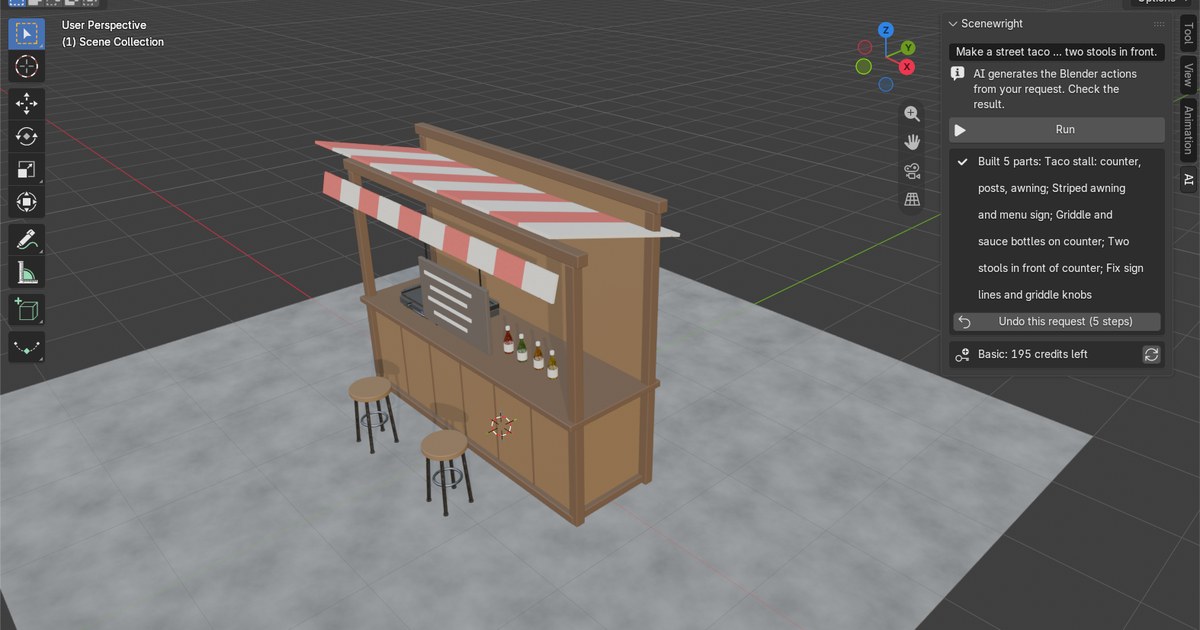
Build rooms, furniture, props and whole scenes in Blender by asking Claude Desktop, Cursor or any MCP app. Scenewright plans big requests in steps, builds them in the scene that is open in Blender, checks the result (floating, overlapping or untextured objects) and fixes what it finds. Every step is a normal Blender undo step, and one call takes back the whole request.
"Build a cozy bedroom with a bed, a desk, a lamp and a rug" → a finished room in your Blender scene.
What you need
- Blender 4.2 or newer with the Scenewright add-on: get it at https://saas-diary.com/blender/ai/ (free credits to start, no card).
- In Blender: Edit > Preferences > Add-ons > Scenewright → turn on "Let AI apps on this computer use Scenewright". Keep Blender open while you work.
- For the one-click file in Claude Desktop, nothing else: Claude Desktop runs it with its own Node.js. For the JSON setup (Cursor, Claude Code and others), Node.js 18 or newer from https://nodejs.org/.
Install
Claude Desktop (one click)
Details
- Repository
- github.com/gramshiftofficial/scenewright-mcp
- Website
- saas-diary.com/blender/ai
- Category
- 3D, CAD & Modeling
- Package
https://github.com/gramshiftofficial/scenewright-mcp/releases/download/v0.1.0/scenewright-0.1.0.mcpb- Transport
- STDIO
- Registry
- MCP registry, active
Similar to Scenewright for Blender
More 3D, CAD & Modeling BlenderMCP serverahujasid35.3K starsConnects Blender to Claude for scene inspection, object and material edits, and live Python execution.
 KiCADMCP servermixelpixx3.5K starsBridge between AI assistants and KiCAD for PCB design: project, board, and component control.
 cli-anything-blenderSkillhkuds/cli-anything1.1K installsA stateful Blender CLI for scene editing with JSON output, undo/redo, and real preview rendering for agents.
 BlenderSkillsfkislev/flue2.9K installsShell-driven Blender control through Flue, a Python bridge to bpy that avoids an MCP server.
 GodotMCP servercoding-solo6.7K starsLocal control of the Godot engine: launching the editor, running projects, and reading debug output.
 TldrawMCP servertldraw51.5K starsCanvas access to a live tldraw editor: draw, edit, and run JavaScript against shapes.