
Alpha Vantage Mcp
alphavantage/alpha_vantage_mcp
Wraps the Alpha Vantage financial data API to give Claude and other MCP-compatible tools direct access to real-time and historical stock market data. Exposes endpoints for daily/intraday time series, company fundamentals, technical indicators, and market news. Built by the Alpha Vantage team with progressive tool discovery to minimize token usage during API calls. Works with Claude Pro, ChatGPT Plus (via developer mode), and various coding environments. Solid choice when you need your AI assistant to pull live stock prices, analyze market trends, or build financial dashboards without switching between tools.
- GitHub stars
- 168
- last updated
- Dec 18, 2025
Sponsors


Readme
Alpha Vantage MCP Server
The official Alpha Vantage API MCP server enables LLMs and agentic workflows to seamlessly interact with real-time and historical stock market data through the Model Context Protocol (MCP). Add this server to your favorite apps such as Claude, Claude Code, Cursor, VS Code, and many more to give them access to comprehensive financial data.
Quickstart
To use the server, get your free Alpha Vantage API key, copy it to your clipboard, then follow the instructions below for the agentic tool/platform of your interest.
The Alpha Vantage functions are exposed directly as MCP tools. MCP clients discover the available tools with tools/list and invoke them with tools/call.
⭐ View MCP source code on Github
👉 Any questions? Please contact support@alphavantage.co
Connection Examples
Remote Server Connection (Recommended, OAuth):
https://mcp.alphavantage.co/mcp
When you connect, an authentication page opens where you enter and authorize your Alpha Vantage API key. If you would like to update/rotate the API key in the future, simple disconnect then reconnect the MCP server and enter the new key in the authentication page.
Remote Server Connection (Legacy, API key in URL, deprecated):
https://mcp.alphavantage.co/mcp?apikey=YOUR_API_KEY
Local Server Connection:
uvx marketdata-mcp-server YOUR_API_KEY
Setup Instructions by Platform
💬📊 Chatbots
⭐ (Anthropic-Verified Connector) Install in Claude
Requirements:
- Any free or paid Claude account
📺 Watch the setup tutorial. (Click image below.)

Claude Remote Server Connection (Recommended, OAuth)
The Alpha Vantage MCP Server is already listed in Claude's official Connectors directory. Getting started is easy:
- Go to https://claude.ai/new#settings/customize-connectors (Web) or Settings → Connectors (Desktop)
- Click the "Add" button in the upper-right corner and choose "Browse connectors" in the dropdown menu
- Search for "Alpha Vantage" in the search box
- Click on the "Alpha Vantage MCP Server" tile returned by the search result
- Click "Connect" near the top-right of the page
- Enter your Alpha Vantage API key in the pop-up authentication page
- Click "Authorize Access"
If you would like to update/rotate the API key in the future, simply disconnect then reconnect to the MCP server and follow steps #6 and #7 again. This brief video shows the key rotation process:
Claude Local Server Connection
See Claude Desktop MCP docs for more info.
Install uv (a modern Python package and project manager):
curl -LsSf https://astral.sh/uv/install.sh | sh
Open Claude Desktop developer settings and edit your claude_desktop_config.json file to add the following configuration:
{
  "mcpServers": {
    "alphavantage": {
      "command": "uvx",
      "args": ["marketdata-mcp-server", "YOUR_API_KEY"]
    }
  }
}
Replace YOUR_API_KEY with your actual Alpha Vantage API key.
⭐ (OpenAI-Verified Connector) Install in ChatGPT
Requirements:
- Any free or paid ChatGPT account
📺 Watch the setup tutorial. (Click image below.)
ChatGPT Remote Server Connection (Recommended, OAuth)
The Alpha Vantage MCP Server is already listed in ChatGPT's official app directory. Getting started is easy:
- In ChatGPT, click Plugins
- Type "Alpha Vantage" into the Search plugins bar
- Click the + (or Install) button on the Alpha Vantage result.
- Enter your Alpha Vantage API key in the pop-up authentication page
- Click "Authorize Access"
If you would like to update/rotate the API key in the future, simply disconnect then reconnect the MCP server and follow steps #4 and #5 again.
Test your connection with a sample query:
Give me last week's OHLCV data for IBM
📺 Below are a few examples of ChatGPT performing various stock analysis & charting tasks:
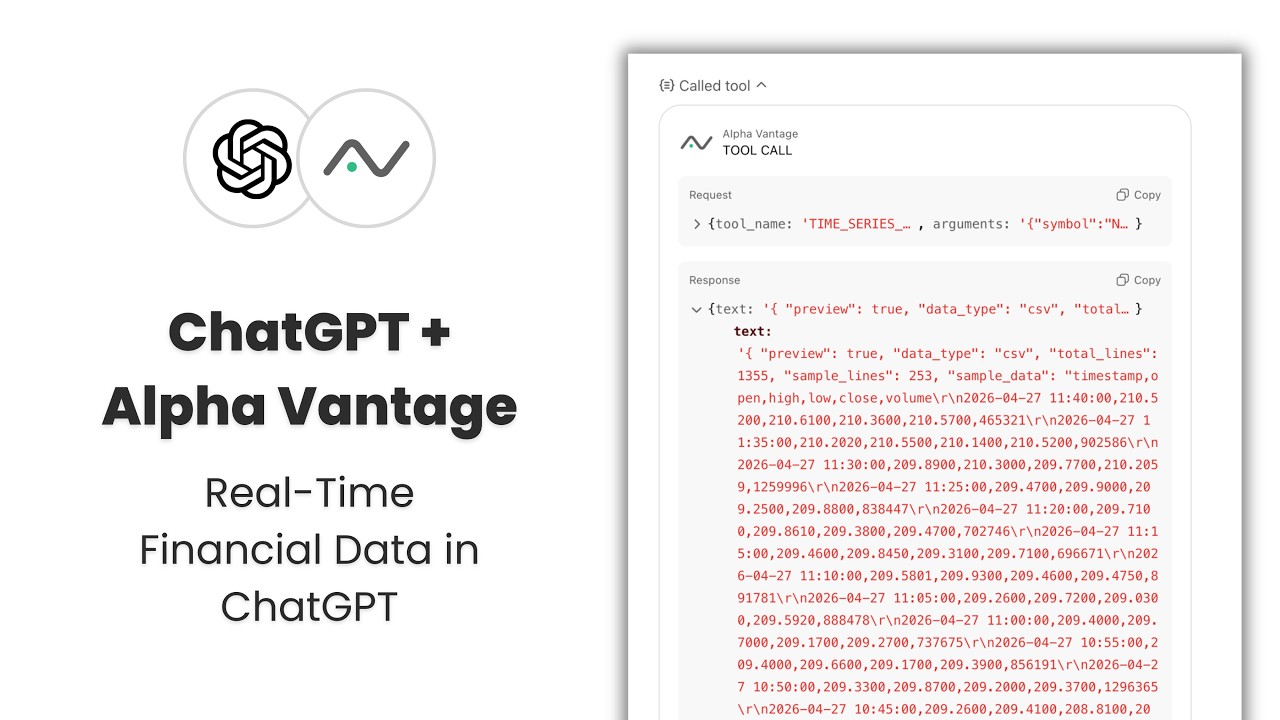
Install in Grok
Requirements:
- SuperGrok (or higher tier)
Setup:
- Click the
+button → Connectors → Add connector → Custom - Name: Alpha Vantage MCP Server (or whatever you prefer)
- Server URL:
https://mcp.alphavantage.co/mcp?apikey=YOUR_API_KEY(replaceYOUR_API_KEYwith your actual Alpha Vantage API key). - Click Add Connector
🤖📈 Agentic systems
⭐ (Microsoft-Verified Connector) Connect in Microsoft Azure AI Foundry
Requirements:
- Azure subscription with access to Azure AI Foundry
📺 Watch the setup tutorial. (Click image below.)

Microsoft Azure AI Foundry — Agent Service Connection
To connect a Foundry agent to this MCP server:
- Open your agent (or Create Agent from Home Dashboard) in Azure AI Foundry's Agent playground or Agent designer.
- In the Tools section of the agent configuration, click Add → Browse All Tools. Select the Catalog tab, then search for Alpha Vantage MCP Server or filter by Finance under the Category filter. Click Create.
- Configure the connection with the following settings:
- Name: Accept the default generated name, or enter your own
- (read-only) Remote MCP Server endpoint:
https://mcp.alphavantage.co/mcp - (read-only) Authentication: Key-based
- Credential — apikey: Enter your Alpha Vantage API key
- Click Connect.
Recommended Agent Instructions:
Add the following to your agent's system prompt to optimize performance:
You are a helpful financial agent with access to market data through Alpha Vantage MCP Server.
The Alpha Vantage functions (TIME_SERIES_DAILY, RSI, COMPANY_OVERVIEW, etc.) are exposed
directly as MCP tools. Call them by name with their parameters, e.g.
TIME_SERIES_DAILY(symbol="IBM", outputsize="compact").
Always use Alpha Vantage MCP Server for market data queries. Do not answer from prior knowledge or web search.
Install in Hermes Agent (Nous Research)
Requirements:
- Hermes Agent installed with the
hermesCLI available
Hermes Remote Server Connection (Recommended, OAuth)
Add the server and start the authorization flow:
hermes mcp add alphavantage --url https://mcp.alphavantage.co/mcp --auth oauth
hermes mcp login alphavantage
Or configure it directly in config.yaml:
mcp_servers:
  alphavantage:
    url: https://mcp.alphavantage.co/mcp
    auth: oauth
A browser consent page opens where you enter and authorize your Alpha Vantage API key. If you would like to update/rotate the API key in the future, run hermes mcp login alphavantage (or hermes mcp reauth alphavantage) again and enter the new key on the consent page.
Verify the connection with:
hermes mcp test alphavantage
Hermes Remote Server Connection (API key in URL)
For non-interactive environments (e.g., terminal-only setups where the browser-based OAuth flow is not possible), put the API key in the server URL instead. Add the server to your config.yaml under mcp_servers:
mcp_servers:
  alphavantage:
    url: https://mcp.alphavantage.co/mcp?apikey=YOUR_API_KEY
Replace YOUR_API_KEY with your actual Alpha Vantage API key. To update/rotate the API key, simply change the key in the URL.
Verify the connection with:
hermes mcp test alphavantage
Install in 🦞OpenClaw🦞
Requirements:
- Mac with Apple Silicon (or dedicated Mac mini)
- LLM API Key (OpenAI used in demo)
- Messaging Platform Bot Token (Telegram used in demo)
📺 Watch the setup tutorial (click image below)

- View the detailed installation guide from GitHub Gist
- For additional support links, please check the video description on YouTube.
Configure in OpenAI Agent Builder
Requirements:
- OpenAI account with access to Agent Builder (e.g., billing details added, organization verified)
📺 Watch the setup tutorial. (Click image below.)

OpenAI Agent Builder Connection
To connect OpenAI Agent Builder to this MCP server:
- Do not add a separate MCP Server object. Instead, click on your agent in OpenAI Agent Builder to add the MCP Server directly to the agent.
- Find the Tools section of the agent and click the + button to add a new tool
- Select MCP Server
- Click "+ Server" in the upper right of the "Add MCP server" menu
- Configure the MCP server with the following settings:
- URL:
https://mcp.alphavantage.co/mcp - Label:
Alpha Vantage MCP Server(or any name you prefer) - Description:
Financial market data and technical indicators(or any description you prefer) - Authentication: Select "Access token / API key" (should be default)
- Access Token: Enter your Alpha Vantage API key
- URL:
- Click Connect
- If successful, the next prompt will display all the tools. Scroll to the bottom and click Add.
Recommended Agent Instructions:
Add the following instruction to your agent's configuration to optimize performance:
You are a helpful financial agent with access to market data through Alpha Vantage MCP Server.

The Alpha Vantage functions (TIME_SERIES_DAILY, RSI, COMPANY_OVERVIEW, etc.) are exposed
directly as MCP tools. Call them by name with their parameters, e.g.
TIME_SERIES_DAILY(symbol="AAPL", outputsize="compact").
Install in OpenAI Agents SDK
To use the Alpha Vantage MCP server with OpenAI Agents SDK, see our example agent that demonstrates:
- Interactive financial analysis agent
- Session management for conversation continuity
- Real-time tool execution with Alpha Vantage data
- Support for both HTTP and stdio MCP connections
The example includes a complete setup guide and configuration templates.
💻💵 Coding tools
⭐ (Anthropic-Verified Connector) Install in Claude Code
Requirements:
- Any free or paid Claude account
Claude Remote Server Connection (Recommended, OAuth)
The Alpha Vantage MCP Server is already listed in Claude's official Connectors directory. Getting started is easy:
- Go to https://claude.ai/new#settings/customize-connectors (Web) or Settings → Connectors (Desktop)
- Click the "Add" button in the upper-right corner and choose "Browse connectors" in the dropdown menu
- Search for "Alpha Vantage" in the search box
- Click on the "Alpha Vantage MCP Server" tile returned by the search result
- Click "Connect" near the top-right of the page
- Enter your Alpha Vantage API key in the pop-up authentication page
- Click "Authorize Access"
If you would like to update/rotate the API key in the future, simply disconnect then reconnect the MCP server and follow steps #6 and #7 again. This brief video shows the key rotation process.
Claude Code Local Server Connection
First, install uv (a modern Python package and project manager):
curl -LsSf https://astral.sh/uv/install.sh | sh
Then run:
claude mcp add alphavantage -- uvx marketdata-mcp-server YOUR_API_KEY
Replace YOUR_API_KEY with your actual Alpha Vantage API key.
Run claude in your terminal from your project directory.
Then connect with:
/mcp
⭐ (OpenAI-Verified Connector) Install in OpenAI Codex
Requirements:
- Any free or paid ChatGPT account
See OpenAI Codex for more information.
Note: Codex and ChatGPT share the same account, so a plugin installed in one should be available for the other.
Codex Remote Server Connection via ChatGPT App (Recommended, OAuth)
The Alpha Vantage MCP Server is already listed in ChatGPT's official app directory. Getting started is easy:
- In Codex, click Plugins
- Type "Alpha Vantage" into the Search plugins bar
- Click the + (or Install) button on the Alpha Vantage result.
- Enter your Alpha Vantage API key in the pop-up authentication page
- Click "Authorize Access"
If you would like to update/rotate the API key in the future, simply disconnect then reconnect the MCP server and follow steps #4 and #5 again.
Test your connection with a sample query:
Give me last week's OHLCV data for IBM
📺 Watch the tutorial. (Click image below.)
⚠️ Legacy setup notice: The initial connection steps demonstrate the legacy local method. For new installations, we strongly recommend following the OAuth instructions above.
Starting at 01:41, the video covers troubleshooting and building end-to-end applications powered by Alpha Vantage market data and dynamic visualizations.

- Download the companion .md file from Github Gist.
- For additional support links, please check the video description on YouTube.
Codex Remote Server Connection via CLI (Alternative, OAuth)
Prefer the command line? Getting started is easy:
- Add the server by running:
codex mcp add alphavantage --url https://mcp.alphavantage.co/mcp
- Codex will open your browser. Enter your Alpha Vantage API key in the pop-up authentication page
- Click "Authorize Access"
- Run
codexfrom your project directory - Verify the connection with:
/mcp
If you would like to update/rotate the API key in the future, simply run codex mcp add again and enter the new key in the authentication page.
Test your connection with a sample query:
Give me last week's OHLCV data for IBM
Install in VS Code (Visual Studio Code)
See VS Code MCP docs for more info.
Create .vscode/mcp.json (your VS Code MCP config file) in your workspace, and paste into it one of the following configurations, depending on whether you’re connecting remotely or running the server locally.
VS Code Remote Server Connection
Paste the following into .vscode/mcp.json:
{
  "servers": {
    "alphavantage": {
      "type": "http",
      "url": "https://mcp.alphavantage.co/mcp?apikey=YOUR_API_KEY"
    }
  }
}
Replace YOUR_API_KEY with your actual Alpha Vantage API key.
VS Code Local Server Connection
First, install uv (a modern Python package and project manager):
curl -LsSf https://astral.sh/uv/install.sh | sh
Then, paste the following into .vscode/mcp.json:
{
  "servers": {
    "alphavantage": {
      "type": "stdio",
      "command": "uvx",
      "args": ["marketdata-mcp-server", "YOUR_API_KEY"]
    }
  }
}
Replace YOUR_API_KEY with your actual Alpha Vantage API key.
Open the Chat view and select Agent mode
Install in Continue (Extension for VS Code, JetBrains)
See Continue MCP docs for more information. Continue uses its own configuration format (not VS Code's mcp.json).
Create .continue/mcpServers/alphavantage.yaml in your workspace, and paste into it one of the following configurations, depending on whether you’re connecting remotely or running the server locally. (Recommended: Remote)
Continue Remote Server Connection
Paste the following into .continue/mcpServers/alphavantage.yaml:
name: Alpha Vantage MCP Server
version: 1.0
schema: v1
mcpServers:
  - name: alphavantage
    type: streamable-http
    url: https://mcp.alphavantage.co/mcp?apikey=YOUR_API_KEY
Replace YOUR_API_KEY with your actual Alpha Vantage API key.
Continue Local Server Connection
First, install uv (a modern Python package and project manager):
curl -LsSf https://astral.sh/uv/install.sh | sh
Then, paste the following into .continue/mcpServers/alphavantage.yaml:
name: Alpha Vantage MCP Server
version: 1.0
schema: v1
mcpServers:
  - name: alphavantage
    type: stdio
    command: uvx
    args:
      - marketdata-mcp-server
      - YOUR_API_KEY
Replace YOUR_API_KEY with your actual Alpha Vantage API key.
Open the Continue panel and select Agent mode. Set up your LLM provider.
Install in Cursor
See Cursor MCP docs for more information.
Paste one of the following configurations into your Cursor ~/.cursor/mcp.json file, depending on whether you’re connecting remotely or running the server locally. You may also install in a specific project by creating .cursor/mcp.json in your project folder.
Cursor Remote Server Connection
Configure Cursor by editing ~/.cursor/mcp.json:
{
  "mcpServers": {
    "alphavantage": {
      "url": "https://mcp.alphavantage.co/mcp?apikey=YOUR_API_KEY"
    }
  }
}
Replace YOUR_API_KEY with your actual Alpha Vantage API key.
Cursor Local Server Connection
First, install uv (a modern Python package and project manager):
curl -LsSf https://astral.sh/uv/install.sh | sh
Then, paste the following into your Cursor ~/.cursor/mcp.json file:
{
  "mcpServers": {
    "alphavantage": {
      "command": "uvx",
      "args": ["marketdata-mcp-server", "YOUR_API_KEY"]
    }
  }
}
Replace YOUR_API_KEY with your actual Alpha Vantage API key.
Install in Gemini CLI
See Gemini CLI Configuration for more information.
Run one of the following commands, depending on whether you’re connecting remotely or running the server locally.
Gemini CLI Remote Server Connection (Recommended):
gemini mcp add -t http alphavantage https://mcp.alphavantage.co/mcp?apikey=YOUR_API_KEY
Replace YOUR_API_KEY with your actual Alpha Vantage API key.
Gemini CLI Local Server Connection:
Install uv (a modern Python package and project manager):
curl -LsSf https://astral.sh/uv/install.sh | sh
Then run:
gemini mcp add alphavantage uvx marketdata-mcp-server YOUR_API_KEY
Replace YOUR_API_KEY with your actual Alpha Vantage API key.
Manual Configuration:
- Open the Gemini CLI settings file. The location is
~/.gemini/settings.json(where~is your home directory). - Add the following to the
mcpServersobject in yoursettings.jsonfile (replaceYOUR_API_KEYwith your actual Alpha Vantage API key):
{
  "mcpServers": {
    "alphavantage": {
      "httpUrl": "https://mcp.alphavantage.co/mcp?apikey=YOUR_API_KEY"
    }
  }
}
Or, for a local server (replace YOUR_API_KEY with your actual Alpha Vantage API key):
{
  "mcpServers": {
    "alphavantage": {
      "command": "uvx",
      "args": ["marketdata-mcp-server", "YOUR_API_KEY"]
    }
  }
}
If the mcpServers object does not exist, create it.
💡💡 I'm just exploring
Just exploring what to build? Check out the Trading Agents stock research tool (#1 trending on Github), which is powered by Alpha Vantage market data with no setup required.
Examples
Below are four example prompts and Claude's expected responses when using the MCP server.
1. Fetch and display structured market data across assets
Prompt: “Give me last week’s OHLCV data for IBM”
Expected Behavior:
- Claude will select and invoke the correct tool, in this case the TIME_SERIES_DAILY function.
- Claude will make the necessary request to the TIME_SERIES_DAILY function and receive the relevant response.
- Claude will then respond directly in the chat interface with both text and image content:
Here's IBM's OHLCV data for last week (March 16–20, 2026):
IBM had a strong Tuesday rally to $256.11, then pulled back through the rest of the week. Friday saw a sharp selloff to close at the session low of $241.77 on more than double the average weekly volume — likely some notable news or broad market pressure driving that move.
2. Use technical indicators and price data to conduct technical analysis
Prompt: “Get NVDA’s hourly price data for the last two days. Compute RSI as well, and plot both hourly with guidelines at 30 and 70 for RSI”
Expected Behavior:
- Claude will select and invoke the correct tools, in this case the TIME_SERIES_INTRADAY function and the RSI function.
- Claude will make two separate requests, one to the TIME_SERIES_INTRADAY function and one to the RSI function. Claude will receive the relevant responses.
- Claude will then make an HTML artifact with the requested visualizations:
3. Visualize fundamental data
Prompt: “Help me visualize AAPL’s earnings surprise trends for the past 4 quarters. Compare actual EPS to analyst estimates”
Expected Behavior:
- Claude will select and invoke the correct tool, in this case the EARNINGS function.
- Claude will make the necessary request to the EARNINGS function and receive the relevant response.
- Claude will do any necessary calculations on top of the returned data, and create an HTML artifact:
4. Compare performance across asset classes
Prompt: “Compare gold, silver, and Bitcoin performance over the past 5 years”
Expected Behavior:
- Claude will select and invoke the correct tools, in this case the TIME_SERIES_MONTHLY function and the DIGITAL_CURRENCY_MONTHLY function.
- Claude will make three separate requests, one to the TIME_SERIES_INTRADAY function using the GLD symbol, one to the TIME_SERIES_INTRADAY function using the SLV symbol, and one to the DIGITAL_CURRENCY_MONTHLY function using the BTC symbol. Claude will receive the relevant responses.
- Claude will do any necessary calculations on top of the returned data, and create an HTML artifact:
Tools Reference
Note: The tools listed below are exposed directly as MCP tools and can be called by name.
| Category | Tools |
|---|---|
| core_stock_apis | TIME_SERIES_INTRADAY, TIME_SERIES_DAILY, TIME_SERIES_DAILY_ADJUSTED, TIME_SERIES_WEEKLY, TIME_SERIES_WEEKLY_ADJUSTED, TIME_SERIES_MONTHLY, TIME_SERIES_MONTHLY_ADJUSTED, GLOBAL_QUOTE, REALTIME_BULK_QUOTES, REALTIME_BULK_BID_ASK_PRICES, SYMBOL_SEARCH, MARKET_STATUS |
| options_data_apis | REALTIME_OPTIONS, REALTIME_OPTIONS_FMV, HISTORICAL_OPTIONS |
| alpha_intelligence | NEWS_SENTIMENT, EARNINGS_CALL_TRANSCRIPT, TOP_GAINERS_LOSERS, INSIDER_TRANSACTIONS, INSTITUTIONAL_HOLDINGS, ANALYTICS_FIXED_WINDOW, ANALYTICS_SLIDING_WINDOW |
| fundamental_data | COMPANY_OVERVIEW, COMPANY_LOGO, INCOME_STATEMENT, BALANCE_SHEET, CASH_FLOW, EARNINGS, LISTING_STATUS, EARNINGS_CALENDAR, IPO_CALENDAR |
| forex | FX_INTRADAY, FX_DAILY, FX_WEEKLY, FX_MONTHLY |
| cryptocurrencies | CURRENCY_EXCHANGE_RATE, DIGITAL_CURRENCY_INTRADAY, DIGITAL_CURRENCY_DAILY, DIGITAL_CURRENCY_WEEKLY, DIGITAL_CURRENCY_MONTHLY |
| commodities | WTI, BRENT, NATURAL_GAS, COPPER, ALUMINUM, WHEAT, CORN, COTTON, SUGAR, COFFEE, GOLD_SILVER_SPOT, GOLD_SILVER_HISTORY, ALL_COMMODITIES |
| economic_indicators | REAL_GDP, REAL_GDP_PER_CAPITA, TREASURY_YIELD, FEDERAL_FUNDS_RATE, CPI, INFLATION, RETAIL_SALES, DURABLES, UNEMPLOYMENT, NONFARM_PAYROLL |
| technical_indicators | SMA, EMA, WMA, DEMA, TEMA, TRIMA, KAMA, MAMA, VWAP, T3, MACD, MACDEXT, STOCH, STOCHF, RSI, STOCHRSI, WILLR, ADX, ADXR, APO, PPO, MOM, BOP, CCI, CMO, ROC, ROCR, AROON, AROONOSC, MFI, TRIX, ULTOSC, DX, MINUS_DI, PLUS_DI, MINUS_DM, PLUS_DM, BBANDS, MIDPOINT, MIDPRICE, SAR, TRANGE, ATR, NATR, AD, ADOSC, OBV, HT_TRENDLINE, HT_SINE, HT_TRENDMODE, HT_DCPERIOD, HT_DCPHASE, HT_PHASOR |
| ping | PING, ADD_TWO_NUMBERS |
| congress | CONGRESS_TRADES, POLITICIAN_METADATA |
Table of Contents - API Tools
- core_stock_apis
- options_data_apis
- alpha_intelligence
- fundamental_data
- forex
- cryptocurrencies
- commodities
- economic_indicators
- technical_indicators
- ping
- congress
💡 Each of these MCP tools maps to a corresponding Alpha Vantage API endpoint. If you are interested in the full API specs (in addition to the brief tool descriptions below), please refer to the Alpha Vantage API documentation. For general guidance on choosing the best stock market data API and/or MCP server in the AI agent era, please refer to this article. Independent API & MCP aggregation platform API Market has also published a practitioner's guide to stock data, which details when to use an MCP server vs. a conventional API (or both) for your workflow design.
CORE_STOCK_APIS
| Category | Tool | Description |
|---|---|---|
| core_stock_apis | TIME_SERIES_INTRADAY | Current and 20+ years of historical intraday OHLCV data |
| core_stock_apis | TIME_SERIES_DAILY | Daily time series (OHLCV) covering 20+ years |
| core_stock_apis | TIME_SERIES_DAILY_ADJUSTED | Daily adjusted OHLCV with split/dividend events |
| core_stock_apis | TIME_SERIES_WEEKLY | Weekly time series (last trading day of week) |
| core_stock_apis | TIME_SERIES_WEEKLY_ADJUSTED | Weekly adjusted time series with dividends |
| core_stock_apis | TIME_SERIES_MONTHLY | Monthly time series (last trading day of month) |
| core_stock_apis | TIME_SERIES_MONTHLY_ADJUSTED | Monthly adjusted time series with dividends |
| core_stock_apis | GLOBAL_QUOTE | Latest price and volume for a ticker |
| core_stock_apis | REALTIME_BULK_QUOTES | Realtime quotes for up to 100 symbols |
| core_stock_apis | REALTIME_BULK_BID_ASK_PRICES | Realtime bid and ask prices for up to 100 US-traded symbols, including extended hours |
| core_stock_apis | SYMBOL_SEARCH | Search for symbols by keywords |
| core_stock_apis | MARKET_STATUS | Current market status worldwide |
OPTIONS_DATA_APIS
| Category | Tool | Description |
|---|---|---|
| options_data_apis | REALTIME_OPTIONS | Realtime US options data with Greeks |
| options_data_apis | REALTIME_OPTIONS_FMV | Realtime US options FMV (fair market value) mark prices |
| options_data_apis | HISTORICAL_OPTIONS | Historical options chain for 15+ years |
ALPHA_INTELLIGENCE
| Category | Tool | Description |
|---|---|---|
| alpha_intelligence | NEWS_SENTIMENT | Live and historical market news & sentiment |
| alpha_intelligence | EARNINGS_CALL_TRANSCRIPT | Earnings call transcripts with LLM sentiment |
| alpha_intelligence | TOP_GAINERS_LOSERS | Top 20 gainers, losers, and most active |
| alpha_intelligence | INSIDER_TRANSACTIONS | Latest and historical insider transactions |
| alpha_intelligence | INSTITUTIONAL_HOLDINGS | Institutional ownership and holdings information |
| alpha_intelligence | ANALYTICS_FIXED_WINDOW | Advanced analytics over fixed windows |
| alpha_intelligence | ANALYTICS_SLIDING_WINDOW | Advanced analytics over sliding windows |
FUNDAMENTAL_DATA
| Category | Tool | Description |
|---|---|---|
| fundamental_data | COMPANY_OVERVIEW | Company information, financial ratios, and metrics |
| fundamental_data | INCOME_STATEMENT | Annual and quarterly income statements |
| fundamental_data | BALANCE_SHEET | Annual and quarterly balance sheets |
| fundamental_data | CASH_FLOW | Annual and quarterly cash flow statements |
| fundamental_data | EARNINGS | Annual and quarterly earnings data |
| fundamental_data | LISTING_STATUS | Listing and delisting data for equities |
| fundamental_data | EARNINGS_CALENDAR | Earnings calendar for upcoming earnings |
| fundamental_data | IPO_CALENDAR | Initial public offering calendar |
| fundamental_data | COMPANY_LOGO | Company logo URLs in PNG and SVG formats |
FOREX
| Category | Tool | Description |
|---|---|---|
| forex | FX_INTRADAY | Intraday foreign exchange rates |
| forex | FX_DAILY | Daily foreign exchange rates |
| forex | FX_WEEKLY | Weekly foreign exchange rates |
| forex | FX_MONTHLY | Monthly foreign exchange rates |
CRYPTOCURRENCIES
| Category | Tool | Description |
|---|---|---|
| cryptocurrencies | CURRENCY_EXCHANGE_RATE | Exchange rate between digital/crypto currencies |
| cryptocurrencies | DIGITAL_CURRENCY_INTRADAY | Intraday time series for digital currencies |
| cryptocurrencies | DIGITAL_CURRENCY_DAILY | Daily time series for digital currencies |
| cryptocurrencies | DIGITAL_CURRENCY_WEEKLY | Weekly time series for digital currencies |
| cryptocurrencies | DIGITAL_CURRENCY_MONTHLY | Monthly time series for digital currencies |
COMMODITIES
| Category | Tool | Description |
|---|---|---|
| commodities | WTI | West Texas Intermediate (WTI) crude oil prices |
| commodities | BRENT | Brent crude oil prices |
| commodities | NATURAL_GAS | Henry Hub natural gas spot prices |
| commodities | COPPER | Global copper prices |
| commodities | ALUMINUM | Global aluminum prices |
| commodities | WHEAT | Global wheat prices |
| commodities | CORN | Global corn prices |
| commodities | COTTON | Global cotton prices |
| commodities | SUGAR | Global sugar prices |
| commodities | COFFEE | Global coffee prices |
| commodities | GOLD_SILVER_SPOT | Live spot prices for gold and silver |
| commodities | GOLD_SILVER_HISTORY | Historical gold and silver prices (daily, weekly, monthly) |
| commodities | ALL_COMMODITIES | All commodities prices |
ECONOMIC_INDICATORS
| Category | Tool | Description |
|---|---|---|
| economic_indicators | REAL_GDP | Real Gross Domestic Product |
| economic_indicators | REAL_GDP_PER_CAPITA | Real GDP per capita |
| economic_indicators | TREASURY_YIELD | Daily treasury yield rates |
| economic_indicators | FEDERAL_FUNDS_RATE | Federal funds rate (interest rates) |
| economic_indicators | CPI | Consumer Price Index |
| economic_indicators | INFLATION | Inflation rates |
| economic_indicators | RETAIL_SALES | Retail sales data |
| economic_indicators | DURABLES | Durable goods orders |
| economic_indicators | UNEMPLOYMENT | Unemployment rate |
| economic_indicators | NONFARM_PAYROLL | Non-farm payroll data |
TECHNICAL_INDICATORS
| Category | Tool | Description |
|---|---|---|
| technical_indicators | SMA | Simple moving average (SMA) values |
| technical_indicators | EMA | Exponential moving average (EMA) values |
| technical_indicators | WMA | Weighted moving average (WMA) values |
| technical_indicators | DEMA | Double exponential moving average (DEMA) values |
| technical_indicators | TEMA | Triple exponential moving average (TEMA) values |
| technical_indicators | TRIMA | Triangular moving average (TRIMA) values |
| technical_indicators | KAMA | Kaufman adaptive moving average (KAMA) values |
| technical_indicators | MAMA | MESA adaptive moving average (MAMA) values |
| technical_indicators | VWAP | Volume weighted average price (VWAP) for intraday time series |
| technical_indicators | T3 | Triple exponential moving average (T3) values |
| technical_indicators | MACD | Moving average convergence / divergence (MACD) values |
| technical_indicators | MACDEXT | Moving average convergence / divergence values with controllable moving average type |
| technical_indicators | STOCH | Stochastic oscillator (STOCH) values |
| technical_indicators | STOCHF | Stochastic fast (STOCHF) values |
| technical_indicators | RSI | Relative strength index (RSI) values |
| technical_indicators | STOCHRSI | Stochastic relative strength index (STOCHRSI) values |
| technical_indicators | WILLR | Williams' %R (WILLR) values |
| technical_indicators | ADX | Average directional movement index (ADX) values |
| technical_indicators | ADXR | Average directional movement index rating (ADXR) values |
| technical_indicators | APO | Absolute price oscillator (APO) values |
| technical_indicators | PPO | Percentage price oscillator (PPO) values |
| technical_indicators | MOM | Momentum (MOM) values |
| technical_indicators | BOP | Balance of power (BOP) values |
| technical_indicators | CCI | Commodity channel index (CCI) values |
| technical_indicators | CMO | Chande momentum oscillator (CMO) values |
| technical_indicators | ROC | Rate of change (ROC) values |
| technical_indicators | ROCR | Rate of change ratio (ROCR) values |
| technical_indicators | AROON | Aroon (AROON) values |
| technical_indicators | AROONOSC | Aroon oscillator (AROONOSC) values |
| technical_indicators | MFI | Money flow index (MFI) values |
| technical_indicators | TRIX | 1-day rate of change of a triple smooth exponential moving average (TRIX) values |
| technical_indicators | ULTOSC | Ultimate oscillator (ULTOSC) values |
| technical_indicators | DX | Directional movement index (DX) values |
| technical_indicators | MINUS_DI | Minus directional indicator (MINUS_DI) values |
| technical_indicators | PLUS_DI | Plus directional indicator (PLUS_DI) values |
| technical_indicators | MINUS_DM | Minus directional movement (MINUS_DM) values |
| technical_indicators | PLUS_DM | Plus directional movement (PLUS_DM) values |
| technical_indicators | BBANDS | Bollinger bands (BBANDS) values |
| technical_indicators | MIDPOINT | Midpoint values - (highest value + lowest value)/2 |
| technical_indicators | MIDPRICE | Midpoint price values - (highest high + lowest low)/2 |
| technical_indicators | SAR | Parabolic SAR (SAR) values |
| technical_indicators | TRANGE | True range (TRANGE) values |
| technical_indicators | ATR | Average true range (ATR) values |
| technical_indicators | NATR | Normalized average true range (NATR) values |
| technical_indicators | AD | Chaikin A/D line (AD) values |
| technical_indicators | ADOSC | Chaikin A/D oscillator (ADOSC) values |
| technical_indicators | OBV | On balance volume (OBV) values |
| technical_indicators | HT_TRENDLINE | Hilbert transform, instantaneous trendline (HT_TRENDLINE) values |
| technical_indicators | HT_SINE | Hilbert transform, sine wave (HT_SINE) values |
| technical_indicators | HT_TRENDMODE | Hilbert transform, trend vs cycle mode (HT_TRENDMODE) values |
| technical_indicators | HT_DCPERIOD | Hilbert transform, dominant cycle period (HT_DCPERIOD) values |
| technical_indicators | HT_DCPHASE | Hilbert transform, dominant cycle phase (HT_DCPHASE) values |
| technical_indicators | HT_PHASOR | Hilbert transform, phasor components (HT_PHASOR) values |
PING
| Category | Tool | Description |
|---|---|---|
| ping | PING | Health check tool that returns 'pong' |
| ping | ADD_TWO_NUMBERS | Example tool for adding two numbers |
CONGRESS
| Category | Tool | Description |
|---|---|---|
| congress | CONGRESS_TRADES | Congressional stock trades disclosed by US representatives, filtered by stock symbol and/or politician BioGuide ID |
| congress | POLITICIAN_METADATA | Complete roster of US congressional representatives with bioguide_id, district, and time-in-service metadata |
CONGRESS_TRADES requires at least one of symbol or bioguide_id (both may be given together to intersect the results); datatype defaults to json and also accepts csv. Example calls: CONGRESS_TRADES(symbol="AAPL") and CONGRESS_TRADES(bioguide_id="S000510"). Use POLITICIAN_METADATA to look up a politician's bioguide_id.
POLITICIAN_METADATA takes no filter or pagination arguments: every call returns the complete, deterministic roster of representatives directly from Alpha Vantage. The response is large enough to trigger the server's standard preview/CDN handling by default; pass return_full_data=true to receive the complete payload inline.
Both tools proxy the public Alpha Vantage CONGRESS_TRADES and POLITICIAN_METADATA endpoints and preserve upstream response fields (including source_url) unchanged.
Details
- Repository
- github.com/alphavantage/alpha_vantage_mcp
- Categories
- Data & Analytics, Finance & Commerce
- Transport
- SSE
- Registry
- MCP registry, active


