
Summary
Gives AI agents the ability to spin up, manage, and execute commands inside dev containers without contaminating your local environment. Exposes 46 MCP tools across three backends: local Docker via the devcontainer CLI, multi-cloud environments through DevPod, and GitHub Codespaces. The auth broker handles GitHub, AWS, Azure, GCP, and Kubernetes credentials without exposing raw tokens to the agent. You get lifecycle operations (up, stop, delete, build), SSH command execution, file operations (read, write, edit, list), and container introspection. Useful when you want your agent to build, test, or deploy in isolated, reproducible environments defined by devcontainer.json specs, whether that's on your machine, a cloud VM, or Codespaces.



Fastest browser for AI agents to run web automation tasks, always free.
Download Free life-time →
Notes, actions and memory. Without a meeting bot. First month 100% off.
Download for free →


belt cli automatically finds the best tools and skills for your agent. image, video, music, tts...
one prompt install →

Connect your Claude agent to live crypto prices and trading routes via 1inch
Get the MCP →

Block distracting apps from your iPhone permanently without a 3rd party app. Free and open source.
Block now (100% free) →devcontainer-mcp


Give your AI agent its own dev environment — not yours.
devcontainer-mcp is an MCP server that lets AI coding agents create, manage, and work inside dev containers across three backends: local Docker, DevPod, and GitHub Codespaces. The agent builds, tests, and ships code in an isolated container — your laptop stays clean.
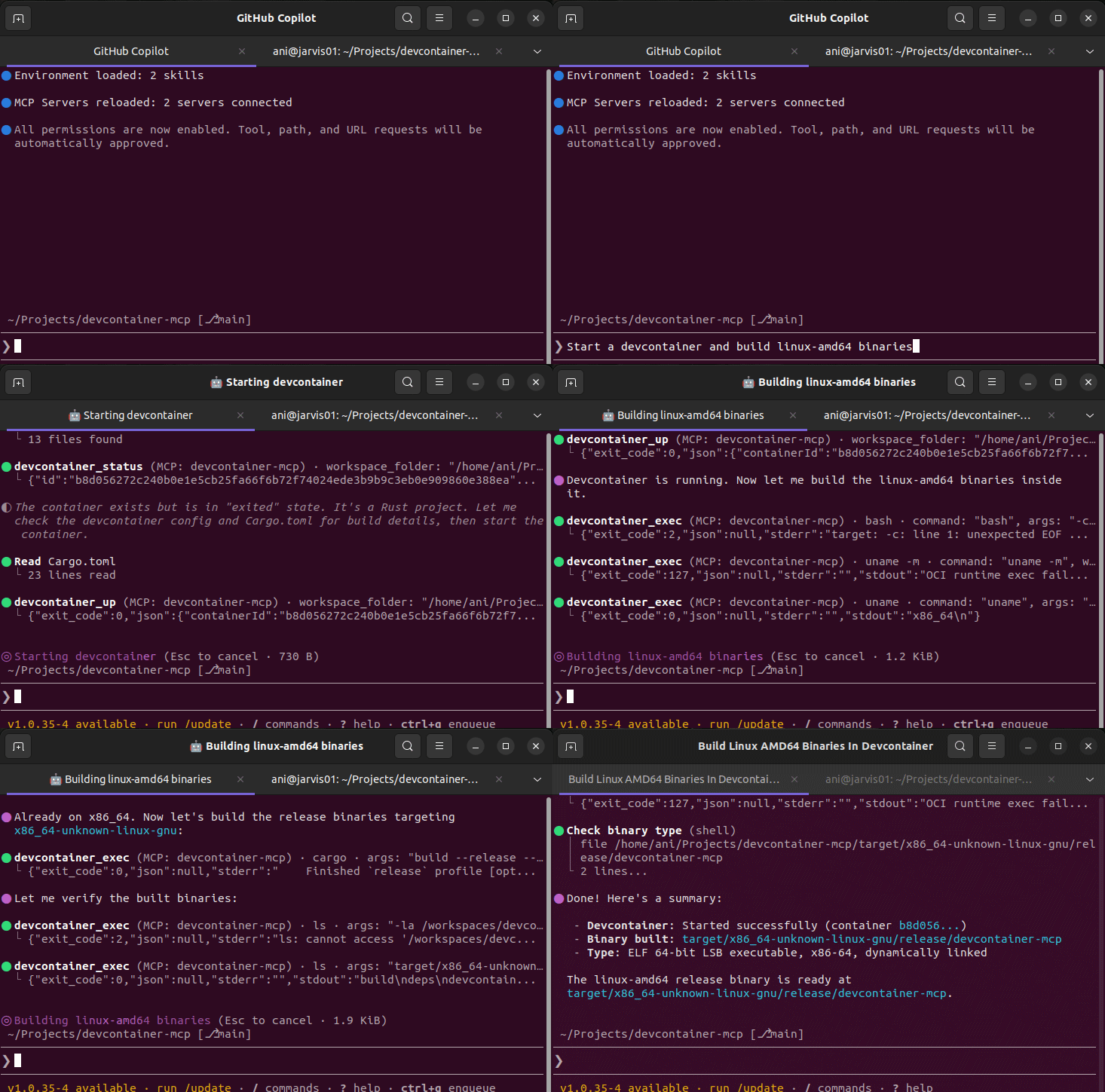
Works with GitHub Copilot, Claude, Cursor, opencode, and any MCP-compatible client.
The Problem
When AI agents write code, they need to run it somewhere. Today that means your host machine:
- 🔴 Host contamination — agents install packages, modify PATH, leave behind build artifacts
- 🔴 "Works on my machine" — agents assume your local toolchain matches production
- 🔴 No isolation — one project's dependencies break another
- 🔴 Security risk — agents run arbitrary commands with your user privileges
- 🔴 Hardware constraints — you're limited to your local machine's resources
The Solution
The devcontainer spec already defines reproducible, container-based dev environments. Every major project ships a .devcontainer/devcontainer.json. But AI agents can't use them — until now.
devcontainer-mcp exposes 45 MCP tools that let any AI agent:
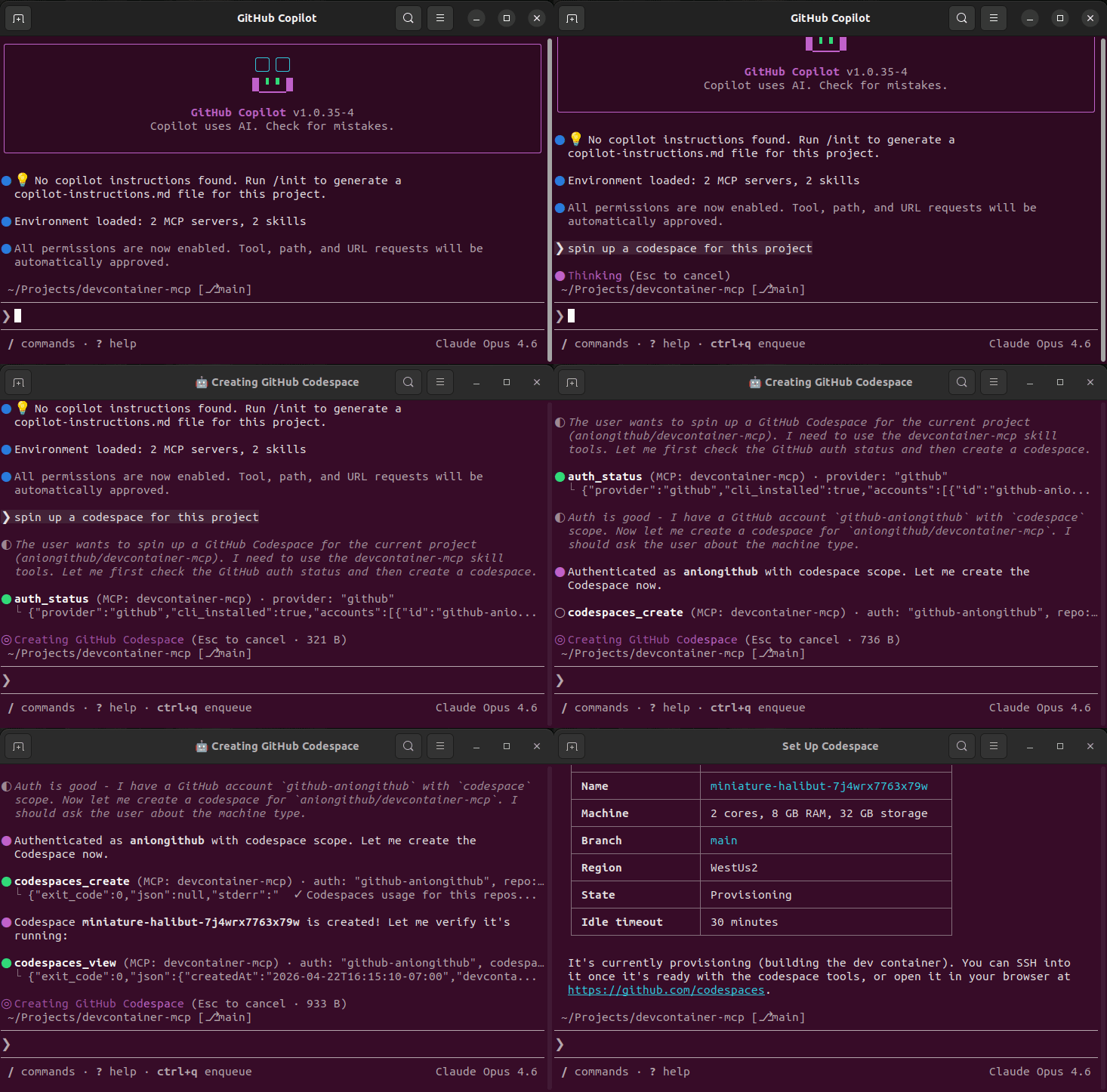
- Spin up a dev container from any repo — locally, on a cloud VM, or in Codespaces
- Run commands inside the container — builds, tests, linting, anything
- Manage the lifecycle — stop, restart, delete when done
- Authenticate against cloud providers — GitHub, AWS, Azure, GCP — without ever seeing a raw token
Agent: "Let me build this project..."
  → auth_status("github") → picks account
  → codespaces_create(auth: "github-you", repo: "your/repo")
  → codespaces_ssh(auth: "github-you", codespace: "...", command: "cargo build")
  → ✅ Built in the cloud. Your laptop did nothing.
Quick Install
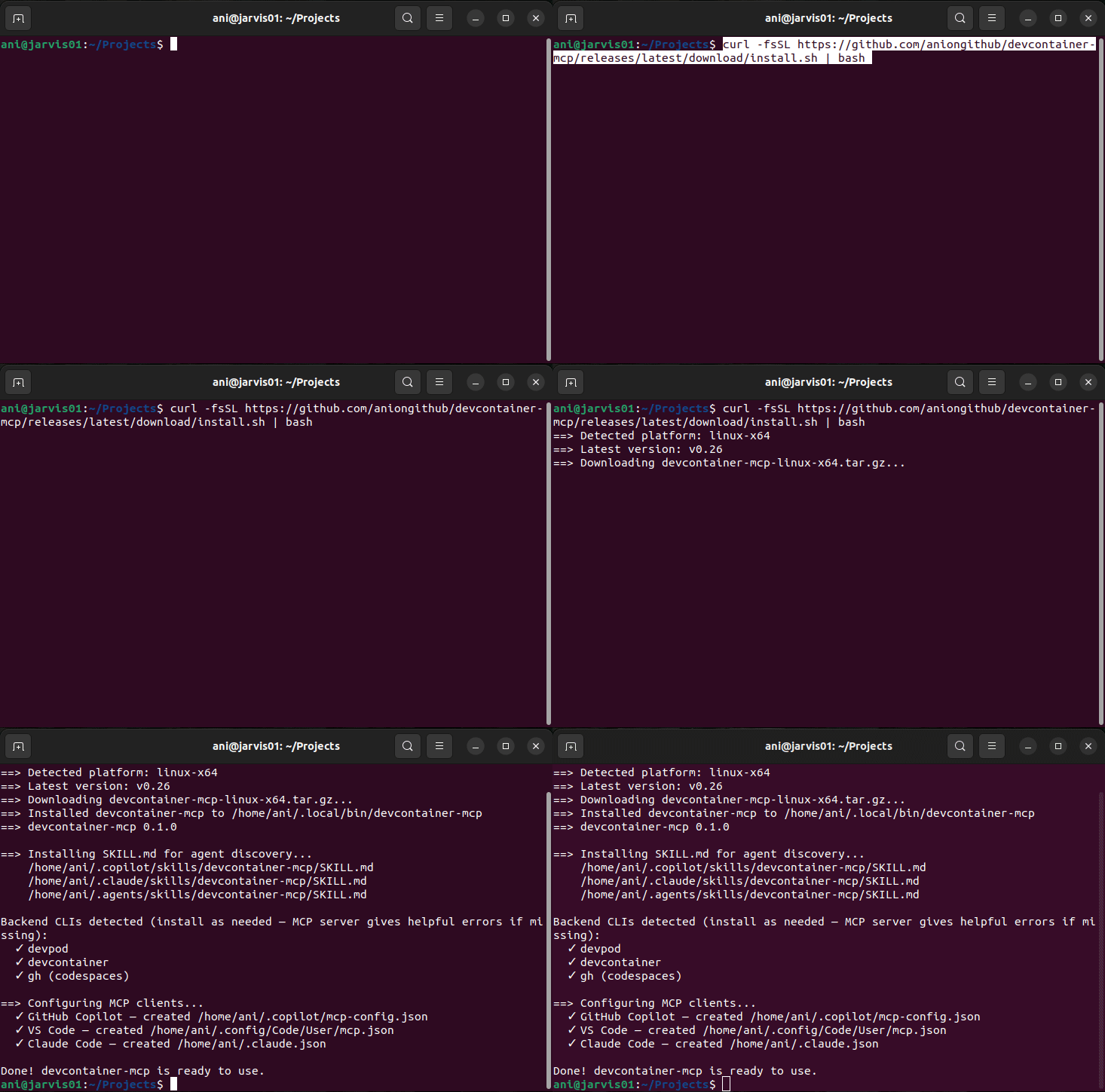
Linux / macOS
curl -fsSL https://raw.githubusercontent.com/aniongithub/devcontainer-mcp/main/install.sh | bash
Windows (via WSL)
Invoke-RestMethod https://github.com/aniongithub/devcontainer-mcp/releases/latest/download/install.ps1 | Invoke-Expression
How it works: The binary runs inside WSL; MCP clients on Windows launch it via
wsl ~/.local/bin/devcontainer-mcp serve. The stdio transport works transparently across the WSL boundary. WSL 2 is required — install it withwsl --installif you haven't already.
Backend CLIs (devpod, devcontainer, gh) are detected at runtime — if one is missing, the MCP server returns a helpful error with install instructions.
Binaries available for linux-x64, linux-arm64, darwin-x64, and darwin-arm64.
Host Protection & Opt-Out
The installer configures two agent hooks (Claude Code & GitHub Copilot CLI) that activate only in a directory containing .devcontainer/devcontainer.json:
devcontainer-guard(PreToolUse) — blocks shell/command execution on the host so the agent routes builds, tests, and runs through the MCP tools instead. Host-safe commands (git,gh) are allowlisted, and both hooks fail open — ifjqis missing or a payload can't be parsed, commands are allowed rather than blocked.devcontainer-skill-loader(SessionStart) — injects theSKILL.mdusage guide as context.
Turning it off for a repo
Sometimes a project ships a stale or unmaintained .devcontainer that you don't actually want to route work through. To disable both hooks for that repo, drop a marker file at the repo root:
touch .devcontainer-mcp-disable
When .devcontainer-mcp-disable is present, the guard allows host commands through and the skill-loader skips context injection — the agent works locally as if no devcontainer were declared. Commit it (or add it to .gitignore for a local-only opt-out).
One-off bypass: to run a single host command without disabling the guard, include USER_CONFIRMED_HOST_OPERATION=1 anywhere in the command.
Architecture
graph TD
    A[AI Agent / MCP Client] -->|stdio JSON-RPC| B[devcontainer-mcp]

    subgraph "devcontainer-mcp"
        B --> C[33 MCP Tools]
        C --> D[Auth Broker]
        C --> E[devcontainer-mcp-core]
    end

    D -->|opaque handles| C
    E -->|subprocess| F[DevPod CLI]
    E -->|subprocess| G[devcontainer CLI]
    E -->|subprocess| H[gh CLI]
    E -->|bollard API| I[Docker Engine]

    F --> J[Docker / K8s / Cloud VMs]
    G --> K[Local Docker]
    H --> L[GitHub Codespaces]
Three Backends, One Interface
| Backend | Best for | Requires | Auth needed? |
|---|---|---|---|
devcontainer CLI (devcontainer_*) | Local Docker — fast, simple | @devcontainers/cli + Docker | No |
DevPod (devpod_*) | Multi-cloud: Docker, K8s, AWS, Azure, GCP | DevPod CLI | Optional (cloud providers) |
Codespaces (codespaces_*) | GitHub-hosted cloud environments | gh CLI | Yes (auth handle) |
Auth Broker
The agent never sees raw tokens. Instead:
auth_status(provider)— list available accounts and scopesauth_login(provider, scopes?)— initiate login, opens browser, handles device codesauth_select(id)— switch the active accountauth_logout(id)— revoke credentials
Codespaces tools require an auth handle (e.g. "github-aniongithub"). The MCP server resolves it to the real token on each call via the CLI's native keyring.
Supported providers: GitHub, AWS, Azure, GCP, Kubernetes
MCP Tools (46 total)
Auth (4 tools)
| Tool | Description |
|---|---|
auth_status | Check auth for a provider — returns handles, accounts, scopes |
auth_login | Initiate login or refresh scopes — browser + device code flow |
auth_select | Switch the active account for a provider |
auth_logout | Revoke credentials for an account |
DevPod (19 tools)
| Tool | Description |
|---|---|
devpod_up | Create and start a workspace from a git URL, local path, or image |
devpod_stop | Stop a running workspace |
devpod_delete | Delete a workspace and its resources |
devpod_build | Build a workspace image without starting it |
devpod_status | Get workspace state (Running, Stopped, Busy, NotFound) |
devpod_list | List all workspaces with IDs, sources, providers, and status |
devpod_ssh | Execute a command inside a workspace via SSH |
devpod_logs | Get workspace logs |
devpod_provider_list | List all configured providers |
devpod_provider_add | Add a new provider |
devpod_provider_delete | Remove a provider |
devpod_context_list | List all contexts |
devpod_context_use | Switch to a different context |
devpod_container_inspect | Docker inspect — labels, ports, mounts, state |
devpod_container_logs | Stream container logs via Docker API |
devpod_file_read | Read file content with optional line range |
devpod_file_write | Create or overwrite a file (auto-creates parent dirs) |
devpod_file_edit | Surgical string replacement — old_str → new_str |
devpod_file_list | List directory contents (non-hidden, 2 levels deep) |
devcontainer CLI (12 tools)
| Tool | Description |
|---|---|
devcontainer_up | Create and start a local dev container |
devcontainer_exec | Execute a command inside a running dev container |
devcontainer_build | Build a dev container image |
devcontainer_read_config | Read merged devcontainer configuration as JSON |
devcontainer_list_configs | Discover all devcontainer.json files in a workspace (single + multi-container) |
devcontainer_stop | Stop a dev container (via Docker API) |
devcontainer_remove | Remove a dev container and its resources |
devcontainer_status | Get dev container state by workspace folder |
devcontainer_file_read | Read file content with optional line range |
devcontainer_file_write | Create or overwrite a file (auto-creates parent dirs) |
devcontainer_file_edit | Surgical string replacement — old_str → new_str |
devcontainer_file_list | List directory contents (non-hidden, 2 levels deep) |
GitHub Codespaces (11 tools) — require auth handle
| Tool | Description |
|---|---|
codespaces_create | Create a new codespace for a repository |
codespaces_list | List your codespaces with state and machine info |
codespaces_ssh | Execute a command inside a codespace via SSH |
codespaces_stop | Stop a running codespace |
codespaces_delete | Delete a codespace |
codespaces_view | View detailed codespace info (state, machine, config) |
codespaces_ports | List forwarded ports with visibility and URLs |
codespaces_file_read | Read file content with optional line range |
codespaces_file_write | Create or overwrite a file (auto-creates parent dirs) |
codespaces_file_edit | Surgical string replacement — old_str → new_str |
codespaces_file_list | List directory contents (non-hidden, 2 levels deep) |
MCP Server Configuration
Linux / macOS
{
  "mcpServers": {
    "devcontainer-mcp": {
      "command": "devcontainer-mcp",
      "args": ["serve"]
    }
  }
}
Windows (WSL bridge)
{
  "mcpServers": {
    "devcontainer-mcp": {
      "command": "wsl",
      "args": ["~/.local/bin/devcontainer-mcp", "serve"]
    }
  }
}
Prerequisites
Install backend CLIs as needed — the MCP server detects them at runtime and returns helpful errors if missing:
- devcontainer CLI:
npm install -g @devcontainers/cli+ Docker - DevPod: DevPod CLI + Docker (or another provider)
- Codespaces: GitHub CLI — auth is handled by the
auth_logintool
Self-Healing
When devcontainer_up, devpod_up, or codespaces_create fails, the full build output (including errors) is returned to the agent. The agent can read the error, fix the Dockerfile or devcontainer.json, and retry — making the dev environment a dynamic, agent-managed asset rather than a static prerequisite.
Multi-container workspaces
The devcontainer spec supports connecting to multiple containers in one workspace by placing per-service configs at .devcontainer/<name>/devcontainer.json, each pointing at a shared docker-compose.yml. devcontainer-mcp supports this pattern end-to-end:
- Discovery —
devcontainer_list_configsreturns every config it finds (root.devcontainer.json,.devcontainer/devcontainer.json, and each.devcontainer/*/devcontainer.json) with its kind (image/dockerfile/compose), service name, and absolute path. - Targeting — Every devcontainer tool (
up,exec,build,stop,remove,status,read_config,file_*) accepts an optionalconfigparameter pointing at a specificdevcontainer.json. Single-container workflows continue to work unchanged —configdefaults to whatever the devcontainer CLI auto-detects. - Ambiguity handling — When a workspace has multiple configs and no
configis provided, lookup-style tools (status,exec,stop,remove,file_*) return a structuredAmbiguousresult listing every matching container so the agent can pick the right one.statusreports this as{"state":"Ambiguous","candidates":[...],"hint":"..."}. - Robust container matching — Sibling compose containers are identified via
com.docker.compose.service+com.docker.compose.project.config_files(not the unreliabledevcontainer.local_folderlabel, which is only stamped on the first container).
Development
This project eats its own dogfood — development happens inside its own devcontainer.
# Using the devcontainer CLI
devcontainer up --workspace-folder .
devcontainer exec --workspace-folder . cargo build --workspace
devcontainer exec --workspace-folder . cargo test --workspace
devcontainer exec --workspace-folder . cargo build --release -p devcontainer-mcp

# Or using DevPod
devpod up . --id devcontainer-mcp --provider docker --open-ide=false
devpod ssh devcontainer-mcp --command "cd /workspaces/devcontainer-mcp && cargo build --workspace"
CI/CD
- Pull Requests —
cargo check,cargo test,cargo clippy,cargo fmtrun automatically - Releases — Creating a GitHub release builds binaries for all 4 platforms
License
Featured
Fastest browser for AI agents to run web automation tasks, always free.
Download Free life-time →Notes, actions and memory. Without a meeting bot. First month 100% off.
Download for free →belt cli automatically finds the best tools and skills for your agent. image, video, music, tts...
one prompt install →Connect your Claude agent to live crypto prices and trading routes via 1inch
Get the MCP →Block distracting apps from your iPhone permanently without a 3rd party app. Free and open source.
Block now (100% free) →Categories
Registryactive
Packagehttps://github.com/aniongithub/devcontainer-mcp/releases/download/v0.38/devcontainer-mcp-linux-x64.tar.gz
TransportSTDIO
UpdatedJun 6, 2026


