
Summary
Gives AI agents full desktop control on macOS through 18 tools: screenshot capture, mouse clicks and drags, keyboard input with Unicode support, window management, and accessibility tree inspection. Zero native dependencies, runs via npx with no build step. Requires macOS Accessibility and Screen Recording permissions. Useful for automating UI tests, scraping visual data from desktop apps, or building agents that need to interact with any macOS application through vision and input rather than APIs. The screenshot→action loop can rack up tokens quickly, so pick a fast model with solid vision capabilities. Works on macOS 13+ on both Intel and Apple Silicon.


Keeps your Mac awake while Claude Code, Codex or Cursor works. Lets it sleep when they are done.
Try free for 7 days →

Block distracting apps from your iPhone permanently without a 3rd party app. Free and open source.
Block now (100% free) →
Notes, actions and memory. Without a meeting bot. First month 100% off.
Download for free →
belt cli automatically finds the best tools and skills for your agent. image, video, music, tts...
one prompt install →
Free an open-source skills that make AI coding agents easier to understand, verify, and control.
Download for free →

Connect your Claude agent to live crypto prices and trading routes via 1inch
Get the MCP →mac-use-mcp
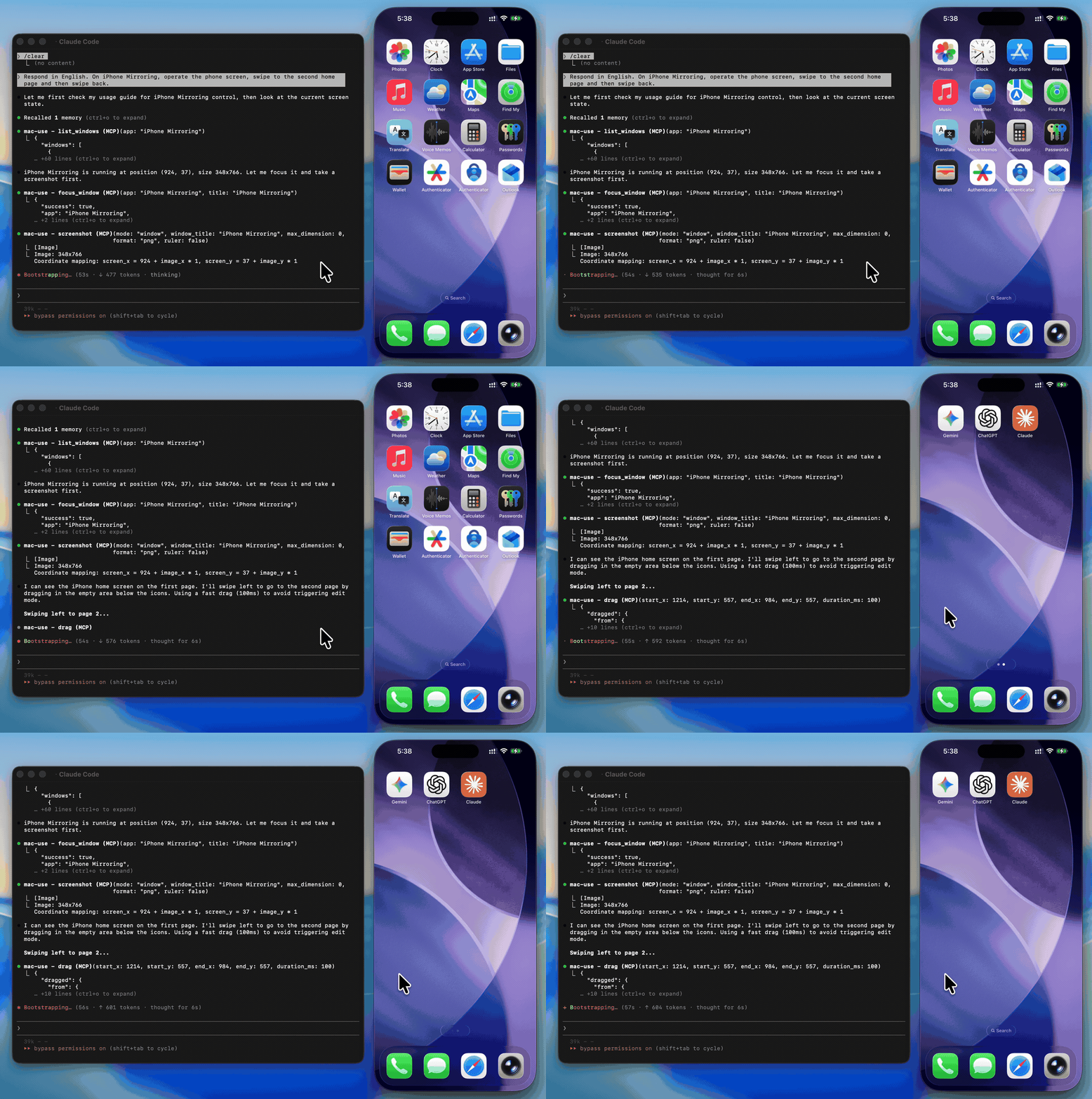
[!WARNING] This tool has full control over mouse, keyboard, and screen. Please use in a sandboxed environment to protect your privacy and avoid accidental data loss by your agents. You are responsible for any actions performed through this tool.
Zero-native-dependency macOS desktop automation via MCP.
Give AI agents eyes and hands on macOS — click, type, screenshot, and inspect any application.







Use Cases
- Automated UI testing — click buttons, verify element states with
get_ui_elements, validate screen content viascreenshot - Desktop workflow automation — launch apps with
open_application, fill forms withtype_text, navigate menus viaclick_menu - Screenshot-based monitoring — capture screen regions periodically with
screenshotfor visual diffing or alerting - Accessibility inspection — query UI element trees with
get_ui_elementsfor QA and compliance checks - AI agent computer use — give LLMs eyes and hands on macOS via
screenshot,click,type_text, and more
Why mac-use-mcp?
- Just works —
npx mac-use-mcpand grant two macOS permissions. No node-gyp, no Xcode tools, no build step. - 18 tools, one server — screenshots, clicks, keystrokes, window management, accessibility inspection, and clipboard.
- macOS 13+ on Intel and Apple Silicon — no native addons, no architecture headaches.
Install
Requirements: macOS 13+ and Node.js 22+. The server communicates over stdio transport.
This package only works on macOS. It will refuse to install on other operating systems.
No build steps. No native dependencies. Just run:
npx mac-use-mcp
npxwill prompt to install the package on first run. Usenpx -y mac-use-mcpto skip the confirmation.
[!TIP] Model selection matters. Desktop automation involves screenshot–action loops that add up in token usage. A fast model with solid reasoning, good vision, and reliable tool calling is recommended:
Model Provider Gemini 3 Flash Claude Sonnet 4.6 Anthropic GPT-5 mini OpenAI MiniMax-M2.5 MiniMax Kimi K2.5 Moonshot AI Qwen3.5 Alibaba GLM-4.7 Zhipu AI
Permission Setup
mac-use-mcp requires two macOS permissions to function. Grant them once and you're set.
Accessibility
Required for mouse and keyboard control.
- Open System Settings > Privacy & Security > Accessibility
- Click the + button
- Add your MCP client application (e.g., Claude Desktop, your terminal emulator)
- Ensure the toggle is enabled
Screen Recording
Required for screenshots.
- Open System Settings > Privacy & Security > Screen Recording
- Click the + button
- Add your MCP client application
- Ensure the toggle is enabled
- Restart the application if prompted
Verify permissions
After granting both permissions and configuring your MCP client (see next section), use the check_permissions tool to confirm everything is working:
> check_permissions
✓ Accessibility: granted
✓ Screen Recording: granted
MCP Client Configuration
Claude Code
claude mcp add mac-use-mcp -- npx mac-use-mcp
Claude Desktop
Add to ~/Library/Application Support/Claude/claude_desktop_config.json:
{
  "mcpServers": {
    "mac-use-mcp": {
      "command": "npx",
      "args": ["mac-use-mcp"]
    }
  }
}
OpenAI Codex
Add to ~/.codex/config.toml:
[mcp_servers.mac-use]
command = "npx"
args = ["-y", "mac-use-mcp"]
Or via CLI:
codex mcp add mac-use -- npx -y mac-use-mcp
Google Antigravity
Add to ~/.gemini/antigravity/mcp_config.json:
{
  "mcpServers": {
    "mac-use-mcp": {
      "command": "npx",
      "args": ["mac-use-mcp"]
    }
  }
}
Gemini CLI
Add to ~/.gemini/settings.json:
{
  "mcpServers": {
    "mac-use-mcp": {
      "command": "npx",
      "args": ["mac-use-mcp"]
    }
  }
}
VS Code / Copilot
Add to .vscode/mcp.json in your workspace (or open the Command Palette and run MCP: Open User Configuration for global setup):
{
  "servers": {
    "mac-use-mcp": {
      "command": "npx",
      "args": ["mac-use-mcp"]
    }
  }
}
Cursor
Add to ~/.cursor/mcp.json (global) or .cursor/mcp.json (project-level):
{
  "mcpServers": {
    "mac-use-mcp": {
      "command": "npx",
      "args": ["mac-use-mcp"]
    }
  }
}
Windsurf
Add to ~/.codeium/windsurf/mcp_config.json:
{
  "mcpServers": {
    "mac-use-mcp": {
      "command": "npx",
      "args": ["mac-use-mcp"]
    }
  }
}
Cline
Open Cline's MCP settings (in the Cline extension panel, click the MCP servers icon), then add:
{
  "mcpServers": {
    "mac-use-mcp": {
      "command": "npx",
      "args": ["mac-use-mcp"]
    }
  }
}
Kiro
Add to ~/.aws/amazonq/mcp.json:
{
  "mcpServers": {
    "mac-use-mcp": {
      "command": "npx",
      "args": ["mac-use-mcp"]
    }
  }
}
Tools
This Node.js MCP server exposes 18 tools for mouse, keyboard, and screen control to any MCP-compatible client.
Screen
| Tool | Description |
|---|---|
screenshot | Capture the screen, a region, or a window by title (PNG or JPEG) |
get_screen_info | Get display count, resolution, origin, and scale factor for each display |
get_cursor_position | Get current cursor coordinates |
Input
| Tool | Description |
|---|---|
click | Click at screen coordinates with button, click count, and modifier options |
move_mouse | Move the cursor to a position |
scroll | Scroll up, down, left, or right at a position |
drag | Drag from one point to another over a configurable duration |
type_text | Type text at the cursor position (supports Unicode, CJK, and emoji) |
press_key | Press a key or key combination (e.g., "cmd+c", "Return") |
Window & App
| Tool | Description |
|---|---|
list_windows | List all visible windows with positions and sizes |
focus_window | Activate an app and bring a specific window to the front |
open_application | Launch an application by name |
click_menu | Click a menu bar item by path (e.g., "File > Save As...") |
App names support fuzzy matching — "chrome" resolves to "Google Chrome", "code" to "Code", etc.
Accessibility
| Tool | Description |
|---|---|
get_ui_elements | Query UI elements via Accessibility API — find buttons, text fields, and other controls by role or title |
Clipboard
| Tool | Description |
|---|---|
clipboard_read | Read the current system clipboard as plain text |
clipboard_write | Write text to the system clipboard |
Utility
| Tool | Description |
|---|---|
wait | Pause for a specified duration (in milliseconds, 0–10 000, default 500) |
check_permissions | Verify Accessibility and Screen Recording access |
Examples
Common workflow patterns using mac-use-mcp tools:
Screenshot a specific window
1. focus_window({ app: "Safari" })
2. screenshot({ mode: "window", window_title: "Safari" })
Click a button in a dialog
1. get_ui_elements({ app: "Finder", role: "AXButton" })
   → finds "OK" button at position (500, 300)
2. click({ x: 500, y: 300 })
Automate a menu action
1. open_application({ name: "TextEdit" })
2. click_menu({ app: "TextEdit", path: "Format > Make Plain Text" })
Copy text between apps
1. focus_window({ app: "Safari" })
2. press_key({ key: "cmd+a" })       # select all
3. press_key({ key: "cmd+c" })       # copy
4. focus_window({ app: "Notes" })
5. press_key({ key: "cmd+v" })       # paste
How It Works
- Swift binary handles mouse input (CGEvent), screen capture (CGWindowListCreateImage), window enumeration (CGWindowListCopyWindowInfo), and UI element queries (Accessibility API)
- AppleScript handles keyboard input (System Events
key code), window focus, and menu clicks - Node.js MCP server orchestrates everything over stdio, translating MCP tool calls into system operations
- No native Node.js addons — the Swift binary is pre-compiled and ships with the npm package
- Serial execution queue prevents race conditions between system operations
Known Limitations
- Screen Recording prompt on Sequoia: macOS 15 shows a monthly system prompt asking to reconfirm Screen Recording access. This is an OS-level behavior and cannot be suppressed.
- Secure input fields: Password fields and other secure text inputs block synthetic keyboard events. This is a macOS security feature.
- Keyboard input on macOS 26+: CGEvent keyboard synthesis is silently blocked. Keyboard input uses AppleScript (
System Events key code) as a workaround, which may behave differently in some edge cases. - System dialogs: Some system-level dialogs (e.g., FileVault unlock, Login Window) cannot be interacted with programmatically due to macOS security restrictions.
- Headless / CI: Requires a graphical session. Headless macOS environments (e.g., standard GitHub Actions runners) are not supported.
Troubleshooting
Permission prompts keep appearing
Grant Accessibility and Screen Recording permissions to your terminal app in System Settings > Privacy & Security. A restart of the terminal may be required.
macOS Sequoia permission dialogs
macOS 15 (Sequoia) introduced stricter permission prompts. Allow the prompts when they appear. The check_permissions tool can verify your current permission status.
Secure input fields
Some password fields and secure text inputs block programmatic key events. This is a macOS security feature. Use clipboard_write + press_key("cmd+v") as a workaround.
Screen recording shows black screenshots
Ensure Screen Recording permission is granted to your terminal app (not just Accessibility). Restart the terminal after granting.
Related Projects
- Playwright MCP — Browser automation via accessibility tree. Complements mac-use-mcp for web-only tasks.
- Peekaboo — macOS screen automation with ScreenCaptureKit. Requires macOS 15+ and a Swift build.
- awesome-mcp-servers — Curated list of MCP servers across the ecosystem.
Contributing
See CONTRIBUTING.md for development setup and guidelines.
Security
To report a vulnerability, see SECURITY.md.
Support
- Found a bug? Open an issue
- Have a feature idea? Open an issue
- Like the project? Give it a star — it helps others discover mac-use-mcp.
License
MIT © 2026 antbotlab
macOS is a trademark of Apple Inc., registered in the U.S. and other countries and regions.
Featured
Keeps your Mac awake while Claude Code, Codex or Cursor works. Lets it sleep when they are done.
Try free for 7 days →Block distracting apps from your iPhone permanently without a 3rd party app. Free and open source.
Block now (100% free) →Notes, actions and memory. Without a meeting bot. First month 100% off.
Download for free →belt cli automatically finds the best tools and skills for your agent. image, video, music, tts...
one prompt install →Free an open-source skills that make AI coding agents easier to understand, verify, and control.
Download for free →Connect your Claude agent to live crypto prices and trading routes via 1inch
Get the MCP →Categories
Registryactive
Packagemac-use-mcp
TransportSTDIO
UpdatedMar 2, 2026


