
Summary
Every developer has been in a meeting where someone says "kub-cuttle" and everyone pretends not to notice. This server wraps a dictionary of 1,650+ developer jargon pronunciations with cited sources, so Claude can answer "how do you say kubectl?" with the actual audio respelling and a URL proving nginx is "engine-x" per the creator. It exposes lookup operations for words like GIF, JWT, and Pydantic, returns IPA, confidence tags, and source links, and handles contested pronunciations by listing alternates. Useful when writing docs, prepping talks, or settling arguments without opening seventeen Reddit tabs. The underlying dictionary tracks creator statements, RFCs, and community consensus, so you get Linus Torvalds saying "Linux" instead of a phonetic guess.



Fastest browser for AI agents to run web automation tasks, always free.
Download Free life-time →
Notes, actions and memory. Without a meeting bot. First month 100% off.
Download for free →


belt cli automatically finds the best tools and skills for your agent. image, video, music, tts...
one prompt install →

Connect your Claude agent to live crypto prices and trading routes via 1inch
Get the MCP →

Block distracting apps from your iPhone permanently without a 3rd party app. Free and open source.
Block now (100% free) →🔊 say-it · Pronounce
Stop saying "kub-cuttle". One Bash command pronounces 1,903 developer jargon names — most with a cited source.







🌐 pronounce.renlab.ai · 🇨🇳 中文 · 📖 Browse · 🎯 Quiz · 🎤 Voice search · 🔌 MCP server · ⚙️ GitHub Action
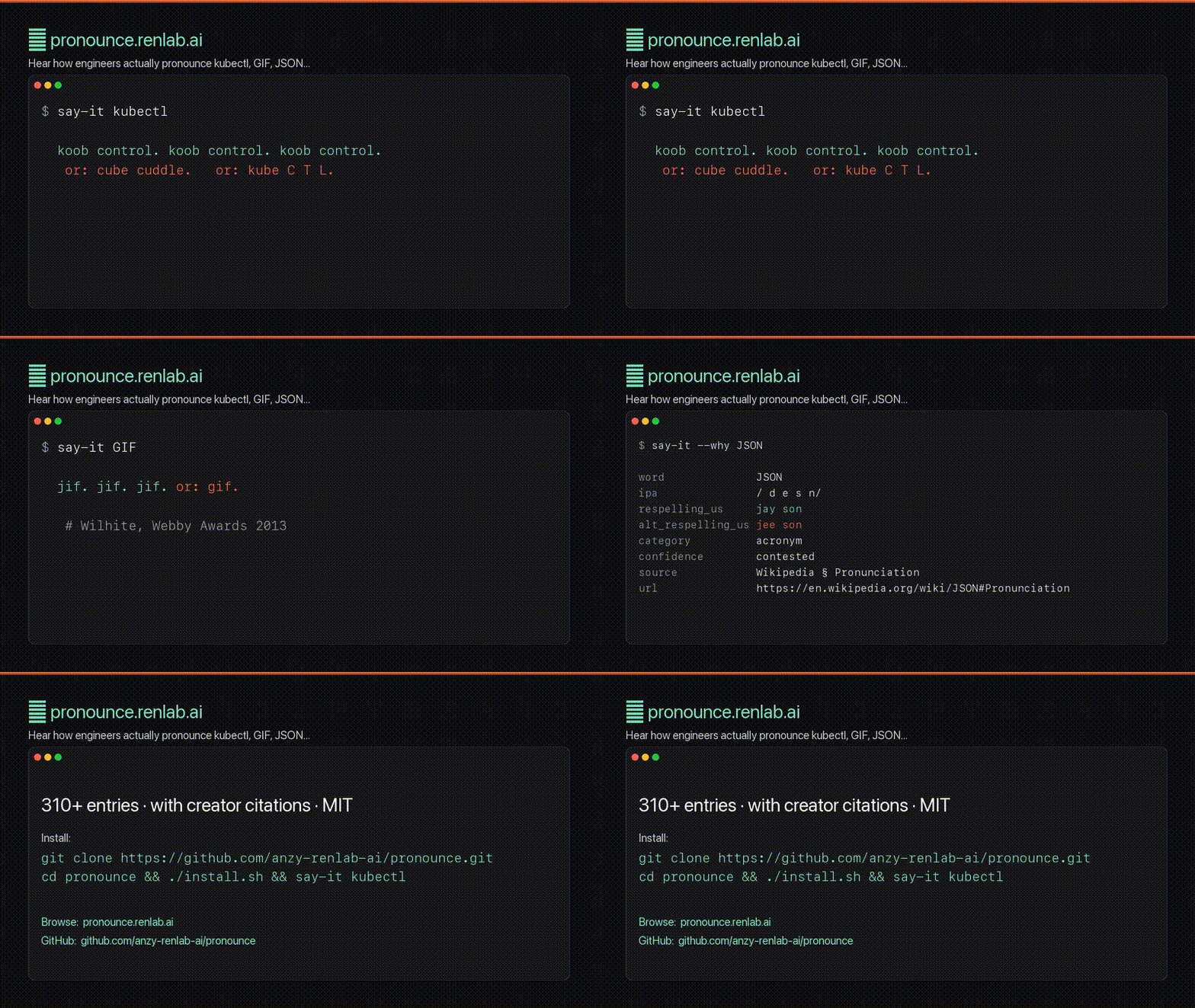
▶ Watch the 47-second promo (with voice) · 🎯 Try the quiz · 🎤 Voice search
🚀 Try it in 30 seconds
git clone https://github.com/anzy-renlab-ai/pronounce.git
cd pronounce && ./install.sh
say-it kubectl

That's it. Now try say-it GIF, say-it nginx, say-it Pydantic, say-it --why JSON, or say-it quiz for a 10-question challenge. Linux users: install espeak-ng (sudo apt install espeak-ng) and the CLI just works. Windows: same CLI under WSL or git-bash + PowerShell. Or skip install and use the browser at pronounce.renlab.ai.
⭐ If
say-it kubectlsaves you one cringey standup moment — star the repo. It nudges more devs to contribute their favorite mispronounced project name.
🏆 The developer pronunciation scoreboard
1,903 entries — 1,283 carry a citable source — 108 settled by the creator themselves, 175 the community still argues about. The famous ones:
✅ Settled — the creator said so
| Word | It's… | …not | Settled by |
|---|---|---|---|
| GIF | "jif" | "ghif" (hard-G speech cue) | Steve Wilhite (creator), NYT 2013 |
| nginx | "engine X" | "n-jinx" | NGINX official |
| YAML | "yam-ul" | "yammel" | yaml.org |
| GNU | "guh-NEW" (hard g) | "noo" | GNU Project |
| LaTeX | "lay-tek" | "lay-teks" | Lamport / LaTeX project |
| TOML | rhymes with "knoll" | "tom-el" | Tom Preston-Werner (creator) |
| Tcl | "tickle" | "T-C-L" | John Ousterhout (creator) |
| awk | "auk" (like the bird) | "A-W-K" | Aho / Weinberger / Kernighan |
⚔️ Still contested — both readings are in active use
| Word | Camp A | Camp B |
|---|---|---|
| kubectl | "koob-control" | "cube-cuddle" |
| SQL | "sequel" | "S-Q-L" |
| JSON | "JAY-son" | "JEE-son" |
| GUI | "gooey" | "G-U-I" |
| JWT | "jot" (per RFC 7519) | "J-W-T" |
Every cell has IPA and audio; 1,283 also carry a citable source. Browse all 1,903 entries →
Disagree with one? That's the whole point — open a PR with your reading and a source. The argument is the dataset.
What you're actually getting
- 1,903 entries — 1,283 carry a citable source. Confidence-tagged (
creator-clarified/community-consensus/contested), each with a citable URL where one exists (we'd rather leave it blank than fabricate one). Wilhite said GIF is "jif" at the 2013 Webby Awards. Crockford says JSON is "JAY-son" (RailsConf 2009). RFC 7519 says JWT is "jot". The dictionary cites them. - Multi-reading audio. For words where the debate is real — GIF, SQL, GUI, char, regex — the CLI chains the alternates after the primary with a spoken "or:" so you hear the debate without staring at the terminal.
--soloskips the tail once you've internalized it. - One Bash CLI, no npm runtime. No sudo, no framework bootstrap, no surprises. It detects macOS
say, Linuxespeak-ng/espeak, or Windows PowerShellSystem.Speech. The repo also ships a Claude Code skill and an MCP server so your AI answers "how do you pronounce X?" with audio, not a phonetic guess. - A docs-native GitHub Action. Scan Markdown changed by a pull request and emit a sourced pronunciation glossary in the job summary — no API key, dependency install, or network request.
- Canonical website audio. The site plays each committed canonical MP3 first and uses Web Speech only as a fallback if playback fails.
$ say-it --why JSON
word              JSON
ipa               /ˈdʒeɪsən/
respelling_us     jay son
confidence        contested
source            Wikipedia § Pronunciation
url               https://en.wikipedia.org/wiki/JSON#Pronunciation
Why not just Google?
Because Google gives you 47 Reddit arguments and a YouTube clip you have to unmute. IPA gives you /ˈkuːb kənˌtroʊl/ — a reference, not a teacher.
You don't need a phonetic transcription. You need to hear the word. Twice. Maybe three times. Done.
say-it ships a community-maintained dictionary of how engineers actually say the names that trip everyone up — and feeds the intended respelling to your OS's text-to-speech engine, so kubectl comes out as koob-control, not whatever your computer guessed from the letters.
Famous moments
Some pronunciations aren't opinions — the creators settled them. The dictionary cites every one:
| Word | Reading | Source |
|---|---|---|
GIF | "jif" (creator says so) | Steve Wilhite, Webby Awards 2013 |
JSON | "jay-son" | Douglas Crockford, RailsConf 2009 |
GNU | "g-noo" (hard G, one syllable) | GNU Project official |
Linux | "LIN-ux" (short i, schwa) | Linus Torvalds himself |
LaTeX | "lay-tek" (or "lah-tek") | Leslie Lamport, official |
Django | "JANG-go" (silent D) | Django FAQ |
Vue | "view" (one syllable) | Evan You, Vue docs |
Vite | "veet" (French for quick) | Vite docs |
Knative | "KAY-native" (the K is voiced) | Knative docs |
etcd | "et-cee-dee" (et-cetera-distributed) | etcd FAQ |
Run say-it --why <word> to see the citation when an entry has a source_url; unsourced entries are left blank rather than given a fabricated URL.
Install
brew install anzy-renlab-ai/tap/say-it # Homebrew on macOS
Or the "Try it in 30 seconds" block above. ./install.sh drops:
- the CLI at
~/.local/bin/say-it, - the pronunciation dictionary at
~/.local/share/say-it/pronunciations.tsv, - if you use Claude Code, a
pronounce-wordskill at~/.claude/skills/pronounce-word/so any "how do you say X?" prompt to your AI gets answered with audio instead of IPA, - the same skill into
~/.agents/skills/(Codex CLI) and~/.kiro/skills/(Kiro) when those dirs exist — it's the cross-tool Agent Skills standard.
Make sure ~/.local/bin is on your $PATH. Linux also works — install espeak-ng (sudo apt install espeak-ng / brew install espeak-ng). Windows: WSL or git-bash + PowerShell. Or skip install entirely with the browser version at pronounce.renlab.ai.
Usage
say-it kubectl                    # primary × 3, then "or: <alt>" for each alternate
say-it --solo kubectl             # primary only — silence the "or:" tail
say-it --alt GIF                  # focus on the first alternate
say-it --alt 2 GUI                # focus on the Nth alternate (1-indexed)
say-it --all SQL                  # primary AND every alternate, each repeated
say-it --no-dict kubectl          # bypass the dictionary entirely
say-it --why JSON                 # show IPA, source URL, category, confidence
say-it list                       # every word in the dictionary
say-it search redis               # grep the dictionary (case-insensitive)

say-it -n 5 Pydantic              # 5 repetitions instead of 3
say-it -r 110 Knative             # slower (110 wpm; default is 130)
say-it -o /tmp/word.aiff Postgres # save to file instead of playing
say-it --list                     # all macOS voices
The default macOS voice is Samantha (General American); -v <voice> selects another macOS voice. Linux and Windows use their detected backend's English voice. The dictionary is GenAm-only, by design.
Claude Code integration
Install the cross-tool Agent Skill directly with GitHub CLI:
gh skill install anzy-renlab-ai/pronounce pronounce-word
You:    kubectl 怎么读?
Claude: 🔊 (plays "koob-control" three times)
        /ˈkuːb kənˌtroʊl/ — "KOOB-control". Kelsey Hightower says it
        this way (KubeCon talk). "Cube-cuddle" is an alternate —
        try `say-it --alt kubectl` to hear it.
Once installed, the pronounce-word skill auto-triggers on:
X 怎么读/X 怎么发音/读一下 Xhow do you pronounce X/pronounce X/how do you say X
Your AI replies with sound, not just a phonetic guess. Skill file: skills/pronounce-word/SKILL.md.
Not on Claude? Same skill drops into Codex CLI (codex plugin marketplace add anzy-renlab-ai/pronounce) and Kiro (~/.kiro/skills/), and the MCP server covers Claude Desktop, Cursor, Continue, Zed, Cline & friends — full matrix in integrations/.

GitHub Action — pronunciation guides for docs
Add a pronunciation glossary to every documentation pull request:
- uses: actions/checkout@v7.0.1
  with:
    fetch-depth: 0
- id: pronounce
  uses: anzy-renlab-ai/pronounce@v2.28.1
Pronounce Docs scans changed Markdown/MDX and writes a table containing each
matched term, its IPA, plain-English respelling, audio page, and creator or
official source where available. It runs locally from the repository snapshot:
no token, API key, telemetry, package install, or network request. See the
complete setup, inputs, and outputs.
VS Code extension

Hover over any tech word in any file — see the IPA, hear the pronunciation. Same 1,903-entry dictionary as the CLI, JSON-bundled at build (zero runtime parse cost).
# Cursor / VSCodium / Zed / Gitpod / Theia / code-server (Open VSX)
code --install-extension sayit.pronounce
# or the listing: https://open-vsx.org/extension/sayit/pronounce
Now live on Microsoft Marketplace too: ext install sayit.pronounce in VS Code. See marketplace listing.
- Hover over
kubectl,YAML,Ghostty,wagmi… → tooltip with IPA + 🔊 Play + ★ Star link. - ⌘⇧' — speak selection.
- Status bar
🔊 sayit— click to speak the current selection. - Welcome walkthrough — 4-step onboarding on first install.
Pronounce: Search dictionary…— fuzzy-find all 1,903 entries.
Source: integrations/vscode/. Cross-platform as of v0.3 — macOS say, Linux espeak-ng, Windows PowerShell.
Chrome / Edge / Brave extension
Click any tech word on any webpage → popup with IPA + audio. Same 1,903-entry dictionary. The extension speaks through Web Speech; pronounce.renlab.ai plays the committed MP3 corpus first and reserves Web Speech for fallback. Sideload only for now (not yet on Chrome Web Store).
Download pronounce-chrome-0.3.1.zip → unzip → chrome://extensions/ → Developer mode → Load unpacked.
Source: integrations/chrome/.
How the dictionary works
data/pronunciations.tsv is the single source of truth — tab-separated, 1,903 entries, covering:
- Cloud / DevOps:
kubectl,nginx,Kubernetes,helm,Istio,Envoy,Prometheus,Grafana,Terraform,Argo,Knative,etcd,containerd,runc,Podman, ... - Languages / Frameworks:
Django,Vue,Vite,Pydantic,Bun,Deno,Hugo,Hono,Caddy,Svelte,Astro,Pinia, ... - Databases:
PostgreSQL,Postgres,SQLite,MySQL,MongoDB,Cassandra,Redis,Ceph,ScyllaDB,ClickHouse,DuckDB, ... - CS jargon / acronyms:
GIF,JSON,SQL,GUI,GNU,char,regex,sudo,tmux,chmod,WYSIWYG,ASCII,enum,NaN,SaaS,PaaS, ... - Distros / tools:
Linux,Debian,Ubuntu,Arch,Nix,LaTeX,TeX,emacs,zsh, ...
Each entry has 10 columns: word | ipa | respelling_us | alt_ipa | alt_respelling_us | source_url | source_label | category | confidence | notes. respelling_us is plain English-like input passed to the detected OS TTS backend, so the intended reading is spoken instead of asking the engine to guess from the project name.
Local override: drop a ~/.config/say-it/pronunciations.local.tsv and it takes precedence.
What works today
- ✅ macOS — built-in
say. - ✅ Linux —
espeak-ng(preferred) orespeak. - ✅ Windows — PowerShell
System.Speechfrom the same Bash CLI under Git Bash/MSYS2/Cygwin. - ✅ 1,903 entries; 1,283 carry a citable source — the rest are confidence-tagged, no fabricated citations.
- ✅ Audible multi-reading awareness — contested words audibly chain alternates with "or:".
- ✅
--alt [N],--all,--solo,--why,--json,--md,--no-dict,list,search,quiz,repl,stream,doctor,export,benchmark,badge,cheatsheet. - ✅ Claude Code skill + MCP server for AI-side pronunciation questions.
- ✅ GitHub Action — sourced pronunciation glossaries for Markdown pull requests.
- ✅ Browser PWA — installable, offline-capable, instant search, voice-mic search, interactive quiz.
- ✅ Editor integrations — Raycast, Alfred, VS Code, Cursor, Codex, Kiro, Continue.
- ✅ 🌐 Live site — pronounce.renlab.ai (1,903 entries browsable with audio; 1,283 sourced entries) + /zh (Chinese landing).
What's coming
See DESIGN.md for the architecture.
- ☁️ Cloud TTS (opt-in ElevenLabs / OpenAI) for the names native TTS still mangles.
- 📚 Anki export for vocabulary drills.
- 🌗 Light theme on the v2 homepage (already shipped on word/SEO pages).
Contributing
Two things we want most:
- Pronunciation entries. Open a PR adding a row to
data/pronunciations.tsv. Required columns:word,ipa,respelling_us. Highly preferred:source_url(creator interview, conf talk, official FAQ — anything verifiable). Contested readings are welcome; put the rival inalt_*columns and we'll wire--altthrough. - Backend quality. macOS (
say) is the gold standard; the Linux (espeak-ng) and Windows (PowerShell) backends ship but are best-effort — help us close the gap. SeeDESIGN.md§Backends.
Keep it tiny. Keep it dep-free where possible. Keep the defaults opinionated (3 reps, GenAm, Samantha voice).
⭐ Support — start with a star
The dictionary is free and MIT. The single highest-leverage thing you can do is star the repo — it's the signal that pulls in more contributors, more PRs, more creator-clarified entries.
- ⭐ Star on GitHub → — one click, no signup, biggest effect.
Optional, if it's saved you real standup pain:
- ☕ Coffee on Ko-fi — pays for one new entry per cup.
- 💚 Sponsor on GitHub — recurring tier (pending Sponsors approval).
Dollars cover hosting (Vercel/Cloudflare/Open VSX), domain renewals, MiniMax narration credits for promo videos, and time to track down creator citations for new entries.
Contributors
Every entry, source upgrade, and skill fix counts. Open a PR — your face shows up here.
License
MIT — see LICENSE.
IPA is a reference. Audio is a teacher.
Featured
Fastest browser for AI agents to run web automation tasks, always free.
Download Free life-time →Notes, actions and memory. Without a meeting bot. First month 100% off.
Download for free →belt cli automatically finds the best tools and skills for your agent. image, video, music, tts...
one prompt install →Connect your Claude agent to live crypto prices and trading routes via 1inch
Get the MCP →Block distracting apps from your iPhone permanently without a 3rd party app. Free and open source.
Block now (100% free) →Registryactive
Packageghcr.io/anzy-renlab-ai/pronounce-mcp:0.1.0
TransportSTDIO
UpdatedJun 10, 2026