
Summary
Built for teams still running on-prem Exchange who need AI agents to schedule meetings without handing over raw credentials or letting the model send invites unreviewed. Wraps EWS calendar operations in a two-step flow: agents call preview tools to draft create, update, or cancel actions, you see exact attendee lists and times, then confirm with a matching ID before anything touches Exchange. Includes room discovery, free/busy queries, attendee resolution, and slot suggestions that respect local work hours. Credentials stay in environment variables or macOS Keychain, and every confirmed action writes to a local JSONL audit log. Designed for regulated environments where Microsoft Graph isn't an option and calendar access requires strict human checkpoints.



Fastest browser for AI agents to run web automation tasks, always free.
Download Free life-time →


belt cli automatically finds the best tools and skills for your agent. image, video, music, tts...
one prompt install →
Free an open-source skills that make AI coding agents easier to understand, verify, and control.
Download for free →

Connect your Claude agent to live crypto prices and trading routes via 1inch
Get the MCP →
Notes, actions and memory. Without a meeting bot. First month 100% off.
Download for free →EWS Meeting MCP


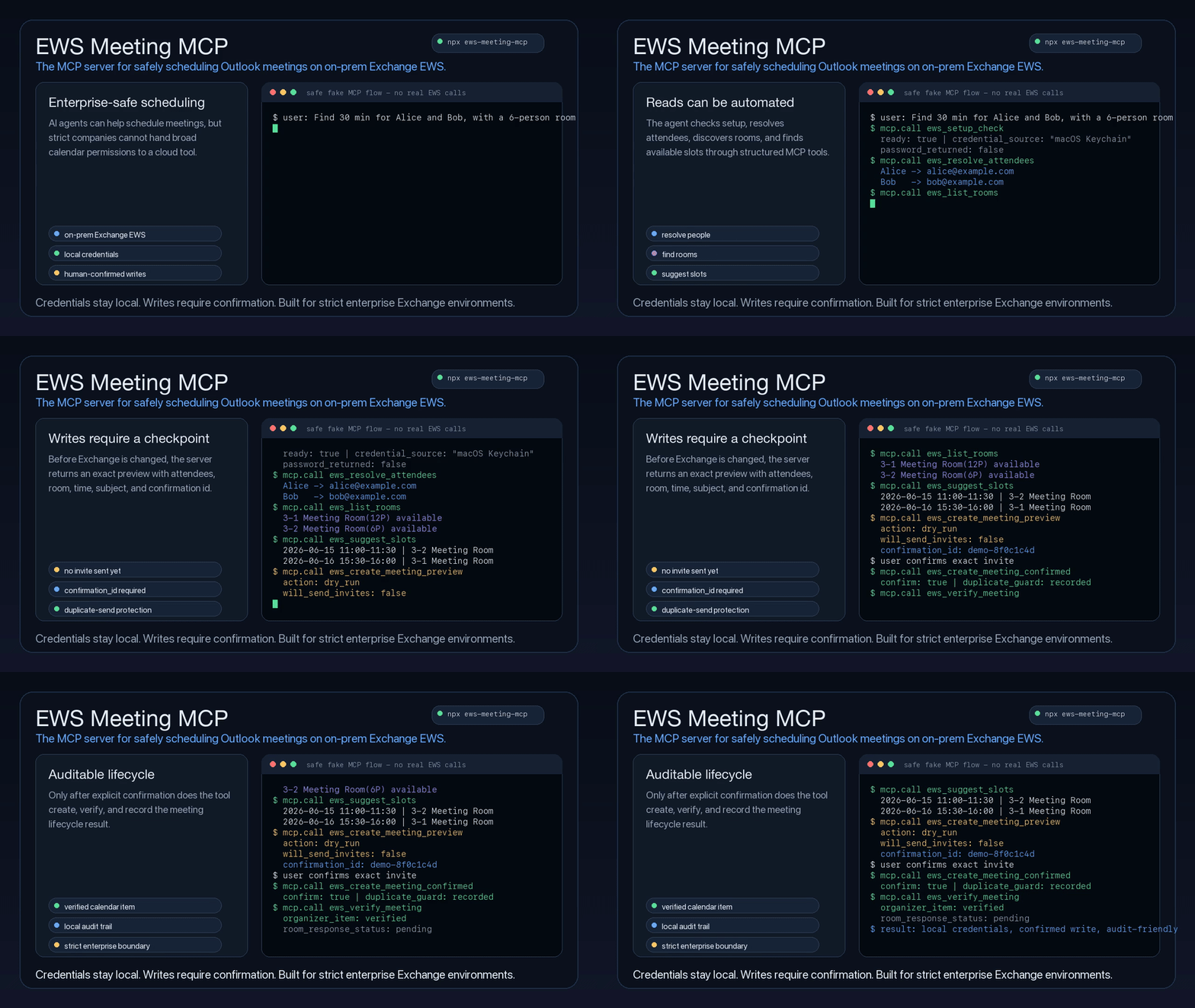
The MCP server for safely reading Outlook inbox messages, sending self-only reports, and scheduling meetings on on-prem Exchange EWS.
EWS Meeting MCP gives coding assistants and desktop agents a safe, structured way to read Outlook inbox messages and availability, send a report only to the configured mailbox, discover rooms, suggest meeting slots, and create, update, or cancel meetings only after an explicit human confirmation step.
It is built for companies where calendar access is sensitive infrastructure: regulated teams, internal networks, strict security review, legacy Exchange deployments, and organizations that cannot simply hand a cloud agent broad Microsoft 365 permissions. Credentials stay local, meeting writes are previewed before they touch Exchange, self-only report sends require idempotency protection, and every write can be traced through a local audit trail.
npx ews-meeting-mcp
Why This Exists
Many teams still run calendar infrastructure through on-prem Exchange/EWS. General-purpose agents can reason about scheduling, but they should not receive raw passwords, guess attendee addresses, or send calendar invitations without a reviewable checkpoint.
This is not a generic Outlook wrapper or a Microsoft Graph-first calendar connector. It is designed for the stricter enterprise case: local EWS access, room resources, explicit human approval, duplicate-send protection, and audit-friendly meeting lifecycle tools.
This project wraps Exchange calendar operations in a small MCP surface with:
- Room-aware scheduling: finds overlapping attendee availability and filters meeting rooms by Exchange discovery or local policy.
- Human-in-the-loop writes: create, update, and cancel operations require a preview plus a matching
confirmation_id. - Outlook Show As: create or update personal appointments with
show_as: "out_of_office"(EWSOOF). Empty attendees and rooms never send invitations; this does not configure email automatic replies. - Local-first credential handling: reads
.env, shell environment, or macOS Keychain without passing passwords through the model. - Structured recovery: setup failures return machine-readable error codes and user-facing setup commands.
- Auditability: lifecycle previews, confirmed actions, duplicate confirmations, in-progress states, and structured errors are written to a local JSONL audit log.
- Agent-ready instructions: the MCP server exposes tool descriptions and initialization guidance, and the repo includes a companion skill for agents that support skills.
What Agents Can Do
| Capability | Tooling | Safety posture |
|---|---|---|
| Check setup and credentials | ews_setup_check, ews_keychain_status | Never returns the EWS password |
| Set up meeting signatures | ews_signature_setup_guide | Returns copyable HTML sample and local env guidance |
| Read Outlook inbox | ews_search_emails, ews_read_email | Read-only; does not mark messages as read or change mailbox state |
| Send a weekly report to self | ews_send_email_to_self | Only sends to EWS_EMAIL; recipient is not an input; requires a stable idempotency key and real EWS CreateItem + SendItem |
| Read calendar availability | ews_list_calendar, ews_get_free_busy, ews_find_calendar_events | Read-only |
| Resolve people and rooms | ews_resolve_attendees, ews_list_rooms | Uses Exchange directory when available |
| Suggest slots | ews_suggest_slots | Applies local workday, avoid windows, and room capacity |
| Create meetings | ews_create_meeting_preview, ews_create_meeting_confirmed | Supports optional weekly recurrence; requires preview, explicit approval, and matching confirmation id |
| Update meetings | ews_update_meeting_preview, ews_update_meeting_confirmed | Requires exact EWS item metadata and matching confirmation id |
| Cancel meetings | ews_cancel_meeting_preview, ews_cancel_meeting_confirmed | Requires exact EWS item metadata and matching confirmation id |
| Verify and audit | ews_verify_meeting, ews_get_audit_log | Confirms server-side state without exposing credentials |
Documentation
- Usage Guide: local setup, Keychain, scheduling policy, smoke checks, CLI examples, MCP config, and npm wrapper details.
- Agent Guide: tool contracts, setup checks, attendee resolution, room selection, preview-confirm flows, audit log, and verification rules.
- Publishing: npm package and GitHub Actions release checklist.
Quick Start
1. Configure EWS
Create a .env file in the working directory or provide equivalent environment variables:
EWS_ENDPOINT=https://mail.company.com/EWS/Exchange.asmx
EWS_EMAIL=your_user@company.com
EWS_USERNAME='DOMAIN\your_user'
EWS_AUTH_TYPE=NTLM
EWS_TIMEZONE=Asia/Taipei
Use EWS_AUTH_TYPE=BASIC only if IT confirms Basic auth is enabled and the endpoint is protected by HTTPS.
2. Store the Password
For local development, the generic ACCOUNT_PASSWORD override works, but do not put it in MCP config:
ACCOUNT_PASSWORD='your-password'
On macOS, Keychain is safer than storing the password in .env or MCP client config:
read -rsp "Account password: " ACCOUNT_PASSWORD
echo
security add-generic-password -U -s ews-meeting-mcp-account-password -a 'DOMAIN\your_user' -w "$ACCOUNT_PASSWORD"
unset ACCOUNT_PASSWORD
Use the same Keychain service/account pair from any local tool that needs this account password:
ACCOUNT_PASSWORD_KEYCHAIN_SERVICE=ews-meeting-mcp-account-password
ACCOUNT_PASSWORD_KEYCHAIN_ACCOUNT='DOMAIN\your_user'
If ACCOUNT_PASSWORD_KEYCHAIN_ACCOUNT is omitted, EWS_USERNAME is used. ACCOUNT_PASSWORD is only a generic local override; Keychain is preferred.
3. Add the MCP Server
For an npm-installed MCP client:
{
  "mcpServers": {
    "ews-meeting-mcp": {
      "command": "npx",
      "args": ["-y", "ews-meeting-mcp@0.1.25"],
      "env": {
        "EWS_ENDPOINT": "https://mail.company.com/EWS/Exchange.asmx",
        "EWS_EMAIL": "your_user@company.com",
        "EWS_USERNAME": "DOMAIN\\your_user",
        "ACCOUNT_PASSWORD_KEYCHAIN_SERVICE": "ews-meeting-mcp-account-password",
        "ACCOUNT_PASSWORD_KEYCHAIN_ACCOUNT": "DOMAIN\\your_user",
        "EWS_AUTH_TYPE": "NTLM",
        "EWS_TIMEZONE": "Asia/Taipei"
      }
    }
  }
}
For a local checkout:
{
  "mcpServers": {
    "ews-meeting-mcp": {
      "command": "/path/to/ews-meeting-mcp/.venv/bin/python",
      "args": ["-m", "ews_meeting_mcp.mcp_server"],
      "cwd": "/path/to/ews-meeting-mcp",
      "env": {
        "PYTHONPATH": "src"
      }
    }
  }
}
Optional: Add an Outlook-Style Signature
Meeting invites append a configured HTML signature by default. Ask the MCP tool for a copyable starter template:
ews_signature_setup_guide
Save the returned sample_html as ews-meeting-signature.html in the MCP working directory, then edit the name, email, title, logo URL, and disclaimer. You can also point to a different file:
EWS_MEETING_SIGNATURE_HTML_PATH=/path/to/ews-meeting-signature.html
EWS_MEETING_SIGNATURE_ENABLED=true
Use an HTTPS logo URL recipients can access, or replace the <img> source with a base64 data URI. Set EWS_MEETING_SIGNATURE_ENABLED=false to temporarily stop appending the signature.
4. Verify Setup
npx ews-meeting-mcp --cli env
npx ews-meeting-mcp --cli probe
The first command prints the configured endpoint and account without printing the password. The second command validates that the account can connect to EWS.
Agent Workflow
For incoming Outlook mail, search the configured inbox first and then read the selected message:
user asks about company email
-> ews_setup_check
-> ews_search_emails with the narrowest known filters
-> user selects or identifies one message
-> ews_read_email with the exact id and optional changekey
These mailbox tools are read-only. They do not mark messages as read, send mail, move messages, or change labels.
For the Thursday Jira weekly-report automation, compose the report from the Jira results and then call the dedicated self-only mail tool through this EWS MCP:
weekly report is ready
-> ews_setup_check
-> ews_send_email_to_self with subject, body, and a stable idempotency_key
-> stop after sent=true; do not use Gmail, to: me, or another mail provider
ews_send_email_to_self takes no recipient, to, cc, or bcc argument. It obtains the only recipient from EWS_EMAIL, sends through Exchange EWS, and appends the configured HTML signature by default. It does not write the email body or recipient address to the audit log. Reuse the same idempotency key for an automation retry; a completed or in-progress key will not call Exchange again.
Scheduling should follow this shape:
user request
-> ews_setup_check
-> ews_signature_setup_guide, if the user needs help creating the optional HTML signature
-> ews_resolve_attendees, if names or aliases are provided
-> ews_list_rooms, if a room may be needed
-> ews_suggest_slots
-> user chooses a slot and room
-> ews_create_meeting_preview
-> show exact invite details, recurrence if present, and confirmation_id
-> user explicitly confirms
-> ews_create_meeting_confirmed with confirm=true and the same confirmation_id
-> ews_verify_meeting, when item id and changekey are available
Recurring meetings are created by passing a structured recurrence object to both preview and confirmed create calls. For example, "every Monday and Wednesday" uses weekly recurrence:
{
  "type": "weekly",
  "interval": 1,
  "weekdays": ["MO", "WE"],
  "range": {
    "type": "numbered",
    "count": 10
  }
}
"Every business day until 7/26" means Monday through Friday, without holiday or makeup-day handling:
{
  "type": "weekly",
  "interval": 1,
  "weekdays": ["MO", "TU", "WE", "TH", "FR"],
  "range": {
    "type": "end_date",
    "end_date": "2026-07-26"
  }
}
If the user asks only for weekdays such as "every Monday and Wednesday" without an end date, occurrence count, or explicit no-end choice, ask for one before previewing.
Existing meeting changes should use exact calendar metadata:
user asks to update or cancel a meeting
-> ews_find_calendar_events with the narrowest known time window
-> user chooses one exact event, if more than one candidate exists
-> ews_update_meeting_preview or ews_cancel_meeting_preview
-> show current/proposed details, warnings, and confirmation_id
-> user explicitly confirms
-> matching confirmed tool with confirm=true and the same confirmation_id
Agents should never infer an event from subject text when multiple candidates are possible.
Safety Model
EWS Meeting MCP is designed around a simple rule: reads may be automated, and every write must have a narrow safety gate. Inbox reads are limited to explicit read-only search and read tools; meeting writes require preview plus explicit confirmation, while the self-only report send requires configured-self enforcement plus idempotency protection.
- Authentication failures are fail-fast: the EWS client uses
FailFast, and after one invalid-credential or locked-account response the MCP blocks all later EWS calls in that process. Fix the shared Keychain item and restart the MCP before trying again. - Confirmed create, update, and cancel tools refuse to run unless
confirm=trueis passed. - Confirmed tools require the exact
confirmation_idreturned by the matching preview. - Confirmed update and cancel tools also require the exact EWS
idandchangekeyfromews_find_calendar_eventsor a prior verified result. - Duplicate confirmed requests return
error_code: "duplicate_confirmation"with prior result metadata instead of calling EWS again. - In-progress confirmations return
error_code: "confirmation_in_progress"and should not be blindly retried. - Preview tools never save, move, delete, or send Exchange notifications.
ews_send_email_to_selfis the only mail-write capability. It is self-only, requiresEWS_EMAILto be configured, and sends a saved draft with EWSCreateItemfollowed bySendItem; it does not accept an arbitrary recipient.- Self-only sends require a stable, non-secret
idempotency_key. A duplicate or in-progress key is refused before another EWS send. If delivery is uncertain, inspect Sent Items before retrying. - Self-only send audit entries contain only action/status and non-sensitive delivery/idempotency metadata; they do not contain the configured email address, subject, body, password, or token.
- The local confirmation ledger and audit log store operation metadata, not EWS passwords.
If ews_setup_check returns ready: false, an agent should show the returned user_message or setup_command verbatim and stop. It should not ask for attendee emails or continue scheduling as a workaround.
Scheduling Policy
By default, scheduling tools look for ews-meeting-policy.json in the current working directory. Set EWS_MEETING_POLICY_FILE to point at a different file.
If no policy file exists, built-in defaults are used:
- workday:
10:00to18:00 - avoid:
12:00-14:00 - fallback rooms:
2-11,2-13,2-14,3-1,3-2,3-4
Live room selection uses Exchange room-list discovery when available, then falls back to configured rooms.
Example policy:
{
  "workday_start": "10:00",
  "workday_end": "18:00",
  "avoid": ["12:00-14:00"],
  "rooms": [
    {
      "alias": "3-1",
      "name": "3-1 Meeting Room(12P)",
      "email": "3-1MeetingRoom@company.com",
      "capacity": 12
    }
  ]
}
Policy rooms are merged with the default fallback rooms by alias. A matching alias overrides the default room, and new aliases are appended.
CLI Usage
The npm wrapper starts the MCP server by default:
npx ews-meeting-mcp
Pass --cli to run the Python CLI through the same package:
npx ews-meeting-mcp --cli env
npx ews-meeting-mcp --cli calendar --days 7
Suggest a 30-minute meeting slot:
npx ews-meeting-mcp --cli suggest \
  --attendee alice@company.com \
  --attendee bob@company.com \
  --start 2026-06-15T09:00:00+08:00 \
  --end 2026-06-19T18:00:00+08:00 \
  --duration-minutes 30 \
  --limit 5
Preview a meeting invitation without sending anything:
npx ews-meeting-mcp --cli create-meeting \
  --attendee alice@company.com \
  --attendee bob@company.com \
  --start 2026-06-15T11:00:00+08:00 \
  --end 2026-06-15T11:30:00+08:00 \
  --subject "Project sync" \
  --body "Discuss next steps" \
  --location "Webex"
Actually create the meeting and send invitations:
npx ews-meeting-mcp --cli create-meeting \
  --attendee alice@company.com \
  --attendee bob@company.com \
  --start 2026-06-15T11:00:00+08:00 \
  --end 2026-06-15T11:30:00+08:00 \
  --subject "Project sync" \
  --body "Discuss next steps" \
  --location "Webex" \
  --confirm
The --confirm flag is intentionally required. Without it, the command prints a dry-run preview and does not call EWS to create the event.
Calendar Show As / 不在辦公室
The create and update preview/confirmed MCP tools accept optional show_as:
show_as | EWS LegacyFreeBusyStatus |
|---|---|
free | Free |
tentative | Tentative |
busy | Busy |
out_of_office | OOF |
Omitting it during creation keeps the existing Busy default; omitting it during updates preserves the stored status. Personal appointments use attendees: [] and rooms: [], and are saved with SendToNone. Existing meetings with attendees or resources retain their invitation behavior. Weekly recurring creation also accepts show_as; recurrence editing capabilities are unchanged.
Call ews_create_meeting_preview with, for example:
{
  "subject": "不在辦公室",
  "attendees": [],
  "rooms": [],
  "start": "2026-09-21T09:00:00+08:00",
  "end": "2026-09-21T18:00:00+08:00",
  "show_as": "out_of_office",
  "include_signature": false
}
Show the user the start/end, timezone offsets, show_as, and invitation behavior. After explicit confirmation, call ews_create_meeting_confirmed with the same arguments plus confirm: true and the returned confirmation_id. Changing the status after preview invalidates that confirmation. Query/verification tools return the stored show_as and raw legacy_free_busy_status; use ews_verify_meeting to read the server after saving.
See Calendar status usage, MCP update steps, and live verification for update examples and a manual verification checklist. This feature affects the calendar status only, not mail automatic replies.
Local Development
For detailed setup, smoke tests, CLI examples, and MCP client configuration, see the Usage Guide.
The short development loop is:
python3 -m venv .venv
source .venv/bin/activate
pip install -r requirements.txt
cp .env.example .env
npm test
Run the MCP server from a checkout:
env PYTHONPATH=src python -m ews_meeting_mcp.mcp_server
Companion Skill
The repo includes a companion skill for agents that support skills:
skills/ews-meeting-mcp/SKILL.md
See the Agent Guide for the same workflow in plain Markdown.
Troubleshooting
Operational troubleshooting lives in the Usage Guide. For agent behavior, setup-check handling, and lifecycle safety, see the Agent Guide.
Release
See Publishing.
License
MIT
Featured
Fastest browser for AI agents to run web automation tasks, always free.
Download Free life-time →belt cli automatically finds the best tools and skills for your agent. image, video, music, tts...
one prompt install →Free an open-source skills that make AI coding agents easier to understand, verify, and control.
Download for free →Connect your Claude agent to live crypto prices and trading routes via 1inch
Get the MCP →Notes, actions and memory. Without a meeting bot. First month 100% off.
Download for free →Configuration
EWS_ENDPOINT*Exchange EWS endpoint, for example https://mail.company.com/EWS/Exchange.asmx
EWS_EMAIL*Mailbox email address used as the meeting organizer.
EWS_USERNAME*Exchange login username, often DOMAIN\username for NTLM.
EWS_PASSWORDsecretExchange password. Prefer macOS Keychain variables when possible.
EWS_PASSWORD_KEYCHAIN_SERVICEOptional macOS Keychain service name for reading the password locally.
EWS_PASSWORD_KEYCHAIN_ACCOUNTOptional macOS Keychain account. Defaults to EWS_USERNAME when omitted.
EWS_AUTH_TYPEdefault: NTLMExchange auth type. Usually NTLM for on-prem Exchange.
EWS_TIMEZONEdefault: Asia/TaipeiIANA timezone for calendar operations.
Registryactive
Packageews-meeting-mcp
TransportSTDIO
AuthRequired
UpdatedJun 10, 2026


