
Summary
A solid wrapper around Notion's API that lets Claude and other MCP clients create pages, manipulate blocks, query databases, and manage comments through natural language. Handles the full spectrum of Notion operations including batch block updates, database creation with custom properties, user management, and search functionality. The setup requires a Notion integration token and works with Cursor, Claude Desktop, and other MCP-compatible tools. Good choice when you need programmatic Notion access without writing custom API calls, especially for content management workflows where you want to update documentation, manage task databases, or collaborate on pages through AI assistance.



Fastest browser for AI agents to run web automation tasks, always free.
Download Free life-time →

Integrate web data into your AI product. One API to scrape website & brand data.
Get API Key Now →
belt cli automatically finds the best tools and skills for your agent. image, video, music, tts...
one prompt install →

Connect your Claude agent to live crypto prices and trading routes via 1inch
Get the MCP →


Notion MCP Server — Connect Claude, Cursor & VS Code to Notion





Give your AI read/write access to Notion with one token and one command. Claude Code, Claude Desktop, Cursor, VS Code, Cline, Zed, anything that speaks MCP: it can create pages, query databases, append blocks, apply templates, comment and upload files, in plain language.
Notion ships its own MCP server. Where this one differs:
- It authenticates with a token, so it runs headless. Notion's hosted MCP is OAuth-only and someone has to click "Authorize". This one works in CI, cron jobs, background agents and self-hosted deployments.
- It doesn't spend your context on tool schemas. The official open-source server loads 24 endpoint schemas into the model's context at connection: 17,163 tokens, re-sent with every request for the rest of the session. This one loads three tools, 1,005 tokens. That is 94% less, 17× smaller, and operation schemas are fetched only when a task actually touches one, so even a heavy eight-operation session stays 76% lighter. Measured, reproducible →
Responses are slimmed on the way back too: a database query returns flat name → value rows, typically 5–10× fewer tokens than Notion's raw properties bags, with nothing lost. Batched mutations with atomic rollback, idempotency keys, retry on rate limits and self-healing validation errors are built in, and the comparison below has the rest.
Quick start
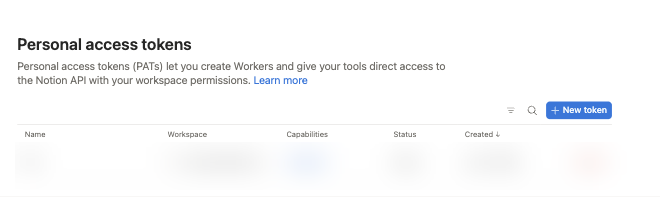
1. Get a Notion token. Open app.notion.com/developers/tokens → + New token → name it, pick your workspace → Create token → copy the ntn_… value. A Personal Access Token sees everything you can see, with no per-page sharing. (Page missing or empty? Your admin disabled PATs — see auth alternatives.)
2. Install it.
npx add-mcp notion-mcp-server --env NOTION_TOKEN=ntn_paste_your_token_here
add-mcp finds the MCP clients on your machine and writes the config for the ones you pick: Claude Code, Claude Desktop, Cursor, VS Code, Codex, Gemini CLI, Cline, Windsurf, Zed and a dozen others. Add -g to install at user level instead of the current project, -a claude-code to skip the picker, --all to write every client at once.
Keep the
--envflag. Without it the entry is written without a token, and the server starts and then fails every call with an auth error.
Or install it by hand: JSON config, Claude Code, Cursor, VS Code, Gemini CLI, Claude Desktop, Docker
Any client that reads an mcpServers block (Cursor's ~/.cursor/mcp.json, Claude Desktop's claude_desktop_config.json, Cline's settings, Zed, Continue…):
{
  "mcpServers": {
    "notion": {
      "command": "npx",
      "args": ["-y", "notion-mcp-server"],
      "env": { "NOTION_TOKEN": "ntn_paste_your_token_here" }
    }
  }
}
Claude Code:
claude mcp add notion -s user \
  -e NOTION_TOKEN=ntn_paste_your_token_here \
  -- npx -y notion-mcp-server
Claude Code speaks the 2025-era protocol over stdio unless told otherwise. Set MCP_PROTOCOL_NEGOTIATION=auto in its environment and it probes for MCP 2026-07-28 (stateless requests, cache hints on every list). The server serves both.
Cursor:  — click, then replace
 YOUR_NOTION_TOKEN in the generated entry.
VS Code (Copilot agent mode): 
Gemini CLI:
gemini extensions install https://github.com/awkoy/notion-mcp-server
The repo ships a gemini-extension.json, so this installs as an extension: it asks for the token once, keeps it in your system keychain, and starts the server with npx.
Claude Desktop, without Node.js: download notion-mcp-server.mcpb from the latest release and double-click it (or drag it into Settings → Extensions), then paste your token when prompted. Never edited a config file before? The step-by-step walkthrough assumes nothing.
Docker / Podman / OrbStack:
claude mcp add notion -s user \
  -e NOTION_TOKEN=ntn_paste_your_token_here \
  -- docker run --rm -i -e NOTION_TOKEN ghcr.io/awkoy/notion-mcp-server:latest
The -i flag is required for stdio. The image is OCI-compliant, so Podman, OrbStack, colima, Rancher Desktop, Finch and nerdctl take the same flags. For a long-running HTTP container see Remote / HTTP transport.
3. Try it. In a new chat:
"Use Notion to make a page called 'Hello from my agent' and add a checklist of three things to try today."
Your AI calls notion_write and replies with a live page link.
What your AI can do with it
- "Find every row in my Tasks database where Status is 'Doing' and tell me which are overdue." — typed
wherefilters, flattened rows - "Rename these 50 pages to the new convention." — one batched call, 10-way parallel, idempotent retry
- "Create a page from my 'Weekly review' template and fill in this summary."
- "Rewrite that spec page: fix the headings and add a code sample." — markdown round-trip via
get_page_markdown→ edit →update_page_markdown - "Comment on yesterday's meeting notes with a one-paragraph summary."
- "Upload this diagram to the design page." — single- and multi-part uploads
- "Look at the screenshot on that bug report and tell me what's wrong." —
get_imagehands the model the picture itself
The full catalog is the operations menu: 47 operations behind three tools.
Which Notion MCP should you use?
| Best for | Auth | Headless / CI | Notes | |
|---|---|---|---|---|
Notion hosted MCP (mcp.notion.com) | Interactive chat in claude.ai, ChatGPT, Cursor | OAuth (a human must click; Notion says non-interactive auth is in the works) | ❌ | First-party, ~34 markdown tools (11 of them Custom Agent session tools that need Notion AI), some plan-gated |
| Official open-source server | — | Token | ✅ | Notion calls it deprecated and "no longer actively maintained"; the repo says it "may sunset" it and that issues and PRs are not actively monitored |
| This server | Agents, automation, CI, self-hosting, token-sensitive workloads | Token (PAT) | ✅ | Actively maintained, agent-first design |
To chat with your Notion in claude.ai's web UI, use Notion's hosted connector: it's one click. Use this server when the agent runs unattended, when context cost matters, or when you want batch and idempotent semantics and your own host.
Detailed comparison vs. the official open-source server
| Capability | Official Notion MCP (open source) | This server |
|---|---|---|
| Tool surface | 24 tools (one per endpoint), 17,163 tokens loaded into context | 3 tools, 1,005 tokens — 94% less schema at connection |
| Operations covered | ~24 endpoints | 47 operations (plus a trash_page alias) across pages, blocks, databases, data sources, views, templates, comments, users, files |
| Batch mutations | Not documented | ✅ Universal { items: [...] } envelope; up to 10 in parallel |
| Atomic batches + rollback | Not documented | ✅ atomic: true aborts on first failure, best-effort archives entities created earlier |
| Idempotency | Not documented | ✅ idempotency_key — same key + op returns the cached result for 5 minutes |
| Rate-limit handling | 429s bubble up | ✅ Token-bucket limiter (3 req/s default) + exponential backoff, honors Retry-After |
| Response shapes | Raw Notion SDK JSON | Slim shapers drop noise by default; verbose: true opts out |
| Database queries | Raw properties bag per row | Flattened name → primitive map (all 20+ property types) |
| Writing properties | Full Notion property JSON | Plain values: { Status: "Done", Due: "2026-10-01", Tags: ["a"] }, typed from the data source schema (cached 5 min); wrong names and options rejected with the valid ones |
| Filters | Raw Notion filter JSON | Typed where shorthand — { Status: "Done", Priority: { in: [...] }, OR: [...] } and sorts: ["-Due Date"]; raw filters still accepted |
| Unknown fields | Rejected | Ignored with a warnings entry naming the field and the accepted ones, so the call still runs |
| Pagination | Manual cursors | Opt-in paginate: true walks next_cursor (cap ≈ 1000 items) |
| Wire format | Default SDK serialization | Compact JSON — ~30% smaller payloads |
| Markdown | Page-level markdown tools | ✅ Accepted by create_page / append_blocks / update_block / comments, plus full round-trip (get_page_markdown / update_page_markdown), full GFM |
| Templates | — | ✅ create_page from a Notion template + list_data_source_templates discovery |
| Database views | — | ✅ list / get / query / create / update / delete; query_view runs a view's stored filters and sorts and returns hydrated rows |
| File uploads | Not in the documented tool surface | ✅ Single- and multi-part (5 MB chunks), MIME inferred |
| Validation errors | Plain error string | Self-healing: { code, message, path, issues, schema, example, fix } — corrected in one round-trip |
| Notion API version | — | Pinned 2026-03-11 (data sources, views, templates) |
What that buys you in practice: renaming 50 pages is one notion_write call with { items: [...], concurrency: 10 } rather than 50 trips through the agent's reasoning loop, and the prompt-token savings are the bigger half of the win. The benchmark has the method, the tokenizer and an honest worst case.
Configuration
Token: PAT or internal integration
Both go in the same NOTION_TOKEN env var; only where you get them differs.
| Personal Access Token (recommended) | Internal Integration (scoped) | |
|---|---|---|
| Where | app.notion.com/developers/tokens → + New token | app.notion.com/developers/connections → + New connection |
| Scope | Everything you can see | Only pages where you clicked • • • → Connect → <integration> |
| Friction | None | A Connect step per page or database |
| Use when | Default: personal and team workspaces, prototyping | An admin requires explicit per-resource scoping, or for shared production bots |
💡 Most
object_not_founderrors are the wrong auth choice rather than a bug: an Internal Integration token that was never Connected to the page. Switch to a PAT.
PAT details: capabilities, expiry, revocation, admin-disabled fallback
Can: read every page you have access to; create and update pages and databases where you have edit rights; comment as you; upload files. Can't: reach pages you can't see, bypass workspace permissions, act as another user, or change admin settings. A PAT's scope is your account, so if you lose access to a page, so does the PAT. Issue separate tokens per teammate.
Expiry: PATs expire 1 year after creation (Notion docs). Set a reminder for month 11.
Revoking: app.notion.com/developers/tokens → Revoke next to the token, effective immediately. Workspace admins can revoke anyone's from Settings & members → Connections → All personal access tokens.
Admin disabled PATs? Ask them to enable it, or create an Internal Integration at app.notion.com/developers/connections (+ New connection) and • • • → Connect it to every page the agent should touch. Same NOTION_TOKEN env var.
Official reference: PAT guide · Authorization overview.
Environment variables
| Env var | Required | Default | Meaning |
|---|---|---|---|
NOTION_TOKEN | ✅ | — | PAT (ntn_…, recommended) or Internal Integration secret (secret_… / ntn_…) |
NOTION_PAGE_ID | — | — | Default parent for create_page / create_database when no parent is passed (page → Share → Copy link; the whole URL or the bare 32-char id both work) |
NOTION_RATE_LIMIT | — | 3 | Requests/second for the shared limiter (Notion's documented per-integration limit) |
NOTION_READ_ONLY | — | — | true/1/yes disables every write operation in one switch |
NOTION_ALLOWED_OPERATIONS | — | all | Comma-separated allowlist of operations or group presets — see Restricting operations |
NOTION_BLOCKED_OPERATIONS | — | — | Comma-separated blocklist (same vocabulary); wins over the allowlist |
NOTION_CONFIRM_DESTRUCTIVE | — | — | true/1 keeps destructive operations enabled but asks you first — see Restricting operations |
NOTION_UPLOAD_ROOT | — | — | Confine upload_file's path source to one directory — see Files |
NOTION_FILE_URLS | — | full | ref replaces Notion's signed file URLs (~1,650 chars, valid for an hour) in slim responses with short notion-file: refs — see Files |
HTTPS_PROXY / HTTP_PROXY | — | — | Route all outbound traffic — Notion API calls and the downloads in get_image and upload_file's url source — through an HTTP(S) proxy (standard env vars, lowercase also accepted) |
NOTION_DAILY_LOG_PAGE_ID | — | — | Only used by the daily-log MCP prompt |
HTTP-transport variables (MCP_TRANSPORT, PORT, HOST, MCP_AUTH_TOKEN, …) are in Remote / HTTP transport.
Upgrading from v1.x or v2.x? Every env var still works unchanged. The break is the tool surface: v1's five tools, then v2's
notion_execute, becamenotion_read+notion_write, andnotion_describeis as it was. Modern clients rediscover tools automatically. Details in MIGRATION.md.
Restricting operations
NOTION_ALLOWED_OPERATIONS (allowlist) and NOTION_BLOCKED_OPERATIONS (blocklist) each take a comma-separated list of group presets or exact operation names.
| Preset | Expands to |
|---|---|
read | every non-mutating operation |
write | every mutating operation |
destructive | operations whose purpose is removal (archive_page/trash_page, delete_block, batch_mixed_blocks, delete_comment, delete_view) |
pages blocks databases data_sources views comments users files | every operation in that family, read and write |
{ "env": { "NOTION_ALLOWED_OPERATIONS": "read" } }                       // read-only, the common case
{ "env": { "NOTION_BLOCKED_OPERATIONS": "destructive" } }                // everything except removals
{ "env": { "NOTION_ALLOWED_OPERATIONS": "read,append_blocks,add_page_comment" } }
Names are case-insensitive, unknown tokens are ignored with a warning, the blocklist wins, and an allowlist that resolves to zero operations disables everything (fail-closed). Disabled operations vanish from the tools' operation enums, from notion_describe and from the notion://operations menu, so naming one fails validation before it runs; when no write operation is enabled, notion_write is not advertised at all. One line on stderr at startup says what resolved. Check it first when the config doesn't behave:
Operation access: 22/48 enabled (allow=read; block=(none))
Confirm instead of block. NOTION_CONFIRM_DESTRUCTIVE=true keeps destructive operations available and makes notion_write ask you before running one, through MCP elicitation: an elicitation/create request on 2025-era clients, an input_required round trip on MCP 2026-07-28 clients, where the retry carries a sealed requestState that only matches the call it was minted for. You get a yes/no dialog naming the operation and its target (the page, database, data source or block title when one retrieve can fetch it within 5 s, otherwise the id; for a batch, how many items).
Restores (restore_page, delete_database / delete_data_source with in_trash: false) and a batch_mixed_blocks call with no delete entry never prompt, and a blocked operation is still rejected with operation_not_allowed before anyone is asked. Decline, cancel or answer no and the call returns confirmation_declined; the server instructions tell the model not to retry and to ask you instead. A client that hasn't declared the elicitation capability gets confirmation_unavailable rather than a silent run. Use a client that supports elicitation, unset the variable, or block destructive operations outright.
Per-operation reference & limitations
| Domain | Read | Write |
|---|---|---|
pages | search_pages get_page get_page_markdown | create_page set_page_title set_page_property set_page_properties update_page_markdown move_page restore_page archive_page† trash_page† |
blocks | get_block get_block_children | append_blocks update_block delete_block† batch_mixed_blocks† |
databases | query_database | create_database update_database delete_database† |
data_sources | list_data_sources get_data_source list_data_source_templates | update_data_source delete_data_source† |
views | list_views get_view query_view | create_view update_view delete_view† |
comments | list_comments get_comment | add_page_comment add_discussion_comment update_comment delete_comment† |
users | list_users get_user get_bot_user get_self | — |
files | list_file_uploads get_file_upload get_file_url get_image | upload_file |
† = also in the destructive group.
Limitations. Control is per-operation, not per-parameter: update_page_markdown is a write op that can replace a page body, and blocking destructive does not disable it. For a guaranteed no-mutation deployment use NOTION_ALLOWED_OPERATIONS=read or NOTION_READ_ONLY=true. MCP prompts may still mention disabled operations, but execution is rejected.
Files
Uploads. upload_file takes its bytes as base64, a public url, or a local path the server reads directly. A path source can read any file the server process can, so when a model composes the path, set NOTION_UPLOAD_ROOT to confine it: relative paths resolve inside the root, and symlinks are resolved before the check so they cannot point out of it.
File URLs. Notion mints a fresh signed S3 URL for every hosted file on every read: about 1,650 characters (~500 tokens), valid for an hour, different each time, and easy for a small model to mangle. NOTION_FILE_URLS=ref replaces them in slim responses (get_page, search_pages, query_database, query_view, get_block, get_block_children, …) with short, stable refs.
| Ref | Names | Resolved by |
|---|---|---|
notion-file:block/<block-id> | The file in an image block | get_file_url → { ref, url }, a fresh signed URL good for about an hour |
notion-file:page/<page-id>/<property>/<index> | One entry of a page's files property (property name URL-encoded) | get_image → the image as MCP image content, so the model can look at it (image/* only, up to 5 MB) |
Both resolvers re-read the object through the Notion API, so a ref stays valid as long as the file does. get_image fetches only the URL Notion returned for a Notion-hosted file, never one supplied by the caller, so it cannot be steered at a LAN host, a cloud metadata endpoint or an exfil target. External URLs (linked images, external files) are short and stable already: they pass through untouched in either mode, and get_image returns them as text rather than fetching them. get_page_markdown is Notion's own rendered markdown and is not rewritten. The default, full, leaves every response as it was.
Remote / HTTP transport
The server speaks stdio by default. Set MCP_TRANSPORT=http to run it as a remote endpoint instead, for web clients, networked agents and shared deployments:
MCP_TRANSPORT=http PORT=3000 NOTION_TOKEN=ntn_xxx npx -y notion-mcp-server
# -> notion-mcp-server vX.Y.Z running on http://127.0.0.1:3000/mcp
It serves MCP Streamable HTTP on /mcp for both current protocol generations, picked per request from what the client sends. MCP 2026-07-28 clients get the stateless path, where every POST stands alone: no session, server/discover, cache hints on every list. 2024-11-05 … 2025-11-25 clients get sessions via the mcp-session-id header plus the GET stream and DELETE, and a GET/DELETE without a session id is answered 405. There is also an unauthenticated GET /health. The process is single-tenant: every request acts as the one NOTION_TOKEN it started with.
| env | default | meaning |
|---|---|---|
MCP_TRANSPORT | stdio | set to http to enable HTTP |
PORT | 3000 | listen port (0 = OS-assigned) |
HOST | 127.0.0.1 | bind address; set 0.0.0.0 to expose externally (only with MCP_AUTH_TOKEN) |
MCP_AUTH_TOKEN | — | when set, every /mcp request must send Authorization: Bearer <token> |
MCP_ALLOWED_HOSTS | localhost + bound host | comma-list for DNS-rebinding Host allowlist |
MCP_ALLOWED_ORIGINS | localhost origins | comma-list for browser Origin allowlist |
⚠️ Whoever reaches
/mcpacts as yourNOTION_TOKEN. On loopback, the default, that means local processes only. Before binding a non-loopbackHOST, setMCP_AUTH_TOKEN(the server warns if you don't) and put an authenticating reverse proxy in front of it.
Connecting from a client that supports headers (Claude Code, Cursor, VS Code), and checking it locally:
claude mcp add --transport http notion https://your-host/mcp \
  --header "Authorization: Bearer <MCP_AUTH_TOKEN>"

curl http://127.0.0.1:3000/health
# -> {"status":"healthy","transport":"http","port":3000}
npx @modelcontextprotocol/inspector --transport http --server-url http://127.0.0.1:3000/mcp
In Docker, HOST=0.0.0.0 is what makes the published port reachable, since inside the container 127.0.0.1 is the container's own loopback. A non-loopback bind is exactly where MCP_AUTH_TOKEN earns its keep:
docker run --rm -e NOTION_TOKEN=ntn_xxx -e MCP_TRANSPORT=http -e HOST=0.0.0.0 -e MCP_AUTH_TOKEN=change-me \
  -p 3000:3000 ghcr.io/awkoy/notion-mcp-server
Claude Desktop builds affected by anthropics/claude-code#93290 send a 2026-07-28 body under a
MCP-Protocol-Version: 2025-11-25header. The server realigns that one known mismatch so those builds work; every other header/body disagreement gets the rejection the spec prescribes (-32020).
Health checks for an HTTP container
The image ships without a HEALTHCHECK because it starts in stdio mode, where nothing listens and a built-in probe of /health would mark every stdio container unhealthy. Add one yourself for an HTTP deployment. The same command sits commented out in the Dockerfile, and works as --health-cmd on docker run too:
services:
  notion-mcp-server:
    image: ghcr.io/awkoy/notion-mcp-server:latest
    environment:
      NOTION_TOKEN: ${NOTION_TOKEN:?NOTION_TOKEN is required}
      MCP_TRANSPORT: http
      HOST: 0.0.0.0
      MCP_AUTH_TOKEN: ${MCP_AUTH_TOKEN:?MCP_AUTH_TOKEN is required}
    ports: ["3000:3000"]
    healthcheck:
      test: ["CMD", "node", "-e", "fetch('http://127.0.0.1:'+(process.env.PORT||3000)+'/health').then(r=>process.exit(r.ok?0:1)).catch(()=>process.exit(1))"]
      interval: 30s
      timeout: 3s
      start_period: 5s
      retries: 3
MCP tools
Three tools, whichever of the 47 operations you end up calling. notion_read runs the reads, notion_write the writes, and notion_describe returns one operation's JSON Schema plus a working example, which is worth a round-trip before a complex call: filter expressions, mixed block batches, database property definitions. Each tool's operation field is an enum of exactly what this server has enabled, so the menu ships with the tool list, a client can validate a call before sending it, and a name sent to the wrong tool fails in one round-trip with a message naming the right one.
Every id field (page_id, block_id, database_id, view_id, …) also accepts a Notion URL, so paste what Share → Copy link gives you. A block link's #fragment is used for block_id fields and a database link's ?v= for view_id fields.
// notion_read
{ "operation": "search_pages", "payload": { "query": "Q3 plan" } }
{ "operation": "get_page_markdown", "payload": { "page_id": "https://www.notion.so/Q3-plan-1f3c…" } }

// notion_write, single call
{ "operation": "set_page_title", "payload": { "page_id": "<page-id>", "title": "Q3 plan" } }

// notion_write, batch: every mutating op takes { items: [...], atomic?, concurrency?, idempotency_key? }
{
  "operation": "set_page_title",
  "payload": {
    "items": [{ "page_id": "<p1>", "title": "First" }, { "page_id": "<p2>", "title": "Second" }],
    "concurrency": 3,
    "idempotency_key": "rename-pass-2026-07-02"
  }
}

// markdown shortcut (create_page, append_blocks, update_block, update_page_markdown)
{
  "operation": "create_page",
  "payload": {
    "parent": { "type": "page_id", "page_id": "<parent>" },
    "title": "Notes",
    "markdown": "# Heading\n\n- [ ] todo\n- [x] done\n\n```ts\nconst x = 1;\n```"
  }
}

// a database row: plain property values, typed from the data source's schema
{
  "operation": "create_page",
  "payload": {
    "parent": { "type": "data_source_id", "data_source_id": "<data-source-id>" },
    "title": "Write the report",
    "properties": { "Status": "In Progress", "Due Date": "2026-10-01", "Tags": ["q3", "docs"] }
  }
}

// upload a file and place it on a page in one call
{
  "operation": "upload_file",
  "payload": {
    "source": { "type": "path", "path": "~/Desktop/chart.png" },
    "attach_to": { "block_id": "<page-or-block-id>", "caption": "Q3 revenue" }
  }
}
A payload that doesn't validate comes back with the operation's full JSON Schema, a working example and a fix hint, so the next call can be corrected without a notion_describe round-trip.
Per-tool permissions
MCP clients grant permission by tool name, so the read/write split lets you approve reads once and keep writes behind a prompt. In Claude Code (~/.claude/settings.json or the project's .claude/settings.json, where notion is whatever you named the server):
{
  "permissions": {
    "allow": ["mcp__notion__notion_read", "mcp__notion__notion_describe"]
  }
}
Cursor's MCP settings offer the same per-tool allowlist. notion_read is annotated readOnlyHint: true and notion_write destructiveHint: true, for clients that read annotations.
Operations menu (47 ops, plus one alias)
Reads (get_*, list_*, search_pages, query_database, query_view) go through notion_read, everything else through notion_write.
| Area | Operations |
|---|---|
| Pages | create_page, get_page, set_page_title, set_page_property, set_page_properties, archive_page (alias: trash_page), restore_page, search_pages, move_page, get_page_markdown, update_page_markdown |
| Blocks | append_blocks, get_block, get_block_children, update_block, delete_block, batch_mixed_blocks |
| Databases | create_database, query_database, update_database, delete_database |
| Data sources | list_data_sources, get_data_source, update_data_source, delete_data_source, list_data_source_templates |
| Views | list_views, get_view, query_view, create_view, update_view, delete_view |
| Comments | list_comments, add_page_comment, add_discussion_comment, get_comment, update_comment, delete_comment |
| Users | list_users, get_user, get_bot_user, get_self |
| Files | upload_file, list_file_uploads, get_file_upload, get_file_url, get_image |
The authoritative list, with batchability and the tool that runs each op, is served as an MCP resource at notion://operations.
MCP resources
Clients that support resource attachment (@-mention) can pull Notion content into context without a tool call. Dynamic resources route through the same auth, rate limiting and access gating as tool calls.
| Resource URI | Returns |
|---|---|
notion://operations | Markdown cheat sheet of every enabled operation |
notion://page/<page_id> | Page body as markdown |
notion://database/<data_source_id> | Data source schema as JSON |
Troubleshooting
object_not_found/ "Could not find …" — an Internal Integration token only sees pages explicitly Connected to it. Switch to a PAT to skip per-page sharing.- "Notion auth failed" on every call — token missing, revoked or expired (PATs last a year). Check
NOTION_TOKENin your client config, then that the token is still Active at app.notion.com/developers/tokens. Installed withadd-mcpand skipped--env? The entry has no token; re-run with it. - "No parent page configured" — pass
parentin the call, or setNOTION_PAGE_ID. multi_source_databasefromquery_databaseorcreate_page— the database has several data sources. Calllist_data_sources, then passdata_source_id(or adata_source_idparent) instead ofdatabase_id.- A successful result carries
warnings— the call ran; each entry names a field that was ignored (misspelt or misplaced) or a property name that was corrected. Fix the payload next time, nothing to retry. - Tools don't appear in Claude Desktop — token typo (it must stay inside the quotes) or the app wasn't fully quit (
Cmd+Q, not window close) before reopening. - Startup logs "Notion auth check failed" but tools work — the startup check is best-effort; ignore it if calls succeed.
- Docker exits immediately / "Connection closed" — the
-iflag is required:docker run --rm -i …. - Docker: "NOTION_TOKEN is not set" despite
-e— write-e NOTION_TOKEN(forwards from the parent env) or-e NOTION_TOKEN=ntn_xxx, not-e NOTION_TOKEN ntn_xxx.
Still stuck? GitHub Issues · FAQ · Notion API reference · MCP spec
Privacy
The server runs on your machine or your own host and talks only to api.notion.com, over HTTPS, with the token you configure. No telemetry, no analytics, no server of ours in the path: nothing you read or write in Notion goes anywhere else. The token stays where your MCP client keeps it, in its config file or in a keychain for clients that have one. With HTTPS_PROXY set, traffic goes through your proxy instead. get_image fetches only the signed URLs Notion returns for files it hosts, never a URL supplied by the model, and upload_file reads a local file only when asked to, inside NOTION_UPLOAD_ROOT when that is set. Notion's own handling of your data is covered by Notion's privacy policy.
Development
git clone https://github.com/awkoy/notion-mcp-server.git
cd notion-mcp-server
npm install
echo "NOTION_TOKEN=ntn_xxx" > .env

npm run build       # tsc -> build/
npm test            # vitest suite
npm run inspector   # MCP inspector against the built binary
Point a client at the local build instead of npx:
claude mcp add notion -s user -e NOTION_TOKEN=ntn_xxx -- node "$(pwd)/build/index.js"
Logs go to stderr and are also sent to the client as MCP notifications/message entries (logger notion-mcp-server), so they show up in the client's own log view — VS Code's output channel, MCP Inspector, Claude Desktop's logs — where stderr is usually hidden. 2025-era clients pick the level with logging/setLevel (default info); MCP 2026-07-28 clients have no such call and ask per request with the io.modelcontextprotocol/logLevel envelope key, so a request without it gets no log notifications. Stderr is unaffected either way. At debug you also get one line per notion_read / notion_write call: operation, batch size, duration, ok or error, never the payload or page content.
Technical details: how it's built
- TypeScript + MCP TypeScript SDK v2 (
@modelcontextprotocol/server+@modelcontextprotocol/node2.0.0); stdio + Streamable HTTP transports; protocol revisions 2024-11-05 through 2026-07-28 (serveStdio/createMcpHandlerfor the stateless 2026-07-28 path, the sessionful transport for the rest) - Notion SDK
@notionhq/client@^5.22.0, pinnedNotion-Version: 2026-03-11 - Zod 4 payload validation; emits draft-7 JSON Schema with
$defsdeduplication for error envelopes - Markdown → Notion blocks via
remark/remark-gfm - Bounded-concurrency batch worker (default 3, max 10); shared token-bucket rate limiter;
withRetrywith exponential backoff around every dispatched call - In-memory idempotency cache (5-minute TTL, 512 entries)
- Slim shapers per entity type with
verbose: trueopt-out - Vitest suite covering the markdown parser, shapers, schema emitter, dispatcher, batch semantics (partial success / atomic rollback / idempotency), access control, and HTTP transport
End-to-end smoke test against a real workspace
npm test runs against a mocked Notion client. scripts/e2e.mjs drives the built server over stdio against a real workspace: every read operation, the resources and prompts, notion_describe for every operation, and, with --write, every write operation inside one throwaway page.
npm run build
printf 'NOTION_TOKEN=ntn_...\nNOTION_PAGE_ID=<page the token can write under>\n' > .env   # gitignored
npm run e2e                      # read-only pass
npm run e2e -- --write           # full pass; creates one page under NOTION_PAGE_ID and trashes it at the end
npm run e2e -- --write --keep    # keep the test page for inspection
npm run e2e -- --modern          # any of the above as an MCP 2026-07-28 client (stateless envelope, input_required confirmations)
It prints a PASS/FAIL table per check, lists any operation the run did not reach, and exits non-zero on failure. It is not part of CI.
Contributing
PRs welcome. Fork → branch → commit → push → PR. Run npm test before submitting.
License
MIT — see LICENSE.
mcp-name: io.github.awkoy/notion-mcp-server
Featured
Fastest browser for AI agents to run web automation tasks, always free.
Download Free life-time →Integrate web data into your AI product. One API to scrape website & brand data.
Get API Key Now →belt cli automatically finds the best tools and skills for your agent. image, video, music, tts...
one prompt install →Connect your Claude agent to live crypto prices and trading routes via 1inch
Get the MCP →


