
Summary
Turns local audio files into an interactive waveform UI inside your MCP host, with playback, EBU R128 loudness metrics (LUFS, LRA, true peak), and a reassigned spectrogram colored by spectral centroid. You call display_audio_file with an absolute path and get transport controls, looping region selection, and both global and instantaneous loudness stats. The playhead position and any selected region are exposed back to the model so follow-up prompts can reference what you're actually hearing. Runs over stdio via npx, works in Claude Desktop, VS Code, Goose, and the MCP Inspector. Reach for it when you need to analyze audio characteristics or discuss specific moments in a file without bouncing between a DAW and your chat window.


Keeps your Mac awake while Claude Code, Codex or Cursor works. Lets it sleep when they are done.
Try free for 7 days →

Block distracting apps from your iPhone permanently without a 3rd party app. Free and open source.
Block now (100% free) →
Notes, actions and memory. Without a meeting bot. First month 100% off.
Download for free →
belt cli automatically finds the best tools and skills for your agent. image, video, music, tts...
one prompt install →
Free an open-source skills that make AI coding agents easier to understand, verify, and control.
Download for free →

Connect your Claude agent to live crypto prices and trading routes via 1inch
Get the MCP →Audio File MCP App
An MCP App for playing and inspecting local audio files in an MCP host.
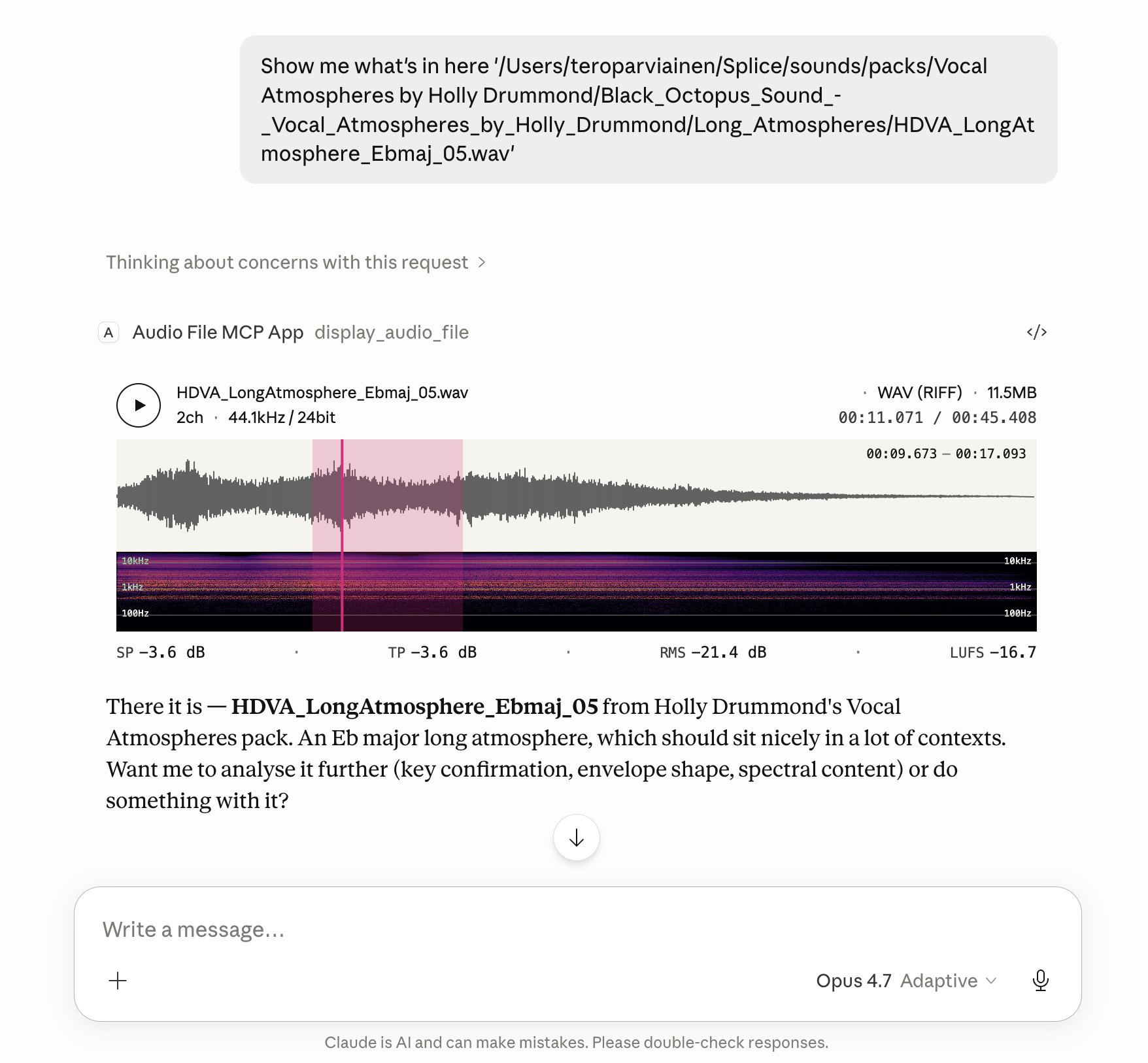
Renders an in-conversation UI with playback, metadata, loudness, a spectrogram, and an optional annotation-lane timeline.
File metadata, loudness statistics, the current playhead position, any selected region, and the annotation lanes active at the playhead are also exposed back to the model, so follow-up tasks can refer to what the user is actually hearing and looking at.
Features
- Global loudness metrics computed to EBU R128: Integrated Loudness (LUFS), Loudness Range (LRA), True Peak (dBTP), Sample Peak, and RMS.
- Instantaneous loudness metrics while playing or hovering: Momentary (400 ms) and Short-Term (3 s) LUFS, plus sample-peak and RMS at the cursor position.
- Waveform colouring by spectral centroid — each waveform slice is shaded along a tonal ramp using a low/mid/high band-energy ratio, so bright/dark regions read at a glance as bright/dark sound.
- Reassigned spectrogram with log-frequency bins (20 Hz floor) and an Inferno colour scale; time-frequency reassignment sharpens transients and tonal partials beyond what a plain STFT shows.
- Looping region selection. Drag on the timeline to mark a region; playback loops over it, and the region's start/end are passed back to the model alongside the file's loudness and playhead state.
- Annotation-lane timeline. Supply timeline annotations and the widget draws a stack of thin labelled lanes between the waveform and spectrogram, aligned to the audio's own timeline. Each lane carries time spans, an optional colour, and an optional envelope that fades span opacity along the lane. Hovering a span reveals its label, and the lanes active at the playhead — plus those starting, ending, or active within a selected region — are reported back to the model.
Install
The server runs locally over stdio. Every install path below configures the
same command: npx -y @counterpoint-studio/audio-file-mcp-app.
Claude Desktop
Easiest: grab the latest .mcpb from the
Releases page
and double-click it. Claude Desktop has Node bundled, so no extra runtime
is needed.
Or add the server by hand to claude_desktop_config.json:
{
  "mcpServers": {
    "audio-file": {
      "command": "npx",
      "args": ["-y", "@counterpoint-studio/audio-file-mcp-app"]
    }
  }
}
Codex Desktop
- Go to Settings -> MCP Servers
- Add Server
- Name:
audiofile-mcp-app - Command to launch:
npx - Arguments
-yand@counterpoint-studio/audio-file-mcp-app
VS Code (Copilot, Agent mode)

Or add to .vscode/mcp.json (workspace) or your user mcp.json:
{
  "servers": {
    "audio-file": {
      "type": "stdio",
      "command": "npx",
      "args": ["-y", "@counterpoint-studio/audio-file-mcp-app"]
    }
  }
}
Goose
Paste this deep link into your browser (Goose Desktop must be installed; the custom URI scheme can't be a real link in a GitHub README):
goose://extension?id=audio-file&name=Audio%20File%20MCP%20App&cmd=npx&arg=-y&arg=%40counterpoint-studio%2Faudio-file-mcp-app
Or run goose configure → Add Extension → Command-line Extension and
enter npx -y @counterpoint-studio/audio-file-mcp-app.
MCP Inspector
npx @modelcontextprotocol/inspector npx -y @counterpoint-studio/audio-file-mcp-app
Usage
Ask the host to show you a local audio file by its absolute path. For example:
"Show me
/Users/me/Music/track.wav"
The host calls the display_audio_file tool, which renders the in-app UI
with waveform, spectrogram, loudness metrics, and playback transport.
Annotation lanes
display_audio_file accepts an optional annotations object describing lanes
to draw on the timeline (or an annotationsPath pointing at a JSON file with
the same { "lanes": [...] } shape — handy for large payloads):
{
  "annotations": {
    "lanes": [
      {
        "label": "Delay tails",
        "color": "#e6007e",
        "spans": [{ "start": 8, "end": 24 }],
        "envelope": [
          { "time": 8, "value": 0 },
          { "time": 24, "value": 1 }
        ]
      }
    ]
  }
}
Times are in seconds on the audio's own timeline. label, color, and
envelope are optional; a lane with an envelope fades its span opacity along
the envelope curve, and uncoloured lanes use a light-accent fill. Overlapping
spans in a lane are truncated at the next span's start so rows never overlap.
The model can author annotations to point out sections, mark events, or
visualise an analysis it just ran.
Security model
- The server runs locally over stdio, with your user account's permissions.
display_audio_fileopens any file path it is given, by design, but only accepts files recognised as audio.- The player streams the file through a byte-range resource
(
audiofile-range://…). It returns bytes only of files recognised as audio; anything else, including a path that doesn't exist, gets the same "Not a recognised audio file" error. annotationsPathreads a JSON file you name, and only uses it if it matches the annotation format.- Tool errors are specific on purpose, so you can see what went wrong: they
can reveal whether a named path exists, is a regular file, or (for
annotationsPath) is valid JSON in the annotation format. They never include the file's contents. - What remains: a model that can call tools can open any audio file on your machine. Hosts that ask for approval before tool calls are the control for that.
To report a vulnerability, see SECURITY.md.
Client compatibility
Tested and known to work in:
- Claude Desktop — Chat, Cowork, and Code
- Codex Desktop
- Visual Studio Code
- Goose
- MCP Inspector
Development
pnpm install
pnpm run build:dsp   # emsdk required; see WASM-BUILD.md
pnpm run serve       # runs the server with tsx, no compile step
pnpm test
pnpm run build:dist produces the publishable layout under dist/
(dist/mcp-app.html + dist/server/).
Releasing
pnpm version <bump>          # bumps every version string (package.json, server.json,
                             # mcpb/manifest.json, src/server/app.ts) + commits + tags
git push && git push --tags
source /path/to/emsdk_env.sh # prepublishOnly rebuilds the DSP code with Emscripten
pnpm publish --access public # publishes to npm
gh workflow run publish-registry.yml -f tag=v<version> # MCP Registry, once npm shows the version
pnpm run build:mcpb          # produces dist/audio-file-mcp-app-<version>.mcpb
gh release create v<version> dist/*.mcpb # attaches the bundle to a GitHub release
npm can hold a new version in validating for up to an hour before it
appears. The registry checks the npm package, so run the registry workflow
only after npm view @counterpoint-studio/audio-file-mcp-app version shows
the new version.
The MCP Registry is published from GitHub Actions
(.github/workflows/publish-registry.yml) because the interactive
mcp-publisher login github only grants a personal namespace, not
io.github.counterpoint-studio/*.
License
ISC © Counterpoint Studio OÜ
Featured
Keeps your Mac awake while Claude Code, Codex or Cursor works. Lets it sleep when they are done.
Try free for 7 days →Block distracting apps from your iPhone permanently without a 3rd party app. Free and open source.
Block now (100% free) →Notes, actions and memory. Without a meeting bot. First month 100% off.
Download for free →belt cli automatically finds the best tools and skills for your agent. image, video, music, tts...
one prompt install →Free an open-source skills that make AI coding agents easier to understand, verify, and control.
Download for free →Connect your Claude agent to live crypto prices and trading routes via 1inch
Get the MCP →Categories
Registryactive
Package@counterpoint-studio/audio-file-mcp-app
TransportSTDIO
UpdatedMay 19, 2026


