
Summary
Wraps OWASP ZAP in an MCP interface so agents can run web security scans without writing glue scripts. Ships with Docker Compose for self-hosting, includes guided tools for spider, active scan, passive scan, API imports, and report generation, plus lower-level ZAP context and user controls when you need them. Uses API key or JWT auth by default, enforces rate limits and URL validation to block private networks, and stores scan history in Postgres for multi-replica deployments. Reach for this when you want Claude to orchestrate security testing workflows against authorized targets with operator guardrails, not full ZAP API access.


Keeps your Mac awake while Claude Code, Codex or Cursor works. Lets it sleep when they are done.
Try free for 7 days →

Block distracting apps from your iPhone permanently without a 3rd party app. Free and open source.
Block now (100% free) →
Notes, actions and memory. Without a meeting bot. First month 100% off.
Download for free →
belt cli automatically finds the best tools and skills for your agent. image, video, music, tts...
one prompt install →
Free an open-source skills that make AI coding agents easier to understand, verify, and control.
Download for free →

Connect your Claude agent to live crypto prices and trading routes via 1inch
Get the MCP →

MCP ZAP Server
Give AI agents a safe, self-hosted ZAP operator for guided web security scans, findings, reports, and production guardrails.



Note This project is not affiliated with or endorsed by the ZAP project. It is an independent implementation.
mcp-zap-server exposes ZAP through MCP over streamable HTTP so agentic tools can run operator-controlled security workflows without brittle glue scripts or unsafe scanner access.
Use it when you want:
- safe agentic scanning with guided defaults for spider, active scan, passive scan, API imports, findings, and reports
- operator control through API-key or JWT auth, tool scopes, runtime policy bundles, rate limits, and audit events
- self-hosted deployment with Docker Compose for local adoption and Helm for Kubernetes
- expert ZAP access when you intentionally need lower-level ZAP context, user, scan, and report controls
Full documentation: danieltse.org/mcp-zap-server
An experimental headless Apple Silicon package bundles Java and ZAP for HTTP workflows. It is a maintainer-built local preview; public downloads are not available, and supplied previews are unsigned. The private ChatGPT connection guide explains Secure MCP Tunnel prerequisites and access to a local scanner.
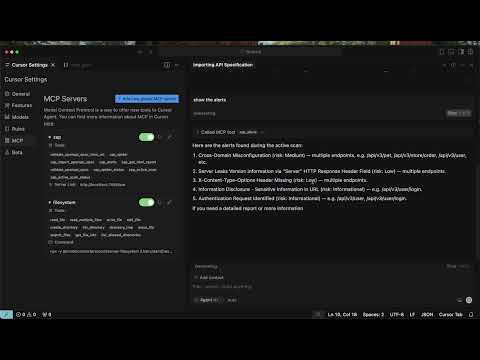
Watch the demo: browser demo or YouTube
Quick Start
Prerequisites:
- Docker 20.10+
- Docker Compose v2 or newer (
docker compose) with--waitand--wait-timeoutsupport - your own MCP client with Streamable HTTP and custom-header support
The default v0.16.0 image is published on Docker Hub and GHCR for Linux AMD64
and ARM64. See the release and upgrade guide
for the verified image digest and upgrade requirements. Existing settings and
selected versions are preserved; set IMAGE_TAG in .env deliberately when
upgrading an existing installation.
Prefer to ask Codex to handle setup? Manually install the optional MCP ZAP Connect plugin, then ask it to check prerequisites, start the Docker stack, configure your private MCP connection and verify status. The skill can help install missing prerequisites with your approval, then recheck and continue setup. Scanning is a separate request. The commands below remain available without the plugin.
For Cursor Desktop Free, follow the guided Cursor setup. Use a local Agent chat with available Cursor allowance to set up the scanner, check status, then request a demo crawl and report separately.
Claude Code local preview uses the same scanner and setup skill in a local Claude Code session.
For Claude Desktop Free, follow the download, setup and first-scan guide.
The macOS MCPB preview adds agent-callable setup tools around the same Docker
scripts and reuses existing installations. Choose a
scanner release that includes
the Desktop .mcpb, matching guide and checksum files. If those assets are not
listed, use the local build instructions.
This extension is separate from the Claude Code plugin.
git clone https://github.com/dtkmn/mcp-zap-server.git
cd mcp-zap-server

./bin/bootstrap-local.sh --start
This creates missing settings, preserves existing keys and workspace data, and starts a versioned release image. It reports ready after container health and authenticated MCP checks pass.
Use Self-Serve First Run for version selection, configuration, stopping/restarting, startup timeouts, and recovery. For source builds, use the contributor setup.
Connect your MCP client:
- MCP endpoint for host-side clients:
http://localhost:7456/mcp - Authentication: send
MCP_API_KEYfrom.envin theX-API-Keyheader - MCP client setup and authentication
The stack runs the MCP server, ZAP, and demo targets. Install and configure your preferred MCP client separately.
After connecting, try this first prompt:
Use the guided ZAP tools to crawl http://juice-shop:3000. Wait for the crawl
and passive analysis to finish, show a findings summary, generate an HTML
report, and read it back through MCP. Do not run an active scan.
Expect a completed crawl, a findings summary, and a report the client can
read. Use the container URL http://juice-shop:3000 for this scan; the host
preview http://localhost:3001 is for your browser. Finding counts vary;
a connection or scan error is not a clean result.
The default stack binds published ports to loopback. Review Quick Start Security before changing access or scan-target settings. Agent install notes cover setup permissions and standalone OCI use.
Discovery Metadata
This repository includes MCP Registry metadata in .mcp/server.json.
Version 0.16.0 is published as active/latest in the
MCP Registry
with versioned GHCR and Docker Hub images. Use metadata from the same version as
the image you deploy. The image includes the MCP server name expected by
registry and catalog tooling. The release and upgrade guide
records the publication evidence and immutable image digest.
Docker Compose remains the easiest installation path because the MCP server is designed to operate with a ZAP sidecar and explicit auth keys. The OCI package metadata is for advanced standalone installs where ZAP is already running and reachable from the MCP container.
What You Get
- Guided scans: intent-first tools for spider, active scan, passive scan, API imports, findings, reports, and scan history.
- Expert ZAP control: optional lower-level tools for advanced ZAP context, user, scan, and report workflows.
- Authentication: API key mode by default, optional JWT mode with refresh and revocation support.
- Runtime policy bundles: dry-run and enforcement support through
zap_policy_dry_runand policy-mode configuration. - Scan queue and history: queued active, traditional spider, AJAX Spider, and Client Spider jobs with claim-based recovery, durable Postgres state, and evidence export.
- Extension contracts: experimental policy, protection, evidence metadata, and extension metadata APIs with sample extension packaging.
- Operational guardrails: request body limits, rate limits, workspace quotas, tool-scope authorization, structured logs, metrics, and audit events.
- Deployment paths: local Docker Compose, published JVM container images, and Helm charts for Kubernetes.
In v0.13.0, Client Spider and browser authentication profiles support direct and queued browser crawling. See the Client Spider guide for setup, authenticated crawling, and reports. These features are not included in v0.12.0.
Version 0.16.0
Version v0.16.0 is released.
Linux AMD64 and ARM64 images are published on GHCR and Docker Hub, and MCP
Registry 0.16.0 is active/latest. The
release and upgrade guide records the
image digest and installation boundaries.
Automation Framework plans now validate whole-plan durations and required
engine/add-on capabilities, enforce filesystem containment for plans and
artifacts, and validate report output directories and filenames. Plan status
reports Successful as pending, no or unknown without treating a finish
timestamp as proof of a completed scan. Scanner-aware CI comparisons require matching
measured engine/add-on inventories, and target-scoped reports retain root alert
evidence from the requested origin.
The local Docker quick start uses an explicitly versioned release image and authenticated readiness checks. The Apple Silicon package and private ChatGPT connection are optional preview paths; follow their guides for installation and network requirements.
Version 0.15.0
See GitHub Releases for the latest published version and its publication date. Version-specific documentation describes that version's behavior; it does not announce image availability. Deploy only after the corresponding release workflow succeeds and the versioned image is available in your registry.
Version v0.15.0 introduces optional OpenAPI imports from client-supplied content
and complete paged report retrieval. Target-scoped reports remove unrelated
shared-session data, HTTP crawl depth is configured independently from child
count, and health checks reapply mandatory outbound settings when ZAP starts
late or its engine is replaced. Review the storage and configuration requirements
before enabling content import or upgrading an existing deployment.
It also includes a CloudFormation EKS starter and a walkthrough for deploying the Helm chart with JWT authentication, persistent report storage and network policies.
Version 0.14.0
Version v0.14.0 hardens API-key configuration, JWT revocation and refresh,
Automation Framework plans, OpenAPI target overrides, HTTP metrics, and Helm
ingress policy. It also adopts Gateway Core and the Spring WebFlux adapter
0.11.0, including shared governance audits and active-tool validation.
Read the upgrade notes before deploying: the legacy API-key property is removed,
JWT backend failures fail closed, and accepted automation inputs and audit fields
have changed. Use published release images when upgrading.
Security Defaults
The default posture is intentionally conservative:
api-keymode is the base runtime default.nonemode is for explicit local dev/test only.- Docker Compose binds published ports to loopback by default.
- The Java 25 JVM image uses a digest-pinned distroless runtime with no shell or package manager; debug it through logs, metrics, and external diagnostic containers rather than installing tools into the application container.
- URL validation blocks localhost, private networks, and link-local targets by default.
- Target authentication is optional and profiles default to an empty list. When enabled, guided auth binds an exact server-side credential reference and login settings to one approved origin; callers provide only
profileIdandtargetUrl. - Public auth exchange endpoints are rate-limited.
- MCP request bodies have a hard early size cap.
For a first private AWS deployment without Kubernetes, use AWS EC2 with Docker Compose and its standalone example.
For Kubernetes, use the EKS infrastructure starter to create a dedicated evaluation cluster in an existing VPC, then deploy with the existing Helm chart. Follow the walkthrough for network configuration, JWT authentication, persistent storage and deployment checks.
Production and shared deployments should review:
- Security Modes
- JWT Authentication
- Optional Target Form-Login
- Authenticated Scanning Reference
- Abuse Protection
- Production Readiness Checklist
- Security Policy
Architecture
flowchart LR
  Client["Your MCP Client"] -->|"MCP over Streamable HTTP"| MCP["MCP ZAP Server"]
  MCP -->|"ZAP API"| ZAP["ZAP"]
  ZAP -->|"scan"| Target["Authorized target app"]
  MCP -->|"reports / findings / history"| Evidence["Evidence + reports"]
For multi-replica queueing, durable Postgres state, claim recovery, and ingress affinity, use the operations docs instead of this README:
- Queue Coordinator and Worker Claims
- Multi-Replica Deployment Requirements
- Scan History Ledger
- Helm Deployment
Extension Model
The extension API exposes selected contracts for policy, protection, evidence and metadata integrations:
mcp-zap-extension-apipackages selected policy, protection, evidence, and metadata contracts without gateway runtime internals.- How extensions work explains the core versus extension boundary.
- Build your own extension shows the target standalone repository shape.
- Extension API release policy explains publication stages and compatibility gates.
- Standalone sample extension shows how a separate project depends on the API artifact.
Extensions do not add runtime multi-engine support. Additional scanner engines require their own adapters and explicit capability boundaries.
Documentation Map
Start here:
- Full documentation
- Self-Serve First Run
- OSS Extension Model
- MCP Access Authentication
- MCP Client Authentication
- Optional Target Form-Login
- Tool Surfaces
Scanning:
- MCP Client Scan To Evidence
- Scan Execution Modes
- Seeded API Gate Playbook
- API Schema Imports
- AJAX Spider
- Client Spider (v0.13.0)
- Findings and Reports
Operations:
Open Source Core And Extension Model
mcp-zap-server is the Apache-2.0-licensed open-source core. It is intended to be useful on its own for self-hosted MCP and ZAP workflows.
Private or enterprise capabilities may be built as separate extensions around this core. Those extensions are not required to run the OSS project, and enterprise implementation code is not shipped in this repository.
The boundary is intentional:
- this repository remains the public OSS distribution
- extension points should be documented and kept stable where practical
- private extensions must not weaken the security, licensing, or usability of the OSS core
- security scanning and open-source program entitlements for this repository apply only to this public project
Contributing And Support
If this project saves you time or becomes part of your security workflow, you can sponsor the maintainer to support ongoing maintenance.
Agentic Lab offers optional paid support for teams adopting the public core in production. Commercial support is separate from the Apache-2.0-licensed OSS distribution, and the public core should remain usable without private extensions or paid services.
License
Apache License 2.0. Copyright 2025-2026 Daniel Tse. See LICENSE.
Featured
Keeps your Mac awake while Claude Code, Codex or Cursor works. Lets it sleep when they are done.
Try free for 7 days →Block distracting apps from your iPhone permanently without a 3rd party app. Free and open source.
Block now (100% free) →Notes, actions and memory. Without a meeting bot. First month 100% off.
Download for free →belt cli automatically finds the best tools and skills for your agent. image, video, music, tts...
one prompt install →Free an open-source skills that make AI coding agents easier to understand, verify, and control.
Download for free →Connect your Claude agent to live crypto prices and trading routes via 1inch
Get the MCP →Configuration
ZAP_API_URLdefault: mcp-zap-zapHostname or URL of a separately running OWASP ZAP daemon reachable from this container.
ZAP_API_PORTdefault: 8090OWASP ZAP API port.
ZAP_API_KEY*secretAPI key configured on the OWASP ZAP daemon.
MCP_API_KEY*secretAPI key clients must send as X-API-Key.
MCP_SERVER_TOOLS_SURFACEdefault: guidedTool surface to expose. Use guided for the safer default workflow, or expert when clients need raw ZAP tools such as zap_report_read.
MCP_SECURITY_MODEMCP_SECURITY_ENABLEDMCP_SECURITY_ALLOW_PLACEHOLDER_API_KEYCategories
Registryactive
Packageghcr.io/dtkmn/mcp-zap-server:v0.8.0
TransportHTTP
AuthRequired
UpdatedMay 10, 2026


