
Summary
Bridges GenieACS TR-069 auto-configuration servers to LLMs through MCP, exposing both read-only resources (device details, presets, provisions, faults) and write operations (reboot, firmware downloads, parameter get/set, tagging, connection requests). Written in Go with stdio and HTTP transports. You can query device lists, manage presets and provisions, search CPE fleets, and handle task lifecycles all through natural language. Tested with MCP Inspector but still gathering real-world LLM client feedback. Ships as an npm package that downloads pre-built binaries or runs in Docker Compose alongside the full GenieACS stack. Part of a larger GenieACS ecosystem that includes Ansible collections, Home Assistant integrations, and n8n workflow nodes.


Keeps your Mac awake while Claude Code, Codex or Cursor works. Lets it sleep when they are done.
Try free for 7 days →

Block distracting apps from your iPhone permanently without a 3rd party app. Free and open source.
Block now (100% free) →
Notes, actions and memory. Without a meeting bot. First month 100% off.
Download for free →
belt cli automatically finds the best tools and skills for your agent. image, video, music, tts...
one prompt install →
Free an open-source skills that make AI coding agents easier to understand, verify, and control.
Download for free →

Connect your Claude agent to live crypto prices and trading routes via 1inch
Get the MCP →







genieacs-mcp is an MCP server for GenieACS, the open-source TR-069 ACS that manages routers, ONTs and other CPE devices. Add it to Claude Desktop, Cursor or any other MCP client and ask in plain words: which devices stopped informing last night, what firmware serial 000003 runs, reboot the ones tagged pilot. The assistant reads and acts through your GenieACS NBI with 7 resources and 12 tools; one Go binary, no database of its own.
Features
- Find devices the way you would ask a colleague: by tag, model, firmware, last inform, or any TR-069 parameter (
search_devicestakes a MongoDB-style filter). - Read a device's full parameter tree, its tasks and its faults, plus the presets, provisions and files on the ACS, as resources (
genieacs://device/{id},genieacs://devices/list, ...). - Reboot a device, push firmware to it, refresh or set a parameter, or wake it with a connection request, from a chat.
- Tag devices, create or delete presets and provisions, and delete or retry tasks, so the assistant can fix what it finds.
- Every tool description says what it does, its limits and an example, so clients pick the right one without a prompt from you.
- Read versus act:
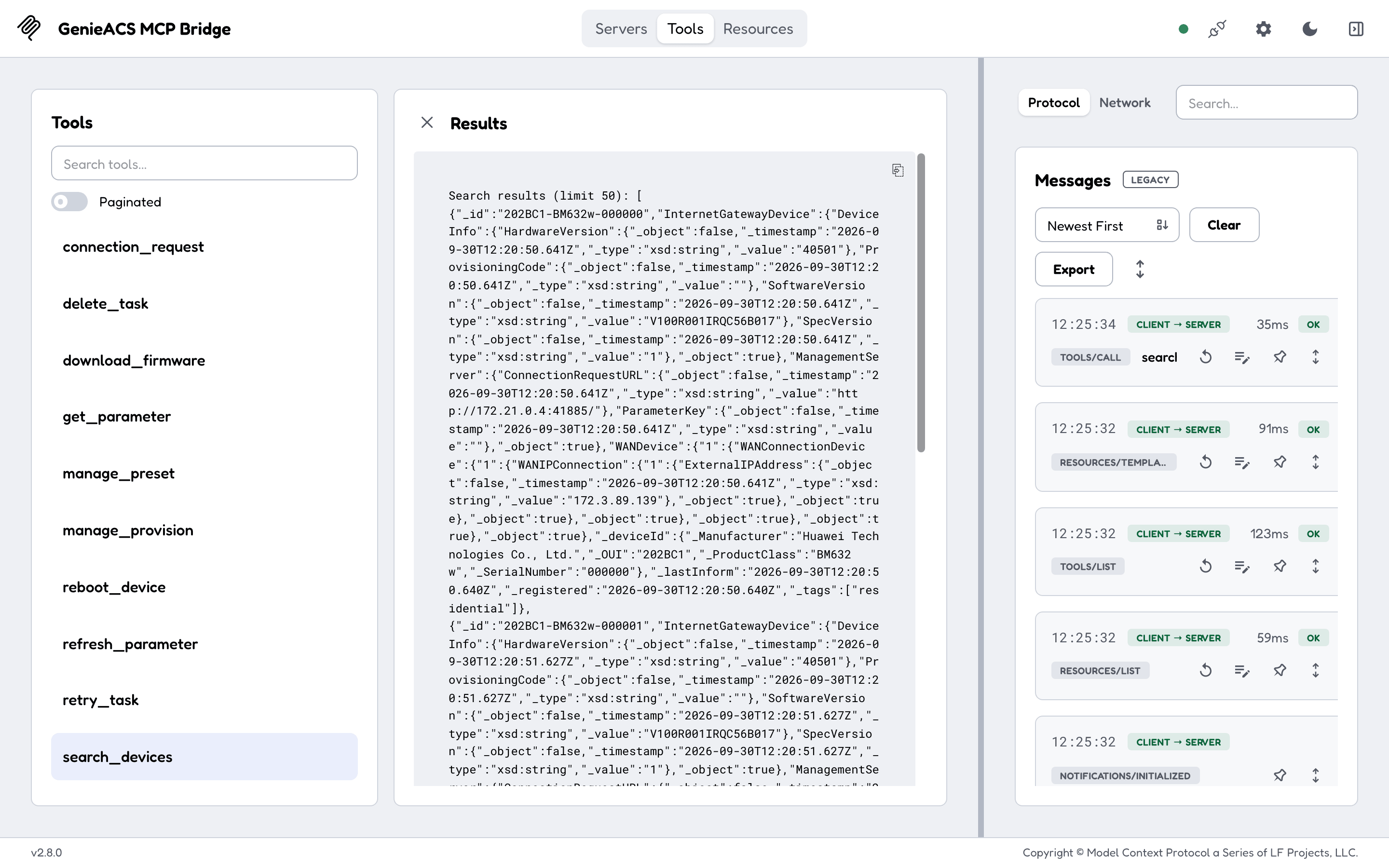
search_devices,get_parameterand the seven resources only read; the other ten tools queue a task on a device or change the ACS. - No read-only mode: point it at an ACS you are willing to let an assistant act on, and keep your client's tool-approval prompts on.
- Safe on a laptop: the HTTP transport listens on loopback only unless you set an address and a bearer token, and checks
HostandOriginagainst DNS rebinding. - One static Go binary for Linux, macOS and Windows on amd64 and arm64, also as an npm package (
npx genieacs-mcp) and a Docker image.
Quick start
You need a GenieACS whose NBI (port 7557) this machine can reach; without one, the family's demo stack gives you an ACS with a simulated router in about a minute:
curl -fsSLO https://raw.githubusercontent.com/GeiserX/genieacs-container/main/docker-compose.yml
docker compose --profile testing up -d      # GenieACS + MongoDB + one simulated CPE, NBI on localhost:7557
Then add the server to a client that reads an mcpServers block (Claude Desktop, Cursor, Claude Code; in VS Code the .vscode/mcp.json key is servers):
{
  "mcpServers": {
    "genieacs": {
      "command": "npx",
      "args": ["-y", "genieacs-mcp"],
      "env": { "ACS_URL": "http://localhost:7557" }
    }
  }
}
It worked when you ask "which devices does the ACS know about?" and the assistant answers with device ids such as 202BC1-BM632w-000000 (the demo stack) or your own. Docker, the HTTP transport and a local build are in Getting started.
Documentation
The full documentation is at geiserx.github.io/genieacs-mcp.
- Getting started: npm, Docker Compose, local build, and what the first exchange looks like
- Configuration: every environment variable, the HTTP transport's security model, client config for stdio and HTTP
- Usage: the 7 resources and 12 tools with their arguments, which ones act on devices, example prompts
- Development: tests, trying the server with MCP Inspector, contributing
- Related projects: the GenieACS family, other MCP servers, where this server is listed
Related projects
Listed in the official MCP Registry as io.github.GeiserX/genieacs-mcp. Part of the GenieACS family: genieacs-container (the ACS itself, Docker and Helm, with this server as a compose profile), genieacs-sim-container, genieacs-ansible, genieacs-ha, genieacs-services, and n8n-nodes-genieacs (archived).
License
Featured
Keeps your Mac awake while Claude Code, Codex or Cursor works. Lets it sleep when they are done.
Try free for 7 days →Block distracting apps from your iPhone permanently without a 3rd party app. Free and open source.
Block now (100% free) →Notes, actions and memory. Without a meeting bot. First month 100% off.
Download for free →belt cli automatically finds the best tools and skills for your agent. image, video, music, tts...
one prompt install →Free an open-source skills that make AI coding agents easier to understand, verify, and control.
Download for free →Connect your Claude agent to live crypto prices and trading routes via 1inch
Get the MCP →Configuration
ACS_URL*GenieACS NBI API URL (e.g. http://genieacs:7557)
ACS_USERGenieACS NBI basic-auth username
ACS_PASSsecretGenieACS NBI basic-auth password