
Summary
Connects Claude to the MeltFlex AI interior design API for photorealistic room transformations. Exposes two core operations: redesigning spaces with eight modes (restyle, virtual staging, declutter, exterior, garden, wall texture, floor restyle, seasonal) and placing specific furniture products into scenes using reference images. Each generation costs 10 credits billed to your MeltFlex account. Requires an active paid subscription and API key from meltflexai.com. Useful when you need to transform real room photos into styled renders, furnish empty spaces, or visualize specific furniture pieces in context without leaving your Claude workflow.



Fastest browser for AI agents to run web automation tasks, always free.
Download Free life-time →


belt cli automatically finds the best tools and skills for your agent. image, video, music, tts...
one prompt install →
Free an open-source skills that make AI coding agents easier to understand, verify, and control.
Download for free →

Connect your Claude agent to live crypto prices and trading routes via 1inch
Get the MCP →
Notes, actions and memory. Without a meeting bot. First month 100% off.
Download for free →MeltFlex AI Skills


AI agent skills for photorealistic interior and exterior design and 3D via MeltFlex AI — restyle rooms, place real furniture, swap floors, walls, stairs, doors and windows, redesign kitchens, bathrooms, facades and gardens, and turn 3D drafts into photos, all from a single photo. Then go further: cinematic video walkthroughs, 2D floorplan → 3D model or rendered 3D picture, furniture photo → GLB 3D model, and photo → explorable 3D world. Works with Claude Code,  Hermes, Cursor, Codex, Cline, and other AI agents that load Markdown-based skills or speak MCP.
Each user authenticates with their own MeltFlex API key; every generation is billed to their account credits. The skills call the public MeltFlex API directly, so there's nothing extra to install.
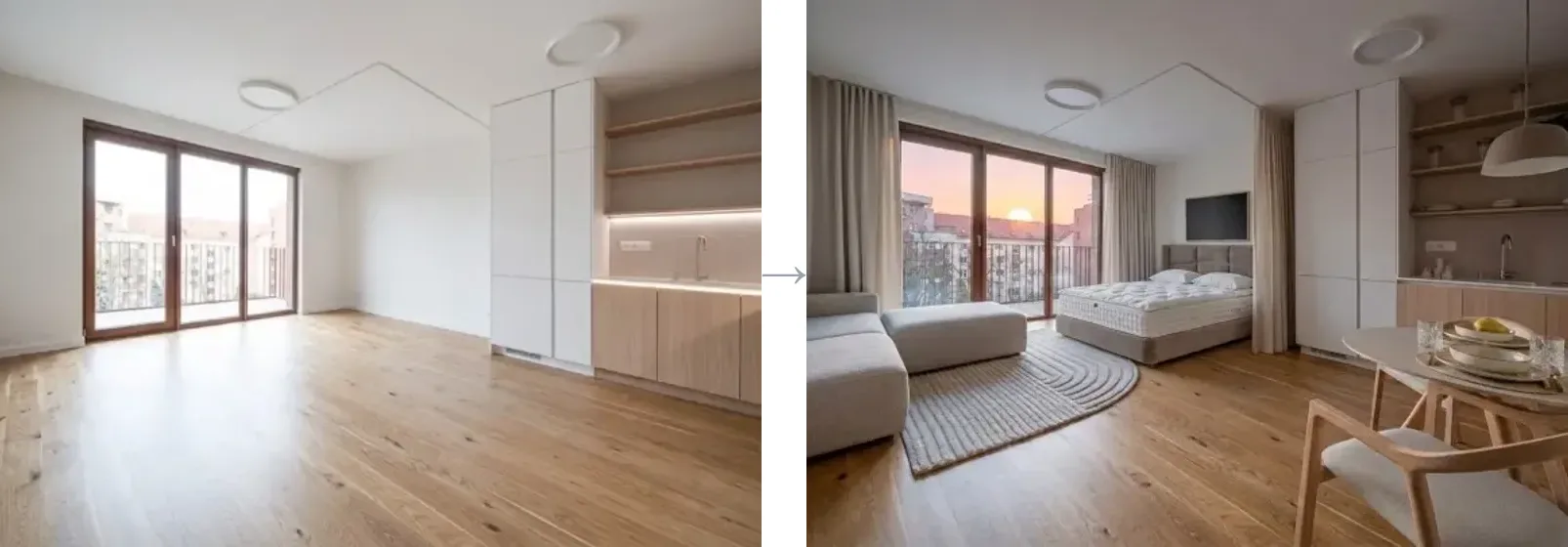
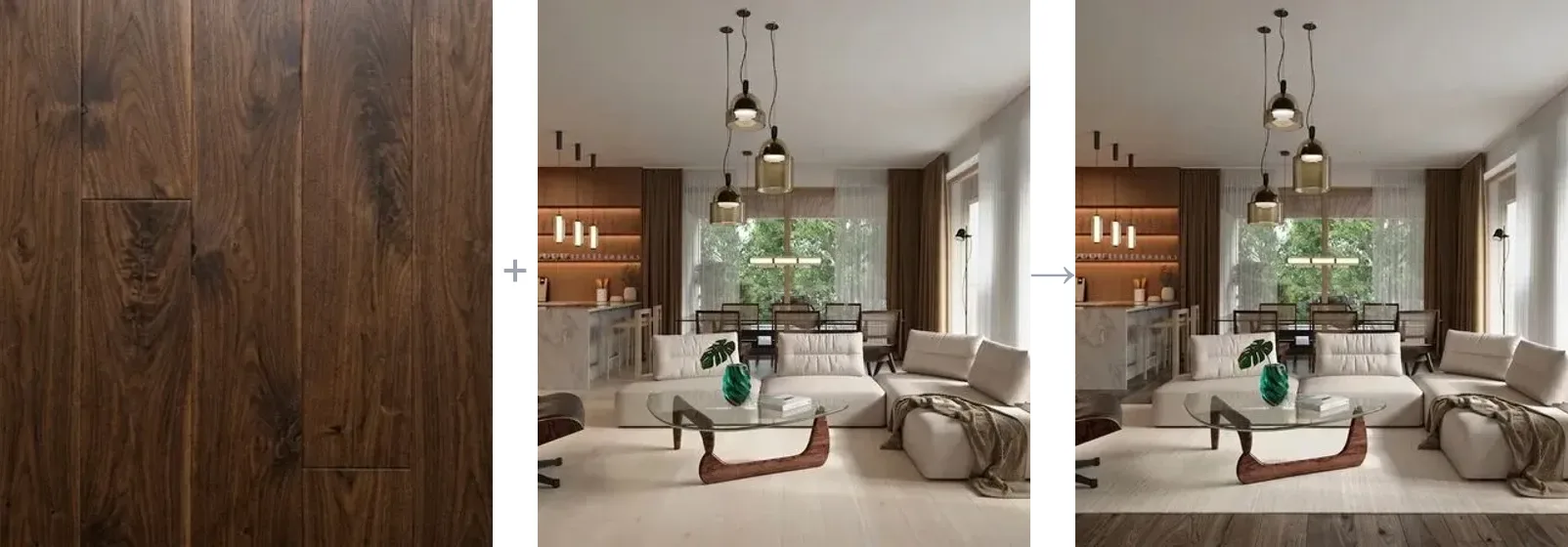
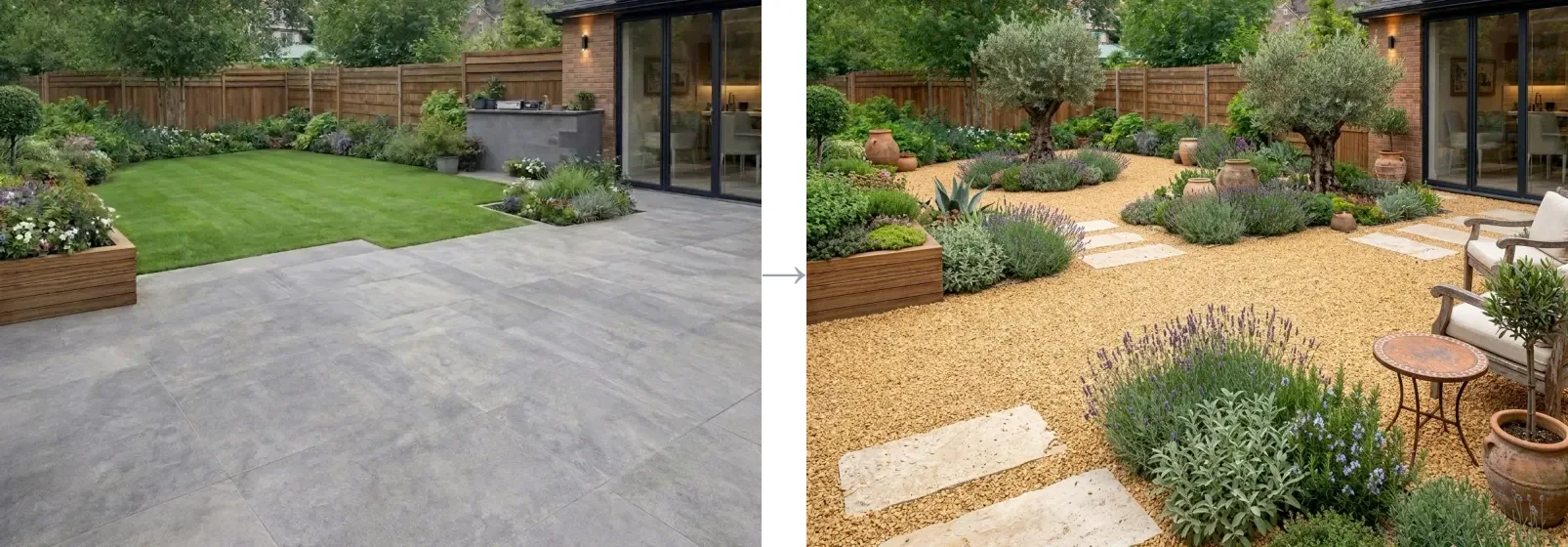
Interior redesign · floor restyle from a material · garden design — a few of the 16 image modes, all from one photo.


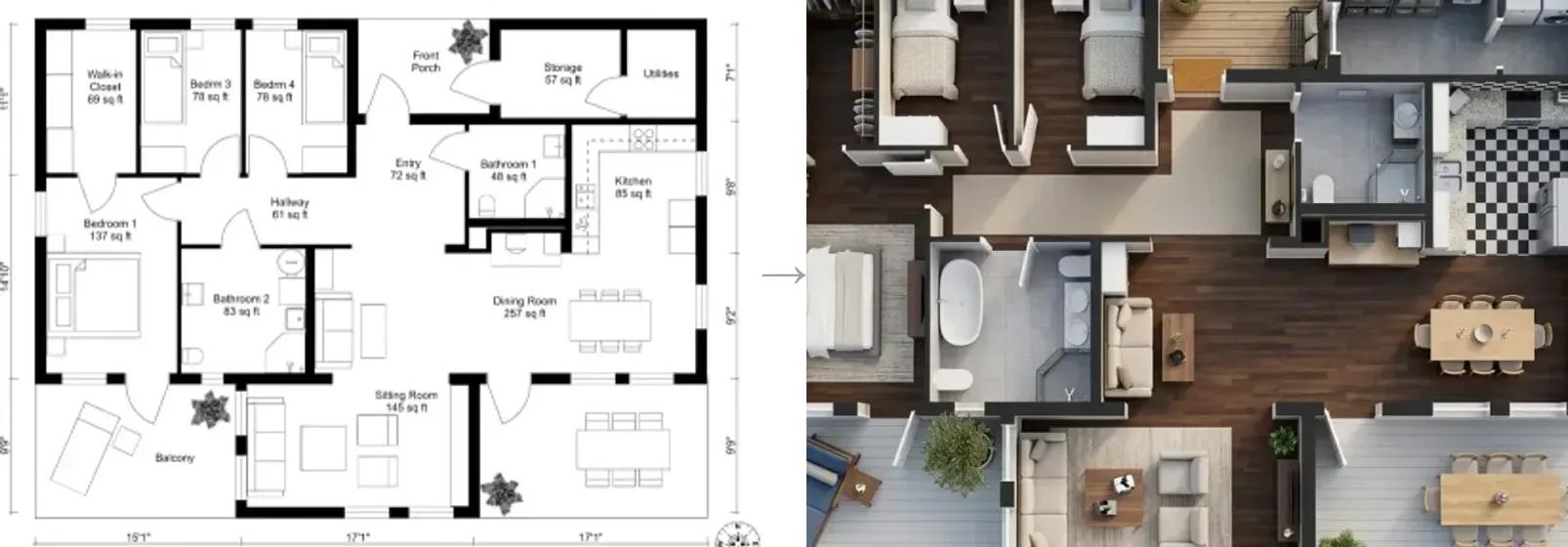
Furniture photo → 3D model · room render → explorable 3D world · 2D floorplan → 3D model. Real outputs of /api/v1/furniture-3d, /api/v1/world and /api/v1/floorplan-to-3d.
Install
Pick one. Each method sets up the skills for your agent.
npx skills — recommended, cross-agent
npx skills add MeltFlexDevs/skills
GitHub CLI (v2.90+)
gh skill install MeltFlexDevs/skills
Claude Code marketplace
Inside Claude Code:
/plugin marketplace add MeltFlexDevs/skills
/plugin install meltflex@meltflex
Setup script
Universal fallback:
git clone --depth 1 https://github.com/MeltFlexDevs/skills.git
cd skills
./setup
More options in INSTALL.md. Agent-driven install (paste into your agent): INSTALL_FOR_AGENTS.md. Cline and other MCP-settings agents: llms-install.md.
Authenticate
You need an active subscription (any paid plan) — without one the key won't work. After subscribing at https://www.meltflexai.com/settings, open account settings → API Key under Profile, then Generate API Key (shown once — copy it):
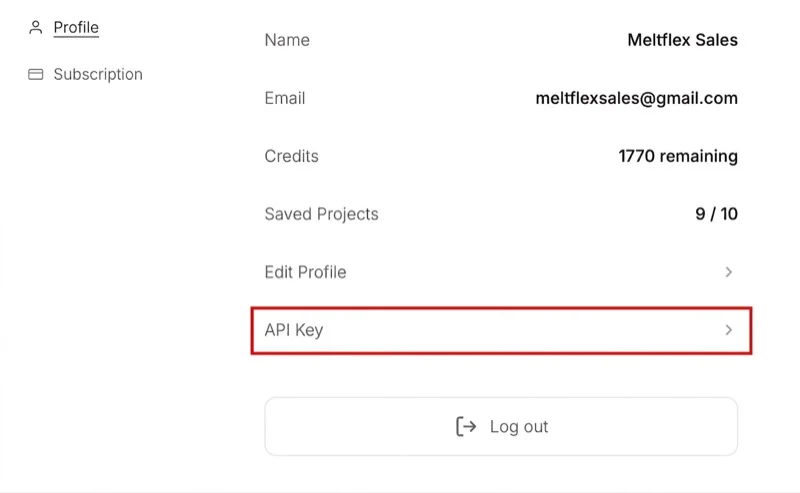
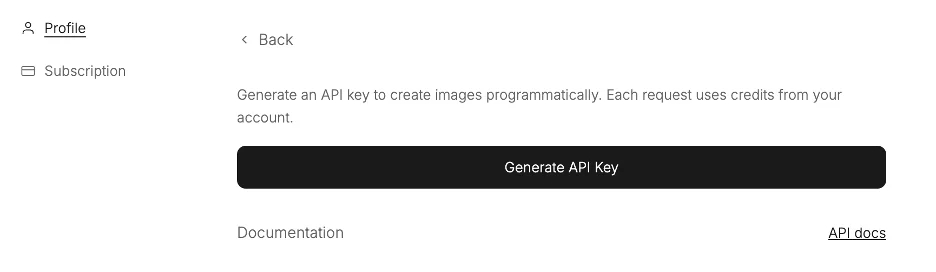
Then expose it:
export MELTFLEX_API_KEY="mf_sk_xxxxxxxxxxxx"
If you use the MCP server / CLI, you can skip the copy-paste and sign in from the browser instead: npx -y meltflex-mcp auth login opens https://www.meltflexai.com/cli/authorize, mints a key from your signed-in session and stores it in ~/.meltflex/config.json (chmod 600).
Skills
| Skill | Invoke | Description |
|---|---|---|
| meltflex-design | /meltflex:design | Restyle a room, facade or garden; swap floors, walls, stairs, doors or windows; redesign a kitchen or bathroom; boost a layout; turn a 3D draft into a photo. 16 prompt-driven modes with quality levels, region editing and batches, plus video walkthroughs via the API. |
| meltflex-furniture | /meltflex:furniture | Place specific real furniture/decor products into a room photo, matching their exact colors, materials, and proportions (up to 10 reference items). |
| meltflex-3d | /meltflex:3d | 3D output: a furniture photo → GLB model, a 2D floorplan → GLB model or rendered 3D picture, a room photo → explorable 3D world (splat + hosted viewer). Handles the long-build polling. |
| meltflex-embed | /meltflex:embed | Put the design tool on your own website as an iframe: visitors design their room, or place your shop's products in it, without an account. Installs the code in HTML, React, Vue, Shopify or WordPress and fixes a blank frame. No API key. |
Image skills are self-contained: a room photo in, a photorealistic redesign out, 10 credits per image (auto-refunded on failure).
Image modes
meltflex-design — 16 modes, each the same POST /api/v1/generate endpoint with a mode-tuned prompt:
| Mode | What it's for |
|---|---|
restyle | Change a room's style or theme |
virtual_staging | Furnish an empty room |
layout_boost | Rearrange existing furniture into a better layout |
declutter | Clean up / depersonalize a space |
exterior | Building facade / house exterior |
garden | Landscaping and outdoor design |
wall_texture | Change wall material or finish |
floor_restyle | Change the flooring |
stairs | Restyle a staircase in place |
doors | Swap interior doors |
windows | Swap window frames / glazing |
kitchen | Whole kitchen redesign |
bathroom | Whole bathroom redesign |
photo_to_render | Turn a 3D draft / SketchUp shot into a photo |
seasonal | Time-of-day / seasonal / lighting variation |
region_edit | Change only one area — paint it solid red, send mask: true |
Optional fields on every image call: resolution (512 / 1K / 2K), designLevel (lite −2 cr · quick · pro +5 cr), variations (1–3 per call, charged per image), up to 10 referenceImageUrls.
Video & 3D
Same key, five more outputs. The three 3D builds can take minutes; they answer HTTP 202 + a poll URL when they outlive the request, and /meltflex:3d shows how to poll.
| Output | Endpoint | Credits | Time | MCP tool · CLI |
|---|---|---|---|---|
| Cinematic walkthrough video (MP4, Veo 3.1) | POST /api/v1/video | 100 (4s) / 150 (8s) | ~1 min | generate_video · meltflex video |
| Floorplan → rendered 3D picture (PNG) | POST /api/v1/floorplan-to-3d output: "render" | 10 | ~20 s | REST only |
| Floorplan → GLB 3D model | POST /api/v1/floorplan-to-3d output: "model" | 100 | ~3 min | floorplan_to_3d · meltflex floorplan |
| Furniture photo → GLB 3D model (+ USDZ/FBX/OBJ) | POST /api/v1/furniture-3d | 75 | 2–3 min | furniture_to_3d · meltflex furniture |
| Photo → explorable 3D world (.spz + viewer link) | POST /api/v1/world | 30 (draft) / 200 (hd) | ~1 / ~5 min | generate_world · meltflex world |
Full reference with response bodies and three.js / Spark loader snippets: https://www.meltflexai.com/api.
Quick Reference
| What you want | Skill | Note |
|---|---|---|
| Restyle a room from a photo | meltflex-design | Pick a mode, write a specific prompt |
| Furnish an empty room | meltflex-design | virtual_staging mode |
| Place a specific sofa/bed/table | meltflex-furniture | Pass product images as references |
| Redesign a house exterior or garden | meltflex-design | exterior / garden mode |
| Swap flooring or wall finish | meltflex-design | floor_restyle / wall_texture (attach the material as a reference) |
| Restyle stairs, doors or windows | meltflex-design | stairs / doors / windows mode |
| Redesign a kitchen or bathroom | meltflex-design | kitchen / bathroom mode |
| Turn a 3D draft into a photo | meltflex-design | photo_to_render mode |
| Change only one marked area | meltflex-design | region_edit — paint it red, mask: true |
| Sharper output / several options | meltflex-design | resolution: "2K", designLevel: "pro", variations: 3 |
| Cinematic video walkthrough | meltflex-design | POST /api/v1/video (100–150 credits) |
| 3D model of a furniture piece | meltflex-3d | POST /api/v1/furniture-3d (75 credits) |
| 2D floorplan → 3D model / 3D picture | meltflex-3d | POST /api/v1/floorplan-to-3d (100 / 10 credits) |
| Walk through a room in 3D | meltflex-3d | POST /api/v1/world (30 draft / 200 hd) |
| Check credit balance | — | meltflex credits (CLI) or the MCP check_credits tool |
Embed on your website
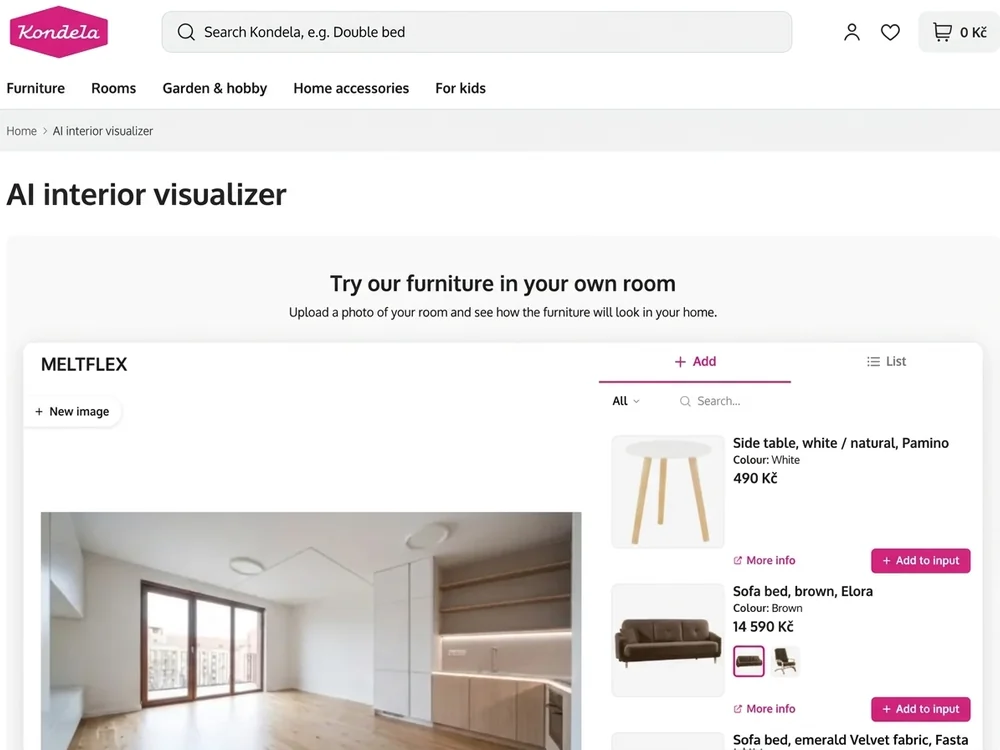
Live on the Kondela furniture shop: shoppers place its own products in a photo of their room, on the shop's own page.
No API key and no backend: build an embed in the Website Embed Builder (your domain, logo, colour, language, and for shops your product feed), then paste one iframe. Visitors design their room on your page without an account; each design uses 10 credits from your account. The code unlocks on an Enterprise plan.
<iframe
  src="https://widget.meltflexai.com/YOUR_EMBED_ID"
  title="AI Interior Design by MeltFlex"
  width="100%"
  height="720"
  style="border:0;border-radius:12px;max-width:100%;"
  allow="clipboard-write"
  loading="lazy"
></iframe>
On a shop's product page, add ?product=<product page address> and the tool opens with that product. /meltflex:embed installs the code in your project (HTML, React / Next.js, Vue, Shopify, WordPress), sets the frame-src rule if your site has a Content Security Policy, and walks through a blank frame. Guide: https://www.meltflexai.com/api#embed.
Use with the MCP server
Agents that prefer tool calls over scripted API calls can run the meltflex-mcp server (npm, stdio). It exposes six tools — generate_interior, generate_video, floorplan_to_3d, furniture_to_3d, generate_world, check_credits — and handles polling and saving files to disk.
npx -y meltflex-mcp auth login              # or: npx -y meltflex-mcp auth mf_sk_xxxxxxxx
claude mcp add meltflex -- npx -y meltflex-mcp
Any MCP client works with the same shape (command: npx, args: ["-y", "meltflex-mcp"], optional env.MELTFLEX_API_KEY). The same package is a terminal CLI: meltflex generate | video | floorplan | furniture | world | credits. A Claude Desktop extension bundle lives in mcpb/.
Hermes
Hermes (Nous Research) speaks MCP, so it runs MeltFlex through the same server.
From the catalog (once merged into the Hermes catalog):
hermes mcp install meltflex
Manually — sign in once, then add the server to ~/.hermes/config.yaml:
npx -y meltflex-mcp auth login
mcp_servers:
  meltflex:
    command: npx
    args: ["-y", "meltflex-mcp"]
Start hermes chat (or run /reload-mcp in a session) to load the six MeltFlex tools. Full guide: https://www.meltflexai.com/mcp.
Going further
- API docs: https://www.meltflexai.com/api
- CLI: https://www.meltflexai.com/cli —
meltflex generatefrom your terminal - MCP server: https://www.meltflexai.com/mcp —
npx -y meltflex-mcp - Cookbook: COOKBOOK.md · Changelog: CHANGELOG.md
Security
The skills never contain a key. Each user supplies their own mf_sk_ key via MELTFLEX_API_KEY; generations spend that user's own credits. Credits, auth, and rate limits are all enforced server-side. Never commit your key — revoke it anytime in settings.
License
MIT — see LICENSE. Contributions welcome — see CONTRIBUTING.md.
Featured
Fastest browser for AI agents to run web automation tasks, always free.
Download Free life-time →belt cli automatically finds the best tools and skills for your agent. image, video, music, tts...
one prompt install →Free an open-source skills that make AI coding agents easier to understand, verify, and control.
Download for free →Connect your Claude agent to live crypto prices and trading routes via 1inch
Get the MCP →Notes, actions and memory. Without a meeting bot. First month 100% off.
Download for free →Configuration
MELTFLEX_API_KEY*secretYour MeltFlex API key (mf_sk_...). Requires an active MeltFlex subscription — generate a key at https://www.meltflexai.com/settings.
Categories
Registryactive
Packagemeltflex-mcp
TransportSTDIO
AuthRequired
UpdatedJun 3, 2026


