
Summary
A comprehensive OSINT toolkit that exposes 16 intelligence gathering tools through the Model Context Protocol. It wraps external binaries like holehe, sherlock, sublist3r, and phoneinfoga alongside direct API integrations for Shodan, VirusTotal, Censys, AbuseIPDB, HaveIBeenPwned, and GitHub. The agent chains tools together based on findings, so investigating an email might trigger breach lookups, username enumeration across 300+ platforms, and paste dump searches in sequence. Reports auto-save to PDF and Markdown. All tools run as real system calls, meaning Claude gets actual command output rather than LLM-generated approximations. You'll need API keys for the premium sources and the external binaries installed in your PATH. Best suited for security researchers doing reconnaissance workflows where you want Claude to orchestrate the toolchain rather than running commands manually.


Keeps your Mac awake while Claude Code, Codex or Cursor works. Lets it sleep when they are done.
Try free for 7 days →

Block distracting apps from your iPhone permanently without a 3rd party app. Free and open source.
Block now (100% free) →
Notes, actions and memory. Without a meeting bot. First month 100% off.
Download for free →
belt cli automatically finds the best tools and skills for your agent. image, video, music, tts...
one prompt install →
Free an open-source skills that make AI coding agents easier to understand, verify, and control.
Download for free →

Connect your Claude agent to live crypto prices and trading routes via 1inch
Get the MCP →mcp-name: io.github.OpenOSINT/openosint
OpenOSINT
An OSINT (Open Source Intelligence) agent for security researchers and analysts: 21 investigation tools behind a natural-language interface, plus an MCP (Model Context Protocol) server so any MCP-compatible AI client can drive them directly.
Use it as a REPL, CLI, MCP server, or browser Web UI.
Tool results come from real executions, and every finding is shown with the tool call that produced it. AI summaries are leads to verify, not proof.








Hosted version — OpenOSINT Monitor. Weekly external checks of your domain's email authentication (SPF/DKIM/DMARC), TLS, security headers and lookalike domains. Ownership-verified; free for one domain. Prefer to run it yourself? Everything below is free and MIT-licensed.
Self-host (free, MIT)
pip install openosint
# Interactive AI REPL (default)
openosint

# Web interface
openosint web

# Direct tool (no AI)
openosint email target@example.com

Try the live demo → — bring your own Anthropic / OpenRouter / Ollama key, no signup.
Usage
Start the REPL and investigate any target — the agent decides which tools to run and chains them on findings:
openosint > investigate target@example.com

  -> generate_dorks('target@example.com')
  -> search_breach('target@example.com')
  Found in 2 breaches: LinkedIn (2016), Adobe (2013)

  -> search_github('johndoe99')   <- pivoted from breach findings
  Found: profile, 14 repos, commit-discovered emails

  Report saved -> reports/2026-05-11_14-32-11_report.md
Features
| Capability | Details |
|---|---|
| AI tool chaining | The agent selects and chains tools based on findings; describe the target in plain language |
| 21 modular tools | Email, username, breach, WHOIS, RDAP, IP, subdomain, dorks, paste, phone, Shodan, VirusTotal, Censys, IP2Location, AbuseIPDB, GitHub, DNS, GDELT news geo, live dork search, URL scraping, SERP footprint |
| Three AI backends | Anthropic Claude (default), local Ollama, or any OpenAI-compatible endpoint (LiteLLM, vLLM, LM Studio, ...) |
| Native MCP server | Passive tools (20) exposed by default, all 25 with --allow-active (Passive by default); runs with uvx, no separate install |
| Parallel execution | --parallel runs complementary tools concurrently via asyncio.gather() |
| Reports | PDF + Markdown auto-saved after every investigation (reportlab optional) |
| Session history | All REPL sessions saved to ~/.openosint/history/; browse with openosint history |
| Web UI | Browser-based AI chat with streaming output, tool cards, light/dark theme |
 Investigation results land live on the globe — click a point to pivot. Watch the sharper MP4.
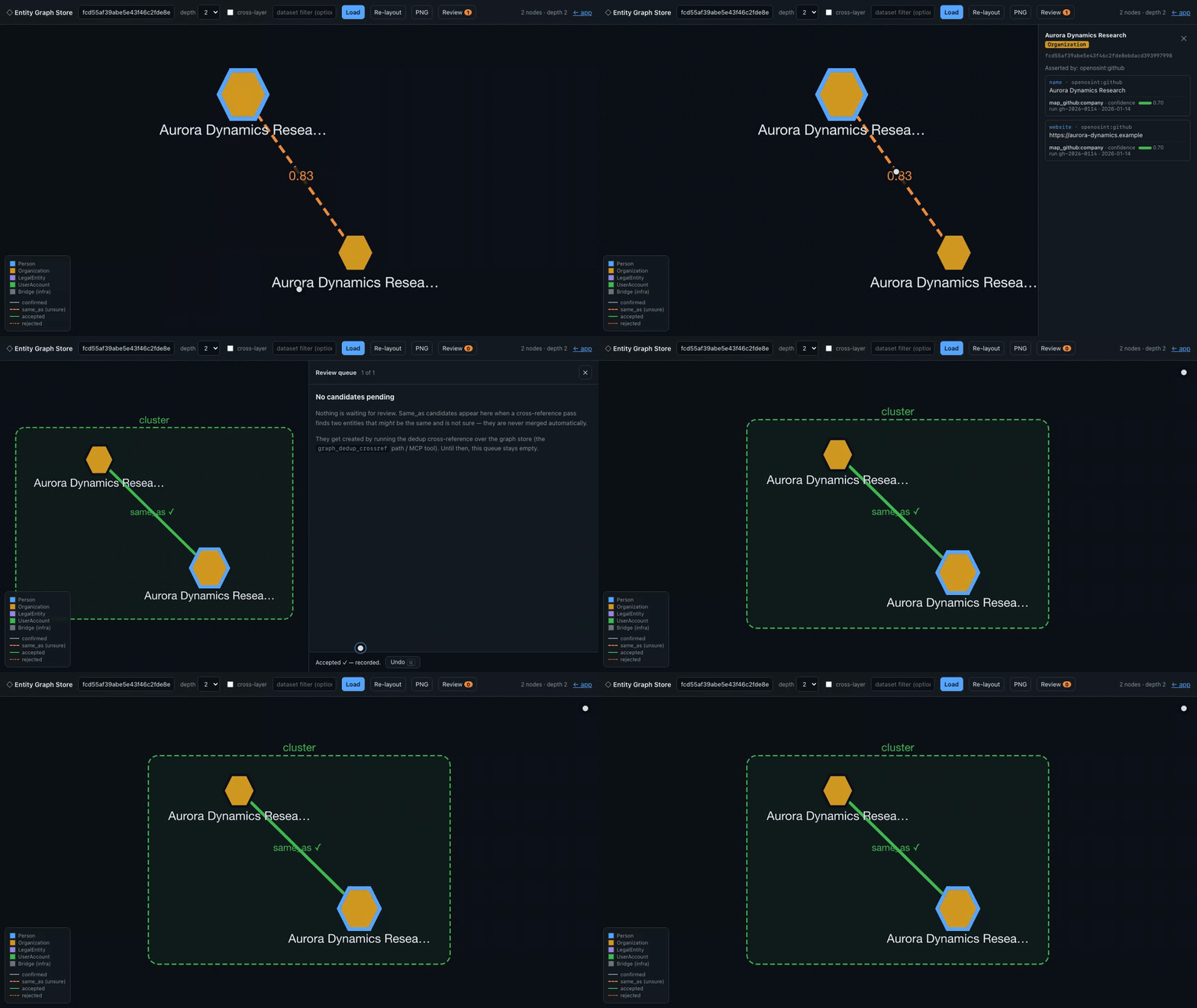
Deterministic, synthetic-data demo — every entity shown is fictional; regenerate with demo/web_demo.py.
The entities are seeded at the statement layer, not produced by today's mappers — see demo/README.md.
Legal Disclaimer: OpenOSINT is intended for legal and authorized use only. Users are solely responsible for ensuring their use complies with all applicable laws and regulations. The authors accept no liability for misuse. See DISCLAIMER.md.
Tools
| Tool | Powered by | What it investigates |
|---|---|---|
search_email | holehe | Social accounts linked to an email address (noisy, off by default) |
search_username | sherlock | Username presence across 400+ platforms (noisy, off by default) |
search_breach | HaveIBeenPwned v3 API | Data breach exposure |
search_whois | python-whois | Domain registrant and DNS info |
search_ip | ipinfo.io | Geolocation, ASN, hostname |
search_domain | sublist3r | Subdomain enumeration (noisy, off by default) |
generate_dorks | built-in | 12 targeted Google dork URLs (no network calls) |
search_paste | psbdmp.ws | Pastebin dump mentions |
search_phone | phoneinfoga | Carrier, country, line type (unverified network behavior, off by default) |
search_shodan | Shodan API | Open ports, banners, CVEs |
search_virustotal | VirusTotal API v3 | Verdict from 70+ antivirus engines |
search_ip2location | IP2Location.io API | Enhanced IP intel: VPN/Proxy/Tor/datacenter flags (sponsored) |
search_censys | Censys Search API | Internet-facing infrastructure, certificates |
search_abuseipdb | AbuseIPDB v2 API | IP abuse reputation: confidence score, reports, country, ISP |
search_github | GitHub REST API | Profile, repos, commit-discovered emails, username/keyword search |
search_dns | dnspython (built-in) | A/AAAA/MX/NS/TXT/CNAME/SOA records; SPF, DMARC, DKIM analysis |
search_rdap | RDAP (IANA bootstrap, keyless) | Registrar, registration/expiry dates, name servers, status; registrant contacts redacted by policy |
search_gdelt_geo | GDELT 15-minute GKG feed (keyless) | Recent worldwide news placed on a map: headline, link, place; GeoJSON output |
search_dorks_live | Bright Data SERP API | Live Google search results for dork queries (title, URL, snippet) |
scrape_url | Bright Data Web Unlocker | Fetch any URL bypassing Cloudflare/CAPTCHA — returns clean Markdown (touches the target, off by default) |
search_footprint | Bright Data SERP API | Entity-type-aware public search-engine footprint: detects email/username/domain/phone/name and returns structured results + Entity Correlation Graph nodes/edges |
Full per-tool documentation, CLI flags, and output formats: openosint.tech.
Passive by default
OpenOSINT starts in passive mode: agents and MCP clients are only offered tools that query third-party data sources or compute locally. Tools that touch the target's infrastructure, or that send many requests about the target from your IP, are off until you opt in. They are not just refused when called; they are not offered to the model at all, and an MCP client does not see them in tools/list.
| Level | Meaning |
|---|---|
| passive | Queries third-party data sources or computes locally; sends no request from your machine to the target's own infrastructure. Standard DNS lookups are the one indirect exception: they reach the target's nameservers through your resolver (see search_dns). |
| touches target | Makes requests the target's infrastructure can see (their web server, DNS probes, or a service fetching their URL for you). |
| noisy | High request volume, or requests to many third-party services about the target; expect rate limits, WAF blocks, and possible alerts. |
| unverified | Network behavior not yet verified with a traffic capture; treated as non-passive. |
| inherits | A fan-out tool; it only runs what the current mode allows. |
Passive is not private. Every third-party service you query sees what you searched for, and usually your API key or IP. Treat queries to Shodan, HIBP, VirusTotal, Bright Data and similar services as visible to those providers.
Enable active tools explicitly (each is labeled with its noise level):
| Where | How |
|---|---|
| CLI / REPL | openosint --allow-active … |
| Any process | OPENOSINT_ALLOW_ACTIVE=1 |
| Web UI | Settings → "Enable active tools" (loopback only) |
| MCP server | uvx --from openosint openosint-mcp --allow-active (or openosint-mcp --allow-active if installed), or set OPENOSINT_ALLOW_ACTIVE=1 in the client's env block |
A publicly reachable or demo instance can never enable active tools, whatever the settings. If a disabled tool is requested anyway it returns a structured disabled_in_passive_mode result that says how to enable it.
Tool-call cap. Each user request is limited by OPENOSINT_MAX_TOOL_CALLS (default: 15 calls; each new message resets it). investigate_multi shares one cap across all targets (OPENOSINT_MAX_TOOL_CALLS_MULTI, default 30). When the cap is reached the investigation stops with an explicit message. An MCP client that drives the tools itself is not capped by the server; only investigate_multi is.
| Tool | Level | Default | What it actually sends, and where |
|---|---|---|---|
generate_dorks | passive | on | Builds Google search URLs locally; sends nothing. |
graph_export | passive | on | Reads the local graph database only. |
graph_neighbors | passive | on | Reads the local graph database only. |
graph_review_candidates | passive | on | Reads the local graph database only. |
investigate_graph | inherits | on | Chains tools from a seed; in passive mode it routes only to passive tools. |
investigate_multi | inherits | on | Runs one agent per target under a shared tool-call cap; passive unless active is enabled. |
scrape_url | touches target | off | Bright Data fetches the URL, so the target's server logs a request (from Bright Data's IP, not yours). |
search_abuseipdb | passive | on | One request to api.abuseipdb.com. |
search_breach | passive | on | One request to haveibeenpwned.com. |
search_censys | passive | on | Censys API; returns data Censys already holds. |
search_dns | passive | on | Record lookups go through your DNS resolver; the target's nameservers see the resolver, not you. Active part: DKIM selector probes (enumeration) run only with active tools enabled. |
search_domain | noisy | off | sublist3r scrapes several search engines and aggregators from your IP; expect captchas and blocks. |
search_dorks_live | passive | on | Google results via Bright Data; the target is sent to those two services. |
search_email | noisy | off | holehe probes many sites' sign-up/reset flows with the email from your IP; may notify the account owner or trigger security alerts. |
search_footprint | passive | on | Up to 3 Google queries via Bright Data; the target is sent to those two services. |
search_gdelt_geo | passive | on | Downloads GDELT's public news feed and filters it locally; your search term never leaves your machine. |
search_github | passive | on | A few requests to api.github.com. |
search_ip | passive | on | One request to ipinfo.io. |
search_ip2location | passive | on | One request to api.ip2location.io. |
search_paste | passive | on | One request to psbdmp.ws. |
search_phone | unverified | off | Runs phoneinfoga; what it sends over the network has not been verified with a traffic capture. |
search_rdap | passive | on | Queries IANA and the registry's RDAP server, not the target. |
search_shodan | passive | on | Shodan API; reads Shodan's existing index, requests no new scan. |
search_username | noisy | off | sherlock sends requests from your IP to hundreds of sites; expect rate limits and WAF blocks. |
search_virustotal | passive | on | IP, domain and hash lookups read VirusTotal's existing data. URL submission is a separate active mode, off by default: it makes VirusTotal fetch the URL and makes it visible to the VirusTotal community. |
search_virustotal (URL submission) | touches target | off | VirusTotal fetches the submitted URL, and the URL becomes visible to the VirusTotal community, which can reveal your investigation. |
search_whois | passive | on | Queries the registry/registrar WHOIS server, not the target. |
The Apify Actors in actors/ are separate products with their own documented behavior (they are not governed by passive mode); see each Actor's README.
This table says what each tool does according to its code. It is not a guarantee about what a remote service, or a third-party binary such as holehe, sherlock, sublist3r or phoneinfoga, does with a request.
search_email
Enumerates online services linked to an email address using holehe.
openosint email target@example.com
[+] Spotify        https://open.spotify.com/user/target
[+] WordPress      https://wordpress.com/target
[+] Gravatar       https://gravatar.com/target
[+] Office365      email used
search_username
Searches for a username across 400+ platforms using sherlock.
openosint username johndoe99
[+] GitHub         https://github.com/johndoe99
[+] Twitter        https://twitter.com/johndoe99
[+] Reddit         https://reddit.com/user/johndoe99
search_breach
Checks data breach exposure via HaveIBeenPwned v3 API. Requires HIBP_API_KEY.
[+] LinkedIn (2016-05-05) — leaked: Email addresses, Passwords
[+] Adobe (2013-10-04) — leaked: Email addresses, Password hints
search_whois
Retrieves WHOIS data using python-whois.
[+] Registrar: ICANN
[+] Created: 1995-08-14
[+] Expires: 2024-08-13
[+] Name Servers: A.IANA-SERVERS.NET
search_ip
Retrieves geolocation and ASN data via ipinfo.io. Free tier: 50k/month.
[+] Hostname: dns.google
[+] Org: AS15169 Google LLC
[+] City: Mountain View, CA, US
search_domain
Enumerates subdomains using sublist3r.
[+] mail.example.com
[+] dev.example.com
[+] api.example.com
generate_dorks
Generates 12 targeted Google dork URLs for any target. No network calls.
[+] "johndoe" site:linkedin.com
    https://www.google.com/search?q=%22johndoe%22+site%3Alinkedin.com
[+] "johndoe" leaked OR breach OR dump
    https://www.google.com/search?q=%22johndoe%22+leaked+OR+breach+OR+dump
search_paste
Searches Pastebin dumps via psbdmp.ws.
[+] https://pastebin.com/aB1cD2eF (2023-04-12)
[+] https://pastebin.com/xY3zA4bC (2022-11-08)
search_phone
Gathers phone intelligence using phoneinfoga. Use E.164 format.
[+] Country: United States
[+] Carrier: AT&T
[+] Line type: Mobile
search_shodan
IPv4 input → host lookup (open ports, org, CVEs). Any other query → banner/keyword search. Requires SHODAN_API_KEY.
openosint shodan 8.8.8.8
openosint shodan "apache port:80 country:DE"
[+] Org: Google LLC | Open ports: 53, 443
search_virustotal
Checks an IP, domain, URL, or file hash against VirusTotal's 70+ engines. Auto-detects input type. Requires VIRUSTOTAL_API_KEY.
openosint virustotal 8.8.8.8
openosint virustotal example.com
openosint virustotal 44d88612fea8a8f36de82e1278abb02f
[VirusTotal] Malicious: 0 / Harmless: 72
search_ip2location
Queries IP2Location.io for enhanced IP intelligence: geolocation, ISP, ASN, and — on the Security Plan — VPN/Proxy/Tor/datacenter detection. Sponsored integration. Requires IP2LOCATION_API_KEY.
openosint ip2location 8.8.8.8
[IP2Location] City: Mountain View, CA, US  |  ISP: Google LLC
[IP2Location] VPN: No  |  Proxy: No  |  TOR: No  |  Datacenter: Yes
search_censys
IPv4 → host view (open ports, services, ASN). Domain → certificate search (SANs, issuer). Requires CENSYS_API_ID and CENSYS_SECRET.
openosint censys 8.8.8.8
openosint censys example.com
[Censys] Open Ports: 53, 443, 853 | ASN: AS15169 Google LLC
search_abuseipdb
Checks an IP against AbuseIPDB v2. Returns abuse confidence score, total reports, country, ISP, and last reported timestamp. Requires ABUSEIPDB_API_KEY.
openosint abuseipdb 198.51.100.1
[AbuseIPDB] Abuse Confidence Score: 87%  |  Total Reports: 143
⚠️  HIGH ABUSE CONFIDENCE — flagged by AbuseIPDB
Warning appears when abuseConfidenceScore exceeds 50%.
search_github
Queries GitHub REST API. Username → profile, repos, commit-discovered emails. Keyword → user/repo search. Optional GITHUB_TOKEN raises rate limit from 60 to 5000 req/h.
openosint github johndoe99
[GitHub] Repos: 42  |  Followers: 128
[GitHub] Commit email: johndoe@example.com
search_dns
Queries A/AAAA/MX/NS/TXT/CNAME/SOA records and analyzes SPF, DMARC, and DKIM configuration using dnspython (no external API).
openosint dns example.com
[DNS] A: 93.184.216.34
[DNS] MX: mail.example.com (priority 10)
[DNS] SPF: v=spf1 include:_spf.google.com ~all
search_rdap
Looks up a domain's registrar, registration and expiry dates, name servers and status codes over RDAP, the machine-readable successor to WHOIS. Keyless: it asks the IANA bootstrap registry which server owns the TLD, then queries that server. Registrant contact details are redacted by registry policy and are never returned.
[+] Registrar: RESERVED-Internet Assigned Numbers Authority
[+] Registered: 1995-08-14T04:00:00Z
[+] Name servers: elliott.ns.cloudflare.com, hera.ns.cloudflare.com
search_gdelt_geo
Recent, geolocated worldwide news. The old GDELT GEO 2.0 API was retired (it answers HTTP 404), so this tool reads GDELT's 15-minute GKG article feed (data.gdeltproject.org, keyless, no account) and keeps the last 6 hours of articles in memory. Each article carries its headline, link and the places it mentions; the query is matched against headlines and URLs (quoted phrases and OR work; * means everything), and results are grouped by place for the globe. Country-level mentions are dropped so dots mark cities and regions, not the middle of a country.
Nothing is downloaded until the tool is first used, so a local install that never opens the globe never fetches a GDELT file. The first search loads only the newest 15-minute file and answers from it; older files load in the background, and the result (and the globe) says how far back it covers, for example News: last 15 min — older articles still loading. After that, upstream traffic is one small file per 15 minutes however many searches you run.
GDELT geolocated news for 'ukraine': 53 location(s), 471 article mention(s). Coverage: the last 6 h.

[+] Kyiv, Kyyiv, Ukraine (50.4333, 30.5167) — 38 article(s)
Select an area on the globe (Shift+drag) to search only inside it. Failures (feed down, oversized or corrupt file) return one [service_unavailable] search_gdelt_geo result, and the globe shows a notice instead of an empty layer.
| Variable | Default | Purpose |
|---|---|---|
OPENOSINT_GDELT_WINDOW_HOURS | 6 | How far back articles are kept (1–24). A full 6-hour window holds roughly 23,000 articles and adds about 65 MB of memory. |
OPENOSINT_GDELT_MAX_ARTICLES | 30000 | Hard cap on stored articles; the oldest are dropped first. |
OPENOSINT_GDELT_USE_PROXY | off | Route GDELT downloads through OPENOSINT_PROXY_URL (bypassed by default: the feed is public). |
Attribution and terms. News data: The GDELT Project. GDELT's terms of use say: "all datasets released by the GDELT Project are available for unlimited and unrestricted use for any academic, commercial, or governmental use of any kind without fee." and "any use or redistribution of the data must include a citation to the GDELT Project and a link to this website (https://www.gdeltproject.org/)." (quoted 2026-10-06). The globe keeps the GDELT credit in its map attribution. Headlines and links come from third-party news sites and are shown as plain text.
search_dorks_live
Executes live Google dork queries through the Bright Data SERP API¹, returning structured results (title, URL, snippet). Defaults to 5 dorks per run; each is a separate billable API call. Requires BRIGHTDATA_API_KEY and BRIGHTDATA_SERP_ZONE.
openosint search-dorks-live "john doe" --max-dorks 3
[+] Dork: "john doe" site:linkedin.com
    Title:   John Doe | LinkedIn
    URL:     https://www.linkedin.com/in/john-doe-12345
scrape_url
Fetches any public URL through Bright Data Web Unlocker¹, bypassing Cloudflare/CAPTCHA. Returns clean Markdown. Requires BRIGHTDATA_API_KEY and BRIGHTDATA_UNLOCKER_ZONE.
openosint scrape https://example.com
[Web Unlocker] Remote status: 200
# Example Domain
This domain is for use in illustrative examples in documents.
search_footprint
Collects a target's public search-engine footprint via Bright Data SERP API¹. Detects entity type (email, username, domain, phone, or full name) and runs entity-type-aware Google queries, returning structured results plus Entity Correlation Graph nodes/edges for discovered domains and profiles. Requires BRIGHTDATA_API_KEY and BRIGHTDATA_SERP_ZONE.
openosint footprint johndoe99
Graph module (optional)
An additive FollowTheMoney entity graph —
statement-level provenance, an append-only store, non-destructive same_as
deduplication, and a human review queue — sits alongside the tools above
without changing anything about them. The store, the /graph page, the
/api/graph/* routes and the graph_neighbors / graph_review_candidates
MCP tools work in a plain uvx openosint web install, with no compiler and no
extra. The graph extra (pip install "openosint[graph]", builds PyICU) adds
the real FollowTheMoney library: graph_export and .ftm export. The
graph-dedup extra (Python 3.11+) adds same_as scoring. Without the extra,
ids are produced by a vendored copy that a CI test proves byte-identical to
FollowTheMoney's, so a graph.db is readable either way. Nothing in the web
UI or the agent writes to this store: it is filled through the Python API
(see docs/graph.md for the full guide and a worked example);
the GRAPH tab in the main UI is a separate, client-side view of the current
chat.
The same workflow is shown end to end — including the .ftm export that
passes ftm validate — in the terminal demo in
docs/graph.md; the web UI walkthrough is the demo at the top
of this README.
External exposure report (beta)
openosint exposure checks one domain from the outside and gives it an A-F grade. It is passive and point-in-time: organisation-level checks of email authentication, TLS, domain registration and security headers, plus optional lookalike domains. No AI provider or API key is needed.
openosint exposure example.com                       # terminal summary and grade
openosint exposure example.com --json                # structured JSON
openosint exposure example.com --report out.html --lang it   # self-contained HTML report (it or en)
openosint exposure example.com --lookalikes          # also look for registered typo/homoglyph/TLD-swap domains
openosint exposure example.com --resolver 1.1.1.1    # recursive resolver for lookups outside the domain's own nameservers
openosint exposure example.com --checks email,registration   # passive checks only: never contacts the target
--checks takes any of email, registration, tls, http_headers (default: all four). A selection is not graded: the report has no letter and no score, because a grade from some of the checks would read like a full result. In Python: run_exposure("example.com", checks=PASSIVE_CHECKS) (both names import from openosint.exposure.api); the report's not_run lists what was left out.
| Check | Noise level | What it contacts |
|---|---|---|
| Email authentication (SPF, DMARC, DKIM, MX) | passive | DNS only |
| Domain registration (age, expiry, DNSSEC) | passive | RDAP registry, not the target |
Lookalike domains (--lookalikes) | passive | DNS only; no lookalike web server is ever contacted |
| TLS certificate and protocol | touches target | A TLS handshake with the target on port 443 (the domain and www) |
| Security headers | touches target | One HTTPS GET to https://DOMAIN/ (redirects are followed) |
It does not scan ports, log in to anything, or collect personal data. The grade is not a certification and not proof of NIS2 or any other compliance. Lookalikes are found by DNS only and are never part of the grade.
This feature is beta: checks, scoring and the report format may change between releases. The HTML report footer shows its report_version.
Interfaces
Web UI
uvx openosint web
# or: pip install openosint && openosint web
# Opens http://localhost:8080 automatically
Browser-based AI chat with streaming tool output, inline result cards, light/dark theme toggle. Supports local inference via Ollama or any OpenAI-compatible endpoint — no Anthropic API key required.
Which hosts and sites may talk to the server. On a loopback bind the server only answers requests whose Host is 127.0.0.1, localhost or ::1. Every /api/* request from a browser must come from the UI's own origin; cross-site requests are refused (scripts and curl, which send no Origin, are unaffected).
| Variable | Use it when |
|---|---|
OPENOSINT_ALLOWED_HOSTS | You reach the UI by another name (LAN name, Docker hostname, reverse proxy), e.g. OPENOSINT_ALLOWED_HOSTS=osint.lan,localhost. Comma-separated; host or host:port. On a non-loopback bind (--allow-remote, Docker) the Host check only runs when this is set, so set it there. |
OPENOSINT_ALLOWED_ORIGINS | A separate front end on another origin calls the API, e.g. OPENOSINT_ALLOWED_ORIGINS=http://localhost:3000. Comma-separated. |

Try the live demo → — bring your own Anthropic / OpenRouter / Ollama key, no signup.
# Fully local (no API key) — requires Ollama runtime: https://ollama.com
ollama pull llama3.2
openosint web
# Settings -> Ollama (local) -> model: llama3.2

# OpenAI-compatible endpoint (LiteLLM, vLLM, LM Studio, ...)
export OPENAI_BASE_URL="http://localhost:4000/v1"
openosint web
# Settings -> OpenAI API
Breaking change (v2.28+): key usage now follows bind address, not an env var. Bound to
127.0.0.1/localhost(the default) — no change: keys in your.envwork as before. Bound to any other interface (--host 0.0.0.0, which already requires--allow-remote) — the web UI never uses a key from your environment to serve a request; every caller must supply their own, and breach lookups (search_breach) are disabled outright. This applies regardless of any env var, includingOPENOSINT_DEMO_MODE, which can only add restriction, never remove it. If you were exposing the web UI on a LAN with your own keys and no per-caller auth in front of it, that access pattern no longer works.Running behind a reverse proxy? A loopback bind (
127.0.0.1) only means the OS accepted the connection from this machine — it says nothing about who can reach it if something in front (nginx, Caddy, a Docker/K8s sidecar, a tunnel) forwards requests to it from elsewhere. By default, a request that carries proxy-forwarding headers (X-Forwarded-For,X-Forwarded-Proto,X-Forwarded-Host,Forwarded,CF-Connecting-IP) is treated exactly like a non-loopback bind: your local keys are never used, breach lookups are blocked, and the caller is told why. If you deliberately serve this through a reverse proxy and want it to behave like a normal local instance for requests relayed by that proxy, setOPENOSINT_TRUSTED_PROXY=true. This is a separate variable from the existingTRUSTED_PROXY(which only affects which IP a rate-limit bucket is attributed to — a low-stakes, already-loosely-scoped setting some self-hosters already have on). Reusing that flag here would have silently upgraded an existing rate-limit-only configuration into one that also permits credentialed access, without asking.OPENOSINT_TRUSTED_PROXYgets its own explicit opt-in for that reason. Setting it does not blindly trust the forwarded headers' content — internally inconsistent values (e.g. two disagreeingX-Forwarded-Protovalues on one request) are still treated as public regardless. SettingOPENOSINT_TRUSTED_PROXY=truemeans you are choosing to serve credentialed lookups to whoever your reverse proxy relays to this instance — you are the controller for their queries, the same way OpenOSINT Cloud is for its customers. Put real authentication in front of it if "whoever the proxy relays" is broader than you intend.
Interactive REPL
Run openosint with no arguments to start the AI-powered REPL:
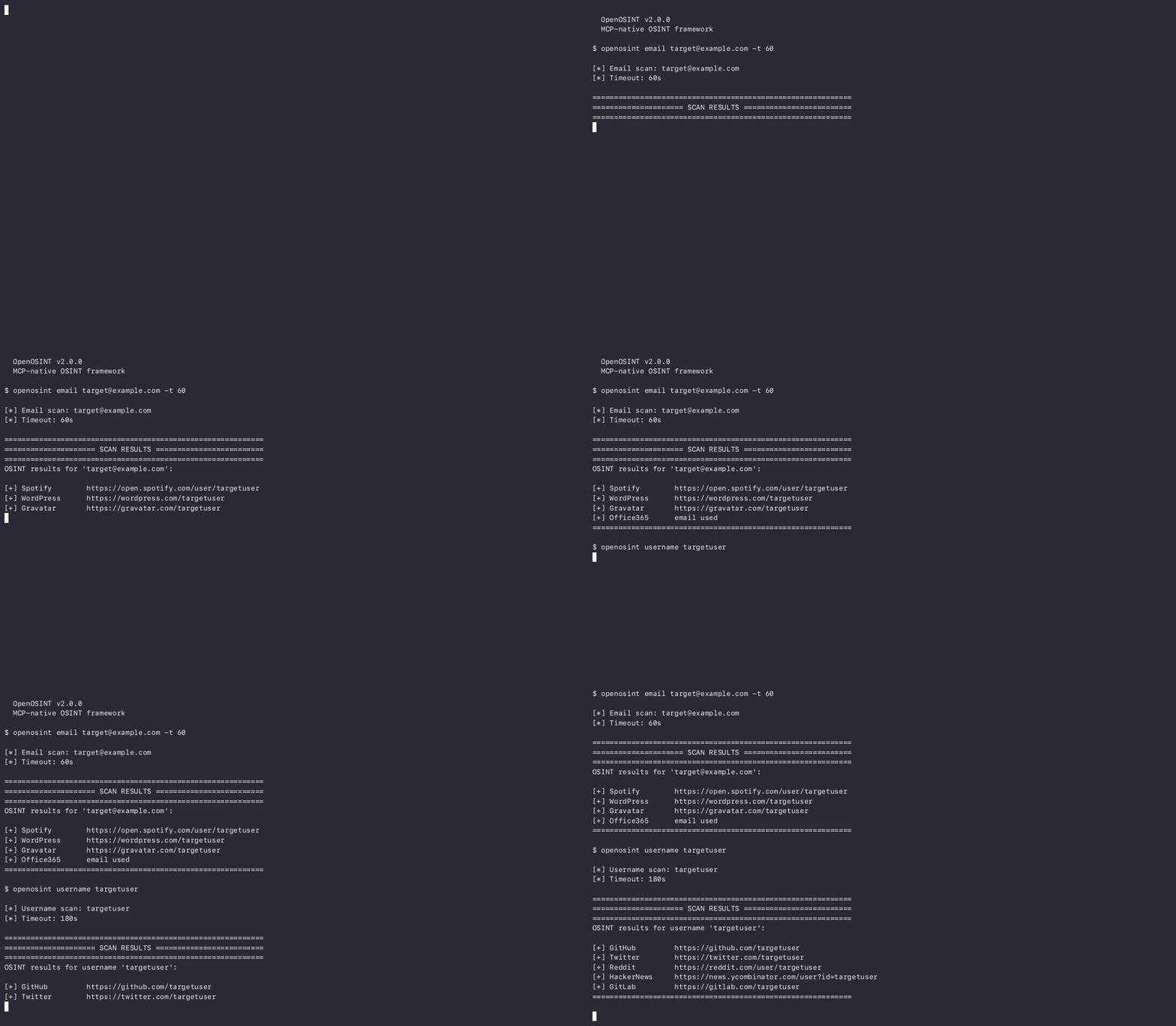
REPL commands:
| Command | Description |
|---|---|
<target> | Investigate any target — email, username, domain, IP, name |
clear | Reset conversation memory |
save | Save last report to reports/ |
tools | List available tools and their status |
config | Show current configuration |
history | Browse saved sessions |
help | Show all commands |
exit / Ctrl-D | Exit |
All sessions are auto-saved to ~/.openosint/history/. Browse with openosint history.
For the REPL/CLI with an OpenAI-compatible backend:
pip install "openosint[openai]"
openosint --provider openai \
  --openai-base-url http://localhost:4000/v1 \
  --openai-model gpt-4o-mini
Live Documentation
Full per-tool reference, CLI flags, and configuration options at openosint.tech.

MCP Server
Expose OpenOSINT to any MCP-compatible AI client with no separate install step. uv must be installed; uvx then fetches and runs openosint on demand. The server offers the 20 passive tools by default and 25 with --allow-active (see Passive by default).
The command every client runs is the same:
uvx --from openosint openosint-mcp # passive tools only (20 listed)
GUI clients (Claude Desktop, Cursor) often launch with a minimal PATH that does not include uvx. If the server fails to start, replace "uvx" with the absolute path from which uvx (macOS/Linux) or where uvx (Windows).
Claude Code:
claude mcp add openosint -- uvx --from openosint openosint-mcp
claude mcp list
Add API keys (-e flags go before the --):
claude mcp add openosint -e SHODAN_API_KEY=your-key -e HIBP_API_KEY=your-key -- uvx --from openosint openosint-mcp
Optional, enables active tools: append
--allow-activeafteropenosint-mcp, or add-e OPENOSINT_ALLOW_ACTIVE=1. This exposes the noisy and target-touching tools (25 listed instead of 20); see the noise table first.
Claude Desktop — edit claude_desktop_config.json, then restart the app:
- macOS:
~/Library/Application Support/Claude/claude_desktop_config.json - Windows:
%APPDATA%\Claude\claude_desktop_config.json
{
  "mcpServers": {
    "openosint": {
      "command": "uvx",
      "args": ["--from", "openosint", "openosint-mcp"],
      "env": {
        "SHODAN_API_KEY": "your-key",
        "HIBP_API_KEY": "your-key"
      }
    }
  }
}
Optional, enables active tools: add
"--allow-active"toargs, or add"OPENOSINT_ALLOW_ACTIVE": "1"toenv. This exposes the noisy and target-touching tools (25 listed instead of 20); see the noise table first.
Cursor — add the same block to ~/.cursor/mcp.json (global) or .cursor/mcp.json (per project); the optional active-tools change above applies here too:
{
  "mcpServers": {
    "openosint": {
      "command": "uvx",
      "args": ["--from", "openosint", "openosint-mcp"],
      "env": { "SHODAN_API_KEY": "your-key" }
    }
  }
}
API keys go in the client's env block. MCP hosts launch the server with a cwd unrelated to your project, so a .env file is not picked up reliably; to use one, set "OPENOSINT_ENV_FILE": "/absolute/path/to/.env" in the same env block.
By default the server lists passive tools only, so a client LLM cannot see the noisy ones. Each tool description carries its noise label. Pin a release with --from openosint==2.36.0. Running from a source checkout instead: "command": "python", "args": ["-m", "openosint.mcp_server"].
Agentic use via Claude Code:
$ claude
> Investigate target@example.com. Trace any username found
  across other platforms and compile a full report.
Installation
Quickstart — web UI in one command
Install uv once. It runs OpenOSINT in its own isolated environment, so there is no Python setup:
# macOS / Linux
curl -LsSf https://astral.sh/uv/install.sh | sh
# Windows (PowerShell)
powershell -ExecutionPolicy ByPass -c "irm https://astral.sh/uv/install.ps1 | iex"
Then start OpenOSINT (open a new terminal first if uvx is not found):
uvx openosint web
You should see:
[*] OpenOSINT x.y.z web server
[*] App  → http://127.0.0.1:8080/
[*] Data → /home/you/.openosint
Your browser opens automatically; if it doesn't, open http://127.0.0.1:8080/. No .env file and no API keys are needed to start — keyless tools work immediately, and AI chat needs a provider key (ANTHROPIC_API_KEY) or a local Ollama.
| Want to… | Do this |
|---|---|
| Use another port | uvx openosint web --port 8081 (if 8080 is busy, OpenOSINT exits and tells you this) |
| Keep the browser closed | uvx openosint web --no-browser |
| Find your data | Graph database and session history live in ~/.openosint/ (%USERPROFILE%\.openosint on Windows). Move it with OPENOSINT_HOME=/path; OPENOSINT_GRAPH_DB still overrides just graph.db. |
| Find reports | CLI and REPL reports are written to ./reports/ in the directory you ran openosint from. The web UI writes none. |
| Use the entity graph store | Works with plain uvx openosint web, no compiler needed: the /graph page, /api/graph/*, and the graph_neighbors / graph_review_candidates MCP tools. graph_export (.ftm) needs the graph extra, which builds PyICU and so needs libicu and a C++ compiler first (Ubuntu: sudo apt install libicu-dev pkg-config g++; macOS: brew install icu4c pkg-config and export PKG_CONFIG_PATH="$(brew --prefix icu4c)/lib/pkgconfig"), then uvx --from "openosint[graph]" openosint web; or use Docker, which includes it. The store starts empty: it is filled through the Python API, not by the UI. |
Alternatives
# pip (Python 3.10+)
pip install openosint
openosint web

# Updating
pip install --upgrade openosint

# From source
git clone https://github.com/OpenOSINT/OpenOSINT.git
cd OpenOSINT
pip install -e .
External binaries (must be in PATH):
| Binary | Purpose | Install |
|---|---|---|
holehe | Email account enumeration | pip install holehe |
sherlock | Username enumeration (400+ platforms) | pip install sherlock-project |
sublist3r | Subdomain enumeration | pip install sublist3r |
phoneinfoga | Phone number intelligence | Download binary |
If a binary is absent, the corresponding tool returns a descriptive error. All other tools remain operational.
Optional Python packages:
| Package | Purpose | Install |
|---|---|---|
ollama | Local LLM backend (no API key) | pip install "openosint[ollama]" (also requires Ollama runtime) |
openai | OpenAI-compatible backend | pip install "openosint[openai]" |
shodan | Shodan API client | pip install "openosint[shodan]" |
reportlab | PDF report export | pip install "openosint[pdf]" |
censys | Censys API client | pip install "openosint[censys]" |
Configuration
Easiest: open the web UI. On a local install, Settings saves your keys on this
computer by default ("Save on this computer"), as does the first-run panel; "Use only
for this browser session" is a secondary option that keeps a key in the tab only. On the
public demo, keys stay in the browser. Keys are written to config.env in the data directory
(~/.openosint/config.env, or $OPENOSINT_HOME/config.env), never inside the
installed package, with user-only permissions (0600) where the OS supports it.
Values are never logged or sent back to the browser; the UI only shows which keys
are configured and where each value came from.
Precedence, highest first:
- real environment variables (a saved value cannot override one; the UI says so)
config.envin the data directory- a legacy
.env(the locations below)
An existing .env keeps working. If the file at the package root (a source
checkout or Docker image) is the one that would be loaded, its known settings
are copied into config.env once, with a notice on stderr that names keys but
never values; the old file is left in place and now has lower priority.
For a file you manage yourself, copy .env.example to .env and fill in your keys. .env is read from the
directory you run openosint from (searched upward, like git finds
.git) — it does not need to be at any particular "project root", and a
regular pip install works the same way as running from a source checkout.
Set OPENOSINT_ENV_FILE=/path/to/.env to point at an explicit file instead
(useful for the MCP server, which is launched by its host with an arbitrary
working directory). A real environment variable always takes priority over
a value in .env.
Required below means required for that specific tool to run, not for openosint
itself — the app starts and every key-less tool works with zero configuration.
| Variable | Tool | Required | Purpose |
|---|---|---|---|
ANTHROPIC_API_KEY | AI agent (REPL/Web UI) | Yes, unless using Ollama or an OpenAI-compatible endpoint | Anthropic API key |
ANTHROPIC_MODEL | AI agent | Optional | Model name to request (default: claude-sonnet-5). Replaces the deprecated OPENOSINT_MODEL. |
OPENAI_BASE_URL | AI agent | Optional | Base URL of an OpenAI-compatible endpoint (e.g. http://localhost:4000/v1) |
OPENAI_API_KEY | AI agent | Optional | API key for the endpoint (local servers may ignore it) |
OPENAI_MODEL | AI agent | Optional | Model name to request (default: gpt-4o-mini) |
OPENOSINT_GDELT_WINDOW_HOURS | search_gdelt_geo | Optional | Hours of news kept in memory (default 6, max 24). See search_gdelt_geo. |
OPENOSINT_GDELT_MAX_ARTICLES | search_gdelt_geo | Optional | Hard cap on stored articles (default 30000; oldest dropped first) |
OPENOSINT_ENV_FILE | All | Optional | Explicit path to a .env file, overriding the directory search above |
OPENOSINT_SETUP_TOKEN | Web UI | Optional | Lets the browser save keys when it is not on loopback (Docker). Send as X-Setup-Token; the UI has a field for it. Unset = saving from a non-loopback browser is off. Failed attempts are throttled. |
HIBP_API_KEY | search_breach | Required for this tool | HaveIBeenPwned v3 — get one |
IPINFO_TOKEN | search_ip | Optional | Works without it; raises ipinfo.io rate limits |
SHODAN_API_KEY | search_shodan | Required for this tool | Shodan API — get one |
VIRUSTOTAL_API_KEY | search_virustotal | Required for this tool | VirusTotal API v3 — get one |
IP2LOCATION_API_KEY | search_ip2location | Required for this tool | IP2Location.io — get one (sponsored) |
CENSYS_API_ID + CENSYS_SECRET | search_censys | Required for this tool | Censys — get one |
ABUSEIPDB_API_KEY | search_abuseipdb | Required for this tool | AbuseIPDB v2 — get one |
GITHUB_TOKEN | search_github | Optional | Works without it (60 req/h); raises the limit to 5000 req/h — get one |
BRIGHTDATA_API_KEY | search_dorks_live, scrape_url, search_footprint | Required for these tools | Bright Data — get one¹ (free tier: 5,000 req/month) |
BRIGHTDATA_SERP_ZONE | search_dorks_live, search_footprint | Required for these tools | Your Bright Data SERP zone name (e.g. serp_api1) |
BRIGHTDATA_UNLOCKER_ZONE | scrape_url | Required for this tool | Your Bright Data Web Unlocker zone name (e.g. web_unlocker1) |
On a fresh install with no keys at all, these still work: generate_dorks,
search_dns, search_whois, search_domain, search_email, search_username,
search_paste, search_phone, search_ip (rate-limited), search_github
(rate-limited), and search_gdelt_geo.
CLI Reference
| Flag / Subcommand | Description |
|---|---|
openosint | Interactive AI REPL (default) |
openosint web [--port N] [--no-browser] | Launch browser UI |
openosint email ADDRESS [-t N] | Direct email scan |
openosint username HANDLE [-t N] | Direct username scan |
openosint shodan QUERY [-t N] | Shodan lookup |
openosint virustotal TARGET [-t N] | VirusTotal lookup |
openosint censys TARGET [-t N] | Censys lookup |
openosint ip2location IP [-t N] | IP2Location lookup |
openosint abuseipdb IP [-t N] | AbuseIPDB reputation check |
openosint github QUERY [-t N] | GitHub profile/repo/email discovery |
openosint dns DOMAIN [-t N] | DNS records + email security analysis |
openosint search-dorks-live TARGET [--max-dorks N] [-t N] | Live Google dork results via Bright Data |
openosint scrape URL [-t N] | Fetch a URL via Bright Data Web Unlocker |
openosint footprint TARGET [--max-queries N] [-t N] | SERP footprint via Bright Data |
openosint multi TARGETS | Parallel multi-target investigation (max 10) |
openosint exposure DOMAIN [--lookalikes] [--report FILE.html] [--lang it|en] [--resolver IP] | External exposure report graded A-F (beta) |
openosint playbook RECIPE TARGET | Run a deterministic investigation playbook (no AI) |
openosint history [--all] [open N] [clear] | View/manage REPL session history |
openosint proxy-test | Verify the configured upstream proxy |
openosint sponsors | List current sponsors and featured integrations |
openosint prompts | Show info about the AI OSINT Prompt Pack |
openosint shell | Explicit alias for the default REPL |
--allow-active | Enable active tools (noisy or touch the target). Off by default; same as OPENOSINT_ALLOW_ACTIVE=1 |
-v, --verbose | Enable debug logging to stderr |
-t, --timeout N | Override subprocess timeout (seconds) |
--api-key KEY | Anthropic API key (overrides env var) |
--parallel | Run complementary tools concurrently |
--json | Output results as structured JSON |
--provider {anthropic,ollama,openai} | AI provider (default: anthropic) |
--ollama-model MODEL | Ollama model name (default: llama3.2) |
--ollama-host URL | Ollama server URL (default: http://localhost:11434) |
--openai-base-url URL | OpenAI-compatible endpoint base URL (env: OPENAI_BASE_URL) |
--openai-model MODEL | Model to request from the endpoint (default: gpt-4o-mini; env: OPENAI_MODEL) |
--openai-api-key KEY | API key for the endpoint (env: OPENAI_API_KEY) |
--no-pdf | Disable automatic PDF generation |
Docker
# Build and run
docker compose up --build

# One-off command
docker compose run --rm openosint email target@example.com --json
.env is optional: with no keys the web UI still starts at http://localhost:8080. To provide keys today, list them under environment: in docker-compose.yml (or in a .env next to it), or put a .env in the data volume (/data/.env). Reports are persisted to ./reports/; the graph database and session history live in the openosint-data volume (/data in the container, via OPENOSINT_HOME). The image includes the graph view.
Saving keys from the browser in Docker. The browser reaches the container over the Docker network, not loopback, so the UI cannot save keys by default and says so (it shows the reason instead of failing silently). Either set the keys in your compose environment or .env, or set a token and enter it in the UI's Save keys to server panel: OPENOSINT_SETUP_TOKEN=choose-a-long-random-string docker compose up. Saved keys go to /data/config.env in the openosint-data volume and survive restarts. Wrong tokens are throttled.
The port is published on 127.0.0.1 only, and the Host check is on (OPENOSINT_ALLOWED_HOSTS defaults to localhost,127.0.0.1 in the compose file; extend it if you reach the UI by another name). To reach it from other machines on purpose, run OPENOSINT_BIND=0.0.0.0 docker compose up: the instance then runs in restricted mode (it never spends keys held on the server). Security note: the UI's setup endpoint accepts and stores API keys, so only do this on a network and behind a firewall or reverse proxy you trust.
Warning:
OPENOSINT_PUBLISHED_BIND.docker-compose.ymlsets this to the same value asOPENOSINT_BINDto tell the server which address the port is published on; an exact loopback value (127.0.0.1,localhost,::1) lifts the restriction that a container's0.0.0.0bind otherwise gets. Never set it to a loopback value yourself, or edit the compose port mapping away from it, when the port is published on any other interface.
Integrations
| Service | URL | Tool | Tier | Auth |
|---|---|---|---|---|
| IP2Location.io | https://www.ip2location.io | search_ip2location | Featured (sponsored) | API key — free tier |
| AbuseIPDB | https://www.abuseipdb.com | search_abuseipdb | Community | API key — free tier |
| Censys | https://censys.io | search_censys | Community | API key — free tier |
| GitHub | https://github.com | search_github | Community | Token optional |
| HaveIBeenPwned | https://haveibeenpwned.com | search_breach | Community | API key — paid |
| holehe | https://github.com/megadose/holehe | search_email | Community | None — local binary |
| ipinfo.io | https://ipinfo.io | search_ip | Community | Token optional |
| phoneinfoga | https://github.com/sundowndev/phoneinfoga | search_phone | Community | None — local binary |
| psbdmp.ws | https://psbdmp.ws | search_paste | Community | None |
| sherlock | https://github.com/sherlock-project/sherlock | search_username | Community | None — local binary |
| Shodan | https://shodan.io | search_shodan | Community | API key — free tier |
| sublist3r | https://github.com/aboul3la/Sublist3r | search_domain | Community | None — local binary |
| VirusTotal | https://www.virustotal.com | search_virustotal | Community | API key — free tier |
| WHOIS (IANA) | https://www.iana.org/whois | search_whois | Community | None |
| DNS (system resolver) | — | search_dns | Community | None |
| Google Search | https://www.google.com | generate_dorks | Community | None |
Limitations
- Authorized use only. OpenOSINT queries public and semi-public sources. It does not bypass authentication, exploit systems, or access anything you aren't already entitled to see. You are responsible for complying with the law and the terms of service of every source you query. See DISCLAIMER.md.
- No aggregation guarantees. Each tool reports what its upstream source currently returns. A negative result (no breach found, no accounts found) means the source didn't report a match — not that no exposure exists.
- Most tools depend on third-party services you don't control. Nine of the 21 tools hard-require an API key and are subject to that provider's uptime, rate limits, and pricing (Shodan, VirusTotal, Censys, AbuseIPDB, IP2Location, HaveIBeenPwned, and the three Bright Data–backed tools). Free tiers are small; heavy use requires a paid plan with the provider, not with OpenOSINT.
- Local binaries are unsandboxed subprocesses.
holehe,sherlock,sublist3r, andphoneinfogarun as external processes on your machine. Keep them updated yourself; OpenOSINT does not patch or vet them. - The entity graph module (
openosint[graph]) is additive, not authoritative.same_aslinks are scored candidates for human review, not verified identity matches — see docs/graph.md. - AI output is a lead, not proof. The agent can only call the tools above (and, by default, only the passive ones). Tool results come from real executions and are shown with the tool call that produced them, but the model can still misread, misattribute or over-weight a result, and its tool selection can be wrong or incomplete for a given target. Check the raw tool output before acting on a conclusion.
Support & commercial
OpenOSINT is free and MIT-licensed. These are optional ways to support it or buy a hosted or contracted version.
- Hosted monitoring: OpenOSINT Monitor, free for one domain.
- Pay-per-use, no install (Apify Actors, also usable as MCP tools in Claude, Cursor and Windsurf): Email Recon (from $0.015/run) · Username Recon ($0.04/username) · Domain Recon ($0.02/domain). MCP endpoint:
https://mcp.apify.com?tools=complete_analogy/openosint-email-recon,complete_analogy/openosint-username-recon,complete_analogy/openosint-domain-recon. Cloud usage funds the self-hosted project. - Newsletter: Agents & OSINT, one AI-OSINT workflow plus a roundup, weekly.
- Guides: free 5-prompt starter set · AI OSINT Complete Kit, $55. Purchases fund development.
- Sponsor: Open Collective · tiers and media kit in SPONSORSHIP.md · commercial@openosint.tech. Current sponsors are listed below.
- Affiliate program: 30-45% commission on the guides above. Details & terms.
- Commercial license & support: vendor contract, warranty, indemnification, SLA or priority support for procurement, from €300/year. The software itself needs no purchase. See COMMERCIAL.md or commercial@openosint.tech.
Featured Integrations

IP2Location.io — powers search_ip2location · Integration guide
Enhanced IP geolocation, ISP, VPN/Proxy/Tor, and datacenter detection

TestMu AI (formerly LambdaTest) is an AI-native testing cloud platform built for modern engineering teams. It covers everything from autonomous test creation and fast execution to testing AI agents, chatbots and voice assistants.
Open: Breach / Compromised-Credential Data · Email / Identity Lookup · Residential Proxies — see SPONSORSHIP.md.
Contributing
Issues and pull requests are welcome. See CONTRIBUTING.md for the development workflow, integration registration checklist, and coding conventions. Please read DISCLAIMER.md before contributing.
Regenerating the demo GIF/MP4
export OPENOSINT_DEMO_KEY=sk-ant-...   # your Anthropic key — never committed
openosint web &                        # start the web server on :8080
make demo                              # record -> encode -> write docs/assets/demo-web-graph.*
git add docs/assets/demo-web-graph.*
See scripts/record-demo/README.md for full prerequisites and pipeline details.
Maintainer
Tommaso Bertocchi
- X (personal): https://x.com/SonoTommy_
- X (OpenOSINT): https://x.com/openosint_oss
- LinkedIn: https://www.linkedin.com/company/openosintoss
- Email: commercial@openosint.tech
Contributors
| Contributor | Contribution |
|---|---|
| @consocio | venv/uv-tool binary resolution fix — co-installed tools are now found without a separate activation step (#6) |
License
OpenOSINT is open source under the MIT License — free for any use, including personal, commercial, academic, and closed-source.
¹ Bright Data links in this README are affiliate/referral links — OpenOSINT earns a commission if you sign up through them, at no extra cost to you.
For authorized security research only. See DISCLAIMER.md.
OpenOSINT v2.36.0 — October 2026
Star History
Featured
Keeps your Mac awake while Claude Code, Codex or Cursor works. Lets it sleep when they are done.
Try free for 7 days →Block distracting apps from your iPhone permanently without a 3rd party app. Free and open source.
Block now (100% free) →Notes, actions and memory. Without a meeting bot. First month 100% off.
Download for free →belt cli automatically finds the best tools and skills for your agent. image, video, music, tts...
one prompt install →Free an open-source skills that make AI coding agents easier to understand, verify, and control.
Download for free →Connect your Claude agent to live crypto prices and trading routes via 1inch
Get the MCP →Configuration
ANTHROPIC_API_KEY*secretAnthropic API key — required for the AI agent REPL
HIBP_API_KEYsecretHaveIBeenPwned API key for breach detection (search_breach tool)
IPINFO_TOKENsecretipinfo.io token for higher IP lookup rate limits (search_ip tool)
IP2LOCATION_API_KEYsecretIP2Location API key for enhanced IP intelligence (search_ip2location tool)
ABUSEIPDB_API_KEYsecretAbuseIPDB API key for IP abuse reputation checks (search_abuseipdb tool)
Registryactive
Packageopenosint
TransportSTDIO
AuthRequired
UpdatedMay 26, 2026


