
Summary
Gives Claude direct access to Windows desktop automation through native APIs instead of visual navigation. You get UI Automation tree inspection for precise element targeting, OCR with word coordinates, mouse and keyboard control, window management, and screenshot capture with configurable quality presets. Also bundles ripgrep for searching across allowed directories. Everything runs as a single binary with no dependencies. The precision approach makes sense when you're automating repetitive desktop workflows or building test scripts where clicking "somewhere near the button" isn't good enough. Windows only for now, with macOS and Linux planned.


Keeps your Mac awake while Claude Code, Codex or Cursor works. Lets it sleep when they are done.
Try free for 7 days →

Block distracting apps from your iPhone permanently without a 3rd party app. Free and open source.
Block now (100% free) →
Notes, actions and memory. Without a meeting bot. First month 100% off.
Download for free →
belt cli automatically finds the best tools and skills for your agent. image, video, music, tts...
one prompt install →
Free an open-source skills that make AI coding agents easier to understand, verify, and control.
Download for free →

Connect your Claude agent to live crypto prices and trading routes via 1inch
Get the MCP →MCP Test Utils


MCP server for automated desktop UI testing. A single binary — no runtime, no dependencies, no installation.
Windows x64 only. macOS and Linux support is planned.
Gives AI agents eyes and hands: screenshots, window management, mouse, keyboard, UI Automation, OCR, file search. Replays saved scenarios as regression runs — after every build, without an agent.
Why
AI agents can trigger actions in applications but can't see the screen. This server bridges that gap:
Agent triggers action → takes screenshot → sees the result →
switches window → clicks a button → verifies → writes report
Fully autonomous, no user involvement required. A path that works can be saved as a scenario and replayed after every build — fast, the same way every time, and without an agent.
Demo
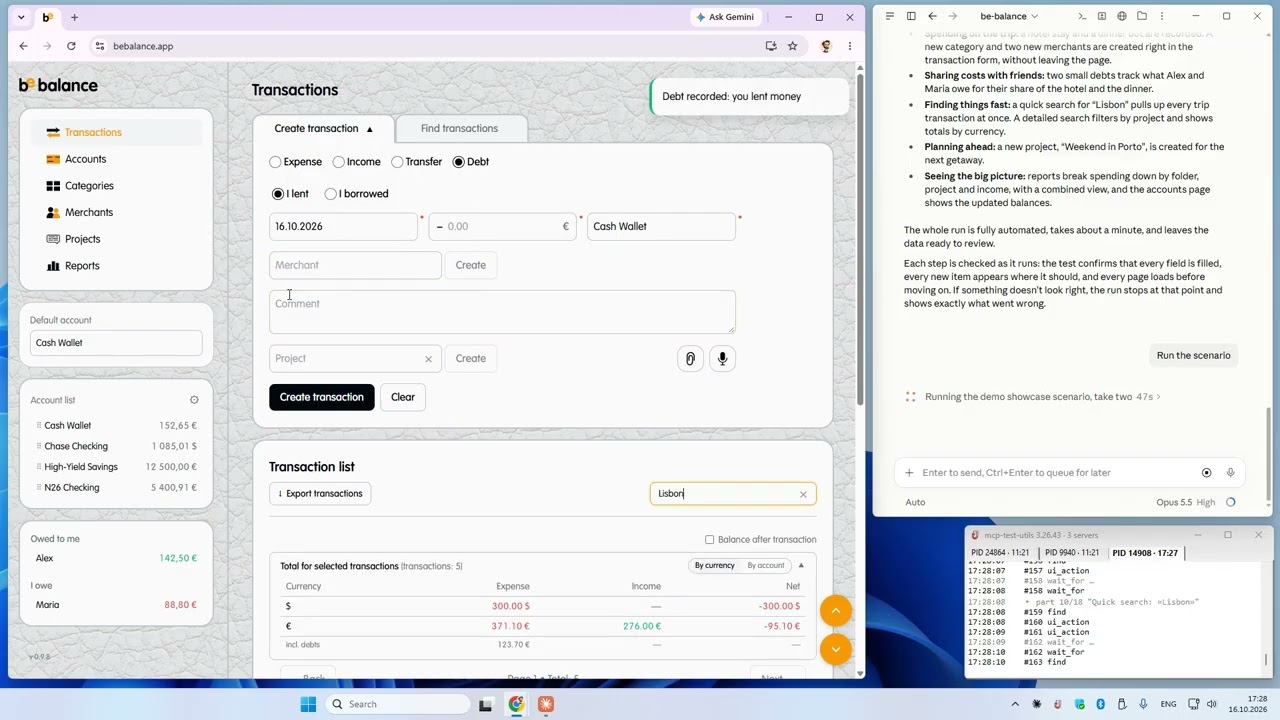
3.26 — Scenario run Claude replays a saved test: 232 steps, one call, 66 s |
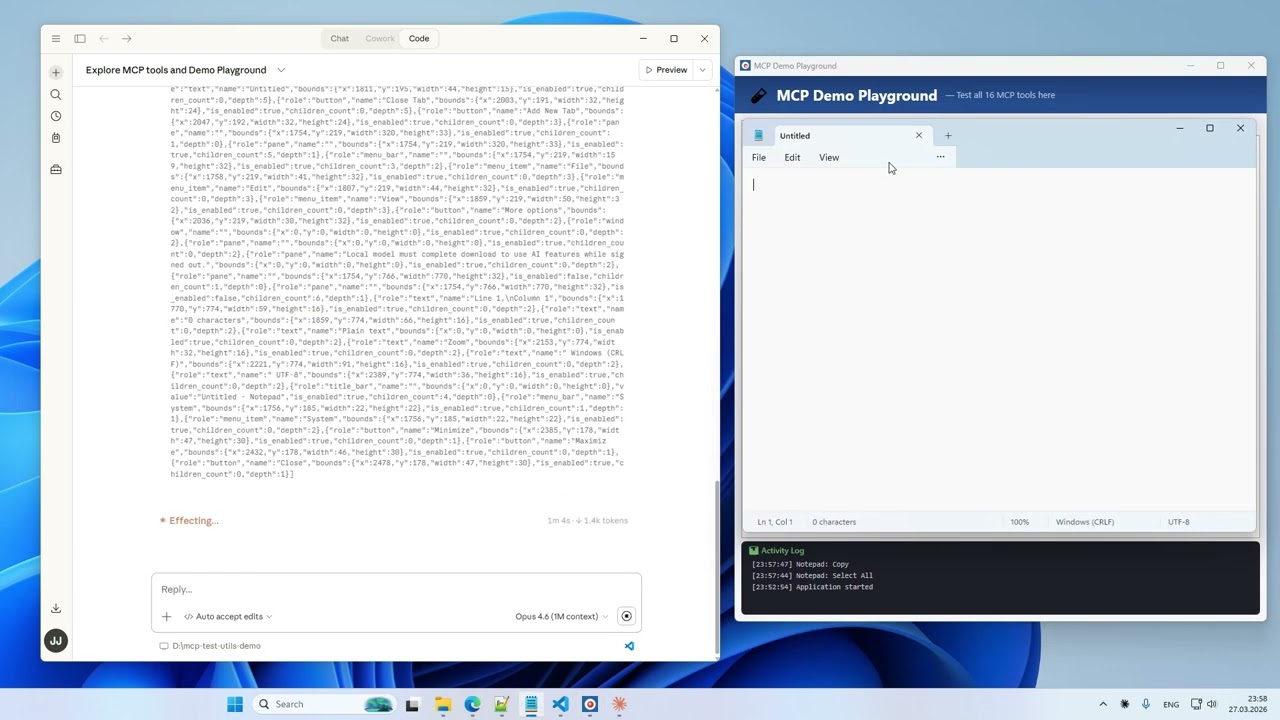
Installation and setup Setting up the server and the basic tools |
Platforms
| Platform | Status |
|---|---|
| Windows x64 | ✅ Full support |
| macOS arm64 | ⏳ Planned |
| Linux x64 | ⏳ Planned |
Tools (26)
Vision
| Tool | Description |
|---|---|
take_screenshot | Screenshot of the entire desktop with configurable quality |
take_window_screenshot | Screenshot of a specific window (screen or window capture mode) |
read_screen_text | OCR the entire screen (Windows.Media.Ocr) |
read_region_text | OCR a screen region with precise word coordinates |
Window Management
| Tool | Description |
|---|---|
list_windows | List windows with id, title, app, position, size, minimized, focused |
focus_window | Bring a window to front, restore if minimized; optionally set its position and size |
Input
| Tool | Description |
|---|---|
mouse_click | Click (left / right / middle) on a UI element by id, or at screen / window-relative coordinates; optionally wait for its effect (expect_after) and repeat a lost click (retry) |
mouse_move | Move cursor to a point or to a UI element |
mouse_drag | Drag from point A to point B |
mouse_scroll | Scroll the mouse wheel |
keyboard_type | Type text (full Unicode — Latin, Cyrillic, CJK, emoji) and check that the field shows what was typed |
keyboard_press | Press a key (Enter, Tab, F1–F12, arrows, etc.) |
keyboard_shortcut | Key combinations (Ctrl+S, Alt+F4, Ctrl+Shift+P, etc.) |
Structured UI Access
| Tool | Description |
|---|---|
list_ui_elements | UI Automation tree — buttons, fields, menus with ids, values, states and exact coordinates; filters by name, value, class |
get_focused_element | Where the focus is now: the UIA focused element (value, ancestors, window) and the Win32 keyboard focus window, and whether they match |
read_text | The whole text of a document or field through UI Automation (TextPattern, else ValuePattern), in windows of up to 100 000 characters — no OCR |
ui_action | Act on an element without the mouse or keyboard: focus, invoke, toggle, expand / collapse, select, set value, scroll into view (UIA patterns); choose an option of a combobox / list and verify the value; wait for the effect (expect_after) and repeat (retry) |
Waiting, Batching and Scenarios
| Tool | Description |
|---|---|
wait_for | Wait for a window, an element or its state instead of sleeping |
batch | Run up to 20 tool calls in one request, with find and assert steps |
run_scenario | Replay a saved scenario file and get a compact pass/fail report (see Regression runs without an agent) |
File Search
| Tool | Description |
|---|---|
search_in_files | Search text or regex in files within allowed directories (like VS Code Find in Files) |
find_files | Find files and directories by name pattern (glob), like "Go to File" |
Agent Guide
| Tool | Description |
|---|---|
get_usage_guide | Usage guide for agents: core rules + sections on request |
prepare_feedback | Prepare a suggestions file for the author (masked; you check it and send it by email — nothing is sent automatically) |
Session Logging
| Tool | Description |
|---|---|
enable_logging | Start recording tool calls to JSONL + screenshots (opt-in) |
disable_logging | Stop recording, get session stats |
search_in_files and find_files appear only with MCP_SEARCH_DIRS, enable_logging and disable_logging only
with MCP_LOG_DIR (see Environment Variables); without them the server lists 22 tools.
Installation
- Download
mcp-test-utils.exefrom Releases (the.sigfile next to it is for the built-in updater — you do not need it). - Add it to your MCP client config. Example below is for Claude Desktop — for other clients, refer to their documentation.
Claude Desktop: %APPDATA%\Claude\claude_desktop_config.json
{
  "mcpServers": {
    "test-utils": {
      "command": "D:\\path\\to\\mcp-test-utils.exe"
    }
  }
}
- Restart Claude Desktop.
- In chat, try: "Take a screenshot" — the agent will return an image of your desktop.
With Logging and File Search (optional)
{
  "mcpServers": {
    "test-utils": {
      "command": "D:\\path\\to\\mcp-test-utils.exe",
      "env": {
        "MCP_LOG_DIR": "D:\\path\\to\\logs",
        "MCP_LOG_MAX_MB": "500",
        "MCP_LOG_RETAIN_DAYS": "30",
        "MCP_SEARCH_DIRS": "D:\\Projects\\app1;D:\\Projects\\app2"
      }
    }
  }
}
Quality Presets
Screenshots support configurable quality to balance detail and token cost:
| Preset | Scale | Format | Use Case |
|---|---|---|---|
full | 100% | JPEG q90 | Maximum detail |
standard | 50% | JPEG q70 | Balanced (default) |
compact | 50% | PNG | When PNG is needed |
minimal | 25% | Grayscale | Lowest token cost |
custom | 10–100% | JPEG / PNG / Grayscale | Full control |
Environment Variables
| Variable | Description | Default |
|---|---|---|
MCP_LOG_DIR | Path for log sessions. Without it, logging tools are hidden | — |
MCP_LOG_MAX_MB | Session size limit (warning on exceed) | 500 |
MCP_LOG_RETAIN_DAYS | Auto-delete sessions older than N days. 0 to disable | 30 |
MCP_SEARCH_DIRS | Allowed directories for search_in_files (; on Windows, : on macOS/Linux). Without it, the tool is hidden | — |
MCP_NOTIFY | off hides the tray icon and the live call log window | — |
MCP_INPUT_LOCK | off disables the keyboard and mouse lock while the server sends input | — |
MCP_INPUT_LOCK_STALL_MS | Silence of the server (ms) after which the lock lets the input go | 60000 |
Tray Log
The server shows a tray icon with a live log of tool calls — one tab per session, errors in red. MCP_NOTIFY=off hides it; the window position is kept in %LOCALAPPDATA%\mcp-test-utils\notify.json.
Updates. The tray menu shows the version and has Check for updates… (once a month the window offers it by itself). Download and install puts a new version from GitHub Releases in place of the running exe — only if it is signed by the author; then restart your MCP client. The server goes online only when you click.
Input Lock
While the server presses keys or clicks, your keyboard and mouse buttons are paused (the mouse still moves) and a
notice in the middle of the screen says so. Press Esc to stop it at once. MCP_INPUT_LOCK=off turns the lock off.
Regression runs without an agent
An agent finds a path through your application once and saves it as a scenario — a JSON file. After that the scenario replays without an agent: fast, the same way every time, no tokens spent.
mcp-test-utils --check order-form.json     # validate the file, touch nothing
mcp-test-utils --run order-form.json       # run: report in the console and in order-form.report.json
- Exit code
0— passed,1— a step failed,2— did not run: ready for a CI job after each build. - On a failure you get a screenshot, the element tree and a hint: the scenario is stale or the application changed.
- An agent runs a scenario with
run_scenario(path)and learns the format fromget_usage_guide(section: "scenarios"). - Without a license key a scenario runs up to 50 steps (see License key).
Feedback
When an agent notices that something was missing in mcp-test-utils (a tool, a parameter, an unclear refusal, a
workaround), it offers at the end of its answer to prepare a short suggestions file. After you agree it calls
prepare_feedback: one Markdown file in Documents\mcp-test-utils feedback\ with a contents list at the top, the
environment (version, OS, client, license status and its registered email), the agent's description, the failed steps
of a report if needed, and session statistics. Emails, user names in paths, secrets, long numbers and tokens are masked;
screenshots and element trees are never included. Check the contents list and attach the file to an email to
JeenyJAI@gmail.com. The server sends nothing itself.
How It Works
MCP Test Utils is a JSON-RPC 2.0 server communicating over stdin/stdout. Any MCP-compatible client launches the binary, sends tool calls, and receives structured responses (text, base64 images). Tested with Claude Desktop.
The server uses native Windows APIs directly — Win32 GDI for screenshots, SendInput for mouse and keyboard, UI Automation COM API for element inspection, WinRT Windows.Media.Ocr for text recognition. File search uses the ripgrep engine (grep-regex, grep-searcher, ignore) — cross-platform, no external dependencies. No PowerShell, no external tools, no network access (except the update check you start in the tray window).
Use Cases
- Automated QA — agent navigates the app, clicks through flows, takes screenshots at each step, writes a test report
- Regression runs — replay saved scenarios after each build, from a script or a CI job, without an agent
- Desktop automation — fill forms, copy data between windows, run workflows
- Accessibility audit — scan UI Automation tree for missing labels or roles
- Visual regression — screenshot comparison across releases
- Data extraction — read document text through UI Automation, or OCR text from applications that don't expose it
- Code search — find patterns across multiple projects without leaving the agent session
Security
- Responds only to requests from the MCP client
- Opens no network ports
- Writes nothing to disk except opt-in logging, scenario reports (next to the scenario file or in
--out), the suggestions file ofprepare_feedback(on request), the license saved by--set-license(%APPDATA%\mcp-test-utils\license.txt), the tray window settings (%LOCALAPPDATA%\mcp-test-utils\notify.json), the input lock state (%LOCALAPPDATA%\mcp-test-utils\input-lock.json) and an update you install from the tray window (next to the running exe) - Sends no data externally; goes online only when you click Check for updates (and Download and install) in the tray window — an agent's tool call never does, and only a file signed by the author is installed
- Holds the user's keys and mouse buttons only during a call,
batchor scenario run that sends input — Esc releases them at once - Screenshots capture the entire screen — make sure no sensitive information is visible
- File search is sandboxed — only directories in
MCP_SEARCH_DIRSare accessible
License key
All tools are free. A license key only lifts the 50-step limit of scenario runs.
For now keys are given through early access: the first 30 users get a free one-year key in exchange for short
feedback after the first month — write to JeenyJAI@gmail.com with your email and the
machine code of your computer. A key is bound to that computer: your agent sees the code in the second line of
get_usage_guide, or print it yourself:
mcp-test-utils --machine-id
Register the key once on that computer:
mcp-test-utils --set-license <email> <key>
Reinstalling Windows or replacing the board alone keeps the key; a new computer needs a new key — write again.
A sealed scenario runs anywhere without the limit — only that file, as sealed. On the licensed computer
mcp-test-utils --seal order-form.json writes a seal into the file; a CI agent or a colleague without a key then
runs it in full. Any change of its steps (or of the fragments it includes) breaks the seal — seal it again on the
licensed computer.
Support us
If you find it useful — jeenyjai.github.io
License
Copyright 2026 JeenyJAI. All rights reserved.
🚀 Created with Claude
Featured
Keeps your Mac awake while Claude Code, Codex or Cursor works. Lets it sleep when they are done.
Try free for 7 days →Block distracting apps from your iPhone permanently without a 3rd party app. Free and open source.
Block now (100% free) →Notes, actions and memory. Without a meeting bot. First month 100% off.
Download for free →belt cli automatically finds the best tools and skills for your agent. image, video, music, tts...
one prompt install →Free an open-source skills that make AI coding agents easier to understand, verify, and control.
Download for free →Connect your Claude agent to live crypto prices and trading routes via 1inch
Get the MCP →Configuration
MCP_LOG_DIRDirectory for logging sessions (opt-in). Without it, logging tools are hidden.
MCP_LOG_MAX_MBdefault: 500Session size limit in MB. Warning on exceed.
MCP_LOG_RETAIN_DAYSdefault: 30Auto-delete log sessions older than N days. 0 to disable.
MCP_SEARCH_DIRSAllowed directories for search_in_files (semicolon-separated). Without it, the tool is hidden.
Categories
Registryactive
Packagehttps://github.com/JeenyJAI/mcp-test-utils/releases/download/v3.10.1/mcp-test-utils.exe
TransportSTDIO
UpdatedApr 6, 2026


