
Summary
Gives Claude a single persistent tmux-backed terminal instead of spawning a new shell for every command. Six tools (pty_open, pty_send, pty_read, pty_key, pty_close, pty_list) let you launch a session, send text into it, and read back token-reduced output with four-layer completion detection (exit status, prompt matching, quiescence, timeout). The real win is nested sessions: ssh into a box or docker exec into a container once, then every subsequent command rides that same authenticated session without reconnecting. No more fail2ban lockouts or MaxStartups rejections from rapid fire connections. Sessions survive server restarts because tmux holds the PTY. Works on Linux, macOS, WSL2, and native Windows (proxies through WSL for tmux). You can even tmux attach to the same socket and watch the AI work.



Fastest browser for AI agents to run web automation tasks, always free.
Download Free life-time →

Integrate web data into your AI product. One API to scrape website & brand data.
Get API Key Now →
belt cli automatically finds the best tools and skills for your agent. image, video, music, tts...
one prompt install →

Connect your Claude agent to live crypto prices and trading routes via 1inch
Get the MCP →


From any MCP client, launch Claude Code, Codex CLI, Grok CLI, or Cursor Agent CLI through one harness API inside a persistent interactive TUI.

This image represents different intelligences sharing one persistent workspace and advancing the same work from their own perspectives.
Aiterm





(日本語: README.ja.md)
Let your AI orchestrate other AIs. One
agent_launchcall selects the execution harness separately from its model and hands you a persistent session to drive. Cursor can run GPT, Claude, or Grok while Cursor still owns the session, hooks, and transcript.What it is: one persistent MCP terminal your AI drives — and can launch other coding agents into.
ssh,docker exec, a REPL, or another agent's TUI all nest inside that one terminal as just text you send in. The mechanism is deliberately plain — your MCP client drives the other agent's terminal turn by turn: no hidden protocol, no separate aiterm-owned shared-memory layer, no autonomous negotiation. Launched agents still read the normal project and harness memory/configuration that a direct CLI launch would use.No human at a terminal required. aiterm is driven programmatically over MCP, so an AI can launch and drive another agent with no one sitting in the terminal — from an orchestration loop, a CI step, or a cron job.
MCP = Model Context Protocol — the open standard that lets tools like Claude Code plug capabilities into an AI.
Built and maintained by Quo at kitepon.dev.
Install in your MCP client
検出したClaude Code・Codex・Grok・Cursorのユーザー設定へ登録する標準入口:
npm install -g aiterm-mcp@latest
aiterm-setup --json
aiterm-setupは端末の依存準備、MCP経由の端末実行、登録と読戻しまでを一回で行う。
WindowsはwingetでPowerShell 7・Git for Windows・psmux、macOSはHomebrewでtmux、
Ubuntu/Debianはsudoとaptでtmuxを準備する。必要な公式package managerと実行権限は事前に必要。
他のLinuxでも既存tmuxを利用できるが、自動導入はunsupportedで停止する。
既存設定の他サーバーを保持し、JSON設定は変更前の.aiterm-backupを残す。
結果のstatusはready/unsupported/failed/restart_required。未検出のAIはnot_detectedとし、全AI未検出は成功にしない。
登録先はglobal packageのNodeとMCP入口の絶対パスで、npm一時cacheやsource checkoutは登録しない。
HomebrewのNodeは更新後も有効なoptのパスをMCP登録とCodexのhookに使う。旧版の登録でNode更新後に起動できなくなった場合も、更新後のaiterm-setup --jsonで修復できる。
更新後も同じ入口を実行し、MCP clientを再起動する。npm install自体はユーザー設定を変更しない。
公開JSONはschema: "aiterm.setup-result.v1"、全体のstatus、端末のbackend、
AI別のintegrationsと選択機能のcodex_steerを持つ。失敗時はreason_codeを付け、終了コードはreadyなら0、再起動待ちは3、それ以外は2となる。
Codex DesktopへSteerを有効にする(macOS・Windows)
対話実行のaiterm-setupで「Aiterm単品」と「Steer付き」を選べます。無人導入では明示します。
aiterm-setup --json --codex-steer enable
公式キューと公式hookを使い、実行中の親には同じターンの次の推論へ回答を渡し、終了後は同じ会話を自動再開します。 Codexの起動プログラムと通常のstdio通信は変更しません。hookの実行ファイルが失われてもCodexの起動・応答は継続します。 終了後の再開は公式キューの監視周期に従い、約10秒かかる場合があります。
aiterm-setupはCODEX_HOME/hooks.jsonへ専用のPostToolUseとStopを追加し、公式APIでその2件だけを承認・読戻しします。
他のhookや承認は保持します。選択と配送の所有記録は~/.config/aiterm-mcp/codex-parent-hooks/へ保存します。
同じ設定で再実行しても既存hookの順序を変えず、新たな再起動要求を発生させません。
WindowsのhookはPowerShell 7で実行します。更新後のsetupで、既存のAiterm hookコマンドも更新します。
既存の中継は新しいhookの確認後に解除し、保存していたCODEX_CLI_PATHを復元します。macOSの専用LaunchAgentも解除します。
移行前から動いているCodexがあればrestart_required(終了コード3)を返します。完全終了・再起動後に
aiterm-setup --codex-steer statusでreadyを確認してください。旧設定は移行を実行するまで維持します。
hookはAiterm自身の配送記録と本文が一致する回答だけを取り出し、利用者がキューに入れた入力は保持します。
取り出し中断や出力失敗はparent_deliveriesにunknownとCODEX_HOOK_DELIVERY_UNCONFIRMEDで現れ、本文を保存します。
自動再送はしません。長い回答はCodexの公式hook処理で抜粋と全文ファイルへの参照になる場合があります。
解除・hook未対応の旧版への巻き戻し前はaiterm-setup --codex-steer disableを実行してCodexを再起動してください。
macOS・Windowsの公式Codex Desktopと、公式キュー・hookに対応する同梱CLIを対象にします。
WindowsのDesktop更新後はsetupを再実行してください。LinuxのSteer付き導入は理由付きunsupportedを返します。
Aiterm単品の公式キュー配送は従来どおり利用できます。
No clone or build is required. Each client launches the published package with:
npx -y aiterm-mcp
Requires Node.js ≥ 18 and a supported multiplexer backend: tmux on POSIX or psmux 3.3.8+ on native Windows. Driving Codex also requires the Codex CLI to be installed and authenticated.
Claude Code
Add it for your user account:
claude mcp add --scope user --transport stdio aiterm -- npx -y aiterm-mcp
Or commit this as a project-scoped .mcp.json:
{
  "mcpServers": {
    "aiterm": {
      "command": "npx",
      "args": ["-y", "aiterm-mcp"]
    }
  }
}
Claude Desktop
Add this server to claude_desktop_config.json:
{
  "mcpServers": {
    "aiterm": {
      "command": "npx",
      "args": ["-y", "aiterm-mcp"]
    }
  }
}
Cursor
Save this as .cursor/mcp.json for the project, or ~/.cursor/mcp.json globally:
{
  "mcpServers": {
    "aiterm": {
      "command": "npx",
      "args": ["-y", "aiterm-mcp"]
    }
  }
}
Ownership boundary: this repository owns installation, configuration, persistent PTYs, agent sessions, state/schema/migrations, diagnostics, recovery, updates, and releases. It can be cloned and operated on its own using this README and the product docs. dotagents optionally integrates Aiterm into the wider factory—host wiring, cross-product compatibility, and aggregate acceptance—but does not control Aiterm and is not a runtime dependency.
Measured, not claimed: in the recorded 203-test benchmark, a pty_read puts ~7.1× fewer tokens in your context than the raw log — and the pass/fail verdict survives the fold. → When to reach for it vs. the built-in shell
Eighteen tools: seven PTY tools — pty_open / pty_send / pty_read / pty_key / pty_close / pty_list / pty_observe — to open, drive, read, and observe one persistent terminal; one canonical agent launcher, agent_launch, which selects claude-code, codex-cli, grok-cli, or cursor-cli as the execution harness; agent_steer for an active Codex or Grok turn; four deprecated launcher aliases kept for migration; agent_configure; agent_approval; claude_turn; claude_approval; and diagnostics. The backend is tmux on POSIX and psmux on native Windows, so sessions survive even if the MCP server or the AI client restarts.
v0.28.0 separates the execution harness from the model. The harness owns the agent loop, authentication, hooks, session, and transcript; model is what that harness runs. Cursor Agent CLI can therefore select GPT, Claude, or Grok without changing the completion contract from Cursor hooks to another harness's. Grok Composer is a Grok CLI model preset, not another harness: use harness: "grok-cli", model: "grok-composer-2.5-fast". The old four launcher tools are thin compatibility aliases over the same implementation.
v0.25.2 stabilizes repeated in-place configuration changes, including Grok 4.6. If Grok Build
1.0.3 redraws before its /model success notice can be observed, aiterm confirms the requested model/effort
from the persistent footer when that state was absent before the command. Callers do not retry, restart, or
round a failure into success; explicit grok-4.6 launch and configuration still pass the live catalog check.
v0.25.0 gives Grok and Composer the same shared launcher controls. Their launchers now pass
reasoning_effort, enforce write_scope: "read-only" with --sandbox read-only, and support
in-place model/effort changes through agent_configure. Before creating a PTY, aiterm checks an
explicit Grok/Composer model—and Composer's default model—against the live grok models catalog.
An unavailable model fails visibly instead of letting the harness CLI fall back to another model.
v0.24.3 forwards explicitly selected launcher environment variables from the current MCP process.
Pass variable names in env_vars; aiterm reads their current values at launch and injects only the
present ones into that agent. This works even when the persistent multiplexer server predates the MCP
process, so a stale backend-server environment cannot erase per-seat identity or workflow variables.
It also recognizes Codex v0.147's optional fast token in long-lived model/effort footers, keeping
agent_configure available on an idle medium fast · session without redraw, retry, or restart.
v0.24.2 keeps in-place configuration working in long-lived Codex sessions. Once the startup header has scrolled out of the captured pane, aiterm recognizes Codex by its persistent model/effort footer together with the input prompt. An idle session is therefore configured directly; callers do not need to redraw the TUI, retry, or restart the agent.
v0.24.0 adds in-place agent configuration. agent_configure uses each harness's
native controls to change the model and/or reasoning effort of a running Codex or Claude
session while preserving its PTY, harness session, and conversation context.
v0.23.0 adds a local, cross-harness portable fork. Pass throughline_source_session
with a mission in prompt to any launcher, and aiterm asks the locally installed Throughline
for that session's read-only handoff context before creating the PTY. The exact returned memory
is prepended to the mission without moving or copying the source session's database ownership.
If Throughline is missing or returns an invalid/empty result, launch fails visibly with no clean
fallback. Omitting the field preserves the ordinary clean launch.
v0.22.0 makes launched agents full project collaborators. All four launchers now use the
same normal HOME, working tree, harness home, project/user/local configuration, MCP servers,
plugins, skills, permissions, trust, memory, and session history as a direct CLI launch. Aiterm
isolates only its own per-launch completion correlation state. Every child is told that it is a
sub-agent and receives its parent session, delegation depth, lineage, and
delegation_allowed=true; a child may delegate further, while the lineage makes reflexive
self-copy loops visible and avoidable. The historical managed_completion receipt field remains
for API compatibility and means “completion correlation enabled,” not environment isolation.
v0.21.3 removes Codex Stop hooks from the completion path. Codex completion and
final-message attribution now come from the root rollout transcript's durable
task_complete.turn_id, observed after the dispatch byte boundary. A broken or stale
hook executable can no longer strand aiterm-wait. v0.21.0 added explicit
write_scope declarations for external-agent launchers; v0.21.3 also fixes their
structured launch receipts so a supplied scope and its enforcement status are retained.
v0.20.3 prevents concurrent
correlated Claude/Fable sessions from turning one broken login into many competing login
flows. Every new Claude launch verifies the
harness-owned shared credential store before creating a PTY, while healthy credentials
remain reusable across concurrent and repeated sessions. The v0.20 line also distinguishes
a non-blocking aiterm-wait --timeout 0 observation (running, exit 5) from a real timed-out
wait. The v0.19 line added the correlated Claude approval relay,
preserved multiline shell delivery, and extended factory diagnostics on native
Windows. As of v0.16/0.17 a parent agent never blocks on aiterm:
agent sessionへの送信は非ブロックdispatchであり、Codex/Claude Code親には回答本文を自動配送する。
それ以外の親はreceiptのprocess起動情報でaiterm-waitを実行する。
終了コードは0=done、3=timeout、4=closed、待機しない照会の5=runningを表す。
Factory diagnostics and the local runtime-error store collect only when
canonical dotagents config explicitly sets collection.enabled: true;
collection is off by default and performs no network I/O. It ships via
tag-triggered CI with npm provenance (OIDC Trusted Publishing); the GitHub
Release re-registers the Official MCP Registry entry.
Status: actively maintained · current public release v0.37.8 · runs on Linux · WSL2 · macOS · native Windows (tmux on POSIX, the tmux-CLI-compatible psmux on native Windows — no WSL required) · MIT · see the CHANGELOG.
Update and rollback
The npm package is the standalone distribution; dotagents is not involved. For a global install,
update with npm install -g aiterm-mcp@latest and aiterm-setup --json. To roll back, install a known-good immutable version,
for example npm install -g "aiterm-mcp@<known-good-version>", then restart the MCP client. setupを持つ版では再起動前にaiterm-setup --jsonを再実行する。For an npx configuration,
use aiterm-mcp@latest to update or replace it with aiterm-mcp@<version> to pin or roll back.
Check the CHANGELOG for state/schema compatibility before downgrading. Maintainer
release and artifact rollback are specified in the product-owned release procedure.
Why now
A lot of 2026's agent tooling is converging on orchestration: a lead model delegating a mechanical refactor to Codex, running Composer on a bulk edit while it reviews the diff, fanning one task across several agents to spare its own context window. All of those agents already live in a terminal. aiterm makes that terminal a first-class, MCP-native tool — so the model doing the orchestrating can spawn and steer the others without a human wiring up panes.
Built with Codex and GPT-5.6 for OpenAI Build Week 2026
aiterm predates Build Week, so the event work is kept visible in dated commits. During the submission window (July 14–16, 2026), I extended it with safe serialized delivery for long PTY input, correlated operation IDs and bounded result recovery, machine-readable launch and idempotent close receipts, and a hardened readiness gate that prevents prompts from disappearing during TUI startup redraws. The public comparison from the pre-event release is v0.12.2...main.
I used Codex with GPT-5.6 as an engineering collaborator: it inspected the implementation, challenged the API and recovery contracts, generated focused regression cases, and helped verify race, security, timeout, and malformed-event paths. I reviewed the diffs and test evidence and retained the final product and architecture decisions. At that Build Week checkpoint, the regression suite contained 262 tests covering normal operation as well as failure and recovery behavior; current release receipts live in the CHANGELOG and release ADRs.
Two ways to use it
1. Drive SSH, containers, and REPLs in one persistent terminal — the primitive
This is the base, and it works with just the platform backend — tmux on POSIX or psmux on native Windows. pty_open grabs one local terminal; ssh host, docker exec -it x bash, or a REPL are just text you pty_send into it — once. Every command after that rides the same already-authenticated session. Session kind is never a tool-level distinction.
pty_open()                         → grab one local terminal
pty_send(id, "ssh 192.168.1.2")    → authenticate once, inside that terminal
pty_send(id, "uname -a")           → every later command rides the SAME session
pty_read(id, { wait: true })       → read the token-reduced output, completion detected
Origin. I built aiterm for exactly this. Driving my homelab from Claude Code one command at a time meant every SSH command became its own connect → authenticate → disconnect: re-typing the passphrase and one-time code each time, short-lived sessions piling up, and eventually my own defenses (fail2ban, MaxStartups/MaxSessions, account lockout) locking me out — the security meant to stop attackers ended up stopping me. Holding one authenticated session fixes all three at once. That pain is why the persistent terminal exists; launching whole other agents inside it is what it grew into.
2. Launch other coding agents into that terminal — the orchestration flagship
The same primitive hosts another agent's TUI. agent_launch starts a selected execution harness inside a fresh persistent terminal and returns a session_id. harness names the component that owns the agent loop, authentication, hooks, session, and transcript; model remains an independent choice. The launched process sees the same project and user environment as a direct CLI invocation: normal configuration, MCPs, plugins, skills, permissions, trust decisions, memory, and history are not copied, filtered, or replaced. Aiterm adds only completion correlation and a non-user sub-agent context containing role=subagent, the parent session, delegation depth, lineage, and delegation_allowed=true.
起動結果には正規harnessを含むaiterm.agent-launch-result.v1が付き、旧providerは互換fieldとして残る。同じharnessはagent dispatch、aiterm-wait、agent_configure、pty_listにも載る。Codexは通常rollout、Grokは通常session event、Claudeはlaunch固有Stop hook、Cursorは通常agent transcriptのturn_endedを完了正本に使う。agentへの送信は非ブロックdispatchで、harnessごとの完了境界を表す整数event_cursorを返す。Codex親は選択に応じて公式Steerまたはqueue、Claude Code親は公式非同期hookで本文を自動受信する。他の親はaiterm-waitを使う。CursorのsubmitはadapterがCLIのextended keyboard protocolへ変換し、送信本文がcomposerへ残る場合は明示errorにする。
agent_launch, pty_send (agent dispatch), and agent_steer accept an optional image: an array of absolute paths to image files (png/jpg/jpeg/gif/webp). Aiterm appends an attachment block to the prompt, and every harness opens the path with its own file-reading tool and sees the image; the caller never learns harness-specific attachment tricks. Invalid paths are rejected before anything is sent.
agent_launch accepts an optional write_scope: either "read-only" or a human-readable description of writable paths. Codex/Grok use --sandbox read-only; Cursor uses its official read-only --mode ask. A path description remains declaration-only because these CLI launch surfaces provide no equivalent path allowlist flag.
Grok/Composerの無人起動は公式--trustで指定された作業フォルダを信頼登録し、確認画面を完了してから初回promptを送る。この登録はGrok CLIの信頼ストアへ保存され、フォルダ内のhook・MCP・LSPにも適用される。read-only sandboxの制限は維持する。画面に残る完了済みhookの結果は実行中と判定しない。
Grok/Composerがread-only sandboxの適用を拒否した場合、prompt送信時にGROK_SANDBOX_STARTUP_FAILEDとCLIの原因を返す。hookパスのシンボリックリンクなど、CLIが示した原因を設定の管理元で修正し、対象sessionをpty_closeして起動し直す。Aitermはsandboxを解除したりhookをコピーしたりしない。
この判定はGrok専用アダプターが所有し、同じCLIを使うComposerにも適用する。初回prompt付きのagent_launchと通常のpty_sendで、入力受付待ち中に拒否を検出すると未送信のエラーを返す。promptなし・trust_project指定なしの起動応答は入力受付を保証しない。trust_project:trueでは入力受付まで確認し、startup.statusを返す。Grokのprivacy notice起動設定も同アダプターが所有する。実装の責務分担はDESIGNを参照。
For a correlated Claude turn stopped at Do you want to proceed?, use claude_approval(action: "inspect", ...) to capture the active operation and SHA-256 screen digest, review the displayed command, then call respond with that exact digest and either approve_once or deny. The relay rechecks the operation and screen under the send lock, never exposes arbitrary input or permanent approval, keeps the active marker intact, and records a prompt-free owner-only receipt. pty_send(force: true) does not bypass this boundary.
agent_launch({ harness: "codex-cli", session_name: "codex1", cwd: "/repo",
              prompt: "port test/legacy.py to vitest",
              model: "gpt-5.6-sol", reasoning_effort: "high",
              write_scope: "test/ only; no commit" })
                                    → { session_id: "codex1", … }   # Codex now live in a persistent terminal
pty_read("codex1", { screen: true })   → read what it's doing (token-reduced)
pty_send("codex1", "also fix the imports it broke")
                                    → non-blocking dispatch; receipt carries event_cursor
# Codex/Claude Code親には回答が自動で届く。それ以外の親:
$ aiterm-wait --session codex1 --cursor <event_cursor>   # never in the parent's foreground; exit 0=done, 3=timeout (not done), 4=closed, 7=error (turn aborted by an API error)
pty_read("codex1", { agent_transcript: true })           → collect the full answer
The canonical harness choices are:
harness | Launches | Notes |
|---|---|---|
claude-code | Claude Code CLI | Claude model and effort controls; correlated Stop hook |
codex-cli | Codex CLI | OpenAI model and effort controls; durable rollout completion |
grok-cli | Grok Build CLI | Grok or Composer model selected with model; live catalog check |
cursor-cli | Cursor Agent CLI | GPT, Claude, Grok, or another Cursor catalog model; normal transcript completion |
env_vars is an allowlist of environment-variable names, not a name/value map. At launch,
aiterm reads each valid name from its current MCP process, shell-quotes present values, and places
them on that one harness launch command. Missing names are omitted; invalid shell variable names
fail before session creation. There is no implicit whole-environment copy, backend-server restart,
retry, or fallback. Values do not enter the MCP tool arguments, but they are delivered through the
PTY launch command and retained in aiterm's per-session .lastcmd; the launched harness and other
processes with access to the same OS user may read them. Use this for non-secret seat identity and
workflow variables, not as a secret transport.
The selected harness CLI must be installed and authenticated. Aiterm resolves CLAUDE_BIN / CODEX_BIN / GROK_BIN / CURSOR_AGENT_BIN, then the documented default binary, then PATH. Cursor resolution deliberately uses cursor-agent, never the ambiguous agent name. Claude and Cursor authentication are checked before a PTY exists, so a failed preflight leaves no session. All harnesses use their normal harness-owned credential and configuration stores in place.
For Grok, Aiterm does not lock, inspect, or modify the credential. A non-empty inherited
GROK_AUTH_PATH must be absolute and exist; Aiterm passes it unchanged to Grok. Grok owns its
contents, permissions, and link handling. Absence of the default auth file is accepted only when
XAI_API_KEY is set.
Portable fork is optional. When throughline_source_session is present, prompt is the required
new mission and launch_operation_id cannot be combined with it. aiterm resolves Throughline via
THROUGHLINE_BIN and then PATH, runs throughline handoff-context --session <id> --json, and
places its returned context before a fixed separator and the mission. This route requires
throughline >= 0.9.0; throughline_supplement_file requires Throughline 0.10.8 or later. Aiterm appends
--supplement-file <path> without reading or interpreting the file. Throughline owns its project
binding, validation, and shared context budget. The route reads source memory without changing database session
ownership. No Throughline dependency is needed when the field is omitted.
Harness adapters translate model and reasoning_effort into each CLI's public controls. Explicit Grok models are checked against grok models; Cursor combines a base model such as gpt-5.6-luna with a separate effort such as high, checks the resulting current catalog ID, and uses Cursor's standard model picker for in-session changes. Missing models are errors, with no cache, retry, or fallback. Claude adds only launch-local Stop-hook settings, Codex reads its normal rollout store, Grok reads its normal session event/history, and Cursor binds its normal agent transcript with the launch ID. Pass an absolute cwd; ~ is not expanded.
There is no hidden protocol between agents: every launched harness is another user-visible persistent terminal session. The MCP client drives that TUI with ordinary PTY operations, and a human can attach to watch or take over.
Demo
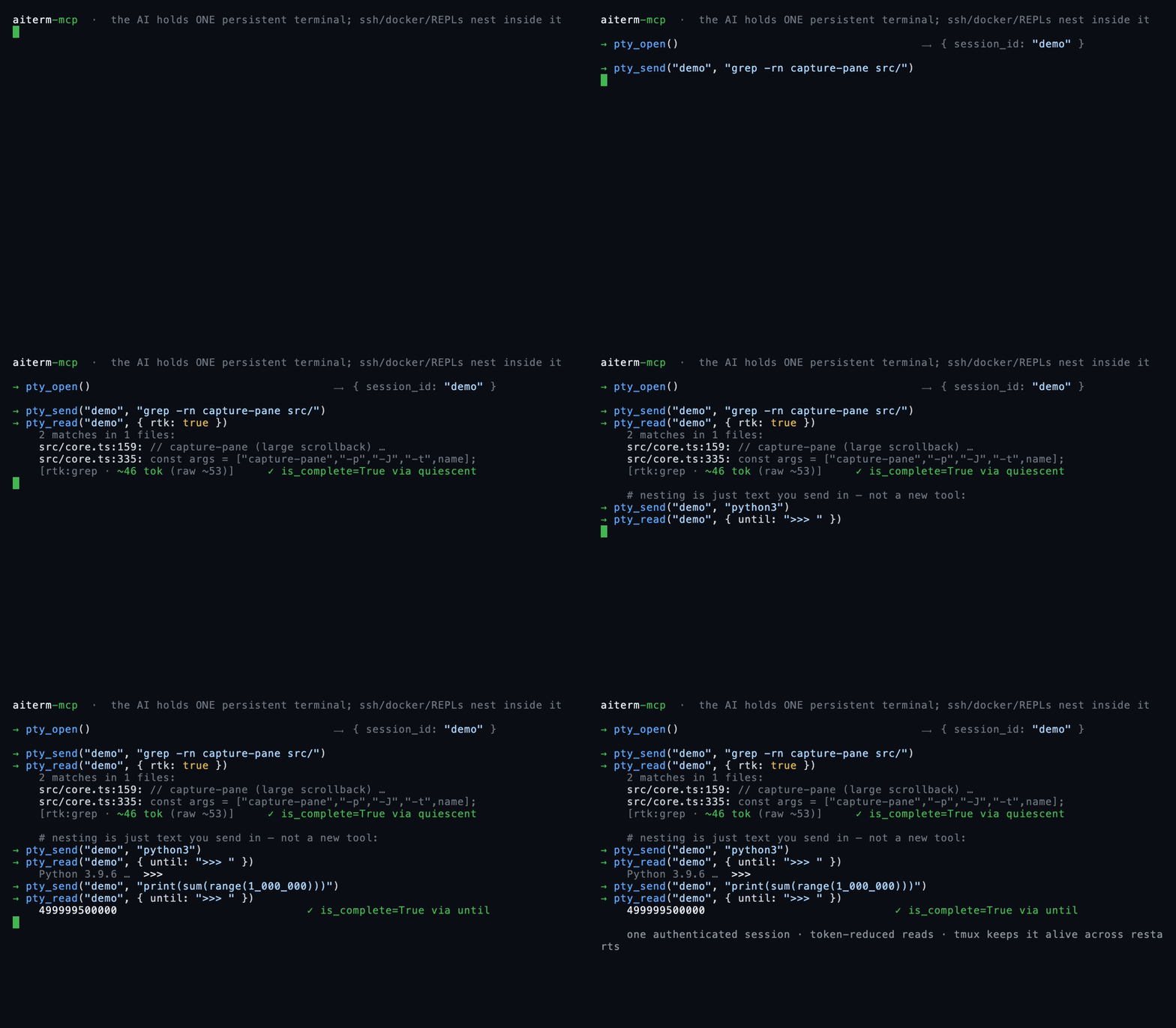
Real captured output — each block below was just run through aiterm in this repo; the numbers, the elision marker, and every is_complete verdict are the tool's own, not mocked. The bracketed meta line is what pty_read appends; its labels are Japanese in the actual output, translated here for readability (the Japanese README shows them verbatim).
A long output folded head+tail — the middle is elided by the reducer, not by me (166 → 56 tokens):
→ pty_send("demo", "seq 1 150")
→ pty_read("demo", { wait: true })
← 1
  2
  3
  ⋮  (head runs to line 29 — abbreviated in this README)
  … ⟨102 lines elided · full=true, or line_range="A:B"⟩ …    ← the tool's own marker
  ⋮  (tail resumes at line 132 — abbreviated in this README)
  149
  150
  [aiterm demo: 51 lines / ~56 tok (raw 152 lines / ~166 tok); 102 lines hidden] [is_complete=True via quiescent]
A grep, folded by the per-command reducer to a count header plus just the hits:
→ pty_send("demo", "grep -rn capture-pane src/ test/")
→ pty_read("demo", { wait: true, rtk: true })
← 2 matches in 1 files:

  src/core.ts:159:// maxBuffer defaults to 1 MiB; capture-pane (large scrollback) … (line truncated here)
  src/core.ts:335:const args = ["capture-pane", "-p", "-J", "-t", name];
  [aiterm demo: rtk:grep applied / ~46 tok (raw ~53 tok)] [is_complete=True via quiescent]
Nesting is just text you send in — here a Python REPL inside the same PTY (an ssh host, a docker exec -it … bash, or a launched coding-agent TUI nests exactly the same way):
→ pty_send("demo", "python3")
→ pty_read("demo", { until: ">>>" })                # nested prompt = "the inner shell is ready"
→ pty_send("demo", "print(sum(range(1_000_000)))")
→ pty_read("demo", { wait: true, until: ">>>" })
← 499999500000                                      [is_complete=True via until]
The only edits to the captures above are the two ⋮ lines (a long head/tail run abbreviated for the README) and one over-long grep line truncated to fit — the ⟨…⟩ marker, the token counts, and every is_complete verdict are exactly what the tool printed. (Use until: ">>>" without a trailing space — the captured prompt is trimmed, so ">>> " would miss and fall through to timeout.) While nested, pass until (the inner prompt) or mark: true, because quiescence cannot fire there by design — see Completion detection and Known constraints. A human can attach to the same multiplexer backend and watch any of this live (see A human can watch).
First run (≈60 seconds)
aiterm-setup --jsonがreadyになったら、利用するMCP clientを再起動して接続を確認する。Claude Codeの場合:
/mcp # aiterm should show as connected, exposing 18 tools
Your first session — four calls, one persistent terminal:
pty_open()                          → { session_id: "t1", attach: "<platform attach command>" }
pty_send("t1", "echo hello")        → command sent into the PTY
pty_read("t1", { wait: true })      → "hello"   (token-reduced, completion detected)
pty_close("t1")                     → terminal released
pty_close is idempotent and returns a structured closed / already_closed
receipt, so durable callers can retry the same session_id after losing the MCP response.
That's it. The terminal in t1 is real and persistent — ssh, docker exec, a REPL, or a launched agent's TUI are just things that live inside it. To launch a worker agent instead, one call does it: agent_launch({ harness: "codex-cli" }) returns a session_id you drive with the same pty_read / pty_send.
Prefer a global install, or a different client?
# install globally, then register the command name
npm i -g aiterm-mcp
claude mcp add --scope user --transport stdio aiterm -- aiterm-mcp
This registers it in ~/.claude.json; you'll get an approval prompt the first time. For client-specific JSON, see Install in your MCP client.
Headless: no human at the terminal
Because an MCP client drives aiterm programmatically over stdio, everything above can run with nobody sitting at the terminal. Any MCP-capable orchestrator can call agent_launch — including a harness matching itself — then pty_read the result and act on it unattended. That makes aiterm a fit for exactly the places a human-driven terminal isn't:
- Multi-agent orchestration — an orchestrator hands sub-tasks to Claude Code / Codex / Grok / Cursor harnesses, each in its own persistent session, and reads them all back. Composer remains a Grok CLI model preset.
- CI — a job step can spin up an agent, drive it, and tear it down.
- cron — a scheduled run can launch an agent and collect its output.
The terminal is real and shared, so a human can jump in (A human can watch) — but nothing requires one to.
How it works
flowchart LR
    AI["AI / MCP client<br/>(the orchestrator)"] -->|"pty_send · pty_observe · agent_launch · agent_steer · agent_configure · agent_approval · claude_turn · claude_approval<br/>legacy launcher aliases · diagnostics"| S["aiterm-mcp<br/>stdio MCP · 18 tools"]
    S -->|"pty_read<br/>token-reduced"| AI
    S -->|"tmux / psmux<br/>send · capture"| P["persistent PTYs<br/>survive restarts"]
    P -->|"ssh · docker · repl"| R["nested<br/>remote · container · REPL"]
    P -->|"launches a fresh PTY per agent"| A["another coding-agent harness<br/>Claude Code · Codex CLI · Grok CLI · Cursor CLI"]
One PTY is the only primitive. Everything else — SSH, containers, REPLs, and the launched agent TUIs — is just something interactive running inside a persistent terminal, driven with the same pty_send / pty_read. Each launcher opens its own fresh PTY. Because the PTYs live in tmux on POSIX or psmux on native Windows, sessions outlive the MCP server and the AI client.
When to reach for it vs. the built-in shell
Your MCP client already has a shell tool, and it wins on some jobs. aiterm wins on others. We measured both on the same commands in this repo, counting tokens the same way on each side (characters ÷ 4, aiterm's own estimator), so the comparison is apples-to-apples.
Start with the built-in tool for a light one-shot. git log --oneline -5 is one round-trip; aiterm is two — pty_send then pty_read — and that second round-trip costs more than a light command saves (~7 s vs ~13 s).
The second round-trip pays for itself once the output runs long, or the state has to outlive the call.
| Command | Built-in shell | aiterm | Verdict |
|---|---|---|---|
git log --oneline -5 | 1 call, ~7 s | 2 calls, ~13 s | shell (fewer round-trips) |
npm test (203 tests) | ~4,292 tok | ~607 tok | aiterm (~7.1× fewer, verdict kept) |
find node_modules -type f | ~500 tok¹ | ~456 tok | tokens tie; aiterm keeps head and tail + line_range |
grep -rn "session" src/ | ~2,989 tok | ~1,096 tok | aiterm (~2.7×; long lines get clipped²) |
In the recorded 203-test benchmark the reduction is real and safe. The built-in tool drops the whole 223-line log — ~4,292 tokens — into context. aiterm folds its own capture of the run down to ~607:
[aiterm demo: 51 行 / ~607 tok (raw 223 行 / ~4292 tok); 172 行 hidden] [is_complete=True via mark]
行 = lines; the meta line is quoted verbatim from aiterm's real output.
That is about 7.1× fewer tokens reaching the model, and the verdict survives the fold: the tail still carries ℹ tests 203 / ℹ pass 203 / ℹ fail 0. The reduction drops the noise and keeps the line you opened the log for. Wall-clock effectively ties, so on a run this long the extra round-trip is a small part of the total.
aiterm also holds state across calls. The built-in tool runs each call in a fresh shell, so cwd resets between calls and the environment doesn't carry. Send cd /tmp && export BENCH_VAR=hello123, then read it back in a second, separate call:
built-in shell  →  var=                   # empty; env dropped, cwd back at project root
aiterm          →  cwd=/tmp var=hello123  # one persistent PTY holds both
cd then set env then build, ssh once then run ten commands on the authenticated session, drive a live REPL or a launched agent's TUI turn by turn — one persistent PTY holds all of it. Reach for aiterm when the terminal has to remember something.
¹ Today's harness auto-offloads the ~192 KB dump to a file and previews only a ~2 KB head, so the token counts nearly tie; aiterm reports the accurate line count and lets line_range="A:B" pull any slice later, head or tail. ² The rtk grep reducer truncates long lines (~80 chars) and folds the overflow into [+N more], which suits scanning; use the built-in tool when you need every full line.
vs. the alternatives
aiterm sits at the intersection of two families: terminal-driving MCP servers, and the newer "agents talk to each other through a shared terminal" idea (see Where aiterm fits). Here's how the axes line up — honestly, including where the others are strong.
| aiterm-mcp | one-shot shell MCP (e.g. mcp-server-commands) | terminal / SSH / tmux MCPs (e.g. iterm-mcp, ssh-mcp, tmux-mcp) | shared-tmux agent-to-agent (e.g. smux) | |
|---|---|---|---|---|
| Persistent session | ✅ tmux / psmux, survives restarts | ❌ new shell every call | ⚠️ varies | ✅ tmux |
| SSH / containers / REPLs | nest with one pty_send | reconnect every command | ⚠️ often separate tools | ✅ tmux (human drives) |
| Launch another agent in one call | ✅ agent_launch(harness=…) | ❌ | ❌ | ⚠️ agents join a human-run tmux via a CLI + skills |
| Headless (no human at a tmux) | ✅ MCP-driven, programmatic | ✅ | ⚠️ varies | ❌ built around a human in the tmux |
| MCP-native (any MCP client) | ✅ one claude mcp add | ✅ | ✅ (they are MCPs) | ❌ tmux config + CLI + Agent Skills |
| Token-reduced reads | ✅ per-command reducers | ❌ raw output | ⚠️ rarely | ❌ raw tmux |
| Completion detection | 5-layer: exit / mark / until / quiescence / timeout | n/a (blocks per call) | ⚠️ prompt-match, fragile | ❌ agent reads the pane |
| Human can co-drive | ✅ shared socket / namespace (attach) | ❌ | ⚠️ varies | ✅ (its core model) |
Where aiterm fits
"AIs talking to each other through a shared terminal" is becoming its own category — and it's a genuinely good idea. The terminal is a universal interface every coding agent already speaks, so no bespoke agent-to-agent protocol is needed; the shell is the shared surface. smux (by @shawn_pana) popularized this framing as a one-command shared tmux environment a human sets up, that agents then join via a tmux-bridge CLI and Agent Skills. It's good at the in-the-loop, shared-pane workflow it's built for, and it has real traction.
aiterm takes the same core insight — the terminal as the meeting point — and makes three deliberate, different choices:
- Headless by construction. Because aiterm is driven programmatically over MCP, an AI can launch and drive another agent with no human sitting in the tmux — from an orchestration loop, a CI step, or a cron job. The shared-tmux tools lead with a human at the keyboard (their docs center on interactive pane navigation), so unattended operation isn't their native mode; aiterm's is.
- MCP-native, not a workflow you adopt. aiterm is a stdio MCP server: one
claude mcp addline and it works as structured tools in any MCP client that speaks stdio (tested in Claude Code; Cursor, Cline, and Claude Desktop speak the same protocol and should work the same way). It doesn't ask you to adopt a tmux config, learn pane navigation, or install skills into your setup — the client already knows how to call tools. - Launching an agent is one tool call — an orchestration primitive.
agent_launch({ harness: "codex-cli" })spawns Codex in a persistent terminal and returns a session you drive immediately. You don't arrange panes or paste between them by hand; the launch, the steering, and the reads are all tool calls the orchestrating model can make on its own.
On top of that sits a productized layer a raw tmux bridge doesn't have: token-reduced reads and 5-layer completion detection. None of this makes the human-in-the-tmux model wrong — it's a different, complementary bet on where the human is standing.
Tools
Session observation and startup
pty_open defaults to bash on POSIX and PowerShell 7 on Windows. Ordinary terminals and agents receive
AITERM_SESSION_ID. Pass environment-variable names in env_vars to inherit ownership information from the MCP process.
pty_list({ env_keys: ["JOB_OWNER"] }) returns only the requested non-secret values in environment; missing values are null.
Its aiterm.pty-list-result.v1 receipt contains observed_at and sessions, whose entries include session_id,
current_command, attached, width, height, harness, and environment. Existing text remains available.
pty_observe({ session_id, cursor? }) returns aiterm.pty-observe-result.v1 with exists, observed_at, state
(busy/idle/blocked/dead/missing/unknown), reason, pane_alive, and harness_alive. pane_process and harness_process
are separate identities. process_identity selects the harness for agents, or the unique child process-group leader
for an ordinary terminal, using the pane when no child leader exists. An identity contains pid, process_group_id,
started_identity, and argv_digest; unresolved identities are null. Windows PIDs are native and its process-group field
is null. Start identity uses POSIX LC_ALL=C ps lstart or Windows UTC ISO milliseconds; the argv digest is SHA-256 hex.
Pass activity.cursor into the next observation to obtain output_changed and cpu_delta_seconds; first observations and
recreated panes return null differences. cpu_seconds is the current subtree's cumulative CPU. If a process disappeared
between observations, the delta covers only observed increments and cpu_delta_complete is false.
background_cpu_seconds, background_cpu_delta_seconds, and background_cpu_delta_complete apply the same measurement
only to descendants created at least 60 seconds after the pane, excluding startup MCP processes. token_hint is the latest
displayed token count or null. Callers do not need raw argv or pane-text parsing.
agent_launch({ harness, cwd, trust_project: true }) completes known workspace, project-hook, and project-MCP startup
consent even without a prompt, then verifies input readiness and harness liveness before returning startup.status="ready".
A prompt-free launch without this option retains startup.status="not_checked". initial_prompt.status distinguishes
not_requested, not_sent, submitted_unconfirmed, and started. Failure responses retain structured session information.
WindowsのCodexもhook確認を認識し、npm shim経由の起動を一つのharnessとして識別する。
Do not resend an unconfirmed prompt; observe or wait using its returned cursor.
For a live Codex approval, inspect with agent_approval({ action: "inspect", session_id }), review prompt and choices,
then respond with observed_prompt_digest and approval_choice (approve_once or deny). Unknown or changed dialogs return
status="blocked" and isError:true without sending input. Permanent approval is not exposed. Correlated Claude approvals
continue to use claude_approval.
| Tool | Role | Key args |
|---|---|---|
pty_open | Open one terminal and return a session_id | name?, shell?, env_vars? |
pty_send | Send text; on an agent session this is a non-blocking dispatch returning an event_cursor | session_id, text, enter=true, mark, force, rtk, raw |
pty_read | Read output, token-reduced (incremental by default) | session_id, wait, until, until_regex, timeout, screen, full, lines, line_range, raw, rtk, agent_transcript, operation_id |
pty_key | Send a control key | session_id, key (C-c/Enter/Up…) |
pty_close | Close idempotently; return closed / already_closed | session_id |
pty_list | Text and structured session list, with explicitly requested non-secret environment values | env_keys? |
pty_observe | Pane/harness liveness, native process identity, state, and activity | session_id, cursor? |
agent_launch | Canonical agent launch; harness and model are independent | harness, prompt?, model?, reasoning_effort?, cwd?, write_scope?, trust_project?, env_vars?, throughline_source_session?, throughline_supplement_file? |
agent_approval | Inspect a Codex approval and submit a one-time approval or denial | action, session_id, approval_choice?, observed_prompt_digest? |
agent_steer | Inject text into the active Codex or Grok turn; return idle without sending when no turn is active | session_id, text |
claude_agent / codex_agent / grok_agent / composer_agent | Deprecated compatibility aliases | legacy launcher arguments |
agent_configure | Change model/effort in a running Claude, Codex, Grok, Composer, or Cursor session without restarting it | session_id, model?, reasoning_effort? |
claude_turn | Issue (dispatch-only) or recover one correlated Claude operation | action, session_id, operation_id, text? |
claude_approval | Inspect or answer the current correlated Claude approval prompt | action, session_id, operation_id?, approval_choice?, observed_prompt_digest? |
diagnostics | Read-only factory readiness as machine-readable JSON | (none) |
diagnostics never starts a PTY or agent. It reports package version, MCP call readiness, a read-only PTY-list summary, bounded runtime-error-store status, and optional vendor-launcher availability. It deliberately excludes paths, environment values, credentials, command text, PTY output, and raw logs; normal unset optional dependencies are not_applicable, while an indeterminate probe is unverified.
Local runtime error snapshot
snapshotのproduct_versionは各recordの最終実発生時の版を表す。store v2は旧v1を読み取り、単発記録の版を保持し、複数回の旧集約の版はunknownにする。読取りでは状態JSONを書き戻さず、次のロック内更新でv2を保存する。consumerを先に更新し、旧writerの終了後に新writerを使う。v2保存後の旧版への切替は、製品のバックアップ復元を伴う。
aiterm-runtime-errors snapshot exposes a machine-readable, product-owned local snapshot for the dotagents factory adapter. Collection is fail-closed unless the canonical dotagents factory-reporter config is schema-exact, its host profile matches the executing OS, and it contains the JSON boolean collection.enabled: true; reporting fields are schema-validated but endpoints and credential files are never contacted, and the store performs no network I/O. The only accepted observations are three fixed codes owned by the core boundary (PTY dependency, persistence, and optional vendor launcher). Stored data is limited to fixed templates and aggregate metadata (SHA-256 fingerprint, count, first/last seen, status, and monotonic sequence); exceptions, stderr/stdout, stacks, prompts, terminal/transcript/event bodies, paths, and arbitrary context cannot enter the API. Persisted JSON is revalidated with exact top/record fields and a recomputed fingerprint before explicit DTO projection.
Consumer flow is aiterm-runtime-errors snapshot, then aiterm-runtime-errors ack --cursor N after durable ingestion. Operators can use resolve|reopen --fingerprint SHA256. MCP collection and diagnostic reads run in timeout-bounded child processes, so a FIFO or stalled filesystem cannot block terminal work; child failure emits only the fixed store diagnostic. Store mutation uses a bounded bakery ticket queue: every waiter owns a never-reused ticket containing PID, process-start identity, and an owner token, so dead owners are removed by unique filename without fixed-path reclaim ABA. The queue deadline measures lack of progress by the same head owner, not total wait behind healthy predecessors; normal polling uses the native process-liveness check and validates process-start identity only when a blocker stalls. Worker deadlines use forced termination so a SIGTERM-ignoring child cannot mutate state after timeout. POSIX state is atomically replaced under $XDG_STATE_HOME/aiterm-mcp/ (default ~/.local/state/aiterm-mcp/) with owner/mode rechecked on every read. Windows native uses %LOCALAPPDATA%\aiterm-mcp\; each DACL is rebuilt and read back as one non-inherited FullControl ACE for the current SID. Windows path/DACL/timeout behavior is covered by pure tests in this change; no new Windows integration success is claimed.
Interactive agent harnesses
agent_launch starts a selected harness's interactive coding-agent TUI inside a fresh persistent PTY and returns its session_id. The harness owns the agent loop, authentication, hooks, session, and transcript; model is independent. The TUI is a full-screen app, so read it with pty_read({ screen: true }) for the rendered view.
agent_configure({ session_id, model?, reasoning_effort? }) changes a running Claude, Codex, Grok, Composer, or Cursor TUI through the harness's standard controls, preserving the PTY and conversation context.
harness | Launches | Model behavior |
|---|---|---|
claude-code | Claude Code CLI | Claude catalog model; native effort controls |
codex-cli | Codex CLI | OpenAI catalog model; native effort controls |
grok-cli | Grok Build CLI | Grok/Composer catalog model; Composer is model: "grok-composer-2.5-fast" |
cursor-cli | Cursor Agent CLI | Cursor catalog model, including GPT/Claude/Grok; effort uses model parameter override |
The selected harness CLI must be installed and authenticated. Use each product owner's official installer and updater; Aiterm does not distribute alternate CLI tarballs. For Cursor Agent CLI, use curl https://cursor.com/install -fsS | bash on macOS/Linux/WSL or irm 'https://cursor.com/install?win32=true' | iex on native Windows, authenticate once with agent login, and update with agent update; Aiterm invokes the unambiguous cursor-agent binary. Missing binaries, invalid model/effort values, unavailable Grok catalog models, and nonexistent cwd fail before a session exists.
Set throughline_source_session together with a non-empty mission in prompt to prepend
Throughline's read-only handoff context. This optional route requires throughline >= 0.9.0,
cannot be combined with launch_operation_id, and leaves the source session's database ownership
unchanged. Optional throughline_supplement_file is passed unchanged to Throughline and requires
throughline_source_session and Throughline 0.10.8 or later; Aiterm does not read or classify the supplement. Throughline is resolved through THROUGHLINE_BIN and then PATH; a missing or invalid
export fails before the PTY exists instead of silently launching clean.
When an agent's answer is longer than the on-screen tail (pane height ≈ 24 lines), callers recover it in full with pty_read({ agent_transcript: true }). It returns the most recently completed turn's final assistant message in plain text with no re-prompting. The existing human-readable content keeps its diagnostic suffix; machine callers read the answer alone from structuredContent.text in aiterm.pty-read-result.v1. Claude reads the bounded owner-only result captured by the launch-correlated Stop hook and verifies its digest/byte count; it never reads Claude's private transcript. Durable machine callers should use claude_turn: issue sends once, recover never sends, pending is distinct from unsafe or malformed state, and only completed carries the exact verified raw_output. Codex uses the normal rollout transcript's task_complete.turn_id; Grok/Composer return the last non-empty assistant message after the last real user row, excluding tool-use preambles; Cursor uses the normal agent transcript bound to the launch ID and current turn. Missing or ambiguous attribution remains an explicit error.
Completion detection (5 layers)
For PowerShell over SSH, mark:true recognizes the current standard PS ...> prompt and emits PowerShell syntax even when Aiterm runs on macOS or Linux. A prompt left in earlier output is not used to select the syntax.
pty_read({ wait: true }) decides "is the command done?" via five layers: process exit / a mark:true sentinel / an until match / output quiescence with shell return / timeout. mark emits the shell's exit status on POSIX shells and 0 (success) or 1 (failure) on PowerShell; fish/csh/tcsh are rejected before send because they do not share either status syntax. When mark or until is active, that requested evidence takes precedence and a momentarily quiet shell cannot complete the read as quiescent. Agent sessions add a sixth exact layer: Codex observes normal rollout task_complete; Grok/Composer observe normal session turn_ended; Claude observes its additive launch-correlated Stop event; Cursor observes turn_ended(status:"success") in the launch-bound normal agent transcript. aiterm-wait --cursor performs that harness-specific observation without the parent blocking or polling. Pre-send readiness failures are MCP errors, and late completion remains recoverable without resending.
Completion push for parent agents (aiterm-wait)
Codex/Claude Code親には子の回答本文が自動で届く。 子を起動・dispatchした後は、別作業へ進むか親のturnを終える。Aitermが完了を観測し、加工前の本文を保存して親へ渡す。waiter、pty_readによる回答回収、子への返送指示は不要。子は全対応harnessから選べる。
自動配送のreceiptにはparent_deliveryが付き、wait_process/wait_commandはnullになる。pty_observeのparent_deliveriesでwaiting、ready、sending、submitted、failed、unknownを確認できる。submittedはCodexの公式受信口での受付またはClaudeのhookへの本文出力を示し、modelの読了ではない。MCP再接続後は未送信の記録を再開し、出力中断で結果が分からない場合は本文を保持してunknownとする。自動再送はしない。
For queue delivery, use a Codex runtime that supplies MCP _meta.threadId and the official thread/queue API (verified with Codex CLI 0.154.0). aiterm-setup checks the installed queue entry point; Aiterm verifies the requesting thread before each dispatch. Codex native sub-agents reject external queue input and cannot be automatic-delivery parents. Steer相当の選択時も公式キューへ投入し、専用hookが同一ターンへ取り込みます。
Claude Codeは2.1.259以上の対話sessionに対応する。aiterm-setupが専用のPreToolUse、PostToolUse、SessionEndを登録するため、Channelsの起動flagは不要。公式asyncRewake hookだけが裏で待ち、親はその間も次のturnへ進める。回答はStop hook feedbackとして届く。hookのexit 2は親の再開信号であり、子の成功・失敗は本文のoutcomeで区別する。
/clear等の会話終了後は未送信の旧回答を送らず、本文を保存する。受信hookの上限は24時間。hookの終了・出力失敗・無効化を成功扱いせず、別の待機経路へ黙って切り替えない。Claude Desktopのチャット、Web、agent_id付きの会話(--agent起動とnative subagent)はこの受信契約に含めない。
hookを持たない旧版へ戻す時は、install前にaiterm-setup --remove-claude-parent-hooksを実行する。Aiterm専用hookだけを解除し、他製品のhookと設定は保持する。
Claudeをリンク経由のcwdから起動した場合も、実体パスに対応する会話記録を参照する。
For other parent hosts, dispatch and start the receipt's waiter in a separate process:
- Launch the child with
agent_launch({ harness: ... }); every launch shares the normal project/user environment and adds only completion correlation plus lineage. Send a turn with plainpty_send(orclaude_turn issuefor durable Claude operations). The call returns immediately with anevent_cursorin its structured receipt. - Pass the receipt's
wait_process.executableandwait_process.argsunchanged to a true argv process API. PowerShell 7'sStart-Processis the exception because it joins-ArgumentListarrays; passwindows_start_process_argument_listas its one ready-made argument string instead. This invokes the bundled waiter through the exact Node runtime that is already running aiterm, including on native Windows where npm's human-facing bin is a PowerShell script shim and install paths may contain spaces.wait_commandremains a compatibility display string for humans. The waiter observes the harness-owned completion source, plus Claude's additive launch hook, as a pure reader and exits with a one-lineaiterm.agent-wait-result.v1receipt. Exit ≠ done: the receipt'soutcomeis authoritative (0=done,3=timeout,4=closed,1= error). - 親自身のforegroundでwaiterを実行しない。 receiptのprocess起動情報を、そのhostが持つバックグラウンドprocess APIへ渡す。親は別作業へ進むかturnを終え、process終了の通知で続行する。
- Collect the result exactly as before:
pty_read(agent_transcript: true), orclaude_turn recoverfor durable Claude operations. The waiter carries the signal, never the payload.
If your host has no completion push (no mechanism that re-invokes the agent when a background process exits), --timeout 0 is a one-shot check instead of a wait: it scans the event file once and returns running (exit 5) when the turn is still in flight, done (exit 0) when it finished, closed (exit 4) when the session is gone. It is deliberately absent from the receipts and tool descriptions — a host that does get pushed should be woken, not poll. An unknown session name is an error, never running, so a typo cannot masquerade as a child that is still working.
aiterm-wait takes no locks, never writes session state, and never dispatches — any number can run beside the MCP server and each other, and pty_close/concurrent sends are unaffected.
Token reduction
pty_readby default strips control characters, collapses repeated lines, and folds long output into head+tail (with a restore hint and a meta line).pty_read({ rtk: true })further shrinks the observed output with a per-command reducer (git status/git log/grep/pytestand more) — a self-contained reimplementation that needs nortkbinary.pty_send({ rtk: true })rewrites a known command intortkform before sending, so reduction happens at the source ifrtkexists there (passthrough otherwise).
Input and output
pty_send does not interpret command or prompt meaning; it delivers the requested text to the terminal. By default it sanitizes ESC and bracketed-paste terminators, while pty_read neutralizes control characters in returned output (raw: true keeps them unchanged). The shell, remote endpoint, or launched harness owns command authorization.
Each pty_send accepts at most 64 KiB of UTF-8 text. Sends to the same session are serialized across aiterm processes so chunks cannot interleave. Every OS pastes through its multiplexer in UTF-8-safe 256-byte chunks with a 10 ms drain interval; macOS, Linux, and WSL2 have all demonstrated silent middle/trailing loss when a long input is pushed without that boundary. Sanitized multiline text sent while a POSIX shell or PowerShell is in the foreground is encoded as one newline-free input (eval for POSIX shells; a dot-sourced, UTF-8 Base64-decoded scriptblock for PowerShell): the shell receives the complete script before it runs the first line, so a pager or REPL started mid-script cannot consume later lines as interactive keystrokes. Single-line input, raw:true, and non-shell frontends remain direct PTY pastes. Agent dispatches additionally use the tmux-compatible bracketed-paste operation (paste-buffer -p): panes that requested bracketed-paste mode receive each chunk wrapped in ESC[200~/201~, hardening prompt injection against mid-word key-interpretation corruption and dropped submits. If a later chunk fails, aiterm reports the partial-send state and does not press Enter automatically. A lock left by a terminated sender fails closed before sending; use pty_list to confirm the affected session, close it with pty_close, then recreate the same session ID. There is no public kill-all tool.
A human can watch
Sessions live on a shared tmux socket on POSIX or a shared psmux namespace on native Windows. The attach line printed by pty_open and agent_launch lets a human attach to the same terminal and intervene, including a Claude/Codex/Grok/Cursor harness session: tmux -S … attach -t <id> on POSIX, or psmux -L <namespace> attach -t <id> on native Windows.
Requirements
- Node.js >= 18
- tmux or psmux (platform runtime prerequisite)
- macOS / Linux / WSL2 run tmux directly. On macOS install it with
brew install tmux(stock macOS ships none). If your MCP client is launched from the GUI rather than a terminal, Homebrew's bin (/opt/homebrew/binon Apple Silicon,/usr/local/binon Intel) may be off itsPATH; aiterm auto-searches those locations, or setAITERM_TMUX=/path/to/tmuxto point at it explicitly. - Native Windows has no tmux, so aiterm drives psmux — a tmux-CLI-compatible native terminal/session multiplexer — with a per-install
-Lnamespace. psmux is not a shell.pty_opendefaults to PowerShell 7 (pwsh.exe) and never falls back to Windows PowerShell 5.1, PowerShell 6, orcmd.exe; if only 5.1 is installed, use Microsoft's official installer or package manager first. Install psmux 3.3.8 or newer (winget install marlocarlo.psmux; 3.3.8 is the first release whosepipe-panefile sink, byte-exactpaste-bufferwire, and foreground#{pane_current_command}behave the way aiterm's capture/dispatch paths rely on). Git for Windows remains required for the explicit Bash shell used internally by harness launchers; System32'sbash.exeis the WSL launcher and is deliberately not used. Override multiplexer/Bash resolution withAITERM_PSMUX/AITERM_BASH. Other products consume persistent terminals through Aiterm's public API instead of depending on psmux directly.
- macOS / Linux / WSL2 run tmux directly. On macOS install it with
- For agent harnesses: the selected CLI, installed and authenticated through its product owner's official path —
claude,codex,grok, or Cursor'scursor-agent. Portable fork additionally needsthroughline >= 0.9.0; ordinary clean launch does not. (Not needed if you only use the PTY tools.) - Optional: the
rtkbinary (used bypty_send'srtk: truedelegation; works fine without it)
Known constraints (by design, not bugs)
Featured
Fastest browser for AI agents to run web automation tasks, always free.
Download Free life-time →Integrate web data into your AI product. One API to scrape website & brand data.
Get API Key Now →belt cli automatically finds the best tools and skills for your agent. image, video, music, tts...
one prompt install →Connect your Claude agent to live crypto prices and trading routes via 1inch
Get the MCP →Categories
Registryactive
Packageaiterm-mcp
TransportSTDIO
UpdatedJun 8, 2026


