
Summary
Bridges Claude to your Figma design system to generate production-ready screens from prompts or HTML. Runs a local bridge and plugin that scans your enabled Figma libraries, extracts components and variables, then builds canvas output with real component instances, variable bindings, and auto-layout. Learns patterns across builds and enforces design rules you correct it on. After each build it audits what was used versus what had to be built as primitives, surfacing coverage gaps with evidence. Works with any Figma library: team systems, community kits, or client files. Output is the deliverable, not a prototype you rebuild. Requires Node 20.6+, Figma desktop, and Professional plan or above.


Keeps your Mac awake while Claude Code, Codex or Cursor works. Lets it sleep when they are done.
Try free for 7 days →

Block distracting apps from your iPhone permanently without a 3rd party app. Free and open source.
Block now (100% free) →
Notes, actions and memory. Without a meeting bot. First month 100% off.
Download for free →
belt cli automatically finds the best tools and skills for your agent. image, video, music, tts...
one prompt install →
Free an open-source skills that make AI coding agents easier to understand, verify, and control.
Download for free →

Connect your Claude agent to live crypto prices and trading routes via 1inch
Get the MCP →

Mimic AI
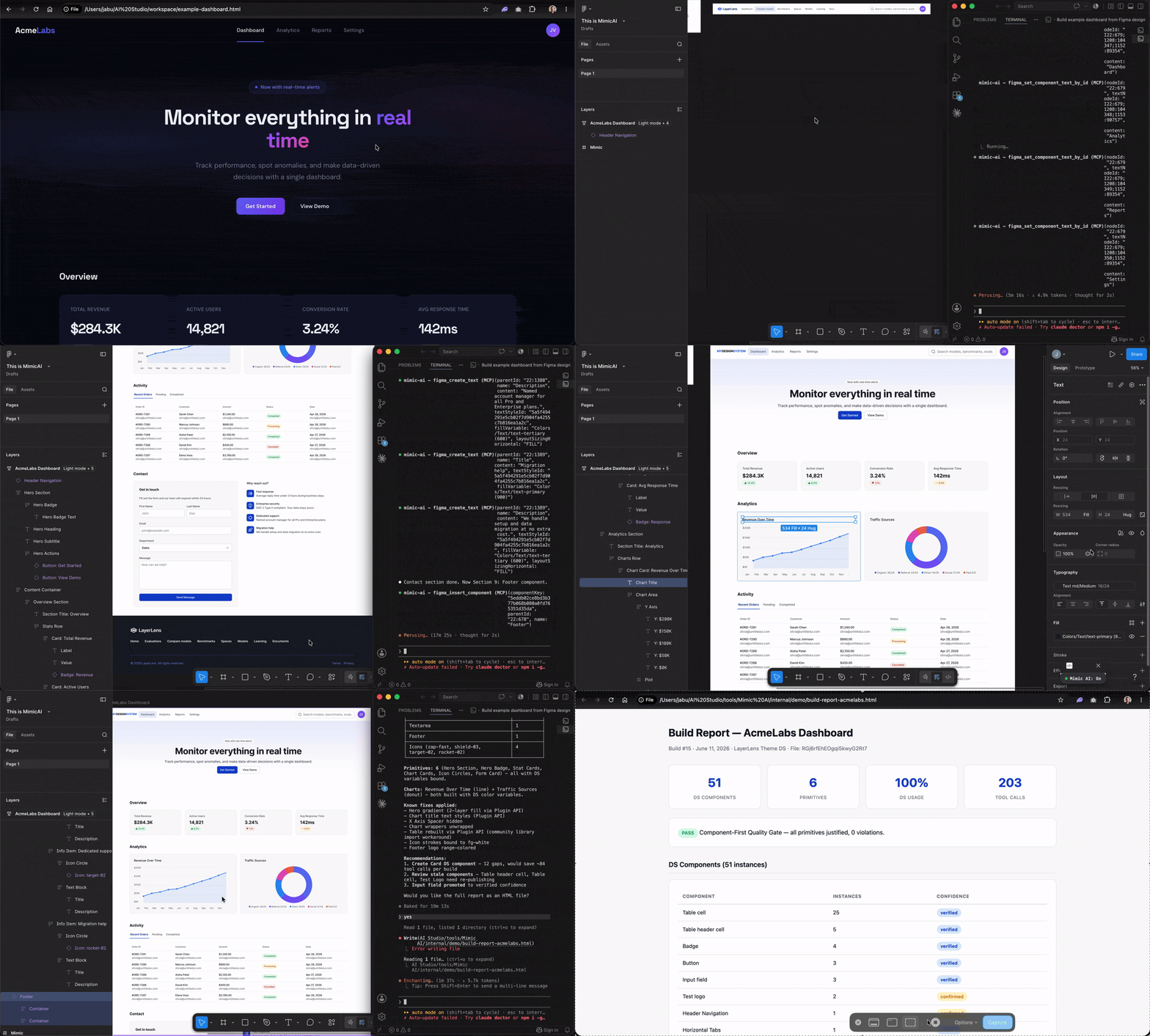
Transforms HTML into Figma using only your design system, enforcing correct component usage and falling back safely when needed, while improving accuracy with every build.







Open-source MCP server. Runs entirely on your machine — no Mimic cloud, no third-party servers. The only network calls are to Figma's own API, with your own token.
Gated, not steered
AI writing into Figma isn't the hard part anymore; several tools do it now. The differences show up in what happens when the AI reaches for something your design system doesn't have. A tool that steers an agent toward your components can still land on a raw hex value, a raw pixel size, or a font your system doesn't use, and general guidance for that category of tool is that the result may need manual review and cleanup before it's usable. Mimic enforces at write time, inside the Figma plugin itself, not just in the prompt.
What the gate blocks
- Raw hex/rgb fills where a DS color variable exists
- Raw pixel font sizes where a DS text style exists
- Fonts outside the design system
- Variable category mismatches (e.g. a background token used as a stroke)
- Primitive frames for elements the DS already has as components (buttons, badges, inputs, table cells, and more)
If the DS genuinely has no equivalent, Mimic says so in the build report instead of quietly leaving a raw value in place.
What the learning accumulates
- Component recipes, replayed automatically once confirmed across builds
- Majority-wins variant defaults, learned from your own usage patterns
- Design rules you set once by correcting a build, enforced on every one after
- No-good compilation: patterns tried and confirmed not to work, so they aren't retried
- Staleness detection: flags a stored recipe the moment it stops matching your current DS
- All scoped per design system library: nothing bleeds across unrelated files
Nothing else accumulates this across builds. A hand-authored Figma Agent Skill is static text; it doesn't learn from what you correct.
What the report proves Every build ends in a compliance-audited report: components used and their keys, primitives built and why, which stored rules were checked and whether they held, and where the DS still has coverage gaps. It's built to be shown to a stakeholder, not just read by the person who ran the build.
Why Mimic exists
You built a design system. Components, tokens, variables. Every decision intentional. Then someone needs a screen in Figma and starts from scratch. Hardcoded colors. Raw font sizes. Frames that break when you resize them. Your system sits right there in the library panel. Unused.
Mimic's output is the deliverable: real Figma layers with real component instances, variable bindings, and auto-layout. Nothing to convert. Nothing to swap. Hand it off.
It learns your system
The first build scans the design system. By the third, recurring components auto-verify. By the tenth, most decisions are instant. The knowledge compounds across every build.
| Build | What Mimic knows | What you experience |
|---|---|---|
| 1 | Nothing. Cold start. Scans your entire DS. | "It found my components and used them. Some primitives where my DS has gaps." |
| 5 | Core patterns verified. Common components cached. | "It remembered that I use Button/Primary for CTAs. It didn't ask about tabs this time." |
| 20 | Deep knowledge. Recipes for every common component. | "I point it at an HTML and get a DS-compliant Figma screen in minutes. It knows my system better than the new hire." |
| 50+ | Comprehensive DS audit data. Recurring gaps visible. | "The gap report says I've used status badges as primitives 31 times. I finally built the component. Mimic started using it immediately." |
Correct it once. Tell Mimic "That's not the right Badge, use Tag/Neutral." The mapping updates permanently. Every future build uses the correction without you having to repeat yourself.
Your DS evolves. Mimic keeps up. Component additions, removals, and variant changes are detected at the start of every build by comparing against what was cached last time — no manual re-sync. Deeper variable-level change detection (e.g. a renamed color token) is coming in a future release.
Every build is a DS review. After each build, Mimic generates a report: what components it used, what it built from primitives and why, what patterns it learned, and what your DS is missing. Recommendations come as questions, not commands: "Should your DS include a Status Badge? 4 elements across 3 builds were built as primitives."
How it works
Pick any starting point:
"Build a dashboard with three metric cards and an activity table"
"Here's the HTML from our staging environment, build it in Figma"
"Rebuild this Claude Design prototype with real components"
Mimic discovers the design system on your file, matches components and tokens, and builds structured Figma. Same rules, same output quality, regardless of how you start.
How Mimic compares
| Mimic | Claude Design | Figma Make | Framelink | html.to.design | |
|---|---|---|---|---|---|
| Output | Figma canvas (real layers) | HTML / React prototype | Interactive prototype | Read-only context | Figma canvas (paid) |
| Uses your components | Yes, real instances | No | Partial (Make Kits) | No (agent infers) | Partial |
| Variable bindings | Yes, every node | No | No (raw values) | No | No |
| Auto-layout | Every frame | N/A | N/A | N/A | Partial |
| Works with any library | Yes | No | Make Kits only | N/A | Limited |
| Learns across builds | Yes | No | No | No | No |
| DS gap detection | Yes, every build | No | No | No | No |
| Open source | Yes (MIT) | No | No | Yes (MIT) | No |
Claude Design is great for ideation. Figma Make is great for interactive prototyping. Framelink is great for giving AI context about your designs. Mimic is for when the output needs to be the actual Figma file you ship with.
Who it's for
Mimic works with any Figma library: your team's, a community kit, or a client's published system.
- Designers who want DS-compliant screens without manual component hunting
- Design system leads testing their system by building real screens, surfacing coverage gaps with evidence
- New team members learning a DS by building with it, seeing what components exist and what's missing
- Agencies and freelancers picking up a client's library and needing to produce screens fast
- DS migration teams rebuilding existing screens with a new system to assess coverage before committing
- Developers who need a Figma reference that matches their frontend components
- Product managers who want to mock up ideas using the DS without waiting for a designer
Get started
Requires: Node.js v20.6+ · the Figma desktop app (browser Figma isn't supported — download) · a Figma Professional plan or above (needed to publish and use team libraries).
1. Install
One-line installer:
bash <(curl -fsSL https://raw.githubusercontent.com/miapre/mimic-ai/main/install.sh)
This clones the repo to ~/mimic-ai, runs npm install, prompts for your Figma personal access token, and offers to register mimic-ai in Claude Code's settings.json automatically.
Manual install:
git clone https://github.com/miapre/mimic-ai.git
cd mimic-ai
npm install
Then set FIGMA_TOKEN in your MCP client's server config (or in ~/.mimic-ai.json — see "Figma setup details" further down for how to generate the token), and point your client's mimic-ai entry at the cloned mcp.js ({ "command": "node", "args": ["/path/to/mimic-ai/mcp.js"] }).
2. Add the Figma plugin
Plugins > Development > Import plugin from manifest > select ~/mimic-ai/plugin/manifest.json
3. Connect (each session)
Figma: Plugins > Development > Mimic AI > Run
The bridge starts automatically when you make your first tool call. No separate process to manage.
4. Enable your design system
Assets panel > Team library icon > toggle on. Once per file. Community libraries work out of the box.
5. Build
"Build a settings page with three form fields and a save button."
One call discovers the entire DS (variables, styles, components), preloads everything, and advances to build-ready. No multi-step setup.
What it learns and enforces
What it learns:
- Component recipes: Configure a component once (variants, booleans, text slots), Mimic replays that configuration on every future insert. After 3 builds, the recipe is confirmed and auto-applied.
- Layout patterns: Frame configs (direction, padding, gap, fills) captured from the first build and reused when the same pattern appears.
- Design rules: Correct Mimic once ("brand color is only for links", "cards must have a card header component"), it saves the rule and enforces it on every future build.
- DS gaps: Patterns built as primitives are tracked across builds. Mimic surfaces recommendations backed by evidence ("Status Badge used 31 times as primitives across 5 builds").
How it enforces:
- Variable categories. Uses bg-* for a stroke? Mimic warns and suggests border-. Uses bg- as text color? Warns and suggests text-*.
- Component-first from experience. If Mimic has used a Badge component in 3+ builds and you try to build one as a raw frame, it blocks with the component key and says "use this instead."
- Rule compliance. Every build report audits stored rules against what was built. Violations are listed with evidence.
- Chart color semantics. Brand, Success, Warning, and Error colors are excluded from chart palettes. Only neutral utility colors suggested for data visualization.
Efficiency features:
- Text batch: All text overrides on a component instance set in a single call
- Bulk table builder: An entire data table (headers, cells, variants, text) in one call
- Bulk chart builder: Bar, line, donut, and radar charts in one call with DS color bindings
What gets checked automatically
Every build enforces 19 quality rules across 6 sequential phases.
- Text uses DS text styles, not raw font properties
- Colors bound to DS variables, not hardcoded
- Variable categories enforced: text-* for text, bg-* for fills, border-* for strokes
- Semantic colors (Brand, Success, Warning, Error) restricted to their intended use
- Spacing and radius bound to DS tokens where available
- Every frame uses auto-layout
- Content matches the source exactly, character for character
- DS components used wherever a match exists, including learned components from prior builds
- Components fully configured: text overrides, variants, icon slots
- User-defined design rules enforced at point of use and audited in the build report
- Build report with component usage %, binding quality, rule compliance, and DS gap recommendations
Full specification: CLAUDE.md
Works with any design system
| Design system type | What Mimic does |
|---|---|
| Team library (components + tokens) | Full usage: components, variables, text styles |
| Team library (components only) | Uses components, flags missing tokens, recommends adding them |
| Community libraries (public kits from Figma Community) | Full support including variable and component discovery |
Enforcement adapts to what the DS provides. A library with text styles but no color variables enforces text styles and accepts raw colors. The build report shows what's missing and what adding it would unlock.
MCP client setup
Works with any MCP client. Optimized for Claude Code. Setup for Claude Code, Cursor, Codex CLI, and Gemini CLI (plus the general stdio-host case) is also in docs/HOSTS.md.
Claude Code
{
  "mcpServers": {
    "mimic-ai": {
      "command": "npx",
      "args": ["-y", "@miapre/mimic-ai"]
    }
  }
}
Cursor
Add to .cursor/mcp.json:
{
  "mcpServers": {
    "mimic-ai": {
      "command": "npx",
      "args": ["-y", "@miapre/mimic-ai"]
    }
  }
}
VS Code
Click the install badge above, or add to settings:
{
  "mcp": {
    "servers": {
      "mimic-ai": {
        "command": "npx",
        "args": ["-y", "@miapre/mimic-ai"]
        }
    }
  }
}
Windsurf / JetBrains
Windsurf: ~/.codeium/windsurf/mcp_config.json
JetBrains: Settings > Tools > AI Assistant > MCP Servers
{
  "mcpServers": {
    "mimic-ai": {
      "command": "npx",
      "args": ["-y", "@miapre/mimic-ai"]
    }
  }
}
All clients need the Figma plugin active. The bridge is embedded and starts automatically.
How it works (architecture)
MCP Client (Claude Code, Cursor, VS Code)
    |
    | MCP Protocol (stdio)
    v
MCP Server (intelligence layer)
    - Tool registry, DS cache, knowledge store
    - Variable validation + suggestions before plugin
    - Circuit breaker (3 failures -> stop + report)
    - Chart geometry engine (Node.js)
    - Phase enforcement (6 sequential phases)
    |
    | Embedded WebSocket bridge (auto-starts)
    v
Figma Plugin (enforcement gate)
    - DS enforcement: rejects raw values when DS has tokens
    - Binding feedback: reports which bindings succeeded/failed
    - Thin handlers: mechanical operations only
    |
    v
Figma Plugin API > Canvas
Intelligence flows down. Binding feedback flows up. The MCP layer validates variable paths before reaching the plugin. The plugin reports exactly which DS bindings succeeded and which failed. Tool responses carry contextual hints so the LLM always knows what to do next.
- Building is unlimited. Frames, components, and token bindings have no rate limit.
- Inspecting is limited. Reading the library uses Figma's daily quota. Mimic caches aggressively to stay well under.
- Token bindings are real. Update a variable in the DS, re-publish, and every node updates automatically.
- Auto-layout everywhere. Every frame resizes correctly. Nothing is manually positioned.
26 tools available
A lean, consolidated surface (v3.0.0) — every tool carries MCP annotations (readOnlyHint, destructiveHint, idempotentHint) and the key workflow tools return structured output (outputSchema).
Status and learning: mimic_status, mimic_discover_ds, mimic_ai_knowledge_read, mimic_ai_knowledge_write, mimic_generate_build_report
DS setup: mimic_ds_assets (discover / preload / set_defaults), figma_list_ds (text styles / fill styles / variables), mimic_map_components
Build: figma_create_frame, figma_create_text, figma_create_shape (rectangle / ellipse), figma_create_svg, figma_insert_component, mimic_build_table, mimic_build_chart
Components: figma_component_text (single or batch overrides), figma_set_variant, figma_swap_main_component (swap / replace), figma_manage_slot (fill / reset)
Edit: figma_update_node (text, text_style, fill, layout, visibility, position, restyle, move, select, page), figma_variable_modes, figma_delete_node
Inspect and QA: figma_inspect (node, children, parent, text, pages, page, selection, variants, section), figma_validate_ds_compliance
Rendering and charts: mimic_pipeline_resolve, mimic_compute_chart
Figma setup details
Desktop app required. Browser Figma won't work. Download
Personal Access Token. Figma > Profile > Settings > Security > Personal access tokens > Generate new token. Name: "Mimic AI", expiration: 90 days. Check five scopes: current_user:read, file_content:read, file_metadata:read, library_assets:read, library_content:read. All read-only. Mimic never writes to your library. Copy the token immediately.
Publish your DS. Components and tokens in a separate file, published as a team library. Re-publish after changes.
Professional plan or above. Free plan can't publish libraries.
FAQ
Does it cost anything?
No. Mimic is free and MIT-licensed. The only requirements are your own Figma plan (Professional or above, to publish and use team libraries) and a read-only Figma personal access token. Note that Figma's own official MCP server and Design Agent are usage-metered as part of Figma's paid plans; Mimic isn't, it's a separate open-source project with no usage limits of its own.
Can teammates share what it learns?
Not yet. Today, each machine builds its own knowledge store scoped per design system library. Knowledge export/import between teammates is planned but not shipped. The store format (ds-knowledge.json) is a shareable JSON file, so a manual copy already works if you want to seed a teammate's setup.
What can the Figma token access?
Five read-only scopes: current_user:read, file_content:read, file_metadata:read, library_assets:read, library_content:read. There is no write scope in that list, so Mimic cannot use this token to modify any Figma file. All writes happen through the Figma plugin's own editor session, not the REST API.
Does it work with community libraries from Figma Community?
Yes. Mimic discovers components and variables from any library enabled in your Figma file, including community-published libraries.
Does my design data leave my machine?
No. Everything runs locally. The only outbound call is to the Figma REST API for published component keys (read-only). No telemetry, no tracking.
What MCP clients are supported?
Any MCP client works. The 6-phase protocol and contextual tool hints are optimized for Claude Code. Cursor, VS Code, Windsurf, and JetBrains get the full toolset but may not follow the protocol as closely.
How is this different from screenshot-to-Figma tools?
Screenshot tools capture pixels, not structure. The result is a flat image you can't iterate on. Mimic reads semantic HTML and produces structured, layered Figma with real components, variable bindings, and auto-layout.
What happens when my design system changes?
Mimic detects component and variant changes at the start of every build by comparing against what was cached from your last session. New components surface automatically. Removed components fall back gracefully with an explanation in the build report. Variable-level changes (e.g. a renamed color token) aren't detected yet — that's coming in a future release.
Can I use it without a published design system?
Yes, but with limited enforcement. Without published components, Mimic builds with primitives and raw values. Without tokens, it accepts hardcoded colors. The build report shows exactly what's missing and what adding it would unlock.
Privacy
Everything runs locally.
No design data leaves your machine. No telemetry. No tracking.
The only outbound call is to the Figma REST API for published component keys.
Constraints
- Figma Professional plan required. Free plan can't publish libraries.
- First-build font caching. Non-Inter DS fonts may fail on the first text node. Retry succeeds.
- npx mode. Doesn't set
FIGMA_ACCESS_TOKEN. Use the full installer for team library support. - Graduated DS enforcement. Adapts to what the DS provides. A component-only library gets components; raw values fill the gaps. The report shows what to add.
- Claude-optimized. The 6-phase protocol and contextual tool hints work best with Claude Code. Other MCP clients get the tools but may not follow the full protocol.
Contributing
Issues and PRs welcome. See the issue tracker and CONTRIBUTING.md for dev setup and PR expectations. Found a security issue? See SECURITY.md instead of opening a public issue.
License
MIT
Featured
Keeps your Mac awake while Claude Code, Codex or Cursor works. Lets it sleep when they are done.
Try free for 7 days →Block distracting apps from your iPhone permanently without a 3rd party app. Free and open source.
Block now (100% free) →Notes, actions and memory. Without a meeting bot. First month 100% off.
Download for free →belt cli automatically finds the best tools and skills for your agent. image, video, music, tts...
one prompt install →Free an open-source skills that make AI coding agents easier to understand, verify, and control.
Download for free →Connect your Claude agent to live crypto prices and trading routes via 1inch
Get the MCP →Categories
Registryactive
Packagehtml-to-figma-design-system
TransportSTDIO
UpdatedApr 11, 2026


