
Summary
Mobile Next MCP enables AI agents and LLMs to automate and interact with native iOS and Android applications across simulators, emulators, and real devices through a unified platform-agnostic interface. The server provides tools for accessibility-based snapshots and coordinate-based interactions from screenshots, allowing agents to perform automated testing, form filling, multi-step user journeys, and general application interaction without requiring platform-specific knowledge. It solves the problem of scaling mobile automation by abstracting away iOS and Android differences and enabling LLMs to drive complex mobile workflows programmatically.
Install to Claude Code
verifiedclaude mcp add mobile-mcp -- npx -y @mobilenext/mobile-mcpRun in your terminal. Replace YOUR_* placeholders with real values; add --scope user to install for every project.
Review the command, arguments, and environment values before installing — MCP servers run with your local permissions.



Fastest browser for AI agents to run web automation tasks, always free.
Download Free life-time →

Integrate web data into your AI product. One API to scrape website & brand data.
Get API Key Now →
belt cli automatically finds the best tools and skills for your agent. image, video, music, tts...
one prompt install →

Connect your Claude agent to live crypto prices and trading routes via 1inch
Get the MCP →


Tools
Verified live against the running server on Jun 10, 2026.
verified live23 tools
mobile_list_available_devicesList all available devices. This includes both physical mobile devices and mobile simulators and emulators. It returns both Android and iOS devices.
List all available devices. This includes both physical mobile devices and mobile simulators and emulators. It returns both Android and iOS devices.
No parameters — call it with no arguments.
mobile_list_appsList all the installed apps on the device1 params
List all the installed apps on the device
Parameters* required
device*stringThe device identifier to use. Use mobile_list_available_devices to find which devices are available to you.
mobile_launch_appLaunch an app on mobile device. Use this to open a specific app. You can find the package name of the app by calling list_apps_on_device.3 params
Launch an app on mobile device. Use this to open a specific app. You can find the package name of the app by calling list_apps_on_device.
Parameters* required
device*stringThe device identifier to use. Use mobile_list_available_devices to find which devices are available to you.
localestringComma-separated BCP 47 locale tags to launch the app with (e.g., fr-FR,en-GB)
packageName*stringThe package name of the app to launch
mobile_terminate_appStop and terminate an app on mobile device2 params
Stop and terminate an app on mobile device
Parameters* required
device*stringThe device identifier to use. Use mobile_list_available_devices to find which devices are available to you.
packageName*stringThe package name of the app to terminate
mobile_install_appInstall an app on mobile device2 params
Install an app on mobile device
Parameters* required
device*stringThe device identifier to use. Use mobile_list_available_devices to find which devices are available to you.
path*stringThe path to the app file to install. For iOS simulators, provide a .zip file or a .app directory. For Android provide an .apk file. For iOS real devices provide an .ipa file
mobile_uninstall_appUninstall an app from mobile device2 params
Uninstall an app from mobile device
Parameters* required
bundle_id*stringBundle identifier (iOS) or package name (Android) of the app to be uninstalled
device*stringThe device identifier to use. Use mobile_list_available_devices to find which devices are available to you.
mobile_get_screen_sizeGet the screen size of the mobile device in pixels1 params
Get the screen size of the mobile device in pixels
Parameters* required
device*stringThe device identifier to use. Use mobile_list_available_devices to find which devices are available to you.
mobile_click_on_screen_at_coordinatesClick on the screen at given x,y coordinates. If clicking on an element, use the list_elements_on_screen tool to find the coordinates.3 params
Click on the screen at given x,y coordinates. If clicking on an element, use the list_elements_on_screen tool to find the coordinates.
Parameters* required
device*stringThe device identifier to use. Use mobile_list_available_devices to find which devices are available to you.
x*numberThe x coordinate to click on the screen, in pixels
y*numberThe y coordinate to click on the screen, in pixels
mobile_double_tap_on_screenDouble-tap on the screen at given x,y coordinates.3 params
Double-tap on the screen at given x,y coordinates.
Parameters* required
device*stringThe device identifier to use. Use mobile_list_available_devices to find which devices are available to you.
x*numberThe x coordinate to double-tap, in pixels
y*numberThe y coordinate to double-tap, in pixels
mobile_long_press_on_screen_at_coordinatesLong press on the screen at given x,y coordinates. If long pressing on an element, use the list_elements_on_screen tool to find the coordinates.4 params
Long press on the screen at given x,y coordinates. If long pressing on an element, use the list_elements_on_screen tool to find the coordinates.
Parameters* required
device*stringThe device identifier to use. Use mobile_list_available_devices to find which devices are available to you.
durationnumberDuration of the long press in milliseconds. Defaults to 500ms.
x*numberThe x coordinate to long press on the screen, in pixels
y*numberThe y coordinate to long press on the screen, in pixels
mobile_list_elements_on_screenList elements on screen and their coordinates, with display text or accessibility label. Do not cache this result.1 params
List elements on screen and their coordinates, with display text or accessibility label. Do not cache this result.
Parameters* required
device*stringThe device identifier to use. Use mobile_list_available_devices to find which devices are available to you.
mobile_press_buttonPress a button on device2 params
Press a button on device
Parameters* required
button*stringThe button to press. Supported buttons: BACK (android only), HOME, VOLUME_UP, VOLUME_DOWN, ENTER, DPAD_CENTER (android tv only), DPAD_UP (android tv only), DPAD_DOWN (android tv only), DPAD_LEFT (a...
device*stringThe device identifier to use. Use mobile_list_available_devices to find which devices are available to you.
mobile_open_urlOpen a URL in browser on device2 params
Open a URL in browser on device
Parameters* required
device*stringThe device identifier to use. Use mobile_list_available_devices to find which devices are available to you.
url*stringThe URL to open
mobile_swipe_on_screenSwipe on the screen5 params
Swipe on the screen
Parameters* required
device*stringThe device identifier to use. Use mobile_list_available_devices to find which devices are available to you.
direction*stringThe direction to swipeone of
up · down · left · rightdistancenumberThe distance to swipe in pixels. Defaults to 400 pixels for iOS or 30% of screen dimension for Android
xnumberThe x coordinate to start the swipe from, in pixels. If not provided, uses center of screen
ynumberThe y coordinate to start the swipe from, in pixels. If not provided, uses center of screen
mobile_type_keysType text into the focused element3 params
Type text into the focused element
Parameters* required
device*stringThe device identifier to use. Use mobile_list_available_devices to find which devices are available to you.
submit*booleanWhether to submit the text. If true, the text will be submitted as if the user pressed the enter key.
text*stringThe text to type
mobile_save_screenshotSave a screenshot of the mobile device to a file2 params
Save a screenshot of the mobile device to a file
Parameters* required
device*stringThe device identifier to use. Use mobile_list_available_devices to find which devices are available to you.
saveTo*stringThe path to save the screenshot to. Filename must end with .png, .jpg, or .jpeg
mobile_take_screenshotTake a screenshot of the mobile device. Use this to understand what's on screen, if you need to press an element that is available through view hierarchy then you must list elements on screen instead. Do not cache this result.1 params
Take a screenshot of the mobile device. Use this to understand what's on screen, if you need to press an element that is available through view hierarchy then you must list elements on screen instead. Do not cache this result.
Parameters* required
device*stringThe device identifier to use. Use mobile_list_available_devices to find which devices are available to you.
mobile_set_orientationChange the screen orientation of the device2 params
Change the screen orientation of the device
Parameters* required
device*stringThe device identifier to use. Use mobile_list_available_devices to find which devices are available to you.
orientation*stringThe desired orientationone of
portrait · landscapemobile_get_orientationGet the current screen orientation of the device1 params
Get the current screen orientation of the device
Parameters* required
device*stringThe device identifier to use. Use mobile_list_available_devices to find which devices are available to you.
mobile_start_screen_recordingStart recording the screen of a mobile device. The recording runs in the background until stopped with mobile_stop_screen_recording. Returns the path where the recording will be saved.3 params
Start recording the screen of a mobile device. The recording runs in the background until stopped with mobile_stop_screen_recording. Returns the path where the recording will be saved.
Parameters* required
device*stringThe device identifier to use. Use mobile_list_available_devices to find which devices are available to you.
outputstringThe file path to save the recording to. Filename must end with .mp4. If not provided, a temporary path will be used.
timeLimitnumberMaximum recording duration in seconds. The recording will stop automatically after this time.
mobile_stop_screen_recordingStop an active screen recording on a mobile device. Returns the file path, size, and approximate duration of the recording.1 params
Stop an active screen recording on a mobile device. Returns the file path, size, and approximate duration of the recording.
Parameters* required
device*stringThe device identifier to use. Use mobile_list_available_devices to find which devices are available to you.
mobile_list_crashesList crash reports available on the device1 params
List crash reports available on the device
Parameters* required
device*stringThe device identifier to use. Use mobile_list_available_devices to find which devices are available to you.
mobile_get_crashGet the full content of a crash report by its ID. Use mobile_list_crashes to find available crash IDs.2 params
Get the full content of a crash report by its ID. Use mobile_list_crashes to find available crash IDs.
Parameters* required
device*stringThe device identifier to use. Use mobile_list_available_devices to find which devices are available to you.
id*stringThe crash report ID to retrieve
Mobile Next - MCP server for Mobile Development and Automation | iOS, Android, Simulator, Emulator, and Real Devices
This is an MCP Server that enables scalable mobile automation, development through a platform-agnostic interface, eliminating the need for distinct iOS or Android knowledge. You can run it on emulators, simulators, and real devices (iOS and Android).
This server allows Agents and LLMs to interact with native iOS/Android applications and devices through structured accessibility snapshots or coordinate-based taps based on screenshots.
Works with Claude Code, Codex, Gemini, GitHub Copilot, Antigravity — or any MCP-compatible client.
Run it against devices on your own machine, or against real iOS and Android devices in the cloud with Mobile Next Cloud — same tools, no local setup.






https://github.com/user-attachments/assets/bb084777-beb3-4930-ae6f-8d3fe694ddde
Main use cases
How we help to scale mobile automation:
- 📲 Native app automation (iOS and Android) for testing or data-entry scenarios.
- 📝 Scripted flows and form interactions without manually controlling simulators/emulators or real devices (iPhone, Samsung, Google Pixel etc)
- 🧭 Automating multi-step user journeys driven by an LLM
- 👆 General-purpose mobile application interaction for agent-based frameworks
- 🤖 Enables agent-to-agent communication for mobile automation usecases, data extraction
Main Features
- 🚀 Accessibility-first — fast and cheap: drives apps from the native accessibility tree (no vision model, no image tokens), falling back to screenshots + coordinates only when needed.
- 📱 One API, every target: the same tools work across iOS and Android — simulators, emulators, and real devices.
- 🧠 No platform expertise required: no XCUITest, no Espresso, no per-platform glue — describe the goal and the agent does it.
- 🧰 Full device control: taps, swipes, and gestures; app install/launch/terminate; screen recording; hardware buttons; deep links; orientation.
- 📊 Structured, deterministic output: reads real UI elements and extracts structured data, cutting the ambiguity of screenshot-only approaches.
🎯 Platform Support
| Target | Supported | Setup |
|---|---|---|
| iOS Simulator | ✅ | Xcode + a booted simulator (xcrun simctl) |
| iOS Real Device | ✅ | Device connected over USB and trusted |
| Android Emulator | ✅ | Android SDK + running emulator (adb) |
| Android Real Device | ✅ | adb + USB debugging enabled & authorized |
🔧 Available MCP Tools
Device Management
mobile_list_available_devices- List all available devices (simulators, emulators, and real devices)mobile_get_screen_size- Get the screen size of the mobile device in pixelsmobile_get_orientation- Get the current screen orientation of the devicemobile_set_orientation- Change the screen orientation (portrait/landscape)mobile_set_location- Override the GPS location reported by the device, or clear the overridemobile_clipboard- Read or replace the device clipboard
Remote Devices (Mobile Next Cloud)
mobile_login_to_cloud_provider- Authenticate this machine with the cloud device provider (browser-based device-code login)mobile_list_remote_devices- List device models available to reserve from the cloud fleetmobile_allocate_remote_device- Reserve a physical cloud device for exclusive usemobile_release_remote_device- Release a reserved cloud device back to the fleet
App Management
mobile_list_apps- List all installed apps on the devicemobile_get_foreground_app- Get the app currently in the foregroundmobile_launch_app- Launch an app using its package namemobile_terminate_app- Stop and terminate a running appmobile_install_app- Install an app from file (.apk, .ipa, .app, .zip)mobile_uninstall_app- Uninstall an app using bundle ID or package name
Screen Interaction
mobile_take_screenshot- Take a screenshot to understand what's on screenmobile_save_screenshot- Save a screenshot to a filemobile_list_elements_on_screen- List UI elements with their coordinates and propertiesmobile_click_on_screen_at_coordinates- Click at specific x,y coordinatesmobile_double_tap_on_screen- Double-tap at specific coordinatesmobile_long_press_on_screen_at_coordinates- Long press at specific coordinatesmobile_swipe_on_screen- Swipe in any direction (up, down, left, right)mobile_start_screen_recording- Start recording the device screen to a video filemobile_stop_screen_recording- Stop the active screen recording and save the video
Input & Navigation
mobile_type_keys- Type text into focused elements with optional submitmobile_press_button- Press device buttons (HOME, BACK, VOLUME_UP/DOWN, ENTER, etc.)mobile_open_url- Open URLs in the device browser
Logs & Crash Reports
mobile_get_device_logs- Collect live device logs (logcat on Android, unified log on iOS), optionally saved to a filemobile_list_crashes- List crash reports available on the devicemobile_get_crash- Get the full content of a crash report by its IDmobile_batch_commands- Run multiple tools in sequence in a single call (e.g. click, type, click), optionally listing screen elements at the end
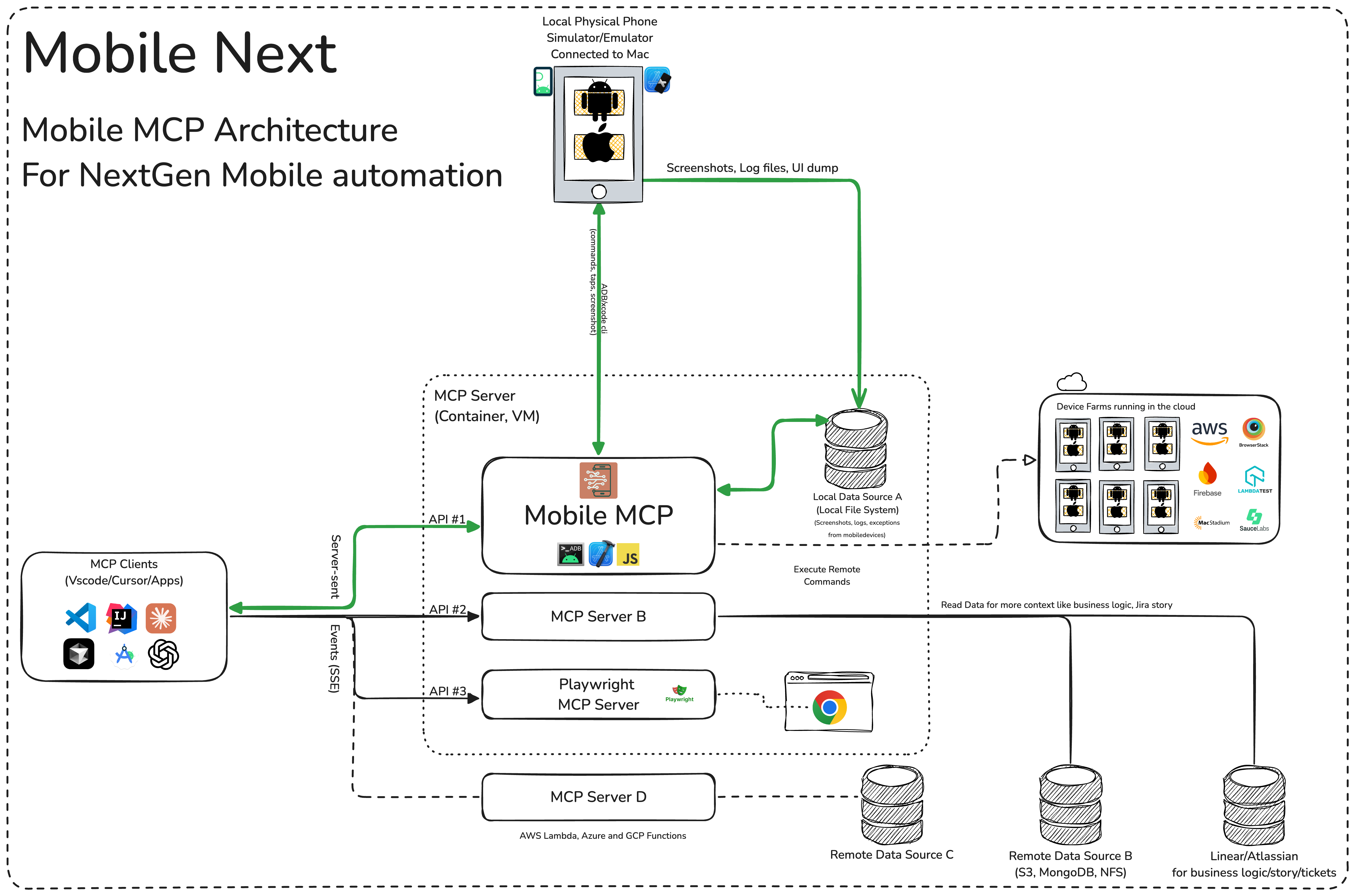
🏗️ Mobile MCP Architecture
📚 Wiki page
More details in our wiki page for setup, configuration and debugging related questions.
Prerequisites
What you will need to connect MCP with your agent and mobile devices:
- Xcode command line tools
- Android Platform Tools
- node.js v20+
- MCP supported foundational models or agents, like Claude MCP, OpenAI Agent SDK, Copilot Studio
Installation and configuration
Standard config works in most of the tools:
{
  "mcpServers": {
    "mobile-mcp": {
      "command": "npx",
      "args": ["-y", "@mobilenext/mobile-mcp@latest"]
    }
  }
}
Amp
Add via the Amp VS Code extension settings screen or by updating your settings.json file:
"amp.mcpServers": {
  "mobile-mcp": {
    "command": "npx",
    "args": [
      "@mobilenext/mobile-mcp@latest"
    ]
  }
}
Amp CLI:
Run the following command in your terminal:
amp mcp add mobile-mcp -- npx @mobilenext/mobile-mcp@latest
Antigravity 2
Antigravity doesn't have a CLI command to add MCP servers, so add it manually. Edit ~/.gemini/config/mcp_config.json and add:
{
  "mcpServers": {
    "mobile-mcp": {
      "command": "npx",
      "args": ["-y", "@mobilenext/mobile-mcp@latest"]
    }
  }
}
Claude Code
Use the Claude Code CLI to add the Mobile MCP server:
claude mcp add mobile-mcp -- npx -y @mobilenext/mobile-mcp@latest
Claude Desktop
Follow the MCP install guide, use json configuration above.
Codex
Use the Codex CLI to add the Mobile MCP server:
codex mcp add mobile-mcp npx "@mobilenext/mobile-mcp@latest"
Alternatively, create or edit the configuration file ~/.codex/config.toml and add:
[mcp_servers.mobile-mcp]
command = "npx"
args = ["@mobilenext/mobile-mcp@latest"]
For more information, see the Codex MCP documentation.
Copilot
Use the Copilot CLI to interactively add the Mobile MCP server:
/mcp add
You can edit the configuration file ~/.copilot/mcp-config.json and add:
{
  "mcpServers": {
    "mobile-mcp": {
      "type": "local",
      "command": "npx",
      "tools": [
        "*"
      ],
      "args": [
        "@mobilenext/mobile-mcp@latest"
      ]
    }
  }
}
For more information, see the Copilot CLI documentation.
Cursor
Click the button to install:

Or install manually:
Go to Cursor Settings -> MCP -> Add new MCP Server. Name to your liking, use command type with the command npx -y @mobilenext/mobile-mcp@latest. You can also verify config or add command like arguments via clicking Edit.
Gemini CLI
Use the Gemini CLI to add the Mobile MCP server:
gemini mcp add mobile-mcp npx -y @mobilenext/mobile-mcp@latest
Goose
Click the button to install:

Or install manually:
Go to Advanced settings -> Extensions -> Add custom extension. Name to your liking, use type STDIO, and set the command to npx -y @mobilenext/mobile-mcp@latest. Click "Add Extension".
Kiro
Follow the MCP Servers documentation. For example in .kiro/settings/mcp.json:
{
  "mcpServers": {
    "mobile-mcp": {
      "command": "npx",
      "args": [
        "@mobilenext/mobile-mcp@latest"
      ]
    }
  }
}
opencode
Follow the MCP Servers documentation. For example in ~/.config/opencode/opencode.json:
{
  "$schema": "https://opencode.ai/config.json",
  "mcp": {
    "mobile-mcp": {
      "type": "local",
      "command": [
        "npx",
        "@mobilenext/mobile-mcp@latest"
      ],
      "enabled": true
    }
  }
}
Windsurf
Open Windsurf settings, navigate to MCP servers, and add a new server using the command type with:
npx @mobilenext/mobile-mcp@latest
Or add the standard config under mcpServers in your settings as shown above.
✅ Verify it works
Once the server is configured, ask your agent to list devices:
list available devices
You should get back your running simulators, emulators, and connected devices. If you do, Mobile MCP is wired up correctly. If the list is empty, make sure a simulator or emulator is running (see Prerequisites) — for more help, check the wiki.
☁️ Scale up, use a cloud device
Want to scale to hundreds of devices? Use Mobile MCP in your CI/CD pipeline?
In your Agent, prompt:
log in to mobile next cloud and then show me which remote devices are available to me
Streamable HTTP Server Mode
By default, Mobile MCP runs over stdio. To start a Streamable HTTP server instead, use the --listen flag:
npx @mobilenext/mobile-mcp@latest --listen 3000
This binds to localhost:3000. To bind to a specific interface:
npx @mobilenext/mobile-mcp@latest --listen 0.0.0.0:3000
Then configure your MCP client to connect to http://<host>:3000/mcp (or https://…/mcp behind TLS). The endpoint accepts Streamable HTTP (POST on /mcp); remote mode is stateless (no session affinity required), which works well with Smithery and other horizontal hosts.
Migration note:
--listenpreviously served the deprecated HTTP+SSE transport on/mcp. Clients must use Streamable HTTP againsthttp(s)://host:port/mcp. The old pure-SSE flow on/mcpis no longer available.
When binding to localhost, Host-header DNS rebinding protection is enabled automatically.
Authorization
To require Bearer token authorization on the HTTP server, set the MOBILEMCP_AUTH environment variable:
MOBILEMCP_AUTH=my-secret-token npx @mobilenext/mobile-mcp@latest --listen 3000
When set, all requests must include the header Authorization: Bearer my-secret-token. When unset, the server accepts unauthenticated connections and logs a warning.
🛠️ How to Use
After adding the MCP server to your IDE/Client, you can instruct your AI assistant to use the available tools. For example, in Cursor's agent mode, you could use the prompts below to quickly validate, test and iterate on UI interactions, read information from screen, go through complex workflows. Be descriptive, straight to the point.
✨ Example Prompts
Workflows
You can specify detailed workflows in a single prompt, verify business logic, setup automations. You can go crazy:
Search for a video, comment, like and share it.
Find the video called " Beginner Recipe for Tonkotsu Ramen" by Way of
Ramen, click on like video, after liking write a comment " this was
delicious, will make it next Friday", share the video with the first
contact in your whatsapp list.
Download a successful step counter app, register, setup workout and 5-star the app
Find and Download a free "Pomodoro" app that has more than 1k stars.
Launch the app, register with my email, after registration find how to
start a pomodoro timer. When the pomodoro timer started, go back to the
app store and rate the app 5 stars, and leave a comment how useful the
app is.
Search in Substack, read, highlight, comment and save an article
Open Substack website, search for "Latest trends in AI automation 2025",
open the first article, highlight the section titled "Emerging AI trends",
and save article to reading list for later review, comment a random
paragraph summary.
Reserve a workout class, set timer
Open ClassPass, search for yoga classes tomorrow morning within 2 miles,
book the highest-rated class at 7 AM, confirm reservation,
setup a timer for the booked slot in the phone
Find a local event, setup calendar event
Open Eventbrite, search for AI startup meetup events happening this
weekend in "Austin, TX", select the most popular one, register and RSVP
yes to the event, setup a calendar event as a reminder.
Check weather forecast and send a Whatsapp/Telegram/Slack message
Open Weather app, check tomorrow's weather forecast for "Berlin", and
send the summary via Whatsapp/Telegram/Slack to contact "Lauren Trown",
thumbs up their response.
- Schedule a meeting in Zoom and share invite via email
Open Zoom app, schedule a meeting titled "AI Hackathon" for tomorrow at
10AM with a duration of 1 hour, copy the invitation link, and send it via
Gmail to contacts "team@example.com".
Running & configuration
Environment variables
| Variable | Description | Example |
|---|---|---|
MOBILEMCP_AUTH | Require a Bearer token on the Streamable HTTP server (--listen) — every request must then send Authorization: Bearer <token>. | MOBILEMCP_AUTH=my-secret-token |
MOBILEMCP_DISABLE_TELEMETRY | Disable anonymous usage telemetry. | MOBILEMCP_DISABLE_TELEMETRY=1 |
MOBILEMCP_ALLOW_UNSAFE_URLS | Allow mobile_open_url to open non-standard URL schemes (blocked by default). | MOBILEMCP_ALLOW_UNSAFE_URLS=1 |
MOBILEMCP_LEGACY_ROBOT | Use the legacy platform-specific robots for Android devices and physical iOS devices. iOS simulators continue to use mobilecli. | MOBILEMCP_LEGACY_ROBOT=1 |
Simulators, Emulators, and Real Devices
When launched, Mobile MCP can connect to:
- iOS Simulators on macOS/Linux
- Android Emulators on Linux/Windows/macOS
- iOS or Android real devices (requires proper platform tools and drivers)
Make sure you have your mobile platform SDKs (Xcode, Android SDK) installed and configured properly before running Mobile Next Mobile MCP.
Telemetry
Mobile MCP collects anonymous usage telemetry via PostHog and Scarf. To disable it, set the MOBILEMCP_DISABLE_TELEMETRY environment variable:
MOBILEMCP_DISABLE_TELEMETRY=1 npx @mobilenext/mobile-mcp@latest
For json configurations:
{
  "mcpServers": {
    "mobile-mcp": {
      "command": "npx",
      "args": ["-y", "@mobilenext/mobile-mcp@latest"],
      "env": {
        "MOBILEMCP_DISABLE_TELEMETRY": "1"
      }
    }
  }
}
Running in "headless" mode on Simulators/Emulators
When you do not have a real device connected to your machine, you can run Mobile MCP with an emulator or simulator in the background.
For example, on Android:
- Start an emulator (avdmanager / emulator command).
- Run Mobile MCP with the desired flags
On iOS, you'll need Xcode and to run the Simulator before using Mobile MCP with that simulator instance.
xcrun simctl listxcrun simctl boot "iPhone 16"
🧩 Part of Mobile Next
Mobile MCP is one piece of a toolkit for driving real mobile devices:
- mobilewright — "Playwright for mobile." When you're ready to turn agent-driven exploration into repeatable, deterministic tests for iOS and Android, graduate to mobilewright.
- mobilecli — the universal device CLI that Mobile MCP is built on: control devices, simulators, and emulators from the command line or a JSON-RPC API.
- Mobile Next Cloud — the same stack, rented: real iOS and Android devices on demand. Just prompt your agent:
log in to mobile next cloud and then show me which remote devices are available to meto get started.
🚀 Roadmap
We're continuously improving Mobile MCP. See what we're building next in ROADMAP.md — priorities are shaped heavily by community feedback, so tell us what you'd like to see.
🤝 Contributing
Contributions are welcome — code, docs, bug reports, and ideas.
- ⭐ Star the repo — the easiest way to help others discover Mobile MCP.
- Read CONTRIBUTING.md for how to build, test, and open a pull request.
- Browse open issues to find something to work on.
- Questions and ideas are also welcome in our Slack community.
Please also review our Code of Conduct.
Thanks to all contributors ❤️
We appreciate everyone who has helped improve this project.
Privacy Policy
Mobile MCP runs locally and communicates only with the devices you connect. See the Mobile Next privacy policy at https://mobilenext.ai/privacy for data collection, usage, retention, and contact information.
Featured
Fastest browser for AI agents to run web automation tasks, always free.
Download Free life-time →Integrate web data into your AI product. One API to scrape website & brand data.
Get API Key Now →belt cli automatically finds the best tools and skills for your agent. image, video, music, tts...
one prompt install →Connect your Claude agent to live crypto prices and trading routes via 1inch
Get the MCP →Categories
Registryactive
Package@mobilenext/mobile-mcp
TransportSTDIO
Tools verifiedJun 10, 2026
UpdatedJun 9, 2026


