
tfmcp
nwiizo/tfmcp
Tfmcp is a command-line MCP server that enables large language models to interact with Terraform environments through tools for reading configurations, analyzing plans, applying changes, managing state, and creating or modifying infrastructure code. It provides capabilities including plan analysis with risk scoring, state inspection with drift detection, workspace management, resource dependency visualization, module registry integration, and enterprise-grade security controls with audit logging. The server solves the problem of giving AI assistants programmatic access to Terraform operations while maintaining production-ready security policies and detailed infrastructure analysis.
- GitHub stars
- 364
- last updated
- Mar 9, 2026
Sponsors


Readme
tfmcp: Terraform Model Context Protocol Tool
⚠️ This project includes production-ready security features but is still under active development. While the security system provides robust protection, please review all operations carefully in production environments. ⚠️
tfmcp runs local Terraform workflows through the Model Context Protocol (MCP). It helps AI assistants inspect a project, prepare execution, review a saved plan, apply that same plan, and check the result. Registry and HCP/TFE tools support these local workflows.
🎮 Demo
See tfmcp in action with Claude Desktop:
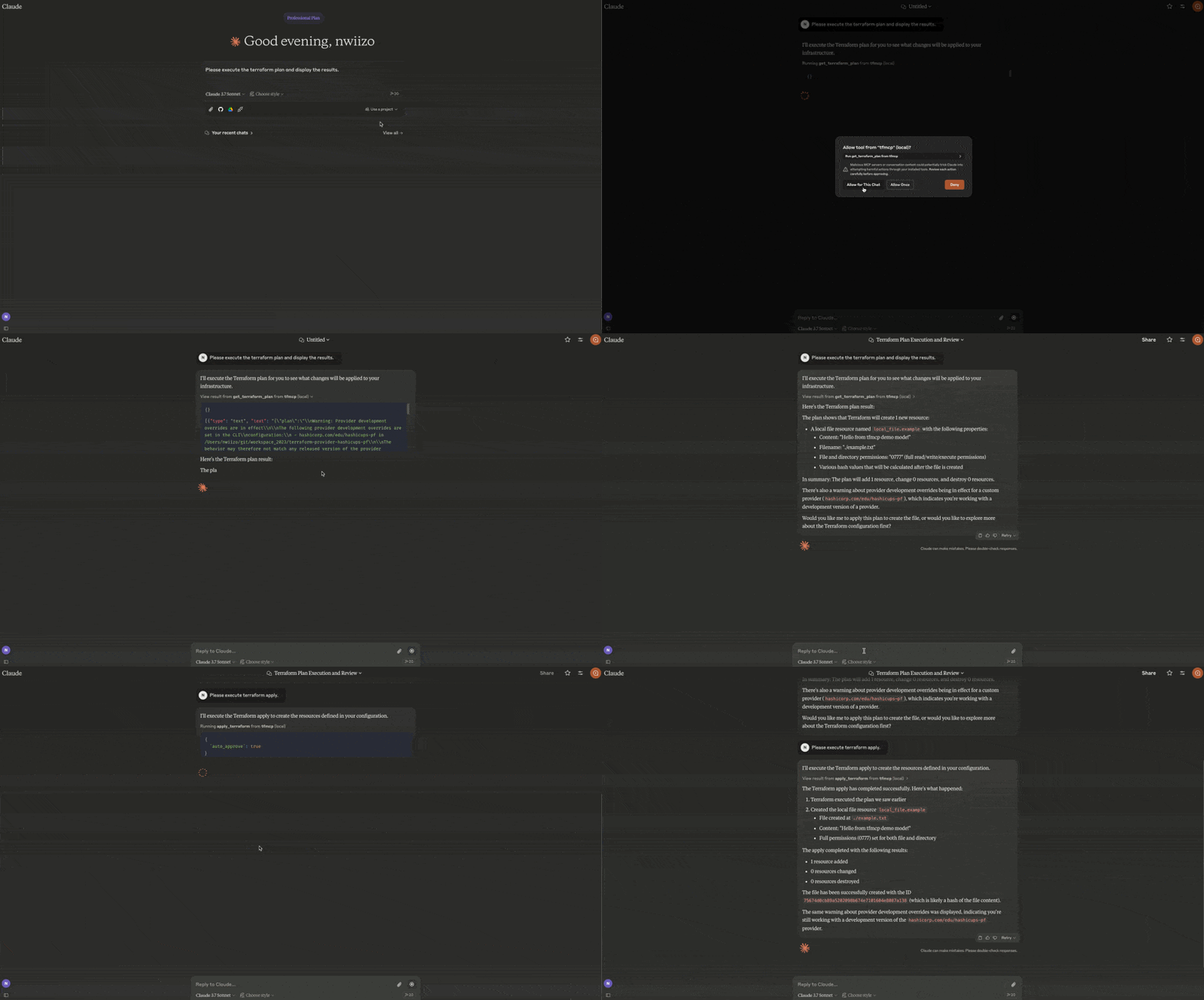
- Reading Terraform configuration files
- Analyzing Terraform plan outputs
- Applying Terraform configurations
- Managing Terraform state
- Creating and modifying Terraform configurations
🎉 Current Release
tfmcp v0.2.4 is the current release:
cargo install tfmcp --version 0.2.4
What's new in v0.2.4
- Reviewed destroy plans with the same saved-plan and permission checks as apply
- Saved-plan listing and disposal to reclaim the 64-plan capacity
- Retained apply results, failed/unknown outcomes, and recovery guidance
- Sensitive output redaction for both full and named output queries
- RMCP 3.5.0, updated dependencies and images, with the Rust 1.88 MSRV retained
Features
| Area | Capabilities |
|---|---|
| Local Terraform | Validate, format, plan/apply workflows, import guidance, outputs, providers, dependency graphs, refresh-only flows, and guarded state operations |
| Repository intelligence | Entrypoint/project detection, configuration analysis, quality checks, security checks, module health, plan review, and drift/state-safety inspection |
| Registry | Public/private provider, module, and policy lookup with HashiCorp-compatible aliases |
| HCP Terraform / TFE | Organizations, projects, workspaces, runs, plans, applies, variables, policy sets, variable sets, tags, stacks, and gated operations |
| MCP deployment | stdio and Streamable HTTP, MCP 2026-07-28 discovery, structured tool results, cache hints, toolsets, resources, health/metrics, sessions, Host/Origin validation, rate limits, TLS wiring, and audit logging |
| Packaging | Cargo, Docker/OCI metadata, MCP Registry metadata, Rust Edition 2024 |
Installation
From Source
# Clone the repository
git clone https://github.com/nwiizo/tfmcp
cd tfmcp

# Build and install
cargo install --path .
From Crates.io
cargo install tfmcp
Using Docker
# Clone the repository
git clone https://github.com/nwiizo/tfmcp
cd tfmcp

# Build the Docker image
docker build -t tfmcp .

# Run the container
docker run -it tfmcp
Requirements
- Rust 1.88.0+ (Rust Edition 2024)
- Terraform CLI 1.15.8 installed and available in
PATH - An MCP-compatible AI client (for example, Claude Desktop or Codex)
- Docker (optional, for containerized deployment)
Usage
$ tfmcp --help
✨ A CLI tool to manage Terraform configurations and operate Terraform through the Model Context Protocol (MCP).

Usage: tfmcp [OPTIONS] [COMMAND]

Commands:
  mcp       Launch tfmcp as an MCP server
  analyze   Analyze Terraform configurations
  help      Print this message or the help of the given subcommand(s)

Options:
  -c, --config <PATH>    Path to the configuration file
  -d, --dir <PATH>       Terraform project directory
  -V, --version          Print version
  -h, --help             Print help
Using Docker
When using Docker, you can run tfmcp commands like this:
# Run as MCP server (default)
docker run -it tfmcp

# Run with specific command and options
docker run -it tfmcp analyze --dir /app/example

# Mount your Terraform project directory
docker run -it -v /path/to/your/terraform:/app/terraform tfmcp --dir /app/terraform

# Set environment variables
docker run -it -e TFMCP_LOG_LEVEL=debug tfmcp
Integrating with Claude Desktop
To use tfmcp with Claude Desktop:
-
If you haven't already, install tfmcp:
cargo install tfmcpAlternatively, you can use Docker:
docker build -t tfmcp . -
Find the path to your installed tfmcp executable:
which tfmcp -
Add the following configuration to
~/Library/Application\ Support/Claude/claude_desktop_config.json:
{
  "mcpServers": {
    "tfmcp": {
      "command": "/path/to/your/tfmcp",  // Replace with the actual path from step 2
      "args": ["mcp"],
      "env": {
        "HOME": "/Users/yourusername",  // Replace with your username
        "PATH": "/usr/local/bin:/usr/bin:/bin:/usr/sbin:/sbin",
        "TERRAFORM_DIR": "/path/to/your/terraform/project"  // Optional: specify your Terraform project
      }
    }
  }
}
If you're using Docker with Claude Desktop, you can set up the configuration like this:
{
  "mcpServers": {
    "tfmcp": {
      "command": "docker",
      "args": ["run", "--rm", "-v", "/path/to/your/terraform:/app/terraform", "tfmcp", "mcp"],
      "env": {
        "TERRAFORM_DIR": "/app/terraform"
      }
    }
  }
}
-
Restart Claude Desktop and enable the tfmcp tool.
-
tfmcp will automatically create a sample Terraform project in
~/terraformif one doesn't exist, ensuring Claude can start working with Terraform right away. The sample project is based on the examples included in theexample/demodirectory of this repository.
Local plan/apply workflow
Start with tfmcp --dir /path/to/project mcp --toolsets terraform.
The default toolset supports preparation and plan review; the terraform
toolset also exposes initialization and gated local writes.
- Call
prepare_terraform_changeto inspect the selected directory, Terraform version, workspace, backend, configuration validity, and state readability.readymeans the inspected prerequisites passed; input variables and provider credentials are checked by the actual plan. Initialize withinit_terraformwhen required, then repeat preparation. - Call
get_terraform_planwith{}or, for example,{"var_files":["environment.tfvars"]}. The result includes aplan_id,target,created_at,has_changes, and a redacted Terraform JSONplanstring. Usereplacefor resource replacement addresses orrefresh_only:trueto preview drift without modifying state. - Pass the returned
plan_idtoanalyze_plan,review_terraform_plan, andsummarize_plan_for_pr. These calls reuse the saved result. Omitting the ID creates a new plan. A review decision is advisory and does not authorize apply. - After reviewing and approving the change, call
apply_terraformwith{"plan_id":"<returned ID>","auto_approve":true}. BothTFMCP_ALLOW_DANGEROUS_OPS=trueandTFMCP_ALLOW_AUTO_APPROVE=truemust already be configured on the server. The saved plan determines the applied changes, including when configuration files have subsequently been edited. - Check
success,status,exit_code,diagnostics,state_verified, andrecovery.next_stepsin the apply result. Retrieve the plan's final status and retainedapply_resultwithget_terraform_plan({"plan_id":"<returned ID>"}). After failure or timeout, inspect state and create a new plan; the attempted ID cannot be applied again.
Migration from v0.2.2: apply_terraform requires plan_id; calls that only
provide auto_approve now return an explanatory error. Approval happens in the
client before the call, because Terraform receives no interactive input.
For a reviewed teardown, create a plan with get_terraform_plan({"destroy":true}),
review its plan_id, then call destroy_terraform with that ID and
auto_approve:true. The server must also have TFMCP_DELETE_ENABLED=true, in
addition to both apply permissions. Passing a destroy plan to apply_terraform
enforces the same permissions. destroy cannot be combined with refresh_only
or replace. Migration from v0.2.3: destroy_terraform now requires a saved
destroy plan; it no longer creates an unreviewed plan or waits for a prompt.
Use list_terraform_plans to find retained IDs and their targets and statuses.
Use discard_terraform_plan({"plan_id":"<ID>"}) to delete an unneeded plan's
temporary files and free capacity. Discard does not change infrastructure,
cancel an operation, or roll back an apply; inspect failed or unknown outcomes
before removing their records. These tools are available in the default and
Terraform toolsets.
Saved plans use private temporary directories and are bound to the project,
workspace, initialized backend metadata, Terraform version, and provider
lockfile. Plan IDs remain valid only for the current server process, with a
maximum of 64 retained plans. Normal server shutdown removes the temporary
files. failed means Terraform returned a nonzero exit code and may have applied
some changes. outcome_unknown means no definitive exit result was obtained,
including timeout or cancellation. Both prevent reapplying the same plan and
include recovery guidance: confirm operations have stopped, inspect the recorded
target and actual resources, resolve the cause, then generate and review a new
plan. No rollback or automatic retry is performed. apply_result is null when a
request was cancelled before a result could be retained. State verification checks
resource addresses, not all attribute values or output values.
Status retrieval waits for an ongoing operation
to finish; live progress and restart recovery are not provided in this release.
MCP Tools
tfmcp provides the following MCP tools for AI assistants:
Core Terraform Operations
| Tool | Description |
|---|---|
init_terraform | Initialize Terraform working directory |
get_terraform_plan | Generate a saved plan, or retrieve its redacted result and status by plan ID |
list_terraform_plans | List saved plan IDs, targets, statuses, and destroy flags |
discard_terraform_plan | Remove an unneeded saved plan and free retention capacity |
analyze_plan | NEW Analyze plan with risk scoring and recommendations |
apply_terraform | Apply the reviewed saved plan ID and verify state resource addresses |
destroy_terraform | Apply a reviewed saved destroy plan with explicit deletion permissions |
validate_terraform | Validate configuration syntax |
validate_terraform_detailed | Detailed validation with guidelines |
get_terraform_state | Show current state |
analyze_state | NEW Analyze state with drift detection |
review_terraform_plan | Review plan risk, blockers, destructive changes, and recommendations |
summarize_plan_for_pr | Generate markdown plan summary for PR comments |
run_terraform_quality_checks | Run CI-friendly validation, module health, guideline, and lockfile checks |
inspect_state_safety | Inspect state readability, drift risk, lockfile status, and blockers |
detect_drift_candidates | Detect drift candidates from readable state without modifying infrastructure |
prepare_terraform_change | Generate blockers, warnings, and a recommended change sequence |
list_terraform_resources | List all managed resources |
set_terraform_directory | Change active project directory |
Workspace & State (v0.1.9)
| Tool | Description |
|---|---|
terraform_workspace | NEW Manage workspaces (list, show, new, select, delete) |
terraform_import | NEW Import existing resources |
terraform_taint | NEW Taint/untaint resources |
terraform_refresh | NEW Refresh state |
Code & Output (v0.1.9)
| Tool | Description |
|---|---|
terraform_fmt | NEW Format code |
terraform_graph | NEW Generate dependency graph |
terraform_output | Get output values with sensitive values redacted, including named queries |
terraform_providers | NEW Get provider info with lock file |
check_provider_lockfile | Check .terraform.lock.hcl for reproducible provider selections |
Analysis & Security
| Tool | Description |
|---|---|
analyze_terraform | Analyze configuration |
inspect_terraform_project | Inspect local Terraform directories, modules, and likely entrypoints |
detect_terraform_entrypoints | Detect likely root module entrypoints |
analyze_module_health | Module health with cohesion/coupling metrics |
get_resource_dependency_graph | Resource dependencies visualization |
suggest_module_refactoring | Refactoring suggestions |
get_security_status | Security scan with secret detection |
Registry
| Tool | Description |
|---|---|
search_providers | Search providers (HashiCorp-compatible alias) |
search_terraform_providers | Search providers |
get_provider_details | Provider details (HashiCorp-compatible alias) |
get_provider_info | Provider details |
get_provider_docs | Provider documentation |
get_provider_capabilities | Provider resources, data sources, functions, and guides |
search_modules | Search modules (HashiCorp-compatible alias) |
search_terraform_modules | Search modules |
get_module_details | Module details |
get_latest_module_version | Latest module version |
get_latest_provider_version | Latest provider version |
search_policies | Search Sentinel/OPA policy libraries |
get_policy_details | Policy library details |
HCP Terraform / Terraform Enterprise (Read-only)
| Tool | Description |
|---|---|
get_token_permissions | Inspect configured token account details without exposing the token |
list_terraform_orgs | List visible organizations |
list_terraform_projects | List projects in an organization |
list_workspaces | List workspaces in an organization |
get_workspace_details | Get workspace details by ID or organization/name |
list_runs | List workspace runs |
get_run_details | Get run details |
get_plan_details | Get plan details |
get_plan_logs | Get plan logs |
get_plan_json_output | Get Terraform JSON plan output |
get_apply_details | Get apply details |
get_apply_logs | Get apply logs |
get_workspace_policy_sets | Get policy sets attached to a workspace |
list_workspace_variables | List workspace variables |
list_variable_sets | List organization variable sets |
read_workspace_tags | Read workspace tags |
list_stacks | List Terraform stacks |
get_stack_details | Get Terraform stack details |
search_private_modules | Search private registry modules |
get_private_module_details | Get private registry module details |
search_private_providers | Search private registry providers |
get_private_provider_details | Get private registry provider details |
HCP Terraform / Terraform Enterprise (Gated Operations)
| Tool | Description |
|---|---|
create_workspace | Create a workspace when ENABLE_TF_OPERATIONS=true |
update_workspace | Update workspace settings when ENABLE_TF_OPERATIONS=true |
delete_workspace_safely | Use the safe-delete workspace action when ENABLE_TF_OPERATIONS=true |
create_run | Queue a run when ENABLE_TF_OPERATIONS=true |
action_run | Apply, discard, cancel, force-cancel, or force-execute a run when ENABLE_TF_OPERATIONS=true |
create_workspace_variable | Create a workspace variable when ENABLE_TF_OPERATIONS=true |
update_workspace_variable | Update a workspace variable when ENABLE_TF_OPERATIONS=true |
attach_policy_set_to_workspace | Attach a policy set to a workspace when ENABLE_TF_OPERATIONS=true |
create_variable_set | Create a variable set when ENABLE_TF_OPERATIONS=true |
create_variable_in_variable_set | Create a variable in a variable set when ENABLE_TF_OPERATIONS=true |
delete_variable_in_variable_set | Delete a variable from a variable set when ENABLE_TF_OPERATIONS=true |
attach_variable_set_to_workspaces | Attach a variable set to workspaces when ENABLE_TF_OPERATIONS=true |
detach_variable_set_from_workspaces | Detach a variable set from workspaces when ENABLE_TF_OPERATIONS=true |
create_workspace_tags | Create or attach workspace tags when ENABLE_TF_OPERATIONS=true |
MCP Resources
| URI | Description |
|---|---|
terraform://style-guide / /terraform/style-guide | Terraform style guide |
terraform://module-development / /terraform/module-development | Terraform module development guide |
terraform://best-practices | tfmcp security and operational best practices |
/terraform/providers/{namespace}/name/{name}/version/{version} | HashiCorp-compatible provider documentation template |
Logs and Troubleshooting
The tfmcp server logs are available at:
~/Library/Logs/Claude/mcp-server-tfmcp.log
Common issues and solutions:
- Claude can't connect to the server: Make sure the path to the tfmcp executable is correct in your configuration
- Terraform project issues: tfmcp automatically creates a sample Terraform project if none is found
- Method not found errors: tfmcp advertises and implements tools/list, resources/list, resources/templates/list, and resources/read
- Docker issues: If using Docker, ensure your container has proper volume mounts and permissions
Environment Variables
Core Configuration
TERRAFORM_DIR: Set this to specify a custom Terraform project directory. If not set, tfmcp will use the directory provided by command line arguments, configuration files, or fall back to~/terraform. You can also change the project directory at runtime using theset_terraform_directorytool.TFMCP_LOG_LEVEL: Set todebug,info,warn, orerrorto control logging verbosity.TFMCP_DEMO_MODE: Set totrueto enable demo mode with additional safety features.TFMCP_COMMAND_TIMEOUT_SECONDS: Positive timeout in seconds for init, plan, saved-plan apply, validation, and execution preparation (default:900). Timed-out writes may have partially completed; inspect state before retrying.
Security Configuration
ENABLE_TF_OPERATIONS: Set totrueto enable gated HCP Terraform / Terraform Enterprise write tools (default:false)TFMCP_ALLOW_DANGEROUS_OPS: Set totrueto enable apply/destroy operations (default:false)TFMCP_DELETE_ENABLED: Set totrueto apply saved destroy plans; both apply permissions are also required (default:false)TFMCP_ALLOW_AUTO_APPROVE: Set totrueto enable auto-approve for dangerous operations (default:false)TFMCP_MAX_RESOURCES: Set maximum number of resources that can be managed (default: 50)TFMCP_AUDIT_ENABLED: Set tofalseto disable audit logging (default:true)TFMCP_AUDIT_LOG_FILE: Custom path for audit log file (default:~/.tfmcp/audit.log)TFMCP_AUDIT_LOG_SENSITIVE: Set totrueto include sensitive information in audit logs (default:false)
HCP Terraform / Terraform Enterprise
TFE_ADDRESS: HCP Terraform or Terraform Enterprise base URL (default:https://app.terraform.io)TFE_TOKEN: API token for HCP Terraform / Terraform Enterprise toolsTFE_SKIP_TLS_VERIFY: Set totrueonly for trusted private TFE installations with custom TLSTFE_MAX_RESPONSE_BYTES: Maximum HCP/TFE response bytes returned to MCP clients before truncation (default:65536)
HCP/TFE write tools are disabled by default and fail closed unless
ENABLE_TF_OPERATIONS=true is set. The default toolset keeps write tools
hidden; use --toolsets operations or --toolsets all to expose them.
MCP Transport
TRANSPORT_MODE: MCP transport mode. Usestdio(default) for local desktop clients orstreamable-httpfor remote/CI clients.TRANSPORT_HOST: HTTP bind host for streamable HTTP mode (default:127.0.0.1).TRANSPORT_PORT: HTTP bind port for streamable HTTP mode (default:8080).MCP_ENDPOINT: Streamable HTTP MCP endpoint path (default:/mcp).MCP_HEALTH_ENDPOINT: Health endpoint path (default:/health).MCP_METRICS_ENDPOINT: OTel-compatible JSON metrics snapshot endpoint path (default:/metrics).MCP_SESSION_MODE:statefulfor normal MCP clients orstatelessfor CI-style JSON responses (default:stateful). Applies only to clients negotiating a protocol version before2026-07-28; that spec removed sessions, so those requests are always served statelessly.MCP_HEARTBEAT_INTERVAL: Streamable HTTP SSE keep-alive interval in seconds. Set to0to disable (default:15).MCP_CORS_MODE: Response CORS policy:strict,development, ordisabled(default:strict). MCP request Origin validation remains enabled in all modes.MCP_ALLOWED_ORIGINS: Comma-separated allowed browser origins. Loopback origins are used by default.MCP_ALLOWED_HOSTS: Comma-separated HTTPHost/ authority values accepted by Streamable HTTP. When unset, rmcp's loopback-only defaults apply.MCP_ORGANIZATION_ALLOWLIST: Comma-separated HCP/TFE organization names that remote requests may access.MCP_RATE_LIMIT_GLOBAL: Maximum HTTP requests per minute across the server (0or unset disables).MCP_RATE_LIMIT_SESSION: Maximum HTTP requests per minute perMcp-Session-Id(0or unset disables). Clients negotiating2026-07-28send no session header, so onlyMCP_RATE_LIMIT_GLOBALbounds them.MCP_TLS_CERT_FILE: PEM certificate file for HTTPS Streamable HTTP.MCP_TLS_KEY_FILE: PEM private key file for HTTPS Streamable HTTP.
HCP/TFE credentials and addresses are server configuration. tfmcp intentionally
does not accept request-scoped TFE_TOKEN, Authorization, or TFE_ADDRESS
overrides for downstream passthrough. When an organization allowlist is active,
account-wide and ID-only HCP/TFE requests fail closed because their owning
organization cannot be verified locally.
Example streamable HTTP launch:
TRANSPORT_MODE=streamable-http \
TRANSPORT_HOST=127.0.0.1 \
TRANSPORT_PORT=8080 \
tfmcp mcp --toolsets default
The MCP endpoint is http://127.0.0.1:8080/mcp, the health endpoint is
http://127.0.0.1:8080/health, and the metrics endpoint is
http://127.0.0.1:8080/metrics.
Security Considerations
tfmcp includes comprehensive security features designed for production use:
🔒 Built-in Security Features
- Access Controls: Automatic blocking of production/sensitive file patterns
- Operation Restrictions: Dangerous operations (apply/destroy) disabled by default
- Resource Limits: Configurable maximum resource count protection
- Audit Logging: Complete operation tracking with timestamps and user identification
- Directory Validation: Security policy enforcement for project directories
🛡️ Security Best Practices
- Default Safety: Apply/destroy operations are disabled by default - explicitly enable only when needed
- Review Plans: Always review Terraform plans before applying, especially AI-generated ones
- IAM Boundaries: Use appropriate IAM permissions and role boundaries in cloud environments
- Audit Monitoring: Regularly review audit logs at
~/.tfmcp/audit.log - File Patterns: Built-in protection against accessing
prod*,production*, andsecret*patterns - Docker Security: When using containers, carefully consider volume mounts and exposed data
⚙️ Production Configuration
# Recommended production settings
export TFMCP_ALLOW_DANGEROUS_OPS=false    # Keep disabled for safety
export TFMCP_ALLOW_AUTO_APPROVE=false     # Require manual approval
export TFMCP_MAX_RESOURCES=10             # Limit resource scope
export TFMCP_AUDIT_ENABLED=true           # Enable audit logging
export TFMCP_AUDIT_LOG_SENSITIVE=false    # Don't log sensitive data
Contributing
Contributions are welcome! Please feel free to submit a Pull Request.
- Fork the repository
- Create your feature branch (
git checkout -b feature/amazing-feature) - Enable the repository-managed fast pre-commit checks once per clone:
git config core.hooksPath .githooks - Run the full correctness checks before pushing:
cargo fmt --all -- --check cargo clippy --all-targets --all-features -- -D warnings cargo test --locked --all-targets --all-features - Commit your changes (
git commit -m 'Add some amazing feature') - Push to the branch (
git push origin feature/amazing-feature) - Open a Pull Request
The pre-commit hook always checks staged whitespace and conditionally runs
cargo fmt, actionlint, Registry metadata validation, module coupling, and
duplicate-code checks for affected files. The optional architecture tools are
still mandatory in Release.sh; install cargo-coupling and similarity-rs
to run the same fast feedback while developing.
Release Process
Releases are done manually after the local release gate passes:
- Confirm
Cargo.toml,Cargo.lock,server.json,Dockerfile, README, andCHANGELOG.mduse the target version. - Run the local release gate:
./Release.sh v0.2.4. - Review
CHANGELOG.mdand the generated package. - Commit and push
main, then confirm CI passed for that exact commit. - From the clean commit, publish with
./Release.sh v0.2.4 --publish.
Roadmap
Here are some planned improvements and future features for tfmcp:
For the consolidated v0.2.1 scope and future work, see docs/releases/v0.2-roadmap.md. Release changes are recorded in CHANGELOG.md.
The local development requirements compare the current implementation with Terraform documentation and the local Terraform in Depth / Terraform at Scale source material, with prioritized jobs and acceptance criteria for future work.
For a hands-on check with a real local Web app, see the local application example. It verifies saved-plan deployment, HTTP responses, actual Terraform arguments, audit records, and teardown, and retains the report and logs.
Completed
-
Basic Terraform Integration Core integration with Terraform CLI for analyzing and executing operations.
-
MCP Server Implementation Initial implementation of the Model Context Protocol server for AI assistants.
-
Automatic Project Creation Added functionality to automatically create sample Terraform projects when needed.
-
Claude Desktop Integration Support for seamless integration with Claude Desktop.
-
Core MCP Methods Implementation of essential MCP methods including tools/list, resources/list, resources/templates/list, and resources/read.
-
Error Handling Improvements Better error handling and recovery mechanisms for robust operation.
-
Dynamic Project Directory Switching Added ability to change the active Terraform project directory without restarting the service.
-
Crates.io Publication Published the package to Crates.io for easy installation via Cargo.
-
Docker Support Added containerization support for easier deployment and cross-platform compatibility.
-
Security Enhancements Comprehensive security system with configurable policies, audit logging, access controls, and production-ready safety features.
-
Module Health Analysis (v0.1.6) Whitebox approach to IaC with cohesion/coupling metrics, health scoring, and refactoring suggestions.
-
Resource Dependency Graph (v0.1.6) Visualization of resource relationships including explicit and implicit dependencies.
-
Module Registry Integration (v0.1.6) Search and explore Terraform modules from the registry.
-
Comprehensive Testing Framework 85+ tests including integration tests with real Terraform configurations.
-
RMCP SDK Migration (v0.1.8) Migrated to official RMCP SDK with proper tool annotations for better MCP compliance.
-
Future Architect Guidelines (v0.1.8) Terraform coding standards compliance checks with secret detection and variable quality validation.
In Progress
- Multi-Environment Support Add support for managing multiple Terraform environments, workspaces, and modules.
Planned
-
Expanded MCP Protocol Support Implement additional MCP methods and capabilities for richer integration with AI assistants.
-
Performance Optimization Optimize resource usage and response times for large Terraform projects.
-
Cost Estimation Integrate with cloud provider pricing APIs to provide cost estimates for Terraform plans.
-
Interactive TUI Develop a terminal-based user interface for easier local usage and debugging.
-
Integration with Other AI Platforms Extend beyond Claude to support other AI assistants and platforms.
-
Plugin System Develop a plugin architecture to allow extensions of core functionality.
License
This project is licensed under the MIT License - see the LICENSE file for details.
Details
- Repository
- github.com/nwiizo/tfmcp
- Category
- Cloud & Infrastructure


