
Summary
A vector-powered memory system that gives Claude persistent storage across conversations. Connects to PostgreSQL with pgvector for semantic search and includes a full web UI for memory management. Exposes MCP tools for storing structured memories, searching by similarity or tags, creating relationships between memories, and organizing everything into workspaces and projects. Ships with Docker Compose that bundles PostgreSQL, Ollama, and the .NET-based Memorizer service. You'd reach for this when building AI agents that need to remember context between sessions, learn from past interactions, or build up domain knowledge over time.



Fastest browser for AI agents to run web automation tasks, always free.
Download Free life-time →

Integrate web data into your AI product. One API to scrape website & brand data.
Get API Key Now →
belt cli automatically finds the best tools and skills for your agent. image, video, music, tts...
one prompt install →

Connect your Claude agent to live crypto prices and trading routes via 1inch
Get the MCP →


Memorizer



Memorizer is a .NET-based service that allows AI agents to store, retrieve, and search through memories using vector embeddings. It leverages PostgreSQL with the pgvector extension to provide efficient similarity search capabilities.
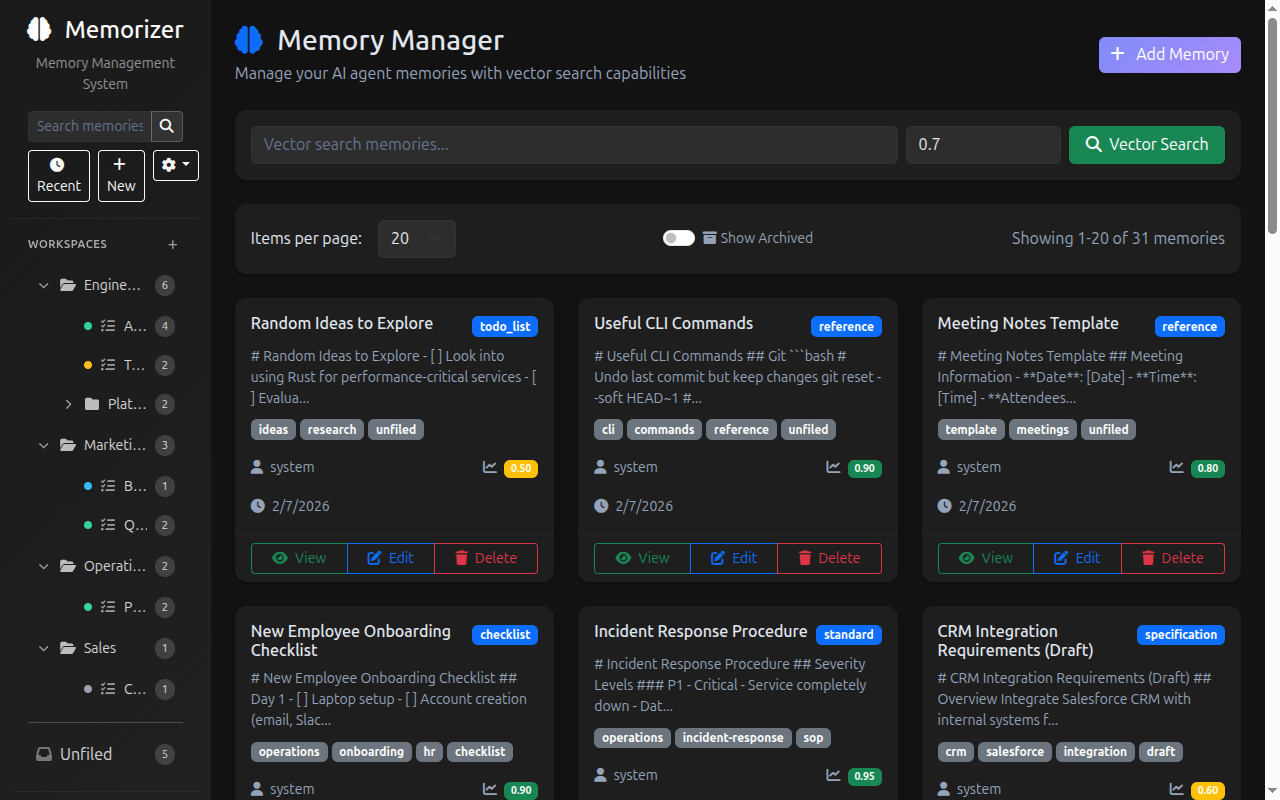
Key features:
- Workspaces & Projects - Organize memories into hierarchical workspaces and projects with status tracking
- Store structured memories with vector embeddings
- Retrieve memories by ID
- Semantic search through memories using vector similarity
- Filter search results using tags
- Edit memory content with automatic versioning and change tracking
- Update memory metadata (title, type, tags, confidence) independently
- Revert memories to previous versions with full audit trail
- Create relationships between memories to form knowledge graphs
- Web UI for manually adding, editing, deleting, viewing memories, and managing versions
- Provider Settings - Configure embedding and LLM providers through the UI (Ollama, OpenAI, and compatible APIs)
- MCP (Model Context Protocol) integration for easy use with AI agents
- Light & Dark theme support
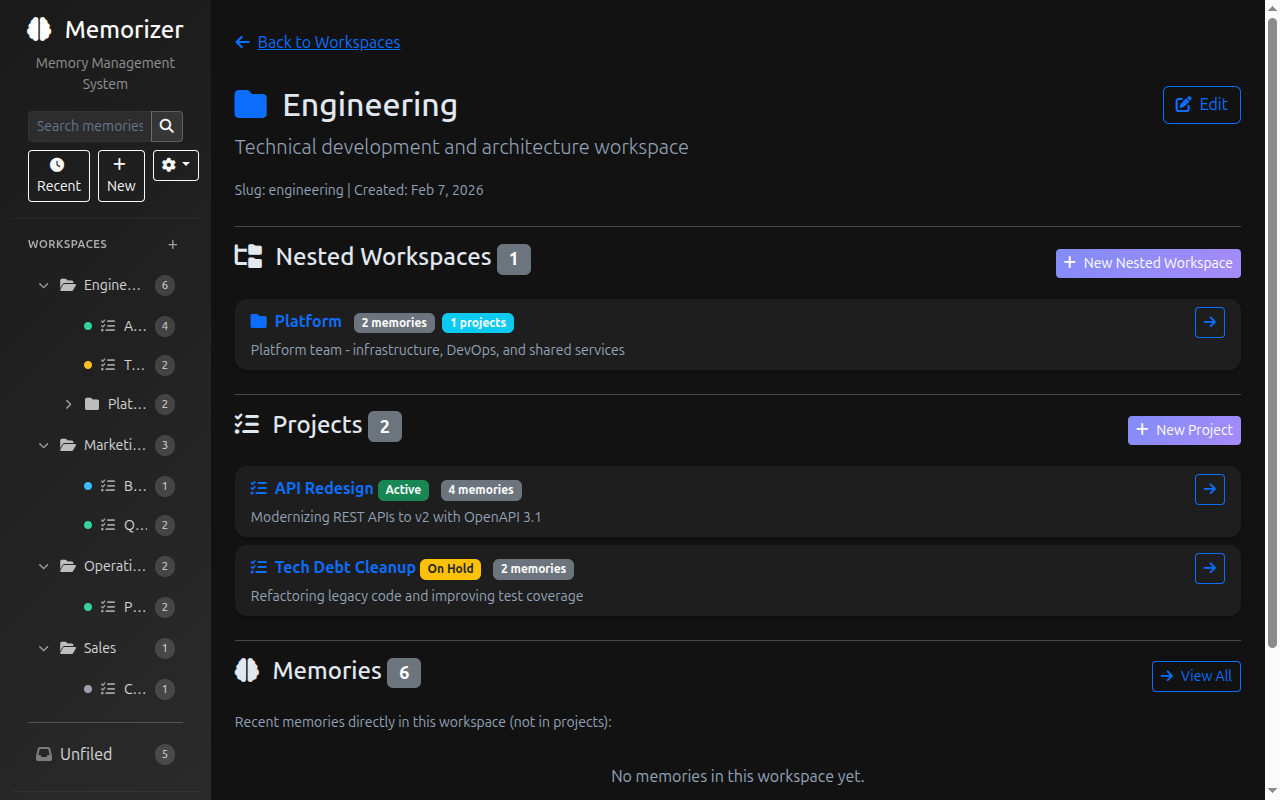
Technologies
- .NET 10.0
- PostgreSQL with pgvector extension
- Model Context Protocol (MCP)
- ASP.NET Core
- Akka.NET for background jobs, such as re-embedding memories if you change algorithms
- Npgsql for PostgreSQL connectivity
📖 Documentation
- Feature Gallery (Screenshots)
- Configuration & Advanced Setup
- Security Configuration
- Embedding Models & Dimensions
- Embedding Dimension Migration
- Local Development
- Schema Migrations
- Architecture Decision Records
Installation with Docker
🐳 Quick Start (Public Image)
The easiest way to get started is using the pre-built Docker image and our docker-compose.yml file:
docker-compose up -d
This will:
- Download and run the latest
petabridge/memorizerimage from Docker Hub - Start PostgreSQL with pgvector (port 5432)
- Start PgAdmin (port 5050)
- Start Ollama (port 11434)
- Start Memorizer API (port 5000)
View the Memorizer Web UI on http://localhost:5000.
🚀 Local Development Builds
If you want to build and run from source:
Prerequisites
- Docker and Docker Compose
- .NET 10.0 SDK
1. Build and Publish Local Container
# From solution root directory
# Build and publish the .NET container
dotnet publish -c Release /t:PublishContainer
This creates a container image named memorizer:latest.
2. Start Infrastructure and Application
docker-compose -f docker-compose.local.yml up -d
This starts the same services but uses your locally built image.
Upgrading to Memorizer 2.0
[!NOTE] The upgrade from Memorizer 1.x to 2.0 is designed to work automatically. All schema migrations run on startup and have been thoroughly tested. Your existing memories will be preserved and continue to work as expected.
[!CAUTION] We recommend backing up your database before upgrading, as a standard best practice. Memorizer 2.0 runs automatic schema migrations on startup that alter tables and add new columns. While we've tested these migrations extensively, having a backup ensures you can recover in the unlikely event that something goes wrong.
Backup Instructions
[!NOTE] The container names below (e.g.,
memorizer-postgres) are based on the defaultdocker-compose.yml. If you've customized your Docker Compose file, adjust the container name accordingly.
Before pulling the new Memorizer 2.0 image, create a PostgreSQL dump of your existing database:
# Create a full database backup
docker exec postgmem-postgres pg_dump -U postgres postgmem > memorizer-backup-$(date +%Y%m%d).sql

# Or use pg_dump with compression
docker exec postgmem-postgres pg_dump -U postgres -Fc postgmem > memorizer-backup-$(date +%Y%m%d).dump
To restore from a backup if needed:
# Restore from SQL dump
docker exec -i postgmem-postgres psql -U postgres postgmem < memorizer-backup-20250207.sql

# Or restore from compressed dump
docker exec -i postgmem-postgres pg_restore -U postgres -d postgmem memorizer-backup-20250207.dump
Updating
# make sure you have created a backup before starting here
git pull
docker-compose down
docker-compose pull memorizer
docker-compose up -d
Breaking Changes in 2.0
- MCP endpoint moved from
/to/mcp. Update your MCP client configurations fromhttp://localhost:5000tohttp://localhost:5000/mcp. - Web UI moved from
/uito/. The Web UI is now at the root path. - New database tables: Workspaces, projects, provider settings, data migrations, and archetype tracking are added automatically on first startup.
- Existing memories are preserved: All your V1 memories will continue to work. They will appear as "Unfiled" until you organize them into workspaces and projects.
After Upgrading
[!TIP] Once the upgrade is complete, ask your AI agent to suggest workspaces and projects to organize your existing memories into. Memorizer 2.0's workspace and project system helps you keep memories structured and easy to find - and your agent can analyze your existing memories to recommend a good organizational scheme.
🔌 MCP Configuration Example
To use Memorizer with any MCP-compatible client, add the following to your configuration (e.g., mcp.json):
{
  "memorizer": {
    "url": "http://localhost:5000/mcp"
  }
}
This uses the modern Streamable HTTP transport (MCP spec 2025-03-26+). Note that the MCP endpoint is at /mcp (changed from / in 2.0).
🖥️ Web UI
Memorizer includes a web-based user interface for managing memories through your browser.
Access the Web UI
Once the application is running (via docker-compose up -d), you can access the Web UI at:
Features
- Memory Management: Create, view, edit, and delete memories with full CRUD operations
- Version Control: View version history, compare versions with visual diffs, and revert to previous versions
- Search & Filter: Search memories using semantic similarity and filter by tags
- Statistics Dashboard: View memory counts, tag distributions, and system statistics
- MCP Configuration: Get the MCP configuration JSON for connecting clients at
/mcp-config
The Web UI provides a user-friendly interface for all Memorizer functionality, making it easy to manage your AI agent's memory without needing to use the MCP tools directly.
🧠 Example System Prompt for LLMs
[!IMPORTANT] ⚡ Pro Tip: Add this system prompt to your
AGENT.md, Cursor Rules files, or any AI agent configuration! This will dramatically improve how often and effectively your LLM uses the Memorizer service for persistent memory management.
You have access to a long-term memory system via the Model Context Protocol (MCP) at the endpoint
memorizer. Use the following tools:Storage & Retrieval:
store: Store a new memory. Parameters:type,text(markdown),source,title,tags,confidence,relatedTo(optional, memory ID),relationshipType(optional).searchMemories: Search for similar memories using semantic similarity. Parameters:query,limit,minSimilarity,filterTags.get: Retrieve a memory by ID. Parameters:id,includeVersionHistory,versionNumber.getMany: Retrieve multiple memories by their IDs. Parameter:ids(list of IDs).delete: Delete a memory by ID. Parameter:id.Editing & Updates:
edit: Edit memory content using find-and-replace (ideal for checking off to-do items, updating sections). Parameters:id,old_text,new_text,replace_all.updateMetadata: Update memory metadata (title, type, tags, confidence) without changing content. Parameters:id,title,type,tags,confidence.Relationships & Versioning:
createRelationship: Create a relationship between two memories. Parameters:fromId,toId,type(e.g., 'example-of', 'explains', 'related-to').revertToVersion: Revert a memory to a previous version. Parameters:id,versionNumber,changedBy.All edits and updates are automatically versioned, allowing you to track changes and revert if needed. Use these tools to remember, recall, edit, relate, and manage information as needed to assist the user.
License
MIT
💖 Attribution
Made with ❤️ by Petabridge
Originally forked from Dario Griffo's postg-mem server
Featured
Fastest browser for AI agents to run web automation tasks, always free.
Download Free life-time →Integrate web data into your AI product. One API to scrape website & brand data.
Get API Key Now →belt cli automatically finds the best tools and skills for your agent. image, video, music, tts...
one prompt install →Connect your Claude agent to live crypto prices and trading routes via 1inch
Get the MCP →


