
Summary
This server brings Excel's COM API to Claude through 25 tools covering Power Query workflows, DAX measures, VBA execution, PivotTables, charts, and range operations. It's Windows only because it automates your actual Excel process, not server side spreadsheet manipulation. You get 230 operations total: create tables with structured references, manage data model relationships, export M code for version control, apply conditional formatting, even capture screenshots for visual verification. The agent mode shows Excel side by side so you watch changes happen in real time. If you're already on Windows with Excel installed and need to automate complex workbooks through conversation rather than writing VBA or Python scripts, this connects those capabilities directly to your AI assistant.


Keeps your Mac awake while Claude Code, Codex or Cursor works. Lets it sleep when they are done.
Try free for 7 days →

Block distracting apps from your iPhone permanently without a 3rd party app. Free and open source.
Block now (100% free) →
Notes, actions and memory. Without a meeting bot. First month 100% off.
Download for free →
belt cli automatically finds the best tools and skills for your agent. image, video, music, tts...
one prompt install →
Free an open-source skills that make AI coding agents easier to understand, verify, and control.
Download for free →

Connect your Claude agent to live crypto prices and trading routes via 1inch
Get the MCP →Tools
Public tool metadata for what this MCP can expose to an agent.
49 tools
EXCEL_ADD_CHARTAdd a chart to a worksheet using Microsoft Graph API.6 params
Add a chart to a worksheet using Microsoft Graph API.
Parameters* required
item_idstringThe ID of the Excel file (drive item) containing the worksheet.
seriesbystringHow the series are by (e.g., 'Auto').
session_idstringOptional session ID for the workbook. If provided, will be sent in the headers.
sourcedatastringThe range of source data for the chart (e.g., 'A1:C4').
typestringThe type of chart to add (e.g., 'ColumnClustered').
worksheetstringThe name or ID of the worksheet (must be URL-encoded if using ID).
EXCEL_ADD_SHAREPOINT_WORKSHEETAdd a new worksheet to a SharePoint Excel workbook using Microsoft Graph Sites API.4 params
Add a new worksheet to a SharePoint Excel workbook using Microsoft Graph Sites API.
Parameters* required
item_idstringThe ID of the Excel file (drive item) to add a worksheet to.
namestringThe name of the new worksheet to add.
session_idstringOptional session ID for the workbook. If provided, will be sent in the headers.
site_idstringThe ID of the SharePoint site containing the Excel file.
EXCEL_ADD_TABLECreate a new table in a worksheet using the Microsoft Graph API.5 params
Create a new table in a worksheet using the Microsoft Graph API.
Parameters* required
addressstringThe range address for the table. If worksheet is specified, use a range like 'A1:D4'. If worksheet is omitted, include the sheet name (e.g., 'Sheet1!A1:D4').
hasHeadersbooleanWhether the first row of the range contains column headers (True) or not (False).
item_idstringThe ID of the Excel workbook (drive item) where the table will be created.
session_idstringWorkbook session ID controlling persistence.
worksheetstringWorksheet name or ID. When provided, the table is created on this worksheet and the address should be a range like 'A1:D4'. When omitted, the table is created at the workbook level and the address...
EXCEL_ADD_TABLE_COLUMNAdd a column to a table using Microsoft Graph API.5 params
Add a column to a table using Microsoft Graph API.
Parameters* required
indexintegerThe index at which to insert the column.
item_idstringThe ID of the Excel file (drive item) containing the table.
session_idstringOptional session ID for the workbook. If provided, will be sent in the headers.
table_idstringThe ID of the table to add a column to.
valuesarrayThe values for the new column. MUST include exactly one value for each row in the table, including the header row. Use list table rows to get the correct number of values needed.
EXCEL_ADD_TABLE_ROWAdd a row to a table using Microsoft Graph API.5 params
Add a row to a table using Microsoft Graph API.
Parameters* required
indexintegerThe index at which to insert the row. Use null to append to the end (recommended). WARNING: Excel may reject insertions at specific indices due to cell movement conflicts.
item_idstringThe ID of the Excel file (drive item) containing the table.
session_idstringOptional session ID for the workbook. If provided, will be sent in the headers.
table_idstringThe ID of the table to add a row to.
valuesarrayThe values for the new row.
EXCEL_ADD_WORKBOOK_PERMISSIONTool to grant access to a workbook via invite. Use when you need to share a specific workbook file with designated recipients and roles.9 params
Tool to grant access to a workbook via invite. Use when you need to share a specific workbook file with designated recipients and roles.
Parameters* required
expirationDateTimestringDateTime when the granted permission will expire (ISO 8601).
item_idstringThe ID of the drive item (Excel file) to share.
messagestringPlain-text message included in the invitation (max 2000 characters).
passwordstringPassword for the invite (OneDrive Personal only).
recipientsarrayCollection of recipients to grant access and send the invitation.
requireSignInbooleanIf true, recipients must sign in to view the shared item.
retainInheritedPermissionsbooleanIf true, existing inherited permissions remain; if false, existing permissions are removed on first share.default: true
rolesarrayRoles to grant: read or write.
sendInvitationbooleanIf true, sends an email invitation; otherwise grants permission silently.default: true
EXCEL_ADD_WORKSHEETAdd a new worksheet to an Excel workbook using Microsoft Graph API.3 params
Add a new worksheet to an Excel workbook using Microsoft Graph API.
Parameters* required
item_idstringThe ID of the Excel file (drive item) to add a worksheet to.
namestringThe name of the new worksheet to add.
session_idstringOptional session ID for the workbook. If provided, will be sent in the headers.
EXCEL_APPLY_TABLE_FILTERApply a filter to a table column using Microsoft Graph API.6 params
Apply a filter to a table column using Microsoft Graph API.
Parameters* required
column_idstringThe ID of the column to filter.
criteriaobjectThe filter criteria as a dictionary.
item_idstringThe ID of the Excel file (drive item) containing the worksheet.
session_idstringOptional session ID for the workbook. If provided, will be sent in the headers.
table_idstringThe ID of the table.
worksheetstringThe name or ID of the worksheet (must be URL-encoded if using ID).
EXCEL_APPLY_TABLE_SORTApply a sort to a table using Microsoft Graph API.5 params
Apply a sort to a table using Microsoft Graph API.
Parameters* required
fieldsarrayList of sort fields (e.g., [{ 'key': 0, 'ascending': true }]).
item_idstringThe ID of the Excel file (drive item) containing the worksheet.
session_idstringOptional session ID for the workbook. If provided, will be sent in the headers.
table_idstringThe ID of the table to sort.
worksheetstringThe name or ID of the worksheet (must be URL-encoded if using ID).
EXCEL_CLEAR_RANGETool to clear values, formats, or contents in a specified worksheet range. Use when you need to reset cells before adding new data.5 params
Tool to clear values, formats, or contents in a specified worksheet range. Use when you need to reset cells before adding new data.
Parameters* required
addressstringThe A1-style address of the range to clear (e.g., 'A1:B2').
applyTostringOptional. The type of clear action. Possible values: All, Formats, Contents.one of
All · Formats · Contentsitem_idstringThe ID of the Excel file (drive item) containing the worksheet.
session_idstringOptional. The workbook session ID for persistent changes.
worksheet_idstringThe name or ID of the worksheet (URL-encoded if necessary).
EXCEL_CLEAR_TABLE_FILTERClear a filter from a table column using Microsoft Graph API.5 params
Clear a filter from a table column using Microsoft Graph API.
Parameters* required
column_idstringThe ID of the column to clear filter from.
item_idstringThe ID of the Excel file (drive item) containing the worksheet.
session_idstringOptional session ID for the workbook. If provided, will be sent in the headers.
table_idstringThe ID of the table.
worksheetstringThe name or ID of the worksheet (must be URL-encoded if using ID).
EXCEL_CLOSE_SESSIONTool to close an existing Excel workbook session. Use when you need to explicitly end a persistent session to release workbook locks.2 params
Tool to close an existing Excel workbook session. Use when you need to explicitly end a persistent session to release workbook locks.
Parameters* required
item_idstringThe ID of the Excel file (drive item) to close the session for.
session_idstringThe workbook session ID to close.
EXCEL_CONVERT_TABLE_TO_RANGEConvert a table to a range using Microsoft Graph API.3 params
Convert a table to a range using Microsoft Graph API.
Parameters* required
item_idstringThe ID of the Excel file (drive item) containing the table.
session_idstringOptional session ID for the workbook. If provided, will be sent in the headers.
table_idstringThe ID of the table to convert to a range.
EXCEL_CREATE_WORKBOOKTool to create a new Excel workbook file at a specified drive path. Generates a new .xlsx file with specified worksheets and data, then uploads it to OneDrive.4 params
Tool to create a new Excel workbook file at a specified drive path. Generates a new .xlsx file with specified worksheets and data, then uploads it to OneDrive.
Parameters* required
drive_idstringID of the drive (use 'me' for the user's default drive)default: me
pathstringPath including folder structure and file name, ending with .xlsx, e.g., 'Documents/newWorkbook.xlsx'
worksheet_dataobjectData to populate worksheets. Dict mapping worksheet names to lists of rows (each row is a list of cell values). Example: {'Sheet1': [['Name', 'Points'], ['LeBron', 40000], ['Jordan', 32292]]}
worksheet_namesarrayList of worksheet names to create in the workbook. If not provided, a single worksheet named 'Sheet1' will be created.
EXCEL_DELETE_TABLE_COLUMNDelete a column from a table using Microsoft Graph API.4 params
Delete a column from a table using Microsoft Graph API.
Parameters* required
column_idstringThe ID of the column to delete.
item_idstringThe ID of the Excel file (drive item) containing the table.
session_idstringOptional session ID for the workbook. If provided, will be sent in the headers.
table_idstringThe ID of the table to delete a column from.
EXCEL_DELETE_TABLE_ROWDelete a row from a table using Microsoft Graph API.4 params
Delete a row from a table using Microsoft Graph API.
Parameters* required
item_idstringThe ID of the Excel file (drive item) containing the table.
row_indexintegerThe index of the row to delete.
session_idstringOptional session ID for the workbook. If provided, will be sent in the headers.
table_idstringThe ID of the table to delete a row from.
EXCEL_DELETE_WORKSHEETTool to delete a worksheet from the workbook. Use when cleaning up unused or temporary sheets after verifying no dependencies exist. Example: "Delete 'Sheet2' after review."3 params
Tool to delete a worksheet from the workbook. Use when cleaning up unused or temporary sheets after verifying no dependencies exist. Example: "Delete 'Sheet2' after review."
Parameters* required
item_idstringThe ID of the Excel file (drive item) containing the worksheet.
session_idstringOptional session ID for the workbook. If provided, will be sent in the headers.
worksheetstringThe name or ID of the worksheet to delete. If using ID, it must be URL-encoded.
EXCEL_GET_CHART_AXISTool to retrieve a specific axis from a chart. Use when you need properties like min, max, interval, and formatting of the chart axis.7 params
Tool to retrieve a specific axis from a chart. Use when you need properties like min, max, interval, and formatting of the chart axis.
Parameters* required
axis_typestringThe type of axis to retrieve. Allowed values: 'valueAxis', 'seriesAxis', 'categoryAxis'.one of
valueAxis · seriesAxis · categoryAxischart_namestringThe name or ID of the chart (must be URL-encoded).
expandstringOData $expand query option to expand related entities (format).
item_idstringThe ID of the Excel file (drive item) containing the workbook.
selectstringOData $select query option to specify which properties to return.
session_idstringOptional workbook session ID. If provided, will be sent in the headers.
worksheetstringThe name or ID of the worksheet (must be URL-encoded if using ID).
EXCEL_GET_CHART_DATA_LABELSTool to retrieve the data labels object of a chart. Use when you need to inspect label settings like position, separator, and visibility flags after creating or updating a chart.4 params
Tool to retrieve the data labels object of a chart. Use when you need to inspect label settings like position, separator, and visibility flags after creating or updating a chart.
Parameters* required
chart_idstringThe ID or name of the chart (must be URL-encoded if using special characters).
item_idstringThe ID of the Excel file (drive item) containing the workbook.
session_idstringOptional workbook session ID. If provided, will be sent in the headers to maintain session state.
worksheet_idstringThe ID or name of the worksheet (must be URL-encoded if using special characters).
EXCEL_GET_CHART_LEGENDTool to retrieve the legend object of a chart. Use after creating or updating a chart when you need to inspect legend visibility and formatting.6 params
Tool to retrieve the legend object of a chart. Use after creating or updating a chart when you need to inspect legend visibility and formatting.
Parameters* required
chart_namestringThe name or ID of the chart (URL-encoded if necessary).
expandstringOData $expand query option to expand related entities, such as format.
item_idstringThe ID of the Excel file (drive item) containing the workbook.
selectstringOData $select query option to specify which properties to return (comma-separated).
session_idstringOptional workbook session ID. If provided, will be sent in the headers to maintain session state.
worksheet_idstringThe ID or name of the worksheet (URL-encoded if necessary).
EXCEL_GET_RANGEGet a range from a worksheet using Microsoft Graph API.4 params
Get a range from a worksheet using Microsoft Graph API.
Parameters* required
addressstringThe address of the range (e.g., 'A1:B2').
item_idstringThe ID of the Excel file (drive item) containing the worksheet.
session_idstringOptional session ID for the workbook. If provided, will be sent in the headers.
worksheet_idstringThe ID of the worksheet.
EXCEL_GET_SESSIONCreate a session for an Excel workbook using Microsoft Graph API.2 params
Create a session for an Excel workbook using Microsoft Graph API.
Parameters* required
item_idstringThe ID of the Excel file (drive item) to create a session for.
persist_changesbooleanWhether changes should be persisted after the session. If false, a nonpersistent session is created.default: true
EXCEL_GET_SHAREPOINT_RANGEGet a range from a worksheet in SharePoint using Microsoft Graph Sites API.5 params
Get a range from a worksheet in SharePoint using Microsoft Graph Sites API.
Parameters* required
addressstringThe address of the range (e.g., 'A1:B2').
item_idstringThe ID of the Excel file (drive item) containing the worksheet.
session_idstringOptional session ID for the workbook. If provided, will be sent in the headers.
site_idstringThe ID of the SharePoint site containing the Excel file.
worksheet_idstringThe ID of the worksheet.
EXCEL_GET_SHAREPOINT_WORKSHEETGet a worksheet by name or ID from a SharePoint Excel workbook using Microsoft Graph Sites API.4 params
Get a worksheet by name or ID from a SharePoint Excel workbook using Microsoft Graph Sites API.
Parameters* required
item_idstringThe ID of the Excel file (drive item) to get the worksheet from.
session_idstringOptional session ID for the workbook. If provided, will be sent in the headers.
site_idstringThe ID of the SharePoint site containing the Excel file.
worksheetstringThe name or ID of the worksheet to retrieve. If using ID, it must be URL-encoded.
EXCEL_GET_TABLE_COLUMNTool to retrieve a specific column from a workbook table. Use when you need to fetch column properties and data by its ID or name.4 params
Tool to retrieve a specific column from a workbook table. Use when you need to fetch column properties and data by its ID or name.
Parameters* required
column_idstringThe ID or name of the column to retrieve.
item_idstringThe ID of the Excel file (drive item) containing the table.
session_idstringOptional session ID for the workbook. If provided, will be sent in the headers.
table_idstringThe ID or name of the table containing the column.
EXCEL_GET_WORKBOOKTool to retrieve the properties and relationships of a workbook. Use when you need to inspect comments, names, tables, or worksheets.4 params
Tool to retrieve the properties and relationships of a workbook. Use when you need to inspect comments, names, tables, or worksheets.
Parameters* required
drive_idstringID of the drive (use 'me' for the user's default drive).
expandarrayOData relationships to expand in the response.
item_idstringID of the drive item (Excel file) to retrieve.
session_idstringOptional workbook session ID. If provided, will be sent in headers.
EXCEL_GET_WORKSHEETGet a worksheet by name or ID from an Excel workbook using Microsoft Graph API.3 params
Get a worksheet by name or ID from an Excel workbook using Microsoft Graph API.
Parameters* required
item_idstringThe ID of the Excel file (drive item) to get the worksheet from.
session_idstringOptional session ID for the workbook. If provided, will be sent in the headers.
worksheetstringThe name or ID of the worksheet to retrieve. If using ID, it must be URL-encoded.
EXCEL_INSERT_RANGETool to insert a new cell range into a worksheet, shifting existing cells down or right. Use when you need to create space for new content without overwriting.5 params
Tool to insert a new cell range into a worksheet, shifting existing cells down or right. Use when you need to create space for new content without overwriting.
Parameters* required
addressstringThe address of the range (e.g., 'A1:B2').
item_idstringThe ID of the Excel file (drive item) containing the worksheet.
session_idstringOptional workbook session ID. If provided, changes persist in that session.
shiftstringDirection to shift cells to make space: 'Down' or 'Right'.one of
Down · Rightworksheet_idstringThe ID or name of the worksheet.
EXCEL_LIST_CHARTSList charts in a worksheet using Microsoft Graph API.3 params
List charts in a worksheet using Microsoft Graph API.
Parameters* required
item_idstringThe ID of the Excel file (drive item) containing the worksheet.
session_idstringOptional session ID for the workbook. If provided, will be sent in the headers.
worksheetstringThe name or ID of the worksheet (must be URL-encoded if using ID).
EXCEL_LIST_CHART_SERIESTool to list all data series in a chart. Use when you need to enumerate chart series for further analysis.4 params
Tool to list all data series in a chart. Use when you need to enumerate chart series for further analysis.
Parameters* required
chart_namestringThe name or ID of the chart (must be URL-encoded).
item_idstringThe ID of the Excel file (drive item) containing the worksheet.
session_idstringOptional session ID for the workbook. If provided, will be sent in the headers.
worksheetstringThe name or ID of the worksheet (must be URL-encoded if using ID).
EXCEL_LIST_COMMENTSTool to list comments in an Excel workbook. Use when you need to retrieve all workbook comments via Microsoft Graph API.2 params
Tool to list comments in an Excel workbook. Use when you need to retrieve all workbook comments via Microsoft Graph API.
Parameters* required
item_idstringThe ID of the Excel file (drive item) to list comments for.
session_idstringOptional session ID for the workbook. If provided, will be sent in the headers.
EXCEL_LIST_FILESList files and folders in a drive root or specified path.2 params
List files and folders in a drive root or specified path.
Parameters* required
drive_idstringID of the drive (use 'me' for the user's default drive)default: me
pathstringOptional folder path under root to list. E.g., 'Documents'
EXCEL_LIST_NAMED_ITEMSList named items in a workbook using Microsoft Graph API.2 params
List named items in a workbook using Microsoft Graph API.
Parameters* required
item_idstringThe ID of the Excel file (drive item) containing the workbook.
session_idstringOptional session ID for the workbook. If provided, will be sent in the headers.
EXCEL_LIST_SHAREPOINT_TABLESList tables in a SharePoint worksheet using Microsoft Graph Sites API.4 params
List tables in a SharePoint worksheet using Microsoft Graph Sites API.
Parameters* required
item_idstringThe ID of the Excel file (drive item) containing the worksheet.
session_idstringOptional session ID for the workbook. If provided, will be sent in the headers.
site_idstringThe ID of the SharePoint site containing the Excel file.
worksheetstringThe name or ID of the worksheet (must be URL-encoded if using ID).
EXCEL_LIST_SHAREPOINT_WORKSHEETSList worksheets in an Excel workbook stored in SharePoint using Microsoft Graph Sites API.3 params
List worksheets in an Excel workbook stored in SharePoint using Microsoft Graph Sites API.
Parameters* required
item_idstringThe ID of the Excel file (drive item) to list worksheets for.
session_idstringOptional session ID for the workbook. If provided, will be sent in the headers.
site_idstringThe ID of the SharePoint site containing the Excel file.
EXCEL_LIST_TABLE_COLUMNSList columns in a table using Microsoft Graph API.3 params
List columns in a table using Microsoft Graph API.
Parameters* required
item_idstringThe ID of the Excel file (drive item) containing the table.
session_idstringOptional session ID for the workbook. If provided, will be sent in the headers.
table_idstringThe ID of the table to list columns from.
EXCEL_LIST_TABLE_ROWSList rows in a table using Microsoft Graph API.3 params
List rows in a table using Microsoft Graph API.
Parameters* required
item_idstringThe ID of the Excel file (drive item) containing the table.
session_idstringOptional session ID for the workbook. If provided, will be sent in the headers.
table_idstringThe ID of the table to list rows from.
EXCEL_LIST_TABLESList tables in a worksheet using Microsoft Graph API. This action retrieves information about all tables present in a specified worksheet of an Excel file. It requires the file ID and worksheet name or ID, and can optionally use a session ID for workbook operations.3 params
List tables in a worksheet using Microsoft Graph API. This action retrieves information about all tables present in a specified worksheet of an Excel file. It requires the file ID and worksheet name or ID, and can optionally use a session ID for workbook operations.
Parameters* required
item_idstringThe ID of the Excel file (drive item) containing the worksheet.
session_idstringOptional session ID for the workbook. If provided, will be sent in the headers.
worksheetstringThe name or ID of the worksheet (must be URL-encoded if using ID).
EXCEL_LIST_WORKBOOK_PERMISSIONSTool to list permissions set on the workbook file. Use when you need to see which users or links have access to a specific Excel file by supplying its drive and item IDs. Example: "List permissions for workbook with drive_id 'b!abc123' and item_id '0123456789abcdef'."6 params
Tool to list permissions set on the workbook file. Use when you need to see which users or links have access to a specific Excel file by supplying its drive and item IDs. Example: "List permissions for workbook with drive_id 'b!abc123' and item_id '0123456789abcdef'."
Parameters* required
$expandstringComma-separated list of related entities to expand.
$selectstringComma-separated list of permission properties to include in the response.
$skipintegerNumber of permission objects to skip.
$topintegerMaximum number of permission objects to return.
drive_idstringThe ID of the drive containing the workbook file. Use 'me' for the current user's default OneDrive.
item_idstringThe ID of the DriveItem representing the workbook.
EXCEL_LIST_WORKSHEETSList worksheets in an Excel workbook using Microsoft Graph API.2 params
List worksheets in an Excel workbook using Microsoft Graph API.
Parameters* required
item_idstringThe ID of the Excel file (drive item) to list worksheets for.
session_idstringOptional session ID for the workbook. If provided, will be sent in the headers.
EXCEL_MERGE_CELLSMerge cells in a worksheet range using Microsoft Graph API.5 params
Merge cells in a worksheet range using Microsoft Graph API.
Parameters* required
acrossbooleanOptional. Set true to merge cells in each row of the specified range as separate merged cells. The default value is false.
item_idstringThe ID of the Excel file (drive item) containing the worksheet.
rangestringThe A1-style address of the range to merge (e.g., 'A1:B2').
session_idstringOptional session ID for the workbook. If provided, will be sent in the headers.
worksheetstringThe name or ID of the worksheet containing the range to merge.
EXCEL_PROTECT_WORKSHEETTool to protect a worksheet using optional protection options. Use when you need to prevent editing certain parts of a sheet before sharing. Example: "Protect 'Sheet1' to lock formatting and sorting."4 params
Tool to protect a worksheet using optional protection options. Use when you need to prevent editing certain parts of a sheet before sharing. Example: "Protect 'Sheet1' to lock formatting and sorting."
Parameters* required
item_idstringThe ID of the Excel file (drive item) containing the worksheet.
optionsobjectSheet protection options. If omitted, default protection is applied.
session_idstringOptional session ID for the workbook. If provided, will be sent in the headers.
worksheetstringThe name or ID of the worksheet to protect. If using ID, it must be URL-encoded.
EXCEL_SORT_RANGESort a range in a worksheet using Microsoft Graph API.5 params
Sort a range in a worksheet using Microsoft Graph API.
Parameters* required
fieldsarrayList of sort fields (e.g., [{ 'key': 0, 'ascending': true }]).
item_idstringThe ID of the Excel file (drive item) containing the worksheet.
range_typestringThe type of range to sort (e.g., 'usedRange').
session_idstringOptional session ID for the workbook. If provided, will be sent in the headers.
worksheetstringThe name or ID of the worksheet (must be URL-encoded if using ID).
EXCEL_UPDATE_CHARTUpdate a chart in a worksheet using Microsoft Graph API.9 params
Update a chart in a worksheet using Microsoft Graph API.
Parameters* required
chart_idstringThe ID of the chart (must be URL-encoded).
heightnumberThe new height for the chart.
item_idstringThe ID of the Excel file (drive item) containing the worksheet.
leftnumberThe new left position for the chart.
namestringThe new name for the chart.
session_idstringOptional session ID for the workbook. If provided, will be sent in the headers.
topnumberThe new top position for the chart.
widthnumberThe new width for the chart.
worksheetstringThe name or ID of the worksheet (must be URL-encoded if using ID).
EXCEL_UPDATE_CHART_LEGENDTool to update formatting or position of a chart legend. Use when adjusting legend settings after confirming chart and worksheet exist.7 params
Tool to update formatting or position of a chart legend. Use when adjusting legend settings after confirming chart and worksheet exist.
Parameters* required
chart_idstringThe name or ID of the chart (must be URL-encoded).
item_idstringThe ID of the Excel file (drive item) containing the workbook.
overlaybooleanSet to true to make the legend overlap the chart body, or false otherwise.
positionstringThe position of the legend on the chart. Possible values: Top, Bottom, Left, Right, Corner, Custom.one of
Top · Bottom · Left · Right · Corner · Customsession_idstringOptional workbook session ID. If provided, will be sent in the 'workbook-session-id' header.
visiblebooleanSet to true to show the chart legend, or false to hide it.
worksheetstringThe name or ID of the worksheet (must be URL-encoded if using ID).
EXCEL_UPDATE_RANGEUpdate a range in a worksheet using Microsoft Graph API.5 params
Update a range in a worksheet using Microsoft Graph API.
Parameters* required
addressstringThe address of the range (e.g., 'A1:B2').
item_idstringThe ID of the Excel file (drive item) containing the worksheet.
session_idstringOptional session ID for the workbook. If provided, will be sent in the headers.
valuesarrayThe values to update in the range.
worksheet_idstringThe ID of the worksheet.
EXCEL_UPDATE_SHAREPOINT_RANGEUpdate a range in a SharePoint worksheet using Microsoft Graph Sites API.6 params
Update a range in a SharePoint worksheet using Microsoft Graph Sites API.
Parameters* required
addressstringThe address of the range (e.g., 'A1:B2').
item_idstringThe ID of the Excel file (drive item) containing the worksheet.
session_idstringOptional session ID for the workbook. If provided, will be sent in the headers.
site_idstringThe ID of the SharePoint site containing the Excel file.
valuesarrayThe values to update in the range.
worksheet_idstringThe ID of the worksheet.
EXCEL_UPDATE_TABLEUpdate a table in a workbook using Microsoft Graph API.7 params
Update a table in a workbook using Microsoft Graph API.
Parameters* required
item_idstringThe ID of the Excel file (drive item) containing the table.
namestringThe new name for the table.
session_idstringOptional session ID for the workbook. If provided, will be sent in the headers.
showHeadersbooleanWhether the table shows headers.
showTotalsbooleanWhether the table shows totals.
stylestringThe style of the table.
table_idstringThe ID of the table to update.
EXCEL_UPDATE_WORKSHEETUpdate worksheet properties (name, position) in an Excel workbook using Microsoft Graph API.5 params
Update worksheet properties (name, position) in an Excel workbook using Microsoft Graph API.
Parameters* required
item_idstringThe ID of the Excel file (drive item) containing the worksheet.
namestringThe new name for the worksheet.
positionintegerThe new position for the worksheet.
session_idstringOptional session ID for the workbook. If provided, will be sent in the headers.
worksheetstringThe name or ID of the worksheet to update. If using ID, it must be URL-encoded.
ExcelMcp - MCP Server for Microsoft Excel








Website · Installation · Features · Troubleshooting · 2-minute demo
Automate real Microsoft Excel with AI. Excel MCP Server lets GitHub Copilot, Claude, ChatGPT, and other agents control Excel through natural-language requests—using either MCP or a token-efficient CLI.
Unlike file-parser tools, ExcelMcp drives the actual Excel application through
its official COM API. It can refresh Power Query, recalculate formulas, evaluate
DAX, run VBA and Python =PY(), and preserve PivotTables, charts, macros, the
Data Model, and workbook formatting.
63 MCP tools across 33 feature areas, with 420 operations, cover end-to-end Excel automation.
[!IMPORTANT] Requires Windows, Microsoft Excel 2016 or later, and an interactive desktop. It is not intended for Linux, macOS, or server-side batch processing.
🚀 Get Started
| Use case | Recommended path |
|---|---|
| VS Code | Install the extension |
| Claude Desktop or another MCP client | Install the MCP Server |
| Coding agents (fewer AI tokens) | Install the CLI |
| Not sure which to choose? | Read the installation overview |
For GitHub Copilot CLI, install either plugin from the Awesome Copilot Excel listings:
copilot plugin install excel-mcp@awesome-copilot
# Or, for command-line Excel automation:
copilot plugin install excel-cli@awesome-copilot
Close open Excel workbooks before starting; ExcelMcp requires exclusive access while automating them.
What You Can Automate
- Data & analytics: Power Query, DAX, Power Pivot, Excel Tables, PivotTables, and data connections.
- Cells & workbooks: ranges, formulas, formatting, worksheets, files, calculation, and named ranges.
- Charts & visuals: charts, slicers, conditional formatting, screenshots, drawings, and sparklines.
- Automation & advanced: VBA, Python in Excel, Goal Seek, scenarios, data tables, windows, and XML Maps.
Explore the capabilities behind all 420 operations. Current command details come from CLI help or the MCP tool descriptions.
See It in Action
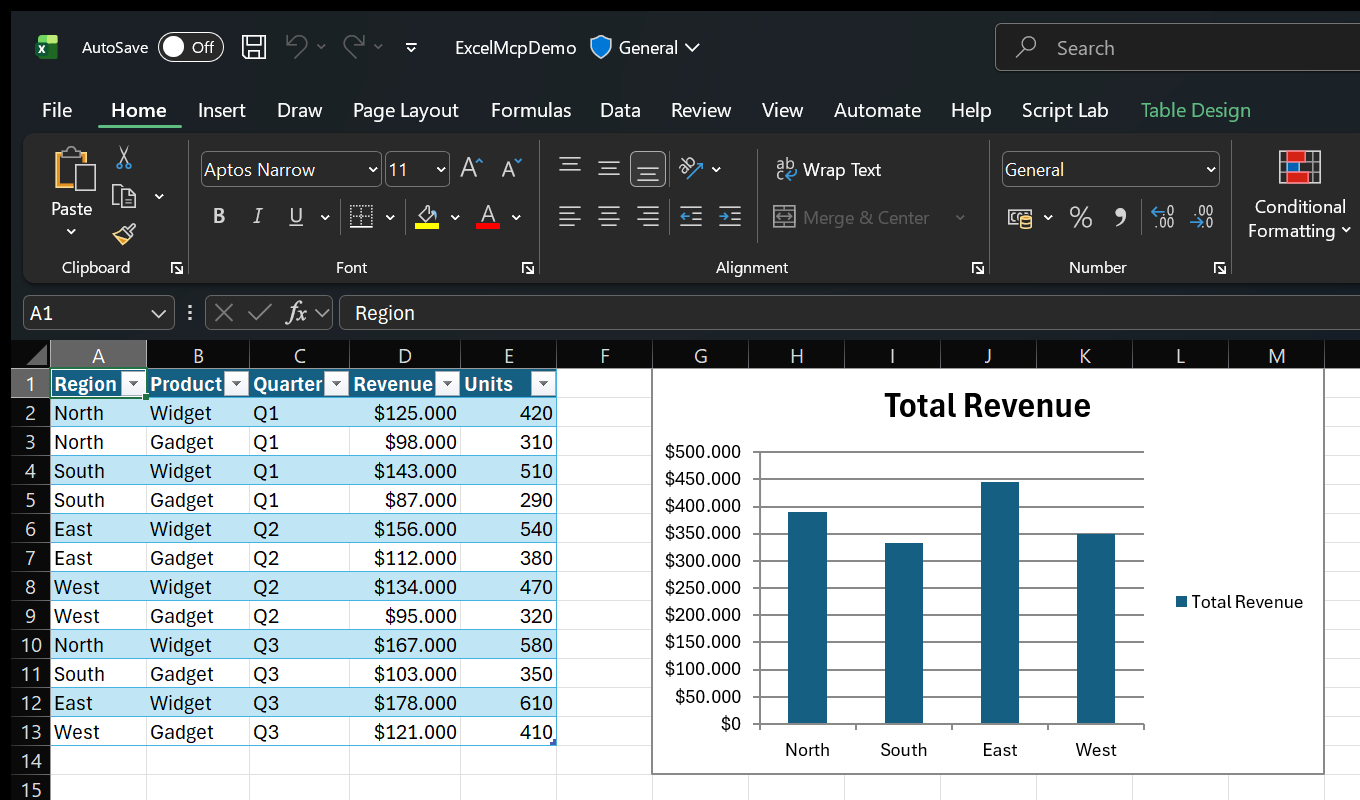
Ask in plain language:
- "Import products.csv with Power Query and load it to the Data Model."
- "Create a PivotTable showing revenue by region, then add a column chart."
- "Use Goal Seek to find the price that produces $100,000 profit."
- "Show me Excel while you work."
Because Excel performs the work, you can inspect results live and continue editing the workbook normally.
See more examples and use cases.
MCP Server or CLI?
Both entry points expose the same Core commands and behavior, so the choice is technical. Coding agents can use either one.
| Interface | Works with | Why |
|---|---|---|
| MCP Server | Any MCP-compatible client | Tool discovery and persistent sessions |
CLI (excelcli) | Agents that can run terminal commands | Built-in help without loading MCP tool definitions, usually with fewer AI tokens |
The MCP Server calls the ExcelMcp service in-process. The CLI uses a background daemon so workbook sessions persist across commands.
AI assistant or script
        │
   MCP Server / CLI
        │
 ExcelMcp Core commands
        │
 Real Excel COM API
Read the architecture or browse the MCP Server and CLI guides.
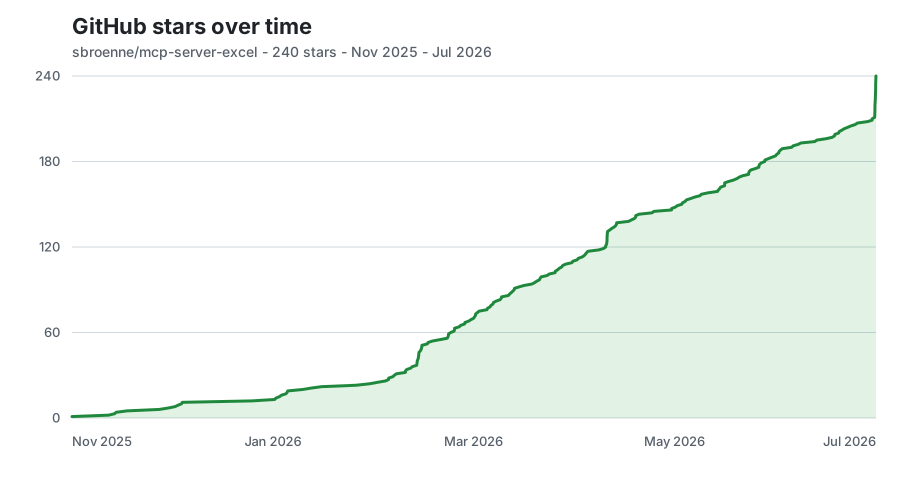
⭐ GitHub Star History
📋 Additional Information
Documentation · Changelog · Contributing · Security · Privacy
License: MIT License - see LICENSE file
Related Projects
Other projects by the author:
- PowerPoint MCP Server — AI-powered PowerPoint automation via MCP, the sister project to this one
- pytest-skill-engineering — LLM-powered testing framework for AI agents
- Windows MCP Server — AI-powered Windows automation via MCP
- OBS Studio MCP Server — AI-powered OBS Studio automation
Featured
Keeps your Mac awake while Claude Code, Codex or Cursor works. Lets it sleep when they are done.
Try free for 7 days →Block distracting apps from your iPhone permanently without a 3rd party app. Free and open source.
Block now (100% free) →Notes, actions and memory. Without a meeting bot. First month 100% off.
Download for free →belt cli automatically finds the best tools and skills for your agent. image, video, music, tts...
one prompt install →Free an open-source skills that make AI coding agents easier to understand, verify, and control.
Download for free →Connect your Claude agent to live crypto prices and trading routes via 1inch
Get the MCP →Registryactive
PackageSbroenne.ExcelMcp.McpServer
TransportSTDIO
UpdatedJun 10, 2026


