
Summary
Gives Claude deterministic knowledge of your AWS infrastructure instead of making it guess from source files. Statically analyzes your codebase and cloud resources to expose DynamoDB tables with their GSIs and partition keys, PostgreSQL schemas with missing indexes, Lambda functions with their triggers and query patterns, plus SQS queues, EventBridge rules, and Secrets Manager. Returns concrete recommendations like exact CREATE INDEX statements or GSI configurations based on what you actually have deployed. Run it locally with `infrawise dev` and it watches for changes, serving 13 MCP tools that let Claude see full table scans, hot partitions, and N+1 queries before they ship. Built for teams using AI assistants to write infrastructure code who need the LLM to know what already exists.


Keeps your Mac awake while Claude Code, Codex or Cursor works. Lets it sleep when they are done.
Try free for 7 days →

Block distracting apps from your iPhone permanently without a 3rd party app. Free and open source.
Block now (100% free) →
Notes, actions and memory. Without a meeting bot. First month 100% off.
Download for free →
belt cli automatically finds the best tools and skills for your agent. image, video, music, tts...
one prompt install →
Free an open-source skills that make AI coding agents easier to understand, verify, and control.
Download for free →

Connect your Claude agent to live crypto prices and trading routes via 1inch
Get the MCP →

Infrawise
Your AI coding assistant finally knows your infra.



Website · Docs · Quick start
Infrawise gives AI coding assistants deterministic infrastructure awareness.
It statically analyzes your codebase, cloud infrastructure, and database schemas, then exposes that context through MCP so tools like Claude Code can understand your actual tables, indexes, query patterns, and service relationships instead of guessing from source files alone.

Why this exists
New software developers don't write wrong code. Claude Code writes wrong code and they ship it. Infrawise is the only thing standing between Claude Code's generated output and a production incident.
AI coding assistants can read your source files but have no deterministic knowledge of your infrastructure. They do not know which GSIs exist, how tables are partitioned, which functions already trigger scans, or where indexes are missing. So they guess.
Infrawise replaces guessing with infrastructure-aware context.
Without Infrawise, an AI assistant might:
- Suggest a
.scan()on your Orders table that has 50M rows - Recommend adding a GSI on
statusthat you already have - Write a
SELECT *when you need to keep query cost low - Not notice that 5 functions are already hammering the same partition key
With Infrawise, it knows:
- Your exact table schemas, partition keys, sort keys, and GSIs
- Which functions query which tables and how
- Which patterns are already flagged as high severity
- The exact
CREATE INDEXSQL or GSI config for your tables — not generic advice
What Infrawise is not
Infrawise is not an AI agent framework, an infrastructure provisioning tool, an observability platform, or a cloud management dashboard.
It is a deterministic infrastructure intelligence layer for AI-assisted development.
Installation
Requires Node.js 22 or later (node --version).
npm install -g infrawise
or use without installing:
npx infrawise start --claude
Quick start
cd your-project
infrawise start --claude
That's it. Infrawise will:
- Probe your environment and generate
infrawise.yaml(first time only — asks which AWS profile to use only if you have several) - Scan your AWS services, databases, and codebase
- Write
.mcp.jsonso your editor auto-connects on every future launch - Open Claude Code with all 22 MCP tools ready
Every time after:
claude # no infrawise command needed — editor manages the connection
Analysis is cached for 24 hours. When the cache is stale, infrawise serve --stdio (spawned automatically by your editor) refreshes it at session start. File changes are detected within the session and the code graph is updated automatically.
Findings (3 total)

1. [HIGH] Full table scan detected on DynamoDB table "Orders"
   listAllOrders() scans without any filter — reads every item in the table.
   Recommendation: Replace Scan with Query using a partition key or add a GSI.

2. [MEDIUM] PostgreSQL table "users" has no index on column "email"
   Filtering on "email" causes sequential scans.
   Recommendation: CREATE INDEX CONCURRENTLY idx_users_email ON users(email);

3. [MEDIUM] DynamoDB table "Sessions" accessed by 6 distinct code paths
   High access concentration may create hot partition issues at scale.
Using with AI coding assistants
Claude Code (recommended)
infrawise start --claude
Writes .mcp.json to your project root (merging with any MCP servers already configured there) and opens Claude Code. Claude Code reads .mcp.json automatically on every launch and manages the infrawise serve --stdio process — no server to start, no ports to configure.
Infrawise is also installable as a Claude Code plugin. It registers the same MCP server and still needs an infrawise.yaml in the project, which infrawise start creates:
/plugin marketplace add Sidd27/infrawise
/plugin install infrawise@infrawise
Cursor
infrawise start --cursor
Writes .cursor/mcp.json (merging with any existing MCP servers) and opens Cursor. All 22 infrawise tools are available in Cursor's MCP panel.
VS Code
infrawise start --vscode
Writes .vscode/mcp.json (merging with any existing MCP servers) and opens VS Code. The tools are available to Copilot agent mode via the MCP servers panel.
Any editor (no flag)
infrawise start
Writes .mcp.json (merging with any existing MCP servers) and exits. Open whichever editor you prefer — point it at infrawise serve --stdio --config /path/to/infrawise.yaml as an MCP server command.
HTTP transport (alternative)
If your editor or workflow requires an HTTP MCP endpoint instead of stdio:
infrawise serve # starts server at http://localhost:3000/mcp
Add to your editor's MCP config:
{
  "mcpServers": {
    "infrawise": {
      "url": "http://localhost:3000/mcp"
    }
  }
}
MCP tools
Every tool is annotated read-only (readOnlyHint: true, openWorldHint: false), so MCP clients that honor annotations can call them without a confirmation prompt.
| Tool | What it provides |
|---|---|
get_infra_overview | Complete snapshot — services, counts, high-severity findings, configured flag (data age and per-source status ride the dataHealth block on every response) |
get_graph_summary | Full infrastructure graph — all nodes, edges, and findings |
get_table_schema | Column-level schema for named tables/collections — types, PKs, FKs, indexes, DynamoDB keys/billing mode, cost signal (no row data) |
analyze_function | Issues in a specific function — scans, missing indexes, N+1, trigger event shapes, missing IAM permissions; returns every same-named file as a separate match, or bind to one with the optional file input; names refused Lambda links and why (unresolvedLambdas) |
suggest_gsi | Exact GSI config for a DynamoDB table + attribute — names the existing index instead when one already covers it |
postgres_index_suggestions | Exact CREATE INDEX SQL for your actual table |
suggest_mongo_index | Exact createIndex command for a MongoDB collection + field |
mysql_index_suggestions | Exact ALTER TABLE ADD INDEX SQL for your MySQL table |
get_queue_details | SQS queues — DLQ status, encryption, FIFO type, visibility timeout, message counts |
get_api_routes | API Gateway APIs (REST, HTTP, WebSocket) — routes, HTTP methods, paths, and Lambda integrations |
get_topic_details | SNS topics — subscription counts, protocols, and filter policies (required message attributes per subscription) |
get_secrets_overview | Secrets Manager — names, rotation status, and key names inferred from code (values never included) |
get_parameter_overview | SSM Parameter Store — names, types, tiers (values never included) |
get_lambda_overview | Lambda functions — runtime, memory, timeout, execution role ARN, triggers (SQS/SNS/DynamoDB/Kinesis/MSK/EventBridge/S3), env var key names, cost signal, why a Lambda could not be linked to its source (unresolvedLink) |
get_eventbridge_details | EventBridge rules — name, state, schedule/event pattern, target functions |
get_s3_overview | S3 buckets — versioning, encryption, public access, event notifications |
get_log_errors | CloudWatch error patterns and counts (no raw log messages) |
get_stack_outputs | Stack outputs and cross-stack exports parsed from local IaC files, with staleness flags for orphaned cdk.out templates |
get_cognito_overview | Cognito user pools — MFA config, app client auth flows, OAuth settings, token validity (secrets never included) |
get_stream_details | Kinesis streams (shards, retention, capacity mode) and MSK clusters (state, Kafka version, brokers) |
get_cache_overview | ElastiCache clusters — engine, encryption in transit/at rest, replication group, failover, cost signal (data never read) |
get_cloudfront_overview | CloudFront distributions — per-behavior path patterns, origins (S3 vs custom, resolved API Gateway name), cache policy, viewer protocol policy |
Every response carries a dataHealth block with a fixed shape: when the infrastructure was read and how long ago, the status of each source behind that answer, whether cdk.out has been synthed since, and the command that refreshes. Every key is always present, so nothing has to be inferred from a field's absence — an empty result you can't distinguish from a failed one reads as "no queues need a DLQ" when the truth is "SQS was never listed".
Infrawise reports; it doesn't rule. Pass maxAgeSeconds when a question is point-in-time and the answer tells you whether the data meets it (advisory — the data still comes back, marked). A running server rechecks the cache on each tool call, so an open session picks up a fresh infrawise analyze on its next question, without a restart. infrawise analyze and infrawise check print the same source warnings and stop calling a run clean when any source went unread.
Age is a proxy for drift, not drift itself — a three-day-old snapshot of an untouched account is accurate, and a five-minute-old one taken before a terraform apply isn't. How Infrawise handles staleness covers where that proxy misleads and what to do about it; the data freshness reference is the field-by-field table and the freshness config key.
CLI reference
| Command | What it does |
|---|---|
infrawise start | Primary command — probe env, generate config, analyze, write editor MCP config |
infrawise start --claude | Same as above, then opens Claude Code |
infrawise start --cursor | Same as above, then opens Cursor |
infrawise start --vscode | Same as above, then opens VS Code (merges into .vscode/mcp.json) |
infrawise start --interactive | Run the guided setup wizard instead of auto-discovery |
infrawise start --rediscover | Delete infrawise.yaml + .infrawise/, then re-probe and re-analyze |
infrawise analyze | Force a full re-scan with extraction progress and a time estimate from past runs — useful after major infrastructure changes |
infrawise check | CI gate — analyze and exit non-zero when findings reach the threshold severity |
infrawise serve | Start the MCP server — HTTP by default, or --stdio for editor integration |
infrawise doctor | Diagnostic escape hatch — validate AWS/DB access, config, and repo scan |
infrawise analyze options
| Flag | Description |
|---|---|
-c, --config <path> | Path to infrawise.yaml (default: infrawise.yaml) |
-r, --repo <path> | Repository to scan (default: current directory) |
--no-cache | Skip reading/writing the cache |
-o, --output <path> | Save findings as a markdown report, e.g. report.md |
--severity <level> | Only show findings at or above this level: high | medium | low |
# Export a shareable findings report
infrawise analyze --output report.md

# Only show high-severity issues
infrawise analyze --severity high

# High-severity issues only, saved to a file
infrawise analyze --severity high --output report.md
infrawise check options (CI/CD)
check runs a fresh analysis and sets a non-zero exit code when blocking findings exist, so it can gate a pipeline without an AI editor.
| Flag | Description |
|---|---|
-c, --config <path> | Path to infrawise.yaml (default: infrawise.yaml) |
-r, --repo <path> | Repository to scan (default: current directory) |
--fail-on <level> | Severity that fails the build: high (default) | medium | low |
# Block a deploy if any high-severity finding exists (exit 1)
infrawise check

# Stricter gate — fail on medium and above
infrawise check --fail-on medium
infrawise serve options
| Flag | Description |
|---|---|
-c, --config <path> | Path to infrawise.yaml (default: infrawise.yaml) |
--stdio | Use stdio transport (for editors via .mcp.json) instead of HTTP |
-p, --port <number> | Port to listen on, HTTP only (default: 3000) |
Configuration
infrawise.yaml is generated by infrawise start (or infrawise start --interactive for the guided wizard) and lives in your repo root. Every service must be explicitly enabled: true — infrawise never connects to anything not listed in config.
Connection strings support ${ENV_VAR} substitution so passwords never need to be committed:
postgres:
  enabled: true
  connectionString: postgresql://infrawise_ro:${DB_PASSWORD}@host:5432/mydb
Full example:
project: payments-service

aws:
  profile: default # AWS profile from ~/.aws/credentials
  region: ap-south-1

dynamodb:
  enabled: true
  includeTables: # omit to include all tables
    - Orders
    - Users

postgres:
  enabled: true
  connectionString: postgresql://infrawise_ro:${DB_PASSWORD}@host:5432/mydb

mysql:
  enabled: false
  connectionString: ''

mongodb:
  enabled: false
  connectionString: ''

sqs:
  enabled: true

sns:
  enabled: true

ssm:
  enabled: true
  paths: [] # filter by prefix e.g. ["/myapp/prod"]

secretsManager:
  enabled: true

lambda:
  enabled: true
  includeFunctions: # omit to include all functions
    - myFunction
    - anotherFunction

eventbridge:
  enabled: true

rds:
  enabled: false

s3:
  enabled: false

apiGateway:
  enabled: false

cognito:
  enabled: false

kinesis:
  enabled: false

msk:
  enabled: false

elasticache:
  enabled: false

cloudfront:
  enabled: false

runtimeSignals:
  enabled: false # Lambda throttles/errors + queue age via CloudWatch metrics
  windowHours: 24

cloudwatchLogs:
  enabled: false
  logGroupPrefixes: []
  windowHours: 24

analysis:
  hotPartitionThreshold: 5
  hotPartitionThresholds:
    high-traffic-table: 12

freshness:
  suggestRefreshAfterHours: 6 # when MCP responses start hinting to re-analyze
AWS setup
Infrawise is read-only. Minimum IAM policy for DynamoDB:
{
  "Version": "2012-10-17",
  "Statement": [
    {
      "Effect": "Allow",
      "Action": ["dynamodb:ListTables", "dynamodb:DescribeTable"],
      "Resource": "*"
    }
  ]
}
For the full policy across all supported services, how to scope it to only the services you enable, and using a session policy for temporary scoped credentials, see the AWS setup guide.
For SSO profiles, log in before running infrawise:
aws sso login --profile myprofile
PostgreSQL setup (optional)
Create a read-only user for infrawise:
CREATE USER infrawise_ro WITH PASSWORD 'yourpassword';
GRANT CONNECT ON DATABASE yourdb TO infrawise_ro;
GRANT USAGE ON SCHEMA public TO infrawise_ro;
GRANT SELECT ON ALL TABLES IN SCHEMA public TO infrawise_ro;
For Amazon RDS: allow inbound on port 5432 from your machine's IP in the security group.
Analysis capabilities
Infrawise has two analysis layers:
Infrastructure analysis (all languages)
Works from AWS APIs, database schema introspection, and IaC files — no dependency on application code:
| Service | What it checks |
|---|---|
| DynamoDB schema | Tables, GSIs, partition keys, billing mode, cost signal (provisioned capacity) |
| PostgreSQL / MySQL schema | Tables, indexes, column types |
| MongoDB schema | Collections, indexes |
| SQS | Missing DLQs, unencrypted queues, large backlogs, FIFO detection, visibility timeout below the consumer Lambda timeout (high) or below AWS's recommended 6× (medium) |
| SNS | Subscription filter policies — required message attributes per subscription |
| Apache Kafka (kafkajs) | Producer/consumer topic mapping from code — any broker (self-hosted, Confluent, Redpanda, MSK); distinct from the MSK Lambda trigger |
| Secrets Manager | Missing secret rotation |
| Lambda | Default memory (128 MB), high timeouts, triggers (SQS/SNS/DynamoDB/Kinesis/MSK/EventBridge/S3), missing DLQ on trigger source, cost signal (high memory with no throttling evidence) |
| S3 | Public access blocking (verify), missing versioning, missing encryption |
| EventBridge | Rules, schedules, event patterns, target Lambda functions |
| API Gateway | REST, HTTP, and WebSocket APIs — routes, methods, Lambda integrations |
| RDS | Publicly accessible, no backups, unencrypted, no deletion protection, single-AZ, cost signal (Multi-AZ on a non-production-looking instance) |
| CloudWatch Logs | Log groups with no retention policy |
| Cognito | User pools and app client config — auth flows, OAuth settings, token validity, client secret presence |
| Kinesis / MSK | Streams (shards, retention, capacity mode) and MSK clusters (state, Kafka version, brokers) |
| ElastiCache | Missing in-transit encryption, single-node clusters with no replication, cost signal (more than 3 nodes) |
| CloudFront | Behaviors serving traffic over plain HTTP (allow-all viewer protocol policy) |
| Runtime signals (opt-in) | Lambda throttling/errors and stale queue messages from CloudWatch metrics |
| Terraform / CloudFormation / CDK | IaC drift vs deployed state; stack outputs and cross-stack exports |
Code correlation analysis (TypeScript / JavaScript / Python)
Uses ts-morph AST analysis to detect which functions call which tables and how:
Python repositories are scanned with a bundled stdlib-ast scanner (requires python3 on PATH; skipped with a warning otherwise): boto3 clients and dynamodb.Table() resources, cursor.execute SQL, pymongo collections, and kafka-python/confluent-kafka producers and consumers. Language detection is automatic — TypeScript and Python scans each run only when matching files exist.
| Analyzer | Severity | What it detects |
|---|---|---|
| Full Table Scan (DynamoDB) | High | .scan() calls without filters |
| Missing GSI | Medium | Queries on attributes without a matching GSI |
| Hot Partition | Medium | 5+ distinct code paths hitting the same table |
| Missing Index (PostgreSQL) | Medium | Tables queried without indexes |
| N+1 Query | High | Repeated query patterns from ORM loops |
| Large SELECT | Low | SELECT * usage |
| Missing MySQL Index | Medium | MySQL tables queried without indexes |
| MySQL Full Table Scan | High | Full table scan patterns in MySQL queries |
| Missing Mongo Index | Medium | Collections queried without secondary indexes |
| Collection Scan | High | find() calls without filter predicates |
| Pipeline: scan in consumer | High / Verify | Full scan inside an event-triggered Lambda handler (High when the lambda-to-code link is IaC-proven, Verify when name-matched) |
| Pipeline: repeated table access | Medium / Verify | Same table read by 2+ functions in one service pipeline |
| Pipeline: missing DLQ hop | Medium | Mid-pipeline queue (has producer and consumer) with no Dead Letter Queue |
Projects in other languages still get full value from infrastructure-level analyzers — code correlation (function-to-table mapping, N+1 patterns) currently supports TypeScript, JavaScript, and Python.
The scanner supports: AWS SDK v3/v2 for DynamoDB, pg/Prisma/Knex for PostgreSQL, mysql2/Knex for MySQL, driver/Mongoose for MongoDB, AWS SDK v3 for SQS/SNS/SSM/Secrets/Lambda, and kafkajs for Kafka topics (producer/consumer).
How it works
- Infrawise scans your repository and infrastructure metadata
- A graph engine maps services, schemas, indexes, and query patterns
- Rule-based analyzers detect infrastructure and query anti-patterns
- The resulting context is exposed through MCP
- AI coding assistants query this context while generating code
Deterministic analysis
Infrawise does not use an LLM to analyze your infrastructure. All extraction and analysis are deterministic: AST parsing, schema introspection, rule-based analyzers, and graph correlation. LLMs are only consumers of the generated context through MCP.
Security
- Read-only — never writes to AWS or your database, never executes DDL
- Local-first — everything runs on your machine, nothing sent to external servers
- No telemetry — zero data collection
- Credentials — uses your existing AWS credential chain, never stored by infrawise
🔒 Security & Project Naming Note
You might see this package flagged on certain supply-chain security scanners under "deceptive naming." This is a false positive triggered by automated tools because of the prefix "infra." This project is completely safe, independent, and unaffiliated with any commercial trademarks.
Architecture overview

Source layout
src/
  types.ts      Shared type definitions
  core/         Config (Zod + YAML), logger (Pino), local cache
  graph/        Graph engine — nodes, edges, builder
  adapters/
    aws/        DynamoDB, S3, Lambda, SQS/SNS/SSM/Secrets/EventBridge/RDS/APIGateway, CloudWatch
    db/         PostgreSQL, MySQL, MongoDB
    iac/        Terraform, CDK, CloudFormation (local file parsing)
  analyzers/    39 rule-based analyzers
  context/      Repository scanner (ts-morph AST + Python stdlib-ast subprocess)
  server/       Fastify MCP server (@modelcontextprotocol/sdk, Streamable HTTP)
  cli/          CLI commands (Commander.js)
Current limitations
- Code-level correlation supports TypeScript, JavaScript, and Python (Python requires python3 on PATH)
- Dynamically constructed queries may not always be resolved statically
- Runtime tracing is not yet implemented
- Large monorepos may require future incremental analysis optimization
Roadmap
Feature roadmap is tracked in the Infrawise v1 project board. Feature requests and upvotes welcome.
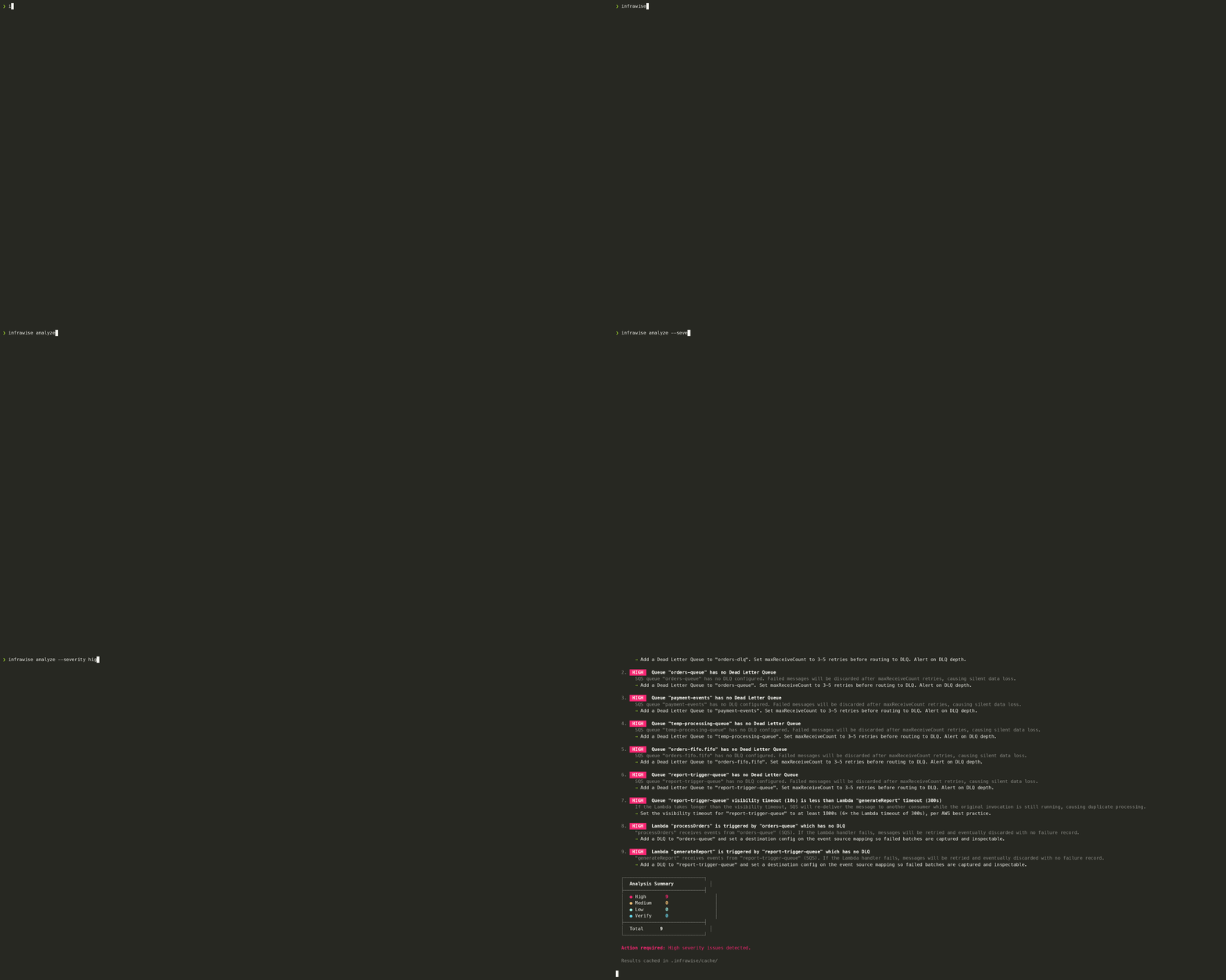
Demo
Two demos run infrawise against real AWS APIs emulated locally in Docker, at zero cost and with no real AWS account.
demo/floci/uses Floci, an MIT-licensed emulator that covers every service infrawise supports — including CloudFront, API Gateway v2, RDS, Cognito, Kinesis, ElastiCache, and MSK. No auth token, no sign-up. Start here.demo/localstack/uses LocalStack community edition, which covers the core services.
Both listen on port 4566, so run one at a time.
Contributing
See CONTRIBUTING.md for a full walkthrough — including how to add a new service adapter, a new analyzer, and the PR checklist.
Releasing
Before releasing, run pnpm check:docs — it fails if the version or the MCP tool list in README.md/AGENTS.md/llms.txt drifted from src/server/index.ts.
pnpm release patch    # 0.1.2 → 0.1.3  (bug fixes)
pnpm release minor    # 0.1.2 → 0.2.0  (new features, backwards compatible)
pnpm release major    # 0.1.2 → 1.0.0  (breaking changes)
pnpm release 1.5.0    # explicit version
Bumps package.json, commits, tags, pushes, and creates a draft GitHub release with notes from commit messages. Then publish the draft on GitHub to trigger npm publish.
License
MIT
Featured
Keeps your Mac awake while Claude Code, Codex or Cursor works. Lets it sleep when they are done.
Try free for 7 days →Block distracting apps from your iPhone permanently without a 3rd party app. Free and open source.
Block now (100% free) →Notes, actions and memory. Without a meeting bot. First month 100% off.
Download for free →belt cli automatically finds the best tools and skills for your agent. image, video, music, tts...
one prompt install →Free an open-source skills that make AI coding agents easier to understand, verify, and control.
Download for free →Connect your Claude agent to live crypto prices and trading routes via 1inch
Get the MCP →Categories
Registryactive
Packageinfrawise
TransportSTDIO
UpdatedJun 8, 2026


