
Summary
Bridges Claude to Unreal Engine 5 through a native C++ plugin that exposes 17 automation tools over a local GraphQL endpoint. You get asset operations (import, duplicate, rename), actor spawning and transforms, PIE session control, Sequencer timeline manipulation, and Niagara particle authoring. The plugin runs inside UE's editor process on port 8091 by default, handling Blueprint graphs, animation state machines, level streaming, and console command execution with safety blocks. Ships as an npm package that talks to the C++ bridge you drop into your project's Plugins folder. Aimed at developers automating repetitive editor tasks or prototyping game logic conversationally instead of clicking through menus. Supports UE 5.0 through 5.7 with graceful degradation when the editor isn't running.
Install to Claude Code
verifiedclaude mcp add unreal-engine-mcp --env LOG_LEVEL=YOUR_LOG_LEVEL --env MCP_ROUTE_STDOUT_LOGS=YOUR_MCP_ROUTE_STDOUT_LOGS --env UE_PROJECT_PATH=YOUR_UE_PROJECT_PATH --env UE_EDITOR_EXE=YOUR_UE_EDITOR_EXE --env UE_SCREENSHOT_DIR=YOUR_UE_SCREENSHOT_DIR --env MCP_AUTOMATION_PORT=YOUR_MCP_AUTOMATION_PORT --env MCP_AUTOMATION_HOST=YOUR_MCP_AUTOMATION_HOST --env MCP_AUTOMATION_ALLOW_NON_LOOPBACK=YOUR_MCP_AUTOMATION_ALLOW_NON_LOOPBACK --env MCP_AUTOMATION_CLIENT_MODE=YOUR_MCP_AUTOMATION_CLIENT_MODE --env MCP_AUTOMATION_USE_TLS=YOUR_MCP_AUTOMATION_USE_TLS --env MCP_CONNECTION_TIMEOUT_MS=YOUR_MCP_CONNECTION_TIMEOUT_MS --env MCP_REQUEST_TIMEOUT_MS=YOUR_MCP_REQUEST_TIMEOUT_MS --env MCP_AUTOMATION_MAX_MESSAGES_PER_MINUTE=YOUR_MCP_AUTOMATION_MAX_MESSAGES_PER_MINUTE --env MCP_AUTOMATION_MAX_AUTOMATION_REQUESTS_PER_MINUTE=YOUR_MCP_AUTOMATION_MAX_AUTOMATION_REQUESTS_PER_MINUTE -- npx -y unreal-engine-mcp-serverRun in your terminal. Replace YOUR_* placeholders with real values; add --scope user to install for every project.
Review the command, arguments, and environment values before installing — MCP servers run with your local permissions.


Keeps your Mac awake while Claude Code, Codex or Cursor works. Lets it sleep when they are done.
Try free for 7 days →

Block distracting apps from your iPhone permanently without a 3rd party app. Free and open source.
Block now (100% free) →
Notes, actions and memory. Without a meeting bot. First month 100% off.
Download for free →
belt cli automatically finds the best tools and skills for your agent. image, video, music, tts...
one prompt install →
Free an open-source skills that make AI coding agents easier to understand, verify, and control.
Download for free →

Connect your Claude agent to live crypto prices and trading routes via 1inch
Get the MCP →Tools
Verified live against the running server on Jun 10, 2026.
verified live23 tools
manage_toolsDynamic MCP tool management. List canonical tools, view category counts, and enable/disable tools or categories at runtime. Required: action. Select one enum value, then provide only parameters relevant to that action. Params by action: tools, category, params.4 params
Dynamic MCP tool management. List canonical tools, view category counts, and enable/disable tools or categories at runtime. Required: action. Select one enum value, then provide only parameters relevant to that action. Params by action: tools, category, params.
Parameters* required
action*stringlist_tools: show canonical tools with status. list_categories: show category counts. enable/disable_tools: toggle specific tools. enable/disable_category: toggle category. get_status: current state...one of
list_tools · list_categories · enable_tools · disable_tools · enable_category · disable_categorycategorystringCategory name to enable/disable (core, world, gameplay, utility, all)
paramsobjectOptional action-specific parameters. These are merged with top-level arguments before routing for clients that cannot send arbitrary top-level fields.
toolsarrayTool names to enable/disable
manage_assetCreate/import/manage assets, material graphs, material instances, procedural textures, render targets, and dependency analysis. Required: action. Select one enum value, then provide only parameters relevant to that action. Params by action: assetPath, directory, classNames, pa...123 params
Create/import/manage assets, material graphs, material instances, procedural textures, render targets, and dependency analysis. Required: action. Select one enum value, then provide only parameters relevant to that action. Params by action: assetPath, directory, classNames, pa...
Parameters* required
action*stringAction to performone of
list · import · duplicate · duplicate_asset · rename · rename_assetadditionalOutputsarrayamountnumberassetPathstringAsset path (e.g., /Game/Path/Asset).
assetPathsarraybaseTexturestringTexture asset path.
blendModestringblendTexturestringTexture asset path.
blendTypestringblueTexturestringTexture asset path.
channelstringcheckoutFilesbooleanclassNamesarraycodestringcompressionSettingsstringconstAnumberconstBnumbercoordinateIndexnumbercurvePointsarraydefaultValuevalueGeneric value (any type).
+103 more parameters. See the server's own documentation for the full schema.
manage_blueprintCreate Blueprints and UMG widgets, add SCS/UI components, set defaults, and manipulate Blueprint graphs, bindings, and widget layouts. Required: action. Select one enum value, then provide only parameters relevant to that action. Params by action: name, blueprintPath, blueprin...147 params
Create Blueprints and UMG widgets, add SCS/UI components, set defaults, and manipulate Blueprint graphs, bindings, and widget layouts. Required: action. Select one enum value, then provide only parameters relevant to that action. Params by action: name, blueprintPath, blueprin...
Parameters* required
action*stringBlueprint actionone of
create · create_blueprint · get_blueprint · get · compile · add_componentactionPathstringAsset path (e.g., /Game/Path/Asset).
alignmentobjectWidget alignment (0-1).
alwaysShowScrollbarbooleanAlways show scrollbar.
anchorMaxobjectMaximum anchor point (0-1).
anchorMinobjectMinimum anchor point (0-1).
anglenumberAngle in degrees.
animationNamestringAnimation name.
applyAndSavebooleanattachTostringautoWrapbooleanEnable text auto-wrap.
bindingSourcestringVariable or function name to bind to.
blueprintPathstringBlueprint asset path.
blueprintTypestringPath or name of the parent class.
brushColorobjectBorder brush color.
brushSizeobjectBrush/image size.
categorystringclippingstringWidget clipping mode.one of
Inherit · ClipToBounds · ClipToBoundsWithoutIntersecting · ClipToBoundsAlways · OnDemandcolorAndOpacityobjectColor and opacity (0-1 values).
columnCountnumberNumber of columns.
+127 more parameters. See the server's own documentation for the full schema.
control_actorSpawn actors, set transforms, enable physics, add components, manage tags, and attach actors. Required: action. Select one enum value, then provide only parameters relevant to that action. Params by action: actorName, childActor, parentActor, classPath, meshPath, materialPath,...36 params
Spawn actors, set transforms, enable physics, add components, manage tags, and attach actors. Required: action. Select one enum value, then provide only parameters relevant to that action. Params by action: actorName, childActor, parentActor, classPath, meshPath, materialPath,...
Parameters* required
action*stringActionone of
spawn · spawn_actor · spawn_blueprint · delete · destroy_actor · delete_by_tagactorClassstringactorNamestringName of the actor.
actorNamesarrayallComponentsbooleanargumentsvalueGeneric value (any type).
blueprintPathstringBlueprint asset path.
childActorstringName of the child actor (for attach/detach operations).
classNamestringclassPathstringAsset path (e.g., /Game/Path/Asset).
collisionEnabledbooleancomponentNamestringName of the component.
componentTypestringfilterstringforceobject3D vector.
functionNamestringName of the function.
limitnumberlocationobject3D location (x, y, z).
materialIndexintegermaterialPathstringMaterial asset path.
+16 more parameters. See the server's own documentation for the full schema.
control_editorStart/stop PIE, control viewport camera, run console commands, take screenshots, simulate input. Required: action. Select one enum value, then provide only parameters relevant to that action. Params by action: location, rotation, viewMode, enabled, speed, filename, fov, width,...39 params
Start/stop PIE, control viewport camera, run console commands, take screenshots, simulate input. Required: action. Select one enum value, then provide only parameters relevant to that action. Params by action: location, rotation, viewMode, enabled, speed, filename, fov, width,...
Parameters* required
action*stringEditor actionone of
play · stop · stop_pie · pause · resume · ejectactorNamestringName of the actor.
assetPathstringAsset path (e.g., /Game/Path/Asset).
blendTimenumberbookmarkNamestringbuttonstringcategorystringcommandstringdeltaTimenumberenabledbooleanWhether the item/feature is enabled.
filenamestringfovnumberheightnumberidstringincludeMetadatabooleaninputActionstringinputTypestringkeystringlevelPathstringLevel asset path.
locationobject3D location (x, y, z).
+19 more parameters. See the server's own documentation for the full schema.
manage_levelLoad/save levels, configure streaming, and build lighting. Required: action. Select one enum value, then provide only parameters relevant to that action. Params by action: levelPath, assetPath, levelPaths, levelName, path, savePath, destinationPath, overwrite, targetPath, expo...35 params
Load/save levels, configure streaming, and build lighting. Required: action. Select one enum value, then provide only parameters relevant to that action. Params by action: levelPath, assetPath, levelPaths, levelName, path, savePath, destinationPath, overwrite, targetPath, expo...
Parameters* required
action*stringActionone of
load · load_level · save · save_level · save_as · save_level_asassetPathstringAsset path (e.g., /Game/Path/Asset).
colorarrayRGBA color as an array [r, g, b, a].
destinationPathstringDestination path for move/copy.
exportPathstringExport file path.
intensitynumberlevelNamestringlevelPathstringLevel asset path.
levelPathsarraylightTypestringLight type. Accepts short names (Point), class names (PointLight), or lowercase (point).one of
Directional · Point · Spot · Rect · DirectionalLight · PointLightlocationobject3D location (x, y, z).
metadataobjectnamestringName identifier.
newNamestringoverwritebooleanOverwrite if the asset/file already exists.
packagePathstringPath to a directory.
paramsobjectOptional action-specific parameters. These are merged with top-level arguments before routing for clients that cannot send arbitrary top-level fields.
parentLevelstringParent level path.
parentPathstringPath to a directory.
pathstringDirectory path for asset creation.
+15 more parameters. See the server's own documentation for the full schema.
build_environmentBuild environments: landscapes, foliage, procedural terrain/biomes, lighting setups, spline roads/rivers/fences, and world decoration. Required: action. Select one enum value, then provide only parameters relevant to that action. Params by action: name, landscapeName, heightDa...118 params
Build environments: landscapes, foliage, procedural terrain/biomes, lighting setups, spline roads/rivers/fences, and world decoration. Required: action. Select one enum value, then provide only parameters relevant to that action. Params by action: name, landscapeName, heightDa...
Parameters* required
action*stringActionone of
create_landscape · sculpt · sculpt_landscape · add_foliage · paint_foliage · create_procedural_terrainactorNamestringName of the actor.
actorPathstringalignToNormalbooleanalignToSplinebooleanamplitudenumberarriveTangentobject3D location (x, y, z).
assetPathsarrayassetsarrayazimuthnumberbClosedLoopbooleanblueprintPathstringBlueprint asset path.
boundsobjectcollisionEnabledbooleancompensationValuenumbercomponentCountobject2D vector.
componentNamestringName of the component.
countnumbercubemapPathstringAsset path (e.g., /Game/Path/Asset).
cullDistancenumber+98 more parameters. See the server's own documentation for the full schema.
animation_physicsAuthor animation and physics assets: Animation Blueprints, blend spaces, montages, Control Rig/IK, skeletons, sockets, physics assets, cloth, ragdolls, and vehicles. Required: action. Select one enum value, then provide only parameters relevant to that action. Params by action...112 params
Author animation and physics assets: Animation Blueprints, blend spaces, montages, Control Rig/IK, skeletons, sockets, physics assets, cloth, ragdolls, and vehicles. Required: action. Select one enum value, then provide only parameters relevant to that action. Params by action...
Parameters* required
action*stringActionone of
create_animation_blueprint · create_animation_bp · create_anim_blueprint · create_blend_space · create_blend_space_1d · create_blend_space_2dactorNamestringName of the actor.
additiveAnimTypestringangularDampingnumberanimationPathstringAsset path (e.g., /Game/Path/Asset).
artifactsarrayassetPathstringAsset path (e.g., /Game/Path/Asset).
assetsarrayassignToMeshbooleanattachBoneNamestringName of the bone.
axisstringaxisNamestringbasePoseFramenumberbasePoseTypestringblendTimenumberblendTypestringblueprintPathstringBlueprint asset path.
bodyAstringbodyBstringbodyTypestring+92 more parameters. See the server's own documentation for the full schema.
system_controlControl the project runtime: profiling, benchmarks, scalability/LOD/Nanite settings, CVars, console commands, Python scripts, UBT, tests, logs, and widgets. Required: action. Select one enum value, then provide only parameters relevant to that action. Params by action: profile...59 params
Control the project runtime: profiling, benchmarks, scalability/LOD/Nanite settings, CVars, console commands, Python scripts, UBT, tests, logs, and widgets. Required: action. Select one enum value, then provide only parameters relevant to that action. Params by action: profile...
Parameters* required
action*stringActionone of
profile · show_fps · set_quality · screenshot · set_resolution · set_fullscreenactorsarrayargumentsstringassetPathstringAsset path (e.g., /Game/Path/Asset).
boostPlayerLocationbooleancategorystringcategoryNamestringcellSizenumberchannelsstringchildClassstringcodestringPython code to execute inline
commandstringconfigurationstringdetailedbooleandurationnumberenableBatchingbooleanenableInstancingbooleanenabledbooleanWhether the item/feature is enabled.
filestringPath to .py file to execute
filenamestring+39 more parameters. See the server's own documentation for the full schema.
manage_sequenceEdit Level Sequences: add tracks, bind actors, set keyframes, control playback, and record camera. Required: action. Select one enum value, then provide only parameters relevant to that action. Params by action: name, path, actorName, actorNames, frame, value, property, destin...31 params
Edit Level Sequences: add tracks, bind actors, set keyframes, control playback, and record camera. Required: action. Select one enum value, then provide only parameters relevant to that action. Params by action: name, path, actorName, actorNames, frame, value, property, destin...
Parameters* required
action*stringActionone of
create · open · add_camera · add_actor · add_actors · remove_actorsactorNamestringName of the actor.
actorNamesarrayclassNamestringdestinationPathstringDestination path for move/copy.
endnumberendFramenumberframenumberframeRatestringlengthInFramesnumberlockedbooleanloopModestringmetadataobjectmutedbooleannamestringName identifier.
newNamestringNew name for renaming.
paramsobjectOptional action-specific parameters. These are merged with top-level arguments before routing for clients that cannot send arbitrary top-level fields.
pathstringAsset path (e.g., /Game/Path/Asset).
playbackEndnumberplaybackStartnumber+11 more parameters. See the server's own documentation for the full schema.
inspectInspect any UObject: read/write properties, list components, export snapshots, and query class info. Actions: inspect_cdo (Blueprint CDO properties + all components without spawning an actor; use blueprintPath, optional detailed/componentName/propertyNames), inspect_class (cla...18 params
Inspect any UObject: read/write properties, list components, export snapshots, and query class info. Actions: inspect_cdo (Blueprint CDO properties + all components without spawning an actor; use blueprintPath, optional detailed/componentName/propertyNames), inspect_class (cla...
Parameters* required
action*stringActionone of
inspect_object · get_actor_details · get_blueprint_details · get_mesh_details · get_texture_details · get_material_detailsactorNamestringName of the actor.
blueprintPathstringBlueprint asset path.
classNamestringclassPathstringAsset path (e.g., /Game/Path/Asset).
componentNamestringName of the component.
componentNamesarraydetailedbooleanfilterstringnamestringName identifier.
objectPathstringAsset path (e.g., /Game/Path/Asset).
paramsobjectOptional action-specific parameters. These are merged with top-level arguments before routing for clients that cannot send arbitrary top-level fields.
propertyNamestringName of the property.
propertyNamesarraypropertyPathstringsnapshotNamestringtagstringName of the tag.
valuevalueGeneric value (any type).
manage_audioPlay/stop sounds, add audio components, configure mixes, attenuation, spatial audio, and author Sound Cues/MetaSounds. Required: action. Select one enum value, then provide only parameters relevant to that action. Params by action: name, soundPath, location, rotation, volume,...69 params
Play/stop sounds, add audio components, configure mixes, attenuation, spatial audio, and author Sound Cues/MetaSounds. Required: action. Select one enum value, then provide only parameters relevant to that action. Params by action: name, soundPath, location, rotation, volume,...
Parameters* required
action*stringActionone of
create_sound_cue · play_sound_at_location · play_sound_2d · create_audio_component · create_sound_mix · push_sound_mixactorNamestringName of the actor.
analysisTypestringassetPathstringAsset path (e.g., /Game/Path/Asset).
attachPointNamestringName of the socket.
attenuationPathstringAsset path (e.g., /Game/Path/Asset).
attenuationShapestringcomponentNamestringName of the component.
concurrencyPathstringAsset path (e.g., /Game/Path/Asset).
defaultValuevalueGeneric value (any type).
dopplerIntensitynumbereffectTypestringenablebooleanenableReverbSendbooleanenabledbooleanWhether the item/feature is enabled.
fadeInTimenumberfadeOutTimenumberfadeTimenumberfadeTypestringfalloffDistancenumber+49 more parameters. See the server's own documentation for the full schema.
manage_geometryCreate procedural meshes using Geometry Script: booleans, deformers, UVs, collision, and LOD generation. Required: action. Select one enum value, then provide only parameters relevant to that action. Params by action: outputPath, assetPath, name, path, actorName, width, height...74 params
Create procedural meshes using Geometry Script: booleans, deformers, UVs, collision, and LOD generation. Required: action. Select one enum value, then provide only parameters relevant to that action. Params by action: outputPath, assetPath, name, path, actorName, width, height...
Parameters* required
action*stringGeometry action to performone of
create_box · create_sphere · create_cylinder · create_cone · create_capsule · create_torusactorNamestringName of the actor.
amountnumberGeneric amount for operations (bevel size, inset distance, etc.).
anglenumberAngle in degrees.
assetPathstringAsset path (e.g., /Game/Path/Asset).
axisstringAxis for deformation operations.one of
X · Y · Zcapbooleancenterobject3D location (x, y, z).
collisionTypestringCollision complexity type.one of
Default · Simple · Complex · UseComplexAsSimple · UseSimpleAsComplexcomputeWeightedNormalsbooleanUse area-weighted normals.
countnumberdepthnumberDepth value.
depthSegmentsnumberSegments along depth.
dimensionsobject3D dimensions (width, height, depth).
distancenumberDistance value.
hardEdgeAnglenumberAngle threshold for hard edges (degrees).
heightnumberHeight value.
heightScalenumberTexture displacement height scale.
heightSegmentsnumberSegments along height.
hullCountnumberNumber of convex hulls for decomposition.
+54 more parameters. See the server's own documentation for the full schema.
manage_pcgCreate, edit, execute, and configure PCG graphs: graph assets, input/sampler/filter/spawner nodes, pin connections, node settings, and partition grid size. Required: action. Select one enum value, then provide only parameters relevant to that action. Params by action: graphPat...39 params
Create, edit, execute, and configure PCG graphs: graph assets, input/sampler/filter/spawner nodes, pin connections, node settings, and partition grid size. Required: action. Select one enum value, then provide only parameters relevant to that action. Params by action: graphPat...
Parameters* required
action*stringPCG graph action to performone of
create_pcg_graph · create_pcg_subgraph · add_pcg_node · connect_pcg_pins · set_pcg_node_settings · add_landscape_data_nodeactorClassstringactorNamestringName of the actor.
assetPathstringAsset path (e.g., /Game/Path/Asset).
classPathstringcomponentNamestringName of the component.
componentPathstringComponent path/name for PCG execution.
createComponentbooleanforcebooleangraphPathstringPCG graph asset path (e.g., /Game/PCG/PCG_MyGraph).
gridSizenumberinputNamestringName of the pin.
meshPathstringMesh asset path.
namestringName identifier.
nodeIdstringID of the node.
nodeNamestringName of the node.
nodeTypestringPCG node type alias or UPCGSettings class path/name.
outputNamestringName of the pin.
overwritebooleanOverwrite if the asset/file already exists.
paramsobjectOptional action-specific parameters. These are merged with top-level arguments before routing for clients that cannot send arbitrary top-level fields.
+19 more parameters. See the server's own documentation for the full schema.
manage_effectNiagara particle systems, VFX, debug shapes, and GPU simulations. Create systems, emitters, modules, and control particle effects. Required: action. Select one enum value, then provide only parameters relevant to that action. Params by action: name, path, savePath, assetPath,...77 params
Niagara particle systems, VFX, debug shapes, and GPU simulations. Create systems, emitters, modules, and control particle effects. Required: action. Select one enum value, then provide only parameters relevant to that action. Params by action: name, path, savePath, assetPath,...
Parameters* required
accelerationobject3D location (x, y, z).
action*stringEffect/Niagara action to perform.one of
particle · niagara · debug_shape · spawn_niagara · create_dynamic_light · create_niagara_systemactorNamestringName of the actor.
alignmentstringassetPathstringAsset path (e.g., /Game/Path/Asset).
attachToActorstringName of the actor.
autoConnectbooleanburstCountnumberburstTimenumbercameraOffsetnumbercollisionModestringcolorvalueRGBA color as an array [r,g,b,a] or object {r,g,b,a} depending on action.
colorModestringdeltaTimenumberdensitynumberdeterministicEnabledbooleandieOnCollisionbooleandurationnumberemitterstringemitterNamestring+57 more parameters. See the server's own documentation for the full schema.
manage_gasCreate Gameplay Abilities, Effects, Attribute Sets, and Gameplay Cues for ability systems. Required: action. Select one enum value, then provide only parameters relevant to that action. Params by action: name, path, assetPath, blueprintPath, replicationMode, attributeSetPath,...59 params
Create Gameplay Abilities, Effects, Attribute Sets, and Gameplay Cues for ability systems. Required: action. Select one enum value, then provide only parameters relevant to that action. Params by action: name, path, assetPath, blueprintPath, replicationMode, attributeSetPath,...
Parameters* required
abilityPathstringPath to ability asset.
abilityTagsarrayGameplay tags for this ability.
action*stringGAS action to perform.one of
add_ability_system_component · configure_asc · create_attribute_set · add_attribute · set_attribute_base_value · set_attribute_clampingactivationBlockedTagsarrayTags that block activation of this ability.
activationPolicystringWhen the ability activates.one of
OnInputPressed · WhileInputActive · OnSpawn · OnGivenactivationRequiredTagsarrayTags required to activate this ability.
aoeRadiusnumberArea of effect radius.
applicationRequiredTagsarrayTags required to apply this effect.
assetPathstringAsset path (e.g., /Game/Path/Asset).
attributeNamestringName of the attribute.
attributeSetPathstringPath to Attribute Set asset.
attributeTypestringPredefined attribute type or Custom.one of
Health · MaxHealth · Mana · MaxMana · Stamina · MaxStaminabaseValuenumberBase value for attribute.
blockAbilitiesWithTagarrayTags of abilities blocked while this is active.
blueprintPathstringBlueprint asset path.
calculationClassstringUGameplayEffectExecutionCalculation class path.
cameraShakePathstringPath to camera shake asset.
cancelAbilitiesWithTagarrayTags of abilities to cancel when this activates.
clampModestringAttribute clamping mode.one of
None · Min · Max · MinMaxcomponentNamestringName of the component.
+39 more parameters. See the server's own documentation for the full schema.
manage_characterCreate Character Blueprints with movement, locomotion, and animation state machines. Required: action. Select one enum value, then provide only parameters relevant to that action. Params by action: name, path, blueprintPath, parentClass, skeletalMeshPath, animBlueprintPath, ca...67 params
Create Character Blueprints with movement, locomotion, and animation state machines. Required: action. Select one enum value, then provide only parameters relevant to that action. Params by action: name, path, blueprintPath, parentClass, skeletalMeshPath, animBlueprintPath, ca...
Parameters* required
accelerationnumberaction*stringCharacter action to perform.one of
create_character_blueprint · configure_capsule_component · configure_mesh_component · configure_camera_component · configure_movement_speeds · configure_jumpairControlnumberanimBlueprintPathstringPath to animation blueprint.
avoidanceEnabledbooleanEnable AI avoidance.
blueprintPathstringBlueprint asset path.
brakingDecelerationnumbercameraUsePawnControlRotationbooleanCamera follows controller rotation.
canCrouchbooleancapsuleHalfHeightnumbercapsuleRadiusnumberclimbSpeednumberclimbableTagstringTag for climbable surfaces.
crouchSpeednumbercrouchedHalfHeightnumbercustomSpeednumberdecelerationnumberfallingLateralFrictionnumberAir friction.
flySpeednumberfootstepEnabledbooleanEnable footstep system.
+47 more parameters. See the server's own documentation for the full schema.
manage_combatCreate weapons with hitscan/projectile firing, configure damage types, hitboxes, reload, and melee combat (combos, parry, block). Required: action. Select one enum value, then provide only parameters relevant to that action. Params by action: blueprintPath, name, path, weaponM...96 params
Create weapons with hitscan/projectile firing, configure damage types, hitboxes, reload, and melee combat (combos, parry, block). Required: action. Select one enum value, then provide only parameters relevant to that action. Params by action: blueprintPath, name, path, weaponM...
Parameters* required
action*stringCombat action to performone of
create_weapon_blueprint · configure_weapon_mesh · configure_weapon_sockets · set_weapon_stats · configure_hitscan · configure_projectileadsEnabledbooleanEnable aim down sights.
adsFovnumberFOV when aiming.
adsSpeednumberTime to aim down sights.
adsSpreadMultipliernumberSpread multiplier when aiming.
ammoPerShotnumberammoTypestringAmmo type identifier.
armorValuenumberattachmentSlotsarrayAttachment slot definitions.
baseDamagenumberblockDamageReductionnumberDamage reduction when blocking (0-1).
blockStaminaCostnumberStamina cost per blocked hit.
blueprintPathstringBlueprint asset path.
bounceEnabledbooleanEnable projectile bouncing.
bounceVelocityRationumberVelocity retained on bounce (0-1).
collisionRadiusnumbercomboWindowTimenumberTime window for combo input.
criticalMultipliernumberCritical hit damage multiplier.
damageAmountnumberdamageImpulsenumberImpulse applied on hit.
+76 more parameters. See the server's own documentation for the full schema.
manage_aiBuild AI systems: AI controllers, Behavior Trees, Blackboards, EQS, perception, State Trees, Smart Objects, NavMesh settings, nav modifiers, links, and pathfinding. Required: action. Select one enum value, then provide only parameters relevant to that action. Params by action:...94 params
Build AI systems: AI controllers, Behavior Trees, Blackboards, EQS, perception, State Trees, Smart Objects, NavMesh settings, nav modifiers, links, and pathfinding. Required: action. Select one enum value, then provide only parameters relevant to that action. Params by action:...
Parameters* required
action*stringAI action to performone of
create_ai_controller · assign_behavior_tree · assign_blackboard · create_blackboard_asset · add_blackboard_key · set_key_instance_syncedactorNamestringName of the actor.
agentHeightnumberNavigation agent height (default: 144).
agentMaxSlopenumberMaximum slope angle in degrees (default: 44).
agentRadiusnumberNavigation agent radius (default: 35).
agentStepHeightnumberMaximum step height agent can climb (default: 35).
areaClassstringNavigation area class path.
areaCostnumberPathfinding cost multiplier for area (1.0 = normal).
assetPathstringAsset path (e.g., /Game/Path/Asset).
bCreateBoxObstaclebooleanAdd box obstacle during nav generation.
baseObjectClassstringbehaviorTreePathstringPath to behavior tree asset.
blackboardPathstringPath to blackboard asset.
blueprintPathstringBlueprint asset path.
broadcastIntervalnumberInterval for state change broadcast (0 = single).
broadcastRadiusnumberRadius for state change broadcast.
cellHeightnumberNavMesh cell height (default: 10).
cellSizenumberNavMesh cell size (default: 19).
childNodeIdstringID of the node.
commentstring+74 more parameters. See the server's own documentation for the full schema.
manage_inventoryCreate item data assets, inventory components, world pickups, loot tables, and crafting recipes. Required: action. Select one enum value, then provide only parameters relevant to that action. Params by action: name, path, save, blueprintPath, itemPath, iconPath, maxStackSize,...57 params
Create item data assets, inventory components, world pickups, loot tables, and crafting recipes. Required: action. Select one enum value, then provide only parameters relevant to that action. Params by action: name, path, save, blueprintPath, itemPath, iconPath, maxStackSize,...
Parameters* required
abilityGrantsbooleanEnable ability grant support when equipped.
action*stringInventory action to perform.one of
create_item_data_asset · set_item_properties · create_item_category · assign_item_category · create_inventory_component · configure_inventory_slotsactorPathstringPath to actor Blueprint for loot drop.
attachToSocketbooleanAttach mesh to socket when equipped.
blueprintPathstringBlueprint asset path.
bobbingbooleanEnable bobbing animation.
categoryPathstringPath to item category asset.
componentNamestringName of the component.
craftTimenumberTime in seconds to craft.
craftingSpeedMultipliernumberdefaultSocketstringName of the socket.
dropCountnumberNumber of drops to roll.
dropOnDeathbooleandropRadiusnumberRadius for scattered drops.
enableWeightbooleanencumberanceSystembooleanencumberanceThresholdnumberentryIndexnumberglowEffectbooleanEnable glow effect.
iconPathstringPath to icon texture.
+37 more parameters. See the server's own documentation for the full schema.
manage_interactionCreate interactive objects: doors, switches, chests, levers. Set up destructible meshes and trigger volumes. Required: action. Select one enum value, then provide only parameters relevant to that action. Params by action: name, folder, blueprintPath, actorName, componentName,...29 params
Create interactive objects: doors, switches, chests, levers. Set up destructible meshes and trigger volumes. Required: action. Select one enum value, then provide only parameters relevant to that action. Params by action: name, folder, blueprintPath, actorName, componentName,...
Parameters* required
action*stringThe interaction action to perform.one of
create_interaction_component · configure_interaction_trace · configure_interaction_widget · add_interaction_events · create_interactable_interface · create_door_actoractorNamestringName of the actor.
autoClosebooleanAutomatically close after opening.
autoCloseDelaynumberDelay before auto-close in seconds.
blueprintPathstringBlueprint asset path.
canTogglebooleanchestPathstringPath to chest actor blueprint.
componentNamestringName of the component.
doorPathstringPath to door actor blueprint.
folderstringPath to a directory.
lockedbooleanWhether the item is locked.
lootTablePathstringPath to loot table asset.
namestringName identifier.
openAnglenumberDoor open rotation angle in degrees.
openTimenumberTime to open/close door in seconds.
paramsobjectOptional action-specific parameters. These are merged with top-level arguments before routing for clients that cannot send arbitrary top-level fields.
promptTextFormatstringFormat string for prompt (e.g., "Press {Key} to {Action}").
requiresKeybooleanWhether interaction requires a key item.
resetTimenumberTime to reset switch in seconds.
showOnHoverbooleanShow widget when hovering.
+9 more parameters. See the server's own documentation for the full schema.
manage_networkingConfigure multiplayer and player flow: replication, RPCs, authority/relevancy, network prediction, sessions, split-screen, LAN/voice chat, game framework classes, match rules, and input mappings. Required: action. Select one enum value, then provide only parameters relevant to...127 params
Configure multiplayer and player flow: replication, RPCs, authority/relevancy, network prediction, sessions, split-screen, LAN/voice chat, game framework classes, match rules, and input mappings. Required: action. Select one enum value, then provide only parameters relevant to...
Parameters* required
action*stringNetworking action to performone of
set_property_replicated · set_replication_condition · configure_net_update_frequency · configure_net_priority · set_net_dormancy · configure_replication_graphactionNamestringLegacy input action mapping name.
actionPathstringAsset path (e.g., /Game/Path/Asset).
actorNamestringName of the actor.
allowSpectatingbooleanAllow spectator mode.
altbooleanRequire Alt for a legacy action mapping.
alwaysRelevantbooleanAlways relevant to all clients.
assetPathstringAsset path (e.g., /Game/Path/Asset).
attenuationFalloffnumberFalloff rate for voice attenuation.
attenuationRadiusnumberRadius for voice attenuation (Proximity chat). REQUIRED for set_voice_attenuation.
autoBalancebooleanEnable automatic team balancing.
axisNamestringLegacy input axis mapping name.
bAllowInvitesbooleanAllow player invites.
bAllowJoinInProgressbooleanAllow joining games in progress.
bDelayedStartbooleanWhether to delay match start.
bIsLANMatchbooleanWhether this is a LAN match.
bShouldAdvertisebooleanAdvertise session publicly.
bUseLobbiesIfAvailablebooleanUse lobby system if available.
bUsesPresencebooleanUse presence for session discovery.
blueprintPathstringBlueprint asset path.
+107 more parameters. See the server's own documentation for the full schema.
manage_level_structureStructure worlds: levels, sublevels, World Partition, streaming, data layers, HLOD, level instances, trigger/blocking/physics/audio/post-process volumes, and nav bounds. Required: action. Select one enum value, then provide only parameters relevant to that action. Params by ac...79 params
Structure worlds: levels, sublevels, World Partition, streaming, data layers, HLOD, level instances, trigger/blocking/physics/audio/post-process volumes, and nav bounds. Required: action. Select one enum value, then provide only parameters relevant to that action. Params by ac...
Parameters* required
action*stringLevel structure action to perform.one of
create_level · create_sublevel · configure_level_streaming · set_streaming_distance · configure_level_bounds · enable_world_partitionactorNamestringName of the actor.
actorPathstringPath to actor.
bAutoCalculateBoundsbooleanAuto-calculate bounds from content.
bBlockOnSlowStreamingbooleanbCreateWorldPartitionbooleanCreate with World Partition enabled.
bDisableDistanceStreamingbooleanDisable distance-based streaming.
bEnableWorldPartitionbooleanEnable World Partition for level.
bEnabledbooleanWhether the audio volume is enabled.
bIsInitiallyLoadedbooleanData layer initially loaded.
bIsInitiallyVisiblebooleanData layer initially visible.
bIsSpatiallyLoadedbooleanHLOD is spatially loaded.
bPackBlueprintsbooleanInclude blueprints in packed level.
bPackStaticMeshesbooleanInclude static meshes in packed level.
bPainCausingbooleanWhether the volume causes pain/damage.
bShouldBeVisiblebooleanLevel should be visible when loaded.
bShouldBlockOnLoadbooleanBlock game until level is loaded.
bUnboundbooleanWhether post process volume affects entire world.
bUseExternalActorsbooleanEnable One File Per Actor (OFPA/External Actors) for Data Layer compatibility. Automatically enabled when bCreateWorldPartition is true.
bWaterVolumebooleanWhether this is a water volume.
+59 more parameters. See the server's own documentation for the full schema.

EngineWire








EngineWire connects Claude, Cursor, VS Code or any other MCP client to a running Unreal Editor,
and let it build levels, Blueprints, UI, materials, effects and more, through a native C++ editor plugin.
🧭 One tool, over 400 capabilities · ⚙️ Native C++ editor plugin · 🌐 HTTP or stdio · 🔐 Local and token-protected by default · 🎮 Unreal Engine 5.0 – 5.8
🚀 Quick Start · 📖 Wiki · 📦 Releases · 💬 Discussions
📌 Which version is this? This README describes the 0.6 line: the
devbranch and npmunreal-engine-mcp-server@beta. The previous stable release, 0.5.30 (npmlatest), exposes 23 separate tools instead of one; see Upgrading from 0.5.x.
Contents · What it does · How it works · Quick start · The unreal tool · Configuration · Security · Engine plugins · Docker · Documentation · Development · Community
What it does
|
🏗️ Levels and actors |
🧩 Blueprints and UI |
🎨 Materials and worlds |
|
🕹️ Gameplay |
🎬 Cinematics and audio |
🧪 Play and verify |
Nearly 400 capabilities in all, behind a single MCP tool. The assistant finds them by searching in plain words, so nobody has to learn their names. The full list is the generated Action Reference.
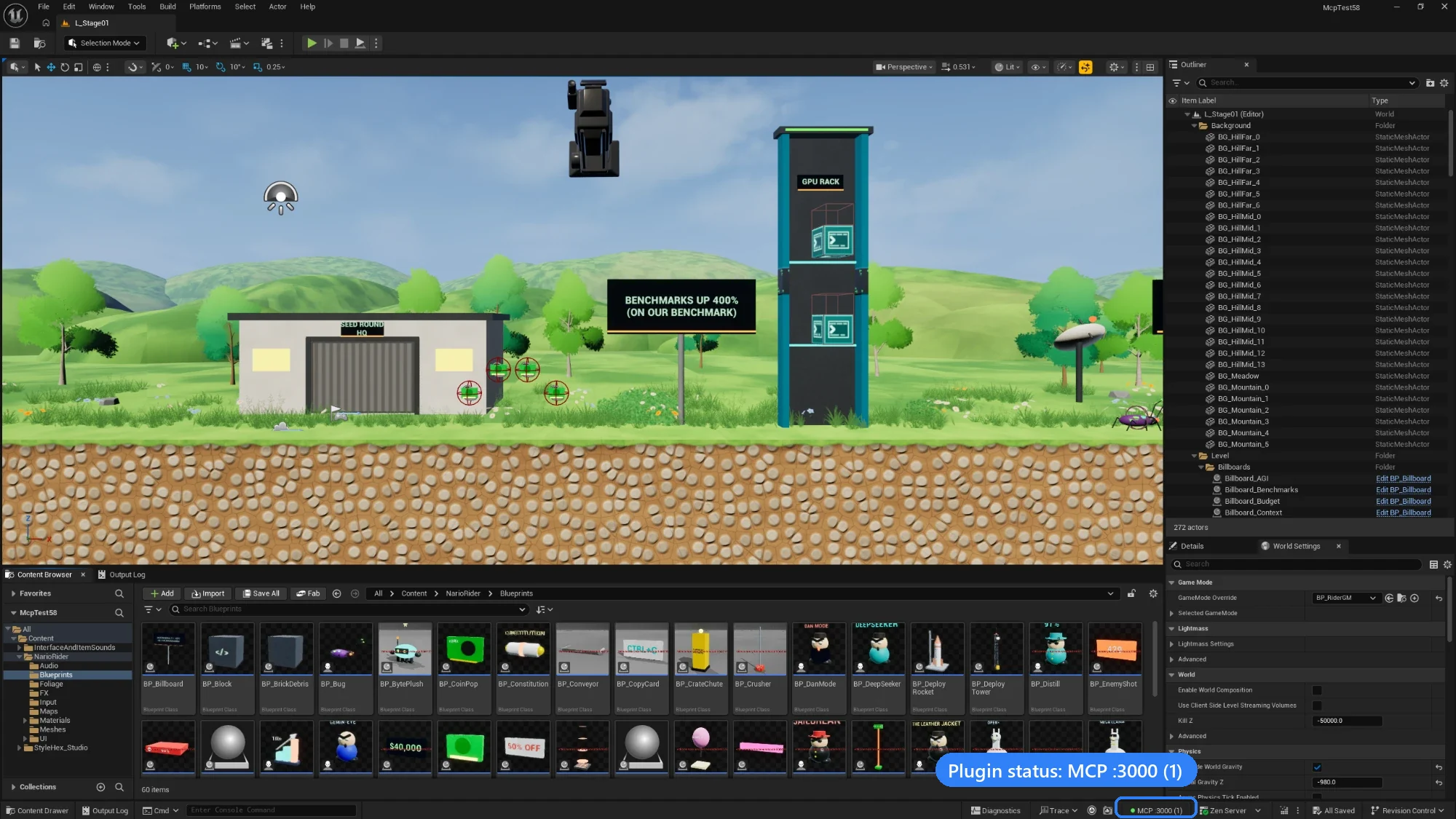
A platformer level built with the MCP, in Unreal Editor 5.8. Bottom right: the plugin's status, MCP :3000 (1), meaning the native server is running on port 3000 with one client connected.
How it works

The EngineWire plugin runs inside the editor and does all the work, on the editor's game thread. Clients reach it in one of two ways, and both expose the same single tool, unreal:
| 🌐 Route A · Native HTTP | 🧩 Route B · stdio | |
|---|---|---|
| Path | Client → the plugin's Streamable HTTP server at http://127.0.0.1:3000/mcp | Client → unreal-engine-mcp-server (Node.js, stdio) → the plugin's WebSocket on 127.0.0.1:8090 |
| Node.js | Not needed | 20.19 or later |
| Capability token | The client sends it in the X-MCP-Capability-Token header | Read from the project, given UE_PROJECT_PATH |
| Best for | Claude Code, Cursor, VS Code, and several clients sharing one editor | Claude Desktop, and clients that only launch local commands |
Everything listens on 127.0.0.1 and requires the project's capability token unless you change it.
Quick start
The Quick Start page walks through this with screenshots. You need Unreal Engine 5.0 to 5.8 and a project with C++ code; a Blueprint-only project can use prebuilt binaries.
1. Add the plugin
Download EngineWire-plugin-<version>.zip from the newest v0.6 pre-release on the Releases page, and copy the EngineWire folder it contains into your project:
MyGame/Plugins/EngineWire/
Or use a clone of this repository: copy plugins/EngineWire/, or reference the folder from your .uproject with "AdditionalPluginDirectories": ["C:/Path/To/Unreal_mcp/plugins"].
Open the project and let Unreal rebuild the plugin. When it's loaded, the status bar shows MCP off. If you see "Engine modules cannot be compiled at runtime", build the project once in Visual Studio, Rider or Xcode. More in Installation.
https://github.com/user-attachments/assets/d8b86ebc-4364-48c9-9781-de854bf3ef7d
Prebuilt binaries (Blueprint-only projects, teams)
Build the plugin once on a machine with the engine and a compiler, then hand out the zip. No compiler is needed on the target machine:
node scripts/package-plugin.mjs "C:/Program Files/Epic Games/UE_5.7"
This writes build/EngineWire-v<version>-UE5.7-<Platform>.zip, where <version> is the package.json version (currently 0.6.0-beta-f). Unzip it into YourProject/Plugins/. Binaries only work with the engine minor and platform they were built for: a 5.6 build won't load in 5.5, 5.7 or 5.8.
2. Connect your client
Route A · Native HTTP (no Node.js)
-
In Edit › Project Settings › Plugins › EngineWire, tick Enable Native MCP Server (port
3000by default), then restart the editor. The status bar now readsMCP :3000 (0).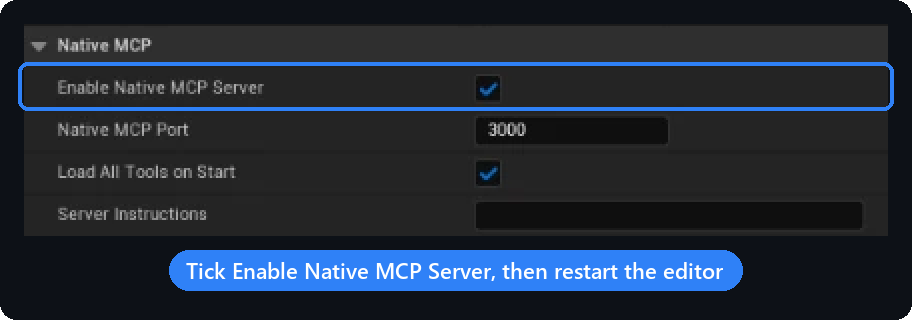
-
Read the capability token the plugin generated:
<YourProject>/Saved/MCP/capability-token. Treat it like a password. -
Add the server to your client and send the token in the
X-MCP-Capability-Tokenheader. Claude Code:claude mcp add --transport http unreal-engine http://127.0.0.1:3000/mcp --header "X-MCP-Capability-Token: <token>"Or in a project
.mcp.json(Claude Code), reading the token from an environment variable:{ "mcpServers": { "unreal-engine": { "type": "http", "url": "http://127.0.0.1:3000/mcp", "headers": { "X-MCP-Capability-Token": "${UNREAL_MCP_TOKEN}" } } } }Cursor (
.cursor/mcp.json) takes the sameurlandheaderswithouttype. VS Code, Windsurf and others: Connecting Clients. -
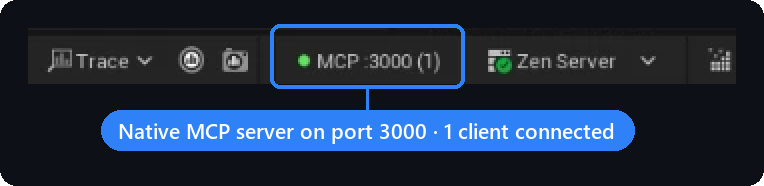
Check it: when the client connects, the count in the status bar goes up.
Keep the session when the editor restarts (proxy, Node.js 20.19+)
A client connected straight to /mcp loses its session whenever the editor closes or crashes, and has to reconnect by hand. The package's proxy command sits in between over stdio: while the editor is down every call answers NOT_CONNECTED, and the first call after it is back reaches it, with no reconnect. It keeps the editor's last tool list, so a session that starts before the editor still gets the real tool.
{
  "mcpServers": {
    "unreal-engine": {
      "command": "npx",
      "args": ["-y", "unreal-engine-mcp-server@beta", "proxy"],
      "env": { "UE_PROJECT_PATH": "C:/Path/To/YourProject" }
    }
  }
}
The token is found the same way as on Route B (MCP_AUTOMATION_CAPABILITY_TOKEN, else the project's token file). UNREAL_MCP_URL points it at another endpoint (default http://127.0.0.1:3000/mcp). Route B survives editor restarts the same way on its own.
Route B · stdio (Node.js 20.19+)
Add this to your client's MCP configuration, for example Claude Desktop's claude_desktop_config.json:
{
  "mcpServers": {
    "unreal-engine": {
      "command": "npx",
      "args": ["-y", "unreal-engine-mcp-server@beta"],
      "env": {
        "UE_PROJECT_PATH": "C:/Path/To/YourProject"
      }
    }
  }
}
UE_PROJECT_PATH (the project folder or its .uproject) is how the server finds the capability token and the plugin's port, so nothing else needs setting. Keep the @beta tag: without it, npm installs 0.5.30, which doesn't match a 0.6 plugin.
3. Try it
With the editor open, ask your assistant to "list the actors in the current level", "spawn a point light 300 units above the origin", or "take a screenshot of the viewport". If it doesn't connect, see Troubleshooting.
The unreal tool
Both routes expose exactly one MCP tool, unreal, with four operations. Only the contract the model is about to use gets loaded, instead of hundreds of tool schemas:
| Operation | What it does |
|---|---|
search | Finds capabilities from 2-4 plain words, such as spawn actor or save level. Every row carries a ready-to-send nextCall. |
describe | Returns one capability's exact contract: parameters, schemas, an example, and the consent grant when one is needed |
execute | Runs one capability with validated parameters and returns the data plus a receipt of what changed |
configure | Enables or disables groups of internal tools; never touches the editor |

A typical exchange:
{ "operation": "search", "query": "spawn actor" }
{ "operation": "describe", "tool": "control_actor", "action": "spawn" }
{
  "operation": "execute",
  "tool": "control_actor",
  "action": "spawn",
  "params": { "classPath": "/Script/Engine.PointLight", "actorName": "KeyLight", "location": [0, 0, 300] }
}
- Parameters are strict. An undeclared name is refused with
UNDECLARED_PARAMETERand the list of allowed names; every error carries an executablenextCall. - Deletes need consent. 62 capabilities (all destructive ones, plus some writes) only run with the
consentGrantfromdescribe, passed back as a top-levelconsentfield. - Names. Both routes accept the
tool+actionpair; the stdio route also accepts a capability id, such as"capability": "control_actor.spawn".
Full reference with real replies: Using the Gateway.
Migrating from direct tool calls
The single unreal tool is permanent on both routes; there is no opt-out and no 23-tool listing to restore. A client that still calls a canonical tool name directly (tools/call with name: "manage_asset", name: "control_actor", …) receives a bounded, copy-paste-executable DIRECT_TOOL_CALL_REMOVED receipt instead of a routed call. Its nextCall drills exactly one level: { "operation": "search" } for an unknown name, { "operation": "describe", "tool": "<tool>" } when no action was given, or { "operation": "execute", "tool": "<tool>", "action": "<action>", "params": { ... } } when the call already named an action. Run that nextCall through unreal to finish the migration. See Upgrading.
Protocol versions
Both routes negotiate the MCP protocol version at initialize. The native /mcp transport supports 2025-11-25 (latest), 2025-06-18 and 2025-03-26; the stdio server also accepts the legacy 2024-11-05 and 2024-10-07. An unsupported MCP-Protocol-Version header on the native route gets HTTP 400. Both also answer server/discover without a session, listing those versions, so a client on the newer 2026-07-28 revision falls back to initialize. Details: docs/protocol.md.
The 23 internal tools behind unreal
These route requests inside the gateway; clients never list them. More in the Tools Reference.
| Category | Tool | Covers |
|---|---|---|
| Core | manage_asset | Assets and folders, materials and material graphs, textures and render targets, data tables, structs, enums, source control |
| Core | manage_blueprint | Blueprints, components, variables, event graphs, UMG widgets, layout, bindings, widget animations |
| Core | control_actor | Spawning, transforms, attachment, components, materials, tags, placement audits |
| Core | control_editor | Play-In-Editor, synthetic input, screenshots, viewport camera, undo, editor preferences |
| Core | manage_level | Create, load, save, stream, import and export levels; world settings; lighting builds |
| Core | system_control | Console commands, logs, project settings, profiling, builds and packaging, tests, Python |
| Core | inspect | Read and write any UObject's properties, components and class info |
| Core | manage_tools | Which internal tools are enabled (through configure) |
| World | build_environment | Landscapes, foliage, lights and sky, water, weather, splines, procedural terrain |
| World | manage_level_structure | Sublevels, World Partition, streaming, data layers, HLOD, volumes |
| World | manage_geometry | Geometry Script meshes: booleans, deformers, UVs, collision, LODs, polygon cages, subdivision surfaces, material ids, vertex-color masks |
| World | manage_pcg | PCG graphs: create, add and connect nodes, execute |
| Gameplay | animation_physics | Animation Blueprints, blend spaces, montages, skeletons, Control Rig and IK, ragdolls, cloth, vehicles |
| Gameplay | manage_character | Character Blueprints, movement, MetaHuman |
| Gameplay | manage_combat | Weapons, projectiles, hit detection |
| Gameplay | manage_effect | Niagara systems, emitters and modules, debug shapes |
| Gameplay | manage_gas | Gameplay Ability System: abilities, attributes, effects |
| Gameplay | manage_ai | AI controllers, Behavior Trees, EQS, State Trees, Smart Objects, perception, navigation |
| Gameplay | manage_inventory | Items, loot tables, crafting recipes |
| Gameplay | manage_interaction | Doors and other interactables |
| Utility | manage_audio | Sounds, audio components, Sound Cues, MetaSounds, attenuation, mixes |
| Utility | manage_sequence | Level Sequences, Movie Render Queue, media, Take Recorder, replays |
| Utility | manage_networking | Replication, RPCs, sessions, game framework classes, Enhanced Input |
Configuration
Most setups touch one setting: Enable Native MCP Server for Route A, or UE_PROJECT_PATH for Route B. Everything is listed on the Configuration page.
Plugin settings (Project Settings › Plugins › EngineWire, saved in Config/DefaultGame.ini):
| Setting | Default | |
|---|---|---|
| Enable Native MCP Server | off | Serve MCP over HTTP at /mcp |
| Native MCP Port | 3000 | The MCP_NATIVE_PORT environment variable of the editor process overrides it |
| Listen Ports | 8090,8091 | WebSocket ports for Route B |
| Require Capability Token | on | Both routes refuse clients without the token |
| Allow Non Loopback | off | LAN access for both listeners. See Security. |
Environment variables (Route B only, in the client's env block):
| Variable | Default | |
|---|---|---|
UE_PROJECT_PATH | unset | Project folder or .uproject; used to find the token and the port |
MCP_AUTOMATION_PORT | the project's first Listen Ports entry, else 8090 | Editor WebSocket port |
MCP_AUTOMATION_HOST | 127.0.0.1 | A LAN address also needs MCP_AUTOMATION_ALLOW_NON_LOOPBACK=true |
MCP_AUTOMATION_CAPABILITY_TOKEN | read from the token file | Token to present, when the server can't read the project folder |
MCP_ADDITIONAL_PATH_PREFIXES | empty | Extra content roots such as /MyPluginContent/, comma-separated; most content-path arguments also accept the mounts the connected editor reports, so this is needed only with no editor connected, for a mount the editor does not report or the server ignores, and for arguments the server treats as files (filePath, outputPath and a few others), even where outputPath names an asset |
LOG_LEVEL | info | debug, info, warn or error; logs go to stderr |
Security
- Local by default. Both routes listen on
127.0.0.1only. LAN access needs Allow Non Loopback, and the native server refuses to bind off-loopback unless Require Capability Token is on. - Capability token. Generated per project at
<Project>/Saved/MCP/capability-token(a value typed into Capability Token overrides it) and compared in constant time. Delete the file and restart the editor to rotate it. - Consent for destructive work. Deletes and some other writes need a per-call consent grant, which the plugin checks itself.
- Guard rails. Asset paths are limited to
/Game,/Engine,/Script,/Temp,/Niagaraplus configured prefixes, and a content path may also sit under a mount the connected editor reports; arguments the server treats as files (such asfilePath, andoutputPatheven where it names an asset) never use the reported mounts; console commands that chain or quit the editor are blocked; the plugin's own settings are out of reach of automation.
Details: Security. Please report vulnerabilities privately through GitHub security advisories.
Engine plugins
The bridge declares its engine-plugin dependencies, so Unreal enables them together with it.
Required (always enabled with the bridge)
| Plugin | Used for |
|---|---|
| Python Editor Script Plugin | Python-backed editor automation, system_control Python execution |
| Editor Scripting Utilities | Asset and actor subsystem operations |
| Niagara | Visual effects |
| Gameplay Abilities | manage_gas |
| Smart Objects | AI smart objects |
Optional (used when present, skipped when not)
| Plugin | Used for |
|---|---|
| Level Sequence Editor, Takes, Movie Render Pipeline, Movie Pipeline Mask Render Pass, Electra Player | manage_sequence: Sequencer, Take Recorder, Movie Render Queue, media playback |
| Control Rig, RigVM, IK Rig, Animation Data | animation_physics: Control Rig and IK |
| Chaos Vehicles, Chaos Cloth | animation_physics: vehicles and cloth |
| Niagara Editor | manage_effect: Niagara authoring |
| Behavior Tree Editor, Environment Query Editor, StateTree, Mass Gameplay | manage_ai |
| Geometry Scripting, Geometry Processing, Mesh Modeling Toolset, Procedural Mesh Component | manage_geometry (Catmull-Clark, Loop and bilinear subdivision need Mesh Modeling Toolset) |
| PCG | manage_pcg, compiled in only when the project itself enables the PCG plugin |
| MetaSound, Synthesis | manage_audio: MetaSound authoring |
| Enhanced Input, Online Subsystem, Online Subsystem Utils | manage_networking: input mappings, sessions |
| Interchange, Interchange OpenUSD, Data Validation, StructUtils | Import/export, validation, struct helpers |
| Fab, Bridge | Fab asset library access (optional EngineWireFab module) |
The plugin targets every Unreal Engine minor from 5.0 to 5.8. If it fails to build on yours, please open an issue with the build log.
Docker
The image runs the stdio server. It has to reach the editor's WebSocket on 127.0.0.1, so use host networking (Linux), and pass the token because the container can't read your project folder:
docker build -t unreal-mcp .
docker run -i --rm --network host -e MCP_AUTOMATION_CAPABILITY_TOKEN=<token> unreal-mcp
Use -i without -t: a TTY corrupts the MCP stream on stdout.
Documentation
| 📖 Wiki | Quick Start, Installation, Connecting Clients, Using the Gateway, Configuration, Security, Troubleshooting, FAQ, Upgrading |
| 📋 Action Reference | Every capability with its effect, scope and consent, generated from the capability records |
| 🔌 Gateway client guide | The gateway contract, with the source file behind each claim |
| 📡 Protocol | Transports, version negotiation, cancellation |
| 🔐 Security and receipts | Scopes, consent, path gating, idempotency, refusal codes |
| 🧪 Testing guide | Test suites and how to add cases |
| 🧩 Extending the plugin | Adding an editor action: record, handler, route and tests, plus the rules for plugin code |
| 🗺️ Roadmap | Development roadmap |
| 📝 Changelog | What changed in each release |
Development
npm install
npm run build              # clean + compile TypeScript to dist/
npm run dev                # run from source with ts-node
npm run lint               # ESLint (CI fails on any warning)
npm run type-check         # tsc --noEmit, sources and tests
npm run test:unit          # Vitest unit tests (no Unreal required)
npm run test:smoke         # offline mock-mode MCP check (needs built dist/)
npm run test:params        # strict parameter audit
npm run registry:generate  # capability records -> generated contracts, native shards, action reference
npm run registry:check     # fail if generated artifacts drift
npm run manifest:check     # fail if the gateway manifest drifts
npm run eval:check         # search-ranking corpus
npm run version:check      # all version sources agree
npm test                   # integration suite (needs a live Unreal Editor + bridge)
The capability records in src/tools/catalog/capabilities/records/ are the single source of truth; every *.generated.* file, the plugin's MCP/Generated/ shards and the action reference are generated from them. Never hand-edit generated files. How to add a capability: Development.
CI runs, in order: ESLint (npx eslint . --max-warnings=0), type-check, unit tests, registry:check, manifest:check, headers:check, the strict parameter audit (test:params) and eval:check, then a blocking runtime dependency audit (npm audit --omit=dev --audit-level=moderate) and an informational full-tree audit. A Node 20.19 / 26 matrix adds build and test:smoke. Plugin packaging runs only when an Unreal Engine root is configured, because CI runners don't ship an engine. Release archives exclude Binaries/, Intermediate/ and Saved/.
Community
| 💬 Discussions | Questions, ideas, show and tell |
| 🐞 Issues | Bug reports and feature requests |
| 🗺️ Project board | Roadmap progress and priorities |
Contributing: keep pull requests small and focused, with a Conventional Commits title; include reproduction steps for bugs; follow the existing code style. See CONTRIBUTING.md.
License
MIT. See LICENSE.
Featured
Keeps your Mac awake while Claude Code, Codex or Cursor works. Lets it sleep when they are done.
Try free for 7 days →Block distracting apps from your iPhone permanently without a 3rd party app. Free and open source.
Block now (100% free) →Notes, actions and memory. Without a meeting bot. First month 100% off.
Download for free →belt cli automatically finds the best tools and skills for your agent. image, video, music, tts...
one prompt install →Free an open-source skills that make AI coding agents easier to understand, verify, and control.
Download for free →Connect your Claude agent to live crypto prices and trading routes via 1inch
Get the MCP →Configuration
LOG_LEVELLogging level: debug, info, warn, error (default: info)
MCP_ROUTE_STDOUT_LOGSRoute standard output to standard error to avoid protocol corruption (default: true)
UE_PROJECT_PATHAbsolute path to your Unreal .uproject file
UE_EDITOR_EXEPath to UnrealEditor-Cmd.exe (optional)
UE_SCREENSHOT_DIRDirectory to save screenshots (optional)
MCP_AUTOMATION_PORTAutomation bridge WebSocket port (default: 8091)
MCP_AUTOMATION_HOSTAutomation bridge WebSocket host (default: 127.0.0.1). Set to 0.0.0.0 for LAN access (requires MCP_AUTOMATION_ALLOW_NON_LOOPBACK=true)
MCP_AUTOMATION_ALLOW_NON_LOOPBACKSECURITY: Allow binding to non-loopback addresses (e.g., 0.0.0.0) for LAN access. Only enable if you understand the security implications. (default: false)
MCP_AUTOMATION_CLIENT_MODERun as client connecting to UE (false) or server listening for UE (true) (default: false)
MCP_AUTOMATION_USE_TLSUse wss:// for the automation bridge client connection (default: false)
MCP_CONNECTION_TIMEOUT_MSConnection timeout in milliseconds (default: 5000)
MCP_REQUEST_TIMEOUT_MSRequest timeout in milliseconds (default: 30000)
MCP_AUTOMATION_MAX_MESSAGES_PER_MINUTEMax inbound automation bridge messages per minute before disconnect (default: 600)
MCP_AUTOMATION_MAX_AUTOMATION_REQUESTS_PER_MINUTEMax inbound automation request messages per minute before disconnect (default: 120)
Categories
Registryactive
Packageunreal-engine-mcp-server
TransportSTDIO
Resources6
Tools verifiedJun 10, 2026
UpdatedJun 5, 2026


